---
updatedAt: 2026-06-03T09:29:56.000Z
agentTools:
siteIndex: https://docs.jfrog.com/llms.txt
projectIndex: https://docs.jfrog.com/artifactory/llms.txt
---
# CocoaPods Repositories
CocoaPods is a dependency manager for Swift and Objective-C projects. It simplifies the process of integrating over 90,000 third-party libraries, known as "pods," into your Xcode projects, allowing you to manage complex dependencies and scale your applications efficiently. You can use Artifactory for your CocoaPods repositories to manage dependencies in a team or enterprise environment. CocoaPods repositories give you a central, reliable source for every pod your projects rely on. For more information, see the CocoaPods documentation.
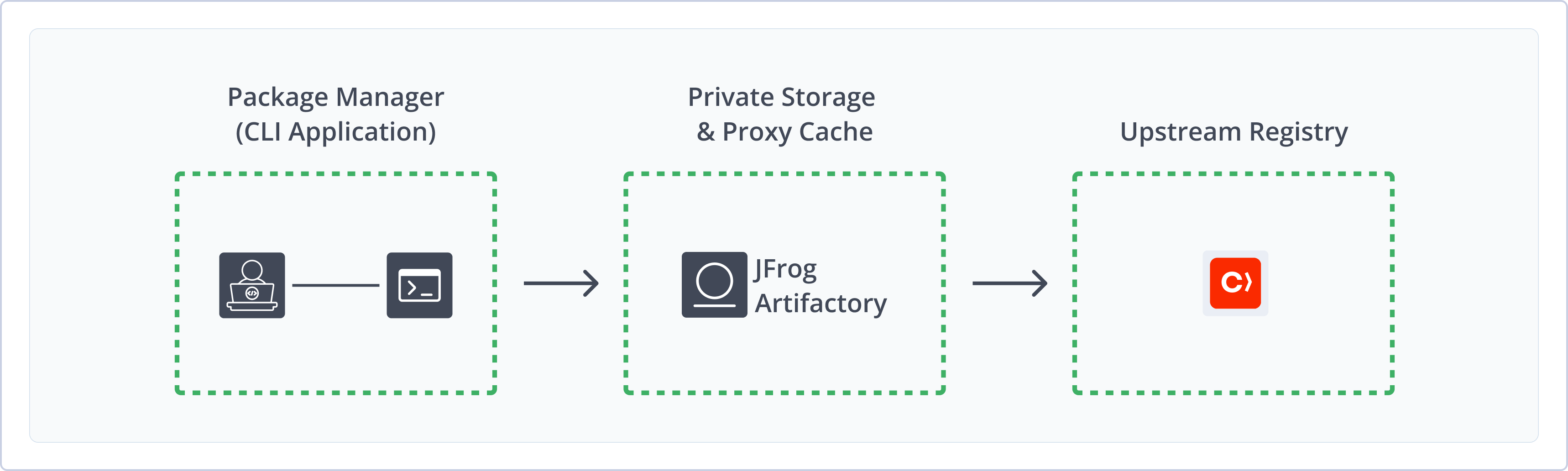
Artifactory supports the following capabilities for CocoaPods repositories:
* **Robust Metadata Capabilities**: Calculate metadata for CocoaPods packages hosted in Artifactory's local repositories.
* **Unified Repository Management**: Consolidate all your pods in Artifactory as a single source of truth. Set up secure local repositories, access cached versions of CocoaPods Specs repositories like `https://github.com/CocoaPods/Specs` or `https://cdn.cocoapods.org/`, and create a single access point for all sources with virtual repositories.
* **Support for CocoaPods CDN**: Use the CocoaPods CDN in your projects to deploy and install pods from your Artifactory repository.
* **Fine-Grained Access Control**: Manage user and group permissions for your CocoaPods repositories, giving access based on projects or development teams.
# Get Started with CocoaPods
To get started working with CocoaPods, complete the following main steps:
1. Create a CocoaPods Repository
2. Connect CocoaPods to Artifactory
3. Deploy and install pods 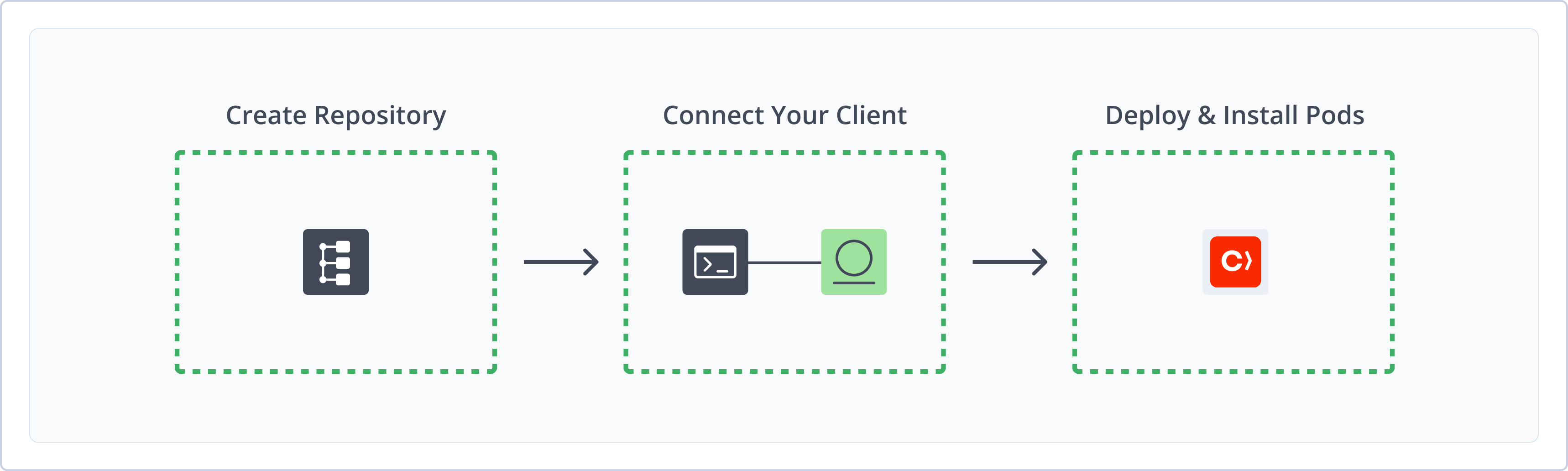
# Create a CocoaPods Repository
This topic describes how to create a CocoaPods repository. This is required before publishing and installing pods. There are three primary types of repositories:
* **Local repositories**: Store and share first- and second-party packages with your organization
* **Remote repositories**: Download packages from remote locations, including external package registries or other Artifactory instances
* **Virtual repositories**: Aggregate remote and local repositories, enabling your organization to scale by providing a single URL that provides access to multiple repositories and types
For more information on JFrog repositories, see [Repository Management](https://docs.jfrog.com/artifactory/docs/repository-management).
**Prerequisite**: You need Admin or Project Admin permissions in Artifactory to create a repository.
**To create a CocoaPods repository**:
1. In the **Administration** tab, click **Repositories | Create a Repository**.
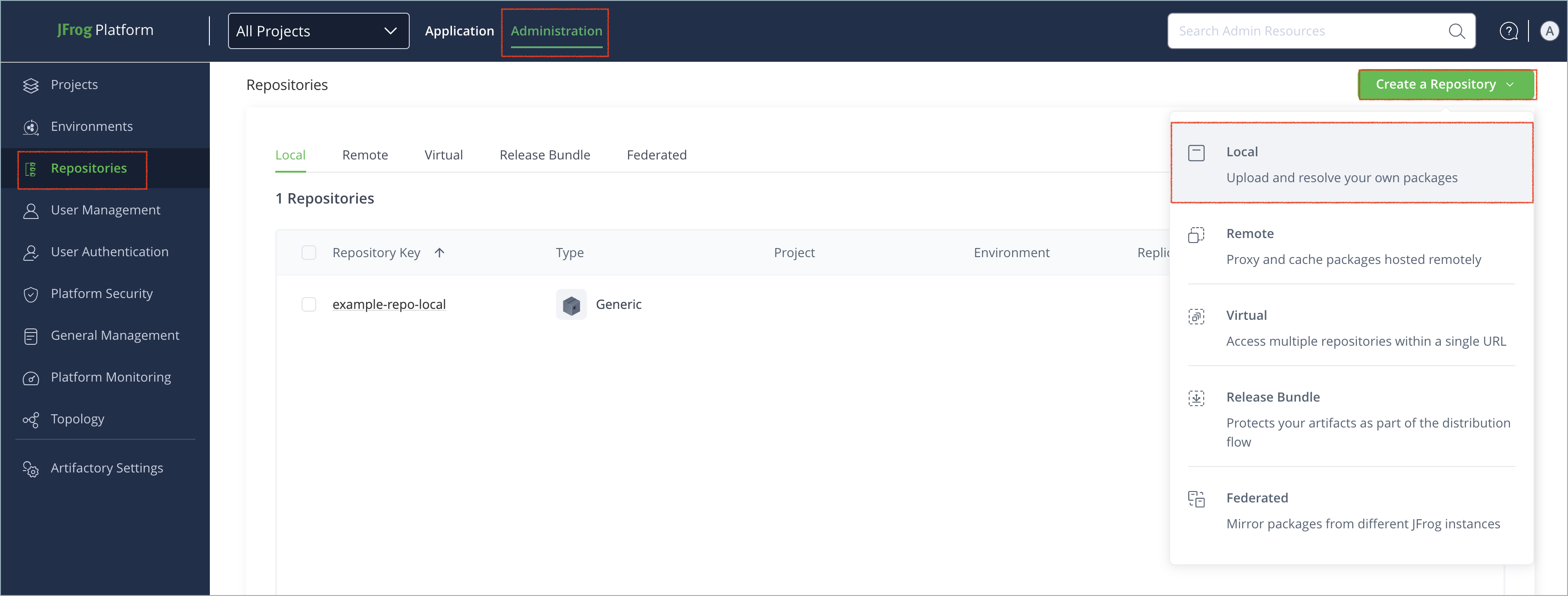
2. Select the type of repository you want to create: local, remote, or virtual.
3. Select the **CocoaPods** package type.
4. Configure the required fields for the repository:
* For local repositories, in the **Repository Key** field, type a meaningful name for the repository. For example, `cocoapods-local`. For more information on local repositories and their settings, see Local Repositories.
* For remote repositories, verify the **Repository URL** and update as needed. For more information on remote repositories and their settings, see Remote Repositories.
By default, the **CDN URL** field points to the public registry `https://cdn.cocoapods.org/`. To use a different URL, define it in the **CDN URL** field, or modify the `podsCdnUrl` parameter via REST API.
**Note**
The public CocoaPods infrastructure consists of two main parts: the specs index provided by the CDN, and the actual source code archives, which are typically hosted on Git providers like GitHub. To effectively cache all components, your remote repository's URL should point to the Git provider (for example, `https://github.com`), while the CDN URL field points to the specs index (`https://cdn.cocoapods.org/`).
**Tip**
If you are proxying a private Bitbucket Server (formerly known as Stash), ensure you select Stash as the Git Provider in the repository configuration, not Bitbucket. The public Bitbucket Cloud API behaves differently, and selecting the wrong provider can lead to resolution failures.
* For virtual repositories, select one or more local or remote repository types to include in the virtual repository. For more information on virtual repositories and their settings, see Virtual Repositories.
Virtual repositories are compatible only with the CocoaPods CDN. All local and remote repositories included in the virtual repository must also be CDN-compatible. For more information, see Identify Whether a CocoaPods Repository Uses CDN.
5. Click **Create Repository**. The repository is created and the Repositories window is displayed.
# Connect CocoaPods to Artifactory
There are two ways to use CocoaPods with Artifactory:
* Connect CocoaPods CDN to Artifactory
* Connect `cocoapods-art` to Artifactory
**CocoaPods Git Indexing Deprecation**
Starting July 2025, you will only be able to configure CocoaPods repositories using CocoaPods CDN, and the use of the `cocoapods-art` plugin will be deprecated. For more information, see [Deprecations in Process](/releases/docs/deprecations-in-process).
**Next steps:**
* Deploy CocoaPods Packages
* Install CocoaPods Packages
## Connect CocoaPods CDN to Artifactory
To resolve dependencies from CocoaPods repositories in Artifactory, connect the CocoaPods CDN to Artifactory.
**Prerequisite**: Before connecting your CocoaPods client to Artifactory, you must have an existing CocoaPods repository in Artifactory. For more information, see Create a CocoaPods Repository.
**To connect the CocoaPods client to Artifactory:**
1. Manually reindex your CocoaPods repository to create the required CDN index structure using one of the following methods:
* **REST API**: Run the Calculate CocoaPods Index REST API.
* **Web UI**: In the **Platform** module, under **Artifactory | Artifacts**, right-click the repository name and select **Recalculate Index**.
2. Add the following authentication snippet to your `.netrc` file:
```
machine [JFrogPlatformURL]
login
password
```
Where:
* `[JFrogPlatformURL]`: Your organization's Artifactory hostname
* ``: Your Artifactory username
* ``: Your Artifactory identity token
For example:
```
machine company.jfrog.io
login jeffry
password 51HnvD0A1g2q3n4b5F6g7H8j9K0l1m2N3o4P5q6R7s8T9u0V1w2X3y4
```
3. Run the following command to add an Artifactory CDN repository to your CocoaPods client:
```
pod repo add-cdn "https://[JFrogPlatformURL]/artifactory/api/pods/"
```
Where:
* ``: The name of your CocoaPods repository in Artifactory
* `[JFrogPlatformURL]`: Your organization's Artifactory URL
For example:
```
pod repo add-cdn cocoapods-local "https://company.jfrog.io/artifactory/api/pods/cocoapods-local"
```
Once this configuration is complete, you can deploy and resolve pods in Artifactory using the CocoaPods CLI.
**Note**
You can also use JFrog Set me up to copy the snippet populated with your token and environment. For more information, see Use Artifactory Set Me Up for Configuring Package Manager Clients.
**Next steps:**
* Deploy CocoaPods Packages
* Install CocoaPods Packages
## Connect cocoapods-art to Artifactory
**CocoaPods Git Indexing Deprecation**
Starting July 2025, you will only be able to configure CocoaPods repositories using CocoaPods CDN, and the use of the `cocoapods-art` plugin will be deprecated. For more information, see [Deprecations in Process](/releases/docs/deprecations-in-process).
To resolve dependencies from CocoaPods repositories in Artifactory using the the `cocoapods-art` plugin, you must first connect it to Artifactory.
**Prerequisite**: Before connecting the plugin to Artifactory, you must have an existing CocoaPods repository in Artifactory. For more information, see Create a CocoaPods Repository.
**To connect `cocoapods-art` to Artifactory:**
1. If needed, install the `cocoapods-art` plugin:
```
gem install cocoapods-art
```
2. Add the following authentication snippet to your `.netrc` file:
```
machine [JFrogPlatformURL]
login
password
```
Where:
* `[JFrogPlatformURL]`: Your organization's Artifactory hostname
* ``: Your Artifactory username
* ``: Your Artifactory identity token
For example:
```
machine company.jfrog.io
login jeffry
password 51HnvD0A1g2q3n4b5F6g7H8j9K0l1m2N3o4P5q6R7s8T9u0V1w2X3y4
```
3. Run the following command to add an Artifactory Specs repository to your CocoaPods client:
```
pod repo-art add "https://[JFrogPlatformURL]/artifactory/api/pods/"
```
Where:
* ``: The name of your CocoaPods repository in Artifactory
* `[JFrogPlatformURL]`: Your organization's Artifactory URL
For example:
```
pod repo-art add cocoapods-local "https://company.jfrog.io/artifactory/api/pods/cocoapods-local"
```
4. To make sure your local client has the latest index of pods available from the Artifactory repository, run this command:
```
pod repo-art update
```
Run this command periodically to keep your local client in sync.
**Important**
If you have removed the public CocoaPods master repository from your client and encounter errors related to the stats plugin, you may need to disable it by adding the following line to your Podfile or setting it as an environment variable:
```
ENV['COCOAPODS_DISABLE_STATS'] = 'true'
```
Once this configuration is complete, you can deploy and resolve pods in Artifactory using the `cocoapods-art` plugin.
**Note**
You can also use JFrog Set me up to copy the snippet populated with your token and environment. For more information, see Use Artifactory Set Me Up for Configuring Package Manager Clients.
**Next steps:**
* Deploy CocoaPods Packages
* Install CocoaPods Packages
# Deploy CocoaPods Packages
Once you connect a CocoaPods client to Artifactory, you can deploy pods to the specified repositories in Artifactory using the Web UI or REST API.
A pod is a `tar.gz` file that contains your project code as well as a `.podspec` or `.podspec.json` file describing the package metadata.
**Supported File Types**
Artifactory CocoaPods local repositories only support pods archived as `tar.gz` files.
**To deploy pods:**
From the root directory of the package, run this command to deploy the package to your Artifactory repository:
```
curl -L -u: "https://[JFrogPlatformURL]/artifactory//" -T
```
Where:
* ``: Your Artifactory username
* ``: Your Artifactory identity token
* `[JFrogPlatformURL]`: Your organization's Artifactory URL
* ``: The name of the target repository
* ``: The destination path of the package within the target repository
* ``: The path to the package on your local machine
For example:
```
curl -L -ujeffry:51HnvD0A1g2q3n4b5F6g7H8j9K0l1m2N3o4P5q6R7s8T9u0V1w2X3y4 "https://company.jfrog.io/artifactory/cocoapods-local/AcmeAnalytics/2.5.0/AcmeAnalytics-2.5.0.tar.gz" -T ~/Downloads/2.5.0.tar.gz
```
**Note**
You can also use JFrog Set me up to copy the snippet populated with your token and environment. For more information, see Use Artifactory Set Me Up for Configuring Package Manager Clients.
# Install CocoaPods Packages
Once you have connected CocoaPods to Artifactory, you can configure your CocoaPods client to install pods from your Artifactory repository.
**To install pods:**
1. Add the relevant line to your podfile:
* **CocoaPods CDN:**
```
source "https://[JFrogPlatformURL]/artifactory/api/pods/"
```
Where:
* `[JFrogPlatformURL]`: Your organization's Artifactory URL
* ``: The name of your CocoaPods repository in Artifactory
For example:
```
source "https://company.jfrog.io/artifactory/api/pods/cocoapods-local"
```
* **`cocoapods-art`**:
```
plugin 'cocoapods-art', :sources => [
''
]
```
Where `` is the name of the CocoaPods repository in Artifactory. For example:
```
plugin 'cocoapods-art', :sources => [
'cocoapods_virtual'
]
```
2. Run the install command:
```
pod install
```
The command installs pods from the specified Artifactory repository.
# Additional CocoaPods Information
The following pages provide additional information about using CocoaPods with Artifactory:
* Identify Whether a CocoaPods Repository Uses CDN
* Work with CocoaPods in Artifactory Without Anonymous Access
## Identify Whether a CocoaPods Repository Uses CDN
Starting from version 7.8x.x, Artifactory supports using CocoaPods virtual for CDN supported repositories.
To identify whether a repository in your environment is CDN enabled or not:
1. From the Application module, go to **Artifactory** > **Artifacts**
2. Locate the repository you would like to check, and click the '**>**' symbol to expand its contents.
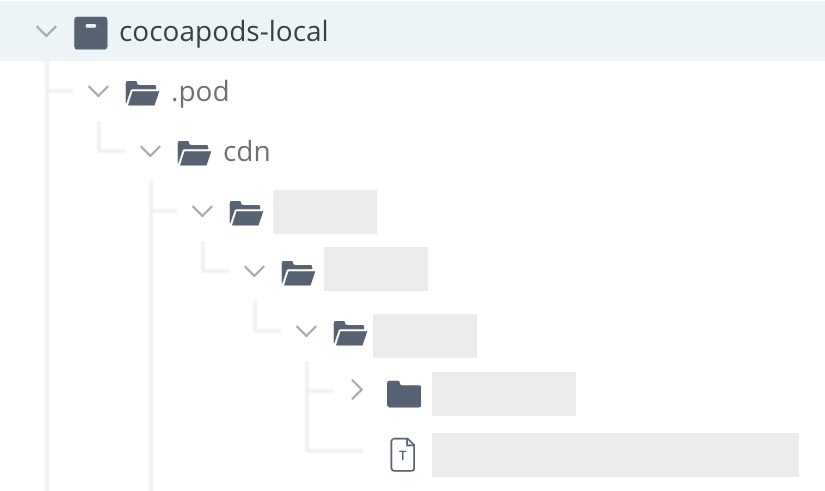
3. Look for a folder named **`.pod/cdn/`** and check if it contains any files. If the folder exists and has content in it, that means that it is indexed for CDN support.
**Regarding Remote Repositories**
CDN-using remote repositories might not contain this folder if you have not resolved any artifacts from them.
To tell whether such a remote repository supports CDN, look for three or more levels of nested folders- if they exist within the remote repository, you can confidently assume that it is indexed for CDN support.
## Work with CocoaPods in Artifactory Without Anonymous Access
By default, Artifactory allows anonymous access to CocoaPods repositories. This is defined in the Administration module under **Security | General**. For more information, see [Allow Anonymous Access](/administration/docs/security-configuration).
If you want to be able to trace how users interact with your repositories you need to uncheck the Allow Anonymous Access setting. This means that users will be required to enter their username and password.
Unfortunately, the pod command line tool does not support authentication against http endpoints. The *cocoapods-art* plugin solves this by forcing curl (which pod uses for all http requests) to use the .netrc file:
**.netrc file example**
```
machine art-prod.company.com
login admin
password password
```
Artifactory also supports basic authentication using an [Identity Token](/user-management/docs/identity-tokens#generate-identity-token):
**.netrc file using an Identity Token**
```
machine art-prod.company.com
login admin
password Random_Token!AKCp2TfQM58F8FTkXo8qSJ8NymwJivmagefBqoJeEBQLSHCZusEH6Z2dmhS1siSxZTHoPPyUW
```
**Use an encrypted password**
We recommend using an encrypted password instead of clear-text. For more information, see [Centrally Secure Passwords](/administration/docs/centrally-secure-passwords).
# CocoaPods Limitations in Artifactory
The following are the limitations of CocoaPods in Artifactory:
* **Dynamic Variables**: Artifactory does not support dynamic variables in the podspec file.
* **Supported Parameters and Specs:** Apart from the exceptions mentioned above, Artifactory supports all parameters mentioned in the CocoaPods podspec documentation. Other syntax specifications have not been tested.
* **Supported Commands**: The `$ pod try` command is not supported.
* **`tar.gz` Requirements**: Local CocoaPods repositories in Artifactory only support pods packaged as `.tar.gz` files. The pod archive `(.tar.gz)` must contain only one `podspec` or `podspec.json` file at its root.
* **Git submodules limitations:** Artifactory supports Git submodules for CocoaPods packages fetched from remote repositories. This is also supported for virtual repositories when the pod is resolved through a remote child repository. However, Git submodule support is not available for local repositories or for virtual repositories backed only by local repositories.