---
updatedAt: 2026-11-04T11:57:20.000Z
agentTools:
siteIndex: https://docs.jfrog.com/llms.txt
projectIndex: https://docs.jfrog.com/artifactory/llms.txt
---
# Hex Repositories
The JFrog Artifactory integration with Hex allows you to manage Hex packages in Artifactory. Hex is a package manager for the BEAM ecosystem. It supports any programming language that compiles to run on the BEAM VM, such as Elixir and Erlang. For more information, see Hex documentation.
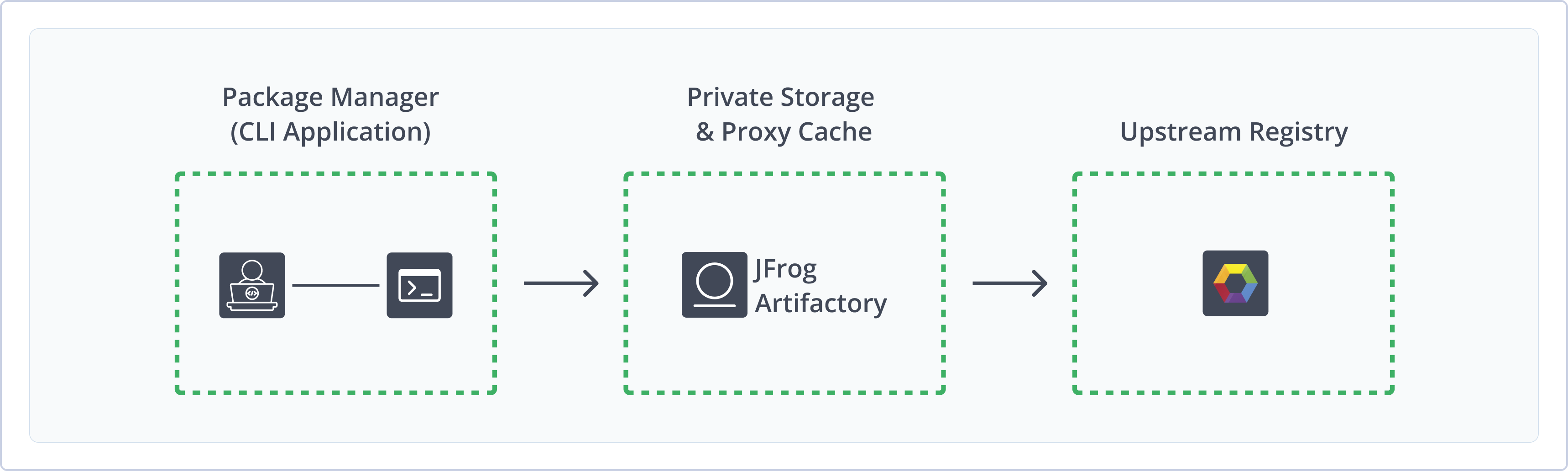
Artifactory fully supports Hex repositories, including the following capabilities:
* **RSA Key Pair Management**: Secure protobuf-encoded package transfer between Artifactory, upstream Hex registries, and the Mix client using configurable RSA key pairs.
* **Unified Repository Management**: Consolidate Hex packages with local repositories for first- and second-party packages, remote repositories that proxy `hex.pm` or self-hosted Hex servers, and virtual repositories that aggregate multiple sources behind a single URL.
* **Mix Client Integration**: Connect the Mix client to local, remote, and virtual Hex repositories to deploy and resolve Elixir and Erlang packages.
* **Upstream Registry Proxy and Caching**: Proxy the public Hex.pm registry or private self-hosted Hex servers through remote repositories, with automatic population of the upstream registry public key for `hex.pm`.
* **Fine-Grained Access Control**: Apply permissions to Hex repository layout folders (installs, packages, tarballs) using include and exclude patterns.
## Get Started with Hex
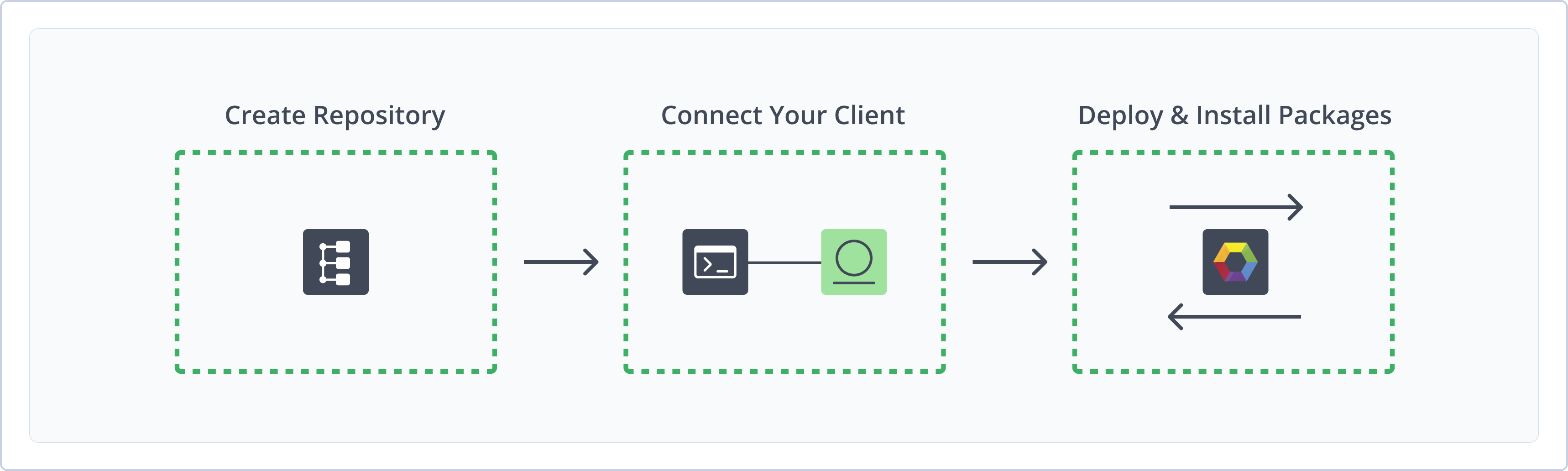
To get started working with Hex, complete the following main steps:
1. Generate and Upload RSA Key Pair
2. Create a Hex Repository
3. [Download Public Key to Hex Project Folder](#download-public-key-to-hex-project-folder)
4. [Connect Mix to Artifactory](#connect-mix-to-artifactory)
5. [Deploy](#deploy-hex-packages) and Resolve Hex Packages
## Hex Repository Prerequisites
The Hex package manager is unique as it uses protobuf encoding for efficient binary sizing and performance. This means that every Hex package is encrypted by the server and decrypted by the client/proxy server using an RSA public key.
**[Generate and upload RSA key pair to Artifactory](#generate-and-upload-rsa-key-pair)**: These RSA keys will be assigned to your Hex repositories to encode the content for transfer to the Mix client.
For Artifactory to support the following you must meet the above prerequisite before proceeding with creating repositories:
* **Provide the Hex upstream registry public key**
This is entered during the remote repository creation and used to decrypt the package content being downloaded from the upstream registry to Artifactory.
**Note**
When using the Hex.pm public registry we auto-populate this value for you. For self-hosted Hex servers, you are required to provide the public key manually in the repository setup.
* **Place the Artifactory public key within your Hex Project**
This is required according to the Mix client specification to allow the Mix client to validate and decrypt the package content from Artifactory.
### Generate and Upload RSA Key Pair
This topic describes generating and uploading an RSA key pair to Artifactory. RSA keys are used for secure authentication when interacting with repositories, ensuring encrypted communication between clients and the artifactory.
Generate an RSA key pair, upload the public key to Artifactory, and configure it to streamline your development and deployment workflows.
To use the mix client with Artifactory, you must authenticate the client using an RSA key.
#### Understanding RSA Key Pairs in Hex Package Management
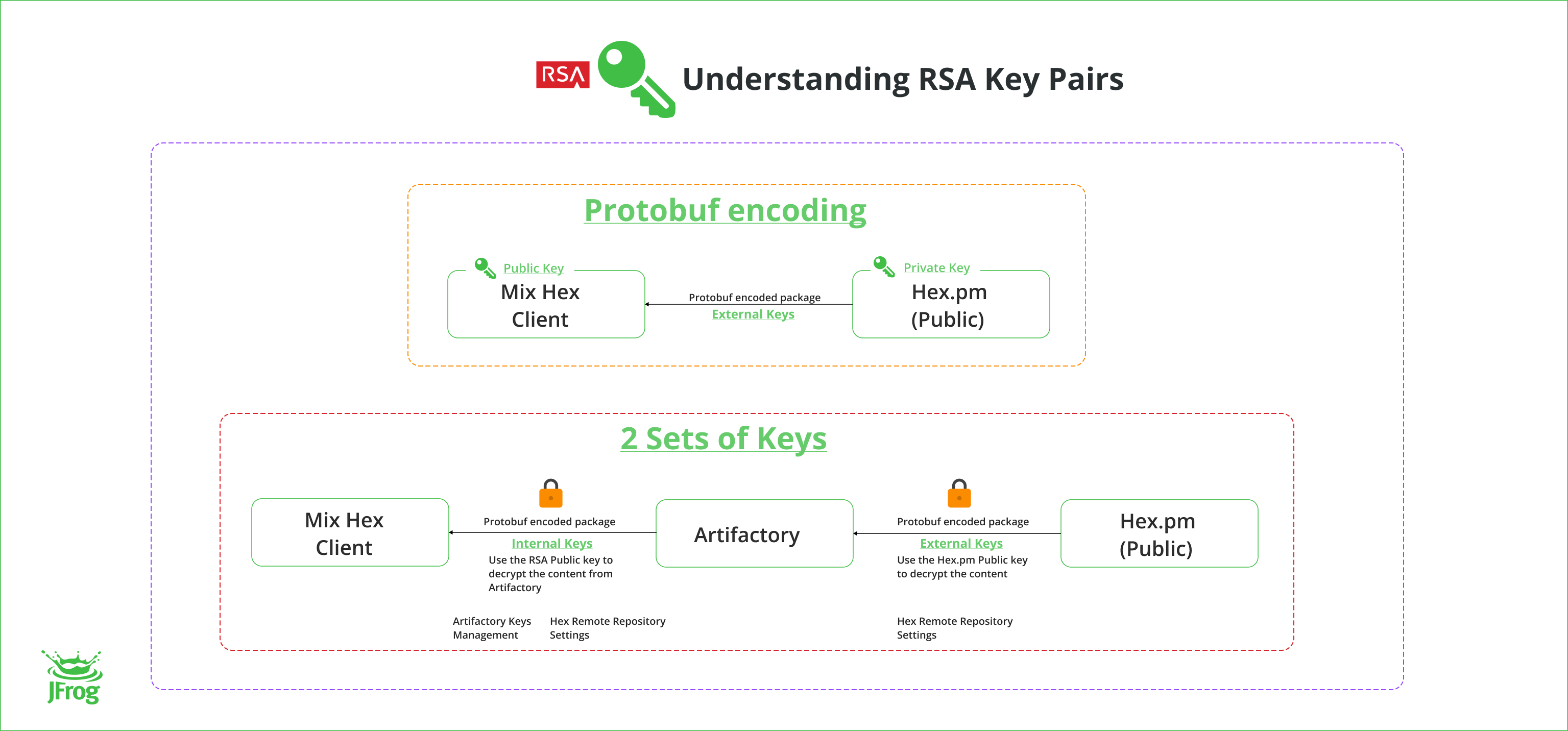
Hex uses Protobuf encoding for efficient binary sizing and performance. To download Hex packages, you must provide a public key in your project. This key allows the Mix client to validate the content from the registry and is used to encrypt and decrypt the data.
When using Artifactory as a middleman for Hex packages, you need two sets of RSA key pairs:
* **External Keys**: These keys are required to access the remote Hex registry (public, private, or self-hosted hex server). Each Hex registry has its own public and private key pair. You must enter the public key while creating the remote repository in Artifactory.
* **Internal Keys**: These keys allow the mix client to access Artifactory, which acts as a Hex server. You can set up the internal keys in Artifactory under **Security** | **Keys Management** | **RSA Key Pair**. Assign this key pair to the remote repository.
By using two sets of keys, we ensure secure communication between your project, Artifactory, and the external Hex registry.
To learn how to generate and upload an RSA key pair, refer to the [Setting Up RSA Key Pairs](/installation/docs/rsa-key-pairs#setting-up-rsa-key-pairs)
To learn more, refer to the [RSA Key Pairs](/installation/docs/rsa-key-pairs).
**Next steps**
* [Create a Hex Repository](#create-a-hex-repository) .
## Create a Hex Repository
This topic describes how to create a Hex Repository. This is required before publishing and installing Hex packages. There are three primary types of repositories:
* **Local repositories**: Where you store and share 1st and 2nd party packages with your organization
* **Remote repositories**: Enable you to download from any remote location including external package registries or other Artifactory instances
* **Virtual repositories**: Enable aggregating remote and local repositories enabling your organization to scale by providing a single URL that provides access to multiple repositories and types
For more information on JFrog repositories, see [Repository Management](https://docs.jfrog.com/artifactory/docs/repository-management).
**Prerequisite**: You need Admin or Project Admin permissions to create a Hex repository. If you don't have Admin permissions, the option will not be available.
**To create a Hex repository**:
1. In the **Administration** tab, click **Repositories | Create a Repository**
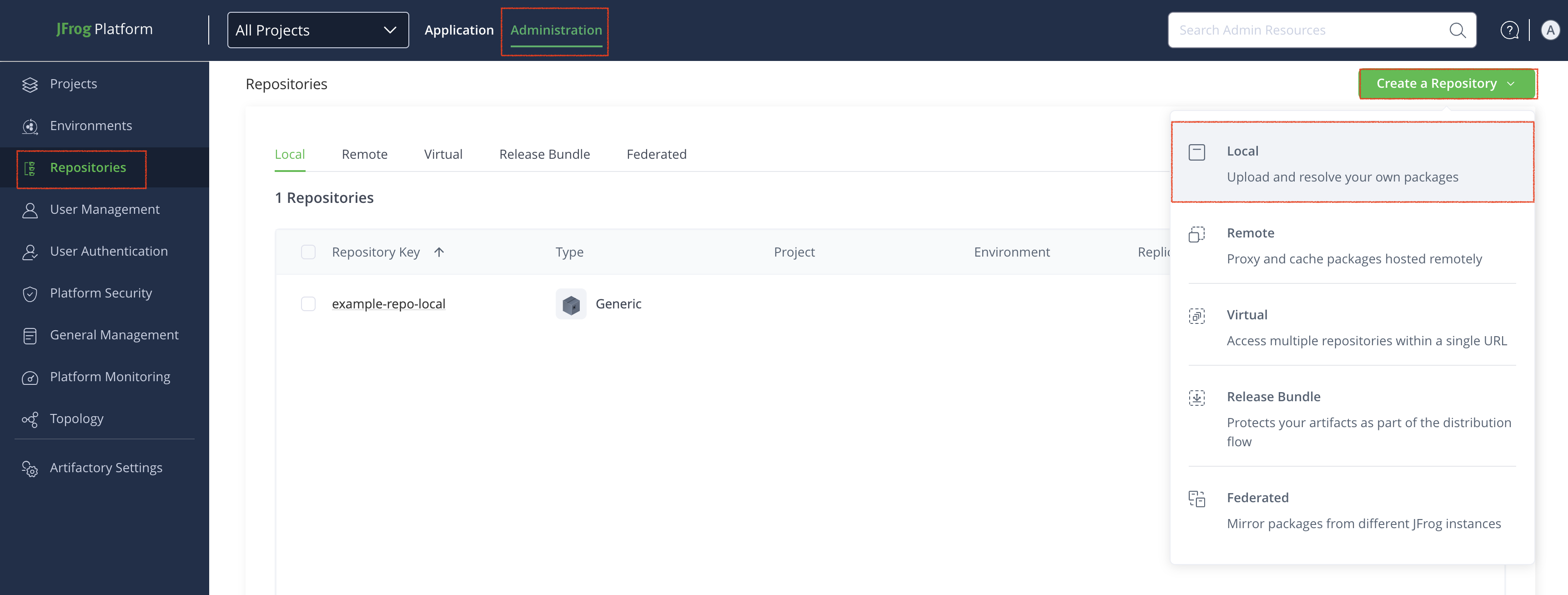
2. Select the repository type you want to create, configure the required fields:
* For **Local Repositories**, in the **Repository Key** field type a meaningful name for the repository. For example, `hex-local-repository-1`. For more information on local repositories and all their possible settings, see Local Repositories.
* For **Remote Repositories**, additionally verify the **Repository URL** and update if needed. For more information on Remote Repositories and all its possible settings, see Remote Repositories.
* For **Virtual Repositories**, additionally **select one or more local or remote repository types** to include in the virtual repository. For more information on virtual repositories and all its possible settings, see Virtual Repositories.
3. For **RSA Key Pair**, select the RSA key you would like to use from the drop-down menu. This key is used for the protobuf encoding to communicate with your mix client.
4. Click **Create Repository**. The repository is created, and the Repositories window is displayed.
**Next steps**
* [Connect Mix to Artifactory](#connect-mix-to-artifactory)
## Connect Mix to Artifactory
This topic provides details on configuring Hex to work with Artifactory using the Mix client. To get up and running quickly to use Hex see Get Started with Hex.
Mix is the Artifactory-supported build tool for Elixir and OTP projects. `rebar3` is not supported.
**Prerequisites**:
* An existing Hex repository in Artifactory. For more information, see Create a Hex Repository.
* The Artifactory Public Key downloaded to your project folder. For more information, see [Download Public Key to Hex Project Folder](#download-public-key-to-hex-project-folder).
* Make sure the `publickey.pem` key is pointing to the correct location in your project.
**Supported Versions**:
To ensure a successful connection, your environment must meet the following version requirements:
* Hex versions 2.1.1 and above
* Elixir versions 1.16 and above
* Open Telecom Platform (OTP) versions 26.2.5.6 and above
* One of the following Artifactory versions:
* SaaS versions 7.152.2 or 7.153.3 and above
* Self-Managed version 7.146.13 and above
**Warning**
In earlier versions of Artifactory, an unannounced change to the Hex registry metadata format causes dependency resolution from remote and virtual repositories backed by `repo.hex.pm` to fail. Local repositories are unaffected. For more information, see [Hex Limitations in Artifactory](#hex-limitations-in-artifactory).
For full functionality of all repository types, use a supported version of Artifactory.
**Logged in vs. Anonymous User**: You can work with Artifactory as either a logged in user or as an anonymous user. To work with Artifactory using Anonymous Access. You need to configure that access under **Admin > Security > General**. For more information, see [Allow Anonymous Access](/administration/docs/security-configuration).
To connect Mix to Artifactory, see the following instructions:
* [Add Local Repository to Mix](#add-local-repository-to-mix)
* [Add Remote Repository to Mix](#add-remote-repository-to-mix)
* [Add Virtual Repository to Mix](#add-virtual-repository-to-mix)
**Note**
Hex 2.4.0 introduces an OAuth authentication flow that causes connection issues with remote and virtual Artifactory repositories proxying `https://repo.hex.pm`.
To restore connectivity, run `mix hex.repo set --no-oauth-exchange` to disable the OAuth exchange. Note that a known issue in Hex 2.4.0 may cause private package downloads from [https://repo.hex.pm](https://repo.hex.pm) to fail, even with OAuth disabled.
Local and self-managed repositories are not affected.
### Add Local Repository to Mix
**To add a local repository to your Mix client:**
Run the following command in the Hex project directory:
```shell
mix hex.repo add https:///artifactory/api/hex/ --auth-key "Bearer " --public-key ./publickey.pem
```
Where:
* ``: Your JFrog Platform URL
* ``: The name of the target repository
* ``: Your Artifactory identity token
For example:
```shell
mix hex.repo add hex-local https://company.jfrog.io/artifactory/api/hex/hex-local --auth-key "Bearer cmVmdGtuOjAxOjEMTGJqNDZKSG5ETEJi" --public-key ./publickey.pem
```
**Note**
You can also use JFrog Set Me Up to copy the snippet populated with your token and environment. For more information, see [Use Artifactory Set Me Up for Configuring Package Manager Clients](/artifactory/docs/use-artifactory-set-me-up-for-configuring-package-manager-clients).
### Add Remote Repository to Mix
**To add a remote repository to your Mix client:**
Run one of the following commands in the Hex project directory to connect your Mix client to the public registry or a private organization within `hex.pm`:
* **Hex.pm hosted**:
```shell
mix hex.repo set hexpm --url https:///artifactory/api/hex/ --auth-key "Bearer " --public-key ./publickey.pem
```
Where:
* ``: Your JFrog Platform URL
* ``: The name of the target repository
* ``: Your Artifactory identity token For example:
```shell
mix hex.repo set hexpm --url https://company.jfrog.io/artifactory/api/hex/hex-remote --auth-key "Bearer cmVmdGtuOjAxOjEMTGJqNDZKSG5ETEJi" --public-key ./publickey.pem
```
* **Self-hosted Hex server**:
```
mix hex.repo add https:///artifactory/api/hex/ --auth-key "Bearer " --public-key ./publickey.pem
```
Where:
* ``: The name of the target repository
* ``: Your JFrog Platform URL
* ``: Your Artifactory identity token\
For example:
```shell
mix hex.repo add hex-remote https://company.jfrog.io/artifactory/api/hex/hex-remote --auth-key "Bearer cmVmdGtuOjAxOjEMTGJqNDZKSG5ETEJi" --public-key ./publickey.pem
```
**Note**
You can also use JFrog Set Me Up to copy the snippet populated with your token and environment. For more information, see [Use Artifactory Set Me Up for Configuring Package Manager Clients](/artifactory/docs/use-artifactory-set-me-up-for-configuring-package-manager-clients).
### Add Virtual Repository to Mix
**To add a virtual repository to the Mix client**:
Run the following command:
```shell
mix hex.repo set hexpm --url https:///artifactory/api/hex/ --auth-key "Bearer " --public-key ./publickey.pem
```
Where:
* ``: The name of the target repository
* ``: Your JFrog Platform URL
* ``: Your Artifactory identity token
For example:
```shell
mix hex.repo set hexpm --url https://company.jfrog.io/artifactory/api/hex/hex-virtual --auth-key "Bearer cmVmdGtuOjAxOjEMTGJqNDZKSG5ETEJi" --public-key ./publickey.pem
```
**Note**
You can also use JFrog Set Me Up to copy the snippet populated with your token and environment. For more information, see [Use Artifactory Set Me Up for Configuring Package Manager Clients](/artifactory/docs/use-artifactory-set-me-up-for-configuring-package-manager-clients).
**Next Steps:**
* Deploy Hex Packages
* Resolve Hex Packages
## Deploy Hex Packages
Deploying Hex packages makes them available to other users. The following options are available for deploying Hex packages:
* Deploy Hex Packages via the UI
* Deploy Hex Packages via API
### Deploy Hex Packages via the UI
**To deploy a Hex package via Artifactory UI**:
1. In the **Platform** tab, click **Artifactory | Artifacts**, then click **Deploy**. Deploy options are displayed.
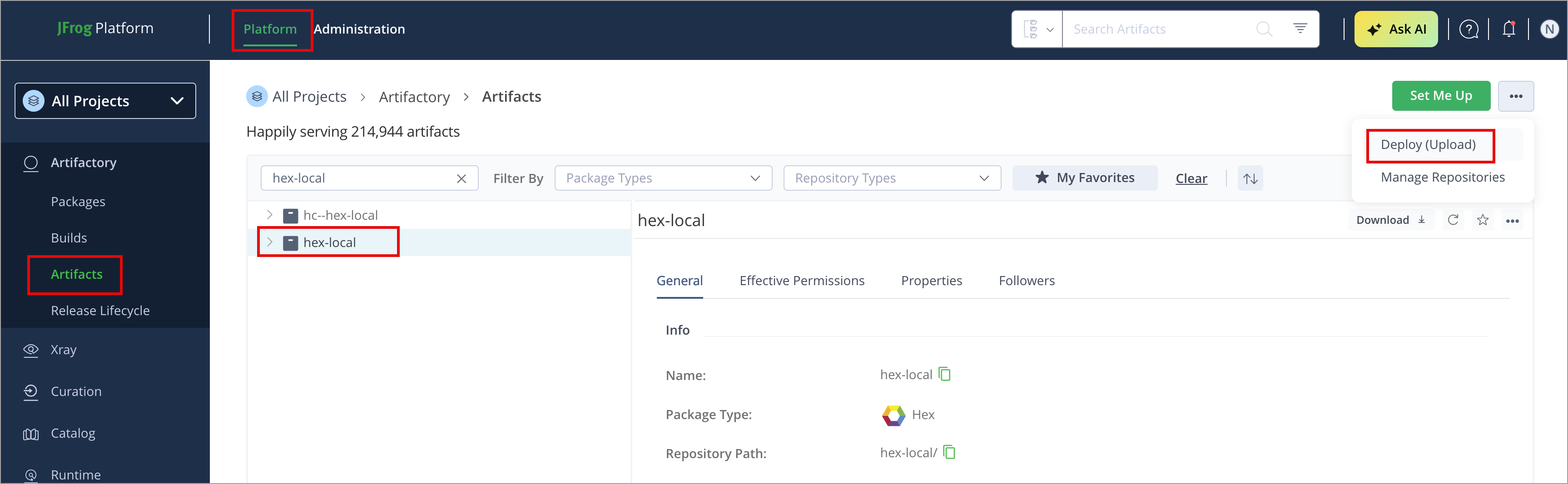
2. Verify the deploy options, then click **Deploy**.
The package is deployed.
### Deploy Hex Packages via API
You can publish packages via the REST API.
**To deploy Hex package via cURL**:
```shell
curl -L -u: -XPUT https://[JFrogPlatformURL]/artifactory//tarballs/ -T
```
Where:
* ``: Name of the repository/repository key
* ``: Your JPD access token
* ``: URL of your JPD
* ``: Name of the repository/repository key
* ``: This specifies the local file to upload
**For example:**
```shell
curl -L -uadmin:cmVmdGtuOjAxOj05KMzNiZnVxMFFj -XPUT https://company.jfrog.io/artifactory/hex-virtual/tarballs/ -T my_package-0.1.0.tar
```
You can also use JFrog Set me up to copy the snippet populated with your token and environment. For more information, see Use Artifactory Set Me Up for Configuring Package Manager Clients.
## Resolve Hex Packages
This topic describes how to resolve Hex packages using the `mix.exs` file:
* [Resolve from a Local Hex Repository](#resolve-from-a-local-hex-repository)
* [Resolve from a Remote Hex Repository](#resolve-from-a-remote-hex-repository)
* [Resolve from a Virtual Hex Repository](#resolve-from-a-virtual-hex-repository)
### Resolve from a Local Hex Repository
**To resolve Hex packages using the mix.exs file**:
To resolve dependencies from a Local Artifactory Hex repository, add the package names, versions, and repository name to your `mix.exs` file:
```
defp deps do
[
{:, "", repo: "REPOSITORY_NAME"}
]
```
Where:
* ``: Name of the package
* ``: Version of the package
* ``: Name of the repository
* ``: Name of the organization
For example:
```
defp deps do
[
{:jason, "1.4.4", repo: "hex-local"}
]
```
Run the command.
```
mix deps.get
```
**Note**
You can also use JFrog Set Me Up to copy the snippet populated with your token and environment. For more information, see [Use Artifactory Set Me Up for Configuring Package Manager Clients](/artifactory/docs/use-artifactory-set-me-up-for-configuring-package-manager-clients).
### Resolve from a Remote Hex Repository
Artifactory supports the following options for resolving a Hex package from Remote repository:
* **Resolve from hex.pm**
* Public packages
To resolve your public Hex dependencies, add the package names and versions to your `mix.exs` file:
```
defp deps do
[
{:, ""}
]
```
For example:
```
defp deps do
[
{:jason, "1.4.4"}
]
```
Run the command.
```
mix deps.get
```
* Private packages (Organization)
To resolve your hex dependencies from a private organization in `hex.pm`, add the package names, versions, and organization name to your `mix.exs` file:
```
defp deps do
[
{:, "", organization: ""}
]
```
For example:
```
defp deps do
[
{:jason, "1.4.4", repo: "hex-remote", , organization: "acme"}
]
```
Run the command.
```
mix deps.get
```
**Note**
Hex 2.6.0 and later can fail to install private organization packages when the Mix client authenticates to Artifactory with the repository key only. Add your Artifactory authentication information to `~/.netrc`. For more information, see [Hex Limitations in Artifactory](#hex-limitations-in-artifactory).
* **Resolve from a private Hex server**
To resolve your Hex dependencies from a private Hex server, add the package names, versions, and repository name to your `mix.exs` file:
```
defp deps do
[
{:, "", repo: "REPOSITORY_NAME"}
]
```
For example:
```
defp deps do
[
{:jason, "1.4.4", repo: "hex-remote"}
]
```
**Note**
Organizations are not supported in private Hex server.
Run the command.
```
mix deps.get
```
### Resolve from a Virtual Hex Repository
Artifactory supports the following options for resolving a Hex package from Virtual repository:
* Public packages
To resolve your public Hex dependencies, add the package names and versions to your `mix.exs` file:
```
defp deps do
[
{:, ""}
]
```
For example:
```
defp deps do
[
{:jason, "1.4.4"}
]
```
Run the command.
```
mix deps.get
```
* Private packages (Organization)
To resolve your hex dependencies from a private organization in `hex.pm`, add the package names, versions, and organization name to your `mix.exs` file:
```
defp deps do
[
{:, "", organization: ""},
]
```
For example:
```
defp deps do
[
{:jason, "1.4.4", repo: "hex-remote", , organization: "acme"}
]
```
Run the command.
```
mix deps.get
```
**Note**
Hex 2.6.0 and later can fail to install private organization packages when the Mix client authenticates to Artifactory with the repository key only. Add your Artifactory authentication information to `~/.netrc`. For more information, see [Hex Limitations in Artifactory](#hex-limitations-in-artifactory).
## Additional Hex Actions
The following additional actions are available with Hex repositories:
* Download Public Key to Hex Project Folder
* Hex Repository Layout and Permission
* Hex Supported Commands
### Download Public Key to Hex Project Folder
This topic describes how to download the public key to your project folder to work with Hex repositories in Artifactory. It provides instructions to download the public key using curl or wget.
The Mix client requires that you host your Hex repository RSA public key in your project folder to verify the index signature.
First, generate a user token using the Set Me Up dialog. This token will auto-populate in all relevant placeholders within the set-me-up instructions.
**To configure the Mix client, follow these steps:**
Copy the `publickey.pem` key hosted in Artifactory to your Mix project folder using the following curl or Wget commands:
* **Curl**
```
curl -u: -o publickey.pem https://[JFrogPlatformURL]/artifactory/api/security/keypair/public/repositories/
```
Where:
* ``: Name of the repository/repository key
* ``: Your JPD access token
* ``: URL of your JPD
* ``: Name of the repository/repository key
**For example:**
```
curl -uadmin:cmVmdGtuOjAxOj45NTgLXlYaFVCYXZYOONaY2dRUEJioEVpNFpT -o publickey.pem https://company.jfrog.io/artifactory/api/security/keypair/public/repositories/hex-remote
```
* **Wget**
```
wget -O publickey.pem https://:@[JFrogPlatformURL]/artifactory/api/security/keypair/public/repositories/
```
**For example:**
```
wget -O publickey.pem https://admin:cmVmdGtuOjAxOj45NTgLXlYaFVCYXZYOONaY2dRUEJioEVpNFpT@company.jfrog.io/artifactory/api/security/keypair/public/repositories/hex-remote
```
**Note**
You can also use JFrog Set Me Up to copy the snippet populated with your token and environment. For more information, see [Use Artifactory Set Me Up for Configuring Package Manager Clients](/artifactory/docs/use-artifactory-set-me-up-for-configuring-package-manager-clients).
### Hex Repository Layout and Permission
This topic describes the Hex local and remote repositories layout and permissions you can apply.
* [Hex Local Repository Layout](https://docs.jfrog.com/artifactory/docs/hex-repositories#hex-local-repository-layout)
* [Hex Remote Repository Layout](https://docs.jfrog.com/artifactory/docs/hex-repositories#hex-remote-repository-layout)
#### Hex Local Repository Layout
The following is the Hex Local Repository Layout.
**Note**
All the uploaded `tar` files must be under the tarballs directory as `tarballs/[name]-[version].tar`.
```
├── names
├── versions
├── installs
|-- hex-1.x.csv
├── packages
|--
├── tarballs
|-- -.tar
```
* **repository name** - Name of the repository
* **names** - Name details of a package
* **versions** - Version details of a package
* **installs** - Metadata uploaded for the package
* **packages** - Metadata of packages uploaded in the local
* **tarballs** - Packages uploaded in the local repository
#### Hex Remote Repository Layout
```
├── installs
|-- hex-1.x.csv
├── packages
|--
├── tarballs
|-- -.tar
```
* **Installs** - Metadata pulled from the remote
* **packages** - The package metadata pulled from the remote
* **tarballs** - Redistributable binaries for each package pulled from the remote
#### Permissions on Hex Remote Repository Directories
You can provide granular permissions for users to specific packages. To limit access, apply permissions to each of the layout folders.
For example, to exclude packages that start with abc in the hex repository, add Exclude Patterns for each layout folder as:
* installs/abc\*
* tarballs/abc\*
* packages/abc\*
To learn more, refer to the following:
* Include/Exclude Patterns
* [Add Repositories](/administration/docs/permissions)
#### Hex Virtual Repository Layout
```
├── names
├── versions
├── packages
|--
├── tarballs
|-- -.tar
```
* **repository name** - Name of the repository
* **names** - Name details of a package
* **versions** - Version details of a package
* **packages** - Metadata of packages
* **tarballs** - Packages uploaded
#### Private Packages
```
├── repos
│ ├──
│ │ ├── packages
│ │ │ └──
```
* **repository name** - Name of the repository
* **repos** - A folder that holds multiple sub-repositories
* **org-name** - Name of the organization
* **packages** - List of packages
### Hex Supported Commands
This topic describes the hex supported commands in Artifactory.
* `mix deps.get --verbose`
* `mix deps.update --all`
* `mix hex.outdated `
* `mix hex.repo list`
## Hex Limitations in Artifactory
The following are the limitations of Hex in Artifactory:
* **Hex.pm Registry Compatibility:** Due to an unannounced change to the Hex registry metadata format, remote and virtual repositories backed by `repo.hex.pm` may fail to resolve packages and return a 404 "package not found" error. Dependency resolution through Artifactory can fail intermittently, especially for Elixir packages such as `plug`, `cowboy`, `phoenix`, and `ecto`. For full remote and virtual repository functionality against `repo.hex.pm`, use a supported version of Artifactory as documented in [Connect Mix to Artifactory](#connect-mix-to-artifactory).
* **Mix Client**:
* **Single Repository Limitation:** The Mix client allows only one repository to point to `repo.hex.pm`. As a result, you can only set one Artifactory endpoint as the default repository that connects to the public `hex.pm` registry.
* **Repository Naming:** The name of your self-hosted Hex repository in the Mix client must exactly match the full URL of the Artifactory remote repository.
* **Private organization packages in Hex 2.6.0 and later:** Hex 2.6.0 and later can fail to install private organization packages when the Mix client authenticates to Artifactory with the repository key only.
Add the following snippet with your Artifactory authentication information to your `~/.netrc` file.
```text
machine
login
password
```
Where:
<JFROG_HOSTNAME>: The host name of your JFrog Platform<USERNAME>: Your Artifactory username<TOKEN>: Your Artifactory identity token
For example:
```text
machine company.jfrog.io
login admin
password example-identity-token
```
If Hex asks whether you want to authenticate now, enter `n`. You don't need to change `mix.exs` or `mix.lock`.
* **Hex Server**:
* **Private Package Support:** Self-hosted Hex servers do not support private organizations or private packages. This feature is only available through the public `hex.pm` registry, which offers private hosted repositories.
* **Hex Local Repository**:
* Parsing any info related to docs, tests, etc.; from `mix.exs` is not supported.
* `mix hex.publish` command to publish packages to local repository is not supported. **Workaround:**Deploy Hex Packages via API to local repository.
* Deploying packages under any other directory except `tarballs` is not supported. To learn more, see Hex Repository Layout and Permission.
* **Repository Browsing**: Artifactory does not support browsing Hex remote registries. The artifact tree only shows packages explicitly pulled into Artifactory, not the contents of the remote registry.
* **Hex Virtual Repository**: A single Mix client can link to only one Hex virtual repository.