---
updatedAt: 2026-11-10T12:32:04.000Z
agentTools:
siteIndex: https://docs.jfrog.com/llms.txt
projectIndex: https://docs.jfrog.com/user-management/llms.txt
---
# API Key
You can authenticate REST API requests in JFrog Artifactory with your API key instead of your password. Use the `X-JFrog-Art-API` header, or use basic authentication with your username and API key.
**Note**
JFrog recommends not using API keys. This feature has reached end of life, and you can't create new API keys. Existing API keys continue to authenticate until an administrator disables API key usage. This topic helps you and your administrators find where API keys are still in use and migrate to reference tokens. For more information, see [JFrog API Key Deprecation Process](#jfrog-api-key-deprecation-process).
**Warning**
Artifactory 7.47.10 introduced the API key deprecation process. Artifactory 7.98 disables creation of new API keys. For more information, see [JFrog API Key Deprecation Process](#jfrog-api-key-deprecation-process).
You control the migration to reference tokens, which replace API keys.
* On SaaS, from Artifactory 7.107.1, the JFrog Platform UI includes a checkbox so you can control API key usage deprecation. For more information, see [JFrog API Key Deprecation for SaaS](#jfrog-api-key-deprecation-for-saas).
* On a self-managed JFrog Platform, you can control the deprecation through system properties. For more information, see [API Key Deprecation Configuration Create and Usage Flags](#api-key-deprecation-configuration-create-and-usage-flags).
**Note**
Use an API key generated in Artifactory 4.4.3 or later. If it was generated before 4.4.3, regenerate your API key and use the new key as a password for basic authentication.
### JFrog API Key Deprecation Process
##### Why Is JFrog Deprecating API Keys?
JFrog is deprecating API keys. From Artifactory 7.98.x, you can't create new API keys. For specific information for your hosting model, see [JFrog API Key Deprecation for SaaS](#jfrog-api-key-deprecation-for-saas) and [JFrog API Key Deprecation for Self-managed Platforms](#jfrog-api-key-deprecation-for-self-managed-platforms).
JFrog introduced API keys with JFrog Artifactory 4.4.3, so you could create a secret to authenticate with Artifactory over REST or through clients such as the JFrog CLI and package manager clients. You can create and use API keys. They're less secure for the following reasons:
* API keys are retrievable. The keys are saved in the database, and you can retrieve them through the REST API or the UI.
* API keys don't have lifecycle management features. API keys aren't created with an expiry date and, by default, never expire, so you or an Artifactory administrator must manually revoke them. You can have one active API key at a time, so you share that key with multiple clients. If you revoke it, you revoke it for all clients.
* API keys are not manageable. Administrators can't monitor or manage your API keys.
##### What Is Replacing API Keys?
Use reference tokens and identity tokens for API authentication. They're more secure because they inherit the security features of access tokens. For more information, see [Comparing Identity Reference Tokens With API Keys](/user-management/docs/identity-tokens#comparing-identity-reference-tokens-with-api-keys).
To migrate to the new method and start using identity and reference tokens, see [Understanding Reference and Identity Tokens](/user-management/docs/identity-tokens#understanding-identity-tokens).
### JFrog API Key Deprecation for SaaS
**Warning**
JFrog recommends not using API keys.
Artifactory SaaS 7.63.5 includes the option to view and download the list of users who use API keys before the deprecation. For more information, see [Collect API Key Users for SaaS](#collect-api-key-users-for-saas).
With this process, administrators can identify users on the JFrog Platform who still use API keys, and help those users move to another authentication method.
JFrog has begun the countdown to fully discontinuing its support for this feature.
##### API Key Creation Deprecation
From Artifactory 7.98, you can't create new API keys in the UI or with the REST API.
##### API Key Usage Deprecation
You control the migration to [reference tokens](/user-management/docs/identity-tokens#comparing-identity-reference-tokens-with-api-keys), which replace API keys. From Artifactory 7.107.1, you can use a checkbox in the JFrog Platform UI to control API key usage deprecation. This checkbox is cleared by default.
**To block API key usage:**
* Select the **Disable API Key Usage** checkbox under **Security** > **General**.

#### Collect API Key Users for SaaS
Artifactory version 7.63.5 and later includes the ability to collect the information of the users that access the system with an API key.
**To collect API key users on SaaS:**
1. Log in to the JFrog Platform as an administrator.
2. Navigate to the **Administration Module**.
3. Click **User Management** > **Users**.
A banner appears that contains a download link to the list of users.

4. Open the downloaded CSV file to view the list of users that use API key.
### JFrog API Key Deprecation for Self-managed Platforms
**Warning**
JFrog recommends not using API keys.
With the release of Artifactory 7.47.10, JFrog introduced a method that helps administrators deprecate the API key feature. For more information, see [Collect API Key Users for Self-managed Platforms](#collect-api-key-users-for-self-managed-platforms).
With this process, administrators can identify users on the JFrog Platform who still use API keys, and help those users move to another authentication method.
You control the migration to reference tokens, which replace API keys. On a self-managed JFrog Platform, you can control the deprecation through system properties. For more information, see [API Key Deprecation Configuration Create and Usage Flags](#api-key-deprecation-configuration-create-and-usage-flags).
#### Collect API Key Users for Self-managed Platforms
* [Enable User Collection for Self-managed Platforms](#enable-user-collection-for-self-managed-platforms)
* [Obtain the Realm and Authentication Attempts](#obtain-the-realm-and-authentication-attempts)
* [Collect API Key Login Data](#collect-api-key-login-data)
Artifactory 7.47.10 can collect information about how users log in. You can find users and clients who authenticate with an API key and tell them to change their authentication method. User collection is enabled by default.
##### Enable User Collection for Self-managed Platforms
This command collects the API key authentication method from `var/log/artifactory-access.log`.
**To enable user collection on a self-managed JFrog Platform:**
* Run the following command:
```
bash-4.4$ cat var/log/artifactory-access.log | grep "\\[ACCEPTED LOGIN\\].*\\[apiKey\\]$"
```
For example:
```
2022-11-03T10:26:00.944Z [64f8d13a96f81f10] [ACCEPTED LOGIN] for client : admin / 172.17.0.1. [apiKey]
2022-11-03T10:26:15.252Z [7beab97bfa421337] [ACCEPTED LOGIN] for client : admin / 172.17.0.1. [token]
```
##### Obtain the Realm and Authentication Attempts
Use these steps when the username and authentication method are not enough. For example, use them if you're trying to track where the API key is being used.
**To obtain the realm and authentication attempts:**
1. Go to this file: `var/etc/artifactory/logback.xml`.
2. Add the following to the file:
```
```
3. Then, search for the following in the `var/log/artifactory-service.log`: "Trying to authenticate user:"
For example: 'Trying to authenticate user: 'user1' via ldap.'
##### Collect API Key Login Data
Use the collected logs to find users who authenticated with an API key, then notify them.
**To collect API key login data:**
1. Keep the logs enabled for 3 months.
2. Run a grep command on the logs you collected, or parse the logs with your tools, to get all the usernames that used API keys in the last 3 months. For example:
```
bash-4.4$ cat var/log/artifactory-access.log | grep "\\[ACCEPTED LOGIN\\].*\\[apiKey\\]$"
2022-11-08T13:43:33.208Z [1c8a8e6db8a35b8e] [ACCEPTED LOGIN] for client : admin / 172.17.0.1. [apiKey]
2022-11-08T13:43:52.290Z [2d1cefa1c521a36 ] [ACCEPTED LOGIN] for client : admin / 172.17.0.1. [apiKey]
```
3. Notify the users detected by the log that they need to change their application keys to access tokens or another authentication method.
#### API Key Deprecation Configuration Create and Usage Flags
From Artifactory 7.84.x, you can control creation and usage of API keys on a self-managed JFrog Platform with the following flags in the [Access YAML Configuration](/installation/docs/access-yaml-configuration) file. The default setting is `false`:
```
security.authentication.disable-api-key-creation: false # When set to true, block user from create api key
security.authentication.disable-api-key-authentication: false # When set to true, block user from authenticate with api key.
```
Starting from Artifactory version 7.98, the default setting for `security.authentication.disable-api-key-creation` will be `true`:
```
security.authentication.disable-api-key-creation: true # When set to true, block user from create api key
```
### Block Creation of New API Keys
These settings block creation of new API keys in the JFrog Platform.
**To block creation of new API keys:**
1. Set the property `artifactory.security.apiKey.blockCreate` to `true` in the `$JFROG_HOME/artifactory/var/etc/artifactory/artifactory.system.properties` file.
2. From Artifactory version 7.77, also add the following in the [Access YAML Configuration](/installation/docs/access-yaml-configuration) file:
```
security:
authentication:
disable-api-key-creation: true
```
### Work with API Keys (Until Deprecated)
You can authenticate REST API requests in JFrog Artifactory with your API key instead of your password. Use the `X-JFrog-Art-API` header, or use basic authentication with your username and API key.
##### Create an API Key
To use your API key for authentication, it must be generated using Artifactory 4.4.3 or later. If generated before 4.4.3, regenerate your API key and use the new key as a password for basic authentication.
**To create an API key:**
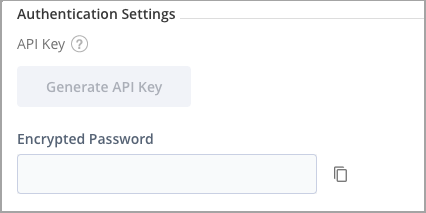
* Once you've [unlocked your profile](/user-management/docs/manage-user-profile#unlock-your-profile), click the **Generate** button next to the **API Key** field.
### API Keys REST API
The following REST API endpoints are available for API keys. From Artifactory 7.49.3, these APIs are deprecated and replaced by the new security APIs.
| Endpoint | Description |
| ------------------- | ---------------------------------------------------------------------------------------- |
| Create API Key | Create an API key for the current user. |
| Get API Key | Returns the current user's API key. |
| Revoke API Key | Revokes the current user's API key. |
| Revoke User API Key | Revokes the API key of another user. Requires administrator privileges. |
| Revoke All API Keys | Revokes all API keys currently defined in the system. Requires administrator privileges. |