

API Key
Artifactory allows authentication for REST API calls using your API key as an alternative to your username and password in two ways: either by using the X-JFrog-Art-API header with which you can specify an API key, or through basic authentication using your username and API key (instead of your password).
Note
It is not recommended to use API Key- this feature has reached End of Life. The recommended way to configure API authentication is using reference tokens. For more information, see JFrog API Key Deprecation Process.
API Key Deprecation
As notified in Artifactory 7.47.10, API key has reached End of Life at the end of Q4, 2024. We have disabled the ability to create new API keys in Artifactory version 7.98. For more information, see JFrog API Key Deprecation Process.
To ease the migration to reference tokens, which replace API Key, we have shifted the control to you.
- For Cloud users, starting from Artifactory version 7.107.1, the JFrog Platform UI includes a checkbox allowing you to control the API usage deprecation. Learn more
- For Self-Hosted users, you can control the deprecation through your system properties. Learn more
Artifactory Minimum Supported Version
To use your API key for authentication, it must be generated using Artifactory 4.4.3 or later. If generated prior to 4.4.3, you must regenerate your API key and use the new key as a password for basic authentication.
JFrog API Key Deprecation Process
Why is JFrog Deprecating API Keys?
JFrog decided to begin the process of deprecating the API Keys. As of Artifactory version 7.98.x, Artifactory no longer supports creating new API Keys. For specific information for your hosting model, see JFrog API Key Deprecation for Cloud Customers and JFrog API Key Deprecation for Self-Hosted Customers.
JFrog introduced API Keys way back with JFrog Artifactory 4.4.3, providing users with a practical solution to easily create a secret, which could then be used to authenticate with JFrog Artifactory over REST or through clients (such as the JFrog CLI and various package manager clients). Although they’re easy to create and use, API Keys have some characteristics that make them less secure:
- API Keys are retrievable: the keys are saved in the database and can be retrieved via REST API or the UI.
- API Keys don’t have lifecycle management features: since API Keys are not created with an expiry date, and, by default, never expire, the user or Artifactory admin must manually revoke them. A single user can have a single active API Key at any moment, which means a single key needs to be shared with multiple clients. If it is revoked, it is revoked for all clients.
- API Keys are not manageable: administrators can not monitor or manage a user’s API Keys.
What is Replacing API Keys?
The recommended API authentication method is using reference tokens and identity tokens: they present a more secure way to manage user authentication because they inherit the security features of access tokens. For more information, see Comparing Identity Reference Tokens With API Keys.
To migrate to the new method and start using identity and reference tokens, see Understanding Reference and Identity Tokens.
JFrog API Key Deprecation for Cloud Customers
Warning
JFrog recommends as a security best practice not to use API Keys anymore.
Cloud Artifactory version 7.63.5 includes the option to view and download the list of users using API Keys regarding the upcoming deprecation. See API Key User Collection for Cloud Customers.
With this new process, admins can identify Platform users who still use API Keys for their authentication, thus helping to migrate those users to alternative means of authentication.
JFrog has begun the countdown to fully discontinuing its support for this feature.
API Key Creation Deprecation
As of Artifactory version 7.98, you will not be able to create new API keys through UI or API.
API Key Usage Deprecation
To ease the migration to reference tokens, which replace API Key, we have shifted the control to you. Starting from Artifactory version 7.107.1, you are able to use a checkbox to control the API Usage Deprecation through the JFrog platform WebUI. This checkbox will be deselected by default: to block API key usage in your environment, select the Disable API Key Usage checkbox under Security > General.

API Key User Collection for Cloud Customers
Artifactory version 7.63.5 and later includes the ability to collect the information of the users that access the system with an API key.
-
Log in to the JFrog Platform UI as an admin user.
-
Navigate to the Administration Module.
-
Click User Management | Users.
A banner appears on top that contains a download link to the list of users.

-
Open the downloaded CSV file to view the list of users that use API key.
JFrog API Key Deprecation for Self-Hosted Customers
Warning
JFrog recommends as a security best practice not to use API Keys anymore.
With the release of Artifactory 7.47.10, JFrog introduced a new method that supports Platform administrators with the deprecation process of the API Key feature. See API Key User Collection for Self-Hosted Customers.
With this new process, admins can identify Platform users who still use API Keys for their authentication, thus helping to migrate those users to alternative means of authentication.
To ease the migration to reference tokens, which replace API Key, we have shifted the control to you. For Self-Hosted users, you can control the deprecation through your system properties. Learn more
API Key User Collection for Self-Hosted Customers
Artifactory version 7.47.10 includes the ability to collect information regarding how your users are logging in to the system. Using this function, you can detect and notify all users/clients who are using an API Key authentication method that they need to change their authentication method. The collection feature of the authentication method is enabled by default.
Enable User Collection for Self-Hosted Customers
Run the following command to collect the API Key authentication method in the var/log/artifactory-access.log:
bash-4.4$ cat var/log/artifactory-access.log | grep "\\[ACCEPTED LOGIN\\].*\\[apiKey\\]$"For example:
2022-11-03T10:26:00.944Z [64f8d13a96f81f10] [ACCEPTED LOGIN] for client : admin / 172.17.0.1. [apiKey]
2022-11-03T10:26:15.252Z [7beab97bfa421337] [ACCEPTED LOGIN] for client : admin / 172.17.0.1. [token]
Obtain the Realm and Authentication Attempts
In cases where simply the username and authentication method are not enough information (for example, if you are trying to track where the API Key is being used), do the following:
-
Go to this file:
var/etc/artifactory/logback.xml. -
Add the following to the file:
<logger name="org.artifactory.security" level="debug" additivity="false"> <appender-ref ref="FILE"/> </logger> -
Then, search for the following in the
var/log/artifactory-service.log: "Trying to authenticate user:"For example: 'Trying to authenticate user: 'user1' via ldap.'
Collect the Data
-
JFrog recommends allowing the system to run with the logs enabled for some time (recommended is 3 months).
-
Run a grep command on the logs you collected (or parse it with your tools) to get all the usernames that used API Keys in the last 3 months. For example:
bash-4.4$ cat var/log/artifactory-access.log | grep "\\[ACCEPTED LOGIN\\].*\\[apiKey\\]$" 2022-11-08T13:43:33.208Z [1c8a8e6db8a35b8e] [ACCEPTED LOGIN] for client : admin / 172.17.0.1. [apiKey] 2022-11-08T13:43:52.290Z [2d1cefa1c521a36 ] [ACCEPTED LOGIN] for client : admin / 172.17.0.1. [apiKey] -
Notify the users detected by the log that they need to change their application keys to Access Tokens or to another authentication method.
API Key Deprecation Configuration Create and Usage Flags
As of Artifactory version 7.84.x, self-hosted customers can control the creation and usage of API Keys in their environments using the following flags in the Access YAML Configuration file, with a default setting of false:
security.authentication.disable-api-key-creation: false # When set to true, block user from create api key
security.authentication.disable-api-key-authentication: false # When set to true, block user from authenticate with api key.
Starting from Artifactory version 7.98, the default setting for security.authentication.disable-api-key-creation will be true:
security.authentication.disable-api-key-creation: true # When set to true, block user from create api keyBlock Creation of New API Keys
To block the creation of new API Keys in the JFrog Platform, set the property, artifactory.security.apiKey.blockCreate, as true in the $JFROG_HOME/artifactory/var/etc/artifactory/artifactory.system.properties file.
From Artifactory version 7.77, to block the creation of new API Keys in the JFrog Platform, also add the following in the Access YAML Configuration file:
security:
  authentication:
    disable-api-key-creation: true
Work with API Keys (Until Deprecated)
Artifactory allows authentication for REST API calls using your API key as an alternative to your username and password in two ways: either by using the X-JFrog-Art-API header with which you can specify an API key, or through basic authentication using your username and API key (instead of your password).
Creating an API Key
To use your API key for authentication, it must be generated using Artifactory 4.4.3 or later. If generated prior to 4.4.3, you must regenerate your API key and use the new key as a password for basic authentication.
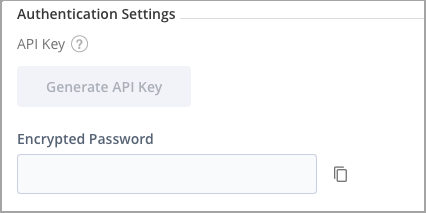
To create an API Key, once you have unlocked your profile, click the Generate button next to the API Key field.
API Keys REST API
The following REST API endpoints are available with regard to API Keys; note that from Artifactory release 7.49.3, these APIs are being deprecated and replaced by the new SECURITY APIs.
| Endpoint | Description |
|---|---|
| Create API Key | Create an API key for the current user. |
| Get API Key | Get the current user's own API key. |
| Revoke API Key | Revokes the current user's API key. |
| Revoke User API Key | Revokes the API key of another user (requires Admin privileges). |
| Revoke All API Keys | Revokes all API keys currently defined in the system (requires Admin privileges). |
Updated 6 months ago