
MyJFrog Admin Interface
MyJFrog is your central portal for managing your JFrog account.
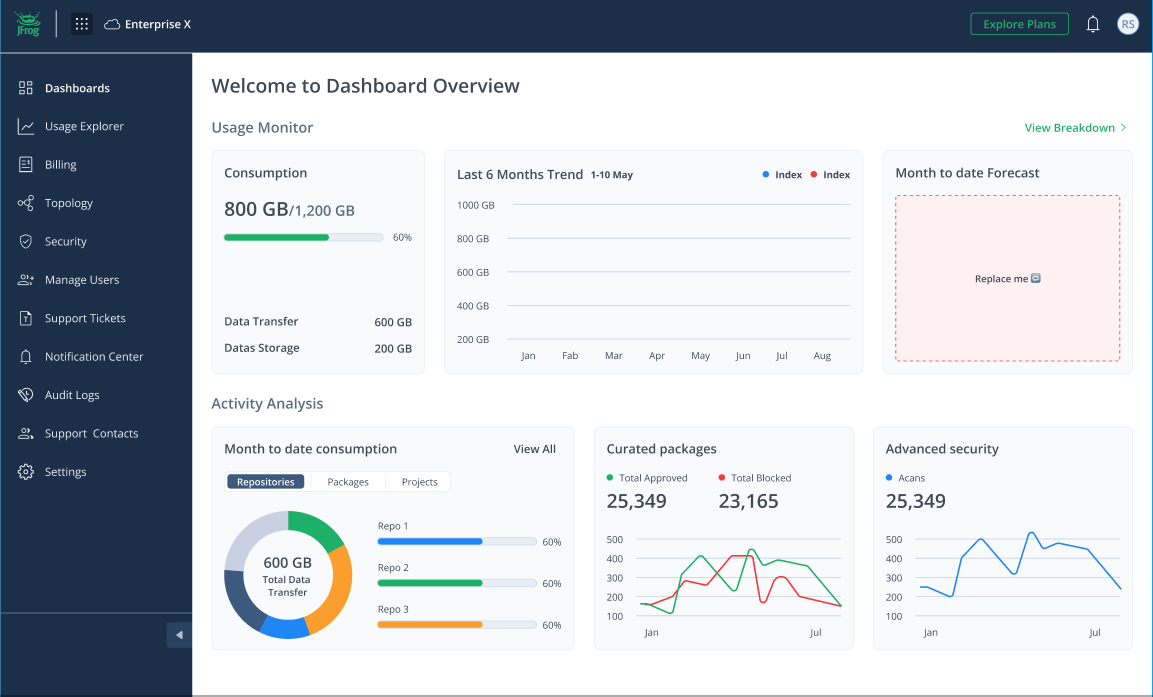
Use the sections of the MyJFrog portal to:
- Manage Your Subscription: Easily view, upgrade, or downgrade your plan, access billing history, and manage invoices.
- Monitor Cloud Usage: Track your consumption of storage, data transfer, and security scanning to stay on top of costs and resource allocation.
- Configure Security and Settings: Control access to your environment with features like custom domain names, audit logs, and user management.
- Manage Topology: Define and manage JFrog Platform Deployments, bridges, and federations.
- Administer Your Environment: Add new users, assign roles, and set up notifications to receive important alerts.
After you complete initial registration, you can access the MyJFrog portal at my.jfrog.com.
Access the following tools in the top bar of the MyJFrog interface:
- Click your User icon to generate an authorization token for your account or to modify other settings.
Click the site launcher

- The Launcher pane lets you move between your organization's sites and subscriptions.
- Click the ? icon to access the Help Center, JFrog Academy, and the JFrog Support Portal.
- Click the email icon to view your JFrog Team contacts.
Updated 3 months ago
Did this page help you?