

Part 3: Block Malicious Packages
This part of the workshop introduces your first enforcement step using JFrog Curation: blocking known malicious packages.
Goal: Protect your organization from Malicious attacks on all fronts. Unlike Operational and Security risks, which can be mitigated, malicious packages present risks that should never be considered. The threat posed by malicious packages must always be taken seriously. Therefore, we recommend beginning proactively by blocking all malicious packages across all repositories. Implementing this measure will not significantly impact development teams that require ongoing assessments.
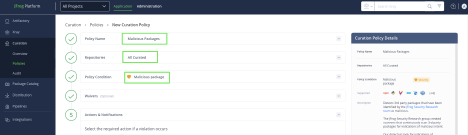
Policy on Malicious Packages: Block all malicious packages on all repositories. With a “Block” policy in place, any requests that violate the policy will be blocked, and the client will receive a “403” error.
How to Create Malicious Package Policy: Navigate to Application Tab → Curation → Policies and create a “Malicious Packages” policy for all the Curated repositories
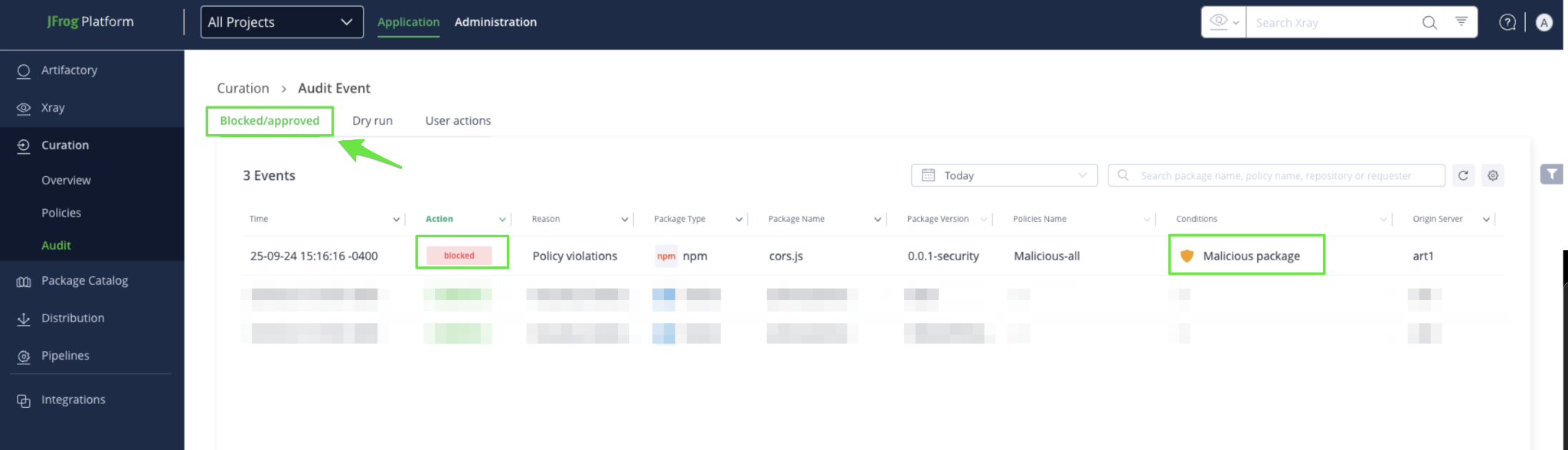
To check whether a malicious package is downloaded through the platform from one of the Curated repositories, navigate to the ‘Application’ Tab in the Platform UI → ‘Curation’ → ‘Audit’ → ‘View the list’. Security team s can view details of blocked or approved requests in the “Blocked/Approved” tab on the Curation Audit page:
When to move on
Once you are comfortable with how malicious package blocking behaves and have validated visibility through audit events, you are ready to continue to the next phase.
Proceed to Part 4: Estimate Policy Impact Using Dry Run
Updated 3 months ago