

Xray Overview Page
Learn what the Xray Overview page shows for scanning, secrets, supply chain, and policies.
The JFrog Platform manages repositories across many teams, technologies, and stages of the software supply chain. As that footprint grows, so does a fundamental question for anyone responsible for security: How well are we actually protected?
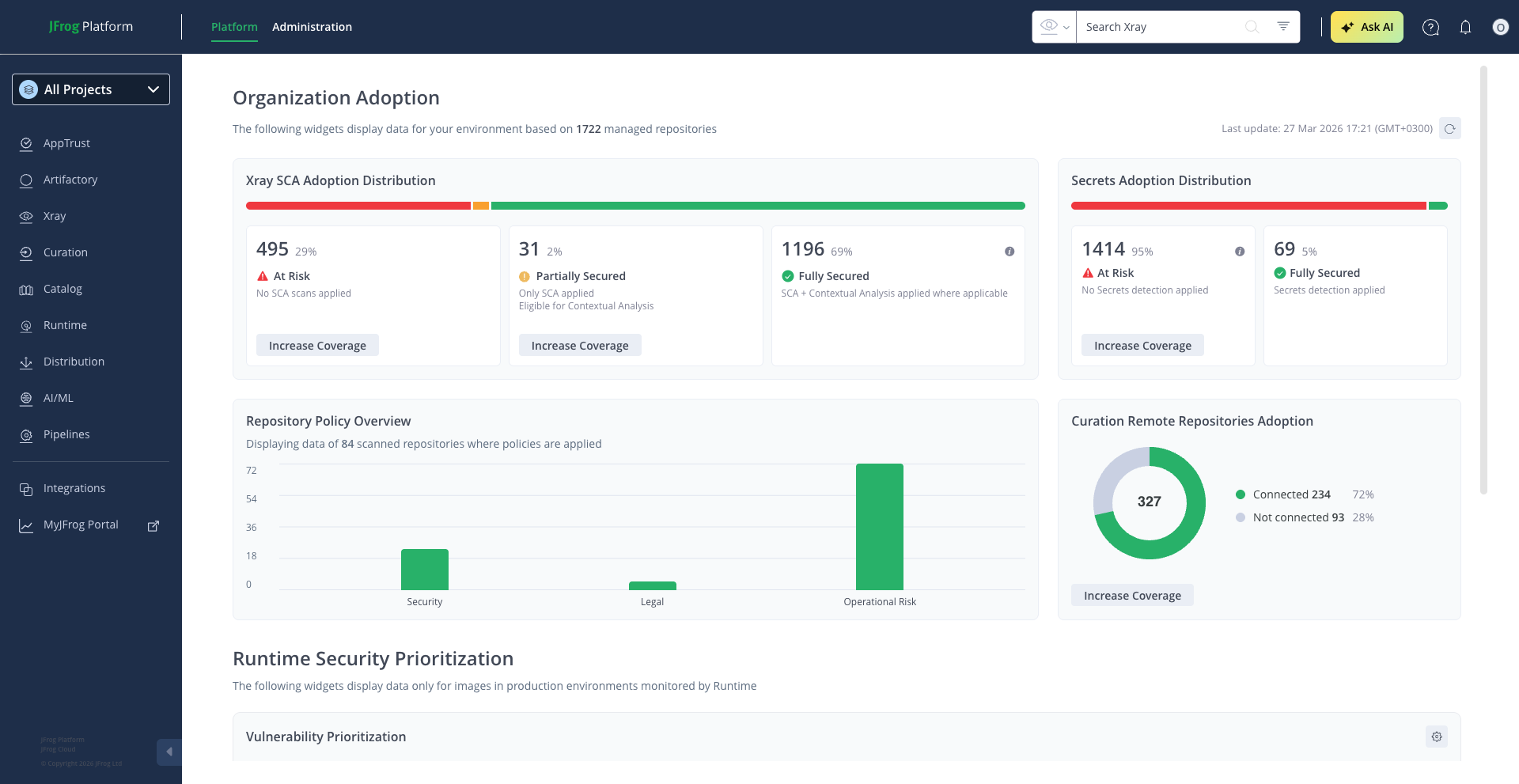
The Xray Overview page answers that question. You can open it from Xray > Overview.
Note
For more information, see the JFrog Academy Xray overview.
Understanding Your Organization's Security Adoption
The Organization Adoption section of the Overview page is designed for the owners of security adoption across your organization. That includes security champions, DevSecOps leads, and platform administrators. Rather than digging through individual repository settings or scanning logs, you get a single consolidated view of where your organization stands in terms of scanning coverage, secrets protection, supply chain defense, and policy enforcement.
The value is straightforward: you can see your coverage gaps at a glance, understand where your teams have adopted security capabilities and where they haven't, and take action directly from the dashboard to close those gaps. Every insight on this page links to the configuration needed to act on it.
Scanning and Detection Coverage
The most fundamental measure of your security posture is how many of your repositories are actually being scanned. The Overview page shows this through two complementary perspectives: vulnerability scanning and secrets detection.
For vulnerability scanning, you'll see a color-coded distribution bar that breaks your entire repository landscape into coverage levels. If your organization has JFrog Advanced Security enabled, repositories are categorized as follows.
- Fully Secured: Repositories are scanned for known vulnerabilities and enriched with Contextual Analysis to assess real-world exploitability.
- Partially Secured: Repositories are scanned but don't benefit from Contextual Analysis.
- At Risk: Repositories aren't indexed for scanning at all.
Without Advanced Security, the view simplifies to scanned versus not scanned, with a prompt to explore what Advanced Security adds.
The key insight is not just how many repositories are scanned, but how many benefit from the deeper analysis that separates theoretical risk from practical threat.
For secrets detection, a similar distribution bar shows how many eligible repositories have secrets scanning turned on. Leaked credentials, such as API keys, tokens, and passwords embedded in artifacts, remain one of the most common and exploitable attack vectors. This view helps you track whether your teams have enabled detection across the repositories where it matters. Hovering over the At Risk segment reveals whether those repositories simply haven't been configured yet or aren't eligible due to their package type, so you know exactly where to focus.
In both cases, clicking Increase Coverage takes you directly to the configuration needed to bring unprotected repositories into the fold.
Supply Chain Protection
Scanning catches problems that are already in your environment. But the stronger defense is preventing risky packages from entering in the first place.
The Overview page includes a pie chart showing how many of your remote repositories are connected to JFrog Curation versus how many are not. Connected repositories benefit from automated evaluation of open-source packages at download time. That evaluation blocks malicious or risky components before they reach your developers. Repositories that aren't connected represent gaps in your supply chain perimeter.
This is a particularly important metric for organizations scaling their use of open-source software. The more remote repositories you connect to Curation, the smaller the window for risky packages to enter undetected. The Increase Coverage link takes you directly to the Curation repository settings to close those gaps.
Policy Enforcement
Detecting vulnerabilities and risks is only half the equation. The other half is enforcing standards. The Overview page shows you how broadly that enforcement reaches.
A bar chart breaks down how many repositories are covered by Security policies, Legal policies, and Operational Risk policies.
| Policy type | What it enforces |
|---|---|
| Security | Vulnerability thresholds |
| Legal | License compliance |
| Operational Risk | Maintenance and end-of-life concerns |
A header shows the total number of repositories with at least one policy applied. For more information, see Policy and Governance.
This matters because scanning without policy enforcement is passive. Your teams see issues, but nothing prevents risky artifacts from flowing through. Policies turn detection into governance. If no policies are applied yet, the widget prompts you to create your first one.
Project-Scoped View
The Xray Overview page respects the JFrog Projects selector. When you select a specific project, all widgets on the page filter their data to show only the repositories and policies belonging to that project.
This means:
- Scanning coverage shows only indexed and non-indexed repositories assigned to the selected project.
- Secrets detection reflects adoption within the project's repositories.
- Supply chain protection displays Curation connectivity for the project's remote repositories.
- Policy enforcement counts only policies applied to the project's repositories.
When the project selector is set to All, the Overview displays organization-wide data across all projects.
The Increase Coverage links also carry the project context. Clicking them opens the configuration page pre-filtered to the selected project, so you can take action without manually re-selecting the scope.
Keeping the View Current
The Organization Adoption section includes a Last Updated timestamp showing when the data was last computed. The Refresh button in the top bar pulls the latest information from across your environment.
Frequently Asked Questions
This section provides answers to frequently asked questions.
FAQs
Q: How do I open the Xray Overview page?
A: You can open it from Xray > Overview. The Organization Adoption section shows scanning coverage, secrets detection, supply chain protection, and policy enforcement.
Q: What is the difference between Fully Secured, Partially Secured, and At Risk?
A: With JFrog Advanced Security, Fully Secured repositories are scanned and enriched with Contextual Analysis. Partially Secured repositories are scanned but don't yet benefit from Contextual Analysis. At Risk repositories aren't indexed for scanning, as described in Scanning and Detection Coverage.
Q: What happens if a repository shows as At Risk for secrets detection?
A: Hover over the At Risk segment on the secrets distribution bar. The repository either hasn't been configured for secrets scanning, or it isn't eligible because of its package type. See Scanning and Detection Coverage.
Q: What do I need before repositories can show as Fully Secured?
A: JFrog Advanced Security must be enabled. Without it, the Overview page shows scanned versus not scanned and prompts you to explore what Advanced Security adds. See Scanning and Detection Coverage.
Q: How can I see organization-wide data?
A: Set the project selector to All to see data across all projects. When you select a specific project, widgets show only the repositories and policies for that project. See Project-Scoped View.
Related Topics
Updated 14 days ago