

Malicious Package Detection
Learn how Xray detects malicious packages, which repositories it covers, and what the Daily Malicious Packages Report includes.
JFrog Xray detects malicious software packages based on artifact scanning. This feature uses a package scanning mechanism that automatically scans packages uploaded to public open-source software repositories. It detects potential security risks and malicious code in various open-source software packages.
Scan Architecture
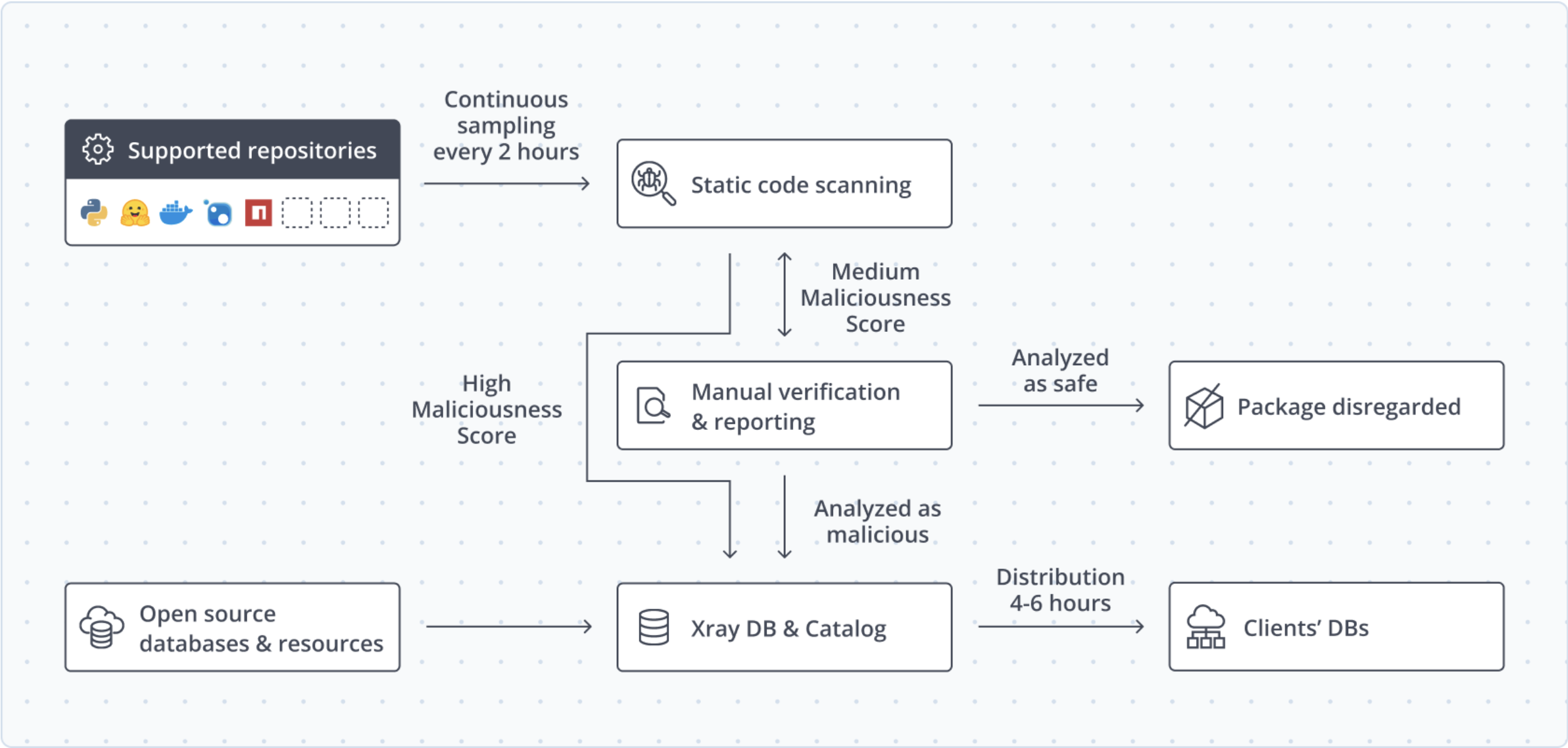
JFrog developed a set of automated scanners that run on each new package created or updated in all of the supported software repositories. These scanners produce a maliciousness score on each package.
If the score is extremely high, Xray automatically adds the package to its database as malicious and discloses it to the public repository maintainer. In this case, the package appears as malicious in Xray SaaS within 2 to 4 hours of the time it was created or updated. For more information, see Understanding and Analyzing Xray Scan Results.
If the score is somewhat high, JFrog researchers manually inspect the package. After careful evaluation, they mark it as malicious or clean. If the package is malicious, Xray updates the SaaS service within 1 to 3 days of the initial scan.
If the maliciousness score is low, Xray treats the package as safe.
An updated list of all packages that JFrog's scanners and the JFrog Security Research team discovered and disclosed is available in the JFrog malicious packages research.
In addition to JFrog's automated scanners, the Xray database is updated with malicious packages from two additional sources:
- Open-source malicious package databases, such as the OpenSSF malicious packages repository.
- JFrog's dedicated malware research team performs a daily audit of all new malware attacks and third-party disclosures, to update the Xray database with newly discovered threats.
Daily Malicious Packages Report
JFrog sends a daily email about public packages identified as malicious. The email subject is Daily Malicious Packages Report.
The email lists public packages identified as malicious during the previous 24 hours. Each entry includes the package name, version, and package type, and links to the package in JFrog Catalog.
You can review each package on its Catalog page. Impact Search checks whether an indexed artifact in JFrog Artifactory is affected. When the package matches a watch and a policy, Xray can notify you and run the actions configured on that policy. For more information, see Watches in JFrog Xray, Policy and Governance, Continuous Monitoring, and Threat Hub.
Which Malicious Code Patterns Can Be Identified by JFrog's Scanners?
JFrog employs many automated scanners that attempt to find the following payload patterns.
Each payload can have a few specific scanners, one for each implementation.
- Code obfuscation.
- Domain name generation.
- Dynamic code evaluation. For example,
eval()in Python. - Download and execute payloads.
- Shell-popping payloads, either listening or connect-back.
- Access to sensitive files. For example,
/etc/shadowor the browser's saved passwords cache. - Environment variable stealing.
- Stealing personally identifiable information.
- Cryptomining.
- Use of popular exfiltration services. For example, Pipedream.
In addition, scanners exist that identify malicious packages through the following metadata patterns:
- Dependency confusion. For example, very high version numbers.
- Typosquatting. The package name is very similar to an existing package name.
- Running code immediately on package installation.
These scanners work together to build a maliciousness score automatically for each new public package.
Supported Software Repositories
JFrog currently supports alerting on malicious package usage from the following public repositories.
- npm: Packages are continuously polled, scanned, and reported to the Xray database.
- PyPI: Packages are continuously polled, scanned, and reported to the Xray database.
- OpenVSX: Extensions are continuously polled, scanned, and reported to the Xray database.
- Hugging Face: Machine learning models are continuously scanned through a webhook push notification and reported to the Xray database. For more information, see Detect Malicious AI Models.
- NuGet: Well-known coverage. Only well-known malicious packages are reported to the Xray database.
- Maven: Well-known coverage. Only well-known malicious packages are reported to the Xray database.
- RubyGems: Well-known coverage. Only well-known malicious packages are reported to the Xray database.
- Crates.io: Well-known coverage. Only well-known malicious packages are reported to the Xray database.
- Go Packages: Well-known coverage. Only well-known malicious packages are reported to the Xray database.
Non-Covered Repositories and Well-Known Coverage Only
Non-covered repositories: Xray currently doesn't support alerting on malicious packages from several repositories, for example CocoaPods.
Repositories with well-known coverage only: For other repositories, most notably Maven, Xray highlights known malicious packages, but it doesn't continuously scan the repository for new malicious packages.
These repositories aren't covered, or are only partly covered, because research showed zero or a negligible number of malicious packages uploaded to them.
Frequently Asked Questions
This section provides answers to frequently asked questions.
FAQs
Q: How does Xray decide that a package is malicious?
A: Scanners assign a maliciousness score to each new or updated public package. An extremely high score is added automatically, a somewhat high score is manually inspected, and a low score is treated as safe. See Scan Architecture.
Q: How soon does a malicious package appear in Xray?
A: An automatically confirmed package appears in Xray SaaS within 2 to 4 hours of creation or update. A package confirmed by manual inspection appears within 1 to 3 days of the initial scan. See Scan Architecture.
Q: What does the Daily Malicious Packages Report include?
A: The email lists public packages identified as malicious during the previous 24 hours, including the package name, version, package type, and a link to the package in JFrog Catalog. Impact Search checks whether an indexed artifact in JFrog Artifactory is affected. See Daily Malicious Packages Report.
Q: What is the difference between continuous coverage and well-known coverage?
A: Continuous coverage means Xray polls and scans new packages from that repository. Well-known coverage means Xray reports only known malicious packages and doesn't continuously scan for new ones. See Supported Software Repositories.
Q: What happens if a package comes from a repository Xray doesn't scan continuously?
A: For well-known coverage, such as Maven, Xray highlights known malicious packages but doesn't continuously scan for new ones. Some repositories, such as CocoaPods, aren't covered at all. See Non-Covered Repositories and Well-Known Coverage Only.
Q: How does Xray handle malicious machine learning models?
A: Hugging Face models are scanned through a webhook and reported to the Xray database. For more information, see Detect Malicious AI Models.
Related Topics
Updated 2 days ago