

Base Image Detection
Important
This capability depends on the SBOM Service.Self-Managed users must enable the SBOM feature and complete the SBOM Migration
When working with container images, vulnerabilities can originate from two distinct sources: the base image (e.g., ubuntu:22.04, node:18-alpine) and the application layers added on top of it. Understanding this distinction is critical for effective vulnerability management because vulnerabilities originating from the base image are typically not the responsibility of the application developer to fix — they are owned and maintained by the base image publisher.
JFrog Xray's Base Image Detection capability enables teams to differentiate between vulnerabilities inherited from a base image and those introduced by application-specific layers. This allows development teams to focus remediation efforts on vulnerabilities they actually own, while separately tracking base image risks that should be addressed by updating or replacing the base image.
Key Insight: A vulnerability that originates from the base image is not the responsibility of the application developer to fix. Instead, the correct remediation path is to update to a newer version of the base image that includes the fix, or switch to a different base image altogether.
Prerequisites and Requirements
For Base Image Detection to work, the following conditions must be met:
Both Images Must Be Scanned by Xray
Xray identifies base image layers by comparing the scanned image against known images in its database. This means:
- The application image (the image being inspected) must be scanned and indexed by Xray.
- The base image (e.g.,
ubuntu:22.04,node:18-alpine) must also be scanned and indexed by Xray in the same instance.
If the base image has not been scanned, Xray cannot recognize its layers, and all components will be treated as application-level components.
Images Must Be Maintained in Retention
Both the application image and the base image must remain within Xray's configured retention period. If a base image falls out of retention (i.e., its scan data is removed), Xray will no longer be able to identify which layers belong to the base image, and the filtering capability will be lost.
Important: Ensure your Xray retention policy is configured to keep base images indexed for as long as application images that depend on them are in use.
Docker / OCI Images Only
Base Image Detection is applicable to Docker and OCI container images only. It relies on Docker image layer information, which is specific to the container image format.
Use Cases and Platform Usage
Filtering in Vulnerability Page
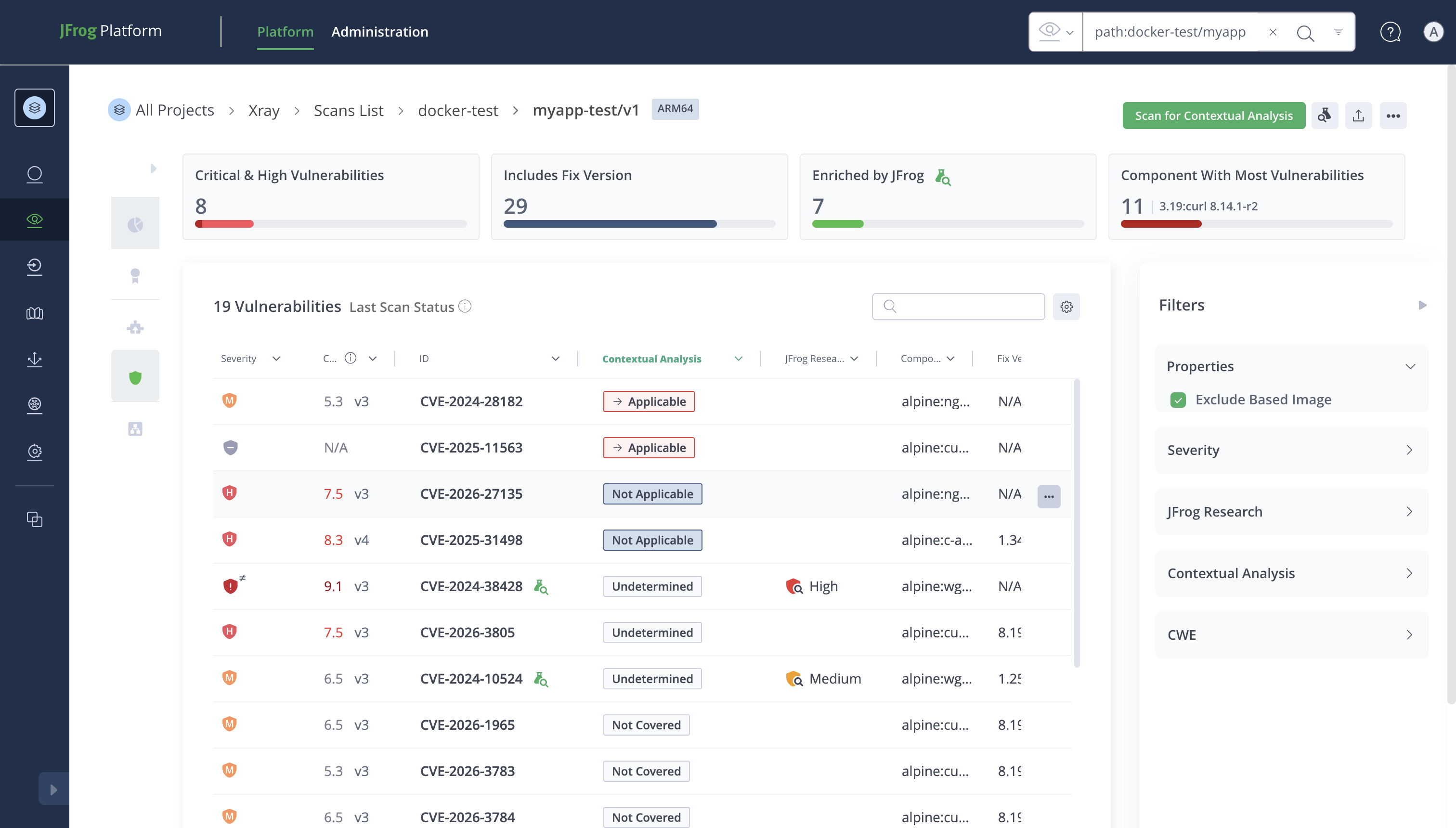
When viewing the security details of a Docker image artifact, users can enable the "Exclude Base Image" filter to hide vulnerabilities that originate from the base image layers. This allows application developers to focus on the vulnerabilities they are responsible for.
How to use:
- Navigate to the Scans List and select a Docker image artifact.
- Open the Security tab to view the vulnerability list.
- Enable the "Exclude Base Image" toggle in the Properties filter panel.
- The vulnerability table will refresh to show only vulnerabilities from application layers.
Tag in Vulnerability Table
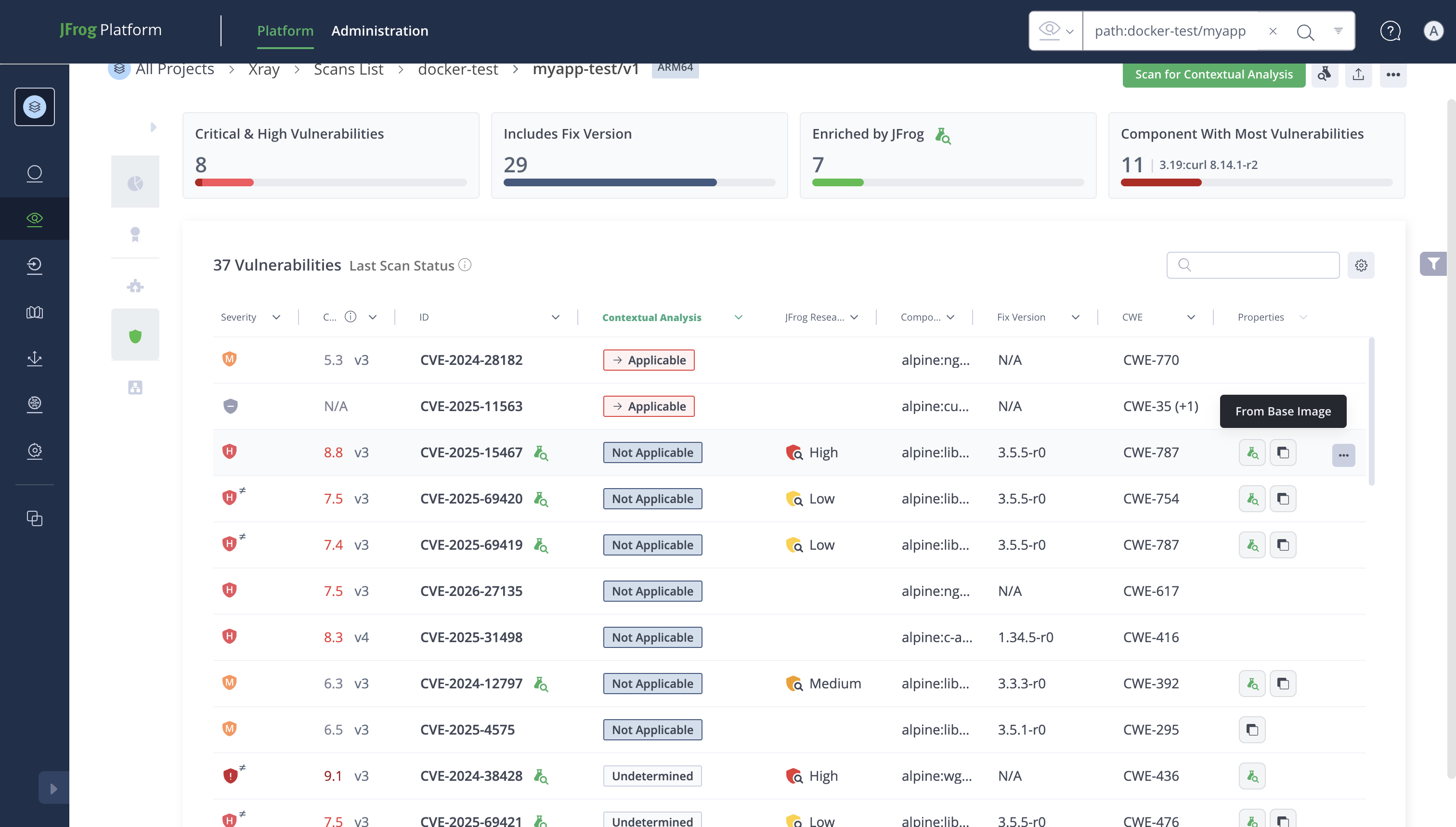
Vulnerabilities displayed in the scan results table are annotated with contextual information about their origin. When Base Image Detection is active and the base image is recognized, each vulnerability's affected components indicate whether they belong to the application layer or the base image layer.
This visual distinction helps security teams quickly triage vulnerabilities by ownership:
- Application layer vulnerabilities: Should be addressed by the application development team.
- Base image layer vulnerabilities: Should be addressed by upgrading the base image.
Tags in SBOM Table and SBOM Tree
The SBOM (Software Bill of Materials) view for Docker images also supports base image detection:
-
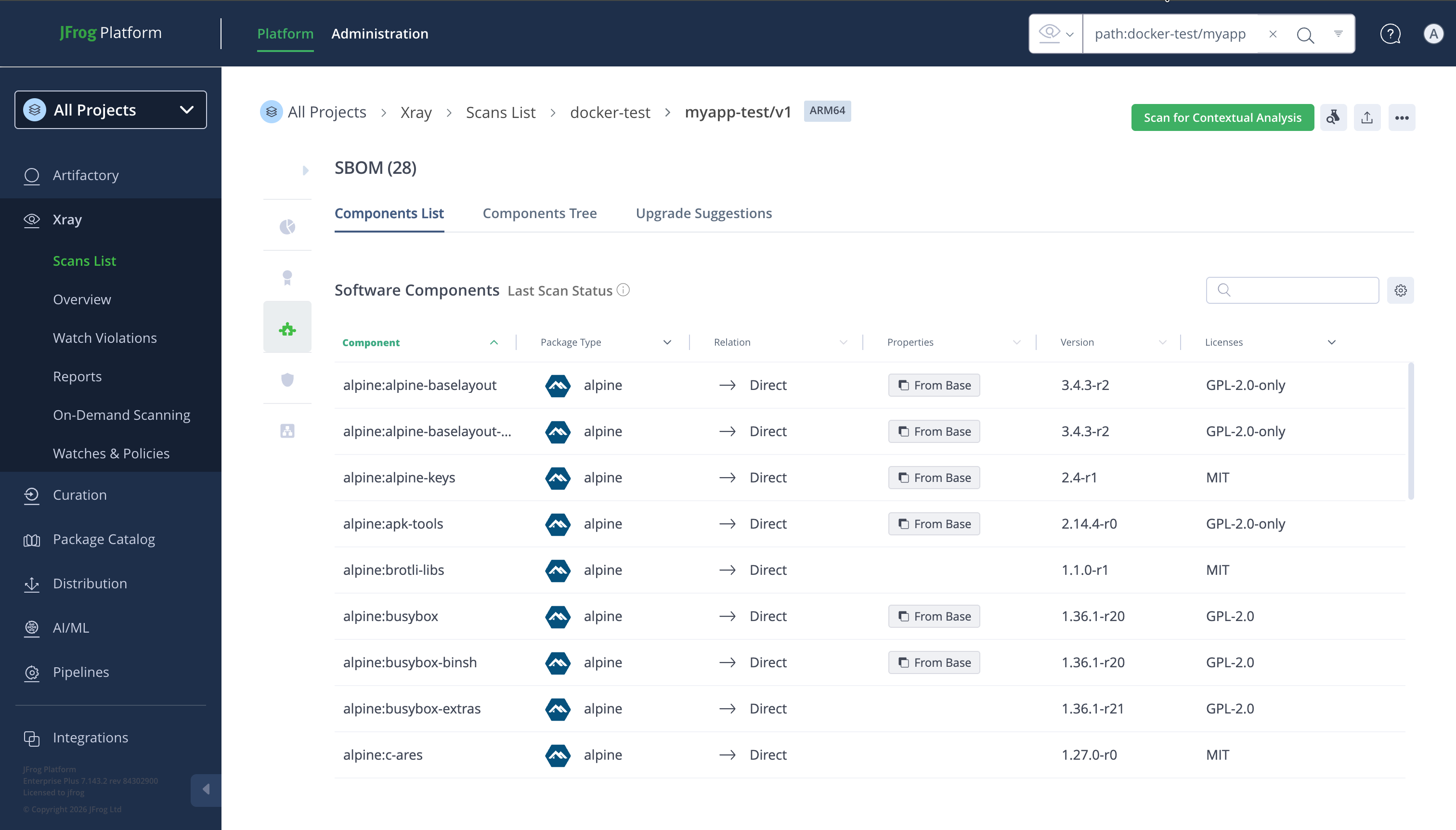
SBOM Table: When viewing the flat SBOM component list, components can be filtered using the "Exclude Base Image" toggle. When enabled, only components from the application layers are shown. Each component's origin (application vs. base image) is reflected through tagging.
-
SBOM Tree (Dependency Tree): The hierarchical dependency tree view shows components organized by their layer of origin. Components from the base image layers are distinguishable from application-layer components, allowing developers to understand the full dependency chain while maintaining clarity about ownership.
Filtering Capability in Export Details
When exporting scan results, the base image detection capability extends to all export formats:
-
Security Export: When exporting the vulnerability report for a Docker image, users can opt to exclude base image vulnerabilities from the export. The exported file will contain only application-layer vulnerabilities, providing a clean report for the development team.
-
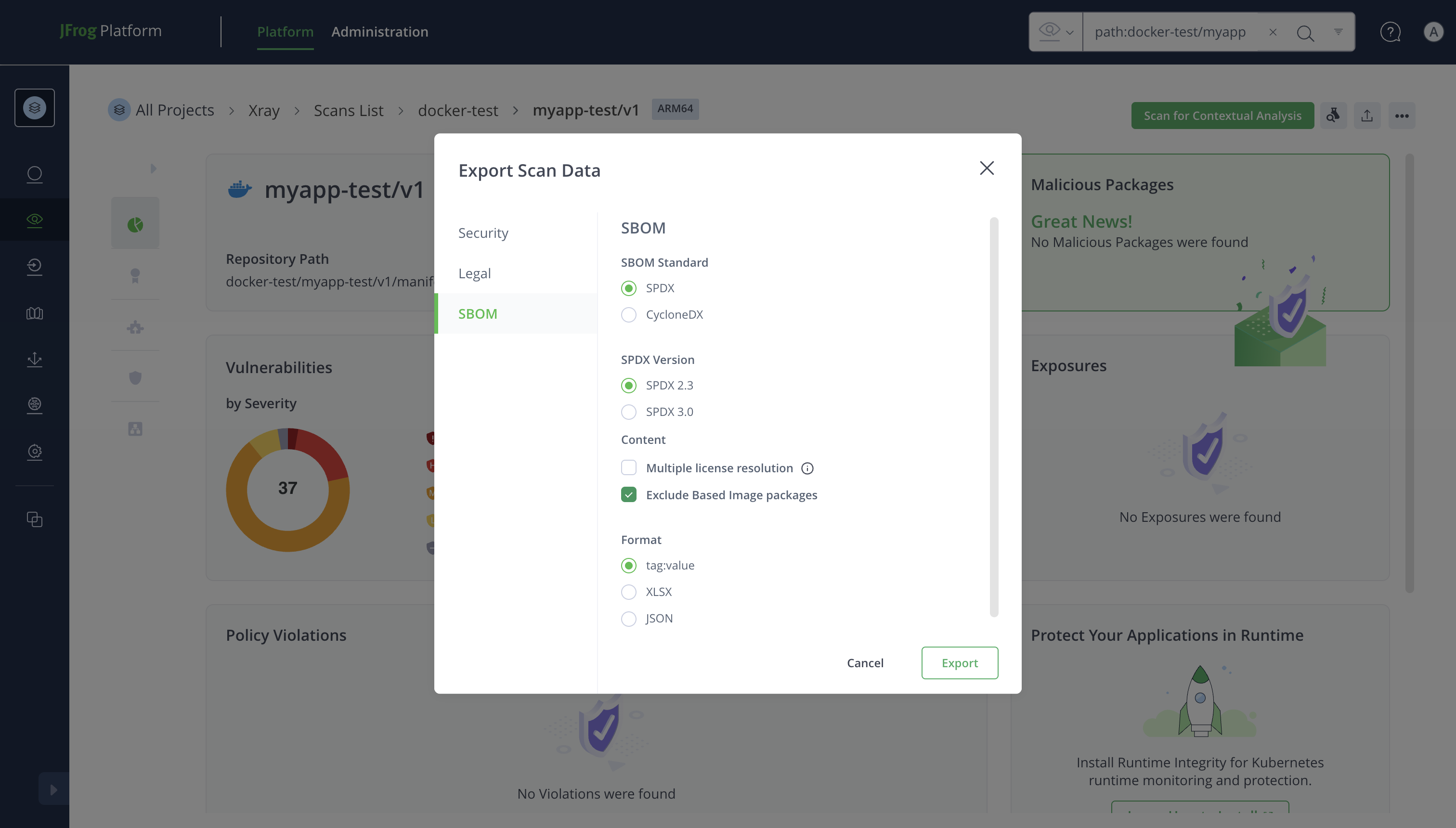
SBOM Export (CycloneDX / SPDX): The SBOM export supports the same exclusion filter. When enabled, the exported SBOM document will only include components from the application layers, producing a focused bill of materials that reflects the application's own dependencies.
-
License Attribution Export: License reports can similarly exclude base image components, ensuring that license compliance reviews focus on the components the application team is responsible for.
How to use in exports:
- Navigate to the artifact's scan results.
- Click the Export button.
- In the Export dialog, check the "Exclude Base Image" option.
- Select the desired export format and download.
Skip Base Image in Policies
The Exclude Base Image filters change what you see and export. Skip base image is a separate setting on a policy rule, and it changes which violations Xray raises for Docker and OCI images.
When you enable Skip base image for a CVE rule or a license rule, that rule doesn't raise violations for anything that came from the base image. Other rules and policies that don't have it enabled can still flag those components.
For more information, see Skip Base Image in Create Policies.
Base Image Remediation
Detection tells you which vulnerabilities come from the base image. To fix them, Xray can also tell you which base image version to move to and give you the FROM line for your Dockerfile. For more information, see Smart Remediation.
This works for Docker and OCI images. It needs the same setup as base image detection: Xray must have scanned both your image and its base image.
Best Practices
-
Always scan your base images: Ensure that all base images used in your organization are stored in Artifactory and indexed by Xray. Without the base image in Xray's database, layer detection cannot function.
-
Keep base images in retention: Configure your retention policy to maintain base image scan data for at least as long as derived application images remain in use.
-
Use the filter for triage, not for ignoring: Base image vulnerabilities still represent real risk. Use the filter to prioritize remediation (application-owned first), but track base image vulnerabilities separately and plan base image upgrades accordingly.
-
Regularly update base images: When base image vulnerabilities are discovered, the recommended remediation is to rebuild your application image with an updated base image that includes the security fixes.
-
Combine with Watches and Policies: Set up Xray Watches that target your Docker repositories, and create Policies that can alert on vulnerabilities in both application and base image layers to maintain full visibility. Enable Skip base image for a rule when you want that rule to cover only the findings your own image layers introduce. For more information, see Skip Base Image in Create Policies.
Updated about 1 month ago