

License Studio
Override component licenses and copyrights in Xray with Impact Analysis.
- Edit a License or Copyright in the UI
- Add a License to a Single Component
- Add a License to Multiple Components
- Delete a License from a Component
- Set Copyrights on a Component
License Studio lets you manually override the license and copyright metadata that JFrog Xray detects on any component. When automatic detection is incomplete or incorrect, you can add, remove, or replace licenses and set copyright notices. Xray propagates those changes across every artifact that contains the component using Impact Analysis.
Use Case
Open-source components sometimes ship without a clear license declaration, or Xray's automated scanners may identify a license that doesn't match the actual terms. Similarly, copyright strings embedded in source files can be missing or outdated. License Studio addresses both scenarios:
- License editing: Add a known license to one component or to several components, or remove an incorrectly assigned license. Xray validates the license name against its full license database before accepting the change.
- Copyright editing: Replace the set of copyright notices attached to a component. This requires the software bill of materials (SBOM) capability to be enabled on the Xray service endpoint.
After you save a change, Xray runs a targeted Impact Analysis pass. Xray resolves every scanned resource that includes the component and re-evaluates license-compliance policies against them. Your policies, watches, and reports reflect the corrected metadata without a full re-scan.
Edit a License or Copyright in the UI
You can change a license or copyright from Component Details in the scan results.
To edit a license or copyright in the UI:
- In the Xray scan results, click the SBOM tab.
- Click a component to open Component Details.
- In Component Details, click one of the following icons.
- Edit License
- Edit Copyright
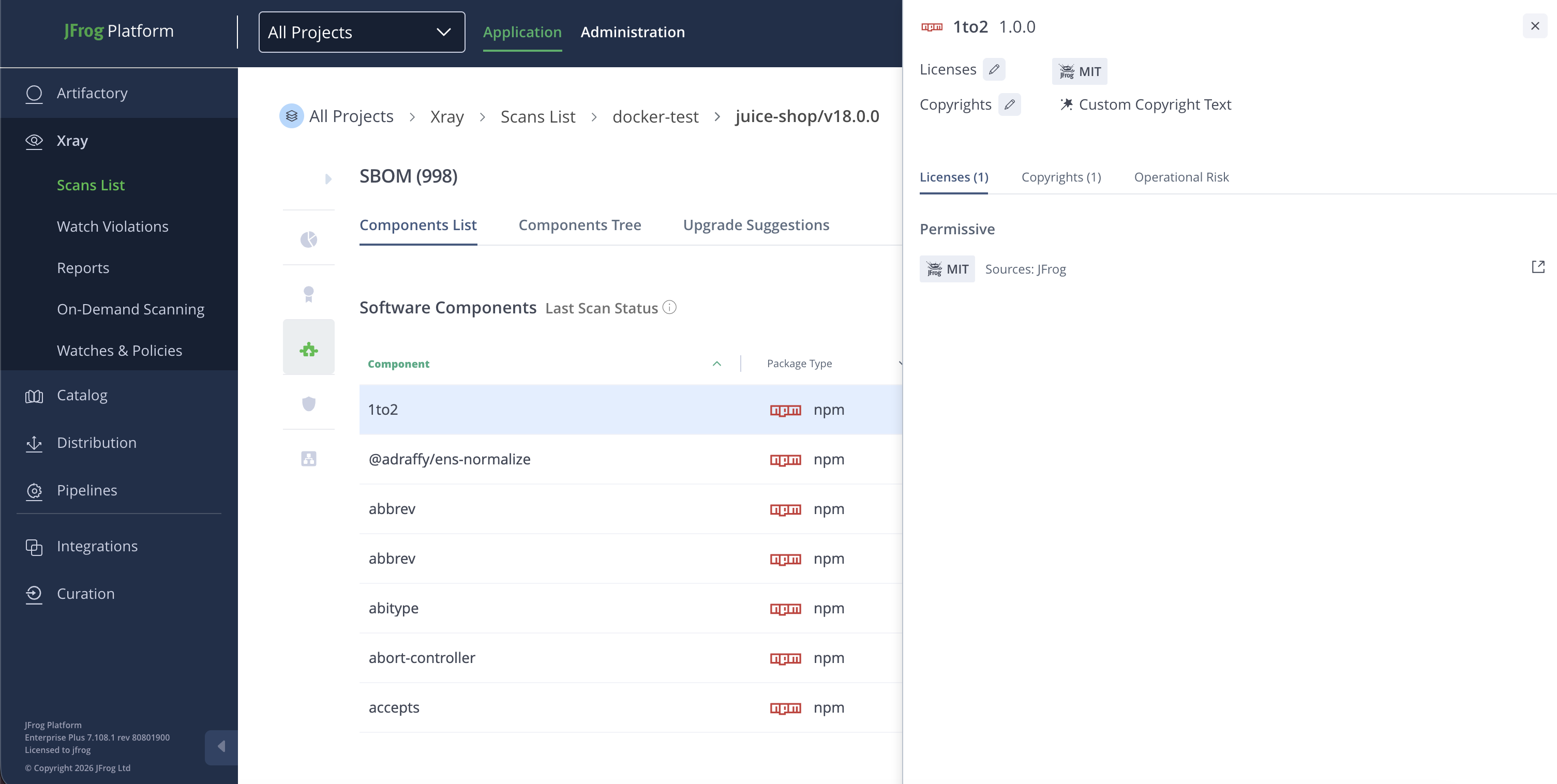
For more information, see How to View and Modify Licenses in the SBOM Tab.
Add a License to a Single Component
You can add one license to one component.
To add a license to a single component:
- Send the following request.
POST /api/v1/licenses
Content-Type: application/json

{
  "component": {
    "package_id": "npm://lodash",
    "version": "4.17.21"
  },
  "license": {
    "name": "MIT",
    "full_name": "MIT License"
  }
}
Add a License to Multiple Components
You can add one license to several components in one request.
To add a license to multiple components:
- Send the following request.
POST /api/v1/licenses/bulk
Content-Type: application/json

{
  "components": [
    { "package_id": "npm://lodash", "version": "4.17.21" },
    { "package_id": "npm://express", "version": "4.18.2" }
  ],
  "license": {
    "name": "MIT",
    "full_name": "MIT License"
  }
}
Delete a License from a Component
You can remove one license from a component.
To delete a license from a component:
- Send the following request.
DELETE /api/v1/licenses?component_id=<COMPONENT_ID>&license=<LICENSE_NAME>Where:
<COMPONENT_ID>: The identifier of the component<LICENSE_NAME>: The name of the license to remove
For example:
DELETE /api/v1/licenses?component_id=npm://lodash:4.17.21&license=MITSet Copyrights on a Component
You can replace the copyright notices on a component.
To set copyrights on a component:
- Send the following request.
POST /ui/copyrights
Content-Type: application/json

{
  "component_id": "npm://lodash:4.17.21",
  "copyrights": [
    "Copyright (c) JS Foundation and other contributors"
  ]
}Note
All license and copyright changes trigger Impact Analysis automatically. You don't need a separate step to propagate the updated metadata.
Related Topics
Updated about 1 month ago