
Manage Global Roles
Configure predefined and custom global roles in JFrog Artifactory Projects, including environments, Basic and Advanced actions, and role limits.
Tip
The Access and Identity tab changes when navigating between the Platform view and the Project view in the UI.
- The Platform view comprises the global roles
- The Project view displays Members and Roles.
Default global roles are predefined in the JFrog Platform. From JFrog Artifactory version 7.77, custom global roles can also be created by the Platform Admin.
For all global roles, Platform Admins can change the default environment and modify the actions set for each role. Project roles are inherited from the global roles and can be edited by the Project Admin at the Project level.
Platform Admin Permissions Required
Only users with the Platform Administrator role can set the environments and modify the environments and actions set for global roles.
Configure Environments and Actions for Global Roles
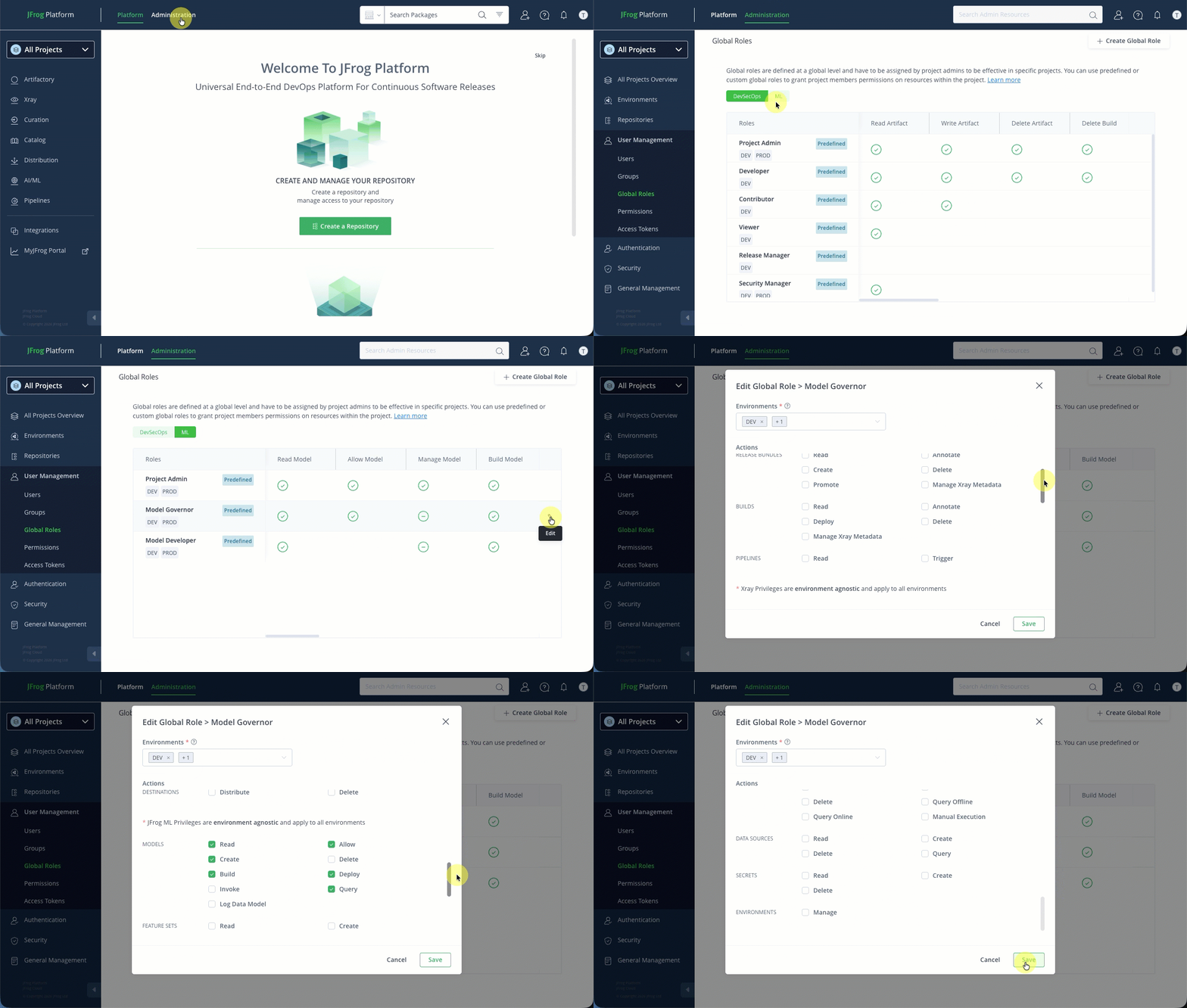
To access global roles, select the Administration module on the taskbar, and then select User Management > Global Roles.
Tip
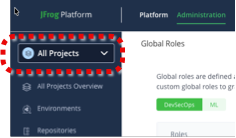
To view the global roles in the Administration pane, ensure that you have selected All Projects from the Projects list in the taskbar.
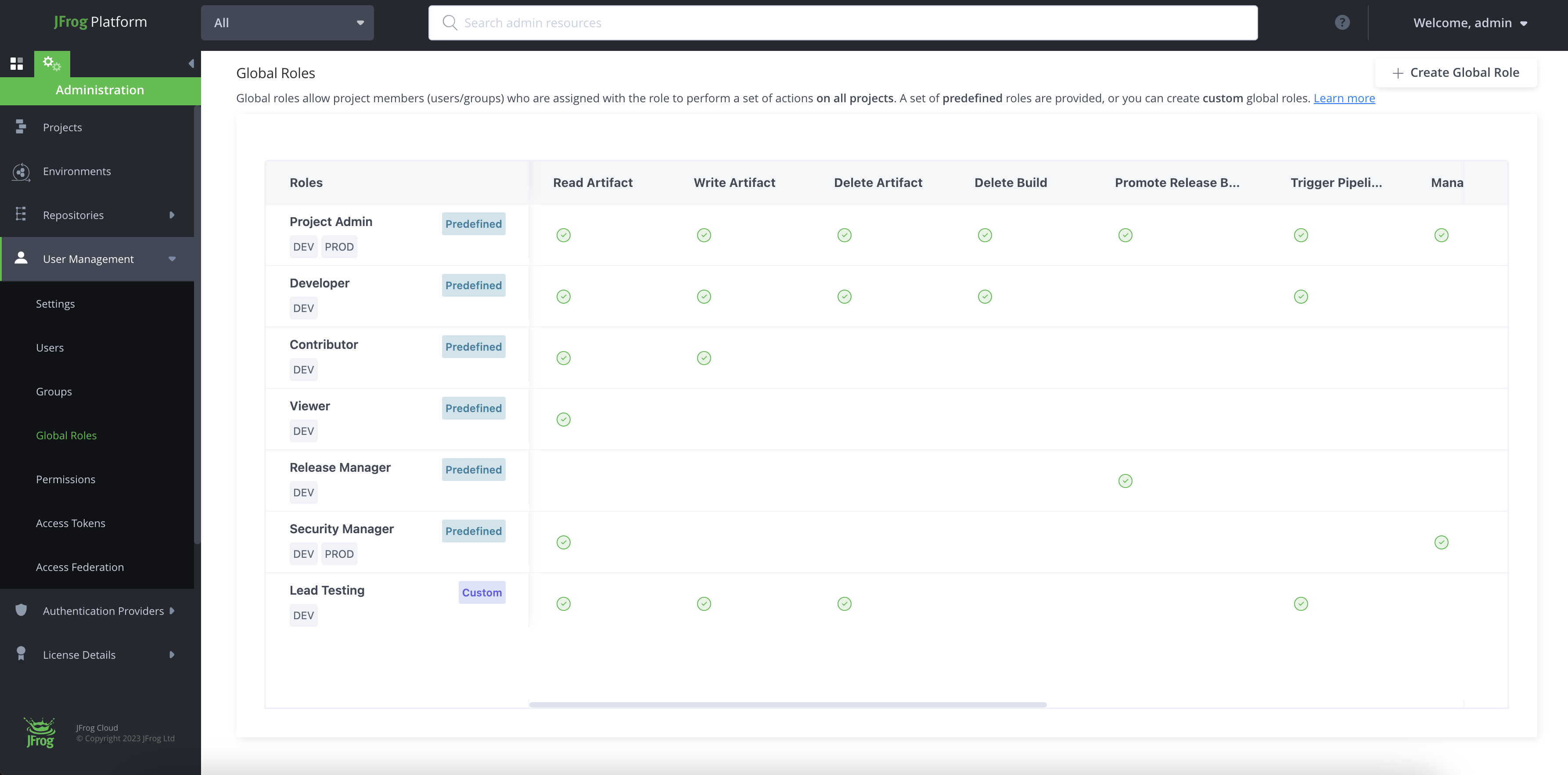
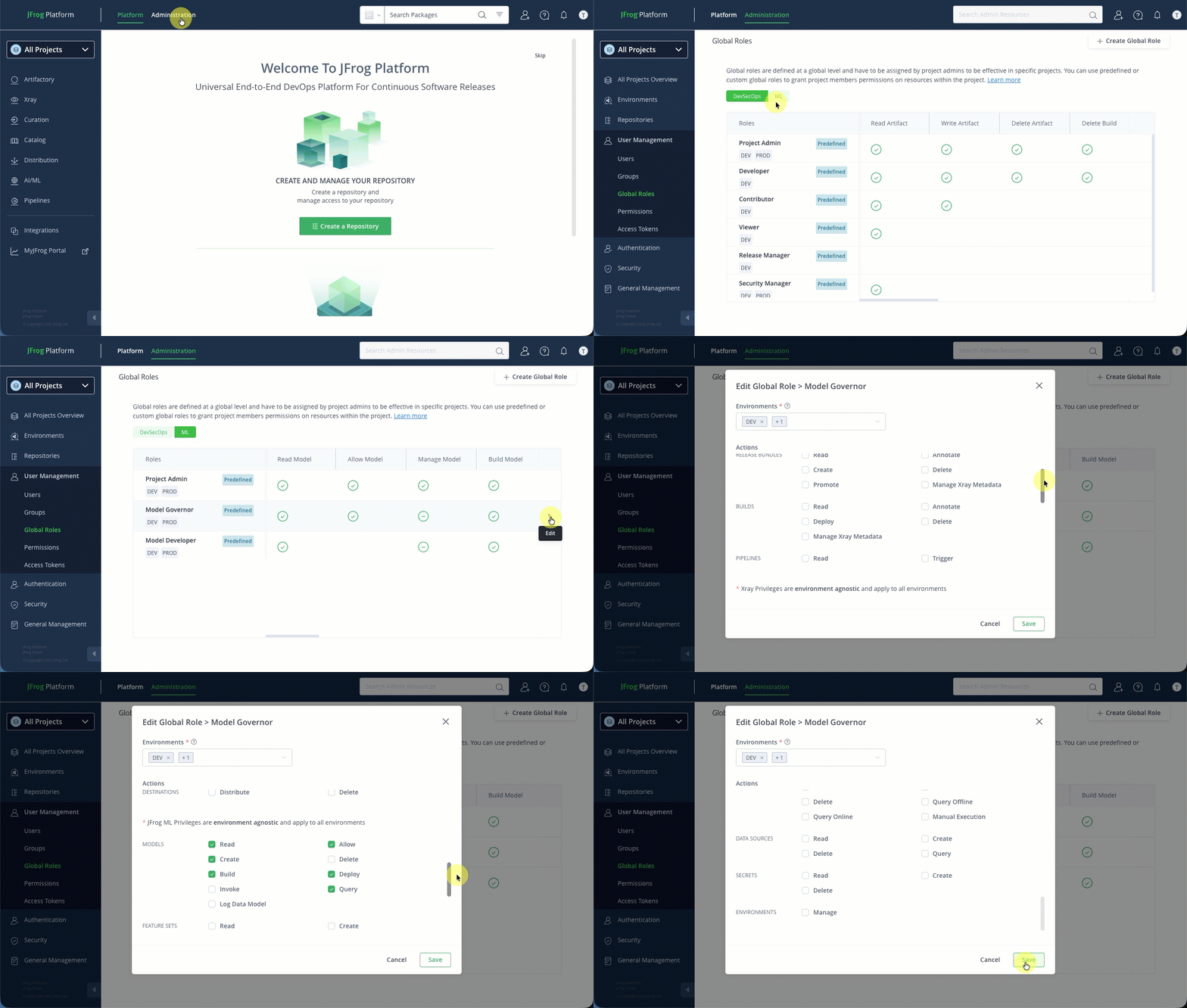
A list of Global roles is displayed, split into two tabs: DevSecOps and ML. enabling you to see which actions are enabled for each predefined role.
The Platform Admin has the option to enable or disable the actions and the environments associated with each of the predefined global roles. See Modify Global Roles.
Predefined Global Roles
| DevSecOps | ML |
|---|---|
| Project Admin | Project Admin |
| Developer | Model Governor |
| Contributor | Model Developer |
| Viewer | |
| Release Manager | |
| Security Manager | |
| Application Admin |
From Artifactory version 7.77, Platform admins can also define and edit environments and actions for customized global roles.
To access global roles, select the Administration module on the taskbar, and then select User Management > Global Roles.
A list of Global roles is displayed, enabling you to see which actions are enabled for each predefined role. Platform administrators can modify the actions assigned to each role by selecting the edit icon located on the far right of each table row, as shown below.
Custom Global Roles
Custom global roles are high-level roles that can be created at the global level and can be applied to all projects. Global roles allow project members assigned with the role to perform a set of actions on all of the projects. The Platform admin defines the scope of the role by enabling the actions supported for each role and sets the environments - DEV (Development) or PROD (Production) in which the global role will apply.
Create Custom Global Roles
Creation of custom global roles has the following limitations:
- Only available from Artifactory release 7.77.
- Platform Administrator permissions required.
- A maximum of 30 custom global roles may be created.
How to create a custom global role
-
From the Projects list, select All.
-
Select the Administration module and navigate to User Management > Global Roles.
-
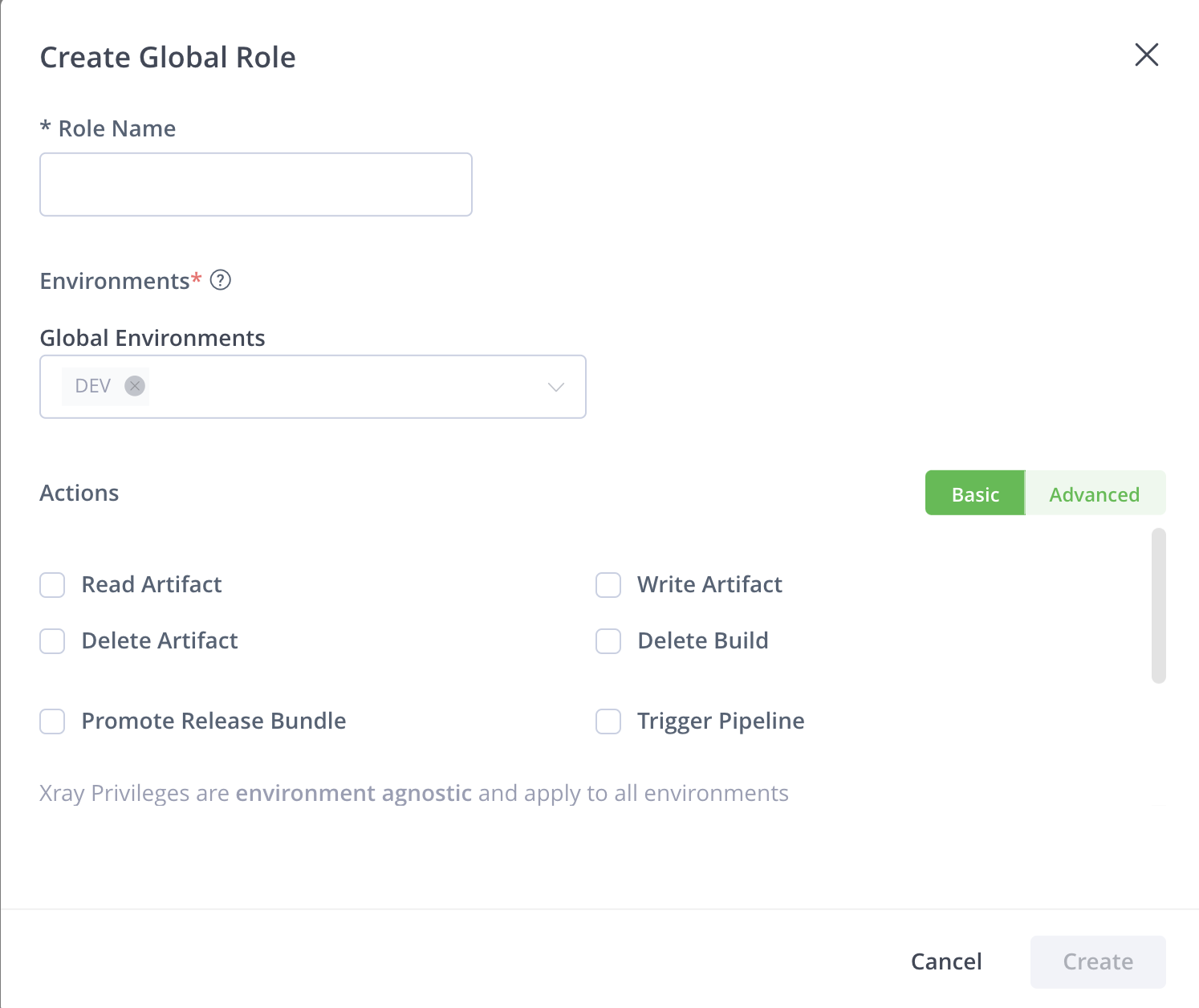
Click Create Global Role and configure the role settings:
-
Enter a unique global role name.
-
Assign one or more environments to the role by selecting from the Global Environments list.
-
Set the basic or advanced role actions to assign to the role:
-
The Basic tab simplifies administration by bundling granular actions and resource types into logical categories. It allows you to grant broad functional capabilities without managing dozens of individual permissions. Use this view for standard roles where speed and ease of setup are the priorities.
-
The Advanced unbundles the categories defined in the Basic tab, providing direct control over every resource type and action. This allows you to create highly specific roles - such as allowing a user to “read” artifacts but not builds. Use this view to implement a strict “Least Privilege” model for specialized technical roles.
Note
Any actions settings made in the Advanced tab are removed if you move back from Advanced to Basic mode.
For both Basic and Advanced, the DevSecOps actions are shown first and you can scroll down to the ML actions.
See Global Role Actions for a full list of available actions.
-
-
-
Click Create to save.
Important
Any changes made to the actions settings in the Advanced tab are lost if you return from Advanced to Basic mode without first clicking Create.
Example Global Role
This example displays a global role with advanced actions, including Read and Annotate on Repositories, Builds, and Release Bundles, and the Trigger action on Pipelines.
Modify Global Roles
Platform administrators can modify the actions assigned to each role by selecting the edit icon located on the far right of each table row, as shown below.
Global Role Actions
The tables below describe all the actions that can be assigned to both custom global roles and JFrog's predefined global roles.
Basic Actions
This section lists the basic action permissions available for devsecops and ML resources.
DevSecOps
| Resource Type | Action | Description |
|---|---|---|
| ARTIFACTS | Read Artifact | Download artifacts and read the metadata. Includes the following actions:
|
| Write Artifact | Upload artifacts. Includes the following actions:
| |
| Delete Build | Delete or overwrites artifacts. | |
| Delete Artifact | Delete or overwrites artifacts. Includes the following actions:
| |
| APPLICATIONS | Read Application |
|
| Write Application |
| |
| Delete Application |
| |
| Promote Application Version |
| |
| APPTRUST POLICIES | Read AppTrust Policy |
|
| Manage AppTrust Policy | Create/update AppTrust policies | |
| Delete AppTrust Policy | Delete AppTrust policies | |
| RELEASE BUNDLES | Promote Release Bundle | Promote Release Bundles between stages. |
| PIPELINES | Trigger Pipeline | Manually trigger execution of steps |
| XRAY | Ignore Global Violations | Ignore violations. |
| Manage Xray Watches & Policies | Manage, delete, and modify Xray watches and policies. | |
| Manage Xray Reports | Manage, delete and modify Xray reports. | |
| Manage Xray Data | Trigger Xray scans on builds. Create and delete custom issues and licenses. | |
| Read Policies | Download policies and read the metadata. | |
| DESTINATIONS | Distribute Release Bundle | Distribute Release Bundles to distribution targets (e.g. Edge nodes). |
ML*
| Resource Type | Action | Description |
|---|---|---|
| MODELS | Read | View a model and its metadata. |
| Manage* | Create, update, and delete a model. | |
| Build | Initiate the process to build a model. | |
| Invoke | Test or invoke a model for a one-off run. | |
| Allow | Allow or approve open-source models for use in projects. | |
| Deploy | Deploy a model to a runtime environment. | |
| Query | Query a deployed model for predictions. | |
| FEATURE SET | Read | View a feature set and its details. |
| Query | Query a feature set for offline or online use. | |
| Manage* | Create, update, and delete a feature set. | |
| DATA SOURCE | Read | View a data source and its details. |
| Query | Query a data source to get data. | |
| Manage* | Create, update, and delete a data source. | |
| SECRET | Read | View a secret. |
| Manage* | Create, update, and delete a secret. | |
| RUNTIME ENVIRONMENT | Manage* | Create, update, and delete a runtime environment |
The global roles contain a set of actions that can be performed on resources within the projects including CRUD actions and product-specific actions.
*To separate permissions for Create and Delete (managed jointly in Basic mode under “Manage” permission), switch to Advanced Mode.
Advanced Actions
To gain an additional level of granularity on the resource level, you can assign advanced settings to the repository and build resources.
DevSecOps
| Resource Type | Action | Description |
|---|---|---|
| REPOSITORIES | Read | Download artifacts and read the metadata. |
| Annotate | Annotate artifacts and folders with metadata and properties. | |
| Deploy/Cache | Deploy artifacts and deploys to remote repository caches. | |
| Delete/Overwrite | Delete or overwrites artifacts. | |
| Manage Xray Metadata | Triggers Xray scans on artifacts in repositories. Members can create and delete custom issues and licenses | |
| APPLICATIONS | Read | Read applications. |
| Create/Update | Create & update applications. | |
| Delete | Delete applications. | |
| Bind/Unbind Asset | Bind & unbind resources from applications. | |
| APPLICATION VERSIONS | Read | Read application versions. |
| Create | Create application versions. | |
| Delete | Delete application versions. | |
| Annotate | Annotate application versions. | |
| Promote/Release |
| |
| APPTRUST POLICIES | Read | Read AppTrust policies. |
| Create/Update | Create & update AppTrust policies. | |
| Delete | Delete AppTrust policies. | |
| RELEASE BUNDLES | Read | View and download Release Bundle artifacts from the relevant Release Bundle repository and reads the corresponding Release Bundles in the Distribution page. |
| Annotate | Annotate Release Bundle artifacts and folder with metadata and properties. | |
| Create | Create Release Bundles. | |
| Delete | Deletes Release Bundles and any associated evidence. | |
| Promote | Promote Release Bundles between stages. | |
| Manage Xray Metadata | Trigger Xray scans on Release Bundles. Create and delete custom issues and license. | |
| BUILD | Read | View and download build info artifacts from the artifactory-build-info default repository and reads the corresponding build in the Builds page. |
| Annotate | Annotate build-info artifacts and folders with metadata and properties. | |
| Deploy | Allows uploading and promoting build info artifacts | |
| Delete | Delete build-info artifacts | |
| Manage Xray Data | Trigger Xray scans on builds. Create and delete custom issues and licenses. | |
| PIPELINES | Read | View the available Pipeline sources |
| Trigger | Manually trigger execution of steps | |
| XRAY | Read Policies | Download policies and read the metadata |
| Manage Watches | Manage and modify Xray watches | |
| Manage Policies | Manage and modify Xray policies | |
| Manage Reports | Manage, modify, and delete Xray reports | |
| Ignore Global Violations | Ignore global Xray violations | |
| DESTINATIONS | Distribute | Distribute Release Bundles to distribution targets (e.g. Edge nodes). |
| Delete | Delete Release Bundles remotely from distribution targets. |
ML*
| Resource Type | Action | Description |
|---|---|---|
| Models | Read | View a model and its metadata. |
| Create | Create a model. | |
| Build | Initiate the process to build a model. | |
| Invoke | Test or invoke a model for a one-off run. | |
| Log Data Model | ||
| Allow | Allow or approve open-source models for use in projects. | |
| Delete | Delete a model. | |
| Deploy | Deploy a model to a runtime environment. | |
| Query | Query a deployed model for predictions. | |
| Feature Sets | Read | View a feature set and its details. |
| Delete | Delete a feature set. | |
| Query Online | Query a feature set for online use. | |
| Create | Create a feature set. | |
| Query Offline | Query a feature set for offline use. | |
| Manual Execution | ||
| Data Source | Read | View a data source and its details. |
| Delete | Delete a data source. | |
| Create | Create a data source. | |
| Query | Query a data source to get data. | |
| Secret | Read | View a secret. |
| Delete | Delete a secret. | |
| Create | Create a secret. | |
| Runtime Environments | Manage* | Create, update, and delete a runtime environment. |
- See Role-based Access Control in JFrog ML for more details.
Update a Global or Project Role
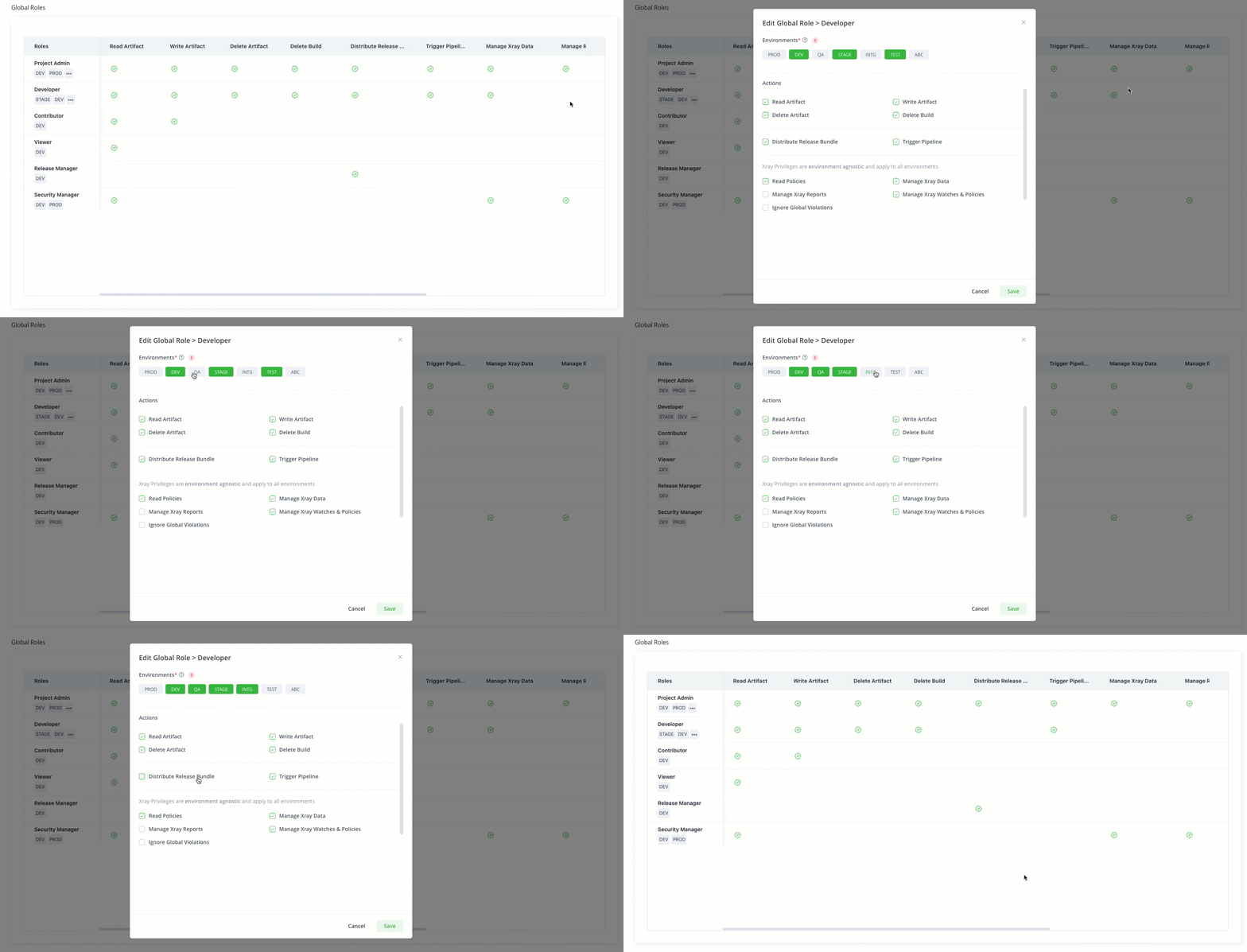
The Platform Admin has the option to enable, disable, or update the actions and the environments associated with global roles. From Artifactory version 7.77, Platform Admins can also define and edit environments and actions for custom global roles. Project Admins can create, edit and delete project roles.
Select Administration in the taskbar, go to User Management and select the type of role to edit, Global Role or Role.
The following example demonstrates how you can update a global role.
Related Topics
Updated about 1 month ago