

Share Repositories Across Multiple Projects
Share local and remote repositories across JFrog Platform Projects using direct or project-aware access so multiple teams can access the same artifacts.
Platform Admins can share repositories to grant access to one, several, or all other projects. The receiving projects consume the content without owning it, and the source project keeps a single point of maintenance.
Sharing repositories addresses inefficiencies where a few repositories in the same JFrog Platform contain high-value resources that are consumed by many projects. Duplicating these repositories in each project is wasteful and hard to maintain, and granting members access across projects ad-hoc undermines governance.
You can share repositories in the following ways:
- Direct sharing: Members of receiving projects access the shared repository directly.
- Project-aware sharing: Recommended for governed environments. Receiving projects connect to the source project through an internal remote repository, so every request carries the receiving project's identity. This method supports per-project Curation and Xray policies, usage tracking, and accurate chargeback. For more information, see Project-Aware Download Requests.
Choose project-aware sharing whenever the shared content will be governed, billed, or audited at the project level. For more information, see Choosing a Sharing Method.
To share a repository, complete the following tasks:
In addition to managing shares in the UI, you can also share repositories using the REST API. For more information, see Share Repository with All Projects and Share Repository with Target Project.
Choosing a Sharing Method
You can use direct sharing and project-aware sharing in the same JFrog Platform, but not for the same repository.
Use direct sharing when the shared repository is low-risk, short-lived, or consumed by a small number of trusted projects that don't need independent governance.
Use project-aware sharing when any of the following is true:
- Finance or Financial Operations (FinOps) needs to attribute artifact consumption to the consuming project.
- Different receiving projects have different security or compliance requirements.
- The source project team needs visibility into which projects are pulling what.
- The shared content is a governed artifact, for example base images, approved libraries, or internal SDKs.
The following table compares features of each sharing method.
| Feature | Direct | Project-Aware |
|---|---|---|
| Grant cross-project read and write access | Yes, with permissions assigned to project members | Yes, with permissions assigned to the internal remote repository |
| See which projects consume the shared content | No | Yes |
| Attribute downloads to the consuming project for chargeback | No | Yes |
| Let each receiving project apply its own Curation policies | No | Yes |
| Let each receiving project apply its own Xray watches and policies | No | Yes |
| Include shared content in a receiving project's virtual repository | Limited | Yes |
| One-time setup step by the receiving Project Admin | No | Yes |
Share a Repository
Prerequisites:
- You need Platform Admin permissions to share repositories.
- Understand the different sharing methods.
- For project-aware sharing:
- On self-managed versions of Artifactory, make sure that project-aware sharing is enabled. For more information, see Enable Project-Aware Sharing (Self-Managed).
- Notify an admin in receiving projects ahead of time so they can be ready to perform the one-time connection step for project members to access the content.
To share a repository with another project:
-
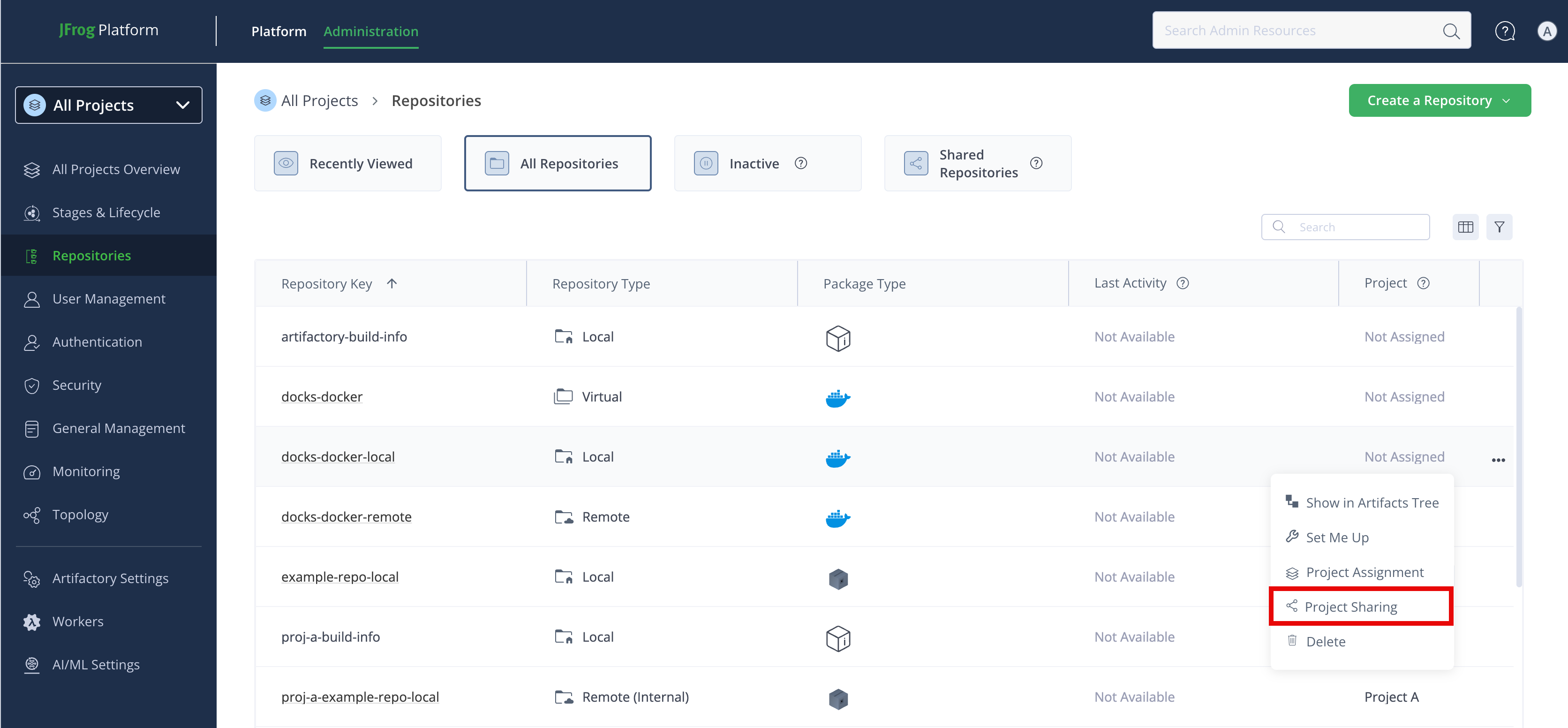
In the Administration module, select a project and go to Repositories.
-
On the Repositories page, find the repository you want to share.
-
From the Actions menu, click Project Sharing. The share repository window opens.
-
On the Select sharing permissions tab:
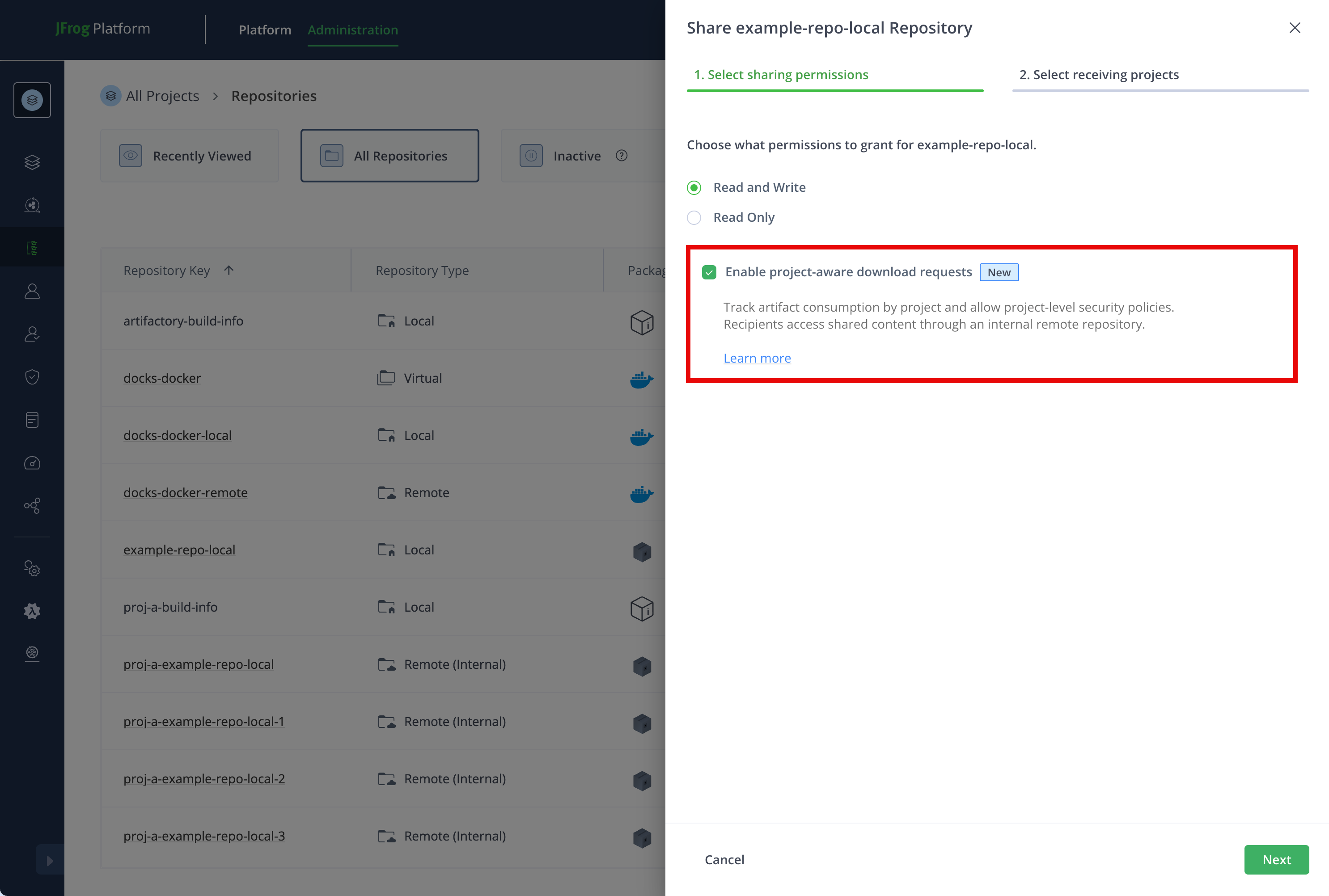
- Choose to grant Read Only or Read and Write permissions for the shared repository. For more information, see Sharing Permissions.
- (Optional) Select Enable project-aware download requests to get usage data and allow receiving projects to apply their own JFrog Curation and security policies to the shared content. For more information, see Project-Aware Download Requests.
-
Click Next.
-
On the Select receiving projects tab, choose who to share the repository with:
- Select Auto share with all projects to share this repository with all existing projects and any project created in the future.
- Select projects to share the repository with.
-
Click Share.
When project-aware download requests are enabled, package manager clients and build configurations use the internal remote repository or a virtual repository that includes it. Direct requests to the shared repository key are refused.
Next steps:
Project-Aware Download Requests
When you enable project-aware download requests, the download request includes both the user identity and the originating project. This additional context provides the following benefits:
- Usage tracking: Project and Platform Admins can track downloads per project and get reliable consumption information for visibility and billing or chargeback purposes.
- Custom security and Curation policies: Receiving projects can apply Curation and security policies to the shared content in their own project.
How Project-Aware Sharing Works
In direct sharing, a client in the receiving project resolves artifacts directly against the shared repository. The request carries only the user's identity, so downstream systems like MyJFrog, Curation, and Xray can see the user but not the project they acted on behalf of.
Project-aware sharing mediates access to the shared content through an internal remote repository in the receiving project. An internal remote repository is a remote repository whose upstream is the shared repository in the same JFrog Platform. Clients in the receiving project resolve against the internal remote repository. Because the request now originates inside the receiving project, instead of directly from a user, every downstream system sees the project context.
Direct requests from a receiving project to a shared repository configured with project-aware download requests are refused. This ensures project context is never bypassed.
Enable Project-Aware Sharing (Self-Managed)
For self-managed Artifactory versions 7.173.8 and newer, you need to manually enable project-aware sharing to make the option available when sharing a repository.
To enable project-aware sharing on self-managed versions of Artifactory:
- Set the following Artifactory system property:
artifactory.project.context.repo.sharing.mode=true.
For more information, see Artifactory System Properties.
Connect to a Shared Repository
When a repository is shared with project-aware download requests enabled, members of the receiving project can't access it directly. A Project Admin must create an internal remote repository that connects to the shared repository. This one-time configuration step establishes the project context that enables per-project policies, virtual repository inclusion, and usage attribution.
Once created, the internal remote repository is the access point for the shared content. Members interact with it like any other remote repository in the project.
Prerequisites:
- Project Admin or Platform Admin permissions
- A repository shared from another project with project-aware download requests enabled
To connect to a shared repository:
-
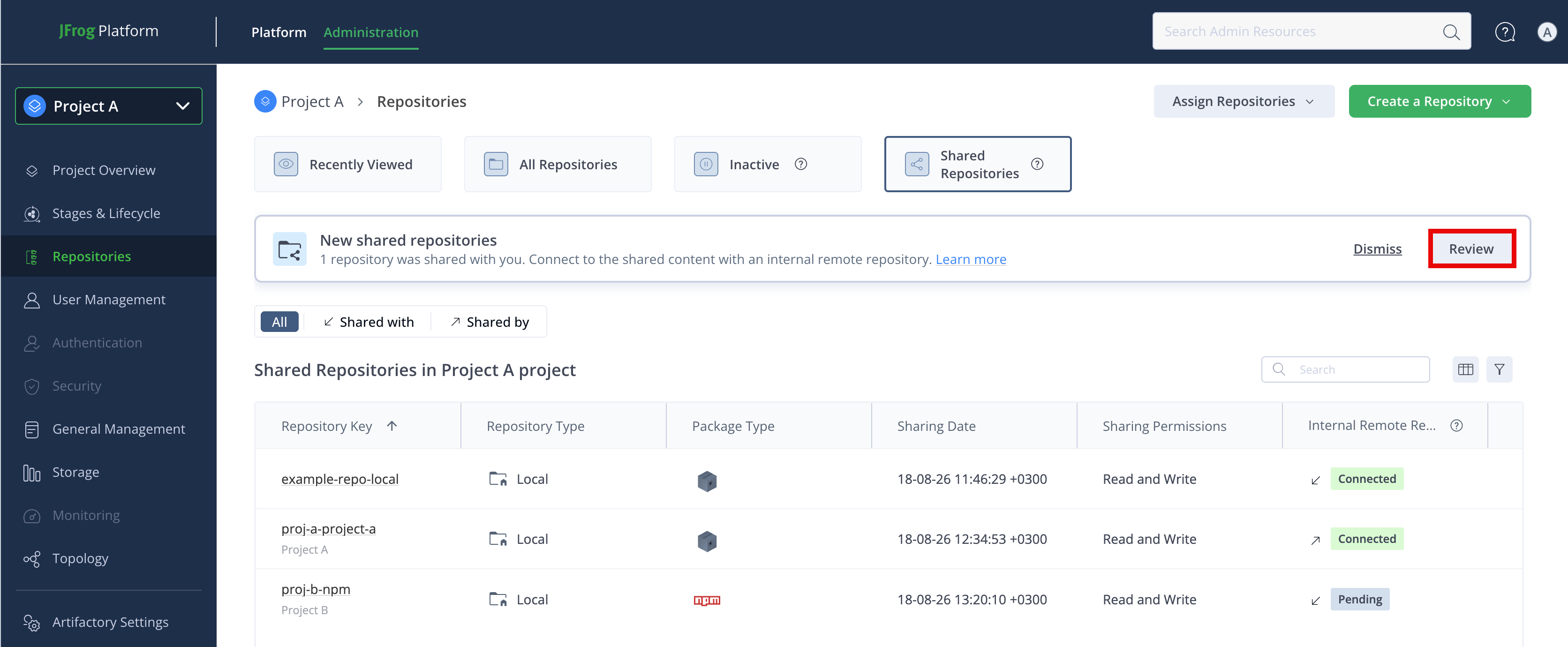
On the Repositories page, in the New shared repositories banner, click Review. The Connect to shared repositories window opens.
-
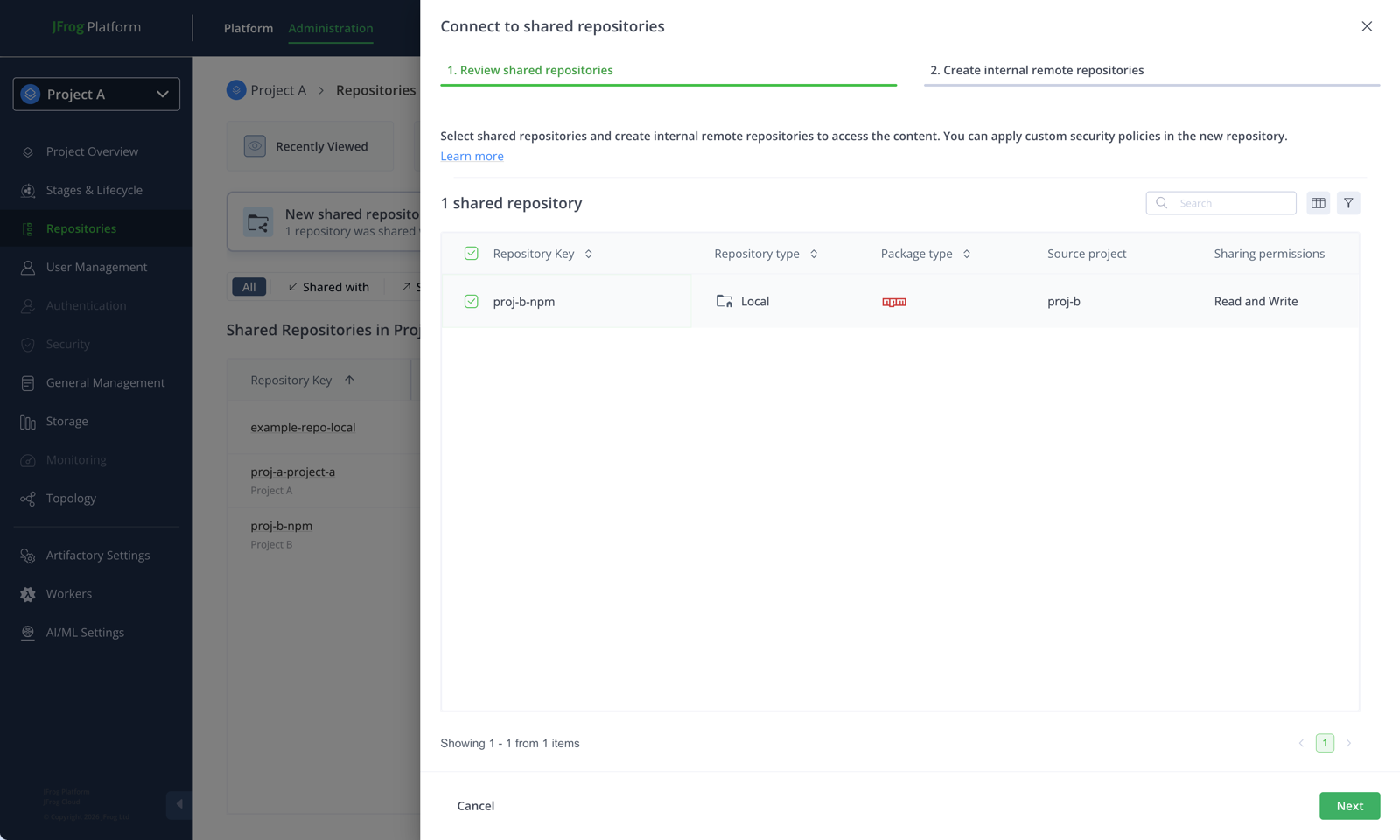
On the Connect to shared repositories tab, select the shared repositories you want to connect to.
-
Click Next.
-
On the Configure internal remote repositories tab, review the internal remote repository name for each selected repository. By default, each name uses the pattern
<PROJECT_KEY>-<SHARED_REPO_KEY>. -
(Optional) Choose whether to add the new internal remote repository to a virtual repository. If so, select virtual repositories from the list.
-
(Optional) Configure lifecycle stages for the repository.
-
Click Create.
The internal remote repository is created and connected to the shared content.
Note
If you dismiss the banner before connecting, you can connect later from the Shared Repositories tab by selecting Connect to shared repository from the Actions menu. For a share that's already connected, you can also select Create another internal remote repository.
Platform Admins and Project Admins with permission to create remote repositories can also create an internal remote repository from the remote repository form. For more information, see Remote Repositories.
Sharing Permissions
Three layers of permissions govern access to a shared repository:
- Sharing permissions: The permission ceiling for the repository set by the sharing Platform Admin as Read Only or Read and Write.
- Project role and actions: What the member can do inside the receiving project.
- Platform permissions: Any additional permissions the user holds at the Platform level.
A member's effective access is the most restrictive of the three. For example, a Read Only project role blocks writes on a Read and Write share.
When you share a repository, you choose to grant Read Only or Read and Write permissions. Access differs depending on whether you share directly or with project-aware download requests enabled.
For direct sharing, project members get access to the shared repository according to their assigned Role and Role Actions in the target project. For project-aware download requests, project members access the internal remote repository as their Role and Role Actions allow.
The following table compares Read Only and Read and Write permissions for shared repositories.
| Sharing Permissions | Direct Sharing | Project-Aware Sharing |
|---|---|---|
| Read and Write | Project members get Read and Write access to the shared repository, if their Role and Role Actions allow. A user with write access in the receiving project can read from and deploy to the shared repository. | Project members with Write access on the internal remote repository can populate the shared repository from its external upstream. Project members with Read Only permissions never write into the shared repository cache, and can only access content already cached in the internal remote repository or in the shared repository. |
| Read Only | Project members get Read access to the shared repository, if their Role and Role Actions allow. | Project members can access content already cached in the internal remote repository or in the shared repository. The shared repository doesn't fetch from its external upstream. If the artifact isn't cached, the request returns not found. |
Note
Because access to the local repository is mediated through an internal remote repository, project-aware sharing doesn't support deploying to a shared local repository, even if the sharing permissions are Read and Write.
Example: Sharing a Hardened Base-Image Repository
The Platform team maintains the repository docker-base-images in the platform project. 40 product teams consume these images. The Security team needs per-team CVE policies, and the Finance team needs per-team consumption attribution.
In this scenario, a Platform Admin shares docker-base-images with Read Only permissions, enables project-aware download requests, and selects Auto share with all projects so current and future teams can access the images. Each receiving Project Admin reviews the New shared repositories banner and creates an internal remote repository with the default key <RECEIVING_PROJECT>-docker-base-images. Teams then pull through that internal remote repository, so each project's Xray watches and Curation policies apply independently and MyJFrog attributes downloads to each consuming project.
Usage Notes
Keep the following usage notes in mind when sharing repositories across projects:
- Resource Ownership and Storage
- Sharing Methods
- Connecting to Shared Repositories
- Unsharing and Disconnects
Resource Ownership and Storage
- Only the owner of the shared repository can delete the shared repository. Removing a shared repository from a project doesn't delete the repository.
- When you assign a resource to a project, the project owns and manages the resource. When you share a resource with a project, the project doesn't own the resource.
Sharing Methods
- You can have direct sharing and project-aware sharing in the same JFrog Platform. Repositories that are already shared aren't migrated to project-aware download requests.
- Project-aware sharing applies only within the same JFrog Platform, not across separate platforms or through federation.
- When a repository is shared with project-aware download requests enabled, the receiving project accesses the shared content through an internal remote repository instead of directly on the shared repository. For more information, see Sharing Permissions.
Connecting to Shared Repositories
- You can't connect to a shared repository from All Projects or from the project that owns the shared repository.
- Unconnected shares remain available to review for 60 days. After 60 days, you can connect from the Shared Repositories view.
Unsharing and Disconnects
- After you unshare a repository from a project, requests from that project's connected internal remote repositories are denied. The internal remote repositories remain until you delete or reconfigure them, but they can no longer retrieve content from the shared source. For more information, see Unshare Repositories Across Projects.
- If an internal remote repository was configured for a shared repository that is no longer connectable, the UI alerts you so you can update or remove that remote repository.
Frequently Asked Questions
This section provides answers to frequently asked questions.
FAQs
Q: Can I change a share from direct to project-aware later?
A: Yes. Editing the share's permissions triggers the same review flow for receiving projects. Existing consumers see a banner prompting them to create an internal remote repository.
Q: Do I have to enable project-aware sharing for every share?
A: No. Sharing method is not global and is configured per repository. Use direct sharing for low-stakes cases and project-aware for anything you'll govern, bill, or audit.
Q: Can members of the receiving project write to a shared repository?
A: Yes, depending on member permissions and sharing permissions. Members can write if the share was granted with Read and Write permissions and if the member's project role permits writes. For project-aware shares, write access allows downloading to the remote cache. Writing to a shared local repository isn't supported because access is mediated through an internal remote repository. For more information, see Sharing Permissions.
Q: What happens if the source project deletes the shared repository?
A: Only the owner of the shared repository can delete it. Removing it deletes the repository and breaks all receiving internal remote repositories. Notify receiving Project Admins before deletion.
Q: Can an internal remote repository be included in a virtual repository?
A: Yes. This is one of the main advantages of project-aware sharing. You can compose shared content with the receiving project's own content behind a single resolution URL.
Related Topics
Updated about 24 hours ago