

Basic Projects Terminology
Learn the essential terms and concepts for JFrog Projects, including project keys, members, resources, environments, and RBAC roles.
Learn the essential terms and concepts for JFrog Projects.
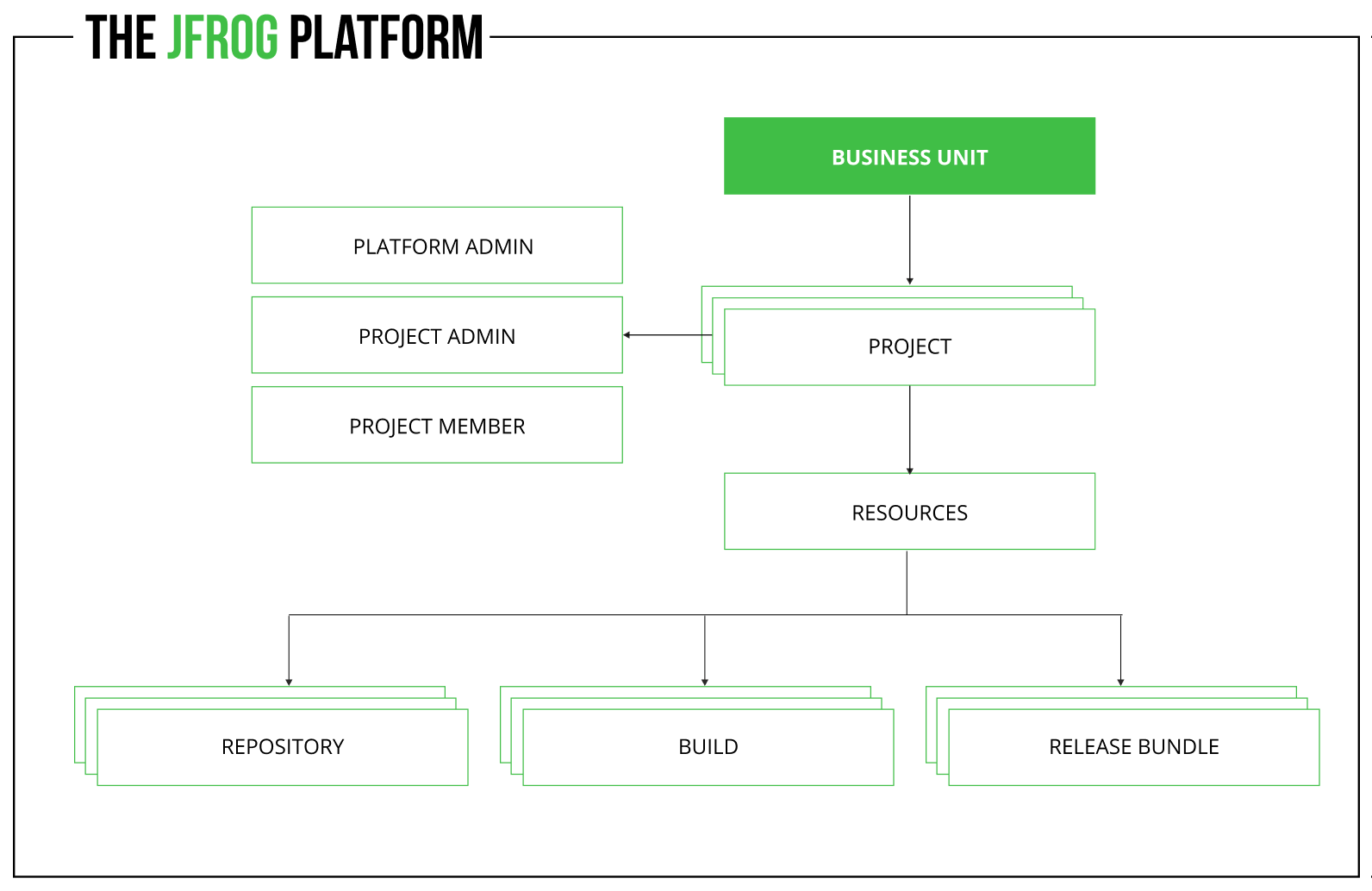
The following diagram describes the basic components within the project entity.
Project
Project — An organizational management entity in the JFrog Platform for hosting your resources (repositories, builds, Release Bundles, etc.) and associating users/groups as members with specific entitlements.
Assigned/Unassigned Resources
Assigned/Unassigned Resources — The JFrog Platform differentiates between assigned and unassigned resources in the scope of projects. When upgrading to the Platform with Projects, all the resources are set as 'Unassigned' as they have not yet been assigned to any project. To support assigning multiple resources to projects, you can assign projects to resources from the unassigned tab.
Project Key
Project Key — A unique key that helps you identify and group your projects. For example, add a key that identifies the location of the project in the US Site or the type of team - the Developer Team. From Artifactory 7.42.1, the minimum number of characters required in Project keys has been reduced from 3 to 2.
Project Members
Project Members — Users or groups assigned a role in a project become Project Members and are listed in the project's Members list.
Resources
Resources — Entities within the JFrog Platform, including repositories, builds, and Pipelines. A set of product-specific actions are available if the product is installed on your system.
Environments
Environment — Used to aggregate project resources for simplified management of project resources (repository, Pipeline source, etc.). Administrators can create environments on a global level that are used by all projects, as well as create environments defined for a specific project. See Environments. You can assign a set of roles to project members for each environment, providing you with an additional layer of role-based access granularity. See Managing Project Roles and Members.
Role-Based Access Control (RBAC) and Actions
Role-Based Access Control (RBAC) and Actions — JFrog Platform users and groups can perform a set of actions in projects using a set of dedicated project-related RBAC roles including Global and project roles.
Project Personas
Project Personas — A set of dedicated project personas are set on the project level, comprising Global roles and Project roles. The main built-in role is the Project Admin role. By default, all Platform Administrators are automatically granted the Project Admin Role. For more information, see Project Roles and Members Concepts.
Frequently Asked Questions
This section answers common questions about basic JFrog Projects terminology.
FAQs
Q: What is a JFrog Project?
A: A Project is an organizational management entity in the JFrog Platform that hosts resources such as repositories, builds, and Release Bundles, and associates users or groups as members with specific entitlements. See Project.
Q: What is the difference between assigned and unassigned resources?
A: Assigned resources belong to a project. After upgrading to the Platform with Projects, existing resources start as Unassigned until you assign them from the unassigned tab. See Assigned/Unassigned Resources.
Q: How short can a Project Key be?
A: From Artifactory 7.42.1, Project Keys require a minimum of 2 characters (reduced from 3). Choose a unique key that identifies location or team so resources are easy to filter later. See Project Key.
Q: What do I need before assigning roles to project members?
A: Users or groups become Project Members when assigned a role in a project. Environments and RBAC roles provide additional access granularity per environment. See Project Members and Environments.
Q: Can Platform Administrators manage projects by default?
A: Yes. By default, all Platform Administrators are automatically granted the Project Admin Role as part of the project personas model. See Project Personas.
Related Topics
Updated 3 months ago