
Projects Best Practices
Learn how JFrog Platform Projects scale governance, RBAC, and ownership across enterprise, automotive, and financial services use cases.
JFrog Projects are the essential enabler for enterprise scale: they are logical management entities that adapt to your specific organizational DNA, mapping perfectly to an application, a team, a microservice, or even an external GitHub organization. Projects provide clear operational governance, resource ownership, and cost accountability for a defined scope, allowing you to grow efficiently across teams and use cases.
Why Use Projects?
Projects offer the following benefits:
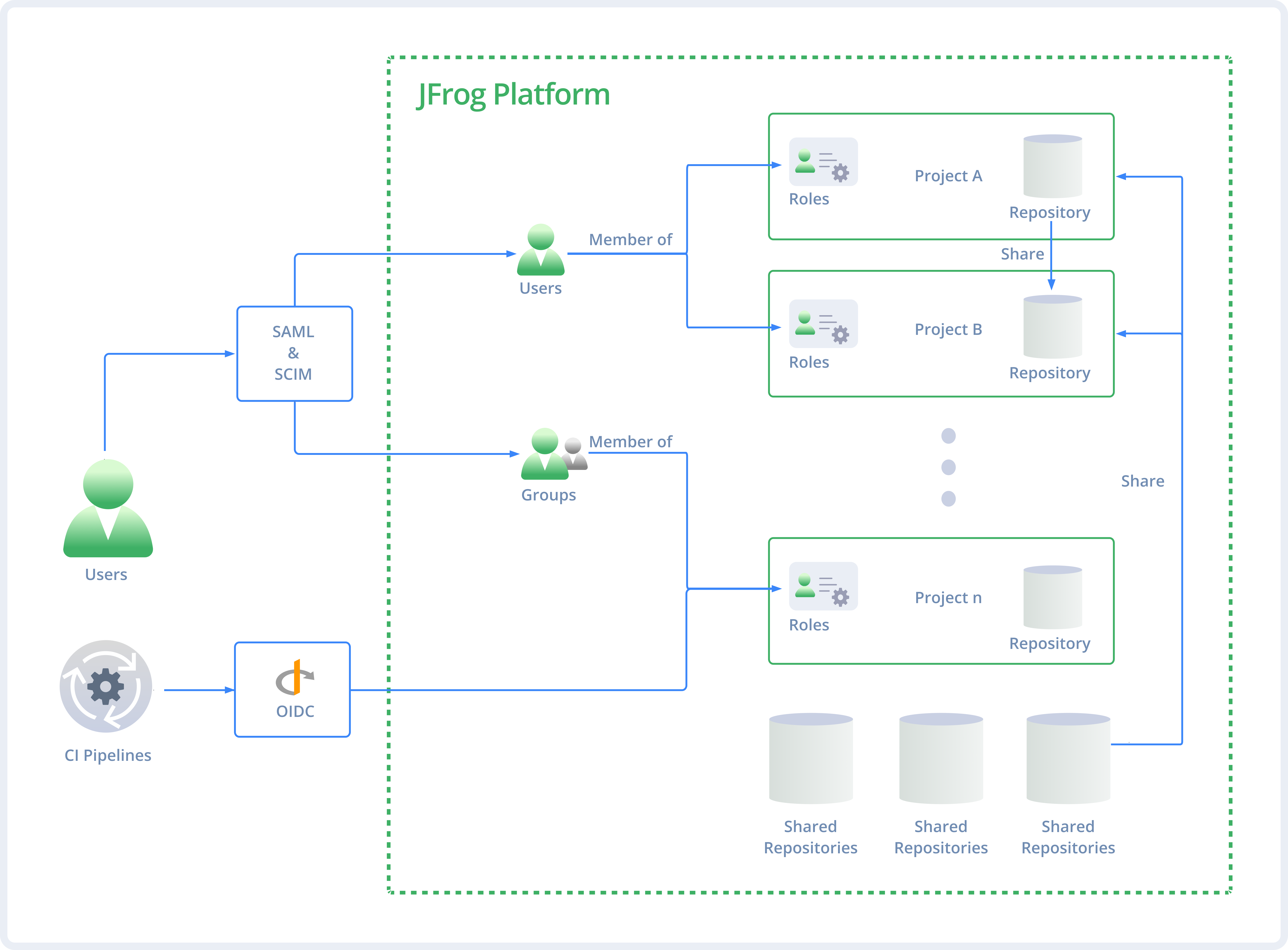
- Managed Scalability: Projects provide the logical workspace to govern Artifactory resources and users at scale, moving to mapping based on your business DNA.
- Separation of Concerns: Enable strict resource isolation and granular RBAC, ensuring that compliance and security are maintained even as the organization grows.
- Delegated Authority: Empower developers through self-service administration, removing the platform admin bottleneck by allowing Project Admins to manage their own teams.
- Optimized Efficiency: Context-aware management allows for virtual repositories and storage quotas tailored to specific technologies, teams, or lifecycle stages.
Mapping JFrog Projects: Use Cases
Different organizations define and structure projects based on their unique business needs, whether that's aligning them with applications, GitHub organizations, or other criteria. The following case studies show how organizations manage projects at scale.
Large Enterprise: Scaling Security and Traceability
The challenge: An enterprise struggled with a legacy self-hosted monorepo containing over 8,000 namespaces and fragile folder-level permissions. They couldn't scale to meet the security needs of a projected 120,000+ source code repositories.
The solution: Instead of a direct migration, the organization adopted a "clean slate" strategy on JFrog SaaS. They implemented a hard cut-over in which application teams migrated their data into a new, standardized Project structure.
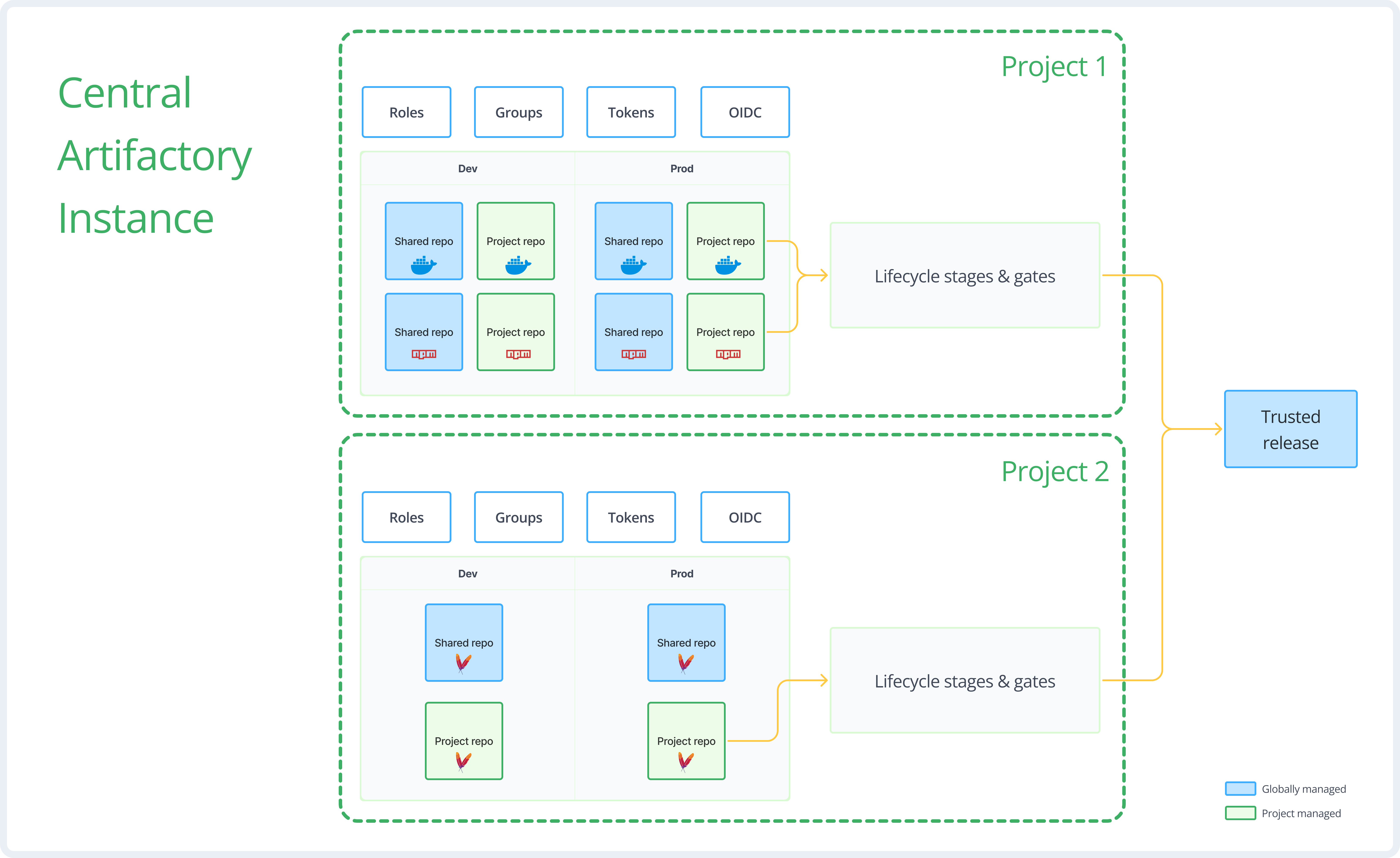
Here is the snapshot diagram of how this enterprise set up its project architecture:
Key project features:
- Mapped by internal budget ID: Projects are structured by application and mapped to an internal immutable identifier tied to budget and funding. This provides a stable management unit that outlasts team restructuring.
- 3-Tier architecture: The workflow uses a separate Curation environment that flows into a Central (Development/CI) environment. Finally, artifacts move to a Certified (Production) environment for distribution to Edge nodes.
- Automated self-service: Automation enables application teams to provision new Projects from strict templates. This ensures standardization across thousands of applications while offloading manual setup from administrators.
- GitHub OIDC integration: Enhances security by replacing static credentials with short-lived tokens, optimizing the mapping between source code and artifacts.
Large Automotive Manufacturer: Eliminating Administrative Bottlenecks
The challenge: With over 35,000 users managed by a platform team of fewer than five people, this manufacturer faced a massive administrative bottleneck. They lacked the manpower to handle manual requests or enforce auditability across thousands of applications.
The solution: They adopted a delegated administration model on JFrog SaaS to democratize management. By utilizing projects, they shifted from a centralized support bottleneck to a self-service model.
Key project features:
- Mapped by enterprise application ID: Projects map 1:1 to an internal enterprise application management system, providing a single source of truth for resource ownership.
- Self-service delegation: Application owners are assigned Project Admin roles, allowing teams to manage their own users and repositories without IT intervention.
- Security isolation: Dedicated projects isolate vulnerability scanning with JFrog Advanced Security (JAS) and map authentication via Microsoft Azure Entra ID.
Financial Services Infrastructure: Zero-Touch Onboarding
The challenge: Launching a greenfield initiative, the organization needed a "software factory" to onboard new development teams instantly. They required a standardized, compliant environment that provided access to global dependencies without manual configuration for every new project.
The solution: The organization adopted a template-based automation strategy. They used scripts to enforce a "zero-touch" onboarding process that provisions compliant workspaces instantly.
Key project features:
- Virtual aggregation pattern: Projects automatically include a Virtual repository that aggregates isolated local builds with shared global dependencies (such as npm central). This gives developers a single URL for all needs.
- Automated onboarding: Automation scripts provision projects and repositories instantly based on strict naming conventions.
- Global RBAC inheritance: Roles are defined globally and then inherited into projects, ensuring consistent permissions across the entire JFrog Platform.
Related Topics
Updated about 2 months ago