

Virtual Repositories
Learn how Artifactory virtual repositories aggregate local and remote repos in one URL.
You can define a virtual repository in JFrog Artifactory to simplify access to different repositories. A virtual repository is a collection of local, remote, and other virtual repositories with the same package type accessed through a single logical URL.
A virtual repository hides the access details of the underlying repositories, so you can work with a single, well-known URL. The underlying participating repositories and their access rules may be changed without requiring any client-side changes.
Generic Virtual Repositories
By their nature, virtual repositories whose package type has been specified as Generic can aggregate repositories of any type. However, generic virtual repositories do not maintain any metadata.
Best Practices for Virtual Repositories
-
Topology Agnostic Naming: Virtual repositories represent the entry point for developers. Because they aggregate across locations, the recommended name omits the
<locator>part of the naming convention.Recommended Format:
<team>-<tech>-<maturity>(for example,payments-maven-dev). -
Resolution Order Optimization: For performance and reliability, the recommended order of underlying repositories is as follows:
- Local Repositories: Local repositories first, for the fastest access to internal builds.
- Remote Repositories: The actual remote source last, because it requires an external network call.
-
Single Entry Point Strategy: Developer tools (for example, Maven
settings.xml) typically point to a virtual repository rather than a local one. Administrators can then change underlying physical storage or add new mirrors without requiring developers to update their local configurations.
Configure a Virtual Repository
The procedure for configuring a virtual repository includes tabs for mandatory basic settings and a tab for advanced settings.
To configure a virtual repository:
-
In the Administration module, go to Repositories.
-
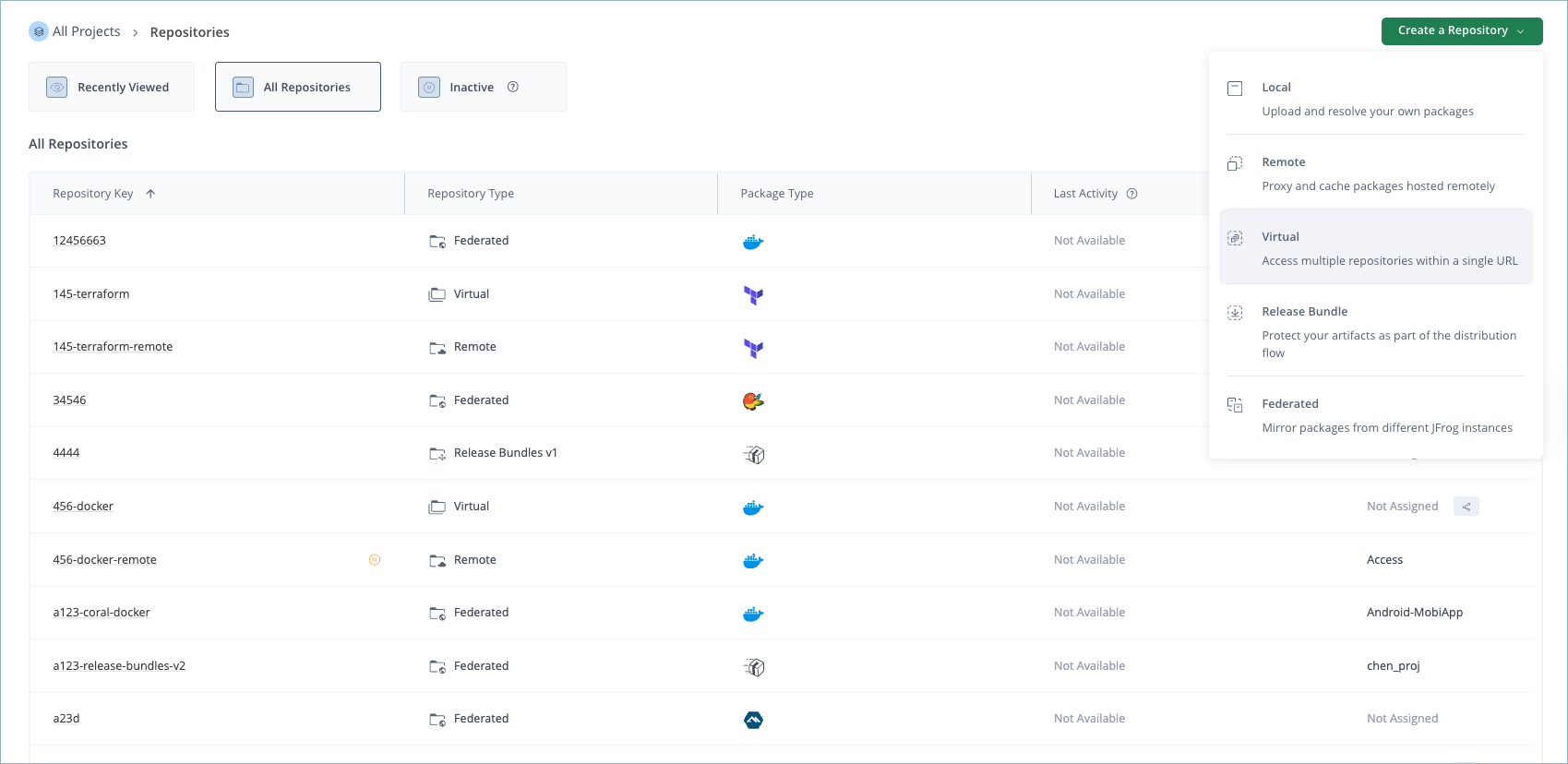
Click Create a Repository and select Virtual from the list.
-
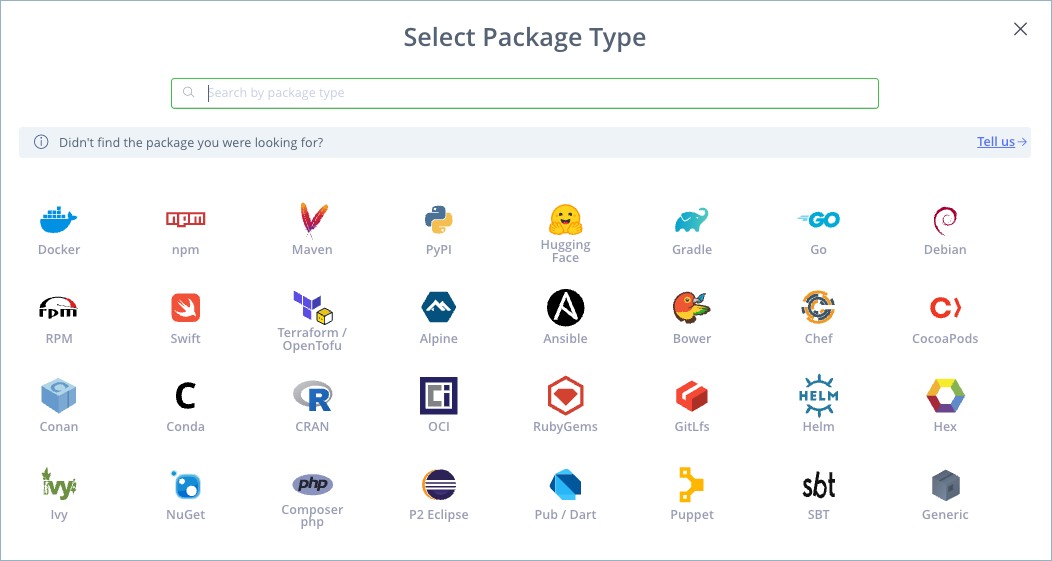
In the Select Package Type window, click the icon for the desired package type.
Note
Once you select the package type, it can't be changed.
The Basic tab for virtual repositories is displayed.
- In the Basic tab, enter the basic settings for the virtual repository. For more information, see Basic Settings for Virtual Repositories and Select Repositories to Include in a Virtual Repository.
- (Optional) In the Advanced tab, enter the advanced settings for the virtual repository.
- When you have finished configuring the repository, click Create Virtual Repository.
Configure a Virtual Repository Using the REST API
You can also create a virtual repository with the Create Repository REST API. For more information, see Create Repository API and Repository Configuration JSON.
Basic Settings for Virtual Repositories
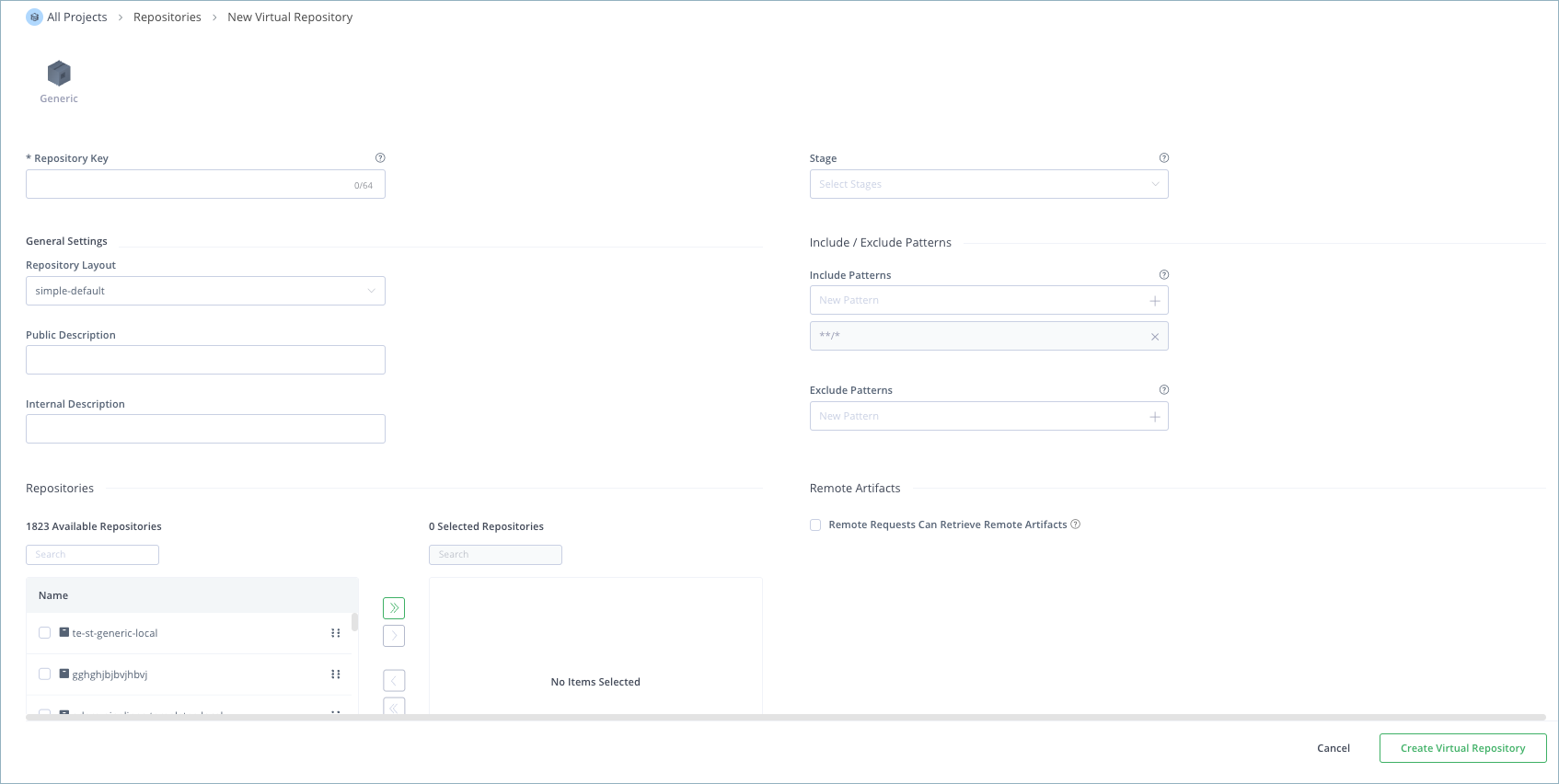
The following basic settings are common for all package types.
| Setting | Description |
|---|---|
| Package Type | The package type must be specified when the repository is created, and once set, can't be changed. |
| Repository Key | The repository key is a mandatory, unique identifier for the repository. It can't begin with a number or contain spaces or special characters. |
| Stage | Defines one or more stages in which this repository will reside. Stages aggregate project resources (repositories, Pipeline sources, etc.) to simplify their management. For more information, see Stages & Lifecycle. Note: Defining a stage is mandatory when creating a repository within a specific project. The default selection is DEV. |
| Repository Layout | Sets the layout that the repository should use for storing and identifying modules. A recommended layout that corresponds to the package type defined is suggested. |
| Public Description | A free text field that describes the content and purpose of the repository. This description can be viewed by all users with access to the repository. |
| Internal Description | A free text field to add additional notes about the repository. These notes are visible only to the administrator. |
| Include and Exclude Patterns | The Include Patterns and Exclude Patterns fields provide a way to filter out specific repositories when resolving the location of different artifacts. In each field, you can specify a list of Ant-like patterns to filter in and filter out artifact queries. Filtering works by subtracting the excluded patterns (default is none) from the included patterns (default is all). Example: Consider that the Include Patterns and Exclude Patterns for a repository are as follows: Include Patterns: Exclude Patterns:
In this example, the repository is searched for
|
| Remote Requests Can Retrieve Remote Artifacts | When set, remote Artifactory instances can retrieve artifacts from remote repositories aggregated under this virtual repository, even if the artifacts are not cached. When not set, artifacts can be retrieved from the caches only (default). Relevant for all package types except Swift, Terraform, and Composer. |
| Included Repositories | See Select Repositories to Include in a Virtual Repository. |
| Default Deployment Repository | Defines the default repository when deploying artifacts to a virtual repository. For more information, see Configure Virtual Repositories for Deployment. |
Note
For information about specific settings for particular package types, see Additional Virtual Repository Settings for Specific Package Types.
Using Include and Exclude Patterns
The ability to define an Include Pattern and an Exclude Pattern for virtual repositories (especially when nesting is used) provides a powerful tool you can use to manage artifact requests in your organization.
For example, your organization may have its own artifacts which are hosted both internally in a local repository and also in a remote repository. For optimal performance, you would want these artifacts to be accessed from the local repository rather than from the remote one. To enforce this policy, you can define a virtual repository called "remote-repos" which includes the full set of remote repositories accessed by your organization, and then specify an Excludes Pattern with your organization's groupID. In this way, any attempt to access your internal artifact from a remote repository would be rejected.
Consider another example in which you wish to define a virtual repository for your developers, however, you wish to keep certain artifacts hidden from them. This could be achieved by defining an Excludes Pattern based on groupId, source, or version.
Select Repositories to Include in a Virtual Repository
When creating a virtual repository, you must select the local and remote repositories that are included. The process is identical for all package types, except for P2 repositories.
To select repositories to include in a virtual repository:
-
In the Administration module, go to Repositories.
-
Click Create a Repository and select Virtual from the list.
-
In the Select Package Type window, click the icon for the desired package type. The Basic tab for virtual repositories is displayed.
-
Select the Available Repositories you want to include in the new virtual repository and move them to the Selected Repositories list.
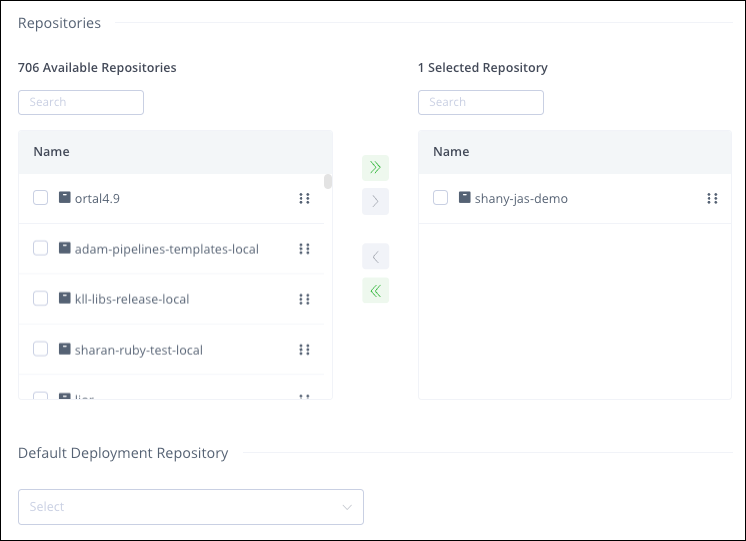
The Selected Repositories section displays the effective list of actual repositories included in this virtual repository. If any of the available repositories you have selected are themselves virtual repositories, then the Selected Repositories section will display the local and remote repositories included within them. The Selected Repositories list is automatically updated if any of the nested virtual repositories change.
Tip
This list can be re-ordered by dragging and dropping within the Selected Repositories list. This is important as it sets the resolution order.
The search/resolution order when requesting artifacts from a virtual repository is always:
- Local repositories
- Remote repository caches
- Remote repositories themselves
The order within these categories is controlled by the order in which they are presented in the Selected Repositories list.
When fulfilling a request for the latest version of an artifact from a virtual repository, Artifactory will search all the included repositories to ensure it retrieves the latest version. This means that Artifactory will still search the remote repository even if it finds a version of the artifact in a local or cache repository, to be certain of returning the most current one. If the remote repository is found to have the latest version, Artifactory will download it and update the remote repository cache.
Virtual Repositories and Projects
Like other resources, a virtual repository can be assigned to a specific project and optionally shared with additional projects. If there are selected local and remote repositories that are not assigned to, or shared with, the same project as the virtual repository, the following message appears in the UI:
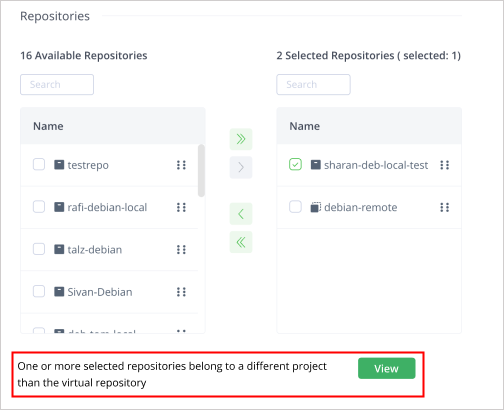
The View control shows a list of conflicting repositories (shown below). The Export icon exports the list to a CSV file.
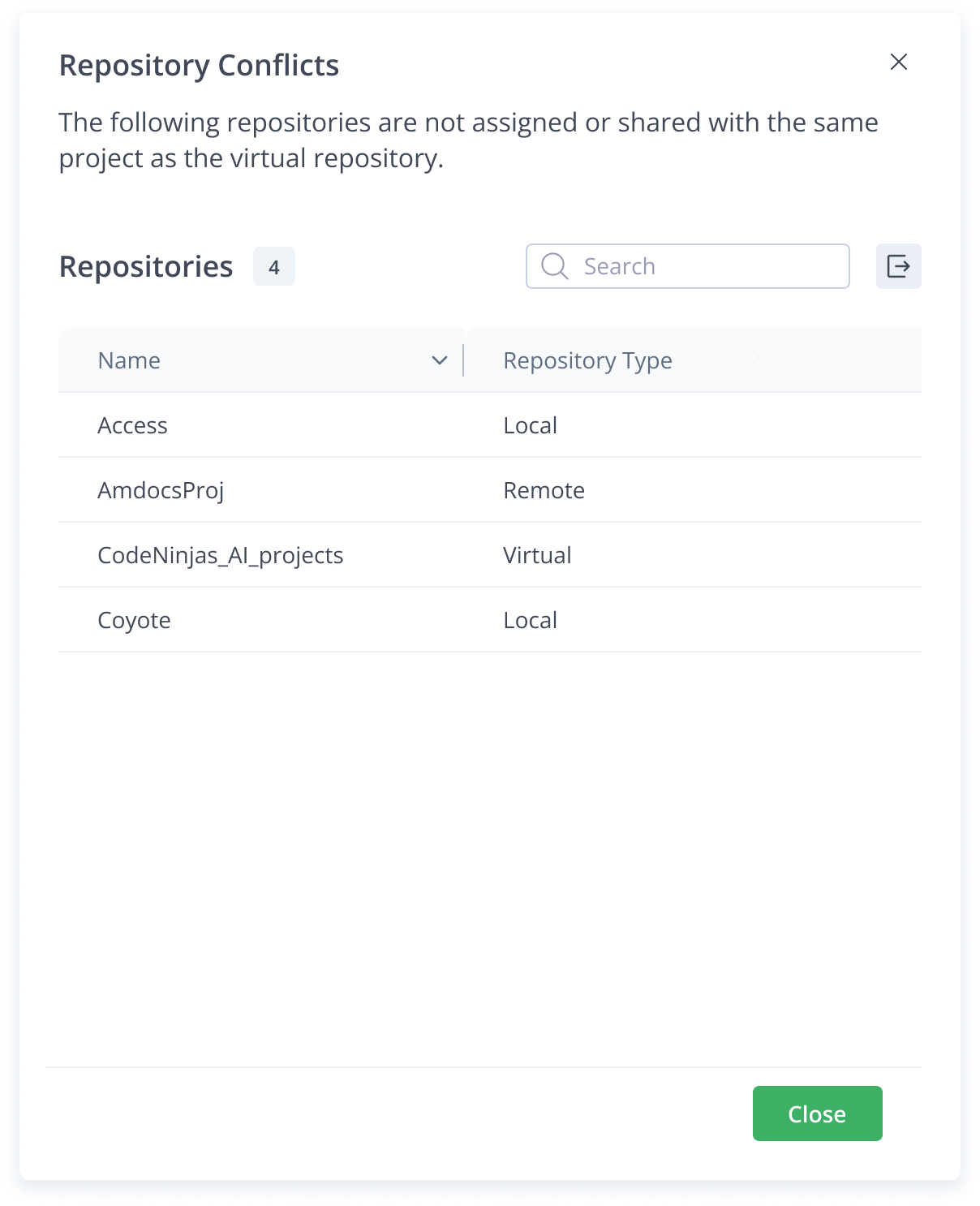
Cross-Project Virtual Access
When remote repositories are shared among different projects, the recommended approach is that each project creates its own virtual repository containing those remote repositories, rather than sharing the virtual repository itself. This approach provides each team with a single URL within their own project context while connecting to the same upstream remote resources.
Sharing the virtual repository across multiple projects can lead to permission conflicts, even when the underlying remote repositories it contains are shared. This is because Artifactory resolves which underlying repositories are in scope using the context of the project that owns the virtual repository. Users from other projects are not recognized during repository resolution, even if the underlying remote repositories are individually shared.
Nesting
Nesting is a unique feature in Artifactory and facilitates more flexibility in using virtual repositories.
Warning
Be careful not to create an infinite loop of nested repositories. Artifactory analyzes the internal composition of virtual repositories and issues a warning if the virtual repository can't be resolved due to invalid nesting.
Virtual Resolution Order
When an artifact is requested from a virtual repository, the order in which repositories are searched or resolved is local repositories first, then remote repository caches, and finally remote repositories themselves.
Within each of these, the order by which repositories are queried is determined by the order in which they are listed in the configuration, as described in General Resolution Order.
For a virtual repository, you can see the effective search and resolution order in the Included Repositories list view in the Basic settings tab. This is particularly helpful when nesting virtual repositories. For more details, see Configure a Virtual Repository.
Additional Virtual Repository Settings for Specific Package Types
Virtual repositories may have additional settings depending on the package type, as described in the following topics:
- Additional Settings for Alpine Virtual Repositories
- Additional Settings for Bower Virtual Repositories
- Additional Settings for Chef Virtual Repositories
- Additional Settings for Conan Virtual Repositories
- Additional Settings for Conda Virtual Repositories
- Additional Settings for CRAN Virtual Repositories
- Additional Settings for Debian Virtual Repositories
- Additional Settings for Docker Virtual Repositories
- Additional Settings for Go Virtual Repositories
- Additional Settings for Maven/Gradle/Ivy/SBT Virtual Repositories
- Additional Settings for npm Virtual Repositories
- Additional Settings for NuGet Virtual Repositories
- Additional Settings for OCI Virtual Repositories
- Additional Settings for P2 Virtual Repositories
Additional Settings for Alpine Virtual Repositories
In addition to the basic settings that are common for all virtual repositories, the following settings are available when configuring Alpine repositories.
| Field | Description |
|---|---|
| Metadata Retrieval Cache Period (sec) | Defines the length of time (in seconds) to cache metadata files before checking for newer versions on aggregated repositories. A value of 0 indicates no caching. The default is 7200 seconds. |
Additional Settings for Bower Virtual Repositories
In addition to the basic settings that are common for all virtual repositories, the following settings are available when configuring Bower repositories.
| Field | Description |
|---|---|
| Enable Dependency Rewrite | When selected, external dependencies are rewritten. |
| Remote Repository for Cache | Defines the remote repository aggregated by this virtual repository in which the external dependency will be cached. |
| Patterns Allow List | Defines an Allow List of Ant-style path expressions that specify where external dependencies may be downloaded from. By default, this is set to **, which means that dependencies may be downloaded from any external source. For example, if you wish to limit external dependencies to be downloaded only from github.com, you should add _github.com_ (and remove the default expression). |
Additional Settings for Chef Virtual Repositories
In addition to the basic settings that are common for all virtual repositories, the following settings are available when configuring Chef repositories.
| Field | Description |
|---|---|
| Metadata Retrieval Cache Period (sec) | Defines the length of time (in seconds) to cache metadata files before checking for newer versions on aggregated repositories. A value of 0 indicates no caching. The default is 7200 seconds. |
Additional Settings for Conan Virtual Repositories
In addition to the basic settings that are common for all virtual repositories, the following settings are available when configuring Conan repositories.
| Field | Description |
|---|---|
| Metadata Retrieval Cache Period (sec) | Defines the length of time (in seconds) to cache metadata files before checking for newer versions on aggregated repositories. A value of 0 indicates no caching. The default is 7200 seconds. |
| Force Authentication | Select this option to require the use of basic authentication credentials to use this repository. |
Additional Settings for Conda Virtual Repositories
In addition to the basic settings that are common for all virtual repositories, the following settings are available when configuring Conda repositories.
| Field | Description |
|---|---|
| Metadata Retrieval Cache Period (sec) | Defines the length of time (in seconds) to cache metadata files before checking for newer versions on aggregated repositories. A value of 0 indicates no caching. The default is 7200 seconds. |
Additional Settings for CRAN Virtual Repositories
In addition to the basic settings that are common for all virtual repositories, the following settings are available when configuring CRAN repositories.
| Field | Description |
|---|---|
| Metadata Retrieval Cache Period (sec) | Defines the length of time (in seconds) to cache metadata files before checking for newer versions on aggregated repositories. A value of 0 indicates no caching. The default is 7200 seconds. |
Additional Settings for Debian Virtual Repositories
In addition to the basic settings that are common for all virtual repositories, the following settings are available when configuring Debian repositories.
| Field | Description |
|---|---|
| Metadata Retrieval Cache Period (sec) | Defines how long before Artifactory checks for a newer version of a requested artifact in the repository. A value of 0 means that Artifactory will always check for a newer version.
|
| Indexed Remote Architectures | Specifies the architectures that will be indexed for the included remote repositories. Specifying these architectures will speed up Artifactory's initial metadata indexing process. The default architecture values are amd64 and i386. |
| Optional Index Compression Formats | Used for selecting the index file formats to create in addition to the default Gzip (.gzip extension) format, which is created for every Debian repository and cannot be disabled. |
| Enable indexing with debug symbols (.ddeb) | When set, it enables the indexing of debug symbols for more efficient debugging. |
| Primary Key Name | The name of the GPG primary key used by the repository. |
| Secondary Key Name | The name of the GPG secondary key used by the repository |
Additional Settings for Docker Virtual Repositories
In addition to the basic settings that are common for all virtual repositories, the following settings are available when configuring Docker repositories.
Additional Advanced Settings
| Field | Description |
|---|---|
| Resolve Docker Tags By Latest Timestamp | When enabled, in cases where the same Docker tag exists in two or more of the aggregated repositories, Artifactory will return the tag that has the latest timestamp. |
Additional Settings for Go Virtual Repositories
In addition to the basic settings that are common for all virtual repositories, the following settings are available when configuring Go repositories.
| Field | Description |
|---|---|
| Enable 'go-import' Meta Tags | When selected (default), Artifactory will automatically follow remote VCS roots in go-import meta tags to download remote modules. |
| go-import Allow List | Defines an Allow List of Ant-style path expressions that specify where external dependencies may be downloaded from. By default, this is set to ******, which means that dependencies may be downloaded from any external source. For example, if you wish to limit external dependencies to be downloaded only from github.com, you should add github.com (and remove the default ** expression). |
Additional Settings for Maven/Gradle/Ivy/sbt Virtual Repositories
In addition to the basic settings that are common for all virtual repositories, there are specific settings for the following package types;
| Field | Description |
|---|---|
| Cleanup Repository References in POMs | This setting provides the ability to ensure Artifactory is the sole provider of artifacts by automatically cleaning up the POM (Project Object Model) file. The POM is the XML file that contains configuration and build information about a Maven project. Available options include:
|
| Key-Pair | Defines a named key-pair to use for signing artifacts automatically. |
| Force Authentication | Select this option to require the use of basic authentication credentials to use this repository. This setting is relevant for Maven virtual repositories only. |
Additional Settings for npm Virtual Repositories
In addition to the basic settings that are common for all virtual repositories, the following settings are available when configuring npm repositories.
Basic Settings
| Field | Description |
|---|---|
| Metadata Retrieval Cache Period (sec) | Defines the length of time (in seconds) to cache metadata files before checking for newer versions on aggregated repositories. A value of 0 indicates no caching. The default is 7200 seconds. |
Advanced Settings
| Field | Description |
|---|---|
| Enable Dependency Rewrite | When selected, external dependencies are rewritten. |
| Remote Repository for Cache | Defines the remote repository aggregated by this virtual repository in which the external dependency will be cached. |
| Patterns Allow List | Defines an Allow List of Ant-style path expressions that specify where external dependencies may be downloaded from. By default, this is set to **, which means that dependencies may be downloaded from any external source. For example, if you wish to limit external dependencies to be downloaded only from github.com, you should add github.com (and remove the default ** expression). |
Additional Settings for NuGet Virtual Repositories
In addition to the basic settings that are common for all virtual repositories, the following settings are available when configuring NuGet repositories.
| Field | Description |
|---|---|
| Force Authentication | Select this option to require the use of basic authentication credentials to use this repository. |
| Enforce Layout | When selected, the repository will not allow duplicate package versions according to the NuGet version normalization rules. This ensures your NuGet repositories align with the NuGet upstream registry. |
Additional Settings for OCI Virtual Repositories
In addition to the basic settings that are common for all virtual repositories, the following settings are available when configuring OCI repositories.
| Field | Description |
|---|---|
| Metadata Retrieval Cache Period (sec) | Defines the length of time (in seconds) to cache metadata files before checking for newer versions on aggregated repositories. A value of 0 indicates no caching. The default is 7200 seconds. |
Additional Settings for P2 Virtual Repositories
In addition to the basic settings that are common for all virtual repositories, the following settings are available when configuring P2 repositories.
| Field | Description |
|---|---|
| Force Authentication | Select this option to require the use of basic authentication credentials to use this repository. |
| Local Repository | Select the local repository to include in the virtual repository. Typically this will be either a Maven or a Generic repository. |
| Path Suffix | Defines an optional sub-path inside the local repository where P2 metadata files reside. When left empty, P2 metadata files (content, artifacts, compositeContent, etc.) are assumed to reside directly in the repository root directory. If you have a Tycho repository deployed as a single archive, specify the archive's root path. For example: 'eclipse-repository.zip!'. |
| P2 Repository URL | Defines the URL of the remote repository that contains the P2 metadata files.
|
Frequently Asked Questions
This section provides answers to frequently asked questions.
FAQs
Q: How do I configure a virtual repository in Artifactory?
A: In the Administration module, go to Repositories, create a Virtual repository, and complete the Basic tab. You can set optional Advanced settings before you click Create Virtual Repository. For more information, see Configure a Virtual Repository.
Q: What is the difference between a virtual repository and a local repository?
A: A local repository stores artifacts you deploy. A virtual repository aggregates local, remote, and other virtual repositories of the same package type behind one URL and does not store artifacts itself. For more information, see Local Repositories.
Q: What happens if I try to change the package type after I create a virtual repository?
A: You can't change the package type after you select it. Choose the correct type when you create the repository. For more information, see Configure a Virtual Repository.
Q: What do I need before I can include repositories in a virtual repository?
A: You need local and remote repositories of the same package type to add to the Selected Repositories list. P2 virtual repositories follow a different include process. For more information, see Select Repositories to Include in a Virtual Repository.
Q: Can I control which artifacts a virtual repository resolves with include and exclude patterns?
A: Include and Exclude patterns on a virtual repository can steer requests, for example to prefer internal artifacts in a local repository over a remote copy. Admin users can still see all items regardless of those patterns. For more information, see Using Include and Exclude Patterns.
Related Topics
Updated 5 days ago