

Remote Repositories
Learn how Artifactory remote repositories cache and proxy artifacts from a remote URL.
A remote repository serves as a caching proxy for a repository managed at a remote URL, which may itself be another JFrog Artifactory remote repository. Artifacts are stored and updated in remote repositories according to various configuration parameters that control the caching and proxying behavior.
You can remove artifacts from a remote repository cache, but you can't deploy a new artifact into a remote repository.
You can access artifacts in a remote repository directly using the following URL:
http://<host>:<port>/artifactory/<remote-repository-name>/<artifact-path>Where:
<host>: The Artifactory host name.<port>: The Artifactory port.<remote-repository-name>: The remote repository key.<artifact-path>: The path of the artifact in the remote repository.
For example:
http://company.jfrog.io/artifactory/dockerhub-remote/library/nginxThis URL returns the remote artifact and stores it in the cache if it isn't stored yet.
Sometimes it's useful to access artifacts that are already stored in the cache, for example to avoid remote update checks. You can access artifacts that are already stored in the cache with the following URL:
http://<host>:<port>/artifactory/<remote-repository-name>-cache/<artifact-path>Proxy vs. Mirror
A remote repository acts as a proxy , not as a mirror. Artifacts are not pre-fetched to a remote repository cache. They are only fetched (pulled) and stored (cached) on demand when requested by a client. Until then, each artifact includes a warning message that "This artifact is not cached".
Therefore, a remote repository should not contain any artifacts in its cache immediately after creation. Artifacts are fetched to the cache only after clients start working with the remote repository and issue requests.
Remote Repository Naming Strategies
A clean architecture distinguishes between internal and external remote sources:
-
External Central Registries: For public registries, the recommended format is
<registry>-remote.Example:
dockerhub-remoteornpmjs-remote. -
Internal Artifactory-to-Artifactory: When remoting a repository from another site, mirror the source repository's name but update the
<locator>to reflect the origin.
Example: If you are remotingpayments-mvn-dev-localfrom the London site, name itpayments-mvn-dev-london. -
Do Not Use Reserved Suffix: Remote repository names can't end with
-cacheas Artifactory automatically appends-cacheto the internal cache remote repository.
Unsupported Remotes
Pointing a remote URL to a third-party product that relies on Artifactory for caching, while also intervening in package manager protocols or applying custom gateway, proxy, or routing logic is not supported. These configurations complicate triage and degrade supportability, and Artifactory may block them.
Configure a Remote Repository
The procedure for configuring a remote repository includes tabs for: Basic Settings, Advanced Settings, and Replications.
To configure a remote repository:
-
In the Administration module, go to Repositories.
-
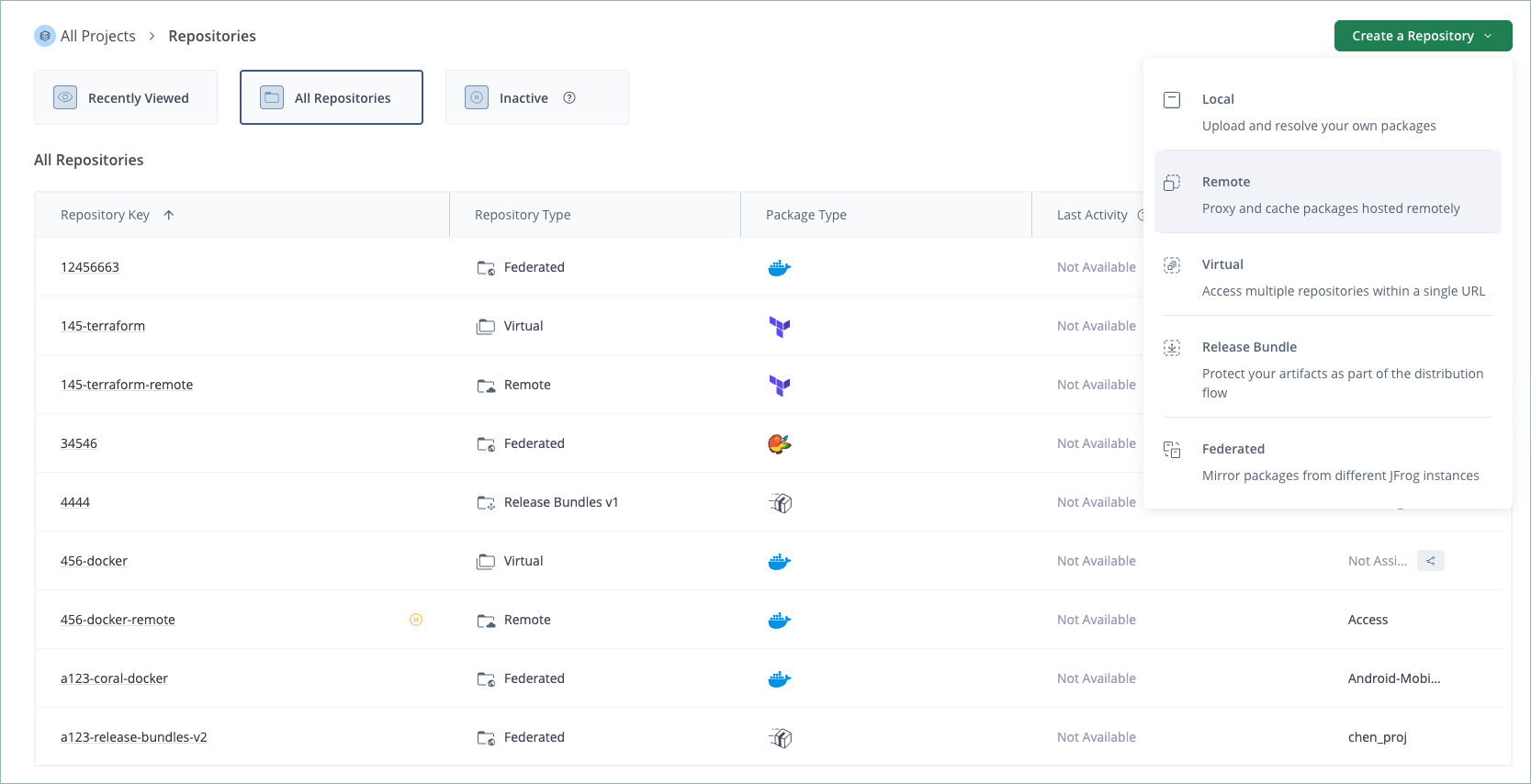
Click Create a Repository and select Remote from the list.
-
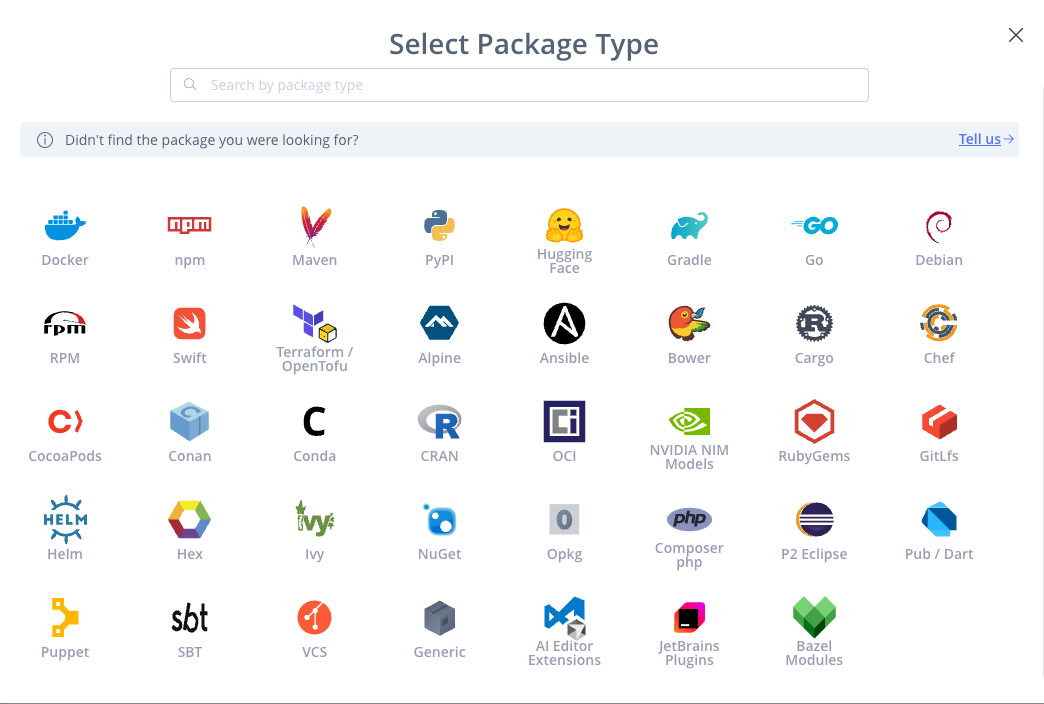
In the Select Package Type window, click the icon for the desired package type.
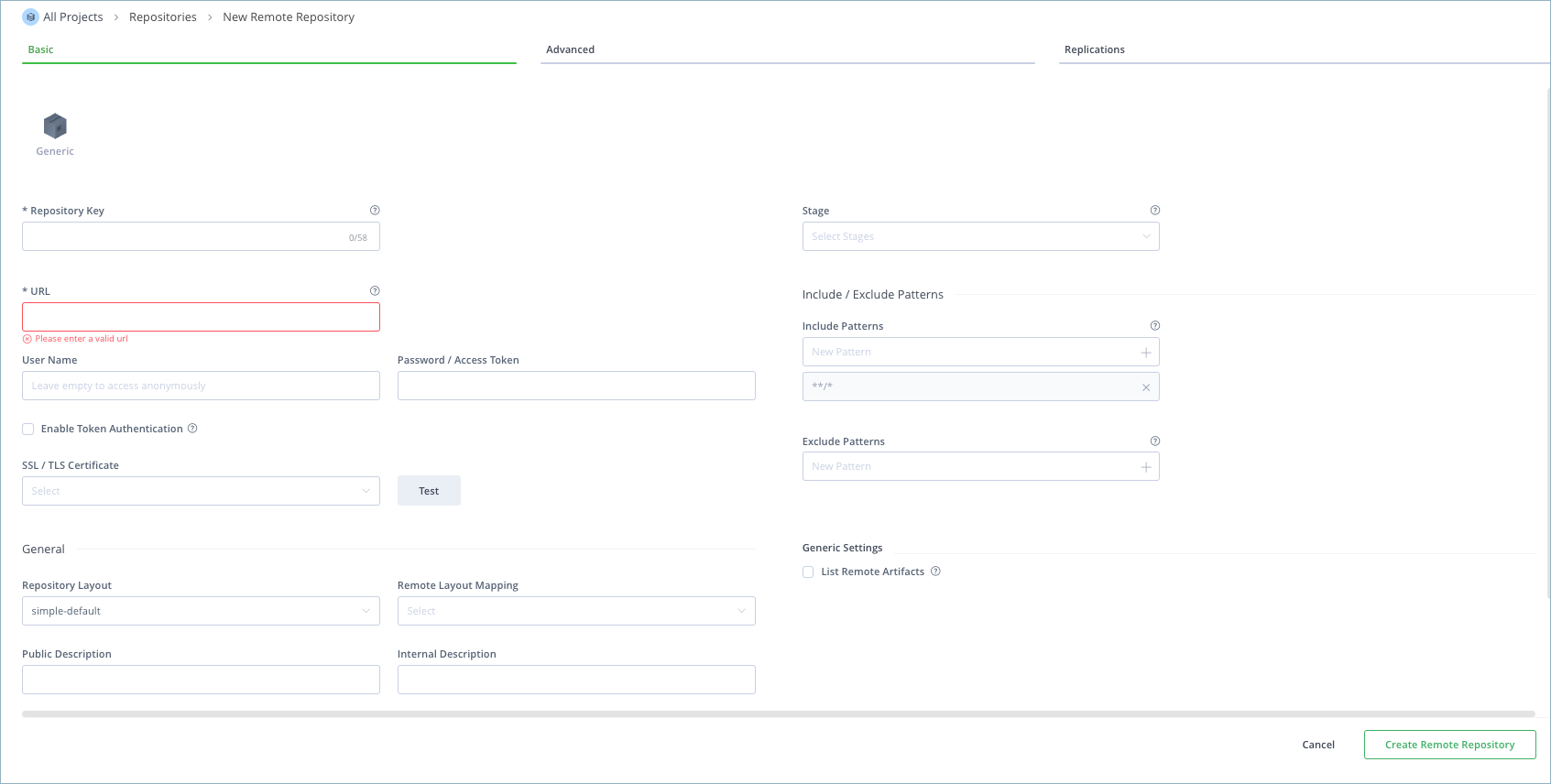
The Basic tab for remote repositories is displayed.
-
In the Basic tab, enter the basic settings for the remote repository. For more information, see Basic Settings for Remote Repositories.
-
(Optional) In the Advanced tab, enter the advanced settings for the remote repository. For more information, see Advanced Settings for Remote Repositories.
-
(Optional) In the Replications tab, select the checkbox to enable event replication and then add the required replications. For more information, see Repository Replication.
-
When finished configuring the repository, click Create Remote Repository.
Configure a Remote Repository Using the API
You can also create and configure a remote repository with the Create Repository REST API. For more information, see Create Repository API and Repository Configuration JSON.
Basic Settings for Remote Repositories
The following basic settings are common for all package types.
| Setting | Description |
|---|---|
| Package Type | The package type must be specified when the repository is created, and once set, cannot be changed. |
| Repository Key | The repository key is a mandatory, unique identifier for the repository. It cannot begin with a number or contain spaces or special characters. |
| Stage | Defines one or more stages in which this repository will reside. Stages aggregate project resources (repositories, Pipeline sources, etc.) to simplify their management. For more information, see Stages & Lifecycle.
|
| URL | The URL for the remote repository. Currently, only HTTP and HTTPS URLs are supported. |
| User Name | The user name for accessing the URL of the remote repository. Leave this field blank to access the repository anonymously. For more information, see Remote Credentials for Remote Repositories. |
| Password/Access Token | The password or access token used to access the repository. For more information, see Remote Credentials for Remote Repositories. |
| Enable Token Authentication | When enabled, the Authorization header is set to Bearer instead of Basic. |
| SSL/TLS Certificate | The certificate used for authentication. Click Test to verify the certificate is valid. For more information, see Remote Credentials for Remote Repositories. |
| Repository Layout | Defines the layout used by the remote repository cache for storing and identifying modules. For more information, see Configure a Remote Repository Layout. |
| Remote Layout Mapping | Defines the layout used by the remote repository for storing and identifying modules. This layout can differ from the layout defined under Repository Layout for the remote repository cache. For more information, see Configure a Remote Repository Layout. |
| Public Description | A free text field that describes the content and purpose of the repository. This description can be viewed by all users with access to the repository. |
| Internal Description | A free text field to add additional notes about the repository. These notes are visible only to the administrator. |
| Include and Exclude Patterns | The Include Patterns and Exclude Patterns fields provide a way to filter out specific repositories when resolving the location of different artifacts. In each field, you can specify a list of Ant-like patterns to filter in and filter out artifact queries. Filtering works by subtracting the excluded patterns (default is none) from the included patterns (default is all). Example: Consider that the Include Patterns and Exclude Patterns for a repository are as follows: Include Patterns: Exclude Patterns:
In this example, the repository is searched for
|
| Offline | If enabled, no attempts will be made to fetch remote artifacts from this repository and only locally-cached artifacts are retrieved. |
| Enable Indexing in Xray | Enables indexing on the repository for security and compliance analysis. Available with JFrog Xray. |
Enable Indexing in Xray
JFrog Xray enables repository indexing for security and compliance analysis of the following package types:
| Supported Package Types | Unsupported Package Types | |
|---|---|---|
Docker npm Maven PyPI Gradle Go Debian RPM Alpine Bower Cargo | Conan Conda CRAN Gems Ivy NuGet Composer SBT Generic HuggingFace | Swift Terraform Chef CocoaPods GitLfs Helm Opkg P2 Pub Puppet VCS |
Note
For information about specific settings for particular package types, see Additional Remote Repository Settings for Specific Package Types.
Remote Credentials for Remote Repositories
You can configure authentication for remote repositories by specifying remote credentials. You can use either one of the following methods to identify yourself:
- Username and password
- Personal Access Token (PAT)
The advantage of using PATs is that you can strengthen your Artifactory security practices by using them for authentication, instead of using your primary credentials. For example, you can create a PAT in GitHub and then configure your remote Docker repository to point to GitHub and authenticate it by using the PAT. You can use PATs for any package type.
To specify remote credentials:
-
In the Administration module, select Repositories.
-
Click the Remote tab and open the relevant remote repository.
-
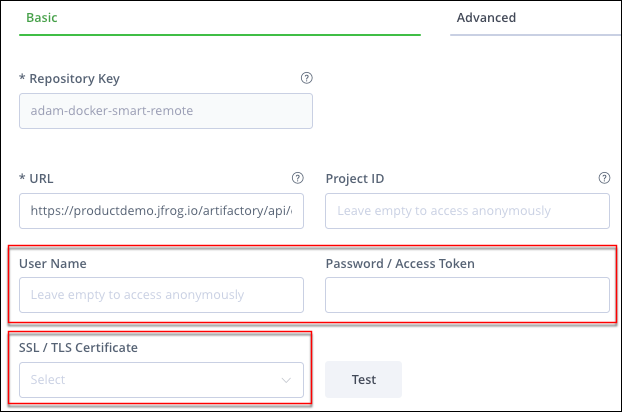
In the Basic tab, enter your remote credentials in the following fields:
-
Use one of the following methods to authenticate yourself when accessing this remote proxy:
-
User name and password:
- Under Remote Authentication, enter a user name in the User Name field.
- Enter a password in the Password/Access Token field.
-
Personal Access Tokens (PAT) used for HTTP authentication (Artifactory 6.18 and later):
-
Create the PAT in the service provider and copy the PAT to the clipboard.
-
In Artifactory, paste the PAT into the Password/Access Token field.
-
Enter a username in the Username field. When a PAT is used for authentication, an arbitrary username can be entered into this field (not applicable for npmjs), but the field must not be left empty.
-
-
Note
To access the npm registry, you must pass a valid npm registry username and generated PAT token. For more details, see this Knowledge Base article.
- Enter the SSL/TLS certificate used for authentication to the remote resource for which this repository is a proxy.
Tip
Click Test to verify the certificate.
- Click Save.
Advanced Settings for Remote Repositories
The advanced settings for a remote repository configure network access behavior, cache management, and other parameters related to remote repository access. The following types of advanced settings are available for remote repositories:
- Network Settings for Remote Repositories
- Cache Settings for Remote Repositories
- Zapping Caches
- Select Property Sets
- Other Advanced Settings for Remote Repositories
To access the advanced settings, select the Advanced tab when editing an existing remote repository or creating a new one.
Network Settings for Remote Repositories
Network settings for remote repositories are described below.
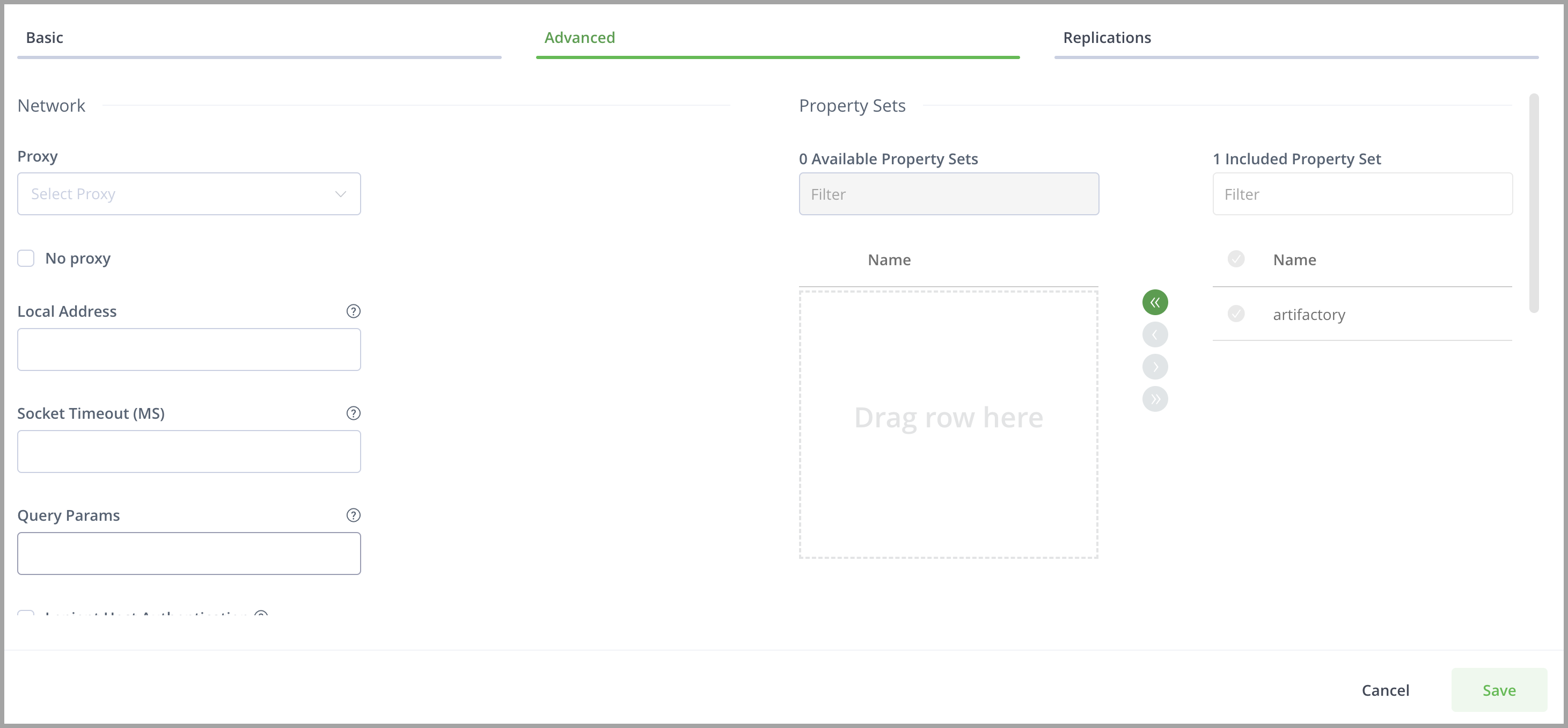
| Field | Description |
|---|---|
| Proxy | If your organization requires you to go through a proxy to access a remote repository, this parameter lets you select the corresponding Proxy Key. For more details on setting up proxies in Artifactory please refer to Manage Proxy Servers. |
| No Proxy | To prevent auto-updates during the edit of system proxies, a flag was added in release 7.41.7 called No Proxy (in the UI) or The flag is set to
|
| Local Address | When working on multi-homed systems, this parameter lets you specify which specific interface (IP address) should be used to access the remote repository. This can be used to ensure that access to the remote repository is not blocked by firewalls or other organizational security systems. |
| Socket Timeout | The time (in ms) that Artifactory waits (for both a socket and a connection) before giving up on an attempt to retrieve an artifact from a remote repository. Upon reaching the specified Socket Timeout Artifactory registers the repository as "assumed offline" for the period of time specified in Assumed Offline Period. |
| Query Params | A custom set of parameters that should automatically be included in all HTTP requests to this remote repository. For example, |
| Lenient Host Authentication | When set, allows using the repository credentials on any host to which the original request is redirected. |
| Cookie Management | When set, the repository will allow cookie management to work with servers that require them. |
Using Oracle Maven Repository
To use Oracle Maven Repository:
- Set your Oracle credentials in Username and Password of the Remote Credentials
- Set Lenient Host Authentication
- Set Enable Cookie Management.
Cache Settings for Remote Repositories
Artifactory stores artifacts retrieved from a remote repository in a local cache. The Cache Settings specify how to manage cached artifacts.
Caching Maven artifacts
Caching for Maven artifacts is only applicable to snapshots since it is assumed that releases never change.
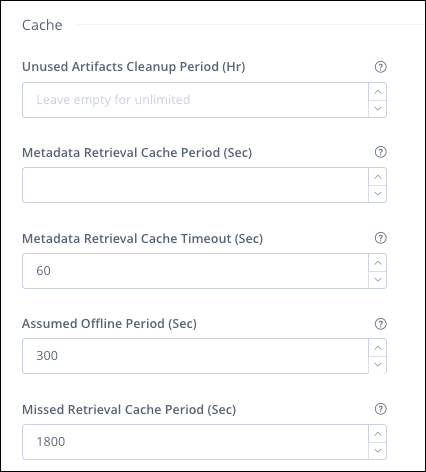
| Field | Description |
|---|---|
| Unused Artifacts Cleanup Period | Specifies how long an unused artifact will be stored before it is removed. Many cached artifacts in Artifactory remote repository storage are not currently used in any project. Once the Unused Artifacts Cleanup Period is reached, Artifacts are removed in the next cleanup run. For more information, see Cleanup Unused Cached Artifacts. Leaving the field empty means that the artifact is stored indefinitely. |
| Metadata Retrieval Cache Period (sec) | Defines how long Artifactory caches metadata files before checking the remote repository for newer versions. The default Metadata Retrieval Cache Period is 2 hours (7,200 seconds) with exceptions for certain package types. For more information, see Metadata Retrieval Cache Period. |
| Metadata Retrieval Cache Timeout | Controls Metadata timeout performance. If the timeout is reached before new metadata is retrieved, the previous metadata is returned to the client. The default value is 60 seconds. |
| Assumed Offline Period | Specifies how many seconds Artifactory waits after a connection error before attempting an online check to reset the offline status. A value of 0 means that the repository is never assumed offline and Artifactory always attempts to make the connection on demand. The default value is 300 seconds. Artifactory attempts 10 retries before declaring the repository offline. The interval between retries increases gradually up to the Assumed Offline Period. The retries help prevent a situation where an unstable network can cause the repository to be stuck offline indefinitely. If all retries fail, the offline period is invoked. |
| Missed Retrieval Cache Period | Specifies how long Artifactory caches A value of 0 means that the |
Metadata Retrieval Cache Period Exceptions and Minimums
The Metadata Retrieval Cache Period setting is relevant for artifacts that expire after a period of time, including metadata files like maven-metadata.xml, npm package.json, or Docker manifest.json. Most downloaded artifacts do not change and this setting does not affect them.
The default Metadata Retrieval Cache Period is 2 hours (7,200 seconds) for most remote repository types and 6 hours (21,600 seconds) for Docker, OCI, and Helm OCI remote repositories.
NuGet remote repositories that proxy community.chocolatey.org have a minimum metadata retrieval cache period of 4 hours (14,400 seconds).
Zapping Caches
Zapping the cache invalidates all cached metadata artifacts (e.g., from pypi.org, repo1.maven.org, registry.npmjs.org), so they are re-fetched from the upstream on the next request. Immutable binaries are not invalidated. Zap does not delete files — it marks metadata as expired; each item is refreshed only when it is next requested.
After zapping, when an invalidated item is requested, Artifactory refreshes it from the upstream. If the upstream is unavailable or times out, Artifactory serves the previously cached (stale) copy. This returns HTTP 200 with the older content — including cases where that content is out of date (for example, after changing the repository's upstream URL or Curation settings), which can surface to clients as a missing version (e.g., npm ETARGET). If you zapped specifically to clear bad/filtered metadata, verify the refresh succeeded before relying on the result.
Large repositories: A full-repo zap scales with the number of cached metadata files and can take many minutes (and may time out or add load) on repositories with tens of thousands of items. Prefer a path-scoped zap — POST api/zap/{repoKey}/{path} — targeting only the affected packages.
After a large zap: Avoid firing many installs at once — a burst of simultaneous refreshes can saturate the upstream connection and cause transient failures. If possible, stagger critical installs and add retry-with-backoff in CI. A failed upstream fetch may also place the remote repository in assumed-offline mode for assumedOfflinePeriodSecs (default 300s), during which stale copies are served. If necessary, lower this and missedRetrievalCachePeriodSecs to reduce the blast radius of a failed post-zap fetch.
Resolving Cache Issues: If there are problems with the cached package artifacts, such as corruption or inconsistencies with the central repository, zapping the cache fixes these issues.
Note
Zapping cache requires Manage or Delete permissions on the Remote Repository.
For zapping a cache via API, refer to Zap Cache REST API.
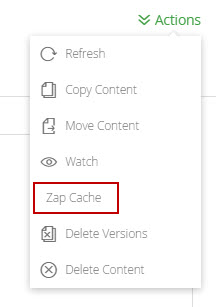
To zap a cache using the platform UI:
-
In the Artifacts module tree browser, select the repository cache you wish to "zap".
-
Click Zap caches in the right-click menu or from the Actions drop-down menu.
Select Property Sets
Defines the property sets that will be available for artifacts stored in this repository. For more information, see Create Property Set.
Other Advanced Settings for Remote Repositories
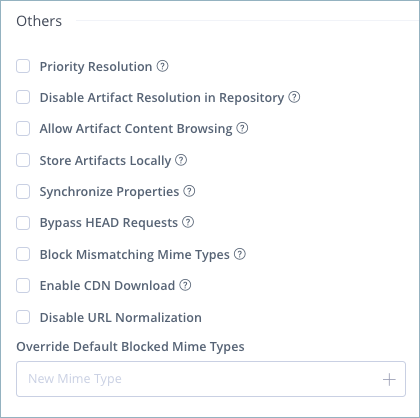
The following advanced settings are common for most package types.
| Field | Description |
|---|---|
| Priority Resolution | Setting Priority Resolution takes precedence over the resolution order when resolving virtual repositories. Setting repositories with priority will cause metadata to be merged only from repositories set with this field. If a package is not found in those repositories, Artifactory will merge metadata from the repositories that have not been set with the Priority Resolution field. Priority Resolution is available for all repository types excluding Chef, CocoaPods, Debian, Git LFS, Opkg, Rust, Vagrant, and VCS repositories. For Docker repositories, Priority Resolution requires the |
| Disable Artifact Resolution in Repository | If set, Artifactory ignores this repository when trying to resolve artifacts. The repository is also not available for download or deployment of artifacts. |
| Allow Artifact Content Browsing | When set, allows Artifactory users to browse the internal contents of archives (for example, browsing specific Javadoc files from within a Javadoc archive).
|
| Store Artifacts Locally | When set, Artifactory artifacts from this repository will be cached locally. If not set, direct repository-to-client streaming is used. This setting is relevant for all package types, except Ansible, Helm OCI, OCI, and Hugging Face.
|
| Synchronize Properties | When set, synchronizes properties of artifacts retrieved from a remote instance of Artifactory. |
| Bypass HEAD Requests | When set, Artifactory will not send a HEAD request to the remote resource before downloading an artifact for caching.
|
| Block Mismatching Mime Types | When set, artifacts will fail to download if a mismatch is detected between the requested and received MIME type, according to a list specified in the You can override this setting by adding MIME types to the override list below.
|
| Enable CDN Download | Enables CDN Download requests to this repository will redirect the client to download the files directly from AWS CloudFront. Supported for Enterprise+ and Enterprise Licenses. For more information, see JFrog Cloud with CDN Distribution.
|
| Disable URL Normalization | When set, prevents URL normalization from occurring. For example, a remote host that redirects to a URL containing double slash symbols as expected behavior should not change "//" to "/".
|
| Override Default Blocked Mime Types | The set of mime types that should override the Block Mismatching Mime Types setting. |
Note
For information about specific settings for particular package types, see Additional Remote Repository Settings for Specific Package Types.
Additional Remote Repository Settings for Specific Package Types
Remote repositories may have additional basic settings depending on the package type, as described in the following topics:
- Additional Settings for Bower Remote Repositories
- Additional Settings for Cargo Remote Repositories
- Additional Settings for CocoaPods Remote Repositories
- Additional Settings for Composer Remote Repositories
- Additional Settings for Conan Remote Repositories
- Additional Settings for Debian Remote Repositories
- Additional Settings for Docker Remote Repositories
- Additional Settings for Generic Remote Repositories
- Additional Settings for Go Remote Repositories
- Additional Settings for Legacy Helm Remote Repositories
- Additional Settings for Helm OCI Remote Repositories
- Additional Settings for Hex Remote Repositories
- Additional Settings for Maven/Gradle/Ivy/SBT Remote Repositories
- Additional Settings for NuGet Remote Repositories
- Additional Settings for Opkg Remote Repositories
- Additional Settings for PyPI Remote Repositories
- Additional Settings for RPM Remote Repositories
- Additional Settings for Swift Remote Repositories
- Additional Settings for Terraform Remote Repositories
- Additional Settings for VCS Remote Repositories
Additional Settings for Bower Remote Repositories
In addition to the basic settings and advanced settings that are common for all remote repositories, the following settings are available when configuring Bower repositories.
| Field | Description |
|---|---|
| Git providers | Select the Git provider to be used by the remote repository:
|
| Registry URL | Defines the base URL of the registry API used by the remote repository. |
Additional Settings for Cargo Remote Repositories
In addition to the basic settings and advanced settings that are common for all remote repositories, the following settings are available when configuring Cargo repositories.
| Field | Description |
|---|---|
| Registry URL | Defines the base URL of the registry API used by the remote repository. |
| Allow anonymous download and search | When selected, the Cargo client does not send credentials when performing download and search for crates. Enable this option to allow anonymous access only to these resources. |
| Enable sparse index support | When selected, enables internal index support based on Cargo sparse index specifications. The legacy Git index is deprecated and no longer supported. |
Additional Settings for CocoaPods Remote Repositories
In addition to the basic settings and advanced settings that are common for all remote repositories, the following settings are available when configuring CocoaPods repositories.
| Field | Description |
|---|---|
| Git provider | Select the Git provider to be used by the remote repository:
|
| Specs Repo URL | Defines the URL of the public CocoaPods Specs repository. This is a git repository containing podspec.json files pointing from a package name and version to its storage endpoint. It does not contain any actual binary packages. The default value is |
| CDN URL | Defines the URL of the CocoaPods CDN, which expedites the workflow by creating a static copy of the CocoaPods Specs repository, reducing the time required for adding repositories. The default is |
| Custom URL Base | A read-only field containing the Custom URL Base defined for the JPD. |
| External Dependencies Enabled | Defines whether to allow pods with source URLs other than Git to be included in the remote repository. |
Additional Settings for Composer Remote Repositories
In addition to the basic settings and advanced settings that are common for all remote repositories, the following settings are available when configuring Composer repositories.
| Field | Description |
|---|---|
| Git providers | Select the Git provider to be used by the remote repository:
|
| Registry URL | Defines the base URL of the registry API used by the remote repository. The default is https://packagist.org. |
Additional Settings for Conan Remote Repositories
In addition to the basic settings and advanced settings that are common for all remote repositories, the following settings are available when configuring Conan repositories.
| Field | Description |
|---|---|
| Force Authentication | Select this option to require the use of basic authentication credentials to use this repository. |
Additional Settings for Debian Remote Repositories
In addition to the basic settings and advanced settings that are common for all remote repositories, the following settings are available when configuring Debian repositories.
| Field | Description |
|---|---|
| List Remote Artifacts | When set, Artifactory lets you navigate the contents of the repository at the remote registry, even if the artifacts have not been cached in this repository. By default, this option is not set. |
| Enable indexing with debug symbols (.ddeb) | When set, it enables the indexing of debug symbols for more efficient debugging. |
Additional Settings for Docker Remote Repositories
In addition to the basic settings and advanced settings that are common for all remote repositories, the following settings are available when configuring Docker repositories.
Additional Basic Settings
| Field | Description |
|---|---|
| Project ID | The unique identifier to use for a Docker project and its associated resources. Use this field to enter your GCR/GAR (Google Container Registry/Google Artifact Registry) project ID to limit the scope of this remote repository to a specific project in your third-party registry. If this field is left blank, remote repositories that support a project ID will default to their default project as set up in your account. |
| Enable Token Authentication | Enables token-based (bearer) authentication. Select this option when you are proxying the Docker Hub (https://registry-1.docker.io/). When replicating from another Artifactory instance with both event-based and scheduled pull replication, keep this option disabled. |
| Block pushing of image manifest v2 schema 1 | When set, Artifactory will block the pushing of Docker images with manifest v2 schema 1 to this repository. |
Additional Advanced Settings
| Field | Description |
|---|---|
| Enable Foreign Layers Caching | When selected, enables Artifactory to download foreign layers to a Docker remote repository. A foreign layer refers to layers within a Docker image that are stored in a different location from the registry from which the image is being pulled. |
| Patterns Allow List | This optional setting allows you to define include patterns (Ant-style path expressions) to match external URLs when trying to download foreign layers. Supported expressions include (, , ?). By default, this field is set to *****, which means that foreign layers may be downloaded from any external source. |
Additional Settings for Generic Remote Repositories
In addition to the basic settings and advanced settings that are common for all remote repositories, the following settings are available when configuring Generic repositories.
Additional Basic Settings
| Field | Description |
|---|---|
| List Remote Artifacts | When set, Artifactory lets you navigate the contents of the repository at the remote registry, even if the artifacts have not been cached in this repository. By default, this option is not set. |
Additional Advanced Settings
| Field | Description |
|---|---|
| Propagate Query Params | When set, any query parameters included in the request to Artifactory are passed on to the remote repository. |
| Retrieve SHA256 from Remote Server | When set, Artifactory retrieves the SHA256 from the remote server if it is not cached in the remote repository. The Retrieve SHA256 from Remote Server option allows you to download the SHA256 checksum for an artifact before it is cached in Artifactory. This is particularly useful for tools that try to fetch the SHA256 before downloading the package, which can result in a 404 error. By enabling this feature, you ensure that Artifactory retrieves the checksum first, generates it upon file download, and serves it as normal. |
Additional Settings for Go Remote Repositories
In addition to the basic settings and advanced settings that are common for all remote repositories, the following settings are available when configuring Go repositories.
| Field | Description |
|---|---|
| Git provider | Select the Git provider to be used by the remote repository:
|
Additional Settings for Helm OCI Remote Repositories
In addition to the basic settings and advanced settings that are common for all remote repositories, the following settings are available when configuring Helm OCI repositories.
Additional Basic Settings
| Field | Description |
|---|---|
| Enable Token Authentication | When set, token-based (bearer) authentication is enabled. |
Additional Advanced Settings
| Field | Description |
|---|---|
| Enable Foreign Layers Caching | When selected, enables Artifactory to download foreign layers to a Helm OCI remote repository. |
| Patterns Allow List | This optional setting allows you to define include patterns (Ant-style path expressions) to match external URLs when trying to download foreign layers. Supported expressions include (, , ?). By default, this field is set to *****, which means that foreign layers may be downloaded from any external source. |
Additional Settings for Legacy Helm Remote Repositories
In addition to the basic settings and advanced settings that are common for all remote repositories, the following settings are available when configuring legacy Helm repositories.
Additional Basic Settings
| Field | Description |
|---|---|
| Charts Base URL | Updates the index.yaml file with the corresponding path where the charts are located on the remote repository. When the Helm client fetches the artifacts, it will fetch them through Artifactory. This field must contain the base path where the charts/tgz files are present. Use this option when the Helm charts and the index.yaml are stored in different locations. For example, if the remote registry is: https://fluxcd-community.github.io/helm-charts But the charts are stored in: https://github.com/fluxcd-community/helm-charts/releases/download Enter the chart path in this field. For more information about this option, see the Knowledge Base article, ARTIFACTORY: How to configure the "Charts Base URL" in a Helm repository. |
Additional Advanced Settings
| Field | Description |
|---|---|
| Enable Dependency Rewrite | When selected, enables the specification of a "safe" Allow List from which dependencies may be downloaded, cached in Artifactory, and configured to rewrite the dependencies so that the Helm client accesses dependencies through a remote repository. |
| Patterns Allow List | An Allow List of Ant-style path expressions that specify where external dependencies may be downloaded from. By default, this is set to For example, if you limit the Patterns Allow List to |
Additional Settings for Hex Remote Repositories
In addition to the basic settings that are common for all remote repositories, the following settings are available when configuring Hex repositories.
| Field | Description |
|---|---|
| Public Key | Contains the public key used when downloading packages from the Hex remote registry (public, private, or self-hosted Hex server). |
| Select Key Pair | Select the RSA key pair to sign and encrypt content for secure communication between Artifactory and the Mix client. |
Additional Settings for Maven/Gradle/Ivy/sbt Remote Repositories
In addition to the basic settings that are common for all remote repositories, there are specific settings for the following package types:
| Field | Description |
|---|---|
| List Remote Artifacts | [Maven only] When set, Artifactory lets you navigate the contents of the repository at the remote registry, even if the artifacts have not been cached in this repository. By default, this option is not set. |
| Checksum Policy | Checking the Checksum effectively verifies the integrity of a deployed resource. The Checksum Policy determines how Artifactory behaves when a client checksum for a remote resource is missing or conflicts with the locally calculated checksum. There are four options:
|
| Max Unique Snapshots | Specifies the maximum number of unique snapshots of the same artifact that should be stored. Once this number is reached and a new snapshot is uploaded, the oldest stored snapshot is removed automatically. A value of 0 (default) indicates that there is no limit on the number of unique snapshots. |
| Eagerly Fetch Jars | When set, if a POM is requested, Artifactory attempts to fetch the corresponding jar in the background. This will accelerate first access time to the jar when it is subsequently requested. |
| Suppress POM Consistency Checks | By default, Artifactory keeps your repositories healthy by refusing POMs with incorrect coordinates (path). If the You can disable this behavior by setting the Suppress POM Consistency checkbox. |
| Eagerly Fetch Sources | When set, if a binaries jar is requested, Artifactory attempts to fetch the corresponding source jar in the background. This will accelerate the initial access time to the source jar when it is subsequently requested. |
| Handle Releases | When enabled, you can deploy or cache release artifacts into this repository. |
| Handle Snapshots | When enabled, you can deploy or cache snapshot artifacts into this repository. |
Additional Settings for NuGet Remote Repositories
In addition to the basic settings and advanced settings that are common for all remote repositories, the following settings are available when configuring NuGet repositories.
| Field | Description |
|---|---|
| NuGet Download Context Path | Defines the context path prefix through which NuGet downloads are served. For example, the NuGet Gallery download URL is |
| NuGet Feed Context Path | Defines the context path prefix for the NuGet feed. The default value is api/v2. |
| NuGet v3 Feed URL | Defines the URL for the NuGet v3 feed. For example, the feed URL for the official nuget.org repository is (also the default value): https://api.nuget.org/v3/index.json |
| NuGet Symbol Server URL | Defines the URL for the NuGet Symbol Server, which is the central repository for symbol packages used for debugging purposes. The default is https://symbols.nuget.org/download/symbols. |
| Force Authentication | Select this option to require the use of basic authentication credentials to use this repository. |
| Enforce Layout | When selected, the repository will not allow duplicate package versions according to the NuGet version normalization rules. This ensures your NuGet repositories align with the NuGet upstream registry. |
Additional Settings for Opkg Remote Repositories
In addition to the basic settings and advanced settings that are common for all remote repositories, the following settings are available when configuring Opkg repositories.
| Field | Description |
|---|---|
| List Remote Artifacts | When set, Artifactory lets you navigate the contents of the repository at the remote registry, even if the artifacts have not been cached in this repository. By default, this option is not set. |
Additional Settings for P2 Remote Repositories
In addition to the basic settings and advanced settings that are common for all remote repositories, the following settings are available when configuring P2 repositories.
| Field | Description |
|---|---|
| List Remote Folder Items | When set, lists the items of remote folders when browsing (simple and list browsing). This setting is required for dynamic resolution that depends on remote folder content information. The remote content is cached according to the value of the Metadata Retrieval Cache Period. |
Additional Settings for PyPI Remote Repositories
In addition to the basic settings and advanced settings that are common for all remote repositories, the following settings are available when configuring PyPI repositories.
| Field | Description |
|---|---|
| Registry URL | Defines the base URL of the registry API used by the remote repository. |
| Registry Suffix | Defines the suffix appended to the end of the PyPI base URL. It is usually defined with the default value 'simple' (corresponding to https://pypi.org/simple/). Define a different value if the remote registry is a PyPI server that has a custom registry suffix (for example, +simple in DevPI). |
Additional Settings for RPM Remote Repositories
In addition to the basic settings and advanced settings that are common for all remote repositories, the following settings are available when configuring RPM repositories.
| Field | Description |
|---|---|
| List Remote Artifacts | When set, Artifactory lets you navigate the contents of the repository at the remote registry, even if the artifacts have not been cached in this repository. By default, this option is not set. |
Additional Settings for Swift Remote Repositories
In addition to the basic settings and advanced settings that are common for all remote repositories, the following settings are available when configuring Swift repositories.
| Field | Description |
|---|---|
| External Dependencies Enabled | When set, allows external dependencies to be included in the remote repository. |
| External Dependencies Patterns | This optional setting allows you to define include patterns (Ant-style path expressions) to match those external dependencies to include in the remote repository. |
Additional Settings for Terraform Remote Repositories
In addition to the basic settings and advanced settings that are common for all remote repositories, the following settings are available when configuring Terraform repositories.
| Field | Description |
|---|---|
| Git providers | Select the Git provider to be used by the remote repository:
|
| Registry URL | Defines the base URL of the registry API used by the remote repository. |
| Providers URL | Defines the base URL of the provider's storage API used by the remote repository. The default is https://releases.hashicorp.com. |
Additional Settings for VCS Remote Repositories
In addition to the basic settings and advanced settings that are common for all remote repositories, the following settings are available when configuring VCS repositories.
| Field | Description |
|---|---|
| Git providers | Select the Git provider to be used by the remote repository:
|
| Max Unique Snapshots | Defines the maximum number of unique snapshots of a single artifact to store. Once the number of snapshots exceeds this setting, older versions are removed. A value of 0 (default) indicates there is no limit, and unique snapshots are not cleaned up. |
Browse Remote Repositories
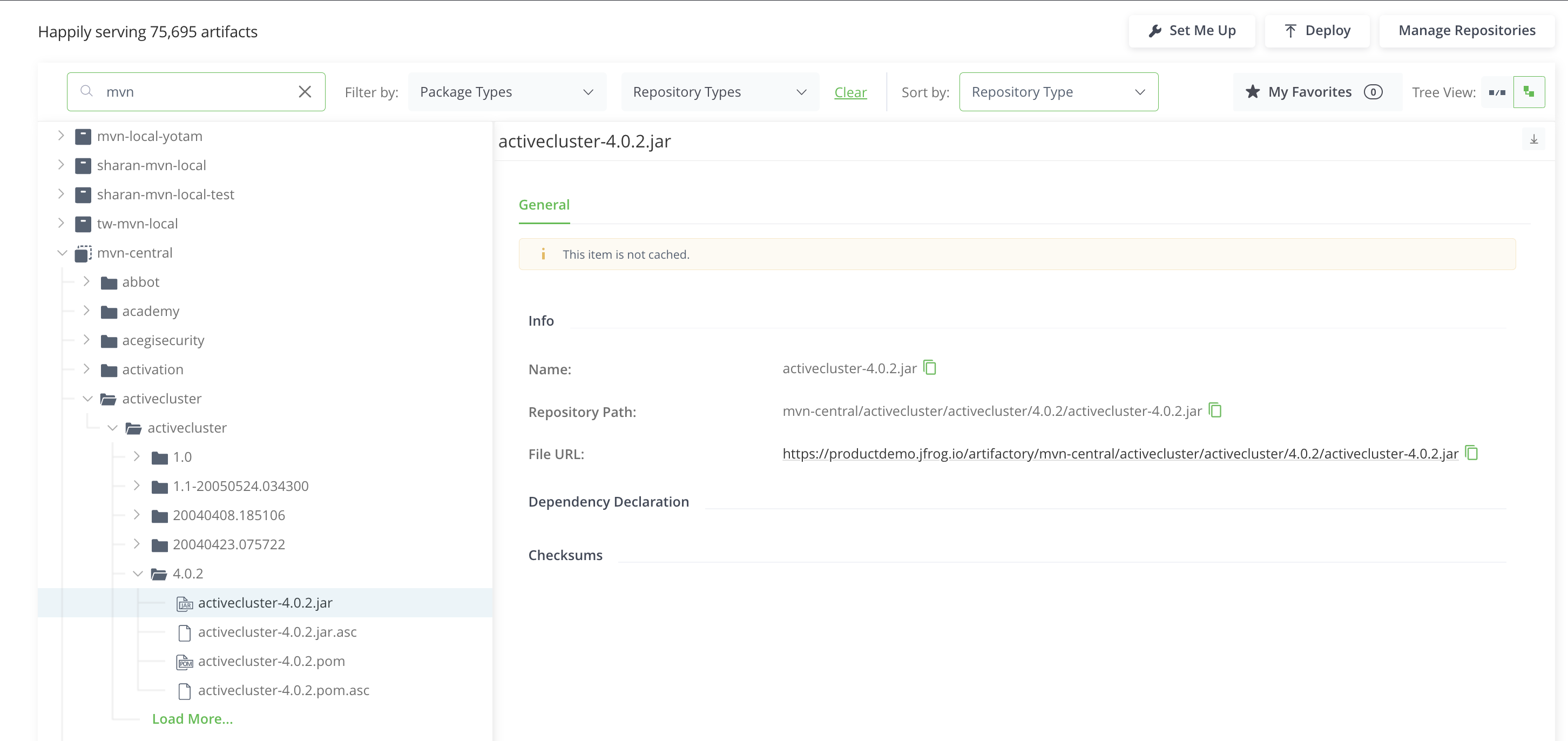
In some cases, the remote resource for which Artifactory serves as a proxy supports remote browsing. In these cases, you can browse the contents of these repositories directly from the UI.
For example, Maven Central supports remote repository browsing, while Docker Hub does not. The following image shows the contents of Maven Central.
Note
The package displayed above is not cached, meaning that this package exists in Maven Central but is not yet in Artifactory since there have been no requests for this package when resolving dependencies through this repository.
Handling Offline Scenarios
Artifactory supports offline repository management at two levels:
- Single Repository: One or more specific remote repositories need to be offline.
- Global: The whole organization is disconnected from remote repositories
Single Repository Offline
If a remote repository goes offline for any reason, you can configure Artifactory to ignore it by selecting the Offline checkbox. In this case, only artifacts from this repository that are already present in the cache are used. No further attempt will be made to fetch remote artifacts.
Global Offline Mode
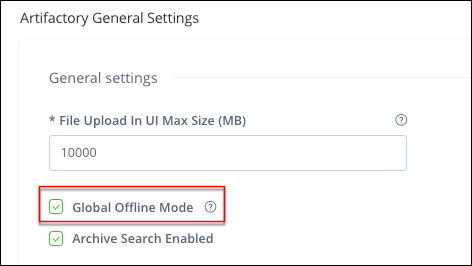
Global Offline Mode is common in organizations that require a separate, secured network and are disconnected from the rest of the world (for example, military or financial institutions).
In this case, remote repositories serve as caches only and do not proxy remote artifacts.
You can enable Global Offline Mode by setting the corresponding checkbox in the Administration module under Artifactory Settings > General Settings.
Frequently Asked Questions
This section provides answers to frequently asked questions.
FAQs
Q: How do I configure a remote repository in Artifactory?
A: In the Administration module, go to Repositories, create a Remote repository, and complete the Basic tab. You can also set Advanced and Replications options before you click Create Remote Repository. For more information, see Configure a Remote Repository.
Q: What is the difference between a remote repository proxy and a mirror?
A: A remote repository in Artifactory is a caching proxy. Artifacts are fetched and stored on demand when a client requests them, and they are not pre-fetched like a mirror.
Q: What happens if I end a remote repository name with -cache?
-cache?A: You can't end a remote repository name with -cache because Artifactory automatically appends -cache to the internal cache repository. Use a name such as dockerhub-remote instead. For more information, see Remote Repository Naming Strategies.
Q: What do I need before artifacts can be cached in a remote repository?
A: You need a reachable remote URL that uses HTTP or HTTPS, and you must create the remote repository with the matching package type. You can remove cached artifacts, but you can't deploy a new artifact into a remote repository. For more information, see Basic Settings for Remote Repositories.
Q: Can I browse a remote repository from the Artifactory UI?
A: You can browse remotes that support remote browsing, such as Maven Central. Docker Hub does not support remote browsing. For more information, see Browse Remote Repositories.
Related Topics
Updated 23 days ago