

Configure Cloudflare Gateway for PTC
Configure Cloudflare Gateway to redirect package traffic to Artifactory for PTC.
Cloudflare Gateway Configuration Guide
Cloudflare Gateway is one of the SASE providers supported by Package Traffic Controller (PTC). Cloudflare Gateway TLS-inspects matching public registry traffic and redirects it to your Artifactory /artifactory/api/package-reroute endpoint, so policy checks and logging happen in one governed path. Cloudflare owns the Gateway portal navigation and labels, which can vary by account and release. Use this as a workflow guide and confirm exact options in Cloudflare's documentation.
Complete Artifactory and workstation setup before activating Gateway policies. See Configure Artifactory for PTC and Configure Workstation for PTC. For the correct deployment sequence, see Deployment Sequence.
- Step 1 — Enable TLS Inspection
- Step 2 — Create a Firewall Policy for npm
- Step 3 — Create a Firewall Policy for PyPI
- Verify End-to-End
Prerequisites
Before you configure Cloudflare Gateway for PTC:
- Create a Cloudflare One user with a valid email address under Team & Resources > Users (URL path:
/one/team-resources/users). - Install the Cloudflare One Client on developer workstations. Download from Cloudflare One Client download.
- Install the Cloudflare certificate on each workstation. The certificate name and installation path differ per operating system. Follow Cloudflare's guide for automated certificate deployment.
- Configure Artifactory for PTC — complete Configure Artifactory for PTC before activating any Gateway redirect rules.
Step 1 — Enable TLS Inspection
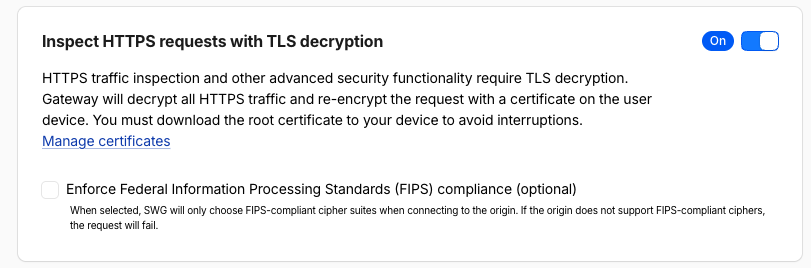
Cloudflare Gateway must decrypt HTTPS traffic to apply redirect rules to package manager requests.
To enable TLS inspection:
Navigate to:
https://dash.cloudflare.com/<ACCOUNT_ID>/one/traffic-policies/traffic-settingsWhere:
<ACCOUNT_ID>: Your Cloudflare account ID, visible in the Cloudflare dashboard URL.
Enable Inspect HTTPS requests with TLS decryption.
Note
Make sure the required package registry traffic is not bypassed in your firewall policies, as some policies may bypass inspection by default.
Step 2 — Create a Firewall Policy for npm
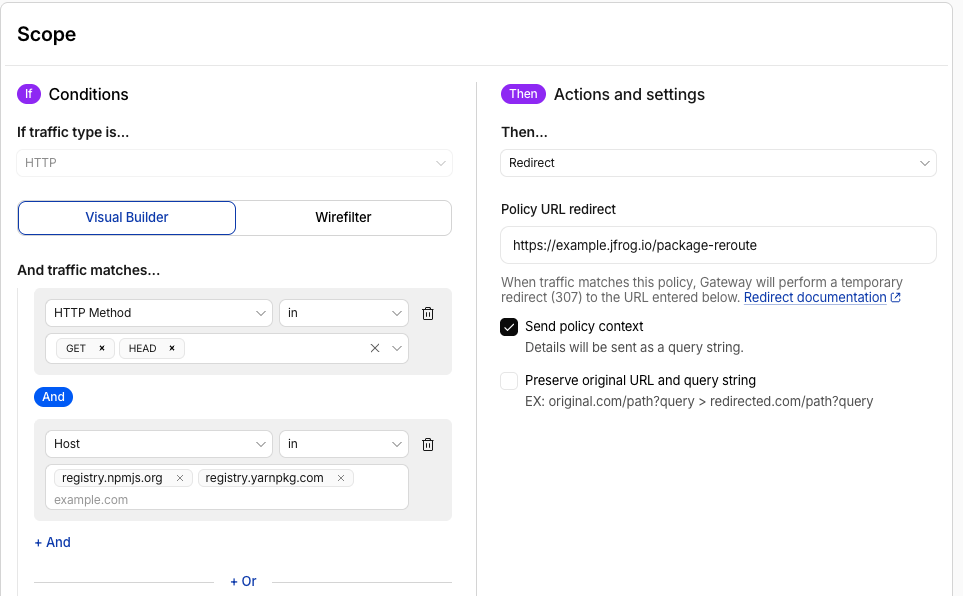
Create a Cloudflare Gateway firewall policy that intercepts npm registry traffic and redirects it to Artifactory.
To create the npm redirect policy:
Navigate to Traffic policies > Firewall policies > Add a policy and configure the following.
Conditions:
| Field | Operator | Value |
|---|---|---|
| Traffic type | is | HTTP |
| HTTP Method | in | GET, HEAD |
| Host | in | registry.npmjs.org, registry.yarnpkg.com |
Important — exclude POST: Do not include POST in the HTTP Method condition. Commands like
npm auditsend POST requests to the registry. Including POST breaks those commands.
Actions and settings:
| Field | Value |
|---|---|
| Then | Redirect |
| Policy URL redirect | https://<YOUR_ARTIFACTORY_URL>/artifactory/api/package-reroute |
Enable Send policy context. Details are sent as a query string to Artifactory.
Step 3 — Create a Firewall Policy for PyPI
PyPI requires special handling because pypi.org hosts both the package index and the PyPI web UI. Redirecting all traffic to pypi.org would break the web UI. The policy must restrict the redirect to the package index URL paths only.
To create the PyPI redirect policy:
Navigate to Traffic policies > Firewall policies > Add a policy and configure the following. Use either Method 1 (Visual Builder) or Method 2 (Wirefilter). They are equivalent.
Method 1 — Visual Builder
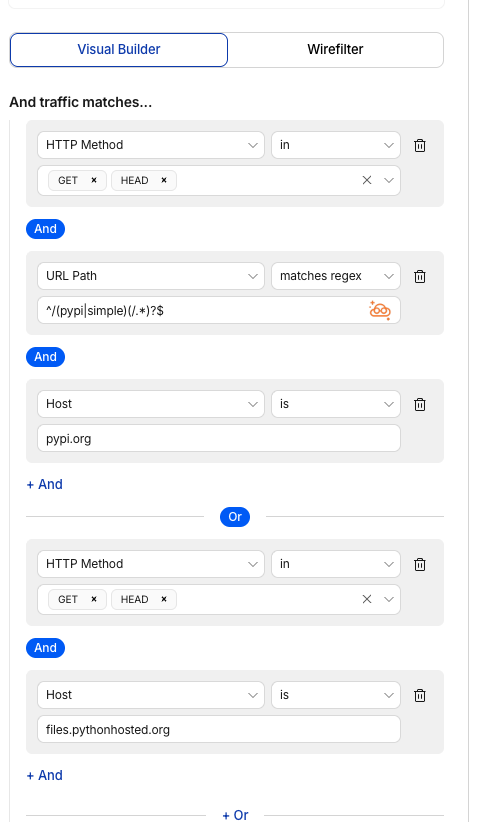
Configure two condition groups connected by Or:
Group 1 — pypi.org package index paths:
| Field | Operator | Value |
|---|---|---|
| Traffic type | is | HTTP |
| HTTP Method | in | GET, HEAD |
| URL Path | matches regex | ^/(pypi|simple)(/.*)?$ |
| Host | is | pypi.org |
Or
Group 2 — Python package files:
| Field | Operator | Value |
|---|---|---|
| Traffic type | is | HTTP |
| HTTP Method | in | GET, HEAD |
| Host | is | files.pythonhosted.org |
Method 2 — Wirefilter
Switch to the Wirefilter tab and enter:
(
  http.request.method in {"GET" "HEAD"} and
  http.request.uri.path matches "^/(pypi|simple)(/.*)?$" and
  http.request.host == "pypi.org"
)
or
(
  http.request.method in {"GET" "HEAD"} and
  http.request.host == "files.pythonhosted.org"
)
Actions and settings (for both methods):
| Field | Value |
|---|---|
| Then | Redirect |
| Policy URL redirect | https://<YOUR_ARTIFACTORY_URL>/artifactory/api/package-reroute |
Note
Hugging Face: If you redirect Hugging Face traffic through PTC, create a separate firewall policy for
huggingface.cothat uses GET only — do not includeHEAD. Hugging Face requires GET-only routing across all SASE providers, including Cloudflare Gateway. See Docker, Hugging Face, and Other Types for Hugging Face setup details.
Verify End-to-End
After activating the Cloudflare Gateway redirect policies from Steps 2 and 3, make sure the Cloudflare One Client is running on the test workstation.
To verify end-to-end connectivity:
Run a test install with verbose logging:
npm install express --loglevel verboseIn the verbose output, look for GET requests going to your Artifactory hostname instead of registry.npmjs.org. You should see a line like:
npm http fetch GET 200 https://<YOUR_ARTIFACTORY_URL>/artifactory/api/npm/<REPO_KEY>/express 350msWhere:
<YOUR_ARTIFACTORY_URL>: Your JFrog Platform URL (for example,acme.jfrog.io).<REPO_KEY>: The name of your npm remote repository in Artifactory.
If you see your Artifactory hostname in the output, PTC is working. Cloudflare Gateway intercepted the request and rerouted it through Artifactory.
Troubleshooting
SSL Error During npm Install
The Cloudflare certificate is not trusted. Check:
- The Cloudflare certificate is installed on the workstation (see Prerequisites).
- The
NODE_EXTRA_CA_CERTSenvironment variable points to the correct certificate file (if you set it manually). - The Cloudflare One Client is connected and TLS decryption is enabled.
Artifactory Hostname Not Appearing in Verbose Output
The request was not rerouted. Check:
- The Cloudflare One Client is connected and signed in.
- The firewall redirect policy is active and includes the correct registry hostnames.
- The policy HTTP Method condition includes GET and HEAD (not POST).
- Artifactory has been configured with the Package Reroute Config API for the relevant package type.
The npm Install Was Rerouted But Curation Blocked the Package
This is expected behavior when a JFrog Curation policy violation is detected. Check your Curation policy in Artifactory under Curation > Audit to understand why the package was blocked.
Frequently Asked Questions
This section provides answers to frequently asked questions.
FAQs
Q: How do I create a firewall policy in Cloudflare Gateway for PTC?
A: Navigate to Traffic policies > Firewall policies > Add a policy, set traffic type to HTTP, add GET and HEAD as HTTP methods, specify the registry hostnames (such as registry.npmjs.org), and set the redirect URL to your Artifactory /artifactory/api/package-reroute endpoint. See Step 2 — Create a Firewall Policy for npm for the full procedure.
Q: What happens if I include POST in the HTTP Method condition?
A: Including POST breaks commands like npm audit, which use POST to communicate with the registry. Configure your HTTP Method condition to include only GET and HEAD. See Step 2 — Create a Firewall Policy for npm for details.
Q: What is the difference between the Visual Builder and Wirefilter methods for PyPI?
A: Both methods produce an identical redirect policy. Visual Builder uses dropdown fields to configure condition groups, while Wirefilter accepts a raw filter expression. Use whichever your team prefers. See Step 3 — Create a Firewall Policy for PyPI for both approaches.
Q: What do I need to configure before activating Cloudflare Gateway redirect rules?
A: Complete three steps first: create a Cloudflare One user, install the Cloudflare One Client and certificate on workstations, and configure Artifactory for PTC using the Package Reroute Config API. See Prerequisites and Configure Artifactory for PTC.
Q: Does the Cloudflare Gateway redirect work for all package types supported by PTC?
A: You can create a separate firewall policy for each supported package type. This guide covers npm and PyPI. For Docker, Hugging Face, and other supported ecosystems, see Configuration by Package Type.
Q: How do I restrict unauthenticated PTC repository access on JFrog Cloud?
A: Use the MyJFrog IP/CIDR allowlist to accept inbound traffic only from your SASE provider's public egress ranges. See Restrict PTC Traffic to SASE Provider Egress.
Related Topics
Updated 23 days ago