

Scan Types
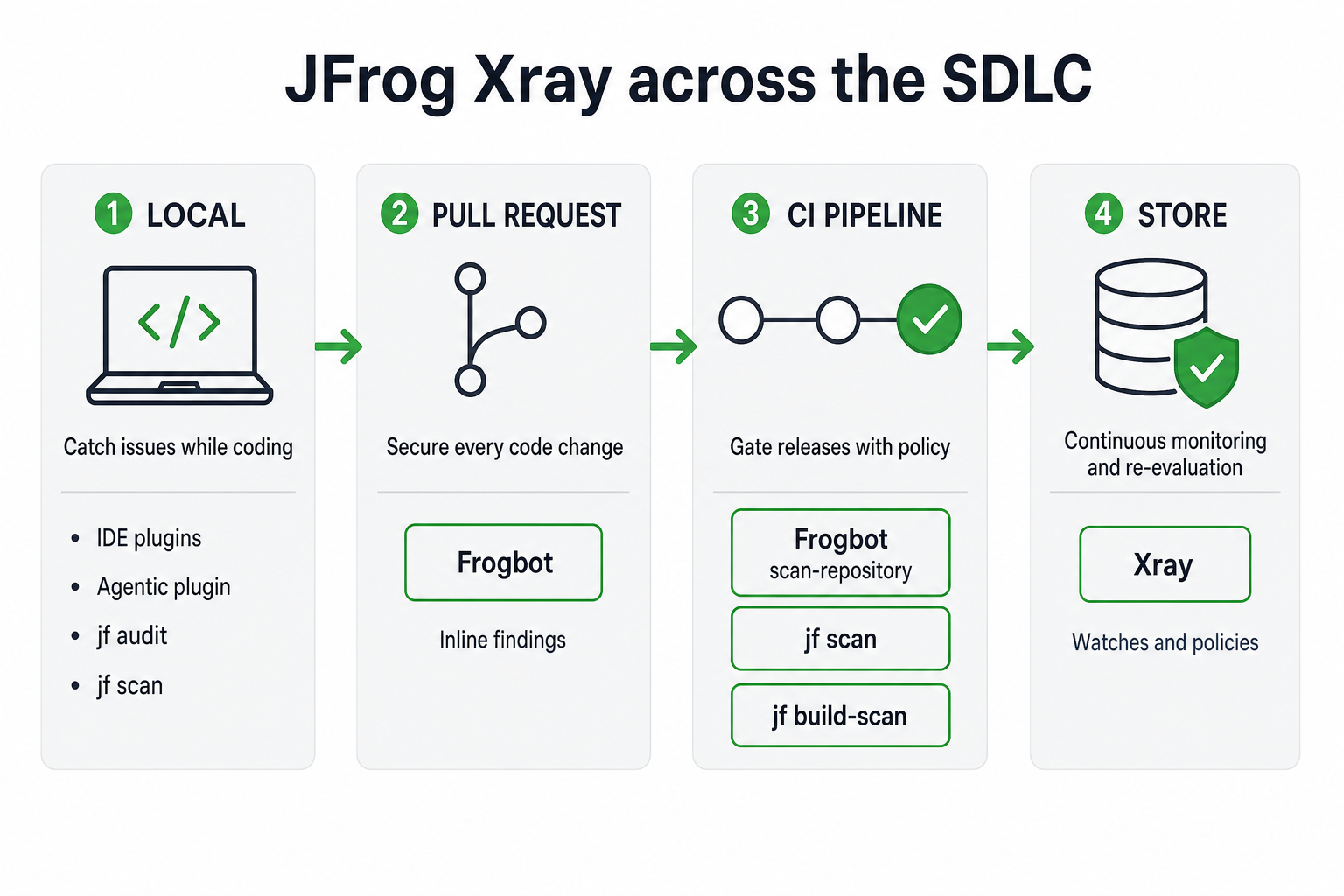
JFrog Xray can scan software at different points in the software development lifecycle. The methods differ in what they scan, where the scan runs, and when results become available. Each approach targets a different stage and artifact type, ensuring full coverage from source code to deployed binaries.
Local Scanning
Local scanning gives developers early feedback in an IDE, with the Agentic plugin, or with JFrog CLI, before changes reach a pull request or shared pipeline. Catching issues at this stage makes fixes faster and cheaper.
You can scan:
- Source and manifests with IDE plugins, the Agentic plugin, or
jf audit. - Local binaries in the CLI, with
jf scanorjf docker scan.
CLI results appear in the terminal and in the JFrog Platform On-Demand Scans pane. IDE and Agentic plugin results appear in the editor.
Source Code Scanning in Pull Requests
Frogbot scans source code files and dependency manifests on pull requests and merge requests. This keeps newly introduced risk out of the main branch and provides more security context for reviewers.
Frogbot posts results as pull request comments and uploads them to the JFrog Platform. For setup details, see Scanning Commits and Pull Requests.
CI Scanning
CI scanning runs security checks in an automated pipeline, so only builds that meet your policies move forward.
Warning
Don't use
jf auditfor CI scanning. Use Frogbot instead.
You can scan:
- Source code and manifests with a Frogbot repository scan (
frogbot scan-repository) before the build. Frogbot can fail the pipeline when issues are found. - Binaries or container images built in the pipeline with
jf scanorjf docker scan, before you upload them to Artifactory. - Published builds with
jf build-scan.
Results appear in your CI logs and in the JFrog Platform. For setup details, see CI/CD Integration with Xray and Scanning Commits and Pull Requests.
Binary Scanning in Artifactory
Binary scanning analyzes packaged artifacts and SBOMs in storage. After you index a repository, Impact Analysis continuously monitors and re-evaluates uploaded or cached artifacts as new threats and policy changes emerge. To scan an SBOM file such as CycloneDX or SPDX, import it to Xray.
This continuous monitoring is what keeps published software protected over time. When a new vulnerability is disclosed or a policy changes, Impact Analysis re-evaluates indexed artifacts, creates or removes violations as needed, and runs the related policy actions such as opening a Jira ticket or blocking downloads. Use Impact Search to see which resources are affected, so teams can prioritize remediation. JFrog designed this model to operate at the scale of millions of artifacts, so large organizations can keep monitoring and re-evaluating without re-scanning everything from scratch.
It can detect vulnerabilities, malicious packages, license issues, and operational risks. Watches and policies can alert, block downloads, or fail builds.
Frequently Asked Questions
These questions cover where each scan type fits in the SDLC and how teams typically use them together.
FAQs
Q: What are the recommended methods for integrating Xray into CI/CD pipelines?
A: Use a Frogbot repository scan (frogbot scan-repository) for source code and manifests before the build, jf scan or jf docker scan for binaries or container images before upload, and jf build-scan for published builds. For setup details, see CI/CD Integration with Xray and Scanning Commits and Pull Requests.
Q: At what stage in the pipeline should we scan source code versus built artifacts?
A: Scan source code and manifests as early as possible: locally with IDE plugins or jf audit, on pull requests with Frogbot, and again in CI with a Frogbot repository scan before the build. Scan binaries or container images built in the pipeline with jf scan or jf docker scan before upload. Scan published builds with jf build-scan, then rely on Impact Analysis for continuous monitoring in Artifactory after artifacts are stored.
Q: How do we enforce security gates and automatically fail builds on policy violations?
A: In CI, Frogbot can fail the pipeline when issues are found, and jf build-scan can fail the build based on Xray watches and policies. In Artifactory, watches and policies can alert, block downloads, fail builds, or run other actions such as opening a Jira ticket.
Q: How can we automatically generate and scan SBOMs within our automation pipelines?
A: After Xray has scanned a component, generate an SBOM in your pipeline with the Export Component Details API (cyclonedx or spdx). To bring an externally generated SBOM into Xray, import it by uploading CycloneDX or SPDX files to an indexed generic repository. To add Xray vulnerability and license data to an external SBOM with the CLI, use jf sbom-enrich.
Q: Do I need to re-scan my artifacts every time a new vulnerability is disclosed?
A: No. After you index a repository, Impact Analysis continuously monitors and re-evaluates uploaded or cached artifacts as new threats and policy changes emerge. It creates or removes violations as needed and runs related policy actions. Use Impact Search to see which resources are affected.
Q: How does Frogbot differ from standard JFrog CLI scanning?
A: Frogbot runs on Git events such as pull requests and repository (commit) scans in CI. It posts pull request comments and uploads results to the JFrog Platform. Don't use jf audit for CI scanning. Use Frogbot instead. jf audit supports local, on-demand source scanning. jf scan and jf docker scan can run locally or in CI on binaries and images. Use jf build-scan in CI for published builds.
Q: What are the best practices for scaling Xray pipeline integration across multiple teams and repositories?
A: Standardize on Frogbot for source scanning in pull requests and CI, and on jf build-scan for published builds. Index the Artifactory repositories that store your artifacts and SBOMs, then apply shared watches and policies so violations and actions stay consistent. Use Impact Search to prioritize remediation when new vulnerabilities appear.
Additional Information
Updated 18 days ago