

Configure Netskope for PTC
Configure Netskope destination profiles, HTTP header profiles, and real-time protection policies to send package traffic to Artifactory for Package Traffic Controller (PTC).
Netskope Configuration Guide
Netskope is one of the SASE providers supported by Package Traffic Controller (PTC). Netskope SSL-inspects matching public registry traffic and redirects it to your Artifactory /artifactory/api/package-reroute endpoint, so policy checks and logging happen in one governed path. Netskope owns the Security Cloud portal navigation and labels, which can vary by tenant and release—use this as a workflow guide and confirm exact options in Netskope's documentation.
Complete Configure Artifactory for PTC before proceeding. For the choose-your-vendor list and shared registry hostname reference, see Supported Security Edges and Public Registry Hostnames.
All Netskope configuration is performed in the Netskope Security Cloud portal under Policies → Profiles and Policies → Real-time Protection.
Netskope Requirements
- Netskope client: Install the Netskope client on each developer workstation. On macOS, allow Full Disk Access and enable the Endpoint Security Extensions for Netskope.
- Certificate: The Netskope client installs its CA certificate (
certadmin). Some Python-based clients require a certificate that includes the requiredcriticalextensions—see Known Limitations. - Workstation trust and install-script requirements are shared across SASE; see Configure Workstation for PTC.
The integration uses three groups of objects in the Netskope Security Cloud, configured in this order:
- Two Destination Profiles — one for the registries that support both
GETandHEAD, and a separate one forhuggingface.co(which is restricted toGETonly). This GET-only requirement for Hugging Face applies to all SASE providers, not just Netskope — always create a separate redirect rule/policy forhuggingface.cousing GET only. - Three HTTP Header Profiles — one to match browsers (so browser visits to registry websites pass through), one for
GET/HEADpackage-manager traffic, and one forGET-only traffic to Hugging Face. - Three Real-time Protection policies — an Allow rule for browsers, then two Redirect rules that send package-manager traffic to Artifactory.
Complete the following procedures in order (after Configure Artifactory for PTC):
- Step 1: Create Destination Profiles
- Step 2: Create HTTP Header Profiles
- Step 3: Create Real-time Protection Policies
Step 1: Create Destination Profiles
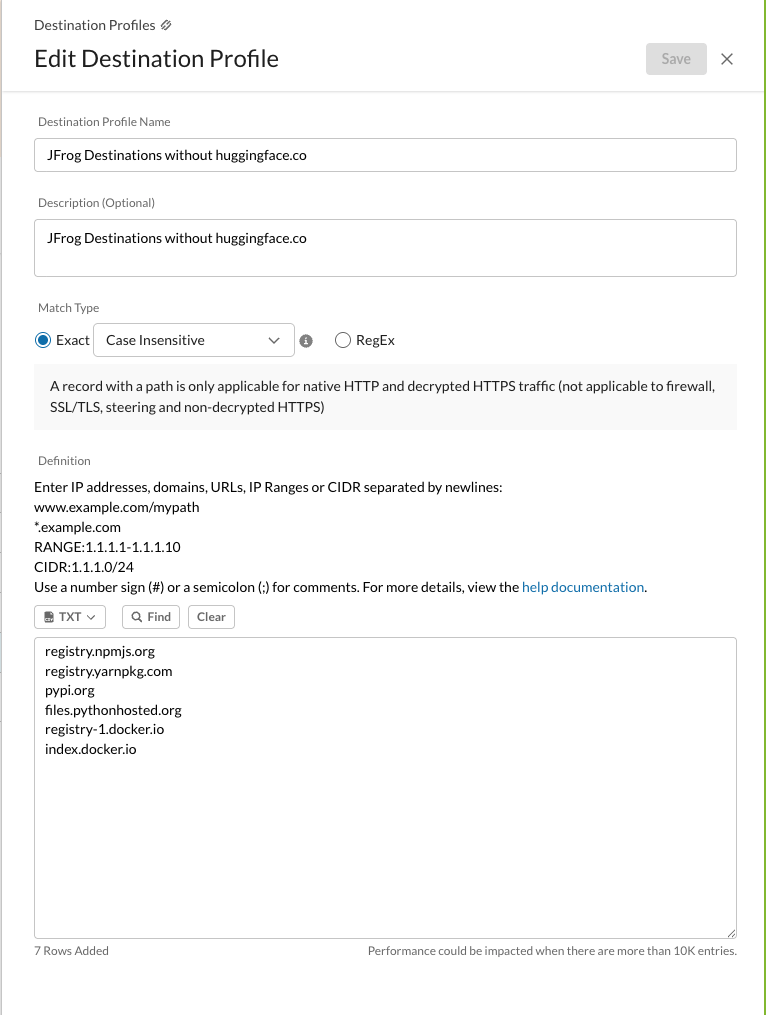
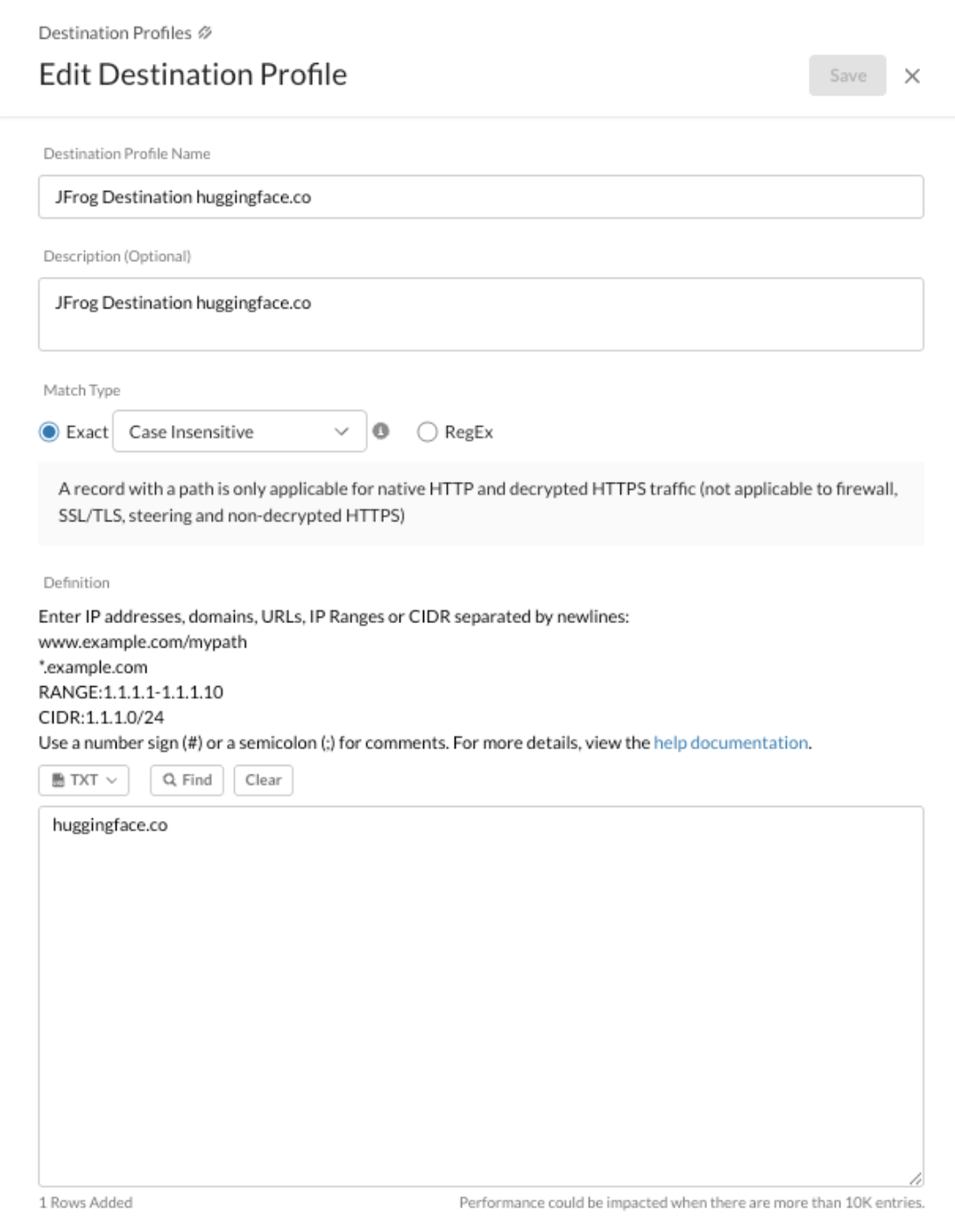
Create two destination profiles. Hugging Face is separated from the other registries because it is redirected with GET only, while the other registries support both GET and HEAD.
To create a destination profile, navigate to Policies > Profiles > Destination > New Destination Profile and enter a descriptive name, the match type (Exact, Case Insensitive), and the registry domains.
1a Profile Without Hugging Face
Add the registry domains for every package type you enable except huggingface.co:
| Ecosystem | Domains |
|---|---|
| npm | registry.npmjs.org, registry.yarnpkg.com |
| Python (PyPI) | pypi.org, files.pythonhosted.org |
| Docker | registry-1.docker.io, index.docker.io |
| Maven | repo1.maven.org, repo.maven.apache.org |
1b Profile for Hugging Face
Create a separate destination profile that contains only huggingface.co.
Step 2: Create HTTP Header Profiles
Create three HTTP header profiles. Together they let browser traffic pass through to the registry websites and redirect package-manager traffic to Artifactory, with the correct method set per destination.
To create an HTTP header profile, navigate to Policies > Profiles > HTTP Header > New HTTP Header Profile and configure the fields below on the Request tab.
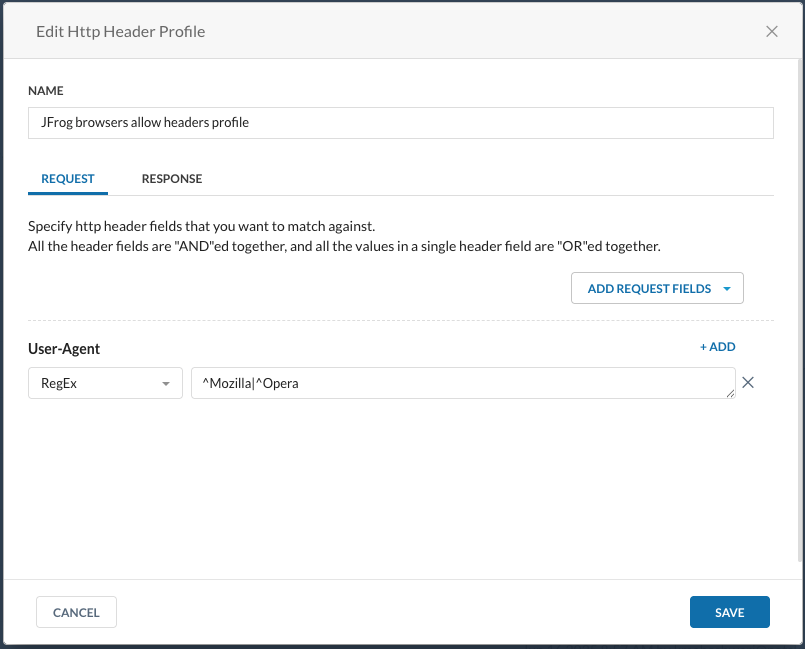
2a Browser Allow
Matches browser traffic so it can pass through to the registry website (instead of being redirected).
- Remove Hosts and Methods.
- Add Request Field > User-Agent.
- Match Type: RegEx.
- Value:
^Mozilla|^Opera
2b PTC GET and HEAD
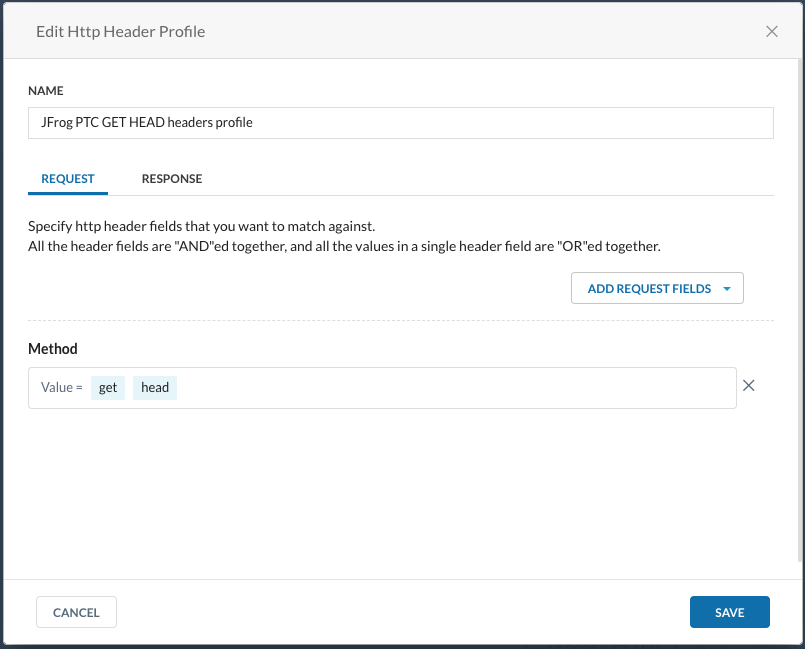
Matches the methods used by package managers against the non–Hugging Face registries.
- Remove Hosts.
- Methods: select GET and HEAD.
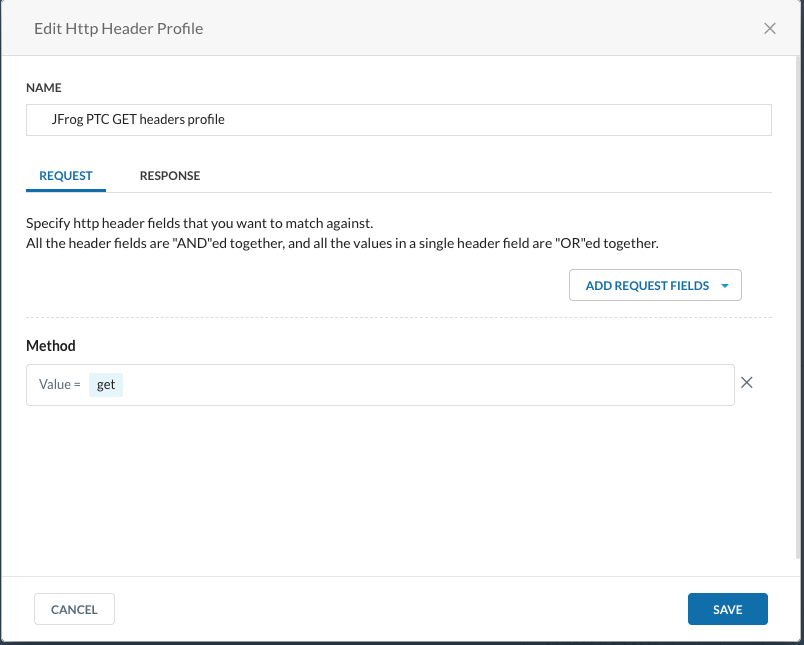
2c PTC GET Only
Matches the method used by package managers against Hugging Face.
- Remove Hosts.
- Methods: select GET only.
Step 3: Create Real-time Protection Policies
Create three Web Access policies in this order. Order matters: Netskope evaluates policies top to bottom, so the Browser Allow rule must sit above the redirect rules.
To create a policy, navigate to Policies > Real-time Protection > New Policy > Web Access.
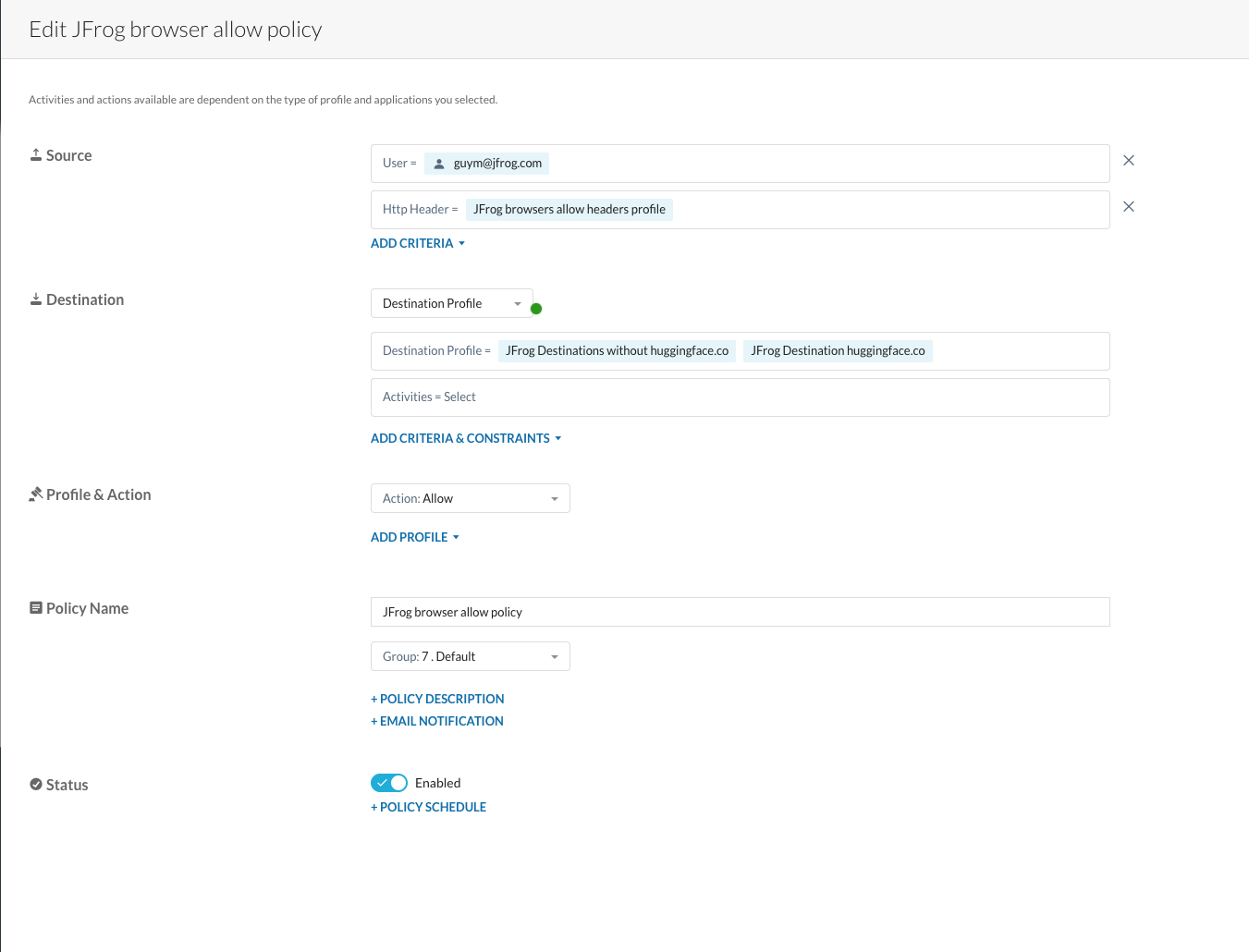
3a Browser Allow
Lets browser visits to the registry websites pass through (no redirect).
- Source > Add Criteria > HTTP Header: select the Browser Allow profile from 2a.
- Destination > Destination Profile: select both 1a (without Hugging Face) and 1b (Hugging Face only).
- Profile & Action: Allow.
- Save with the rule placed at the highest position possible.
3b Redirect Without Hugging Face
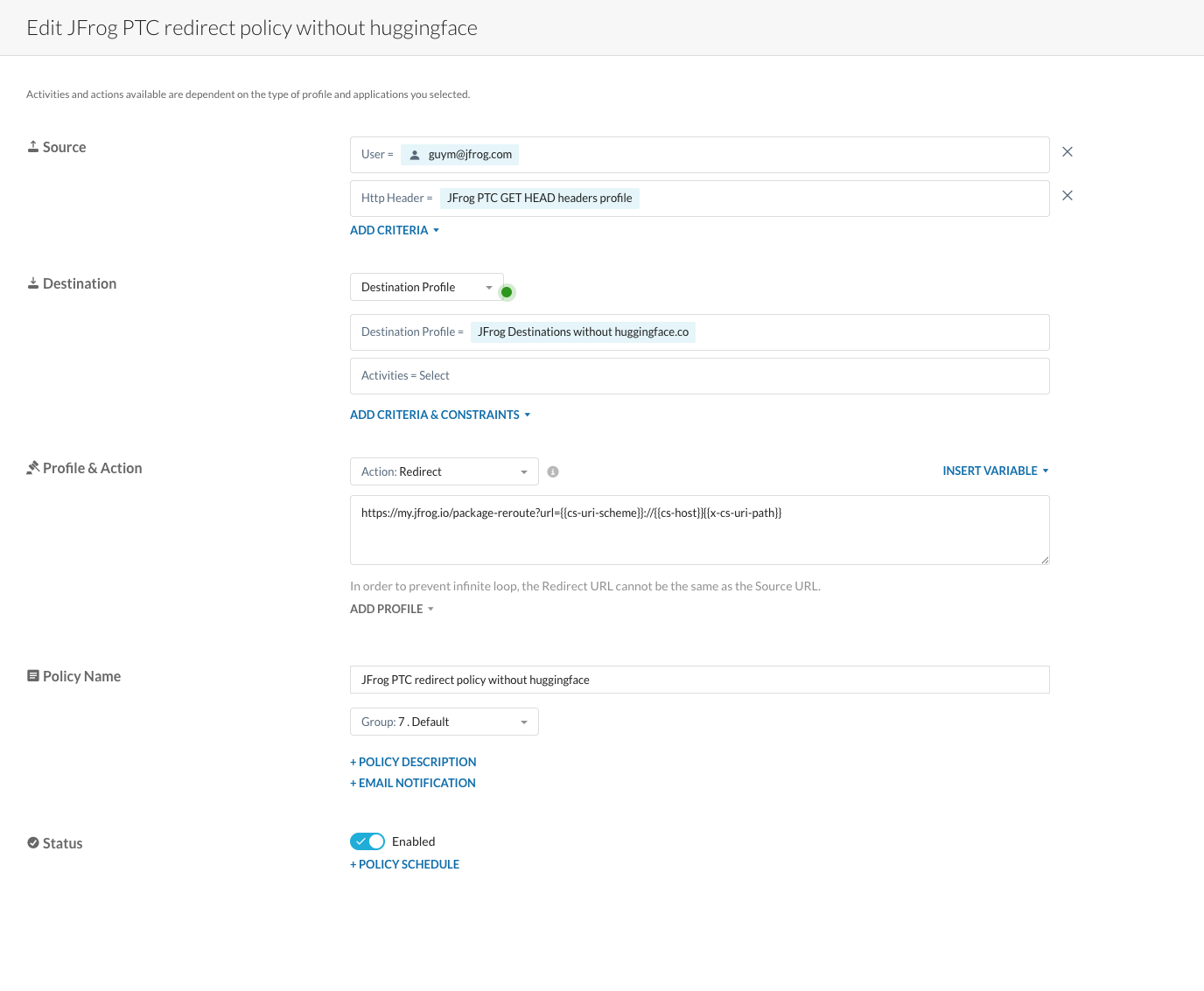
Redirects GET/HEAD package-manager traffic for npm, PyPI, and Docker to Artifactory.
- Source > Add Criteria > HTTP Header: select the PTC GET and HEAD profile from 2b.
- Destination > Destination Profile: select 1a (without Hugging Face).
- Profile & Action: Redirect.
- Redirect URL:
https://<YOUR_ARTIFACTORY_URL>/artifactory/api/package-reroute?url={{cs-uri-scheme}}://{{cs-host}}{{x-cs-uri-path}}Important — order matters: Save with the rule placed directly below Rule a (the Browser Allow rule). The redirect rule must sit under the Browser Allow rule so browser traffic is allowed first and only non-browser traffic is redirected.
Where:
<YOUR_ARTIFACTORY_URL>: Your JFrog Platform hostname (for exampleacme.jfrog.io).{{cs-uri-scheme}}://{{cs-host}}{{x-cs-uri-path}}: Netskope variables that reconstruct the original request URL and pass it as theurlquery parameter to/artifactory/api/package-reroute.
3c Redirect for Hugging Face
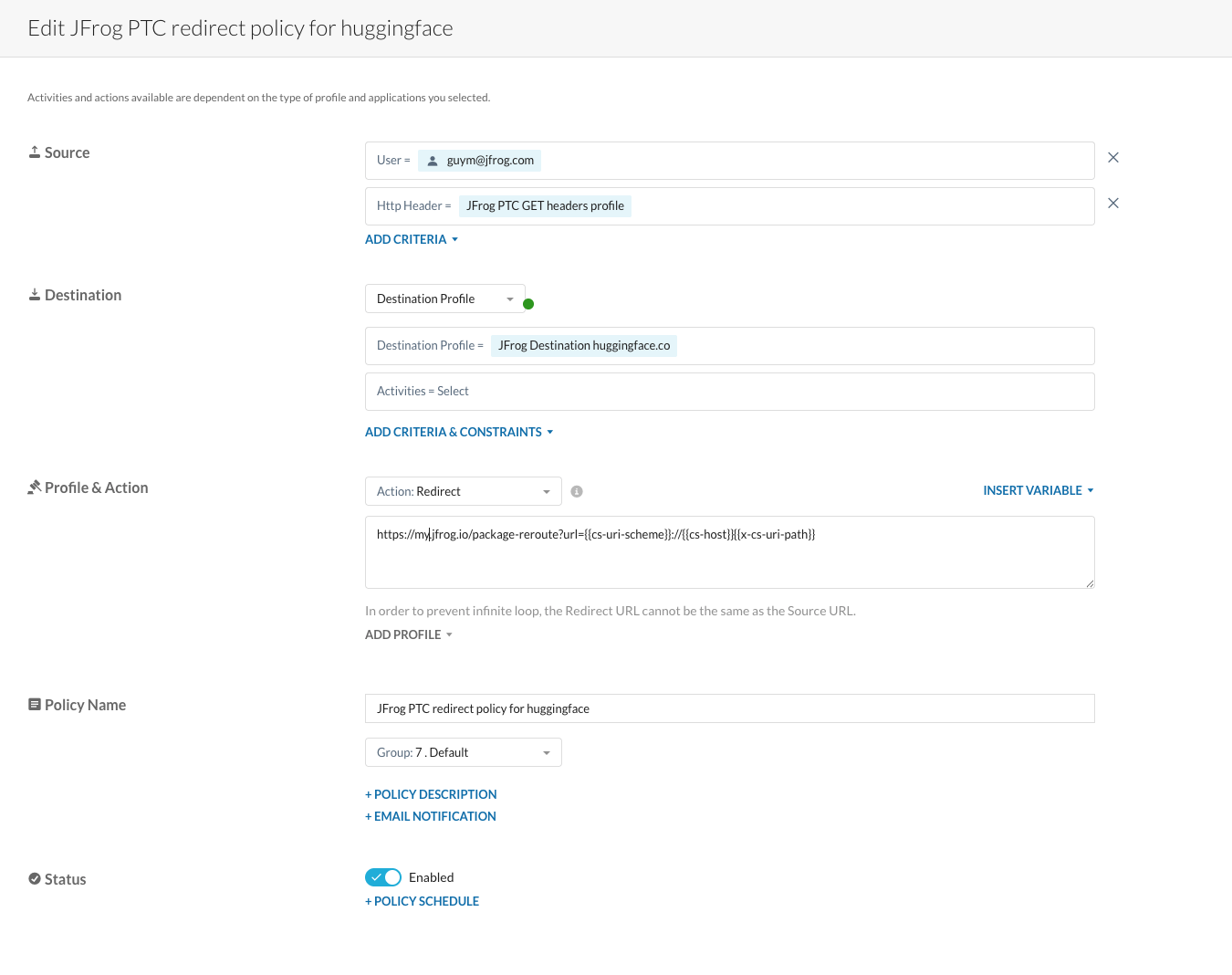
Redirects GET Hugging Face traffic to Artifactory.
- Source > Add Criteria > HTTP Header: select the PTC GET Only profile from 2c.
- Destination > Destination Profile: select 1b (Hugging Face only).
- Profile & Action: Redirect.
- Redirect URL: same as Rule b —
https://<YOUR_ARTIFACTORY_URL>/artifactory/api/package-reroute?url={{cs-uri-scheme}}://{{cs-host}}{{x-cs-uri-path}}
Important — order matters: Save with the rule placed directly below Rule a (the Browser Allow rule). Both redirect rules (Rule b and Rule c) must sit under Browser Allow; the order between Rule b and Rule c does not matter, but neither can be above the Browser Allow rule.
At the end of the process, three rules are visible in the Real-time Protection policy list, in this order: Browser Allow, Redirect Without Hugging Face, Redirect for Hugging Face.

Scope of Support
Netskope PTC targets the public native registry for each package type (for example registry.npmjs.org for npm, pypi.org/files.pythonhosted.org for Python, registry-1.docker.io for Docker, huggingface.co for Hugging Face, repo1.maven.org/repo.maven.apache.org for Maven)—not private repositories. Each supported package type ships its own Netskope destination, header, and policy configuration. Add ecosystems as you roll them out, aligned with Supported Package Types (GA).
Known Limitations
- Certificate
criticalrequirement (Hugging Face and Poetry): Python uses strict (RFC 5280) certificate verification. If the SASE CA certificate does not include the requiredcriticalflag / key-usage extension, Hugging Face and Poetry installs fail through Netskope. pip, uv, npm, and yarn are unaffected. Use a CA certificate that includes the required critical extensions. See also Limitations and Troubleshooting. - Developer identity is not forwarded to Artifactory audit logs: Requests redirected through Netskope arrive at Artifactory via the
_package-reroutesystem user, so the originating developer's user identity does not appear in Artifactory audit entries. This is the general PTC behavior — see Private and Scoped Packages for the full constraint, the user-tracking implications, and the available workarounds.
Rollback Process
If PTC needs to be reverted on the Netskope side, you have two options: stop redirects only (the quick path) or do a full Netskope rollback. The JFrog Artifactory configuration does not need to be rolled back in either case.
Quick Rollback (Stop Redirects Only)
Stop redirecting by disabling the two Redirect Real-time Protection policies created in Step 3 (Rule b and Rule c). The Allow rule (Rule a) can be left in place; with the Redirect rules off, traffic to the public registries flows directly to the registry as before.
Alternatively, remove the registry hostnames from the destination profiles (1a and 1b) so the Real-time Protection policies no longer match registry traffic.
Full Netskope Rollback
To perform a full Netskope rollback:
- In the Netskope Security Cloud portal, navigate to Policies > Real-time Protection.
- Disable or delete the three policies created for PTC (Browser Allow, Redirect Without Hugging Face, Redirect for Hugging Face).
- (Optional) Navigate to Policies > Profiles > HTTP Header and delete the three HTTP header profiles created for PTC (Browser Allow, PTC GET and HEAD, PTC GET Only).
- (Optional) Navigate to Policies > Profiles > Destination and delete the two destination profiles created for PTC (excluding Hugging Face, Hugging Face only).
- Save and apply changes; allow a few minutes for the policy update to propagate.
Verify Rollback on a Workstation
# Should show the original registry CA, not Netskope CA
openssl s_client -connect registry.npmjs.org:443 -servername registry.npmjs.org 2>/dev/null | openssl x509 -noout -issuer

# Package install should work directly against public registry (optional: --loglevel verbose to inspect GET targets)
npm install express --loglevel verbose
Note on Artifactory Configuration
The JFrog Artifactory configuration (repositories, Curation policies) does not need to be rolled back. These settings can remain in place without affecting developers once the Netskope redirect policies are disabled.
Frequently Asked Questions
This section provides answers to frequently asked questions about configuring Netskope for Package Traffic Controller (PTC).
FAQs
Q: How is Netskope different from other SASE providers for PTC?
A: All supported SASE providers SSL-inspect registry traffic and redirect it to Artifactory's /artifactory/api/package-reroute endpoint. The Artifactory setup and supported package types are the same across vendors; only the vendor portal steps differ. See Supported Security Edges for the current list.
Q: Why is Hugging Face in a separate destination profile?
A: Hugging Face traffic is redirected with GET only, while the other registries (npm, PyPI, Docker) accept GET and HEAD. Splitting them lets you bind each destination profile to the right HTTP header profile and method set in Step 3. See Step 1: Create Destination Profiles.
Q: Why does the HTTP header profile match browsers?
A: Some registries serve their website on the same domain used by the package manager. Matching browser user agents lets the Browser Allow policy pass browser visits through to the site, while the redirect rules below it reroute package-manager (CLI) traffic to Artifactory. See 2a Browser Allow.
Q: Do Hugging Face and Poetry work through Netskope?
A: They require a CA certificate that includes the required critical extensions because of Python's strict certificate verification; otherwise they fail. pip, uv, npm, and yarn are unaffected. See Known Limitations.
Q: How do I restrict unauthenticated PTC repository access on JFrog Cloud?
A: Use the MyJFrog IP/CIDR allowlist to accept inbound traffic only from your SASE provider's public egress ranges. See Restrict PTC Traffic to SASE Provider Egress.
Related Topics
Updated 7 days ago