

Continuous Monitoring
Learn how Impact Analysis in Xray continuously monitors indexed artifacts for new threats.
Impact Analysis is how JFrog Xray keeps watching JFrog Artifactory resources after their first scan. When the JFrog Global Vulnerability Database gets new vulnerability or malicious package data, Impact Analysis finds which indexed artifacts are affected and updates their Xray scan reports. If those findings match a Watch and a Policy, it re-evaluates the policy against the up-to-date data. Xray creates a violation and can run the automatic actions you set on the policy rule.
Because Xray is built into Artifactory, Impact Analysis keeps monitoring the repositories, builds, and container images you already store. You don't need to re-upload or manually re-scan every artifact when a new CVE appears or a package is flagged as malicious, including packages involved in supply chain attacks such as Shai-Hulud.
Because those binaries are indexed, Xray can also show how a vulnerable or malicious component affects other artifacts in your environment.
How Impact Analysis Works
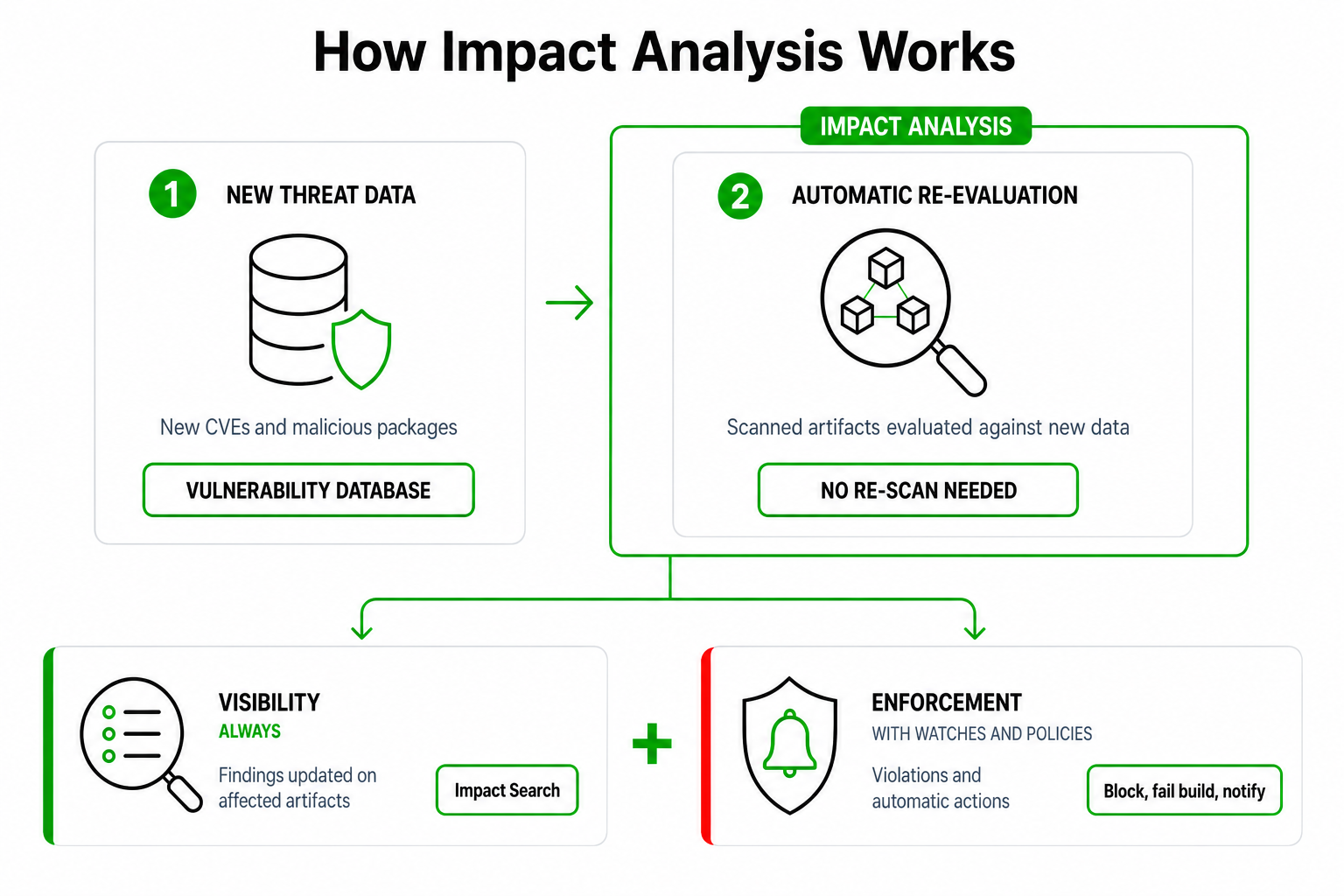
Impact Analysis is event-driven. Each change to the vulnerability database creates a scan event, whether it adds a new vulnerability or changes an existing one. For every event, Xray reuses the dependency graph from the original scan, applies the new data to it, and re-checks only the indexed resources that the change affects.
This includes changes to whether a CVE appears in the Cybersecurity and Infrastructure Security Agency (CISA) Known Exploited Vulnerabilities (KEV) Catalog. When the KEV status changes, Xray updates affected scan results and re-evaluates matching policy rules.
- Vulnerability database updated: New CVEs, malicious packages, advisories, or metadata are added to the JFrog Global Vulnerability Database. Older materials may call this database XUC.
- Impact Analysis scan event: Xray finds affected components in its component graph and maps which indexed artifacts, builds, or Release Bundles are impacted. Results appear in the Xray scan report for those resources.
- Policy check: If watches and policies apply to the affected resources, Xray re-evaluates the policy against the up-to-date findings.
- Violations and actions: Matching rules create violations. Policy actions can block downloads, fail builds, or block distribution, and can notify teams by email, Slack, webhooks, or Jira.
Note
Impact Analysis covers only indexed resources whose scan retention period has not expired. Unindexed or expired resources are out of scope until you index or scan them again.
When Impact Analysis Runs
The following table describes when Impact Analysis runs for each deployment type.
| Deployment | When Impact Analysis runs |
|---|---|
| SaaS | Whenever the Xray database is updated, about every hour. |
| Self-managed with online database sync | With each database sync update. Online mode checks for updates about every hour. |
| Self-managed with offline database sync | After you apply a downloaded database update package. |
During major security incidents, including active malicious package campaigns, JFrog speeds up vulnerability intelligence updates so Impact Analysis can re-check indexed resources with the latest threat data.
Watches, Policies, and Automatic Actions
Impact Analysis finds what is affected. Watches and policies decide what happens next.
- Without watches and policies: Xray updates the scan results for affected resources, but doesn't create violations or run any actions. You can still review the findings yourself with Impact Search.
- With watches and policies: Xray creates violations when findings match your policy rules. Depending on how you configure those rules, Xray can:
- Prevent download: Block non-compliant artifacts from download.
- Fail build: Fail build jobs that introduce or carry risk.
- Block distribution: Block Release Bundles that violate policy.
- Notify: Alert stakeholders through email, Slack, webhooks, Jira, and other integrations.
For more information, see Create Policies, Create Watches, and Violations Handling and Notifications.
Frequently Asked Questions
These questions cover what Impact Analysis is, the vulnerability intelligence behind it, how quickly updates reach Xray, and how teams are notified when indexed artifacts are affected.
FAQs
Q: What is Xray Impact Analysis?
A: Impact Analysis is the JFrog Xray process that re-evaluates already indexed Artifactory resources when new vulnerability or malicious package data arrives. It identifies which artifacts are affected, updates their scan reports, and re-evaluates any matching watches and policies. For more information, see How Impact Analysis Works.
Q: What vulnerability intelligence sources power Xray?
A: The JFrog Global Vulnerability Database combines public and vendor advisory sources with open-source vulnerability, malicious package, and license data, then enriches findings with JFrog Security Research. Impact Analysis uses those updates to re-evaluate indexed resources.
Q: How does JFrog handle newly disclosed or actively exploited zero-day vulnerabilities?
A: The JFrog Security Research team prioritizes high and critical issues, vulnerabilities exploited in the wild, malicious packages, and high-profile disclosures. Database updates are sped up as needed, then Impact Analysis re-evaluates indexed Artifactory resources. For more information, see When Impact Analysis Runs.
Q: Does Impact Analysis cover malicious packages?
A: Yes. When a package is identified as malicious, Impact Analysis maps which indexed Artifactory resources are affected, updates their scan reports, and re-evaluates matching watches and policies. For more information, see Malicious Package Detection.
Q: How quickly are new CVEs and advisories added to the vulnerability database?
A: On SaaS and self-managed online sync, updates arrive about every hour and trigger Impact Analysis. Offline environments update when you apply a downloaded package. During security incidents, JFrog can speed up updates.
Q: Can you be notified when critical zero-days or malicious packages affect artifacts already stored in Artifactory?
A: Yes, when watches and policies cover those resources. Matching rules can notify teams and enforce actions such as blocking downloads or failing builds. For more information, see Watches, Policies, and Automatic Actions.
Q: How can you prioritize Impact Analysis findings beyond raw CVSS?
A: JFrog Security Research enriches CVEs with a JFrog Research Severity Score, exploitability analysis, and real-world attack context. JFrog Advanced Security adds exploitability and applicability controls for policy enforcement.
Related Topics
Updated 29 days ago