

Threat Hub
Threat Hub brings JFrog’s published security research and related threat intelligence into the JFrog Platform, then connects each item to your own environment. You can read about a new attack and immediately answer the question that matters: Am I affected?
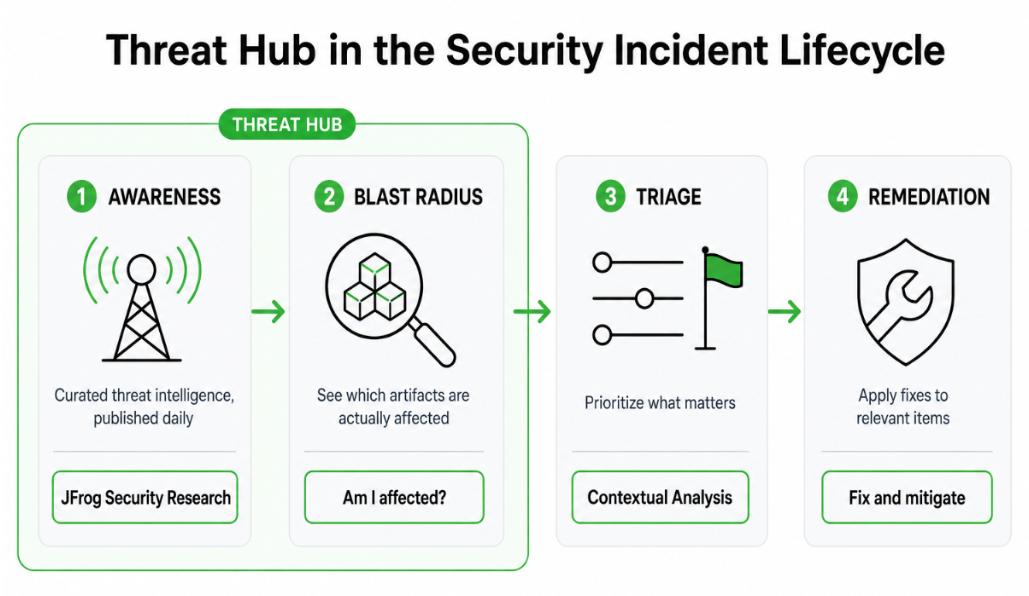
Threat Hub supports the awareness and blast-radius stages of a security incident, and gives you:
- Curated intelligence: JFrog’s Security Research and Threat Intelligence teams continuously analyze open-source ecosystems and publish vetted posts about new attacks, CVEs, and malicious packages.
- Built-in Impact Search: For any post, clicking Am I Affected? searches your environment and tells you whether you’re exposed.
Go to Xray > Overview, then click the Threat Hub tab.
Note
Threat Hub requires JFrog Catalog.
What You See in the Feed
Threat Hub is a feed of security posts about new attacks, CVEs, and malicious packages. The feed updates daily, sorted by publish date so the newest intelligence appears first.
Most posts come from the JFrog Security Research team, whose researchers continuously monitor public repositories such as npm, PyPI, and Hugging Face, run automated scanners across every new and updated package, and manually investigate suspicious findings. The same team analyzes new and existing CVEs for real-world exploitability, discloses newly discovered malware to repository maintainers, and publishes its findings to the wider security community. Threat Hub brings that work directly to you, so you see JFrog’s original research alongside the external advisories that matter.
Each post links to the full blog or advisory and shows its source (JFrog or external), publish date, and tags describing what it covers, such as an ecosystem like npm. When a post is tied to a known attack, it also shows a public label that groups the affected packages and versions, and it may link to a fix or advisory.
Note
Some posts may show a severity mismatch indicator when JFrog Security Research assesses severity differently from the severity marked on the CVE or advisory. Use that signal when prioritizing remediation. JFrog’s research severity reflects real-world exploitability and impact, not only the published score.
Use the All, CVE, or Malicious Package filters to narrow the feed.
Am I Affected?
Threat Hub keeps you updated with a list of the latest threats, but its most important capability is mapping the blast radius: whether any of them actually affect you.
Click Am I Affected? on a post to open Impact Search against your organization, using the post’s public label or CVE. The button appears on CVE posts with a searchable CVE and on malicious package posts with a searchable public label.
When you are affected, Threat Hub shows the matching artifacts and their scan dates, so you can prioritize what needs attention next.
Frequently Asked Questions
These questions cover what first-time users typically need to know when opening Threat Hub.
FAQs
Q: Why is the page empty?
A: Threat Hub requires JFrog Catalog. If Catalog is not installed or not reachable, you see Unable to Access Catalog API for Threat Hub. After Catalog is available, posts appear in the feed sorted by publish date. If Catalog is available but a filter returns nothing, clear the filter or try another type.
Q: How does “Am I affected?” decide whether I’m exposed?
A: Click Am I Affected? to open Impact Search using the post’s public label or its CVE. The public label groups packages and versions tied to the attack. Results list affected artifacts and their scan dates. Only indexed, scanned artifacts are included.
Q: Can I filter or search from Threat Hub?
A: Yes. Use All, CVE, or Malicious Package to narrow the feed. Click Impact Search when you need to search beyond a single post.
Additional Information
Updated 28 days ago