

Custom Webhooks
To create a custom webhook:
-
Select All Projects, or from the Projects list, select the specific project for which to create a webhook.
-
Select the Platform module, then select Integrations > Webhooks.
-
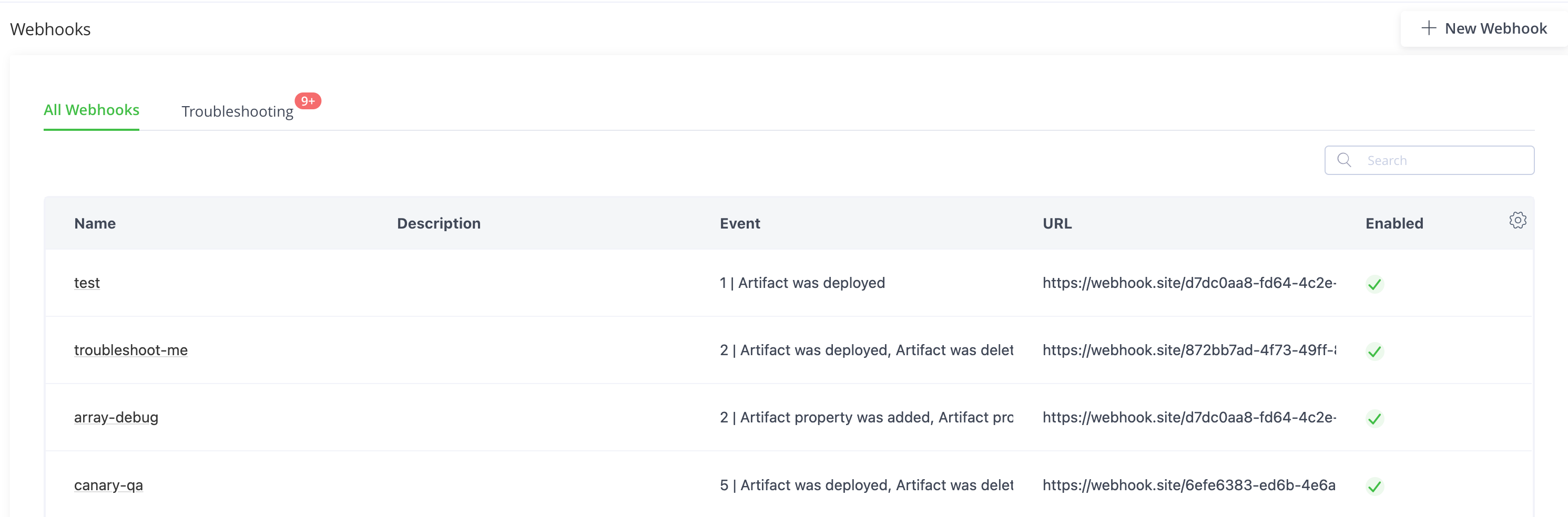
Click New Webhook.
-
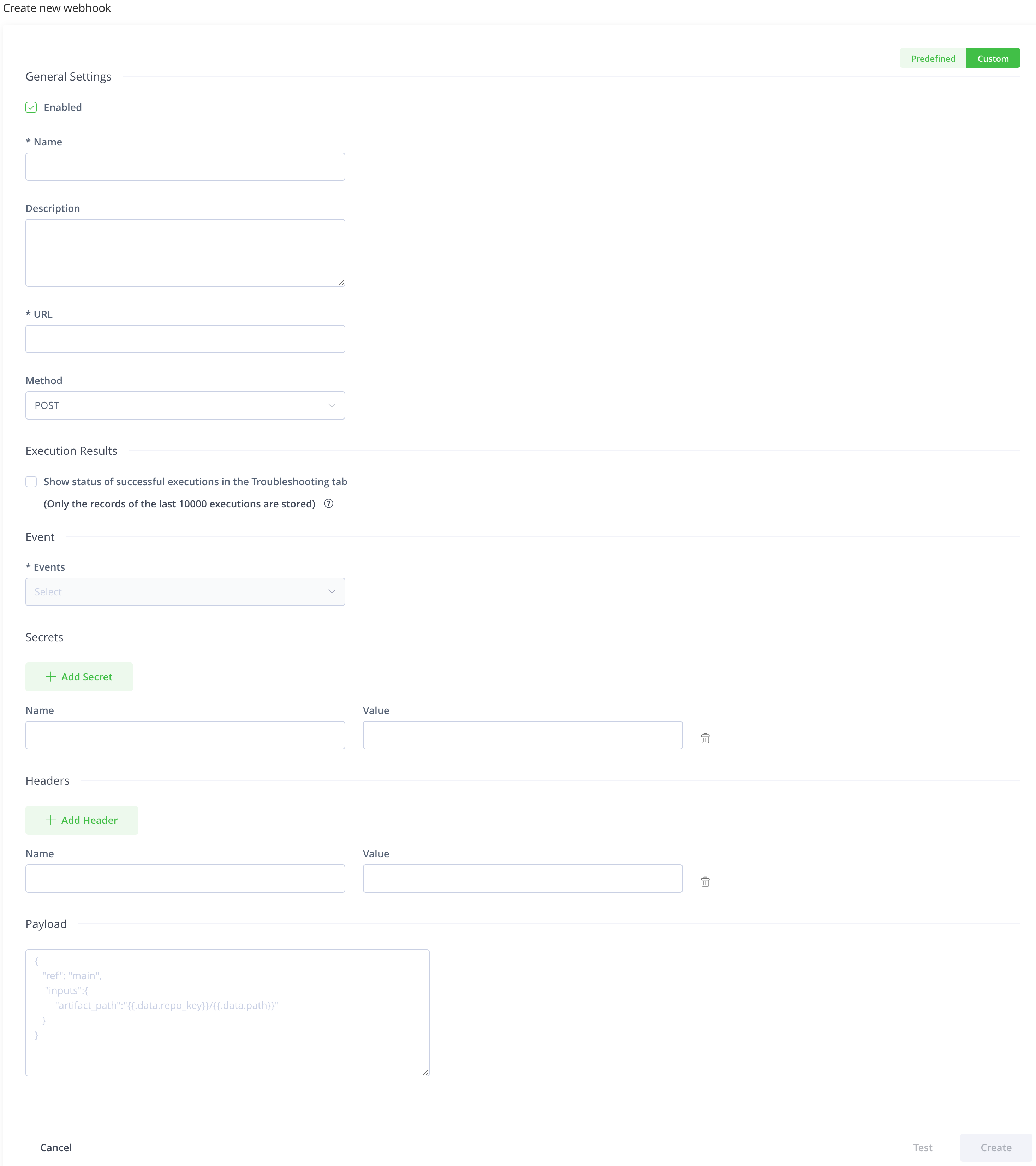
Click the Custom toggle.
-
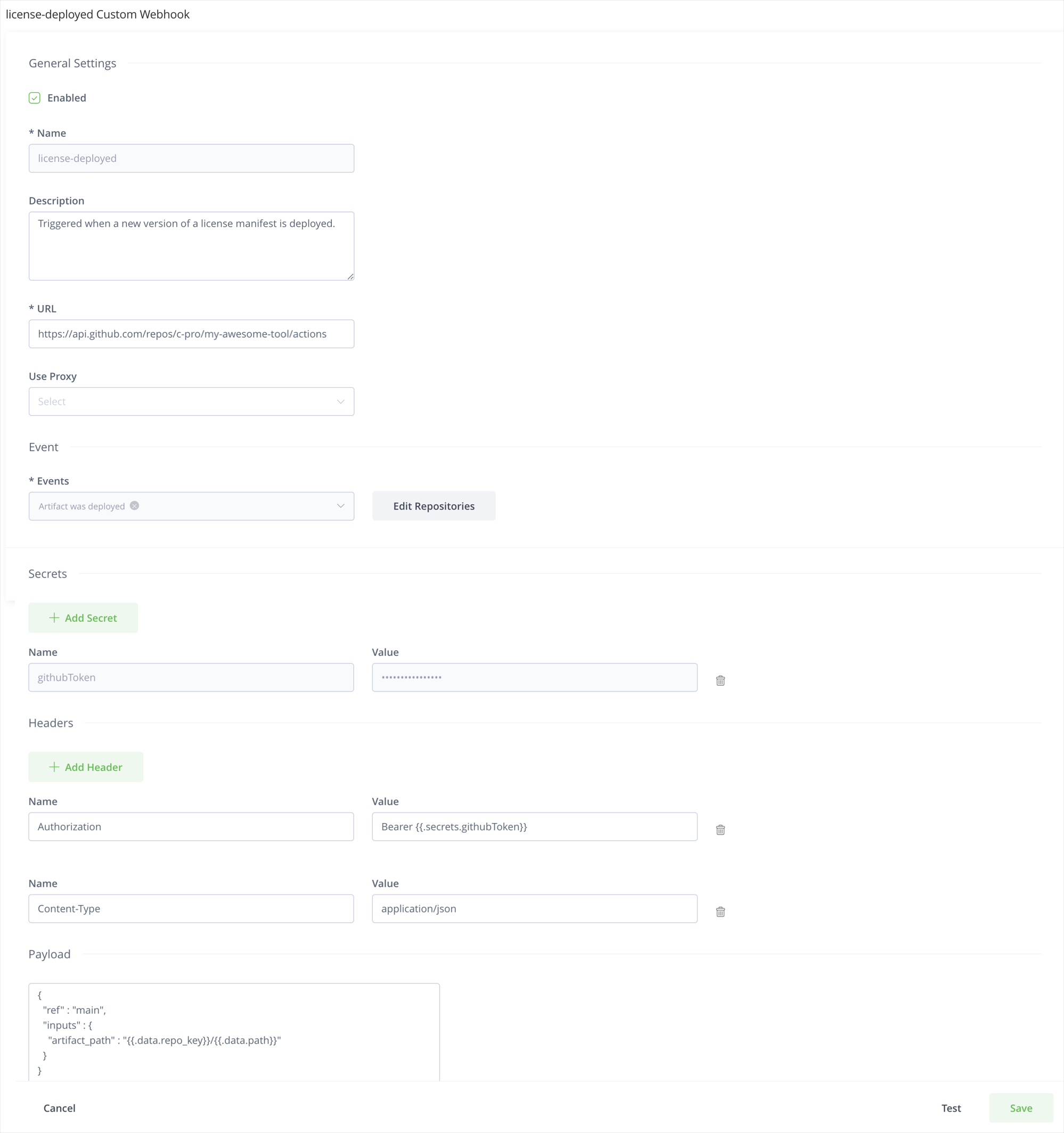
Enter the name and description of the webhook.
-
Enter the URL that the webhook invokes.
For example:
https://api.github.com/repos/myrepo/actions/workflows/artifact_deployed.yml/dispatches -
Select the HTTP method that the webhook should use.
You can choose from
POST,PUT,GET,PATCH, andDELETE. The default selection isPOST.Before Artifactory version 7.80.0, custom webhooks could be used only the
POSTmethod like predefined webhooks. -
Select a proxy server from the list of configured proxy servers in the Use Proxy dropdown if you want to send the webhook through a proxy.
Applicable only for a self-hosted JFrog Platform installation
-
Select whether to show the results of the successful execution of the webhooks in the Troubleshooting tab.
Note
JFrog Cloud: Applicable only if Webhooks troubleshooting is available in your JFrog Cloud instance.
JFrog Self-hosted: Applicable only if you configured Webhooks Troubleshooting.
-
Select the events that should trigger the webhook.
Events drop-down lists the events in Artifactory, and Distribution that function as the event trigger for the Webhook.
You can select multiple events from the list.
You can apply certain events to repositories, builds, and Release Bundles.
Note
For a webhook associated with a specific project, event types are limited to those for Artifacts, Docker, Artifact Properties and Builds.
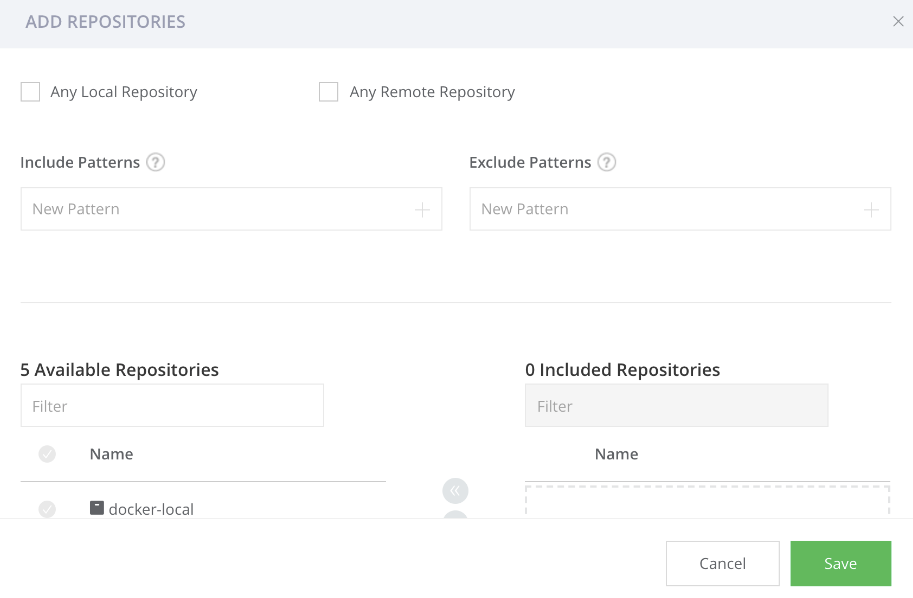
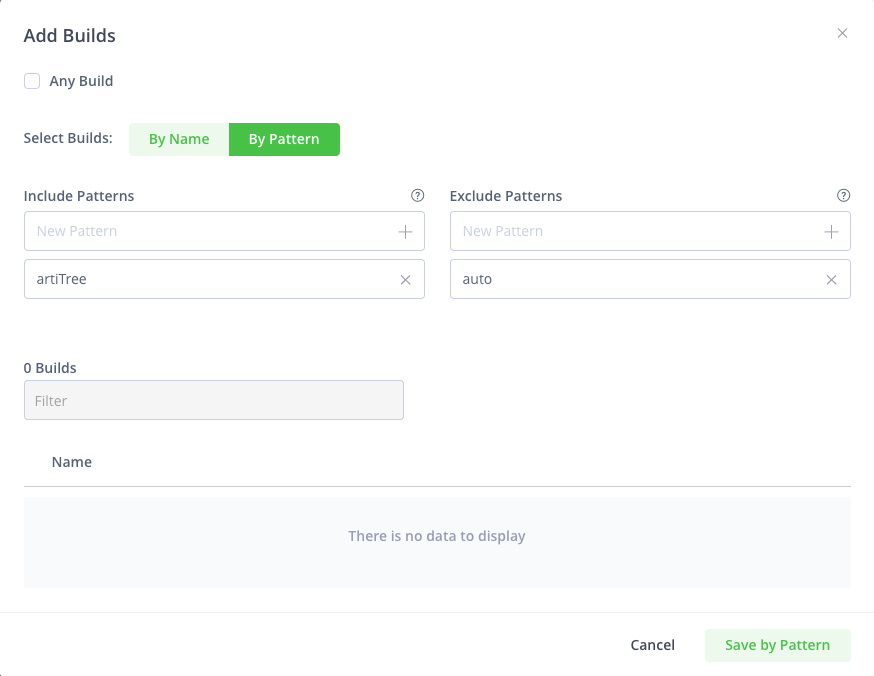
You can apply events such as Artifact was deployed, moved, and added on every repository in Artifactory or on a list of specific repositories, based on a specific list or by using include/exclude patterns.
Note
If you select any local and/or remote repository, the webhook is applied on all existing repositories and any repositories you create in the future.
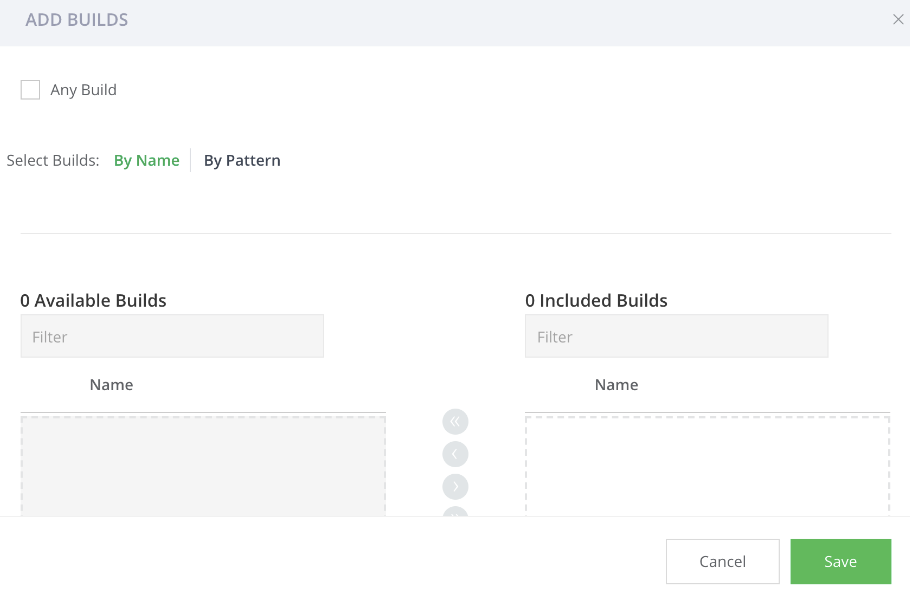
You can apply events such as build was deployed, promoted, and deleted on every new build that is uploaded to Artifactory or on a list of specific builds, based on a specific list or by using include/exclude patterns.
You can apply Release Bundle and Distribution events on every new Release Bundle or on a list of specific Release Bundles, based on a specific list or by using include/exclude patterns.
- Add secrets to the webhook if required.
Defines a set of sensitive values (such as tokens and passwords) that can be injected into the headers and/or payload. The values of the secrets are encrypted.
Invoke the value In the header/payload using the {{.secrets.token}} format, where token is the name provided for the secret value.
Click Add Secret to add more than one secret.
Note
It is possible to update the value of a secret (when a password changes, or a token expires) using the Update Webhook Subscription by Key REST API:
PUT /event/api/v1/subscriptions/<sub-key>/secrets/<secret-name>Authorization: Bearer
<admin token>Content-Type: text/plain
<secret-value>
-
Add HTTP headers you wish to use to invoke the webhook.
Click Add Header to add more than one header.
-
Enter the custom payload that you want to send to the target service.
In the payload, you can invoke values using dotted-syntax. For more information, see Custom Webhooks Payload Templates.
Example
{
    "ref": "main",
    "inputs": {
        "artifact_path": "{{.data.repo_key}}/{{.data.path}}"
    }
}
To know what values can be injected in the payload (as well as in HTTP headers), see Event Types.
-
Click Test to test the configuration.
Sends a fake HTTP request to the target URL and verify that the webhook is working fine.
-
Click Create to save the webhook configuration.
Note
By default, private networks are not allowed to be used as Webhook targets for security reasons. If you would like to allow use of a private network, change the URL strict policy configuration in the
system.yamlfile:urlStrictPolicy: true. See Artifactory System YAML.
Custom Webhooks Payload Templates
JFrog Custom Webhooks use a similar payload templating to Golang text templates, but are limited in that they only support two actions. In payloads, you can:
- Display dynamic scalar values by rendering a textual representation for the variables: For example,
{{ variable_name }}. - Use
jsonoryamlfunctions on an object to convert them into JSON or YAML format, to prepare the object for transmission or storage. For example,{{ json object_name }}.
Two root objects are supported: data and secrets.
Root Object | Description | Example |
|---|---|---|
| An object containing the payload specific to the event, as defined in Event Types. |
In a “build promoted” event, this will contain the build name. |
| An object containing all the secrets you have defined for this webhook. |
This will render the secret name |
Example
To create a custom webhook to automate Kubernetes deployments as part of this workflow, you can use this payload template:
{
    "event_type" : "hot-deploy",
    "client_payload" :  {
        "tag" : "{{ .data.tag }}"
    }
}
Custom Webhooks Examples
The following are some examples of custom webhooks for various services.
GitHub Example
    {
        "key": "subscriptionOnGithub",
        "description": "some custom webhook subscription",
        "enabled": true,
        "event_filter": {
            "criteria": {
                "anyLocal": true
            },
            "domain": "artifact",
            "event_types": [
                "deployed"
            ]
        },
        "handlers": [
            {
                "handler_type": "custom-webhook",
                "url": "https://api.github.com//<username>/<reponame>/dispatches",
                "payload": "{\"event_type\": \"someEventType\"}",
                "secrets": [
                    {
                        "name": "token",
                        "value": "XXX"
                    }
                ],
                "http_headers": [
                    {
                        "name": "Authorization",
                        "value": "Bearer {{ .secrets.token }}"
                    }
                ]
            }
        ]
    }
GitLab Example
{
    "key": "subscriptionOnGitlab",
    "description": "some custom webhook subscription",
    "enabled": true,
    "event_filter": {
        "domain": "artifact",
        "event_types": [
            "deployed"
        ],
        "criteria": {
            "anyLocal": true,
            "anyRemote": false,
            "includePatterns": [],
            "excludePatterns": [],
            "repoKeys": []
        }
    },
    "handlers": [
        {
            "handler_type": "custom-webhook",
            "url": "http://<gitlaburl>/api/v4/projects/2/ref/main/trigger/pipeline",
            "secrets": [
                {
                    "name": "privatetoken",
                    "value": "XXXXX"
                },
                {
                    "name": "accesstoken",
                    "value": "XXXXXX"
                },
                {
                    "name": "token",
                    "value": "XXXXXXX"
                }
            ],
            "http_headers": [
                {
                    "name": "PRIVATE-TOKEN",
                    "value": "{{ .secrets.privatetoken  }}"
                },
                {
                    "name": "Content-Type",
                    "value": "application/x-www-form-urlencoded"
                }
            ],
            "payload": "token={{ .secrets.token }}&variables[TEST_VAR_CHECKSUM]={{ .data.sha256 }}&variables[ACCESS_TOKEN]={{ .secrets.accesstoken }}"
        }
    ]
}
Jenkins Example
{
    "key": "subscriptionOnJenkins",
    "description": "some custom webhook subscription",
    "enabled": true,
    "event_filter": {
        "criteria": {
            "anyLocal": true
        },
        "domain": "artifact",
        "event_types": [
            "deployed"
        ]
    },
    "handlers": [
        {
            "handler_type": "custom-webhook",
            "url": "http://<jenkinsurl>/job/test/buildWithParameters",
            "secrets": [
                {
                    "name": "token",
                    "value": "mytoken"
                },
                {
                    "name": "restapitoken",
                    "value": "XXXXX"
                }
            ],
            "http_headers": [
                {
                    "name": "Content-Type",
                    "value": "application/x-www-form-urlencoded"
                },
                {
                    "name": "Authorization",
                    "value": "Basic {{ .secrets.restapitoken }}"
                }
            ],
            "payload": "token={{ .secrets.token }}&sha256={{ .data.sha256 }}"
        }
    ]
}
Slack Integration Example
{
  "key": "customwebhook",
  "description": "notify slack channel at artifact deploy",
  "enabled": true,
  "event_filter": {
    "domain": "artifact",
    "event_types": [
      "deployed"
    ],
    "criteria": {
      "anyLocal": true,
      "anyRemote": false,
      "excludePatterns": [],
      "includePatterns": [],
      "repoKeys": []
    }
  },
  "handlers": [
    {
      "handler_type": "custom-webhook",
      "url": "https://hooks.slack.com/services/XXXX",
      "payload": "{\"text\": \"Hello from custom webhook triggered by event type {{ .type }}\"}",
      "http_headers": [
        {
          "name": "Content-type",
          "value": "application/json"
        }
      ]
    }
  ]
}
Updated 16 days ago