

Azure ML Integration with JFrog Platform
This integration connects JFrog Artifactory (your artifact repository) with Azure Machine Learning (Microsoft's ML platform) to create a secure, enterprise-grade machine learning pipeline.
What Does this Integration Do?
This project provides a secure, enterprise-ready integration between Azure Machine Learning (AzureML) and JFrog Artifactory. It enables organizations to:
- Build secure training Docker images using base images and Python packages from Artifactory
- Train ML models in AzureML using secure, traceable environments
- Upload trained models to Artifactory's Machine Learning Repository using the FrogML SDK
- Advanced: Authenticate securely using Azure Key Vault, with option for short-lived auto-rotating JFrog tokens based on Managed Identities (no hardcoded credentials)
For more information, see the JFrog-AzureML-integration GitHub repository.
Why Use This?
| Without This Integration | With This Integration |
|---|---|
| Dependencies from public PyPI (which can pose a security risk) | All packages are proxied through or pulled from your Artifactory (scanned, curated) |
| Docker images from Docker Hub (no control) | Images from your Artifactory registry (versioned, secured, approved, and maintained) |
| Models saved locally or in Azure blob | Models in Artifactory ML repo (governed, traceable, versioned) |
| Long-lived tokens are hardcoded | Auto-rotating short-lived tokens via OIDC |
Prerequisites
- JFrog Platform with admin or project admin rights, with the following repositories configured:
- PyPI: remote (
pypi-remote) + virtual (pypi-virtual) - Docker: remote (
docker-remote) + local (docker-local) + virtual (docker-virtual) - ML models: local generic (
ml-models-local) - Azure Subscription with the following resources configured:
- AzureML Workspace, User-Assigned Managed Identity (with Key Vault Secrets User role), and Key Vault storing JFrog credentials (
artifactory-username,artifactory-access-token) - Build environment with Docker, Python 3.11+, and Azure CLI installed (local machine or CI runner)
How the Integration Works
The integration connects JFrog Artifactory to AzureML at each stage of the ML lifecycle:
Build Phase
Python dependencies are pulled from Artifactory via pip.conf configuration, ensuring all packages are scanned and curated. Docker base images are pulled from the Artifactory Docker registry, ensuring only approved and versioned images are used.
Train Phase
The training pipeline creates a connection to Artifactory, allowing AzureML to pull the Docker image:
from azure.ai.ml.entities import WorkspaceConnection, UsernamePasswordConfiguration

credentials = UsernamePasswordConfiguration(username=username, password=access_token)

ws_connection = WorkspaceConnection(
    name="JFrogArtifactory",
    target=artifactory_host,
    type="GenericContainerRegistry",
    credentials=credentials
)

env = Environment(
    image=docker_image  # Training image pulled from Artifactory
)
Upload Phase
After training completes, the model is pushed to Artifactory's ML repository using the FrogML SDK:
import frogml

frogml.files.log_model(
    source_path=model_path,
    repository=ml_repo_name,
    model_name=model_name,
    version=version,
    properties=properties,
    dependencies=dependencies,
    code_dir=code_dir
)
Deploy Phase
To deploy, download the model from Artifactory:
frogml.files.load_model(
    repository=ml_repo_name,
    model_name=model_name,
    version=version,
    target_path=target_path
)
End-to-End Setup Guide
Phase 1: Build Training Container
Who does this: ML Engineer
Step 1.1: Clone Repository
git clone https://github.com/jfrog/JFrog-AzureML-integration.git
cd JFrog-AzureML-integration
Step 1.2: Create pip.conf File
Create a file named pip.conf in the project root or use your user's home directory pip.conf:
[global]
index-url = https://<username>:<access-token>@mycompany.jfrog.io/artifactory/api/pypi/pypi-virtual/simple
trusted-host = mycompany.jfrog.io
Note:
- URL-encode special characters in username (
@becomes%40) - Never commit this file to git (it's in
.gitignore) - Replace
mycompany.jfrog.iowith your JFrog platform host - Replace
pypi-virtualwith the PyPI repository (virtual or remote) being used
Step 1.3: Create Configuration File
cp config/config.example.yaml config/config.yamlEdit config/config.yaml and replace the placeholder values. Most fields are self-explanatory. For key_vault.name, use AzureML Workspace > Overview > Key vault link.
Step 1.4: Set Up Python Environment
export PIP_CONFIG_FILE=$(pwd)/pip.conf
source setup_venv.sh
Verify:
pip list | grep scikit-learnShould show scikit-learn installed from Artifactory.
Step 1.5: Build and Push Docker Image
# Enable BuildKit
export DOCKER_BUILDKIT=1

# Set variables (match your config.yaml)
export ARTIFACTORY_HOST=mycompany.jfrog.io
export ARTIFACTORY_DOCKER_REPO=docker-virtual
export TAG=1.0.0

# Login to Artifactory Docker registry
docker login ${ARTIFACTORY_HOST}
# Enter your JFrog username and access token when prompted

# Build and push
docker build \
  --platform linux/amd64 \
  -t ${ARTIFACTORY_HOST}/${ARTIFACTORY_DOCKER_REPO}/azureml-training:${TAG} \
  -f docker/Dockerfile \
  --secret id=pipconfig,src=${PIP_CONFIG_FILE} \
  --build-arg BASE_IMAGE="${ARTIFACTORY_HOST}/${ARTIFACTORY_DOCKER_REPO}/python:3.13.11-slim" \
  --push \
  .
Expected Output:
...
 => exporting to image
 => pushing mycompany.jfrog.io/docker-virtual/azureml-training:1.0.0
Verify:
Go to JFrog Platform > Artifactory > Artifacts > docker-local. You should see azureml-training/1.0.0.
Phase 2: Run Training Pipeline
Step 2.1: Log in to Azure
az login --tenant <your-tenant-id>Step 2.2: Submit Training Job
python pipeline/training_pipeline.py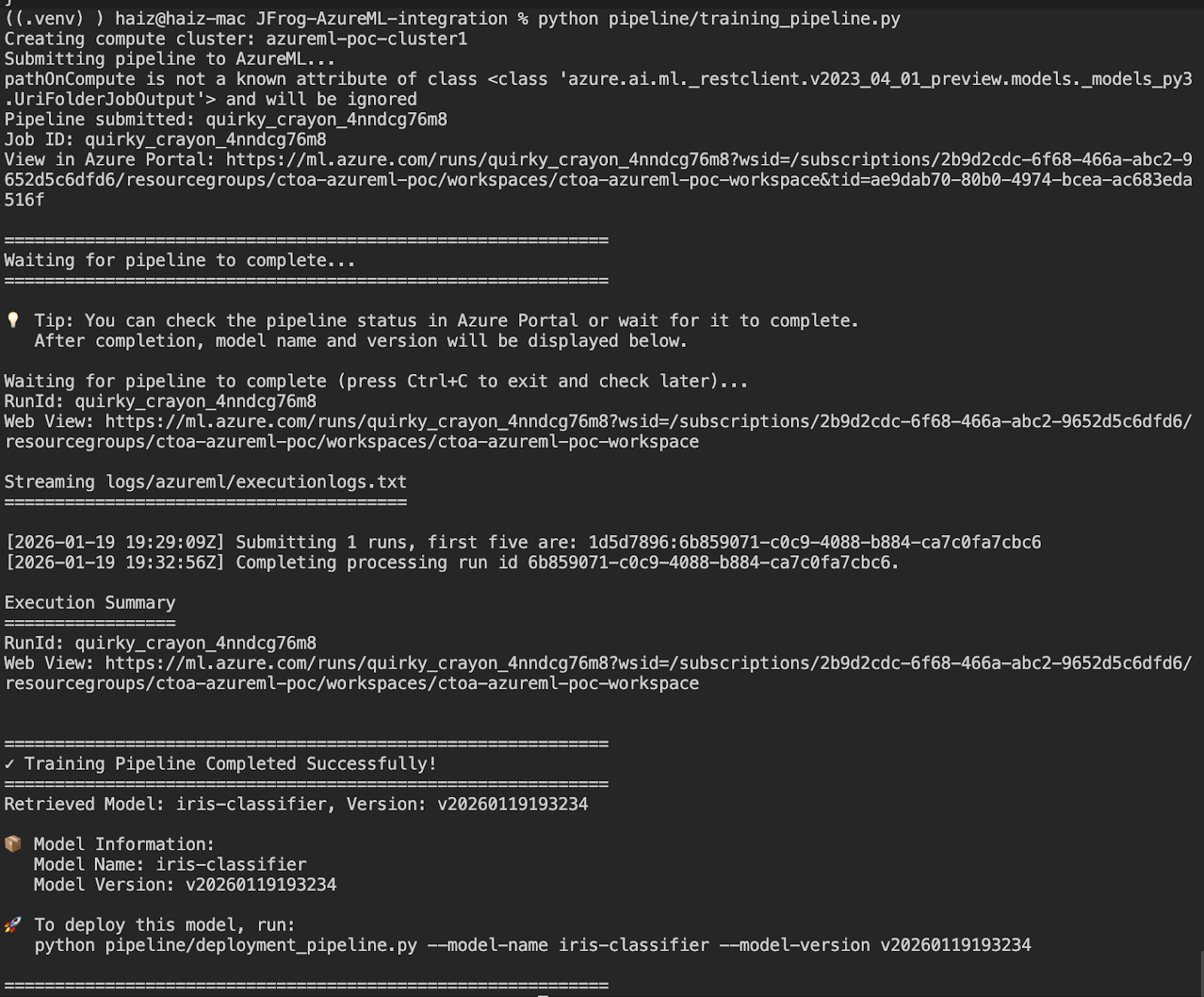
Note down the model name and version from the output (e.g., iris-classifier and v20260119193234). You will need these for deployment.
Phase 3: Deploy and Test Model
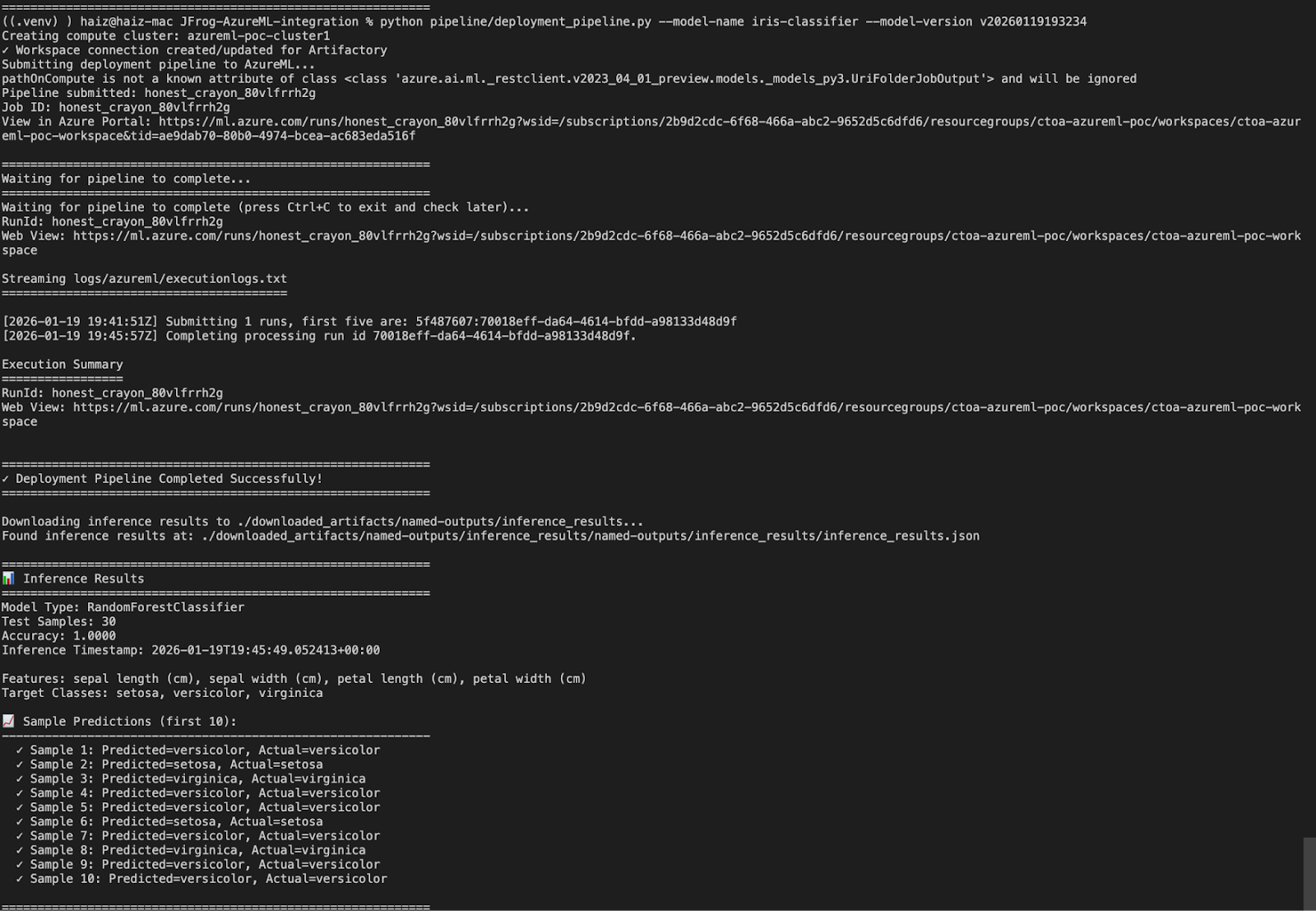
Step 3.1: Run Deployment Pipeline
Use the model name and version from Phase 2:
python pipeline/deployment_pipeline.py \
  --model-name iris-classifier \
  --model-version v20260119193234
![][image3]
Summary
You have successfully:
- Built a secure training container with dependencies from Artifactory
- Trained an ML model on Azure with automatic credential management
- Uploaded the trained model to JFrog ML Repository
- Downloaded and deployed the model for inference
Updated 4 months ago