

TeamCity Artifactory Plug-in
Artifactory provides tight integration with TeamCity CI Server through the TeamCity Artifactory Plug-in. Beyond managing efficient deployment of your artifacts to Artifactory, the plug-in lets you capture information about artifacts deployed, dependencies resolved, environment data associated with the TeamCity build runs and more, which effectively provides full traceability for your builds.
From version 2.1.0 the TeamCity Artifactory Plug-in provides powerful features for release management and promotion. For details please refer to TeamCity Artifactory Plugin - Release Management.
Requirements (as of 2.11.0)
Java: 17 or later. The 2.11.0 release upgrades the plugin to Java 17.
Artifactory: Compatible with Artifactory 7+ for Build-Info links and browsing.
The TeamCity plugin remains maintained primarily for compatibility and critical fixes; for new features, JFrog recommends JFrog CLI inside TeamCity.
Source Code Available!
The TeamCity Artifactory Plugin is an open source project on GitHub that you can freely browse and fork.
Important
Using this Plugin
For integrating TeamCity with the JFrog Platform, we strongly recommend using JFrog CLI directly from within TeamCity, instead of using the TeamCity Artifactory Plug-in. While the plug-in is still maintained, it will most likely not be updated with new features, and only critical issues will be prioritized. JFrog CLI already includes significantly more capabilities than this plug-in, it is extremely popular and is therefore highly recommended.
Before you begin
Please refer to the general information about Artifactory's Build Integration before using the TeamCity Artifactory Plugin.
Build Runner Support
The TeamCity Artifactory plugin supports most build runner types, including: Maven2, Maven 3, Ivy/Ant (with Ivy modules support), Gradle , NAnt, MSBuild, FxCop , and Ipr.
TeamCity License Information
The TeamCity Artifactory plugin is available under the Apache v2 License.
Install the TeamCity Plugin
Plugins are deployed to TeamCity by placing the packaged plugin into the $``<<Anchor label="TeamCity Data Directory" href="https://confluence.jetbrains.com/display/TCD9/TeamCity+Data+Directory" target="_blank">TeamCity Data Directory</Anchor>>/plugins directory and restarting TeamCity. You can also accomplish this via the TeamCity UI via Administration | Plugins List | Upload Plugin Zip and choosing the zip-file from your file-system. You will need to restart TeamCity (tomcat) for the plugin to take effect.
Download the latest version of the plugin from the JetBrains Marketplace.
Remove older versions
If you have an older version of the plug-in, be sure to remove it before upgrading to a newer one
Configure the TeamCity Plugin
Note
Note (2.11.0): The TeamCity Artifactory Plugin now requires Java 17+. If your TeamCity server/agents run older Java, upgrade Java before installing or upgrading to 2.11.0. See the 2.11.0 release for details.
To use the TeamCity Artifactory plugin you first need to configure your Artifactory servers in TeamCity's server configuration. You can then set up a project build runner to deploy artifacts and Build Info to a repository on one of the Artifactory servers configured.
Configure System-wide Artifactory Servers for TeamCity
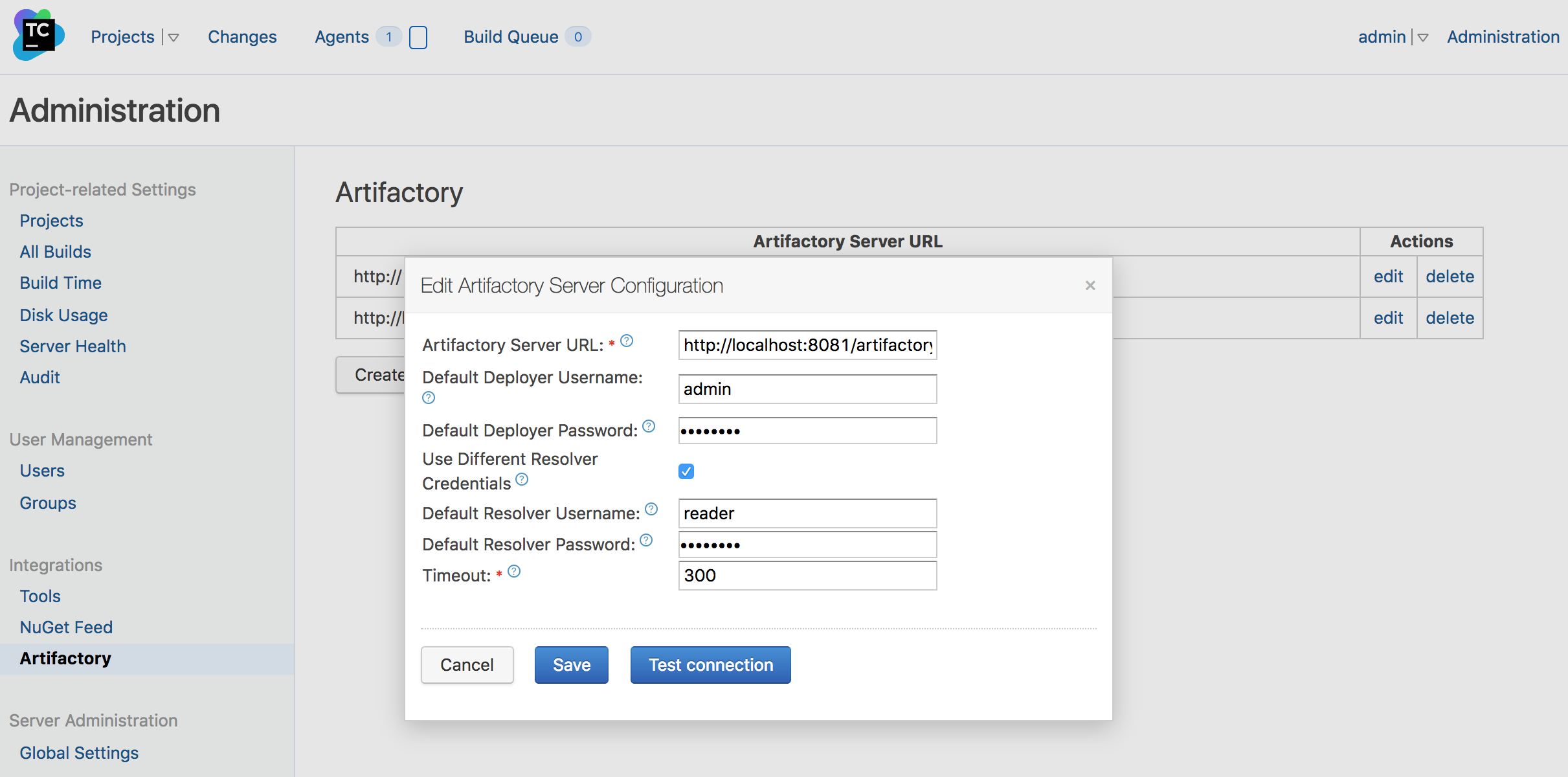
To make Artifactory servers globally available to project runner configurations, they must be defined in Administration | Integrations | Artifactory.
Select Create new Artifactory server configuration and fill in the URL of the Artifactory server.
Deployer credentials can be set at the global level for all builds, but they can also be overridden and set at a project build level.
Specifying a username and password for the resolver repository is optional. It is only used when querying Artifactory's REST API for a list of configured repositories and then only if the target instance does not allow anonymous access.
Run a Build with the Artifactory TeamCity Plugin
The Artifactory Plugin adds the Artifactory configuration to the built-in Maven, Gradle, and Ant and build steps.
In addition, the dedicated Artifactory Docker build step allows pulling and pushing docker images from and to Artifactory, while collecting and publishing build-info to Artifactory.
Generic Build Integration allows downloading and uploading generic files from and to Artifactory, while collecting build Info and publishing it to Artifactory. The Generic Build Integration configuration is added by the Artifactory to the following build steps:
- Command Line
- FxCop
- MSBuild
- Rake
- Powershell
- XCode Project
- NuGet Publish
- NAnt
- Visual Studio (sln)
- Visual Studio 2003
- SBT, Scala build tool
Notes
- General: The configuration added to these build steps allows defining the artifacts to upload and download by either using "File Specs" or "Legacy Patterns".
- File Specs: File Spec are specified in JSON format.
TeamCity Legacy Patterns (deprecated)
Legacy patterns are deprecated since version 1.8.0 and will be removed in future releases.
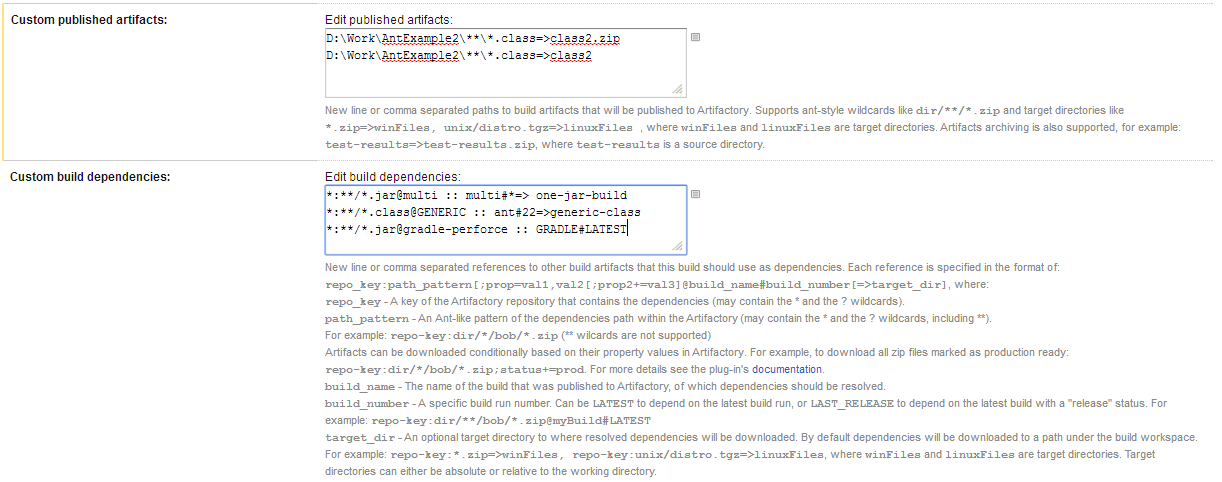
| Custom published artifacts | Allows you to specify which artifact files produced by the build should be published to Artifactory. At the end of the build the plugin locates artifacts in the build's checkout directory according to the specified artifact patterns, and publishes them to Artifactory to one or more locations, optionally applying mapping for the target path of each deployed artifact. The pattern and mapping syntax for Published Artifacts is similar to the one used by TeamCity for Build Artifacts. |
|---|---|
| Custom build dependencies | Allows you to specify dependency patterns for published artifacts that should be downloaded from Artifactory before the build is run. You can have detailed control over which artifacts are resolved and downloaded by using query-based resolution, adding to your artifact paths a query with the properties that the artifact should have before it can be downloaded. |
Note
As of version 2.1.4, the above configuration is not backward compatible and you may need to re-save the builds configuration for them to run properly.
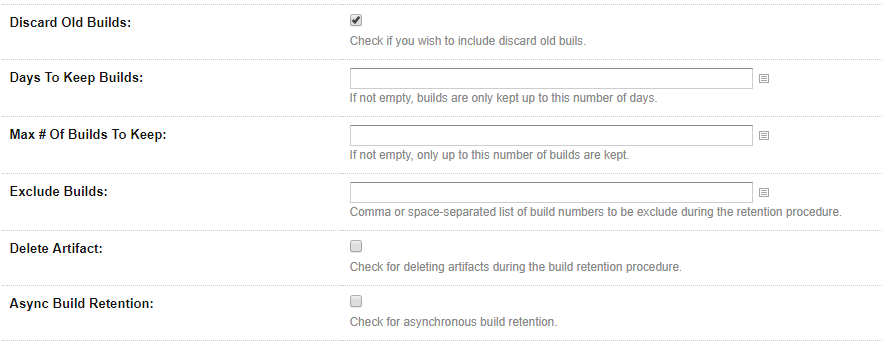
Trigger Build Retention in Artifactory for TeamCity
You can trigger build retention when publishing build-info to Artifactory.
Scan TeamCity Builds with JFrog Xray
The TeamCity Artifactory Plugin is integrated with JFrog Xray through JFrog Artifactory, allowing you to have build artifacts scanned for vulnerabilities and other issues. If issues or vulnerabilities are found, you may choose to fail a build job. The scan result details are always printed into the build log. This integration requires JFrog Artifactory v4.16 and above and JFrog Xray v1.6 and above.
For Xray to scan builds, you need to configure a Watch with the right filters that specify which artifacts and vulnerabilities should trigger an alert, and set a Fail Build Job Action for that Watch.

Attach Searchable Parameters to Build-Info and to Published Artifacts
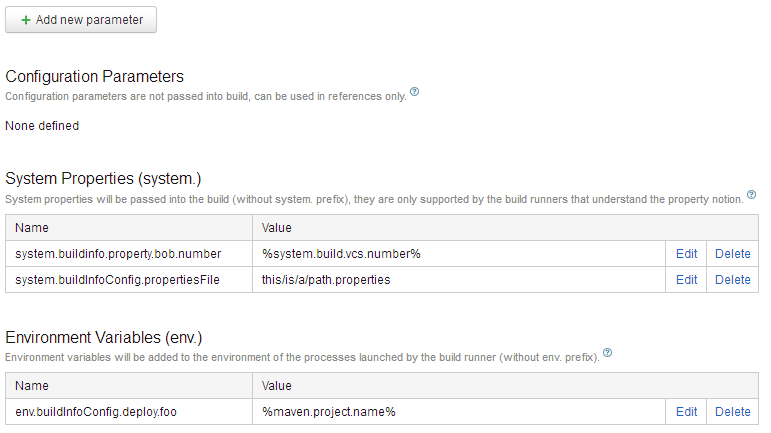
In the Build Configuration Settings you can select Parameters to define system properties or environment variables that should be attached to artifacts and their corresponding build info.
To define a parameter click on the Add new parameter button.
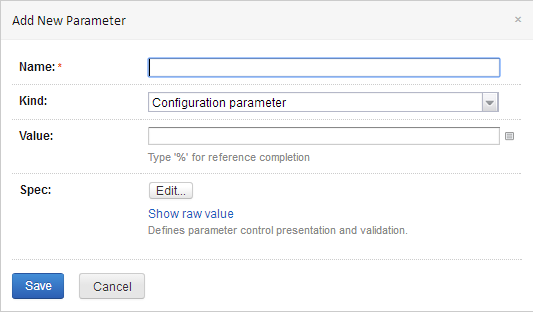
Fill in the corresponding fields.
Parameters relevant for builds run through Artifactory are:
buildInfo.property.*- All properties starting with this prefix are added to the root properties of the build-infoartifactory.deploy.*- All properties starting with this prefix are attached to any deployed produced artifacts
You can specify all the properties in a single file, and then define another property pointing to it.
To point the plugin to a properties file, define a property called buildInfoConfig.propertiesFile and set its value to the absolute path of the properties file.
It is also possible to point the plugin to a properties file containing the aforementioned properties.
Tip
The properties file should be located on the machine running the build agent, not on the server!
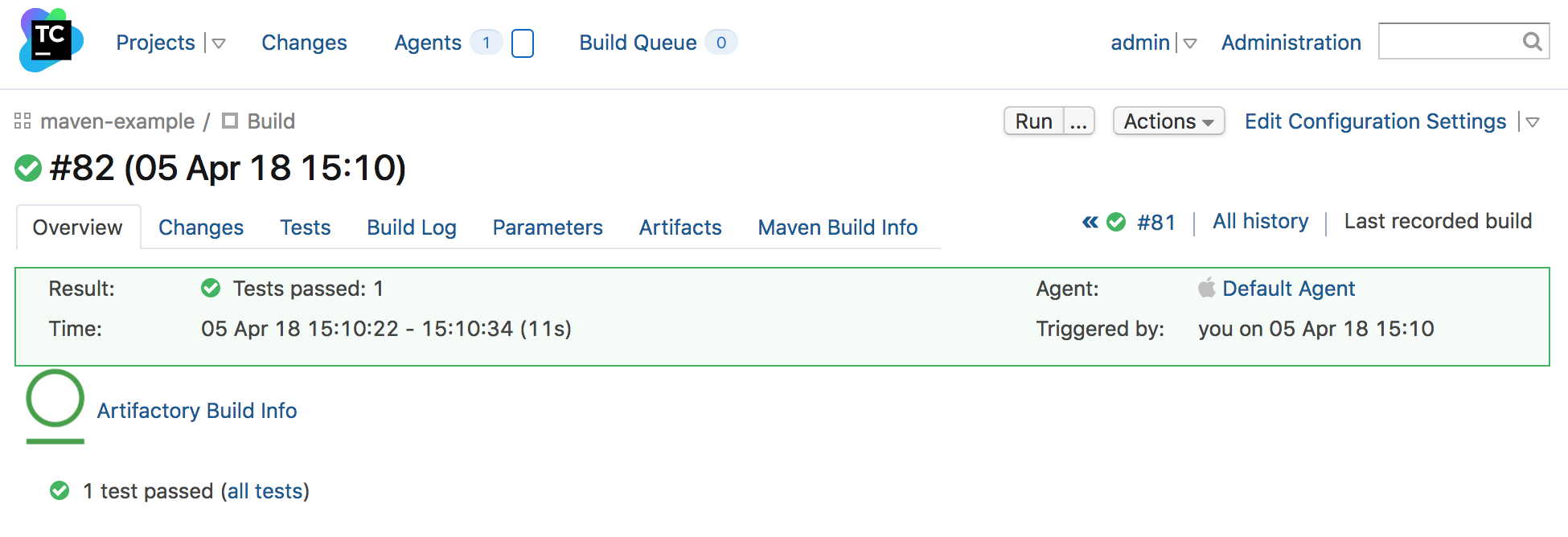
Browse to the Published Build-info in Artifactory
What changed in 2.11.0
- Build-Info links generated by the TeamCity plugin were updated for Artifactory 7+.
- If you saved/bookmarked Build-Info URLs from versions prior to 2.11.0, open the build from Artifactory → Builds again to get the working link in the Build Info Details screen.
If you configured your build step to publish build-info to Artifactory, you can link directly to the build information in Artifactory from a build run view:
Trigger Builds in Reaction to Changes in Artifactory
The plugin allows you to set a new type of trigger that periodically polls a path in Artifactory, a folder, or an individual file. Whenever a change is detected in the polled element, the TeamCity build is triggered. For example, the build could be triggered when new artifacts have been deployed to the specified path in Artifactory.
Artifactory Pro required
Triggering builds is only available with Artifactory Pro
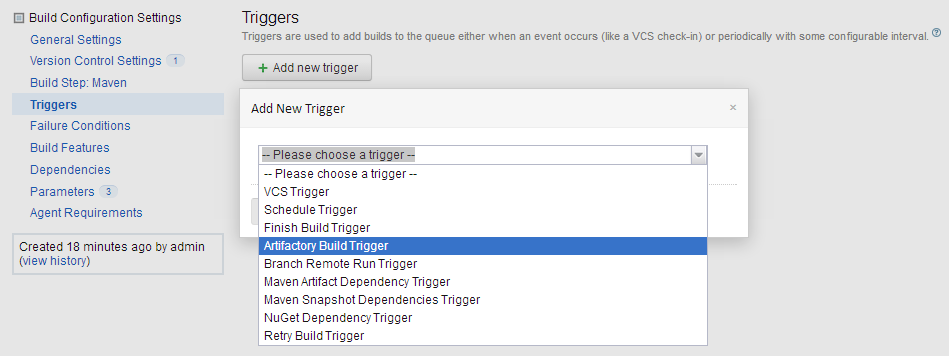
To configure a new build trigger, under Administration, select $PROJECT_NAME | $BUILD_NAME. Then, select Triggers.
Click the Add new trigger button to select an Artifactory Build Trigger
Select the Artifactory Server URL and the Target repository.
Complete the username and password fields of a valid deployer for the selected repository.
Deploy permission
The specified user must have deploy permissions on the repository
Then, in Items to watch, specify the paths in the selected repository in which a change should automatically trigger a build.
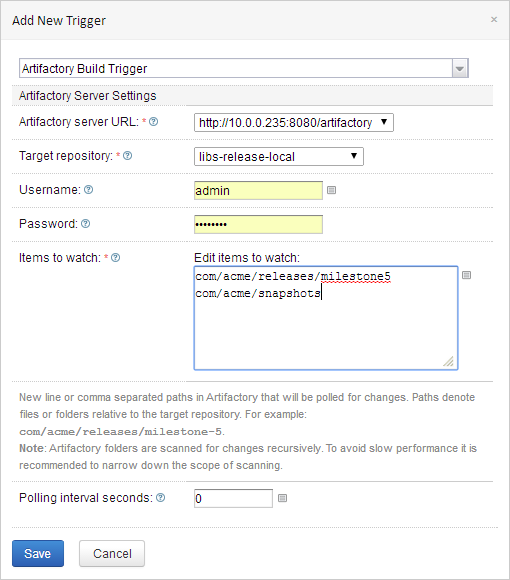
Be as specific as possible in Items to watch
In order to establish if there has been a change, Artifactory must traverse all the folders and their sub-folders specified in Items to watch. If the specified folders have a lot of content and sub-folders, this is a resource-intensive operation that can take a long time.
Therefore, we recommend being as specific as possible when specifying folders inItems to watch.
Configure a Proxy for TeamCity
If the Artifactory server is accessed via a proxy, you need to configure the proxy by setting the following properties in the $TEAMCITY_USER_HOME/.BuildServer/config/internal.properties file. If the file does not exist, you'll need to create it.
org.jfrog.artifactory.proxy.host
org.jfrog.artifactory.proxy.port
org.jfrog.artifactory.proxy.username
org.jfrog.artifactory.proxy.password
Since version 2.5.0, you can also define a proxy for specific build agents. You do that by adding the TeamCity agent name to the end of the above property names.
For example, if you wish to configure a proxy for the "my-agent" agent, the proxy properties configuration should look as follows:
org.jfrog.artifactory.proxy.host.my-agent
org.jfrog.artifactory.proxy.port.my-agent
org.jfrog.artifactory.proxy.username.my-agent
org.jfrog.artifactory.proxy.password.my-agentTip
In case your build agent name contains a white-space, you should replace the white-space in the property name with \u0020.
For example, here's how you define the proxy host for the "Default Agent":
org.jfrog.artifactory.proxy.host.Default\u0020Agent
Release Notes for the TeamCity Plugin
Click to see change log details...
The release notes for versions 2.11.0 and above are available here.
2.11.0 (October 23, 2025)
-
Fix: Update Build-Info URL for compatibility with Artifactory 7+.
166 -
Upgrade: Runtime upgraded to Java 17.
168 -
Dependency: Bump Spring WebMVC version.
169 -
Adding support for Connections to set up Artifactory connection details —
115 -
Support federated repositories —
129 -
Bug fix — Repository verification failure in free text mode —
128 -
Bug fix — Deployment fails with NullPointerException in
DeploymentUrlUtils—684
This section summarizes older releases previously listed individually. For full details, see the corresponding GitHub/JIRA links.
2.9.5 (November 28, 2022)
Bug fix — Wrong build-info URL in Artifactory 7 —
2.9.4 (August 14, 2022)
Bug fix — Artifactory deploy properties not saved on deployed artifacts —
2.9.3 (June 9, 2022)
Bug fix — Trigger configuration does not list repositories —
2.9.1 (June 6, 2021)
Bug fix — Artifactory response parsing can fail due to missing JSON properties —
2.9.0 (December 1, 2020)
New Artifactory Docker build step.
2.8.0 (January 3, 2019)
Support TeamCity 2018 — TCAP-322; allow downloading using file spec with only build — TCAP-326; bug fix — TCAP-323.
2.7.1 (August 20, 2018)
Fix build-info link in TeamCity 2018 — TCAP-318; allow modifying build name in Artifactory — TCAP-210; parallel uploads with File Specs — TCAP-315; bug fix — TCAP-317.
2.6.0 (April 9, 2018)
Concurrent range-request downloads for files >5 MB — TCAP-312; bug fixes — TCAP-305, TCAP-306, TCAP-307, TCAP-309, TCAP-311, TCAP-314.
2.5.0 (September 28, 2017)
Allow proxy configuration per agent — TCAP-237; pattern exclusion in File Specs — TCAP-300; AQL optimizations — TCAP-302; bug fixes — TCAP-297, TCAP-299, TCAP-301, TCAP-303.
2.4.0 (June 29, 2017)
Retention policy support — TCAP-283; Xray build scan — TCAP-292; file specs in generic jobs — TCAP-294; extract supported formats — TCAP-295; bug fixes — TCAP-167, TCAP-293, TCAP-296.
2.3.1 (January 23, 2017)
Support full path in specs — TCAP-287; download by build name/number in file spec — TCAP-288; change File Specs pattern — TCAP-285.
2.3.0 (November 13, 2016)
Upload/download File Specs support for generic jobs — TCAP-284.
2.2.1 (May 19, 2016)
Bug fix — TCAP-275.
2.2.0 (March 21, 2016)
Bug fixes — TCAP-238, TCAP-239, TCAP-241, TCAP-244, TCAP-245, TCAP-247, TCAP-250, TCAP-258, TCAP-236.
2.1.13 (May 4, 2015)
Support multi Artifactory Build Triggers — TCAP-222; support SBT build tool — TCAP-223; bug fix — TCAP-214.
2.1.12 (March 12, 2015)
Support free-text repository configuration — TCAP-217.
2.1.11 (December 7, 2014)
Compatibility with Gradle 2.x — TCAP-211; bug fix — TCAP-205.
2.1.10 (May 8, 2014)
Bug fixes — TCAP-206, TCAP-72.
2.1.9 (April 17, 2014)
Add Version Control URL to Build Info JSON — TCAP-203; support TeamCity 8.1 Release Management; support Maven 3.1.1; bug fixes — TCAP-197, TCAP-161.
2.1.8 (January 15, 2014)
Allow remote repository caches for build triggering — TCAP-196.
2.1.7 (December 18, 2013)
Black Duck integration — TCAP-185.
2.1.6 (September 3, 2013)
TeamCity 8.0.x compatibility — TCAP-172; credentials/repository refresh fixes — TCAP-153, TCAP-166; generic resolution for Xcode builds — TCAP-180; Gradle working directory fix — TCAP-125.
2.1.5 (July 7, 2013)
Security fix — TCAP-172; improve generic resolution — BI-152.
2.1.4 (August 21, 2012)
Compatible with TeamCity 7.1.
2.1.3 (May 30, 2012)
Compatible with TeamCity 7; Perforce in release management; multiple deploy targets in generic deploy; custom build dependency resolution per build.
2.1.2 (December 12, 2011)
Compatible with Gradle 1.0-milestone-6.
2.1.1 (August 9, 2011)
Support for Gradle milestone-4; improved nested Maven release support; minor Maven deployment fixes.
2.1.0 (July 14, 2011)
Release management capabilities; bug fixes.
2.0.1 (January 9, 2011)
Auto snapshot/release target selection; Ivy/artifact deploy patterns; improved Gradle support; bug fixes.
2.0.0 (December 5, 2010)
Support for Gradle; support for Maven 3; default deployer adds resolver credentials; support for multi-step builds.
1.1.3 (November 21, 2010)
Include/exclude pattern for artifact deployment.
1.1.2 (November 7, 2010)
License-check controls (include published artifacts, scope limits, disable discovery).
TeamCity Artifactory Plugin - Release Management
The TeamCity Artifactory Plugin includes release management capabilities for Maven and Gradle runners that use Subversion, Git or Perforce for version control.
When you run your builds using Maven or Gradle with jobs that use Subversion, Git or Perforce as your version control system, you can manually stage a release build allowing you to:
- Change values for the release and next development version
- Choose a target staging repository to which to deploy the release
- Create a VCS tag for the release
Staged release builds can later be promoted or rolled-back, changing their release status in Artifactory, and build artifacts may optionally be moved to a different target repository.
Inside Artifactory, the history of all build status changes (staged, promoted, rolled-back, etc.) is recorded and displayed for full traceability.
Before Getting Started with Release Management
This section reviews different aspects of working with Release Management for the TeamCity Artifactory Plugin. Review the following
- Git Release Management with the TeamCity Artifactory Plugin
- Working with Subversion and the TeamCity Artifactory Plugin
Git Release Management with the TeamCity Artifactory Plugin
Pre-requisites for using Release Management with Git:
- Since the Release Management process runs git commands, the git client must be installed on the TeamCity build agent, using an ssh key (using the git client with user and password is not supported)..
- The git client should be configured with an ssh key, so that it can access your Git repositories. Therefore, before running the Release Management process for the first time, it is recommended that you first make sure that you're able to perform a git push from the build agent console. Also, make sure that the git push command runs without displaying a user prompt. Note that configuring an ssh passphrase for the git client is not supported.
Note
Changes are only committed if the files are modified (POM files or
gradle.properties)
During the release, the plugin performs the following steps:
- If Create Branch is checked, create and switch to the release branch.
- Commit the release version to the current branch.
- Create a release tag.
- Push the changes.
- Switch to the checkout branch and commit the next development version.
- Push the next development version to the working branch.
Working with Subversion and the TeamCity Artifactory Plugin
Release management with TeamCity Artifactory Plug-in supports Subversion when using one checkout directory.
During the release the plugin does the following:
- Commits the release version directly to the tag (if Create tag is checked). The release version is not committed to the working branch.
- Commits the next development version to the working branch.
Maven Release Management and the TeamCity Artifactory Plugin
The TeamCity Artifactory Plugin manages a release with Maven running the build only once using the following basic steps:
- Change the POM versions to the release version (before the build starts).
- Trigger the Maven build (with optionally different goals).
- Commit/push changes to the tag (Subversion) or the release branch (Git).
- Change the POM versions to the next development version.
- Commit/push changes to the trunk.
If the build fails, the plugin attempts to rollback the changes (both local and committed).
For more information including configuration of Maven Runners, and Jobs and staging a release build, please refer to TeamCity Artifactory Plug-in.
Configure Maven Runners for TeamCity Integration
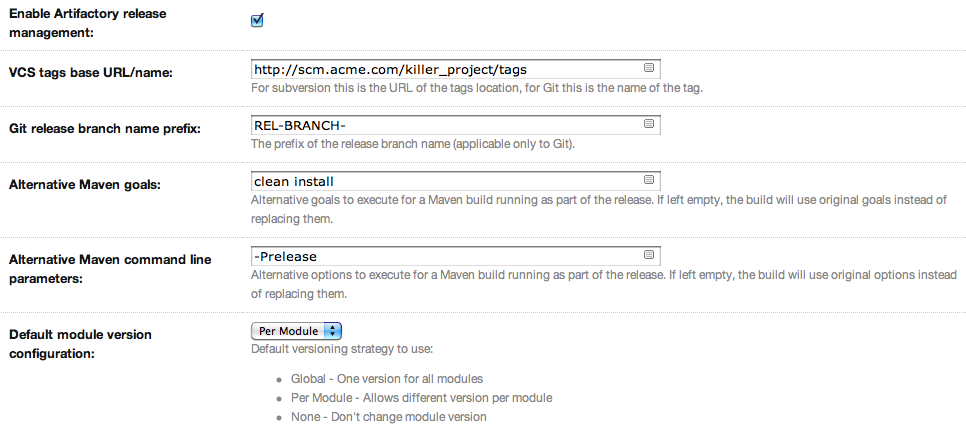
To enable release management in Maven runners, edit the runner's step configuration and check the Enable Artifactory release management checkbox.
Stage a Maven Release Build for TeamCity Integration
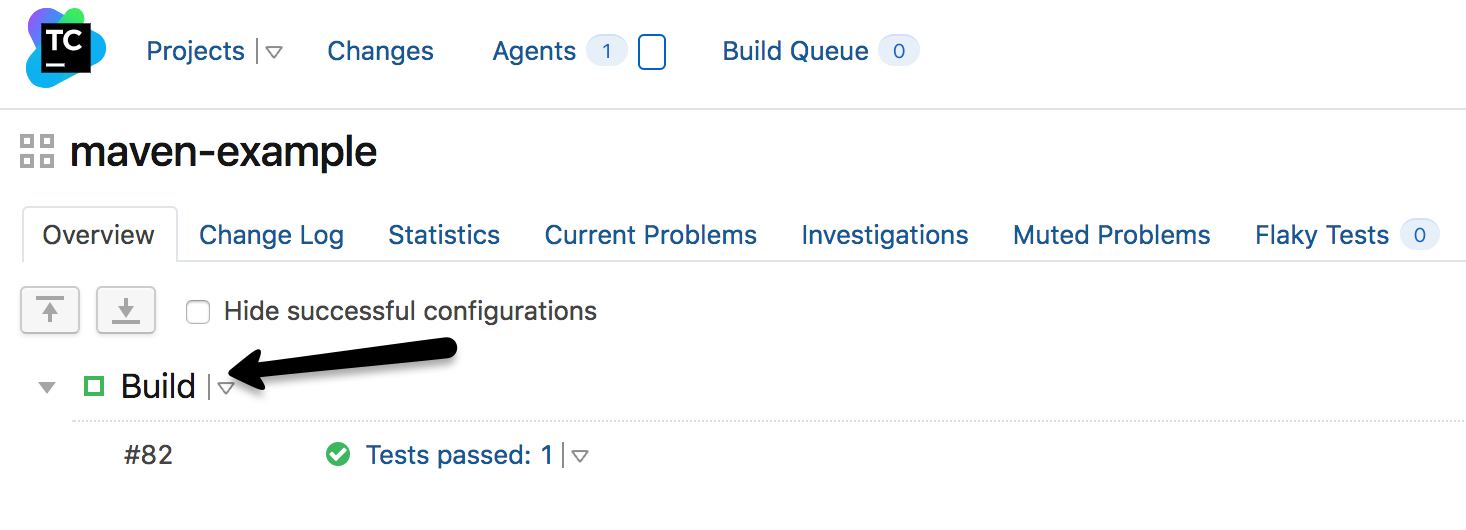
Once release management is enabled, the Artifactory Release Management tab appears at the top of the build page.
Clicking on the tab reveals configuration options for the release build:
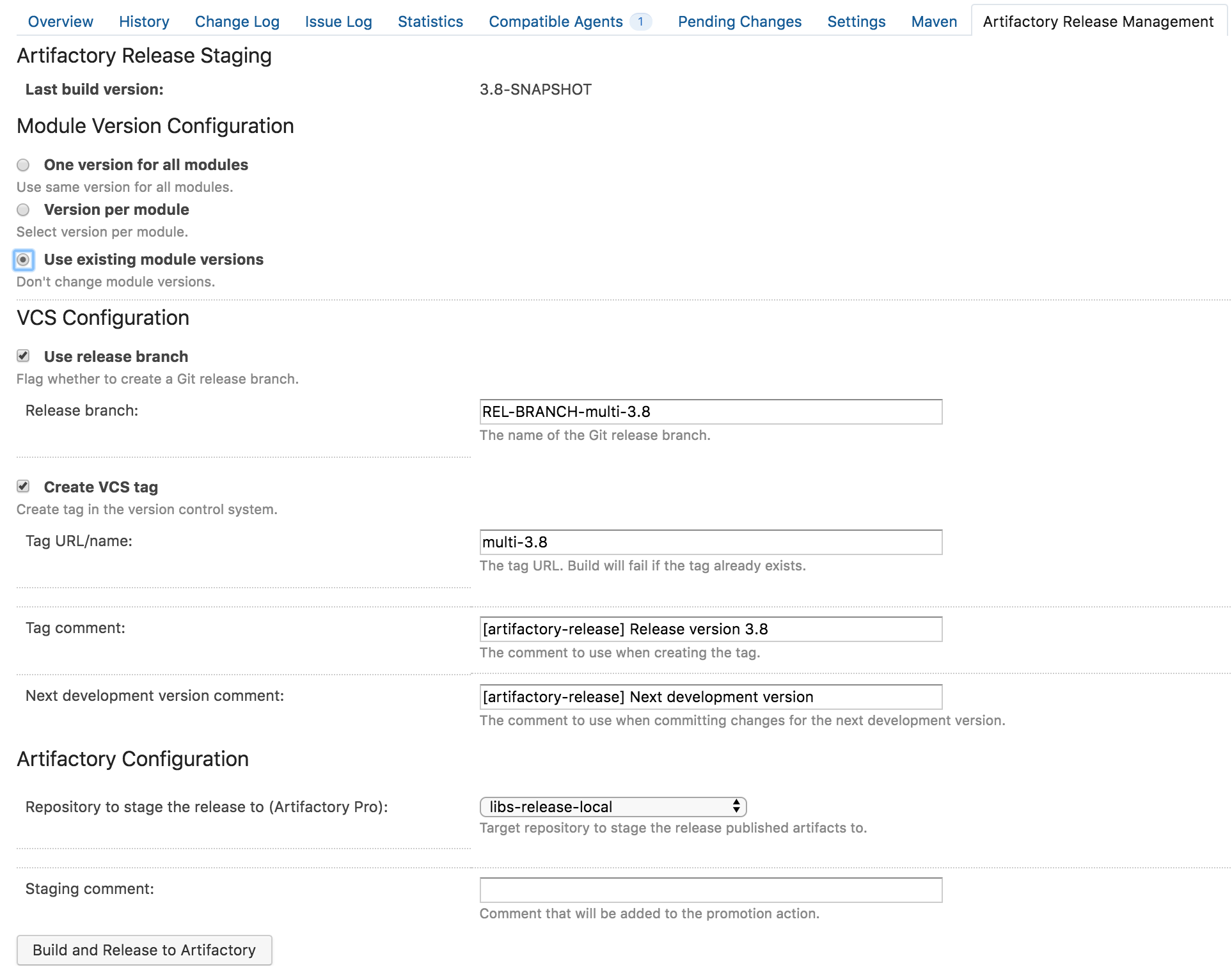
The release staging page displays the last version built (the version tag is that of the root POM, and is taken from the last build that is not a release). Most of the fields in the form are populated with default values.
Version configuration controls how the plugin changes the version in the POM files (global version for all modules, version per module or no version changes).
If the Create VCS tag checkbox is checked (default), the plugin commits/pushes the POMs with the release version to the version control system with the commit comment. When using Git, there's also an option to create a release branch.
Click on the Build and Release to Artifactory button to trigger the release build.
Target server is Artifactory Pro?
If the target Artifactory server is a Pro edition, you can change the target repository, (the default is the release repository configured in Artifactory publisher) and add a staging comment which is included in the build info deployed to Artifactory.
Promote a Release Build for TeamCity Integration
You can promote a release build after it completes successfully.
This is not a mandatory step but is very useful because it allows you to mark the build as released in Artifactory, and move or copy the built artifacts to another repository so they are available to other users.
To promote a build, browse to the build's result page and click the Artifactory Release Promotion link.
Artifactory Pro Required
Promotion features are only available with Artifactory Pro
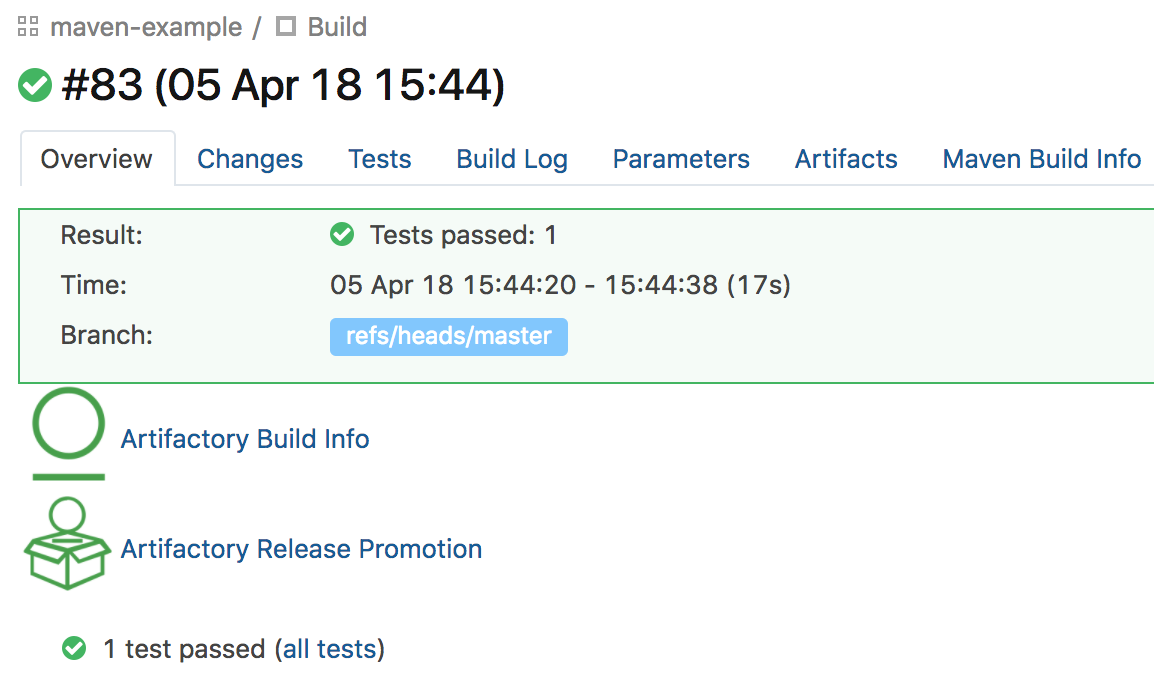
Clicking on the link will open the Release Promotion dialog:
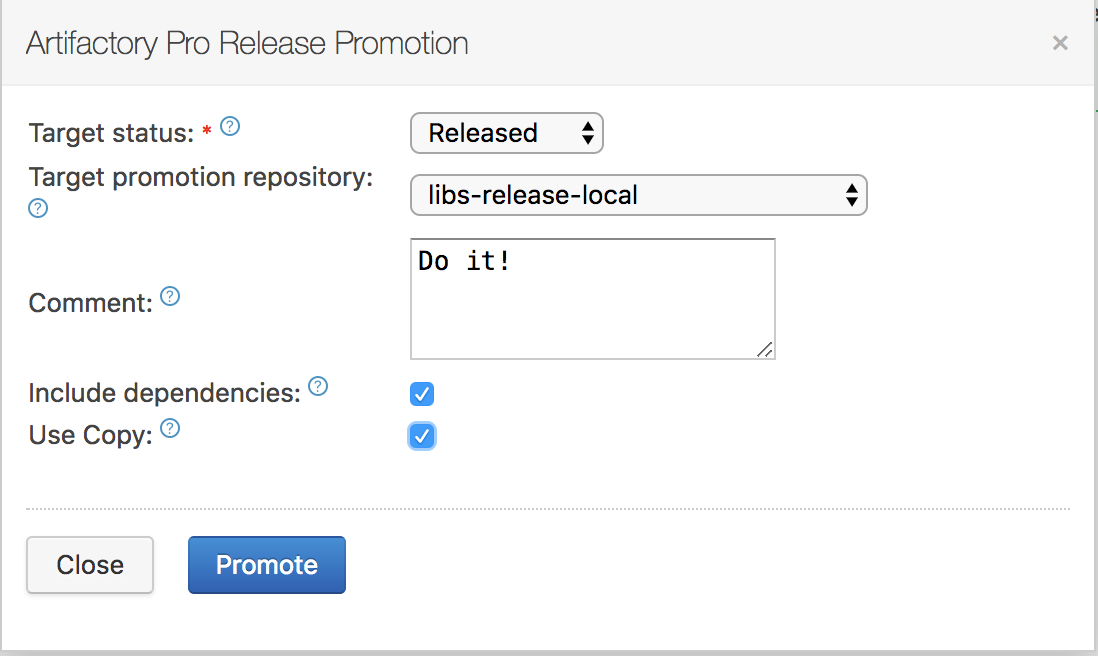
Select the target status of the build ("Released" or "Rolled-Back"). You may also enter a comment to display in the build in Artifactory.
To move or copy the build artifacts, select the Target promotion repository.
Gradle Release Management and the TeamCity Artifactory Plugin
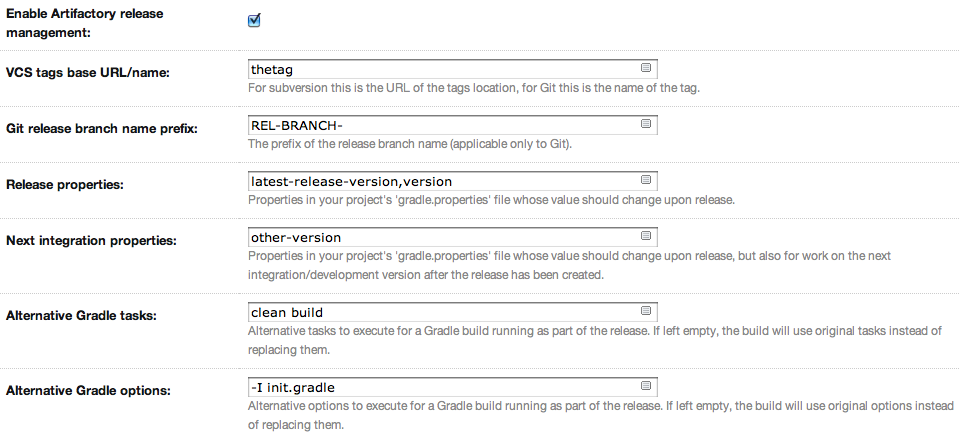
The TeamCity Artifactory Plugin supports release management when running builds with Gradle. This relies on the version property (and others) managed by the gradle.properties file. The plugin reads the properties from the Artifactory release management configuration, and modifies those properties in the gradle.properties file.
The plugin manages a release using the following basic steps:
- Modify properties in the
gradle.propertiesto release values (before the build starts). - Trigger the Gradle build (with optionally different tasks and options).
- Commit/push changes to the tag (Subversion) or the release branch (Git)
- Modify the
gradle.propertiesto the next integration values. - Commit/push changes to the trunk.
Configure Gradle Runners for TeamCity Integration
To enable release management for Gradle runners, edit the runner's step configuration and check the Enable Artifactory release management checkbox.
Stage a Gradle Release Build for TeamCity Integration
Once release management is enabled, the Artifactory Release Management tab appears at the top of the build page.
Clicking on the tab reveals configuration options for the release build:
The Release staging tab displays the Release and Next development properties configured for the runner. The plugin reads these values from the gradle.properties file and attempts to calculate and display Release and Next integration version in the text fields.
If Create VCS tag is checked (default), the plugin commits/pushes the POMs with the release version to the version control system with the commit comment. When using Git, if Use release branch is checked, the Next release version changes are carried out on the release branch instead of the current checkout branch. The final section allows you to change the target repository (the default is the release repository configured in Artifactory publisher) and an optional staging comment which includes the build info deployed to Artifactory.
Click on the Build and Release to Artifactory button to trigger the release build.
Promote a Release Build for TeamCity Integration
You can promote a release build after it completes successfully.
This is not a mandatory step but is very useful because it allows you to mark the build as released in Artifactory, and move or copy the built artifacts to another repository so they are available to other users.
To promote a build, browse to the build's result page and click the Artifactory Release Promotion link.
Artifactory Pro Required
Promotion features are only available with Artifactory Pro
Clicking on the link will open the Release Promotion dialog:
Select the target status of the build ("Released" or "Rolled-Back"). You may also enter a comment to display in the build in Artifactory.
To move or copy the build artifacts, select the Target promotion repository.
Updated 3 months ago