

Build-Info Repository
The artifactory-build-info repository is a special, local repository in Artifactory designed to store the JSON files that contain your build information. By treating these JSON files as artifacts, Artifactory provides a more robust and efficient way to manage your build history.
This repository is created automatically and serves as the central location for all build information uploaded to your Artifactory instance.
Automatic Deployment
Whenever a build is uploaded to Artifactory—whether from a CI server, the REST API, or the UI—a corresponding build info JSON file is automatically deployed to the artifactory-build-info repository.
Directory Structure
Artifactory organizes the build info files using a clear and consistent structure. The files are not stored in the root of the repository but are automatically placed in the following path:
artifactory-build-info/[build name]/[build number]-[deploy timestamp].json
- The
[build name],[build number], and[deploy timestamp]are automatically generated from the build you uploaded. - If you deploy a build with an identical build number and timestamp, it will overwrite the existing build info file rather than creating a new one.
Storing build information this way provides several advantages:
- Granular Permissions: Manage user and group permissions for your builds using include/exclude patterns, just as you would with any other repository.
- Simple Replication: Easily replicate your build history to other Artifactory instances, since the build info is stored in a standard repository format.
- Enhanced Performance: Improve the speed, reliability, and accessibility of the Builds module by centralizing all build data.
Important
- Do Not Delete This Repository: The artifactory-build-info repository is a critical system component. You cannot manually delete it. If it is removed, all build history will be permanently lost, and Artifactory will automatically recreate an empty repository in its place.
- Update Your Cleanup Policies: Since build info files are stored as artifacts, they can be deleted by automated cleanup policies or user plugins. To prevent accidental data loss, you must explicitly exclude the artifactory-build-info repository from any scripts or configurations that clean up artifacts in local repositories.
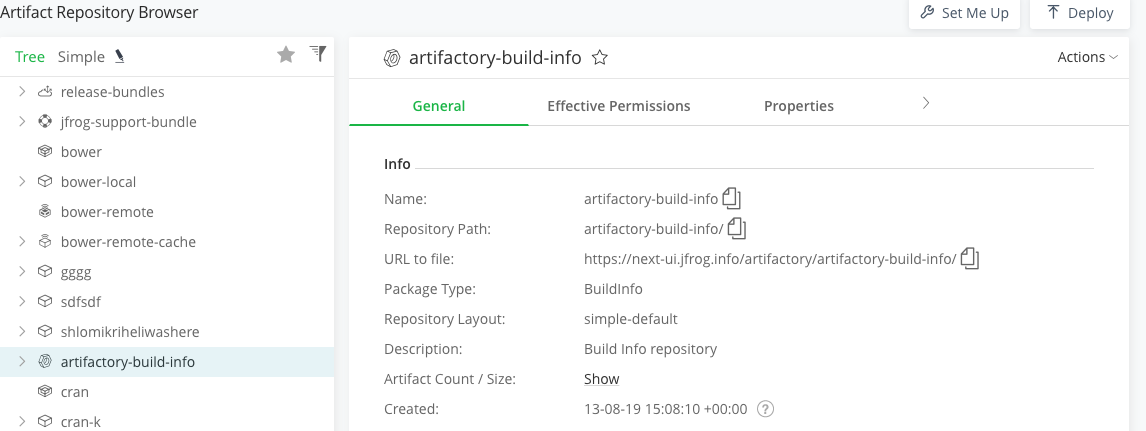
To view the artifactory-build-info repository:
- From the Platform module, navigate to Artifactory > Artifacts.
- Use the search bar or browse the repository tree to find artifactory-build-info.
Migrating to the artifactory-build-info Repository
The migration process may be configured through the following system properties. The migration can run on any node.
Updated 3 months ago