

GitHub Integration Key Features
The partnership between GitHub and JFrog combines GitHub's code management expertise with JFrog's package management strengths, creating a unified experience for managing the software supply chain.
This integration benefits various personas in your organization, including:
- Developers: Enhanced code security and real-time artifact insights.
- Build Engineers: Improved build processes with secure artifact management.
- DevOps Engineers: Streamlined CI/CD pipelines with automated credential management.
- Security Teams: Comprehensive security and compliance tracking.
The integration spans coding, CI, and release management, offering new features and capabilities tailored to different team roles and organizational structures.
| Code | Build | Release | |
|---|---|---|---|
| One Platform Experience | |||
| Name of the Feature | OIDC Integration | ||
| JFrog Product | JFrog Access (OIDC) | ||
| GitHub Product | GitHub OIDC Provider | ||
| Connect Code and CI to Release Packages | |||
| Name of the Feature | JFrog Job Summary DevOps and Security | JFrog Build Info | |
| JFrog Product | JFrog Job Summary | JFrog Build Info | |
| GitHub Product | GitHub Actions | GitHub Actions | |
| Unified Security | |||
| Name of the Feature | JFrog Code Security Insights in GitHub Advanced Security | JFrog Binary Security Insights in GitHub Advanced Security | |
| JFrog Product | Frogbot with Xray/JFrog Advanced Security | JFrog Advanced Security | |
| GitHub Product | Github Advanced Security | Github Advanced Security | |
| AI | |||
| Name of the Feature | JFrog GitHub Copilot Extension - OSS Packages Assistant | ||
| JFrog Product | JFrog GitHub Copilot Extension | ||
| GitHub Product | GitHub Copilot |
To learn more, refer to the following:
OIDC Integration
Who can use this feature?
OIDC integration is available to Enterprise/Enterprise+ customers. For a complete feature comparison by subscription type, refer to the JFrog and GitHub Integration Features Matrix.
Traditional CI/CD pipelines often use long-lived credentials (tokens or username/password combinations) for accessing cloud services and managing deployments. However, these credentials can pose significant security risks and require extensive management, especially during a security breach. Switching to OpenID Connect (OIDC) enhances both security and manageability.
OIDC is a modern and secure authentication protocol that connects GitHub Actions with JFrog Artifactory, streamlining the entire deployment process. This integration facilitates a tokenless experience by connecting GitHub repositories to JFrog projects and simplifying identity management.
What does it do?
- Enhanced Security: Provides a secure, future-proof authentication solution, reducing reliance on long-lived credentials.
- Simplified Authentication: Allows GitHub users to log into the JFrog platform seamlessly.
- Accelerated Deployment: Streamlines the deployment process from code build in GitHub Actions to artifact management in JFrog Artifactory.
Why is it important?
- Build Devs: Streamlines operations and reduces maintenance efforts.
- Security Teams: Lowers security risks and improves monitoring.
JFrog Job Summary
Who can use this feature?
JFrog Job Summary is available to Pro/ProX and Enterprise/Enterprise+ customers. Advanced features, such as detailed security findings and linkage between GitHub and Artifactory, are exclusive to Enterprise/Enterprise+ customers. For a complete feature comparison by subscription type, refer to the JFrog and GitHub Integration Features Matrix.
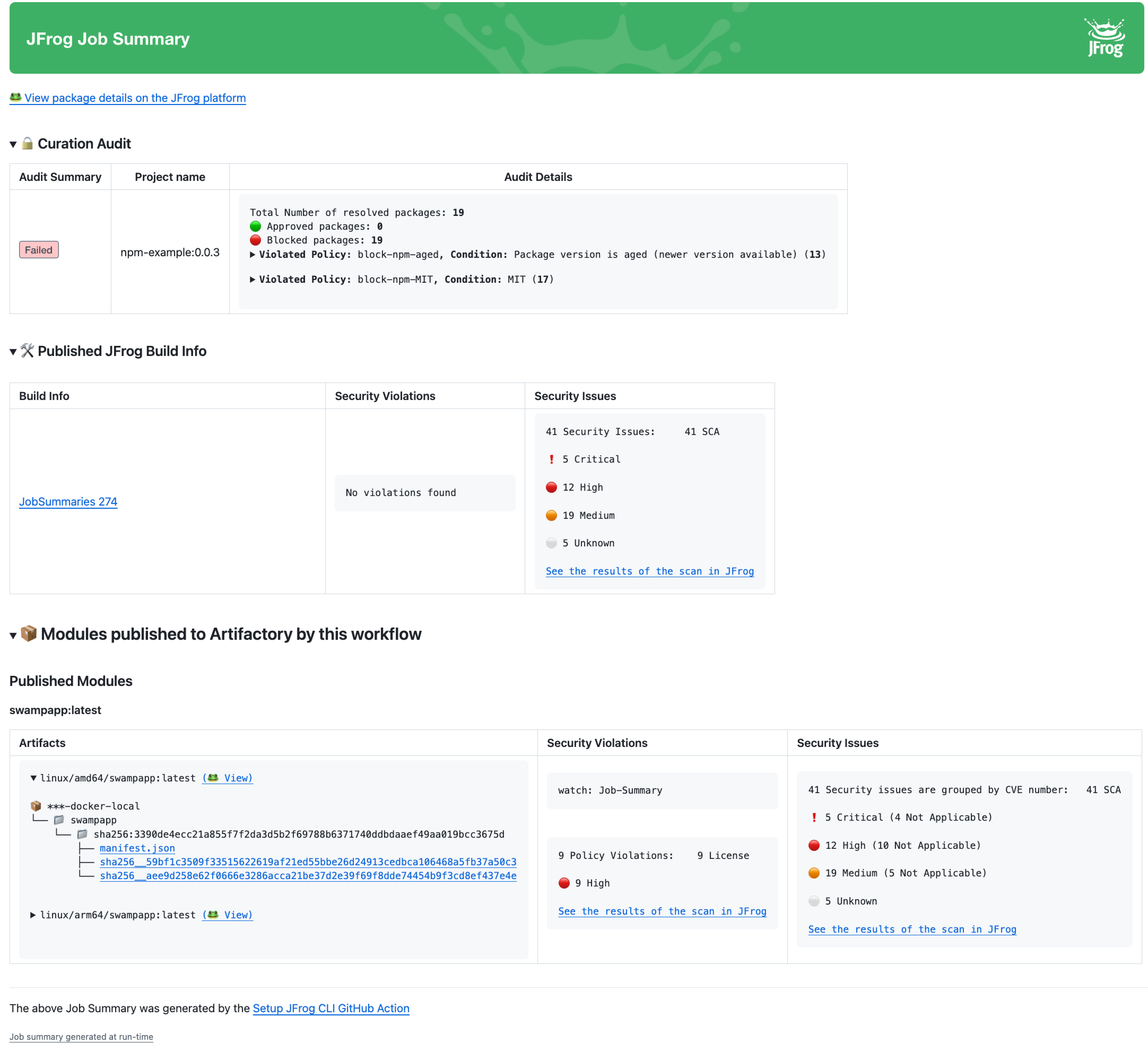
A build failure can disrupt various teams within an organization, affecting developers, security teams, pipeline engineers, and DevOps teams. Rather than manually browsing through logs to diagnose issues, the JFrog and GitHub integration provides a consolidated view of your build process, offering enhanced clarity, control, and security.
What does it do?
The JFrog Job Summary feature offers detailed insights into each build, directly within GitHub Actions. This includes:
- Artifact Linking: Each artifact uploaded to Artifactory is linked to its corresponding Artifactory artifact.
- Package Linking: Project packages uploaded to Artifactory are linked to their corresponding Artifactory packages.
- Published Build: Establishes a bi-directional link between builds and the Buildinfo created in Artifactory, including details on published modules, environment, Xray data, and Build Info JSON.
- Security Issues: Provides summaries of security scans, including SCA (Software Composition Analysis) issues, binary scanning, contextual analysis, and secrets detection.
- Build Info: Details of the build process are published to Artifactory and saved as a Buildinfo artifact. To learn more, refer to JFrog Build Info.
- Curation Audit: Lists packages that violated policies and were blocked from upload, with links from GitHub Actions job summaries to Xray for detailed security insights.
Why is it important?
- Developers: Provides detailed build insights and metadata, improving build quality and visibility.
- Security Teams: Enhances vulnerability and compliance management, supports policy enforcement, and ensures package curation.
JFrog Build Info
Who can use this feature?
JFrog Build Info is available to Enterprise/Enterprise+ customers. For a complete feature comparison by subscription type, refer to the JFrog and GitHub Integration Features Matrix.
Buildinfo provides detailed metadata about a build, including version history, artifacts, project modules, dependencies, and other components used to create the build. It acts as a snapshot of everything required for the build, collected by the build agent.
What does it do?
- Comprehensive Details: Documents all information necessary to create the build, including version history, artifacts, project modules, and dependencies.
- Build Comparison: Allows for comparing different builds to investigate changes.
- GitHub Link: Connects to the GitHub job run that created the build.
- Release Management: Specifies components of the release bundle for promotion in the release lifecycle.
- SBOM Creation: Automatically generates the granular data for the Software Bill of Materials (SBOM).
Why is it important?
- DevOps: Provides comprehensive build traceability and troubleshooting capabilities, streamlining CI/CD lifecycle management.
- Security: Enhances security and compliance by ensuring complete documentation and traceability of build components.
Related Information
JFrog Security Insights in GitHub Advanced Security
This section describes JFrog security insights in GitHub Actions Advanced Security.
| Feature | Description | For more information, see... |
|---|---|---|
| JFrog Code Security Insights in GitHub Advanced Security | The integration scans every code change and displays the results as comments in the Pull Request or in the GitHub Advanced Security Dashboard for branch commits. | JFrog Code Security Insights in GitHub Advanced Security |
| JFrog Binary Security Insights in GitHub Advanced Security | The developers can view detected secrets from Docker image scans directly in the GitHub Advanced Security dashboard under the Code Scanning section | JFrog Binary Security Insights in GitHub Advanced Security |
JFrog Code Security Insights in GitHub Advanced Security
Prevents risky code changes before merging into your GitHub repository.
Who can use this feature?
JFrog Code Security Insights in GitHub Advanced Security is available to Enterprise/Enterprise+ customers with JFrog Advanced Security only. For a complete feature comparison by subscription type, refer to the JFrog and GitHub Integration Features Matrix.
When developers push code to GitHub, it triggers a build process. The integration scans every code change and displays the results as comments in the Pull Request or in the GitHub Advanced Security Dashboard for branch commits. JFrog Advanced Security performs Static Application Security Testing (SAST), CVE Vulnerability Contextual Analysis, and Secrets Detection.
| Product | Security Area | Description |
|---|---|---|
| Xray | SCA | Scans Your Project Dependencies for Security Issues
|
| Xray | Validate Dependency Licenses. | Ensures that the licenses for your project's dependencies align with a predefined list of approved licenses. |
| JFrog Advanced Security | Static Application Security Testing (SAST) | Utilizes fast and accurate security engines to detect zero-day vulnerabilities in sensitive source code operations while minimizing false positives. |
| CVE Vulnerability Contextual Analysis | Utilizes code context to filter out false positives for irrelevant, vulnerable dependencies. For applicable CVEs, Frogbot comments directly on the relevant code lines in pull requests, providing detailed descriptions of the security issues. Currently, Vulnerability Contextual Analysis supports Python, JavaScript, and Java code. | |
| Secrets Detection | Identifies and prevents accidental leaks of internal tokens or credentials by detecting any secrets left exposed in the code. | |
| Infrastructure as Code scans (IaC) | Scans Infrastructure as Code (Terraform) files for early detection of cloud and infrastructure misconfigurations. |
What does it do?
JFrog's Code Security Insights in GitHub Advanced Security proactively secure your code using Frogbot with Xray and JFrog Advanced Security. Findings are displayed in GitHub's Advanced Security code scanning section.
Frogbot scans your source code for security vulnerabilities during branch commits or pull requests. It checks for SCA issues (vulnerable dependencies, malicious packages, license violations) and JFrog Advanced Security issues (SAST, contextual analysis, secrets, IaC), presenting the results in GitHub.
- Branch Commits: Results are displayed in the GitHub Advanced Security Dashboard under the Code Scanning section and in JFrog Xray under Scan List → Git Repositories (SaaS only).
- Pull Requests: Findings appear as comments directly within the Pull Request.
Why is it important?
-
Developers
- Faster Remediation: Enables early detection and quicker resolution of vulnerabilities.
- Improved Code Quality: Proactively manages vulnerabilities to enhance overall code quality.
-
Security
- Early Detection: Identifies risks during pull requests.
- Comprehensive Coverage: Provides consistent security oversight throughout the development lifecycle.
- Enhanced Visibility: JFrog Advanced Security findings are integrated into GitHub dashboards for better visibility.
- Automated Code Reviews: Frogbot integration improves GitHub-managed code scanning by providing automated code reviews for pull requests. This ensures that only authorized, secure code changes can merge into your repository.
- Repository Security: Frogbot offers scanning and fixing functionalities that detect and alert you to exposed secrets, malware, or vulnerabilities within your codebase. It provides proactive resolution of issues, simplifying the process of maintaining security and integrity in your repository.
- JFrog Advanced Security Findings: Includes Software Composition Analysis (SCA) issues (for example, vulnerable dependencies, malicious packages, license and operational risks) and JFrog Advanced Security issues (For example, Static Application Security Testing (SAST).
JFrog Binary Security Insights in GitHub Advanced Security
Who can use this feature?
JFrog Binary Security Insights in GitHub Advanced Security is available to Enterprise/Enterprise+ customers with JFrog Advanced Security only. For a complete feature comparison by subscription type, refer to the JFrog and GitHub Integration Features Matrix.
Developers can view detected secrets in Docker image scans directly in the GitHub Advanced Security dashboard under the Code Scanning section. This integration, JFrog's Secrets Scans with GitHub Actions, provides additional visibility into binary scanning results before uploading binaries to Artifactory.
What does it do?
- Automatic Reporting: Sends results from Docker image scans to the GitHub Advanced Security dashboard within the Code Scanning section.
- Enhanced Visibility: Shows detected secrets alongside code vulnerabilities for a comprehensive security overview.
Why is it important?
CISO: Provides integrated visibility into both code and binary vulnerabilities, allowing for more effective security management.
JFrog GitHub Copilot Extension
Copilot Extensions Deprecation
GitHub has deprecated App-based Copilot Extensions, and uses standard MCP servers for AI integration. Install the JFrog MCP Server to integrate JFrog platform data in your GitHub environment.
Who can use this feature?
JFrog GitHub Copilot Extension is available to Enterprise/Enterprise+ customers. For a complete feature comparison by subscription type, refer to the JFrog and GitHub Integration Features Matrix.
Integrates JFrog Catalog and your JFrog platform data with GitHub Copilot Chat. This allows developers to query GitHub Copilot Chat for recommendations on artifacts, software packages, versions, and their security status.
Note
JFrog GitHub Copilot extension is powered by Azure OpenAI language models.
What does it do?
- Automated Recommendations: Provides AI-driven suggestions for packages and versions in GitHub Copilot.
- Security Status Checks: Offers real-time insights into vulnerabilities and risks.
- Organization-Specific Insights: Delivers tailored information on package availability and suitability.
- Compliance Verification: Ensures packages comply with organizational policies.
Why is it important?
-
Developer: Speeds up the process of selecting dependencies.
-
Security Specialist
- Enhanced Security: Keeps dependencies secure and up-to-date.
- Compliance Assurance: Ensures packages adhere to organizational policies and regulations.
Updated 3 months ago