

Automatic Undeployment
How JFrog ML can remove package model (Hugging Face) deployments that never become available, when that happens, and how it differs from undeploying manually.
Automatic undeployment after startup failure is platform behavior that removes a package model deployment when the model never becomes available in the environment. In JFrog ML, that means deployments for model packages sourced from public repositories such as HuggingFace. The goal is to free resources that would otherwise stay reserved when a deployment cannot run, for example because of a bad container image, missing dependencies, or misconfiguration. Otherwise that failed deployment can sit on the cluster until someone undeploys manually. Automatic undeployment covers the case where the model never served traffic because startup never completed.
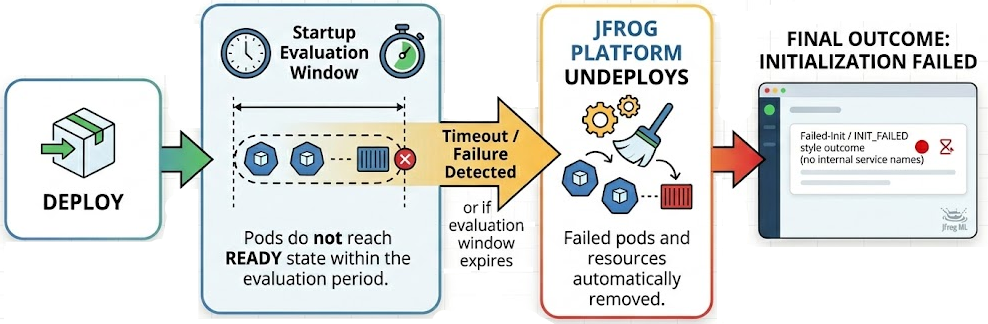
When Automatic Undeployment Can Run
The JFrog Platform automatically undeploys a model if it determines the deployment can never be available for the version you are deploying. This determination occurs if no pod reaches a Ready state within the time required for the JFrog Platform to treat the model as successfully started. This behavior aligns with the model's existing startup health check.
If the model runs successfully at least once, the JFrog Platform handles subsequent failures differently. This process doesn't remove deployments that crash after they’ve been active.
Evaluation Timing
After pods are scheduled for the deployment, the JFrog platform allows a fixed evaluation window of 30 minutes before it concludes that the model won’t become available for that version. If the window ends and the model was still never available, the platform can proceed with automatic undeployment.
If your model takes longer to start than the 30-minute evaluation window, the JFrog Platform may treat the deployment as "never available" and remove it. Ensure your startup health check window accounts for the model's total load time.
If you edit the deployment—for example, by changing the configuration— before an automatic undeployment happens, the platform starts a new evaluation for the new version. You receive a full window again for that version.
Exceptions: When Automatic Undeployment Does Not Run
In the following cases, the JFrog Platform doesn't trigger an automatic undeployment. The deployment remains in a failed or stuck state until you resolve the underlying issue or manually undeploy the model:
- Unscheduled Pods: If the cluster never schedules pods due to capacity or placement rules, the evaluation timer doesn't start. The JFrog Platform won't apply an automatic undeployment until the cluster successfully schedules the pods.
- Manual Intervention: If you manually update the deployment while the health check is in progress, the platform stops the automatic evaluation.
How Automatic Undeployment Differs From a Manual Undeployment
When you undeploy, you intentionally stop serving that model and clear the deployment. When automatic undeployment runs after a startup failure, the JFrog Platform does that cleanup for you because the model never reached a serving state.
To help you tell these outcomes apart, the platform records a dedicated status (Initialization Failed) for the automatic case. You can observe deployment status in the JFrog ML user interface. Programmatic access is through remote procedure call APIs (gRPC) that carry deployment state. There is no REST API surface for this behavior.
Controlling Automatic Undeployment
You do not turn automatic undeploy on or off for individual package model deployments in the JFrog ML user interface. When the behavior is enabled for your environment. The Platform applies the rules automatically on this page while you deploy as usual.
Whether you have this behavior depends on product version, rollout, and how JFrog ML is hosted, for example SaaS compared to self-managed. There is no documented per-deployment opt-out. Stopping it across an environment may require platform-level configuration, especially on self-managed installations. The FrogML CLI does not expose a switch. Ask your administrator or JFrog account team what applies to your organization..
Responding After an Automatic Undeploy
If the platform removes a deployment automatically, treat it like any failed deployment that never came up: fix the root cause (image, dependencies, resource requests, configuration), then deploy again through the same package model workflow you used before.
Related Topics
Updated 5 months ago