

Batch Feature Sets
Batch Feature Set Overview
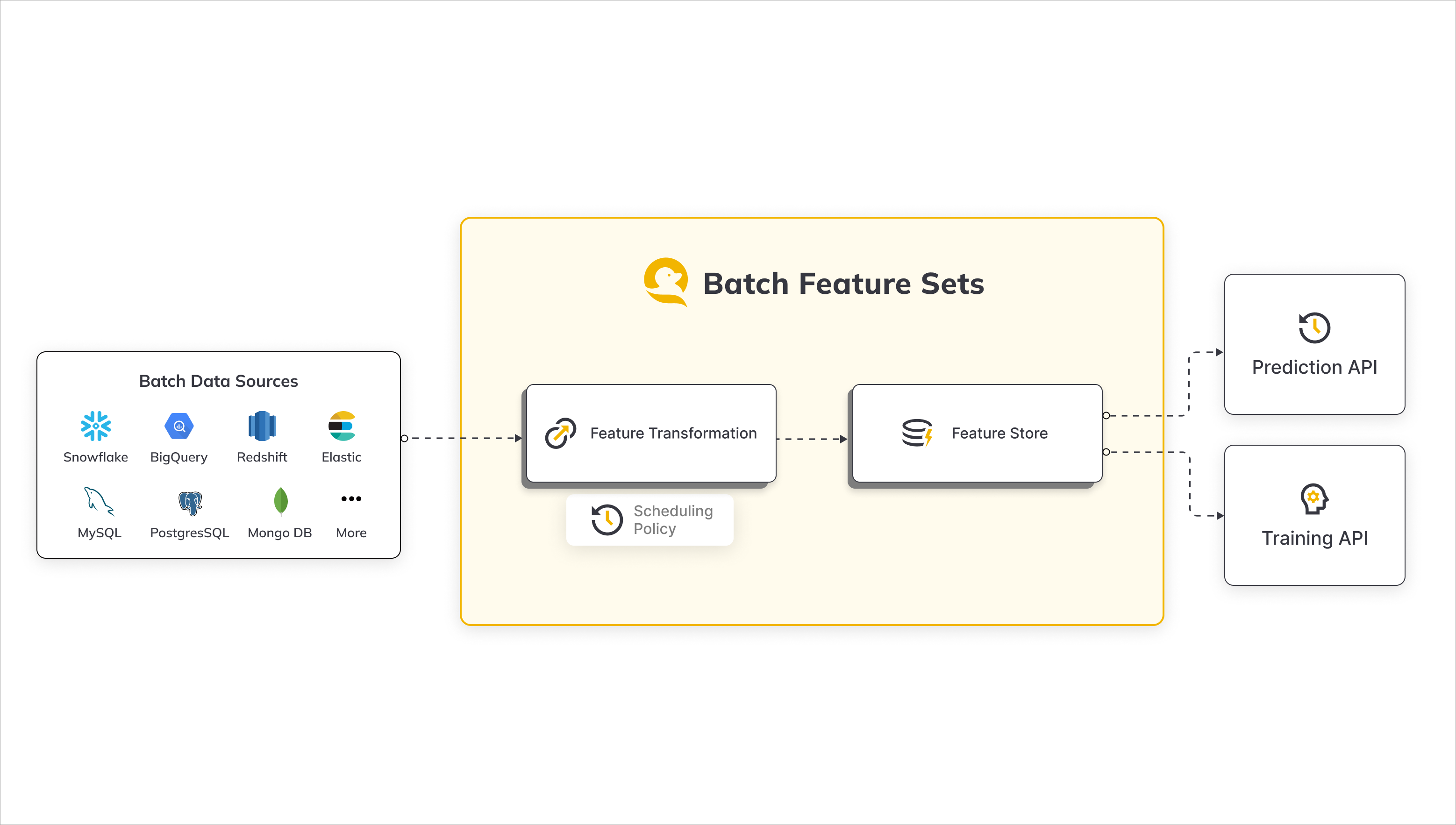
Batch Feature Sets in JFrog ML empower users to derive machine learning (ML) features efficiently by seamlessly extracting data from diverse batch sources such as Snowflake, BigQuery, S3, and more. This feature set methodology is designed to streamline the process of transforming raw data, provided by users, into structured features that can be utilized for various ML applications.
Workflow Overview
-
Data Ingestion:
- JFrog ML supports batch data ingestion from a variety of sources, including Snowflake, BigQuery, S3, and others.
- Users can easily configure connections to these batch sources, ensuring a flexible and scalable data ingestion process.
-
Batch Processing Engine:
- Serves as the computational hub where raw data is transformed into features. It's designed to handle large datasets that don't require real-time processing and prepares them for storage in the offline storage.
- The user-provided transformations can range from aggregations and filtering to complex data manipulations, offering users the flexibility needed to tailor features to their specific requirements.
-
Offline and Online Stores:
- The resulting features are stored in the JFrog ML Feature Storage layer - the Offline and Online Stores.
- The Offline Store acts as your "data warehouse," a secure and organized place where feature data is stored after being processed by the batch or stream engines. It's designed to handle large volumes of data and is optimized for batch analytics.
- The Online Store is designed for low-latency access to feature data. It's optimized for quick reads and is the go-to place for real-time applications.
- Both layers serve as a unified hub for both online inference and the generation of training sets, facilitating seamless integration into ML workflows.
Common Use Cases
Batch Feature Sets in JFrog ML cater to a wide array of use cases, enabling users to derive valuable insights and enhance their machine learning models. Some common scenarios include:
-
Compute Transaction Aggregates:
- Derive transaction aggregates from a Snowflake transaction table.
- Example: Calculate user expenditure over the last week, providing valuable insights into spending patterns.
-
User Properties Ingestion:
- Ingest user properties from a BigQuery users table.
- Example: Incorporate user demographic information into ML models for personalized recommendations or targeted analysis.
These use cases represent just a glimpse of the versatility offered by the JFrog ML Batch Feature Sets, providing a robust framework for feature extraction and transformation in the realm of machine learning.
Batch Feature Set Creation
To create a batch feature set in JFrog ML, follow these steps, which involve defining a feature transformation function and utilizing the @batch.feature_set decorator along with the specified parameters:
-
Feature Transformation Function:
- Begin by crafting a feature transformation function tailored to the desired processing of your raw data.
-
Decorator Implementation:
-
Apply the
@batch.feature_setdecorator to your transformation function, ensuring to include the following parameters:name: If not explicitly defined, the decorated function's name is used. The name field is restricted to alphanumeric and hyphen characters, with a maximum length of 40 characters.key: Specify the key for which to calculate the features in the feature set.data_sources: Provide a dictionary containing the names of relevant data sources that the feature set data will be ingested from.
-
-
Ingestion Job Frequency:
- By default, ingestion jobs are triggered every 4 hours. However, users have the flexibility to explicitly define a different frequency based on their specific requirements.
These steps ensure the seamless creation of a batch feature set, allowing users to define the transformation logic and specify the essential parameters for efficient feature extraction and processing within the JFrog ML ecosystem.
Batch Feature Set Example
# Python
from frogml.feature_store.feature_sets import batch
from frogml.core.feature_store.feature_sets.transformations import SparkSqlTransformation

@batch.feature_set(
    name="user-features",
    key="user_id",
    data_sources=["snowflake_users_table"],
)
@batch.scheduling(cron_expression = "0 0 * * *")
def user_features():
    return SparkSqlTransformation(sql="""
        SELECT user_id,
               registration_country,
               registration_device,
               date_created
        FROM snowflake_users_table""")
This example:
- Creates a job that runs once a day, at midnight.
- Ingests data from the
snowflake_users_tablesource. - Creates a transformed feature vector with the fields:
user_id, registration_country, registration_device - Ingests the feature vector into the JFrog ML Feature Store
Adding Metadata
An optional decorator for defining feature set metadata information of:
owner - User name of feature set owner
description - Describe what does this feature set do
display_name - Alternative feature set name for UI display
# Python
from frogml.feature_store.feature_sets import batch
from frogml.core.feature_store.feature_sets.transformations import SparkSqlTransformation

@batch.feature_set(
    name="user-features",
    key="user_id",
    data_sources=["snowflake_users_table"],
)
@batch.scheduling(cron_expression = "0 0 * * *")
def user_features():
    return SparkSqlTransformation(sql="""
        SELECT user_id,
               registration_country,
               registration_device,
               date_created
        FROM snowflake_users_table""")
Configuring Data Sources
When setting up the feature set data ingestion, carefully assign the Batch Data Sources to be utilized. Ensure that each data source name is explicitly mapped to its intended Read Policy.
If a read policy is not explicitly defined, the default policy is set to New Only, which instructs the system to read only records added since the last ingestion job. This approach optimizes efficiency by focusing on new data, enhancing the overall performance of the feature set.
from frogml.core.feature_store.feature_sets.read_policies import ReadPolicy
from frogml.feature_store.feature_sets import batch
from frogml.core.feature_store.feature_sets.transformations import SparkSqlTransformation

@batch.feature_set(
    name="user-features",
    key="user_id",
    data_sources = {
        "snowflake_users_table": ReadPolicy.NewOnly,
                                "snowflake_countries_table": ReadPolicy.NewOnly,
    },
                timestamp_column_name="date_created"
)
def user_features():
    return SparkSqlTransformation(sql="""
                        SELECT
                            users.user_id,
                            countries.registration_country_name,
                            users.registration_device,
                            users.date_created
                        FROM
                            snowflake_users_table users
                            LEFT JOIN snowflake_countries_table countries
                            ON users.registration_country_code = countries.code
    """)
Timestamp Column
A timestamp column name represents the timestamp in which the feature vector event occurred, and it can either be set explicitly or it will be inferred automatically.
Notes
- When defining multiple data sources you must explicitly set the timestamp column.
- If the read policy is configured as Time Frame, an extra timestamp column named
QWAK_WINDOW_END_TSis introduced, serving as the designated timestamp column for the feature set.
Implicit Timestamp Definition
In the case of a single data source, the date_created_column specified in the data source settings is utilized for timestamp identification.
Important
When using multiple data sources you must explicitly define the timestamp column.
Managing the Scheduling Policy
To regulate the timing of ETL (Extract, Transform, Load) operations for batch features, scheduling policies play a pivotal role. Once a feature is deployed, the system calculates new feature values at intervals determined by the scheduling policy, which adheres to the crontab format.
Default Scheduling Policy
The default scheduling is every 4 hours if no explicit policy is set.
from frogml.feature_store.feature_sets import batch
from frogml.core.feature_store.feature_sets.transformations import SparkSqlTransformation

@batch.feature_set(
    name="user-features",
    key="user_id",
    data_sources=["snowflake_users_table"],
)
@batch.scheduling(cron_expression = "0 0 * * *")
def user_features():
    return SparkSqlTransformation(sql="""
        SELECT user_id,
               registration_country,
               registration_device,
               date_created
        FROM snowflake_users_table""")
The definition above means that the feature ingestion job will be triggered on a daily basis, at midnight.
Creating Feature Sets for Manual Trigger Only
When None or “” is passed to the scheduling decorator during feature set creation, it results in the deployment of a feature set exclusively designed for manual initiation.
Important: Setting None will deactivate the automatic feature ingestion, requiring users to manually trigger the feature set when needed.
from frogml.core.feature_store.feature_sets.read_policies import ReadPolicy
from frogml.feature_store.feature_sets import batch
from frogml.core.feature_store.feature_sets.transformations import SparkSqlTransformation

@batch.feature_set(
    name="user-features"
    key="user_id",
    data_sources=["snowflake_users_table"],
    timestamp_column_name="date_created"
)
# Note: This feature set is manually triggered only
# Passing "" to a feature set disables automatic ingestion
@batch.scheduling(cron_expression="")
def user_features():
    return SparkSqlTransformation(sql="""
        SELECT user_id,
               registration_country,
               registration_device,
               date_created
        FROM snowflake_users_table
    """)
Populating Historical Feature Values through Backfilling
The backfill policy dictates the method, along with the specific date and time, for populating historical feature values in the newly created feature set.
from frogml.core.feature_store.feature_sets.read_policies import ReadPolicy
from frogml.feature_store.feature_sets import batch
from frogml.core.feature_store.feature_sets.transformations import SparkSqlTransformation

@batch.feature_set(
    name="user-features"
    key="user_id",
    data_sources=["snowflake_users_table"],
    timestamp_column_name="date_created"
)
@batch.backfill(start_date=datetime.datetime(year=1987, month=11, day=8))
def user_features():
    return SparkSqlTransformation(sql="""
        SELECT user_id,
               registration_country,
               registration_device,
               date_created
        FROM snowflake_users_table
    """)
Specifying Execution Resources
In JFrog ML, the allocation of resources is crucial for batch execution jobs, often termed as the "cluster template," is vital. This template encompasses resources like CPU, memory, and temporary storage, essential for executing user-defined transformations and facilitating feature ingestion into designated stores.
The default size for the cluster template initiates at MEDIUM if none is explicitly specified.
# Python
from frogml.feature_store.feature_sets import batch
from frogml.core.feature_store.feature_sets.execution_spec import ClusterTemplate
from frogml.core.feature_store.feature_sets.transformations import SparkSqlTransformation

@batch.feature_set(
    name="user-features",
    key="user_id",
    data_sources=["snowflake_users_table"])
@batch.execution_specification(cluster_template=ClusterTemplate.LARGE)
def user_features():
    return SparkSqlTransformation(sql="""
        SELECT user_id,
               registration_country,
               registration_device,
               date_created
        FROM snowflake_users_table""")
Getting Feature Samples
To make sure the generated feature set matches your expectation, even before the feature set is registered in JFrog ML, use the get_sample functionality.
This function computes a sample feature vectors using the defined transformation applied on a sample data from your defined data source and returns a pandas DataFrame.
    @batch.feature_set(
        name="user-transaction-aggregations",
        key="user_id",
        data_sources={"snowflake_datasource": ReadPolicy.NewOnly()},
        timestamp_column_name="DATE_CREATED"
    )
    def user_features():
        return SparkSqlTransformation(sql="""
                SELECT
                user_id,
                date_created,
                AVG(credit_amount) as avg_credit_amount,
                MAX(credit_amount) as max_credit_amount,
                MIN(date_created) as first_transaction
            FROM snowflake_datasource
            Group By user_id, date_created""")

user_features_df = user_features.get_sample(number_of_rows=10)
The following is an example of user_features_df Dataframe result:
+----+--------------------------------------+--------------+-----------------+------------------+------------------+
|    | user_id                              |  date_created |avg_credit_amount | max_credit_amount | first_transaction |
|----+--------------------------------------+----------------+-----------------+------------------+------------------|
|  0 | baf1aed9-b16a-46f1-803b-e2b08c8b47de |1609459200000 |             1169 |              1169 |      1609459200000 |
|  1 | 1b044db3-3bd1-4b71-a4e9-336210d6503f |1609459200000 |             2096 |              2096 |      1609459200000 |
|  2 | ac8ec869-1a05-4df9-9805-7866ca42b31c |1609459200000 |             7882 |              7882 |      1609459200000 |
|  3 | aa974eeb-ed0e-450b-90d0-4fe4592081c1 |1609459200000 |             4870 |              4870 |      1609459200000 |
|  4 | 7b3d019c-82a7-42d9-beb8-2c57a246ff16 |1609459200000 |             9055 |              9055 |      1609459200000 |
|  5 | 6bc1fd70-897e-49f4-ae25-960d490cb74e |1609459200000 |             2835 |              2835 |      1609459200000 |
|  6 | 193158eb-5552-4ce5-92a4-2a966895bec5 |1609459200000 |             6948 |              6948 |      1609459200000 |
|  7 | 759b5b46-dbe9-40ef-a315-107ddddc64b5 |1609459200000 |             3059 |              3059 |      1609459200000 |
|  8 | e703c351-41a8-43ea-9615-8605da7ee718 |1609459200000 |             5234 |              5234 |      1609459200000 |
|  9 | 66025b0f-6a7f-4f86-9666-6622be82d870 |1609459200000 |             1295 |              1295 |      1609459200000 |
+----+--------------------------------------+--------------+-----------------+------------------+------------------+
Registering a Feature Set
The ETL pipeline will begin after registering a batch feature set.
There are two options for registering new features:
-
Pointing directly to a Python file or directory containing the feature set definitions, for example
frogml features register -p ./user_project/features/feature_set.py -
Letting frogml cli recursively search through all python files in the current directory, and all directories below. We will search through all .py files and look for feature set definitions.
frogml features register
Function Naming Conventions
The same feature set transformation function name, cannot be defined more than once per .py file.
✅ Recursively looking for python files in input dir (0:00:00.61)
✅ Finding Data Sources to register (0:00:00.01)
👀 Found 2 Data Sources
----------------------------------------
✅ Finding Feature Sets to register (0:00:00.00)
👀 Found 9 Feature Set(s)
The pipeline execution status will be visible in the UI under the list of registered feature sets.
To view the status in the UI, navigate to Feature Store > Feature Sets > Batch Feature Set Name.
How to Update a Feature Set
Feature set configuration may be updated, except for the following limitations:
Important - Updating/Recreating Feature Sets
Changing any of the parameters above requires deleting and recreating a feature set:
- Backfill Start Date
- Read Policy
- Scheduling Policy
How to Delete a Feature Set
Feature sets may be deleted using a JFrog ML CLI command.
To delete a feature set, simply refer to it by its name.
There's no need to be located in a certain folder in the project structure.
For example, in the above examples we created a feature set named user-features. To delete this feature set via the JFrog ML CLI, all I need is the following command.
frogml features delete user-featuresManually Executing an Ingestion Job
In case you would like to execute an ingestion job immediately, the following options are supported:
-
Python SDK - using the
FrogMlClient:from frogml import FrogMlClient client = FrogMlClient() client.trigger_batch_feature_set("user-features") -
CLI - using the following command:
frogml features run user-features -
JFrog ML UI - via the 'Jobs' tab in the app, click on 'Execute Job'.
Pausing/Resuming Batch Ingestion Jobs
When pausing a Batch Feature Set, future ingestion jobs will not be scheduled (running jobs are not affected), yet you can still manually trigger ingestion jobs.
Upon resuming a batch feature set, it is re-scheduled, and ingestion jobs will continue ingesting data from where they have last left off.
When resuming a feature set, the ingestion jobs will continue as scheduled - meaning feature sets jobs will start "catching up" on jobs that were skipped during the time it was paused.
For example, if an hourly feature set we paused for 3 days - after resuming it, those hourly jobs will be executed immediately one after the other until the data is all caught up.
▶ To pause a batch feature set: Use the JFrog ML CLI:
frogml features pause user-features▶ To resume the batch feature set:
frogml features resume user-featuresTransformations
The section describes the various transformations supported by JFrog ML.
SQL
Note
JFrog ML runs Spark SQL in the background. Please comply with Spark Standards.
The following is an implementation of creating a transformation using a SQL:
from frogml.core.feature_store.feature_sets.read_policies import ReadPolicy
from frogml.feature_store.feature_sets import batch
from frogml.core.feature_store.feature_sets.transformations import SparkSqlTransformation

@batch.feature_set(
    name="user-transaction-aggregations",
    key="user_id",
    data_sources={"snowflake_datasource": ReadPolicy.TimeFrame(days=30)},
)
def user_features():
    return SparkSqlTransformation(sql="""
            SELECT
            user_id,
            AVG(credit_amount) as avg_credit_amount,
            STD(credit_amount) as std_credit_amount,
            MAX(credit_amount) as max_credit_amount,
            MIN(date_created) as first_transaction,
            AVG(duration) as avg_loan_duration,
            AVG(job) as seniority_level
        FROM snowflake_datasource
        Group By user_id""")
Creating Transformations
When creating transformations, keep the following guidelines in mind:
-
Key Inclusion:
- The resulting feature vector must incorporate the feature set key, used in the definition.
-
Timestamp Column Requirement:
- For read policies such as
NewOnlyandFullRead, it is imperative to include the timestamp column in the returned feature vector.
- For read policies such as
-
Use the data source as the table name in the FROM clause.
-
Make sure the column names resulting from the SQL has no special characters. The allowed characters are: a-z, A-Z, 0-9, _.
Logging
JFrog supports the default Python logger, which you can import from the standard python logging library.
PySpark
To use this feature, ensure that you have installed the frogml-cli with the feature-store extra.
pip install -U "frogml-sdk[feature-store]"PySpark transformation is defined by creating a UDF which is responsible for the transformation logic.
UDF Definition:
-
Arguments:
-
df_dict: spark.DataFrame- MandatoryA dictionary in the form of
{'<batch_sourcename>': df ...}. -
qwargs: Dict[str, Any]- OptionalIf added, runtime parameters will be injected via
qwargs(e.g.qwak_ingestion_start_timestamp,qwak_ingestion_end_timestamp)
-
-
Return value: spark.DataFrame
The returned df (PySpark DataFrame) must contain a column representing the configured key. The df column names must not include whitespaces or special characters.
Important - Python and Dependency RestrictionsT
To ensure compatibility and stability, it is mandatory to use Python 3.8 when registering a feature set with a Koalas transformation. Additionally, ensure that
cloudpickleversion is locked to2.2.1.
from typing import Dict, Any

import pyspark.sql as spark
import pyspark.sql.functions as F

from frogml.feature_store.feature_sets import batch
from frogml.core.feature_store.feature_sets.read_policies import ReadPolicy
from frogml.core.feature_store.feature_sets.transformations import PySparkTransformation

@batch.feature_set(
    name="user-features",
    key="user",
    data_sources={"snowflake_transactions_table": ReadPolicy.TimeFrame(days=30)},
    timestamp_column_name="date_created"
)
@batch.scheduling(cron_expression="0 8 * * *")
def transform():
    def amount_stats(df_dict: Dict[str, spark.DataFrame], qwargs: Dict[str, Any]) -> spark.DataFrame:
        df = df_dict['snowflake_transactions_table']
        agg_df = df.groupby('user').agg(F.max('amount').alias("max_duration"))

        return agg_df

return PySparkTransformation(function=amount_stats)Warning - Function Scope and Dependencies
PySpark function scope and variables must be defined under the transform function, as shown in the code snippet above.
At runtime, only PySpark and python native library, are available.
Logging
JFrog supports the default Python logger, which you can import from the standard python logging library.
Warnings about PySpark Usage Patterns
Avoid using DataFrame.localCheckpoint, even though local checkpointing might improve performance of some workloads, local checkpoints are ephemeral, have limited disk space and can lead to execution failures. Regular checkpoints are recommended to use instead for most other cases.
Pandas On Spark
Pandas On Spark is a pandas implementation using Spark. Please ensure your code is Pandas On Spark Library compliant.
The User Defined Function (UDF) receives a dictionary in the form of {'<batch_source_name>': pyspark.pandas.DataFrame ...} as input.
The returned pyspark.pandas.DataFrame (Pandas On Spark DataFrame) must contain a column representing the configured key and timestamp column. The psdf must not include complex columns, such as multi-index, and the name must not include whitespaces or special characters.
Make sure that column names returned from the UDF do not contain special characters.
The allowed characters are: a-z, A-Z, 0-9, _..
RestrictionsDeployment - supported for Hybrid deployments ONLY.
Dependencies - to ensure compatibility and stability, it is mandatory to use Python 3.8 when registering a Feature Set with a Pandas On Spark transformation.
from typing import Dict, Any
from frogml.feature_store.feature_sets import batch
from frogml.core.feature_store.feature_sets.read_policies import ReadPolicy
from frogml.core.feature_store.feature_sets.transformations import PandasOnSparkTransformation
from pyspark.pandas import DataFrame


@batch.feature_set(
    name="user-features",
    key="user",
    data_sources={"snowflake_transactions_table": ReadPolicy.TimeFrame(days=30)},
    timestamp_column_name="date_created"
)
@batch.scheduling(cron_expression="0 8 * * *")
def transform():
    def amount_stats(df_dict: Dict[str, DataFrame], qwargs: Dict[str, Any]) -> DataFrame:
        ps_df = df_dict['snowflake_transactions_table']
        agg_psdf = ps_df.groupby('user').agg({'amount': ['avg', 'sum']})
        return agg_psdf

return PandasOnSparkTransformation(function=amount_stats)Important - Function Scope and Dependencies
Pandas On Spark function scope and variables must be defined under the transform function, as shown in the code snippet above.
Logging
We support the default Python logger, which you can import from the standard python logging library.
Read Policies
Read Policies in Feature Set Data Ingestion
The selection of a Read Policy significantly influences how data is ingested into a feature set. When defining a data source in the feature set definition, careful consideration of the chosen Read Policy is crucial.
This document provides an overview of the diverse read policies accessible within JFrog ML.
Important
Default Read Policy
If no read policy is set,
NewOnlyis the default read policy.
New Only
When employing the "New Only" read policy, each batch execution exclusively processes newly added records, encompassing the timeframe from the last batch execution to the current job execution.
In this context, the batch execution time is determined by the timestamp in the timestamp_column_name column, representing the configured Event time .
When consuming data under the "new only" read policy, JFrog ML defines "new data" as records generated after the completion of the previous batch. The notion of "after" is grounded in the time definition established through the data sources and the data-created column of feature sets.
For instance, consider a scenario with a "New Only" read policy. If the initial job triggered on 20/11/2023 at 00:00:00 ingested data with a maximum timestamp of 19/11/2023 at 23:55:00, subsequent executions will consider data as new if it arrived after 19/11/2023 at 23:55:00, extending up to and including the present moment.
from datetime import datetime
from frogml.feature_store.feature_sets import batch
from frogml.core.feature_store.feature_sets.transformations import SparkSqlTransformation
from frogml.core.feature_store.feature_sets.execution_spec import ClusterTemplate
from frogml.core.feature_store.feature_sets.read_policies import ReadPolicy

@batch.feature_set(
        name="user-transaction-aggregations-prod",
        key="user_id",
        data_sources={"snowflake_datasource": ReadPolicy.NewOnly},
        timestamp_column_name="date_created" # --> must be included in transformation output
)
@batch.scheduling(cron_expression = "0 0 * * *")
@batch.execution_specification(cluster_template = ClusterTemplate.MEDIUM)
@batch.backfill(start_date=datetime(2019, 12, 31, 22, 0, 0))
def transform():
  return SparkSqlTransformation(sql="""
SELECT user_id as user_id,
  age as age,
  sex as sex,
  job as job,
  date_created as date_created
FROM snowflake_datasource
""")
Full Read
The "Full Read" policy, when applied to a single data source, involves consuming all available data from that source up to the scheduled batch time. This essentially means that the defined query or data retrieval process will run against the specified data source (e.g., Snowflake) and retrieve records based on the conditions defined by the timestamp column, up until the scheduled batch time.
Use Cases
-
Snapshot of Data Source:
-
In scenarios where a complete snapshot of the data source is required, each batch job reads all the data until the execution time.
from frogml.core.feature_store.feature_sets.read_policies import ReadPolicy
from frogml.feature_store.feature_sets import batch

      @batch.feature_set(
           name="aggregation-by-time",
           key="user_id",
           data_sources={"full_read_source": ReadPolicy.FullRead}
           timestamp_column_name="processing_time"
      )
-
-
Joining Dimension Tables:
-
When joining a dimension table of user information with another data source, the Full Read policy ensures that all relevant records are considered.
from frogml.core.feature_store.feature_sets.read_policies import ReadPolicy
from frogml.feature_store.feature_sets import batch

      @batch.feature_set(
           name="aggregation-by-time",
           key="transaction_id",
           data_sources={"snowflake": ReadPolicy.NewOnly, "full_read_source": ReadPolicy.FullRead}
           timestamp_column_name="processing_time"
      )
-
Timestamp Considerations:
-
Batch Feature Sets Constraints:
- It's important to note that batch feature sets cannot insert rows with timestamps older than the current oldest timestamp in the offline feature store. Each batch must produce a timestamp equal to or larger than the timestamp of the last batch.
-
Handling Timestamps:
- To utilize the Full Read policy and manage timestamps, JFrog ML feature set transformations support parameters like
qwak_ingestion_start_timestampandqwak_ingestion_end_timestamp. These parameters can be employed to define timestamp columns in transformations.
- To utilize the Full Read policy and manage timestamps, JFrog ML feature set transformations support parameters like
-
from frogml.core.feature_store.feature_sets.read_policies import ReadPolicy
from frogml.feature_store.feature_sets import batch

@batch.feature_set(
    name="aggregation-by-time",
    key="user_id",
    data_sources=`{"full_read_source": ReadPolicy.FullRead}`
    timestamp_column_name="processing_time"
)
def transform():
    return SparkSqlTransformation(sql="""
            SELECT user_id,
                 to_timestamp($`{frogml_ingestion_start_timestamp}`) as processing_time_start,
                 to_timestamp($`{frogml_ingestion_end_timestamp}`) as processing_time
            FROM full_read_source""")
Time Frame
Each batch reads records within a specified time frame, starting from the job execution time until a defined period in the past.
Example
We want to track the total number of transactions a user made in the past 7 days.
We can use a
TimeFrameread policy to show the aggregated data over sliding window.This read policy allows us to read only the newly added records in the last 7 days, and transfer the updated information to the feature store.
from frogml.core.feature_store.feature_sets.read_policies import ReadPolicy
from frogml.feature_store.feature_sets import batch
from frogml.core.feature_store.feature_sets.transformations import SparkSqlTransformation

@batch.feature_set(
    name='total-transactions-7d',
    key="transaction_id",
    data_sources=`{"snowflake": ReadPolicy.TimeFrame(days=7)}`,
)
@batch.scheduling(cron_expression="@daily")
def transform():
    return SparkSqlTransformation(sql="""
        SELECT transaction_id,
        `<SUM(Amount)>` as transactions_total_amount_7d
        FROM snowflake
        GROUP BY transaction_id
    """)
TimeFrame Aggregations.Population Flavor
from frogml.core.feature_store.feature_sets.read_policies import ReadPolicy
from frogml.feature_store.feature_sets import batch
from frogml.core.feature_store.feature_sets.transformations import SparkSqlTransformation

@batch.feature_set(
    name='total-transactions-7d',
    key="transaction_id",
    data_sources = {
        "snowflake": ReadPolicy.TimeFrame(
            days = 7,
            flavor = Aggregations.Population
        )},
)
@batch.scheduling(cron_expression="@daily")
def transform():
    return SparkSqlTransformation(sql="""
        SELECT transaction_id,
        `<SUM(Amount)>` as transactions_total_amount_7d
        FROM snowflake
        GROUP BY transaction_id
    """)
Using the Aggregations.Population flavor of the TimeFrame read policy will result in Keys that belonged to a previous window, but are not present at the current current window, having null feature values.
Important
The Backfill feature is currently not supported for Feature Sets defined with Aggregations.Population flavor.
Using Multiple Read Policies
JFrog ML feature sets support fetching data from multiple sources, with different read policy for each.
Backfill
The feature set backfill process enables users to replace data, either entirely or within a specific time interval, ensuring both online and offline data are appropriately updated according to the specific requirements.
Prerequisistes: You have at least one feature set defined.
Backfill can be triggered via the JFrog platform UI or via CLI command options.
There are three types of backfill:
-
Initial Backfill: Triggered once only on feature set creation if a backfill_spec is defined to fill an empty feature set.
-
Interval Backfill: Use this to replace data within a specific time interval: you can specify a time interval within which data should be replaced in the feature set. Use, for example, for a different transformation, or updated data source etc.
Data outside backfill boundaries remains unaffected and available at all times.
-
Reset Backfill: Use this to replace all data in the feature set: Users can trigger a backfill process to replace all existing data within a feature set. Use, for example, if the feature set definition changed, or the data source changed, etc.
All the backfill processes support different data sources and transforms; the data sources and transformation methods can vary for different backfill processes.
The backfill command can be run via the UI or using the CLI, as described below.
Backfill via the UI
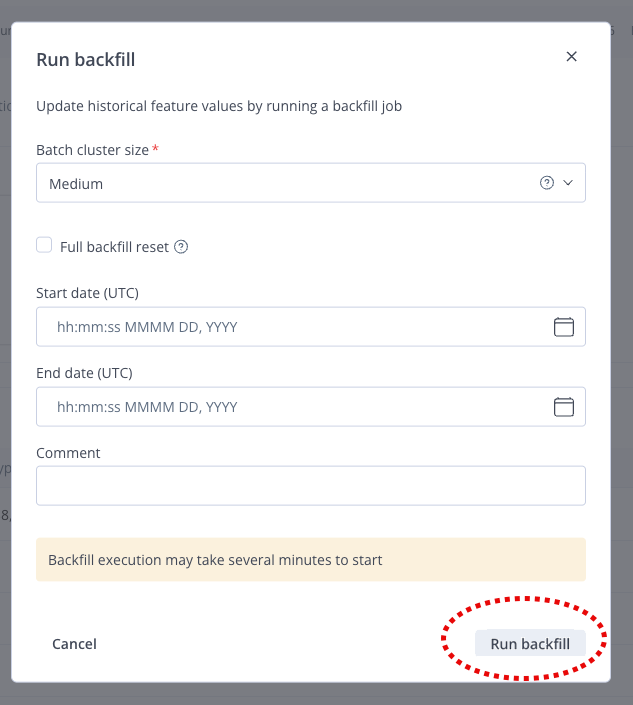
▶ To run backfill:
-
In the JFrog platform, navigate to AI/ML > Feature Sets.
-
Select an existing feature set, and click the three dots button in the top-right corner.
-
From the drop down menu that displays, select Run backfill.
-
Enter the details in the backfill window and click Run backfill (run the backfill).
Note
You can select different cluster-template sizes for backfill executions. JFrog recommends that for large backfills you select a cluster-template size larger than the size defined for the feature set to handle the increased processing load.
Backfill via a CLI Command
The CLI command to trigger the backfill process differs according to the type of backfill required, as follows:
Initial Backfill
See Defining a Feature set. Feature Store Quick Start Guide
Interval Backfill
frogml features backfill --start-time <start_time> --stop-time <stop_time> [--cluster-template <cluster_template>] [--comment <comment>] --environment <environment> --feature-set <feature_set_name>Reset Backfill
frogml features backfill --reset-backfill [--cluster-template <cluster_template>] [--comment <comment>] --environment <environment> --feature-set <feature_set_name>For reset backfills, you can either use
--reset-backfillor--reset.
Command Options Summary:
--reset-backfill,--reset: Perform a complete reset of the feature set's data. This option results in the deletion of the current existing data.--start-time [%Y-%m-%d|%Y-%m-%dT%H:%M:%S|%Y-%m-%d %H:%M:%S]: The start time from which the feature set's data should be backfilled in UTC. Defaults to the feature set's configured backfill start time.--stop-time [%Y-%m-%d|%Y-%m-%dT%H:%M:%S|%Y-%m-%d %H:%M:%S]: The stop time up until which the feature set's data should be backfilled in UTC. Defaults to the current timestamp. If the time provided is in the future, the stop time will be rounded down to the current time.--cluster-template TEXT: Backfill resource configuration, expects a ClusterType size. Optional and defaults to the feature set's resource configuration.--comment TEXT: Optional comment tag line for the backfill job.--environment ENVIRONMENT: JFrog ML environment.--feature-set TEXT or --name TEXT: The name of the feature set for which the backfill process is to be performed. This option is required.
Configure Data Retention (TTL)
Data Retention lets you manage the lifecycle of data in the Online Store by defining a Time to Live (TTL) for Batch Feature Sets. TTL determines how long an entity stays in the Online Store before it is expired and removed. This helps keep the Online Store relevant, improves performance, and reduces storage cost.
TTL for Batch Feature Sets is set at the Feature Set level and is calculated from each entity's event time (timestamp). After an entity exceeds the TTL, it is logically expired and removed in the next ingestion cycle.
Prerequisites: You need an existing Batch Feature Set defined with the JFrog ML SDK (FrogML). For more information on Feature Sets, see the FrogML documentation.
Notes:
- TTL applies only to the Online Store. Data in the Offline Store (Iceberg) is not deleted by this process, so you keep full history for training.
- For streaming aggregation Feature Sets, TTL is built in. Data is tied to time windows and expires as it leaves the window, so you do not configure TTL separately.
To configure Data Retention (TTL) for a Batch Feature Set:
-
Open your Feature Set definition file in a text editor or IDE.
-
In the
@batch.feature_setdecorator, add the TTL parameter. The parameter name may beonline_time_to_live(with a timedelta). Set the value to the duration after which an entity should be considered expired.Where:
online_time_to_live– (Optional) The duration after which an entity is considered expired. An entity is deleted only when Current Time − Event Timestamp > TTL. Deletion is not immediate; it runs during the next Batch Ingestion job.
Example:
from frogml.feature_store.feature_sets import batch
from datetime import timedelta

@batch.feature_set(
    name="user_login_stats",
    key="user_id",
    timestamp_column_name="login_time",
    online_time_to_live=timedelta(days=30),  # 30 days TTL
    data_sources={"log_source": ReadPolicy.NewOnly})
def user_login_stats():
    # Feature set logic here
pass- Save the file and run or deploy your Feature Set so that the next Batch Ingestion job uses the new TTL setting.
Note:
Enabling TTL on an existing Feature Set that already has a large history can make the first ingestion job take longer, because the system processes many expired keys. Billing metrics are updated after entities are successfully deleted from the Online Store.
How Expiration Works
Expiration runs as an automated step at the start of each Batch Ingestion job:
- Watermark tracking – The system keeps an "Expiration Watermark" in metadata. This watermark is the timestamp of the last expired (deleted) key, not the last job time or (last job time − TTL). That timestamp becomes the next watermark.
- Identification – Before ingesting new data, the system finds all keys in the Online Store whose event timestamps have exceeded the TTL since the last watermark.
- Deletion – Those expired keys are removed from the Online Store.
- Ingestion – After cleanup, the new batch of data is ingested.
For more information on Batch Feature Sets, see Batch Feature Sets.
Updated 6 months ago