
JFrog AI Catalog Architecture
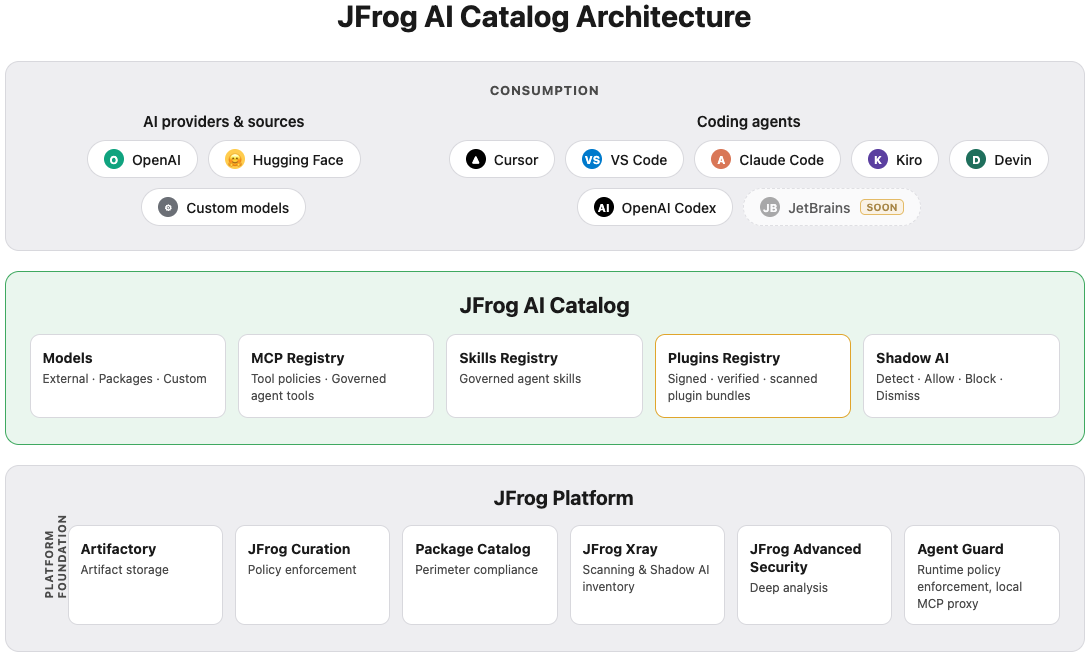
The JFrog AI Catalog is the governance layer for AI assets on the JFrog Platform. It gives your organization one place to discover AI assets, decide what each project may use, and enforce policy before those assets reach applications or coding agents.
The following diagram shows the AI Catalog at the center — models, MCP servers, agent skills, plugins, and Shadow AI detection — and how it connects to the JFrog Platform services that store, scan, and secure those assets.
AI Catalog Capabilities
The AI Catalog governs five areas of the enterprise AI supply chain:
Models
The AI Catalog is the system of record for which models each JFrog Project may use. Supported model types include the following.
| Model type | Description |
|---|---|
| External models | Commercial APIs such as OpenAI and Google Gemini, connected through an AI gateway. |
| Model packages | Open-source models from sources such as Hugging Face, stored and versioned in Artifactory. |
| Custom models | Internally developed models registered from Artifactory repositories. |
Models discovered through Shadow AI detection can be moved into standard catalog governance with allow actions at project or repository scope.
For more information, see Discover and Allow Models.
Each governed model can carry an ML-BOM (Machine Learning Bill of Materials)—a standardized metadata record for compliance and audit. External and package models expose ML-BOM on the model page in Registry; custom models expose ML-BOM per version and per build. For more information, see Understanding ML-BOM in AI Catalog.
Shadow AI Detection
Shadow AI detection finds AI model packages already present in your JFrog Platform repositories that no one centrally approved. JFrog Xray scans indexed repositories and builds an organization-wide inventory broken down by project, repository, and artifact path. Operators review that inventory on the Shadow AI page and apply allow, block, or dismiss actions at the scope that matches their decision.
Blocked models can be enforced through JFrog Curation on subsequent pulls, so unapproved models do not spread across repositories while you bring them under catalog governance.
Shadow AI detection currently covers model packages only. It complements model discovery in the catalog by closing the gap between what developers already pulled and what security teams have explicitly allowed.
For more information, see Shadow AI Detection and Governance.
MCP Registry
The MCP Registry extends AI Catalog governance to Model Context Protocol (MCP) servers, the tools coding agents use to reach internal systems. Public MCP servers are curated and scanned before approval. Custom MCP servers are registered from Artifactory npm or Python Package Index (PyPI) packages, or from remote endpoints. Tool policies control which MCP tools an agent may call per project.
Developers connect coding agents to approved MCP servers through the JFrog Agent Guard, a secure local proxy between the agent and governed MCP servers.
Agent Guard
Agent Guard is the local enforcement point between coding agents and the MCP servers you allowed for a project. It applies tool policies on every MCP call and authenticates against your JFrog Platform environment. IDE plugins can configure Agent Guard for governed MCP usage in editors such as Claude Code, Cursor, Visual Studio Code, Kiro, Devin, and OpenAI Codex.
For more information, see MCP Registry Overview.
Skills Registry
The Skills Registry will govern agent skills — instructions, scripts, and supporting assets — with the same project-scoped approval model as models and MCP servers. Skills will be stored as artifacts in Artifactory and distributed to coding agents through governed paths.
For more information, see Get Started with the Skills Registry.
Plugins Registry
The Plugins Registry is a centralized hub in the AI Catalog where your organization scans, publishes, discovers, and installs plugin bundles — versioned ZIPs that package skills, MCP servers, hooks, sub-agents, and commands together. Plugins are stored in Artifactory Agent Plugins repositories and scanned by JFrog Xray, with each project scoped to its own marketplace (JFrog-
For more information, see Get Started with the Plugins Registry.
Platform Integration
The AI Catalog connects to core JFrog Platform services that store, scan, and enforce policy on AI assets.
Artifactory
Artifactory stores the artifacts the AI Catalog governs: model packages, container images, and MCP server packages in npm and PyPI repositories. Hugging Face and Docker repository types support model and container workflows. Versioning and traceability in Artifactory underpin every allow and block decision in the catalog.
Artifactory version required: >7.117.5
JFrog Security
AI Catalog relies on JFrog Security services to evaluate assets before and after they enter the catalog.
- JFrog Curation and Package Catalog enforce download policy and compliance at the perimeter. Curation also enforces block decisions from Shadow AI on subsequent repository pulls.
- JFrog Xray scans model packages and MCP artifacts for vulnerabilities, malicious content, and license risk. Shadow AI detection uses Xray repository scanning to build the model inventory.
- JFrog Advanced Security (JAS) adds deeper analysis where your subscription includes it.
Versions required for JFrog AI Catalog:
- Package Catalog: >1.31
- Xray: >3.133
For more information, see Scan Your ML Models and Detect Malicious AI Models.
Related Topics
Updated about 1 month ago