

JFrog MCP Registry Overview
Learn why the JFrog MCP Registry is the single source of truth for MCP servers.
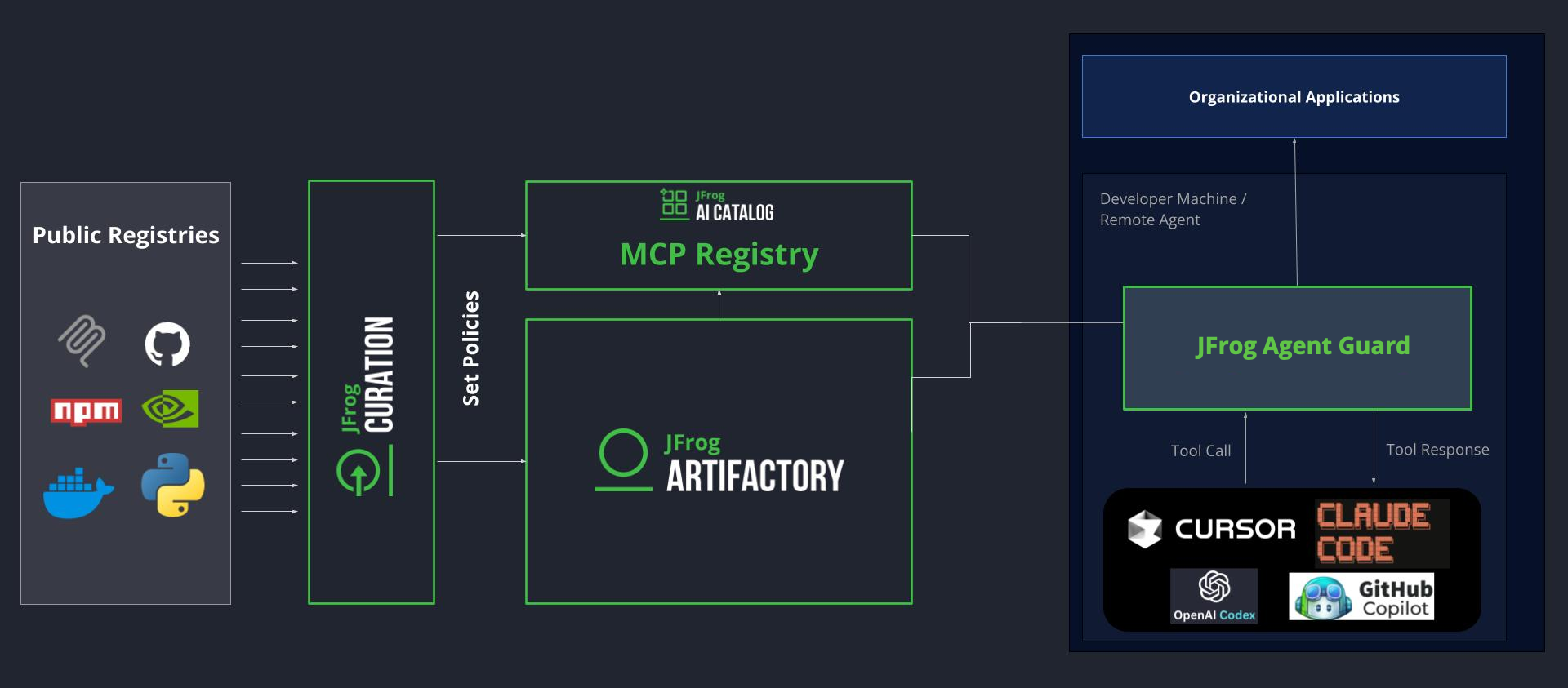
The JFrog MCP Registry is your system of record for managing, discovering, and governing Model Context Protocol (MCP) servers. By treating MCP servers as first-class artifacts within the JFrog Platform, it enables you to govern and secure your AI ecosystem with the same rigor as your software supply chain.
Why Use the JFrog MCP Registry?
Without centralized governance, developers pull unverified MCP servers from public repositories, granting AI agents ungoverned access to sensitive systems.
The following table summarizes common risks without a registry and how JFrog addresses them.
| Without a registry... | With JFrog... |
|---|---|
| Unknown risks: Developers using unverified MCPs from unknown sources | Active security: Automatic JFrog Xray scanning for maliciousness and license compliance before servers reach developer machines |
| Manual configuration: Fragmented setup across different IDEs and teams | Unified DevEx: Install the JFrog IDE plugin for Cursor or VS Code; Agent Guard configures itself automatically |
| Security gaps: Blindly executing third-party binaries inside your network | Granular control: Regex-based tool policies to dynamically allow or block MCP tools |
Core Concepts
- MCP server: An executable package (npm, Python) or remote endpoint that gives your AI agent new capabilities, such as querying databases or accessing internal systems. To guarantee a trusted supply chain, local MCPs are securely resolved and cached via Artifactory repositories.
- JFrog Agent Guard: A local proxy binary that wraps each MCP server individually, enforcing tool policies on every call your AI agent makes. The Agent Guard is installed and managed automatically by the JFrog IDE plugin. It authenticates using your JFrog environment variables or the JFrog CLI. For more information, see Use the MCP Registry with Agent Guard.
- JFrog MCP Registry: The catalog of approved MCP servers your organization has made available. Developers can discover and add servers from the registry conversationally through their AI agent.
- Tool Policies: Granular, regex-based Allow/Deny rules for MCP tool usage. Since MCP tools are dynamic, pattern matching provides exact control over what an agent is allowed to execute — for instance, permitting read operations while blocking delete commands.
- Project Context: Policies tied to JFrog Projects, ensuring developers only access tools relevant to their specific scope.
Supported Capabilities
The JFrog MCP Registry is designed to secure the full lifecycle of agentic MCPs:
- Govern both local server and remote URL endpoints. Remote servers that require OAuth or SSO sign in through a browser flow. For more information, see Authenticate Remote MCP Tools in Agent Guard.
- Secure MCP usage for coding agents in Cursor and VS Code (Claude Code support coming soon).
- Pattern-based policies to allow or block specific tools within an MCP server.
- Register and distribute custom-built MCP servers using standard Artifactory repositories (npm and PyPI). For more information, see Custom MCP Servers.
- Manage MCP servers conversationally — ask your AI agent to list, add, or remove servers without leaving your IDE. For more information, see Manage MCPs via Agents.
Frequently Asked Questions
This section provides answers to frequently asked questions.
FAQs
Q: What is the JFrog MCP Registry?
A: The JFrog MCP Registry is the system of record for MCP servers in the JFrog Platform. Admins discover and allow servers per project, define tool policies, and scan packages before developers use them. See Core Concepts for the main components.
Q: What does JFrog Agent Guard do?
A: JFrog Agent Guard is a local proxy that wraps each MCP server and enforces tool policies on every agent call. The JFrog IDE plugin installs and manages it automatically. For setup steps, see Get Started with MCP.
Q: Which coding agents support the JFrog MCP Registry?
A: The registry supports coding agents such as Claude Code, Cursor and VS Code, as well as additional ones. See the full list of coding agents here JFrog Plugins
Q: How are MCP servers scanned for security risks?
A: Public MCP packages are scanned for maliciousness and license compliance using JFrog Xray before you allow them for a project. For validation at registration and allow time, see Security and Validation.
Related Topics
Updated about 2 months ago