

GitHub Actions: Job Summary
Note: EnterpriseX and Enterprise+ can enjoy the full feature set. Pro/Prox Customers can see limited information.
Value
The JFrog Job Summary Improves visibility and traceability between GitHub workflows and the JFrog Platform. and provides a consolidated view of build outputs directly within GitHub Actions, enabling quick access to artifacts, build metadata, and security findings without switching between systems.
Key Benefits
- Quickly understand the status of your builds, including security posture.
- Easily locate artifacts for deployment and their location
How It Works
-
Use JFrog CLI version 2.66.0 or above
-
Within GitHub Actions use the following step to set up the JFrog CLI
name: Setup JFrog CLI uses: jfrog/setup-jfrog-cli@v4 env: JF_URL: https://${{ vars.JF_URL }}/ JF_PROJECT: ${{ vars.JF_PROJECT }} with: oidc-provider-name: <OIDC integration name set on JFrog platform> -
In Github Actions, use the following step to configure Frogbot
- uses: jfrog/frogbot@v2 with: oidc-provider-name: env: # JFrog platform URL JF_URL: https://${{ vars.JF_URL }}/ JF_PROJECT: ${{ vars.JF_PROJECT }} JF_GIT_TOKEN: ${{ secrets.GITHUB_TOKEN }} ... -
Use the JFrog CLI command to interact with Artifactory
To see Artifacts: Run jf rt upload or package-specific commands (npm, maven, etc.).
To see Security Findings: Run jf scan, jf build-info scan, or jf docker scan.
To see Build Info: Run jf rt build-publish.-
Build results are collected and displayed in the Job Summary section
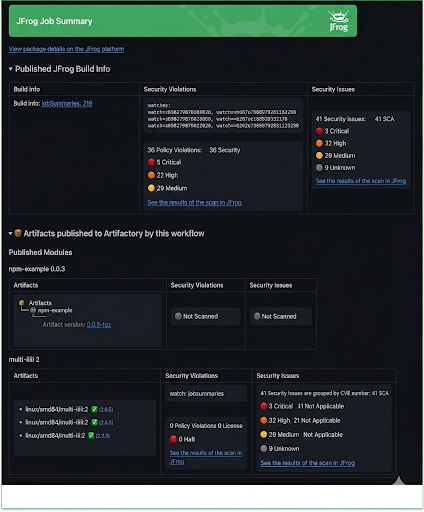
The summary includes links to:
- Artifacts stored in the JFrog Artifactory
- Associated Build Info in JFrog Artifactory
- Security scan results and findings from Xray
This allows users to navigate between the GitHub Actions workflow and JFrog resources easily.
- Job summaries update automatically after each successful build.
Additional Information
Notes:
- The Job Summary is generated for successful builds only
Updated 7 months ago