Authenticate GitHub Actions with OIDC
Authenticate a GitHub Actions job to the JFrog Platform with OIDC.
Authenticate a GitHub Actions job to the JFrog Platform with OpenID Connect (OIDC). The workflow requests a GitHub OIDC token, and jfrog/setup-jfrog-cli exchanges it for a short-lived JFrog token.
JFrog and GitHub Feature Availability lists the current availability sources.
Before You Begin
- A JFrog OIDC integration whose provider name matches
oidc-provider-name. - For a GitHub or GitHub Enterprise provider type, the GitHub organization name in Organization. It's required unless you turn on Enable Permissive Configuration. JFrog then rejects a token whose
repository_ownerclaim names a different organization. - An identity mapping that accepts the claims in the GitHub token. The Setup JFrog CLI README uses a repository claim such as
repository-owner/repository-name. JF_URLset to your JFrog Platform URL.- Workflow permission to request an OIDC token.
permissions:
  id-token: write
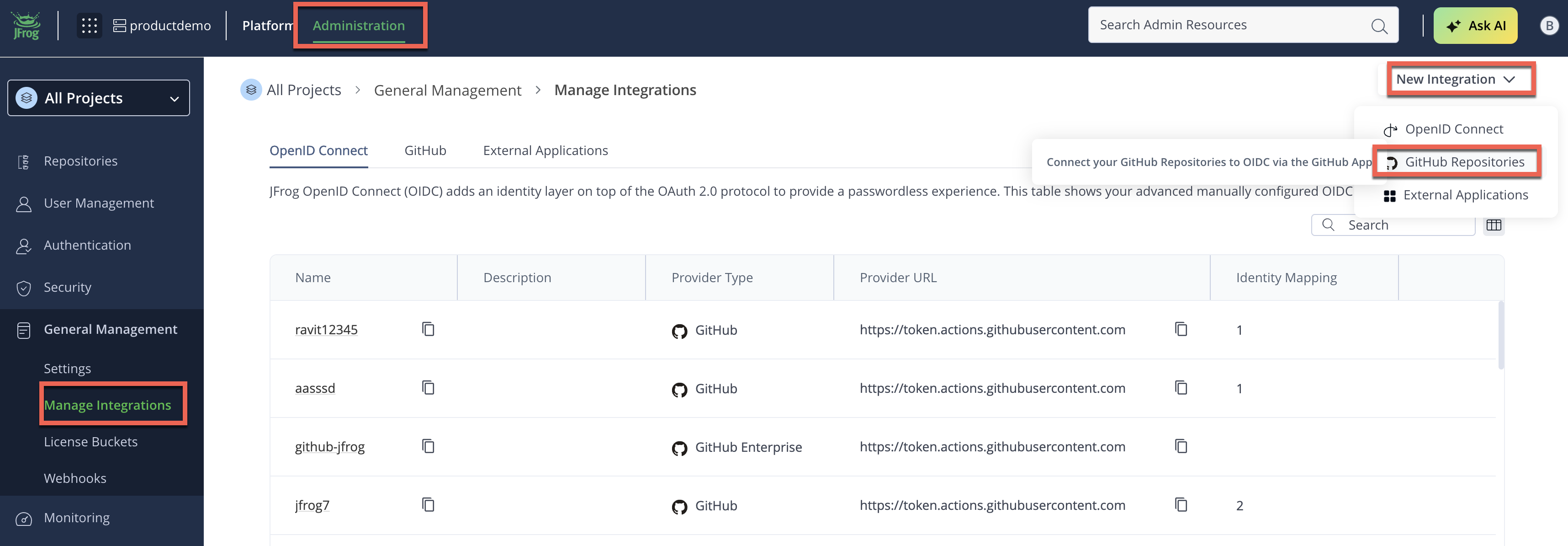
Create the JFrog provider in Administration > General Management > Manage Integrations > OpenID Connect. Click New Integration and choose GitHub. Enter the GitHub organization in Organization, and leave Enable Permissive Configuration cleared. Turn it on only when JFrog should accept a token from any organization. For the rest of the provider setup, see OpenID Connect Integration.
Configure the Workflow
To configure the workflow:
-
Use
jfrog/setup-jfrog-cli@v5. Pin a specific CLI version whendownload-repositorypoints at a repository that stores artifacts locally. Withversion: latest, the action requests the literal pathv2/[RELEASE], and that repository can keep serving the binary cached at that path.permissions: id-token: write steps: - uses: jfrog/setup-jfrog-cli@v5 env: JF_URL: ${{ vars.JF_URL }} with: oidc-provider-name: <OIDC_PROVIDER_NAME>Where:
<OIDC_PROVIDER_NAME>: The OIDC provider name configured in JFrog
-
(Optional) Set
oidc-audienceonly when the JFrog identity mapping requires an audience other than the repository owner URL. The action uses that owner URL when the input is omitted.
When the selected CLI version is 2.75.0 or newer and download-repository isn't set, the action uses the CLI's native OIDC token exchange. Older CLI versions, and installs that use download-repository, use the action's manual token exchange.
Verification Result
After jfrog/setup-jfrog-cli exchanges the GitHub OIDC token, the setup step completes and later JFrog CLI commands in the same job use the exchanged token. The action exposes the generated token and username as the oidc-token and oidc-user outputs. Don't print those outputs in logs.
Troubleshoot
Use the following checks for GitHub Actions OIDC authentication.
| Symptom | What to Check |
|---|---|
JF_URL must be provided when oidc-provider-name is specified | Set JF_URL in the step environment. |
| GitHub can't issue the OIDC token. | Add permissions: id-token: write to the workflow or job. |
| JFrog rejects the token. | Compare oidc-provider-name, the audience, and the identity-mapping claims with the running repository. Confirm that Organization in the OIDC integration matches the organization that owns the repository. |
| A long-lived token is still configured. | Remove the stored JFrog access token from the OIDC job after the short-lived exchange succeeds. |
Related Topics
Updated 12 days ago