

AppTrust GraphQL Reference
Use GraphQL to create a single query to retrieve information from different REST API endpoints in the JFrog Platform, returning only the fields you need.
Using JFrog OneModel GraphQL , you can create a single query to retrieve information from different services and REST API endpoints in the JFrog Platform, returning only the fields you need.
The AppTrust GraphQL API exposes data about your AppTrust applications, application versions, promotions, sources, and bound package versions. It follows the JFrog OneModel GraphQL conventions and supports filtering, ordering, and cursor-based pagination. Queries are sent as HTTP POST to /api/v1/onemodel/graphql with a JSON body of the form { "query": "..." }. The JFrog Platform GraphQL Playground uses this endpoint under the hood.
Documentation
Descriptions of the AppTrust Queries and parameters appear in the Playground with the queries. This document includes those descriptions, plus much more information including:
- General information that applies to all of the queries
- A sample procedure for creating and running a query in the Playground
- Information required for creating and running queries outside the Playground
- Detailed samples of requests and responses derived from an AppTrust integration test suite and reflect realistic field shapes
AI Users and Agents
The information and level of detail provided in this document may be particularly useful to AI tools and agents needing to create and run GraphQL queries in AppTrust.
Prerequisites
- Requires Artifactory version 7.104.1 or later
- JFrog AppTrust installed and running
Endpoint and Request Shape
| Aspect | Value |
|---|---|
| Method | POST |
| Path | /api/v1/onemodel/graphql |
| Content-Type | application/json |
| Body | { "query": "...", "variables": { ... } } |
| Auth | Standard JFrog Platform authentication (access token / basic auth). Resource access is enforced per query (see |
You can also issue queries from the JFrog Platform GraphQL Playground at Integrations > GraphQL Playground, where AppTrust queries appear under Query > ApplicationsQueries.
AppTrust Queries
All AppTrust queries are located under the applications field on Query (i.e. Query.applications: ApplicationsQueries!). The top-level queries are:
getApplication(key: String!): Application— fetch a single application by its unique key. Returnsnullwith aNOT_FOUNDextension code when the application does not exist.searchApplications(where: ApplicationWhereInput!, first: Int, after: Cursor, orderBy: ApplicationOrderInput): ApplicationConnection!— paginated search for applications matching the given filter.getApplicationsByPackageVersionBindings(packages: [ApplicationPackageVersionBindingInput!]!, limitPerPackage: Int): [ApplicationsByPackageVersionBindingResult!]!— for each input package (with optional version), return the applications bound to it (capped per package).getApplicationVersion(applicationKey: String!, version: String!): ApplicationVersion— fetch a single application version. Returnsnullwith aNOT_FOUNDextension code when missing.searchApplicationVersions(where: ApplicationVersionWhereInput, first: Int, after: Cursor): ApplicationVersionConnection!— search application versions across one application or one project (must specifyapplicationKeyXORprojectKey), optionally narrowed by artifact identity.
In the Playground, you will see them grouped under ApplicationsQueries.
Pagination
All paginated fields follow the Relay-style connection pattern:
edges {
  node { ... }
  cursor
}
pageInfo {
  hasNextPage
  hasPreviousPage
  startCursor
  endCursor
}
totalCount
To page forward, pass the previous page's pageInfo.endCursor as after. Cursors are opaque, server-generated strings — do not parse them.
Default and Maximum Page Sizes
| Field | Default first | Maximum first |
|---|---|---|
searchApplications | 25 | 250 |
Application.packageVersionsConnection | 25 | 250 |
Application.versionsConnection | 10 | 100 |
searchApplicationVersions | 10 | 100 |
ApplicationVersion.releasables.releasablesConnection | 25 | 250 |
ApplicationVersion.promotionsConnection | 25 | 250 |
getApplicationsByPackageVersionBindings.limitPerPackage | 10 | (no fixed max; must be >= 0) |
Requests with first < 0, first > max, or an invalid after cursor are rejected with INVALID_INPUT (see Error Handling).
Special Caveats
searchApplicationVersions.totalCountis alwaysnullwhen the filter useshasArtifactWith(artifact-identity search). All other fields on the connection (edges, page info) are still populated.Application.versionsConnectionwithversionSortType: SEMVERdoes not support theaftercursor. UseversionSortType: LEXICOGRAPHICif you need to page through results across multiple requests withSEMVER-style sort, or use the default ordering.Application.versionsConnection,ApplicationVersion.promotionsConnection,ApplicationVersion.releasables.releasablesConnection, andApplication.packageVersionsConnectionare child connections — each starts its own pagination scope inside the parent object, independent from any outer connection.
Filtering and Ordering
ApplicationWhereInput (searchApplications.where)
ApplicationWhereInput (searchApplications.where)projectKey: String— restrict to applications in a specific project.nameContains: String— case-insensitive substring match ondisplayName.criticality: String/criticalityIn: [String!]— exact match or set match. Cannot be combined.maturityLevel: String/maturityLevelIn: [String!]— exact match or set match. Cannot be combined.hasLabelsWith: ApplicationLabelWhereInput— applications having labels matching the given criteria.hasOwnersWith: ApplicationOwnerWhereInput— applications having owners matching the given criteria.hasPackageVersionWith: ApplicationPackageVersionWhereInput— applications bound to a matching package version.
searchApplications.where is required, but it may be {} (match all).
ApplicationOwnerWhereInput
ApplicationOwnerWhereInputname: String— owner name (user or group).type: ApplicationOwnerType—USERorGROUP.and: [ApplicationOwnerWhereInput!]— all sub-criteria must match.or: [ApplicationOwnerWhereInput!]— any sub-criterion may match.
Constraints: cannot mix direct (name/type) with and/or; and/or cannot be nested.
ApplicationLabelWhereInput
ApplicationLabelWhereInputkey: String— label key.value: String— label value (only allowed alongsidekey).and: [ApplicationLabelWhereInput!]— all sub-criteria must match.
Constraints: cannot pass value without key; cannot mix direct (key/value) with and.
ApplicationPackageVersionWhereInput
ApplicationPackageVersionWhereInputtype: PackageType— e.g.npm,maven,docker,nuget,generic.name: String— package name (e.g.org.slf4j:slf4j-api).version: String— package version.
ApplicationToApplicationVersionWhereInput (used in Application.versionsConnection.where)
ApplicationToApplicationVersionWhereInput (used in Application.versionsConnection.where)releaseStatus: ApplicationVersionReleaseStatus— one ofPRE_RELEASE,RELEASED,TRUSTED_RELEASE.tag: String— exact match on the version's tag.
ApplicationToApplicationPackageVersionWhereInput (used in Application.packageVersionsConnection.where)
ApplicationToApplicationPackageVersionWhereInput (used in Application.packageVersionsConnection.where)type: PackageType— restrict to a specific package type.
ApplicationVersionWhereInput (used in searchApplicationVersions.where)
ApplicationVersionWhereInput (used in searchApplicationVersions.where)applicationKey: String— required XORprojectKey.projectKey: String— required XORapplicationKey.hasArtifactWith: ApplicationVersionArtifactWhereInput— artifact-identity filter.
ApplicationVersionArtifactWhereInput
ApplicationVersionArtifactWhereInputfilePath: String— artifact path inside its repository (no repo prefix).sha256: Sha256— SHA-256 of the artifact.
If both are provided, AND semantics apply.
ApplicationVersionReleasableWhereInput (used in releasables.releasablesConnection.where)
ApplicationVersionReleasableWhereInput (used in releasables.releasablesConnection.where)packageTypeIn: [PackageType!]— restrict releasables to specific package types.
ApplicationPackageVersionBindingInput (input to getApplicationsByPackageVersionBindings.packages)
ApplicationPackageVersionBindingInput (input to getApplicationsByPackageVersionBindings.packages)type: PackageType!— required.name: String!— required.version: String— optional. When omitted, any version matches.
Ordering inputs
ApplicationOrderInput—fieldis one ofCREATED_AT(default; default directionDESC) orNAME(default directionASC);direction: SortOrderDirection.ApplicationToApplicationVersionOrderInput—fieldisCREATED_AT(default; defaultDESC) orVERSION;direction(defaultDESC);versionSortTypeisSEMVER(default) orLEXICOGRAPHIC. Note:SEMVERdoes not supportafterpagination.ApplicationVersionPromotionOrderInput—field: CREATED_AT(defaultDESC);direction: SortOrderDirection.ApplicationVersionReleasableOrderInput—fieldisNAME(default; defaultASC) orPACKAGE_TYPE;direction: SortOrderDirection.
Types and Enums
Core types
Application—key,projectKey,displayName,description,criticality,maturityLevel,owners,labels,versionsConnection,packageVersionsConnection. Federated bykey.ApplicationVersion—application,version,tag,createdBy,createdAt,status,messages,releaseStatus,currentStageName,promotionsConnection,releasables,sources,evidenceSubject. Federated byapplication { key }+version.ApplicationVersionReleasables—releasablesCount,artifactsCount,totalSize,sources(de-duplicated across all releasables),releasablesConnection.ApplicationVersionReleasable—name,version,packageType,releasableType(e.g.package_version,artifact),sha256,totalSize,sources,artifacts,vcsCommit,packageVersionLocation.ApplicationVersionArtifact—filePath,downloadPath,sha256,size,evidenceSubject.ApplicationVersionPromotion—sourceStageName,targetStageName,createdBy,createdAt,status,artifacts,messages. The first promotion in a chain has an emptysourceStageName.ApplicationVersionPromotionArtifact—repositoryKey,path,sha256,packageType,packageName,packageVersion,evidenceSubject.ApplicationPackageVersion—type,name,version,vcsCommit.ApplicationVcsCommit—revision,vcsUrl,branch.ApplicationOwner—name,type.ApplicationLabel—key,value.
ApplicationVersionSource interface and implementations
ApplicationVersionSource interface and implementationssources returns an interface; use inline fragments to select implementation-specific fields. The sourceType discriminator is one of:
build—ApplicationVersionSourceBuildwithname,number,startedAt,repositoryKey,evidenceSubject.release_bundle—ApplicationVersionSourceReleaseBundlewithname,version,repositoryKey,evidenceSubject.application_version—ApplicationVersionSourceApplicationVersionwithapplicationKey,version,evidenceSubject.direct—ApplicationVersionSourceDirect. Used for releasables added without a build or release bundle.evidenceSubjectis alwaysnull.
Status and example value sets
Status fields and PackageType are modelled as scalars for forward compatibility — pass values as quoted strings (e.g. releaseStatus: "RELEASED", type: "npm"). ApplicationOwnerType and SortOrderDirection are real enums — pass values bare (e.g. type: USER, direction: ASC).
ApplicationVersionStatus(scalar):STARTED,FAILED,COMPLETED,DELETING.ApplicationVersionReleaseStatus(scalar):PRE_RELEASE,RELEASED,TRUSTED_RELEASE.ApplicationVersionPromotionStatus(scalar):SUBMITTED,STARTED,PENDING,COMPLETED,FAILED,REJECTED.ApplicationVersionReleasableType(scalar):package_version,artifact.criticality(String):unspecified,low,medium,high,critical.maturityLevel(String):unspecified,experimental,production,end_of_life.ApplicationOwnerType(enum):USER,GROUP.PackageType(scalar):maven,npm,docker,nuget,generic, etc.SortOrderDirection(enum):ASC,DESC.ApplicationToApplicationVersionSortType(enum):SEMVER,LEXICOGRAPHIC.
Federated entities (resolved by OneModel)
These types are referenced by AppTrust but resolved by other products in the JFrog OneModel supergraph:
EvidenceSubject { fullPath: String! }— appears onApplicationVersion,ApplicationVersionArtifact,ApplicationVersionPromotionArtifact, and the source implementations. Resolved by the JFrog Evidence service.StoredPackageVersionLocation { repositoryKey, packageVersion { package { type name } version } }— appears on package-version releasables (ApplicationVersionReleasable.packageVersionLocation). Resolved by the JFrog Packages service. Returnsnullif the location cannot be determined or the field was not requested.
Error Handling
GraphQL responses always return HTTP 200 and surface errors via the errors array. Each error includes an extensions.code:
NOT_FOUND— the requested resource does not exist (getApplication/getApplicationVersion). The corresponding data field isnull.ACCESS_DENIED— the caller lacks read permission on the application or project. Note that for callers without admin scope, requesting a non-existent application by key surfaces asACCESS_DENIEDrather thanNOT_FOUND(so existence cannot be probed).INVALID_INPUT— input validation failure. Common causes:- Pagination:
first < 0,first > <max>, invalidaftercursor. - Filters:
hasLabelsWith { value }withoutkey;hasOwnersWith { type }withoutname. - Mutual exclusion: passing both
criticalityandcriticalityIn(or bothmaturityLevelandmaturityLevelIn). getApplicationsByPackageVersionBindings.limitPerPackage < 0.
- Pagination:
All other server-side errors are masked by the GraphQL error presenter to avoid leaking internals.
Create and Run a Query
To create and run a query:
- In the JFrog Platform, go to Integrations > GraphQL Playground > Query > ApplicationsQueries.
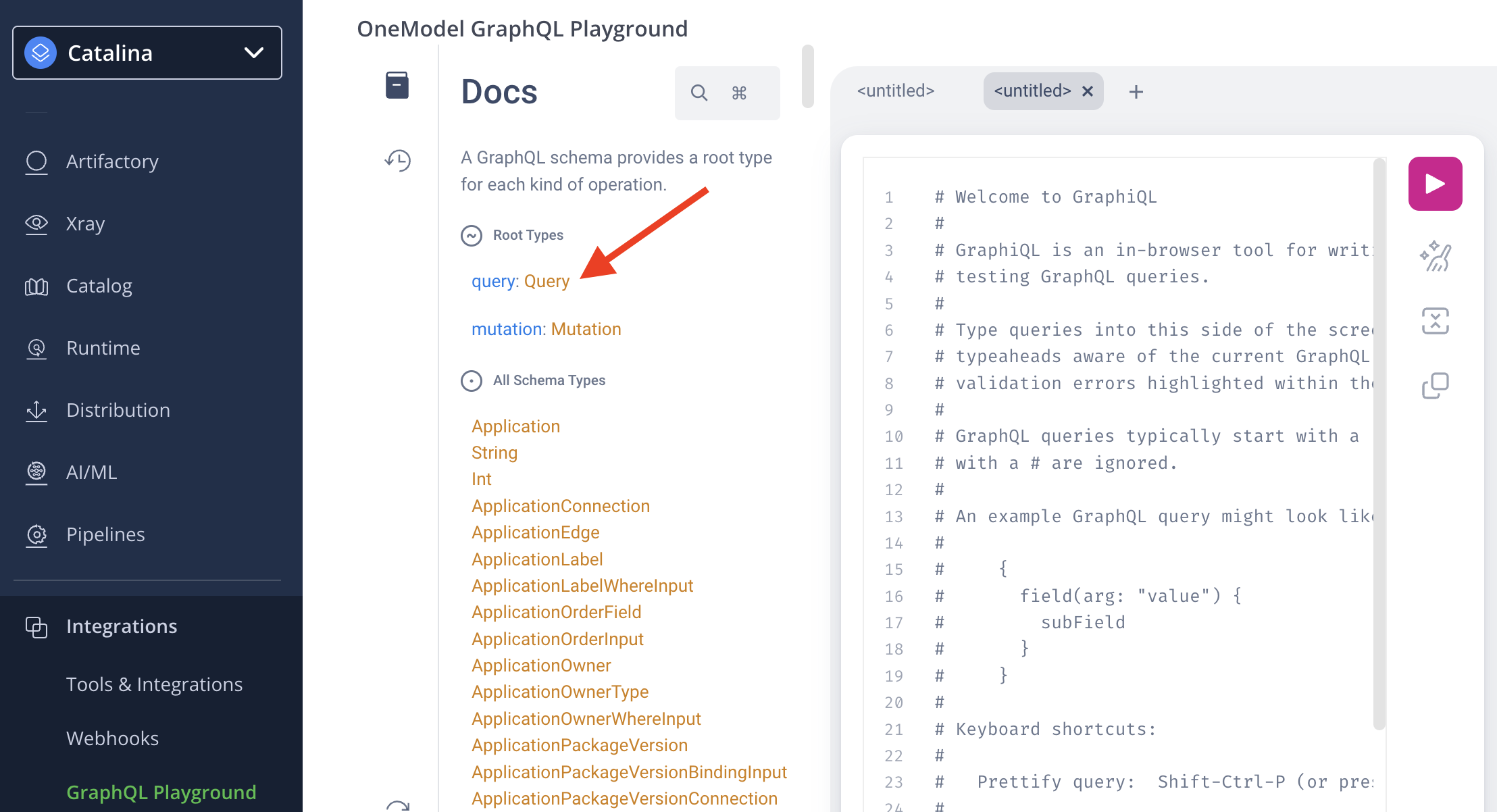
- If this is the first time you are creating a query, read the default text in the query panel, then delete it.
- Enter the text of your query as shown in the simple example below. The query asks for the display name and description of a specific application which is identified by its application key.
query {
  applications {
    getApplication(key: "green-burger") {
      displayName
      description
    }
  }
}- Click the arrow on the top right of the query panel. The response will appear to the right.
{
  "data": {
    "applications": {
      "getApplication": {
        "displayName": "Green Burger Application",
        "description": "Burger ordering application"
      }
    }
  }
}
Additional Sample Queries
The examples below demonstrate every top-level query and every nested connection on the AppTrust GraphQL surface. They are derived from an AppTrust integration test suite and reflect realistic field shapes.
A. getApplication
A1. Fetch an application by key (minimal)
query {
  applications {
    getApplication(key: "green-burger") {
      key
      displayName
      criticality
    }
  }
}{
"data": {
"applications": {
"getApplication": {
"key": "green-burger",
"displayName": "Green Burger Application",
"criticality": "critical"
}
}
}
}A2. Fetch an application with all top-level fields
query {
  applications {
    getApplication(key: "green-burger") {
      key
      projectKey
      displayName
      description
      criticality
      maturityLevel
      owners {
        name
        type
      }
      labels {
        key
        value
      }
    }
  }
}{
"data": {
"applications": {
"getApplication": {
"key": "green-burger",
"projectKey": "apptrust-demos",
"displayName": "Green Burger Application",
"description": "Burger ordering application",
"criticality": "medium",
"maturityLevel": "production",
"owners": [
{ "name": "alice", "type": "USER" },
{ "name": "platform-team", "type": "GROUP" }
],
"labels": [
{ "key": "environment", "value": "production" },
{ "key": "team", "value": "ordering" }
]
}
}
}
}Note: internal-realm labels (those used by AppTrust internals such as lifecycle.*) are filtered out of labels. Only user-facing labels are returned.
B. searchApplications
B1. Search by name substring with ordering
query {
  applications {
    searchApplications(
      where: { nameContains: "Burger" }
      orderBy: { field: NAME, direction: ASC }
    ) {
      edges {
        node {
          key
          displayName
        }
      }
      totalCount
    }
  }
}
B2. Filter by criticality and maturity level
criticality and criticalityIn are mutually exclusive; same for maturityLevel and maturityLevelIn.
query {
  applications {
    searchApplications(
      where: {
        criticalityIn: ["medium", "critical"]
        maturityLevelIn: ["experimental", "end_of_life"]
      }
    ) {
      edges {
        node {
          key
          displayName
          criticality
          maturityLevel
        }
      }
      totalCount
    }
  }
}
B3. Filter by label and owner
query {
  applications {
    searchApplications(
      where: {
        hasLabelsWith: { key: "environment", value: "production" }
        hasOwnersWith: { name: "alice", type: USER }
      }
    ) {
      edges {
        node {
          key
          displayName
          owners { name type }
          labels { key value }
        }
      }
    }
  }
}
B4. Compound owner / label filters with and and or
and and orquery {
applications {
searchApplications(
where: {
hasOwnersWith: {
and: [
{ name: "alice", type: USER }
{ name: "platform-team", type: GROUP }
]
}
hasLabelsWith: {
and: [
{ key: "environment", value: "production" }
{ key: "tier", value: "tier-1" }
]
}
}
) {
edges { node { key displayName } }
}
}
}B5. Filter by bound package version
query {
  applications {
    searchApplications(
      where: {
        hasPackageVersionWith: { type: "npm", name: "colors", version: "1.4.0" }
      }
    ) {
      edges {
        node {
          key
          displayName
        }
      }
    }
  }
}
B6. Pagination — request page 1, then page 2 using endCursor
endCursorquery {
applications {
searchApplications(where: {}, first: 25) {
edges {
node { key displayName }
cursor
}
pageInfo {
hasNextPage
endCursor
}
totalCount
}
}
}Use the returned pageInfo.endCursor as the after argument on the next request:
query {
  applications {
    searchApplications(where: {}, first: 25, after: "<endCursor from previous page>") {
      edges { node { key } cursor }
      pageInfo { hasNextPage endCursor }
    }
  }
}
B7. Invalid input examples
first: -1→INVALID_INPUT(first must be non-negative).first: 251onsearchApplications→INVALID_INPUT(above max of 250).after: "not-a-real-cursor"→INVALID_INPUT(invalid cursor).- Combining
criticalityandcriticalityInin the samewhere→INVALID_INPUT.
C. Application.packageVersionsConnection
C1. Page through bound package versions with VCS info
query {
  applications {
    getApplication(key: "green-burger") {
      key
      packageVersionsConnection(first: 25) {
        edges {
          node {
            type
            name
            version
            vcsCommit {
              revision
              vcsUrl
              branch
            }
          }
          cursor
        }
        pageInfo {
          hasNextPage
          hasPreviousPage
          startCursor
          endCursor
        }
        totalCount
      }
    }
  }
}
C2. Filter by package type
query {
  applications {
    getApplication(key: "green-burger") {
      packageVersionsConnection(where: { type: "npm" }, first: 50) {
        edges { node { type name version } }
        totalCount
      }
    }
  }
}
D. Application.versionsConnection
D1. Filter by tag
query {
  applications {
    getApplication(key: "green-burger") {
      versionsConnection(where: { tag: "release-2026Q1" }) {
        edges { node { version tag } }
      }
    }
  }
}
D2. Filter by release status
query {
  applications {
    getApplication(key: "green-burger") {
      versionsConnection(where: { releaseStatus: "RELEASED" }) {
        edges {
          node {
            version
            releaseStatus
            currentStageName
          }
        }
      }
    }
  }
}
D3. Order by version using semver, descending
query {
  applications {
    getApplication(key: "green-burger") {
      versionsConnection(
        first: 10
        orderBy: { field: VERSION, direction: DESC, versionSortType: SEMVER }
      ) {
        edges { node { version createdAt } }
      }
    }
  }
}
With versionSortType: SEMVER, the after cursor argument is not supported. Use LEXICOGRAPHIC if you need cursor-based pagination across pages.
E. getApplicationVersion
E1. Full version graph (status, releasables, sources, evidence)
query {
  applications {
    getApplicationVersion(applicationKey: "green-burger", version: "1.0.0") {
      application { key }
      version
      tag
      createdBy
      createdAt
      status
      releaseStatus
      currentStageName
      messages { text }
      evidenceSubject { fullPath }
      releasables {
        releasablesCount
        artifactsCount
        totalSize
        sources {
          sourceType
          ... on ApplicationVersionSourceBuild {
            name
            number
            startedAt
            repositoryKey
          }
          ... on ApplicationVersionSourceReleaseBundle {
            name
            version
            repositoryKey
          }
        }
        releasablesConnection {
          edges {
            node {
              name
              version
              packageType
              releasableType
              sha256
              totalSize
              artifacts {
                filePath
                downloadPath
                sha256
                size
                evidenceSubject { fullPath }
              }
              sources {
                sourceType
                ... on ApplicationVersionSourceBuild { name number repositoryKey }
                ... on ApplicationVersionSourceReleaseBundle { name version repositoryKey }
                ... on ApplicationVersionSourceApplicationVersion { applicationKey version }
              }
            }
            cursor
          }
          totalCount
          pageInfo { hasNextPage endCursor }
        }
      }
    }
  }
}
E2. Filter releasables by package type
query {
  applications {
    getApplicationVersion(applicationKey: "green-burger", version: "1.0.0") {
      releasables {
        releasablesConnection(where: { packageTypeIn: ["npm", "maven"] }) {
          edges { node { name version packageType } }
          totalCount
        }
      }
    }
  }
}
E3. Get VCS commit info for a package-version releasable
query {
  applications {
    getApplicationVersion(applicationKey: "green-burger", version: "1.0.0") {
      releasables {
        releasablesConnection {
          edges {
            node {
              name
              version
              packageType
              releasableType
              vcsCommit { revision vcsUrl branch }
            }
          }
        }
      }
    }
  }
}{
"data": {
"applications": {
"getApplicationVersion": {
"releasables": {
"releasablesConnection": {
"edges": [
{
"node": {
"name": "colors",
"version": "1.4.0",
"packageType": "npm",
"releasableType": "package_version",
"vcsCommit": {
"revision": "abc123def456789",
"vcsUrl": "https://github.com/example/colors.git",
"branch": "main"
}
}
}
]
}
}
}
}
}
}E4. Resolve the federated packageVersionLocation
packageVersionLocationpackageVersionLocation is resolved by the OneModel Packages service. It is null when the field is not requested or when the location cannot be determined (e.g. a non-package releasable, or before any promotion sets a stored location).
query {
  applications {
    getApplicationVersion(applicationKey: "green-burger", version: "1.0.0") {
      releasables {
        releasablesConnection {
          edges {
            node {
              name
              version
              packageType
              packageVersionLocation {
                repositoryKey
                packageVersion {
                  package { type name }
                  version
                }
              }
            }
          }
        }
      }
    }
  }
}
E5. Top-level ApplicationVersion.sources (all four implementations)
ApplicationVersion.sources (all four implementations)query {
applications {
getApplicationVersion(applicationKey: "green-burger", version: "1.0.0") {
sources {
sourceType
... on ApplicationVersionSourceBuild {
name
number
startedAt
repositoryKey
evidenceSubject { fullPath }
}
... on ApplicationVersionSourceReleaseBundle {
name
version
repositoryKey
evidenceSubject { fullPath }
}
... on ApplicationVersionSourceApplicationVersion {
applicationKey
version
evidenceSubject { fullPath }
}
... on ApplicationVersionSourceDirect {
sourceType
}
}
}
}
}E6. NOT_FOUND example
query {
  applications {
    getApplicationVersion(applicationKey: "green-burger", version: "9.9.9") {
      version
    }
  }
}{
"data": {
"applications": {
"getApplicationVersion": null
}
},
"errors": [
{
"message": "No application version was found for key 'green-burger' and version '9.9.9'",
"path": ["applications", "getApplicationVersion"],
"extensions": { "code": "NOT_FOUND" }
}
]
}F. ApplicationVersion.promotionsConnection
F1. List promotions with their artifacts and evidence
query {
  applications {
    getApplicationVersion(applicationKey: "green-burger", version: "1.0.0") {
      version
      releaseStatus
      currentStageName
      promotionsConnection {
        edges {
          node {
            sourceStageName
            targetStageName
            createdBy
            createdAt
            status
            artifacts {
              repositoryKey
              path
              sha256
              packageType
              packageName
              packageVersion
              evidenceSubject { fullPath }
            }
            messages { text }
          }
          cursor
        }
        pageInfo { hasNextPage endCursor }
        totalCount
      }
    }
  }
}{
"data": {
"applications": {
"getApplicationVersion": {
"version": "1.0.0",
"releaseStatus": "PRE_RELEASE",
"currentStageName": "DEV",
"promotionsConnection": {
"edges": [
{
"node": {
"sourceStageName": "",
"targetStageName": "DEV",
"createdBy": "admin",
"createdAt": "2026-05-06T10:15:30.000Z",
"status": "COMPLETED",
"artifacts": [
{
"repositoryKey": "apptrust-demos-npm-local",
"path": "colors/1.4.0/colors-1.4.0.tgz",
"sha256": "b50eb83eda7cc37519809e240338fded8e625169945bbfe6d4156445c6610498",
"packageType": "npm",
"packageName": "colors",
"packageVersion": "1.4.0",
"evidenceSubject": {
"fullPath": "apptrust-demos-npm-local/colors/1.4.0/colors-1.4.0.tgz"
}
}
],
"messages": []
},
"cursor": "..."
}
],
"totalCount": 1
}
}
}
}
}The first promotion in a chain has an empty sourceStageName (no prior stage).
G. getApplicationsByPackageVersionBindings
G1. Match by package without a version (any version qualifies)
query {
  applications {
    getApplicationsByPackageVersionBindings(
      packages: [
        { type: "npm", name: "colors" }
        { type: "maven", name: "spring-boot" }
        { type: "nuget", name: "Newtonsoft.Json" }
      ]
      limitPerPackage: 3
    ) {
      package { type name version }
      applications {
        key
        displayName
        criticality
      }
    }
  }
}
G2. Match by exact package version
query {
  applications {
    getApplicationsByPackageVersionBindings(
      packages: [
        { type: "npm", name: "colors", version: "1.4.0" }
        { type: "maven", name: "spring-boot", version: "1.0.0" }
      ]
      limitPerPackage: 5
    ) {
      package { type name version }
      applications { key displayName }
    }
  }
}
G3. Validation behavior
limitPerPackage: 0is valid — each result returns an emptyapplicationslist.limitPerPackage: -1returnsINVALID_INPUTwith messagelimitPerPackage must be non-negative.
H. searchApplicationVersions
H1. Find versions of one application that contain a given artifact (by SHA-256)
query {
  applications {
    searchApplicationVersions(
      where: {
        applicationKey: "green-burger"
        hasArtifactWith: {
          sha256: "b50eb83eda7cc37519809e240338fded8e625169945bbfe6d4156445c6610498"
        }
      }
    ) {
      edges {
        node {
          application { key displayName }
          version
          releaseStatus
          releasables {
            releasablesCount
            artifactsCount
          }
        }
      }
      pageInfo { hasNextPage endCursor }
    }
  }
}
H2. Project-wide search by file path
query {
  applications {
    searchApplicationVersions(
      where: {
        projectKey: "apptrust-demos"
        hasArtifactWith: { filePath: "colors/1.4.0/colors-1.4.0.tgz" }
      }
    ) {
      edges {
        node {
          application { key }
          version
        }
      }
    }
  }
}
H3. Combined filePath + sha256 (AND semantics)
filePath + sha256 (AND semantics)query {
applications {
searchApplicationVersions(
where: {
projectKey: "apptrust-demos"
hasArtifactWith: {
filePath: "colors/1.4.0/colors-1.4.0.tgz"
sha256: "b50eb83eda7cc37519809e240338fded8e625169945bbfe6d4156445c6610498"
}
}
) {
edges { node { application { key } version } }
}
}
}H4. Constraints
where.applicationKeyandwhere.projectKeyare mutually exclusive — exactly one must be provided.- When
hasArtifactWithis used,totalCountis alwaysnullon the resultingApplicationVersionConnection. UsepageInfo.hasNextPageto drive pagination.