

Artifactory and Google Artifact Registry Integration
Google Cloud services like Cloud Run and Vertex AI can only pull container images from Google Artifact Registry or Docker Hub, they have no way to pull directly from JFrog. For joint JFrog and Google Cloud customers who wish to use Artifactory as their single source of truth for container images, this has meant duplicating images into Google Artifact Registry just to satisfy these services and losing governance and traceability over that part of their pipeline.
Note:
The Artifactory and Google Artifact Registry integration currently supports container (Docker/OCI) images only. Google Artifact Registry itself supports additional package formats (for example, Maven, npm, Python), but this integration does not yet extend to them.
The new Connector repository type closes that gap. A Connector acts as a pass-through link between Google Artifact Registry and Artifactory. Cloud Run and Vertex AI pull through Google Artifact Registry as they normally would, while the underlying image continues to live and be governed in Artifactory. There is no duplication or separate copy to keep in sync. This lets customers keep JFrog as the single source of truth for their container images while still meeting Google Cloud services where they already expect to pull from.
Note:
JFrog recommends a 1:1 relationship between Google Artifact Registry repositories and JFrog virtual Docker repositories for easier auditing and to know the real source of the request in Artifactory. For each GCP container runtime scope, you should have a dedicated Google Artifact Registry connector pointing to a dedicated virtual repository in JFrog. For example, on the JFrog side have a dedicated virtual Docker repository for a specific project or environment, and on the GCP side have a dedicated Google Artifact Registry connector for that same specific project or environment configured to the dedicated JFrog Docker repository.
To perform the integration:
- Create a secret according to one of the following options:
-
Recommended: Create an auto-rotating secret according to the instructions in the JFrog GCP Secret Rotator repository.
-
Create a simple secret as follows:
-
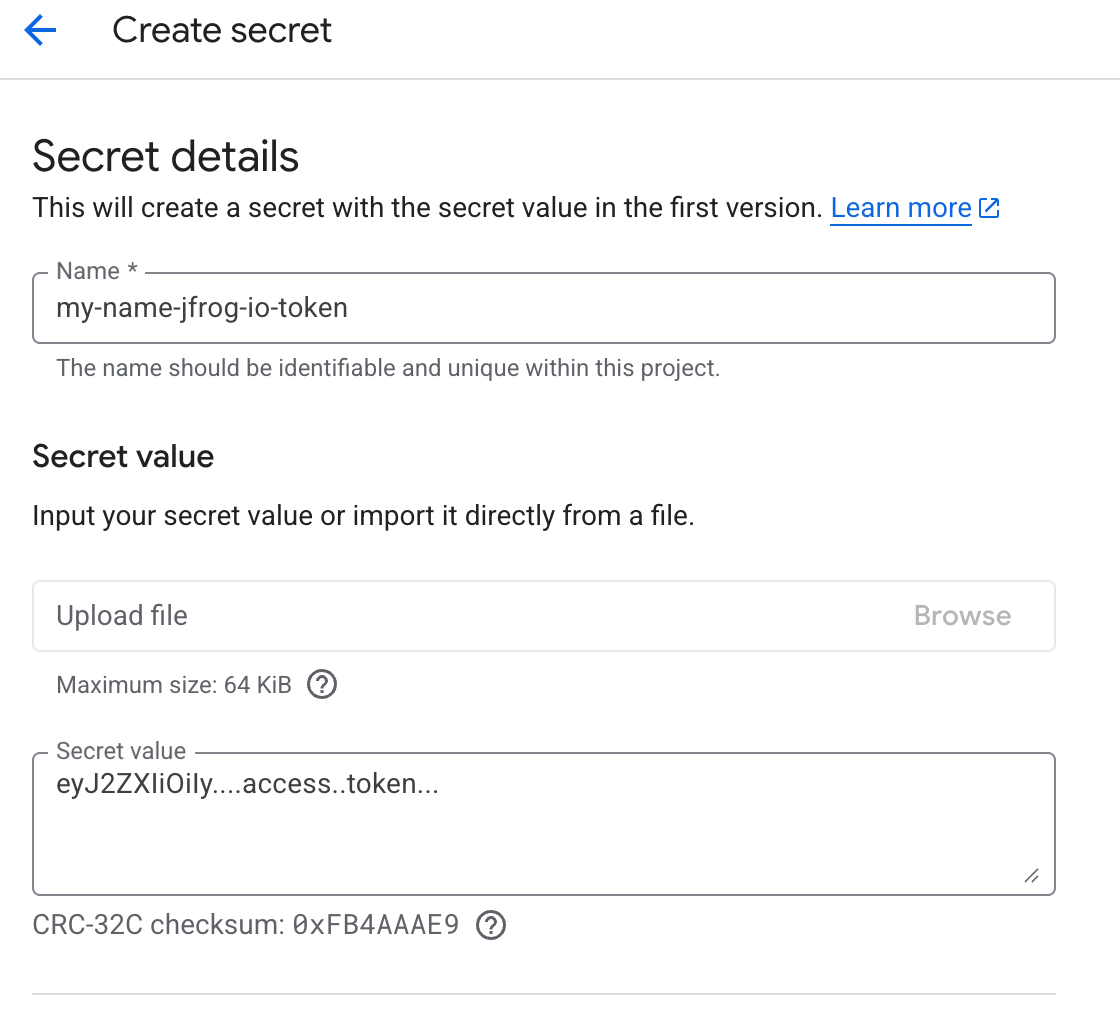
In Google Cloud, open the Secret Manager and click Create secret. The Create secret screen appears, as shown below.
-
Enter a name for the secret.
-
In Secret Value, enter your JFrog access token or password.
Note:
JFrog recommends entering here a least-privileged access token with read-only access to the Docker repository.
-
Click Create secret.
-
-
- In Google Cloud, go to your project and then to Artifact Registry.
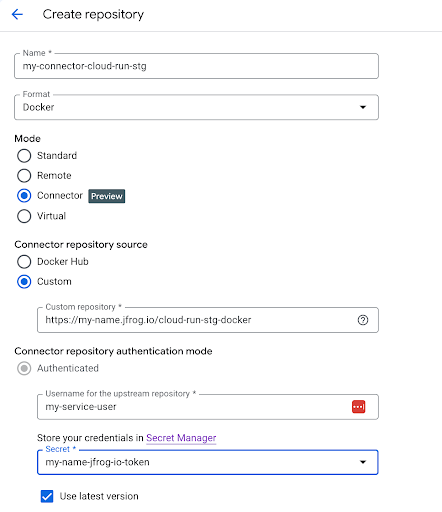
- In Artifact Registry, select Create Repository. The Create Repository window opens, as shown below.
-
Assign a name to the repository.
-
From the Format dropdown, choose Docker.
-
For Mode, choose Connector.
-
For Connector repository source choose Custom, and add the path to your Docker repository that you want to connect to Artifactory in the Custom registry field. The path must include
https://and the repository path. For example: -
At Username for the upstream registry, enter a username.
-
At Store your credentials, select the name of the secret you prepared at step 1 from the dropdown.
-
Click Create.
For more information, see:
Updated about 2 months ago