

Artifactory Microsoft SQL Server Database Creation
Create the SQL Server artifactory database and login in Management Studio, setting Latin1_General_CS_AI collation required by JFrog Artifactory.
- In Microsoft SQL Server Management Studio, open the Object Explorer, right click Security and select New | Login.... Create a new user named
artifactoryand set its password.
Note
Only MSSQL users can be used in
system.yaml/db.properties.
-
Open the Object Explorer, right click Databases and select New database.... The New Database dialog opens.
-
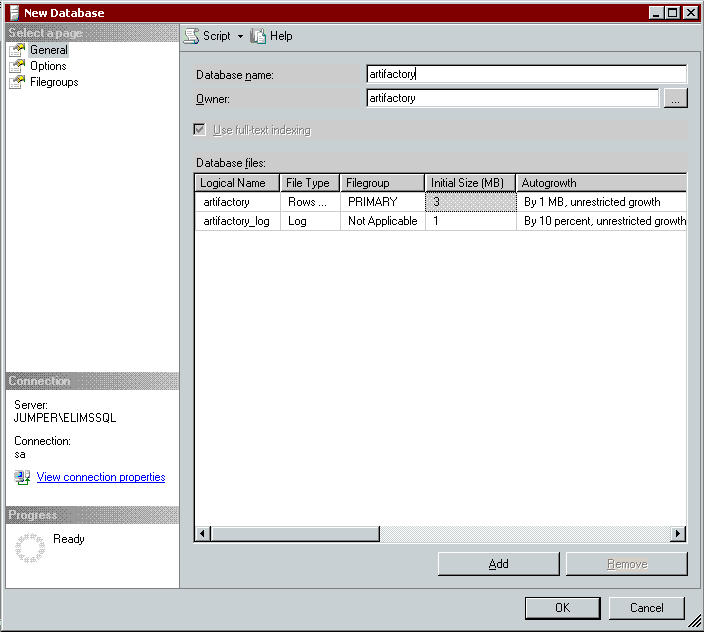
Select General in the Select a page: navigation pane. Set Database name to "artifactory" and Owner to "artifactory" (the user name you created in step 2).
-
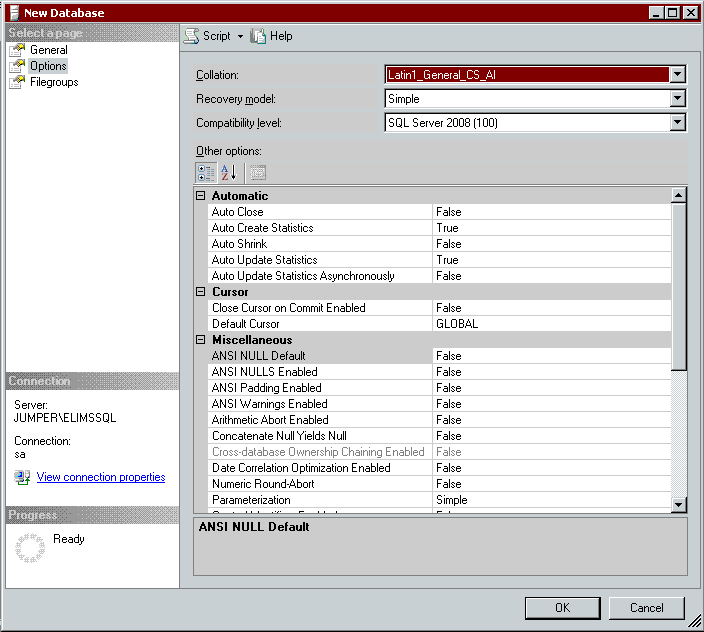
Select Options in the Select a page: navigation pane. Set Collation to "Latin1_General_CS_AI".
Select a Case-sensitive Collation
Microsoft SQL Database Server is not case-sensitive by default, but Artifactory is case-sensitive. Select a case-sensitive collation.
-
Click OK to create the database.
Related Topics
Updated 4 months ago