

Sharding Binary Provider Configuration
Configure sharding with read/write behavior, redundancy, and balancing parameters. Supports cross-zone sharding configurations.
You have the following configuration options for a sharding binary provider.
- Basic Sharding Configuration
- Cross-Zone Sharding Configuration
Basic Sharding Configuration
Basic sharding configuration is used to configure a sharding binary provider for the Artifactory instance.
The following parameters are available for a basic sharding configuration:
| Parameter | Description |
|---|---|
type | Sharding |
lenientLimit | Default: 0 (0 means the The minimum number of shards/nodes that must be available for Artifactory to upload artifacts. However, Artifactory must successfully write binaries on all available shards for an upload to be considered successful. The next balance cycle (triggered with the GC mechanism) will eventually transfer the binary to enough nodes such that the redundancy commitment is preserved. In other words, Leniency governs the minimal allowed redundancy in cases where the redundancy commitment was not kept temporarily. For example, if The amount of currently active nodes must always be greater or equal than the configured |
readBehavior | This parameter dictates the strategy for reading binaries from the mounts that make up the sharded filestore. Possible values are: roundRobin (default): Binaries are read from each mount using a round robin strategy. |
writeBehavior | This parameter dictates the strategy for writing binaries to the mounts that make up the sharded filestore. Possible values are: roundRobin (default): Binaries are written to each mount using a round robin strategy. freeSpace: Binaries are written to the mount with the greatest absolute volume of free space available. percentageFreeSpace: Binaries are written to the mount with the percentage of free space available. |
redundancy | Default: 1 The number of copies that should be stored for each binary in the filestore. Redundancy must be less than or equal to the number of mounts in your system for Artifactory to work with this configuration. |
concurrentStreamWaitTimeout | Default: 30,000 ms To support the specified redundancy, accumulates the write stream in a buffer, and uses “r” threads (according to the specified redundancy) to write to each of the redundant copies of the binary being written. A binary can only be considered written once all redundant threads have completed their write operation. Since all threads are competing for the write stream buffer, each one will complete the write operation at a different time. This parameter specifies the amount of time (ms) that any thread will wait for all the others to complete their write operation.
|
concurrentStreamBufferKb | Default: 32 Kb The size of the write buffer used to accumulate the write stream before being replicated for writing to the “r” redundant copies of the binary.
|
enableShardingBalancer | Default: true Set this flag to false if you want to disable the balancing sharding mechanism. |
maxBalancingRunTime | Default: 0.0 ms Once a failed mount has been restored, this parameter specifies how long each balancing session may run before it lapses until the next Garbage Collection has been completed. For more details about balancing, see Using Balancing to Recover from Mount Failure.
|
disableBalanceOnAddStream | Default: false If this flag is false, when a binary is uploaded Artifactory checks if the binary is present in the other shards. If the number of instances found in the other shards is greater than the value of redundancy, Artifactory will delete the number of instances of the binary greater than redundancy in the next balance cycle. For example, if Artifactory finds 4 binary instances in the other shards and redundancy = 2, in the next balance cycle Artifactory will delete 2 instances of that binary. If this flag is true, the check during upload is disabled and the balance cycle is not triggered. |
freeSpaceSampleInterval | Default: 36,000,000 ms (10 hours) To implement its write behavior, Artifactory periodically queries the mounts in the sharded filestore to check for free space. Since this check can be resource-intensive, use this parameter to control the time interval between free space checks.
|
minSpareUploaderExecutor | Default: 2 Artifactory maintains a pool of threads to execute writes to each redundant unit of storage. Depending on the intensity of write activity, eventually, some of the threads may become idle and are then candidates for being killed. However, Artifactory does need to maintain some threads alive for when write activities begin again. This parameter specifies the minimum number of threads that should be kept alive to supply redundant storage units. |
uploaderCleanupIdleTime | Default: 120,000 ms (2 min) The maximum period of time threads may remain idle before becoming candidates for being killed. |
balancerThreads | Default: 1 The number of threads to use for the rebalancing operations. |
accessibleCheckThreads | Default: 2 The number of threads to use for checking that shards are accessible. |
accessibleCheckTimeoutMillis | Default: 15000 milliseconds (15 seconds) The maximum time to wait while checking if shards are accessible. |
Basic Sharding Example 1
The code snippet shows a sample configuration for the following setup.
- A cached sharding binary provider with three mounts and redundancy of 2.
- Each mount "X" writes to a directory called /filestoreX.
- The read strategy for the provider is roundRobin.
- The write strategy for the provider is percentageFreeSpace.
<config version="4">
   <chain>
       <provider id="cache-fs" type="cache-fs">                   <!-- This is a cached filestore -->
           <provider id="sharding" type="sharding">                   <!-- This is a sharding provider -->
               <sub-provider id="shard1" type="state-aware"/>     <!-- There are three mounts -->
               <sub-provider id="shard2" type="state-aware"/>
               <sub-provider id="shard3" type="state-aware"/>
           </provider>
       </provider>
   </chain>

<!-- Specify the read and write strategy and redundancy for the sharding binary provider -->
  <provider id="sharding" type="sharding">
       <readBehavior>roundRobin</readBehavior>
       <writeBehavior>percentageFreeSpace</writeBehavior>
       <redundancy>2</redundancy>
 </provider>


//For each sub-provider (mount), specify the filestore location
   <provider id="shard1" type="state-aware">
       <fileStoreDir>filestore1</fileStoreDir>
   </provider>

   <provider id="shard2" type="state-aware">
       <fileStoreDir>filestore2</fileStoreDir>
   </provider>

   <provider id="shard3" type="state-aware">
       <fileStoreDir>filestore3</fileStoreDir>
   </provider>
</config>
Basic Sharding Example 2
The following code snippet shows the double-shards template.
<config version="4">
    <chain template="double-shards" />

    <provider id="shard-fs-1" type="state-aware">
        <fileStoreDir>shard-fs-1</fileStoreDir>
    </provider>

    <provider id="shard-fs-2" type="state-aware">
        <fileStoreDir>shard-fs-2</fileStoreDir>
    </provider>
</config>
The double-shards template uses a cached provider with two mounts and a redundancy of 1, that is, only one copy of each artifact is stored.
<chain>
    <provider id="cache-fs" type="cache-fs">
        <provider id="sharding" type="sharding">
            <redundancy>1</redundancy>
            <sub-provider id="shard-fs-1" type="state-aware"/>
            <sub-provider id="shard-fs-2" type="state-aware"/>
        </provider>
    </provider>
</chain>
To modify the parameters of the template, change the values of the elements in the template definition. For example, to increase the redundancy to 2, modify only the <redundancy> tag as shown in the following sample.
<chain>
    <provider id="cache-fs" type="cache-fs">
        <provider id="sharding" type="sharding">
            <redundancy>2</redundancy>
            <sub-provider id="shard-fs-1" type="state-aware"/>
            <sub-provider id="shard-fs-2" type="state-aware"/>
        </provider>
    </provider>
</chain>
Cross-Zone Sharding Configuration
Sharding across multiple zones in an HA Artifactory cluster allows you to create zones or regions of sharded data to provide additional redundancy in case one of your zones becomes unavailable. You can determine the order in which the data is written between the zones and you can set the method for establishing the free space when writing to the mounts in the neighboring zones.
The following parameters are available for a cross-zone sharding configuration in the binarystore.xml file.
| Parameter | Description |
|---|---|
readBehavior | This parameter dictates the strategy for reading binaries from the mounts that make up the cross-zone sharded filestore. Possible value is: zone: Binaries are read from each mount according to zone settings. |
writeBehavior | This parameter dictates the strategy for writing binaries to cross-zone sharding mounts: Possible values are: zonePercentageFreeSpace: Binaries are written to the mount in the relevant zone with the highest percentage of free space available. zoneFreeSpace: Binaries are written to the mount in the zone with the greatest absolute volume of free space available. |
Add to the Artifactory System YAML file
The following parameters are available for a cross-zone sharding configuration in the Artifactory System YAML file.
- shared.node.id: The unique descriptive name of this server.
Uniqueness
Each node must have an id that is unique across your whole network.
-
shared.node.crossZoneOrder: Sets the zone order in which the data is written to the mounts. In the following example,
crossZoneOrder: "us-east1,us-east2", the sharding will write to the US-EAST-1 zone and then to the US-EAST-2 zone.
Note
You can dynamically add nodes to an existing sharding cluster using the Artifactory System YAML file. To do so, you need your cluster to already be configured with sharding, and by adding the crossZoneOrder: us-east-1,us-east-2 property, the new node can write to the existing cluster nodes without changing the binarystore.xml file.
Cross-Zone Sharding Example
This example displays a cross-zone sharding scenario in which the Artifactory cluster is configured with a redundancy of 2 and includes the following steps.
-
The developer first deploys the package to the closest Artifactory node/
-
The package is then automatically deployed to the 'US-EAST-1" zone to the shard with the highest percentage of free space in the "S1" shard (with 51% free space).
-
The package is deployed using the same method to the "S3" shard, that also has the highest percentage of free space in the 'US-EAST-2' zone.
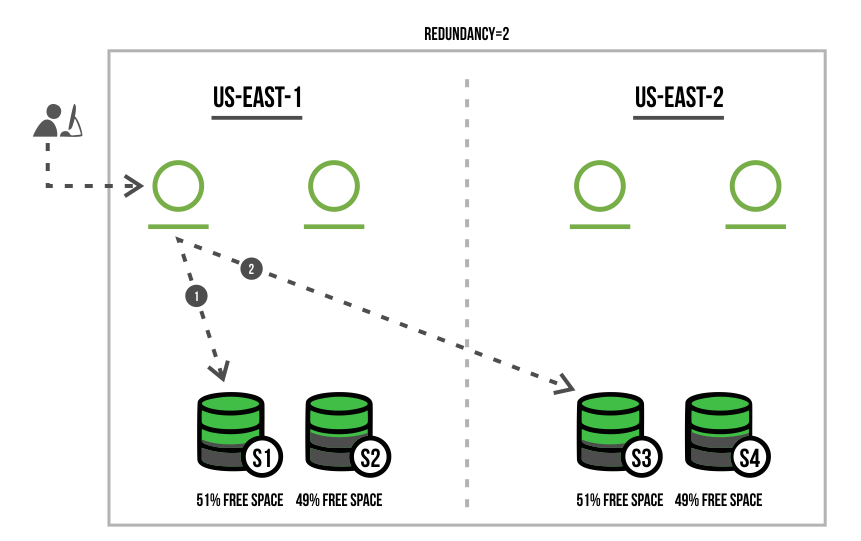
The following code snippet is a sample configuration of our cross-zone setup.
- 1 Artifactory cluster across 2 zones: "us-east-1" and "us-east-2" in this order.
- 4 HA nodes, 2 nodes in each zone.
- 4 mounts (shards), 2 mounts in each zone.
- The write strategy for the provider is zonePercentageFreeSpace .
Cross-zone sharding configuration in Artifactory System YAML
node:
  id: "east-1-node-1"
  crossZoneOrder: "us-east-1,us-east-2"
Example: Cross-zone sharding configuration in the binarystore.xml
<config version="4">
    <chain>
        <provider id="sharding" type="sharding">
            <sub-provider id="shard1" type="state-aware"/>
            <sub-provider id="shard2" type="state-aware"/>
            <sub-provider id="shard3" type="state-aware"/>
            <sub-provider id="shard4" type="state-aware"/>
        </provider>
    </chain>

    <provider id="sharding" type="sharding">
        <redundancy>2</redundancy>
        <readBehavior>zone</readBehavior>
        <writeBehavior>zonePercentageFreeSpace</writeBehavior>
    </provider>

    <provider id="shard1" type="state-aware">
        <fileStoreDir>mount1</fileStoreDir>
        <zone>us-east-1</zone>
    </provider>

    <provider id="shard2" type="state-aware">
        <fileStoreDir>mount2</fileStoreDir>
        <zone>us-east-1</zone>
    </provider>

    <provider id="shard3" type="state-aware">
        <fileStoreDir>mount3</fileStoreDir>
        <zone>us-east-2</zone>
    </provider>

    <provider id="shard4" type="state-aware">
        <fileStoreDir>mount4</fileStoreDir>
        <zone>us-east-2</zone>
    </provider>
</config>
Related Topics
- Filestore Configuration
- Filestore Sharding
- Sharding-Cluster Binary Provider
- State-Aware Binary Provider
- Using Balancing to Recover from Mount Failure
- Double Shards Binary Provider
- Redundant Shards Binary Provider
Frequently Asked Questions
This section provides answers to frequently asked questions.
FAQs
Q: What is the default value of redundancy and what constraint applies to it?
redundancy and what constraint applies to it?A: The default value of redundancy is 1 for basic sharding. The value must be less than or equal to the number of mounts in your system; otherwise Artifactory cannot work with the configuration. See Sharding Binary Provider Configuration for the full parameter reference.
Q: How does lenientLimit affect upload behavior when a mount goes down?
lenientLimit affect upload behavior when a mount goes down?A: lenientLimit sets the minimum number of shards that must be available for uploads to continue. For example, with lenientLimit set to 3 and 4 filestores, losing one filestore allows writes to continue, but losing a second stops them. If set to 0, the full redundancy commitment must always be met.
Q: What should I do if write operations are failing due to concurrency timeouts?
A: Try increasing concurrentStreamWaitTimeout (default 30,000 ms) and concurrentStreamBufferKb (default 32 Kb). Both parameters control how redundant write threads share the write buffer, and increasing them can resolve failures when threads cannot complete writes within the default window.
Q: What write behavior options are available for cross-zone sharding?
A: Cross-zone sharding supports zonePercentageFreeSpace, which writes to the mount with the highest percentage of free space in the relevant zone, and zoneFreeSpace, which writes to the mount with the greatest absolute free space. The zone value is used for readBehavior in cross-zone configurations.
Q: How do you add a new node to an existing cross-zone sharding cluster without modifying binarystore.xml?
binarystore.xml?A: Add the crossZoneOrder property to the Artifactory System YAML file on the new node. Nodes can be added dynamically using node.crossZoneOrder without changing the binarystore.xml on existing nodes.
Updated 4 months ago