

Catalog Installation
Install JFrog Catalog for vulnerability and license data via interactive script or Helm.
Catalog Installation
Install JFrog Catalog to provide vulnerability and license data for JFrog Curation.
How Catalog, Curation, and Xray Work Together
- Catalog provides package vulnerability and license data.
- Curation uses Catalog data to evaluate open source packages before they enter your development pipeline. Curation cannot function without Catalog.
- Xray continuously scans packages that are already in your environment for newly identified vulnerabilities and compliance issues.
Curation is a component of Xray and is installed with Xray. If your subscription includes Curation, you can enable it from the JFrog Platform UI. Catalog is installed and operated as a separate service.
Together, Curation and Catalog help prevent risky packages from entering your software supply chain, while Xray continuously monitors components already in use.
Architecture and Deployment
Choose a deployment topology based on the environment and expected load:
- POC and small-scale environments: Catalog and Xray can run on the same VM.
- Production environments: Deploy Catalog in a high availability (HA) configuration to prevent resource contention and provide service continuity.
- Catalog and Valkey: Installing Catalog and Valkey on the same VM is supported, but is not recommended for production. The production best practice is to run Catalog and Valkey on dedicated VMs.
- Database: Catalog can use the same database instance as Xray.
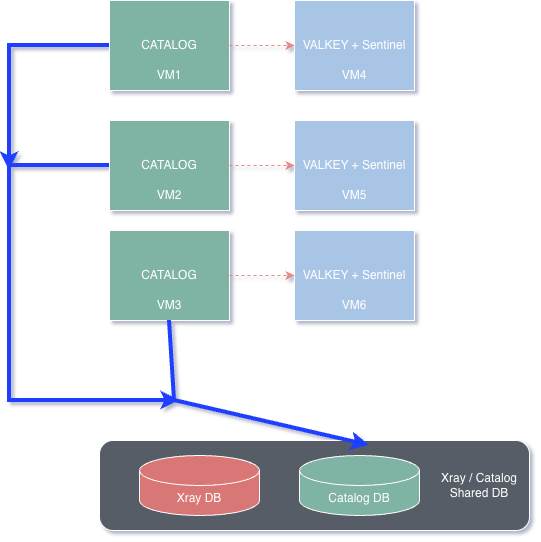
For production deployments, use Catalog HA and separate Catalog and Valkey onto dedicated VMs. Do not use a single co-located VM for production.
High Availability
- Catalog HA provides service continuity if a node fails. It isn't a disaster recovery solution.
- Catalog HA requires at least two Catalog nodes.
- Three Catalog nodes are recommended for high-load environments.
- Catalog nodes discover one another automatically through the router topology.
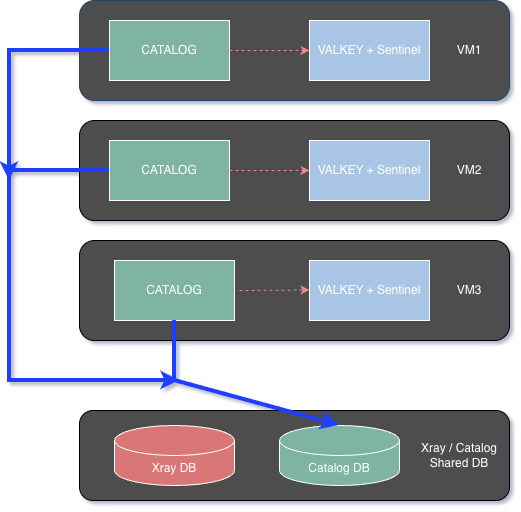
- Separating Catalog and Valkey onto dedicated VMs is the recommended deployment. A combined three-VM cluster, with Catalog and Valkey installed together on each VM, is also supported.
Reference Architecture
Isolated Clusters (Catalog & Valkey)
Preferred for production
Combined HA cluster
While this configuration reduces VM count, it may induce resource contention between Catalog and Valkey components. Deployment in this mode requires careful monitoring and is advised only with appropriate caution.
Resource Requirements
VM Specifications
| Configuration | CPU | Memory | Disk |
|---|---|---|---|
| Catalog and Valkey on the same VM | 10 cores | 36 GB | 700 GB |
| Standalone Valkey node | 4 cores | 12 GB | 200 GB |
| Standalone Catalog node | 6 cores | 24 GB | 500 GB |
Database Specifications
Catalog can share the same database instance as Xray. For database sizing, throughput, and IOPS requirements, see the JFrog Xray Hardware Sizing Matrix.
Cache Configuration
Catalog supports the following cache options:
- Bring your own cache: Use an existing compatible cache service, such as Amazon ElastiCache or a managed Redis service.
- Bundled cache: Install the bundled Valkey service.
Use only one cache installation type in an environment. Do not mix bring-your-own and bundled cache nodes in the same deployment.
For production, deploy the cache separately from Catalog to reduce resource contention. See Valkey Installation with Interactive Script and Valkey HA Installation for installation guidance.
Monitoring and Maintenance
Monitor the following areas after installation:
- Request latency: The target response time is less than 100 ms with Valkey enabled. Without Valkey, expect response times of approximately 100–300 ms.
- Integration load: Monitor Catalog performance when the Artifactory request rate exceeds 100 requests per second.
- Service dependencies: Catalog curation services depend on Xray and Artifactory availability.
- Data freshness: Catalog refreshes cached data through background cache invalidation. Verify data freshness in the UI footer or by using REST API queries.
- Health: Use the Catalog application health endpoint and REST APIs for health checks and system diagnostics. Refer here for the details of health check
Installation Methods
Install Catalog using one of the following methods:
- Interactive Script for VM-based installations.
- Helm and OpenShift for Kubernetes and OpenShift installations.
Catalog Installation with Interactive Script
Install JFrog Catalog using the interactive script, which installs the required prerequisites and dependencies.
Catalog Helm and OpenShift Installation
Install or upgrade JFrog Catalog on Kubernetes and OpenShift as a standalone chart or as a sub-chart of the JFrog Platform or Xray chart.
PostgreSQL for JFrog Catalog
Configure PostgreSQL for JFrog Catalog, including backup and restore support.
Related Topics
Updated 5 days ago