

Artifactory Security
Configure PEM certificate aliases in Artifactory for remote repositories requiring SSL/TLS client authentication.
Artifactory Security - General Settings
Artifactory provides several system-wide settings to control access to different resources. In the Administration module, go to Artifactory > Security.
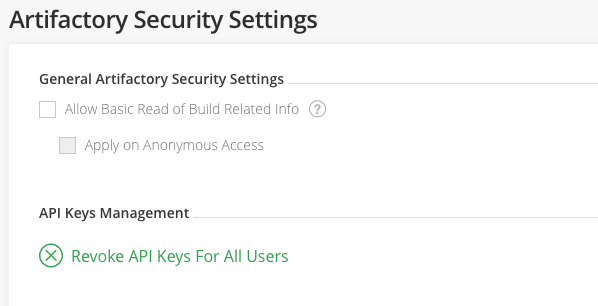
| Field | Description |
|---|---|
| Allow Basic Read of Build Related Info | When enabled, gives all users (including anonymous users) view permissions to published modules for all builds in the system. This overrides specific permissions applied to a particular build. |
| API Keys Management | The export target directory on your server. To revoke all API keys in the system, clickRevoke API Keys for All Users. |
Artifactory Security - Certificates
Some remote repositories (for example, Red Hat Networks) block access from clients that are not authenticated with an SSL/TLS certificate. To use a remote repository to proxy such resources, Artifactory must have the corresponding SSL/TLS certificate.
Add Certificates
Certificates are managed in the Administration module under Artifactory > Security > Certificates.
The certificate you add should be a PEM file that includes both a private key and its corresponding certificate.
To add a new certificate, click New.
Enter the Certificate Alias and copy or drag the certificate contents or PEM file into the designated area.
Tip
To avoid text errors, drag and drop the PEM file into the designated area.
Password-protected PEM files are not supported
The PEM file you upload must not be password-protected.
Use a Certificate with a Remote Repository
When a remote repository proxies a resource that requires authentication with a certificate:
- Obtain the certificate from the resource's owner and add it to the list of certificates as described above.
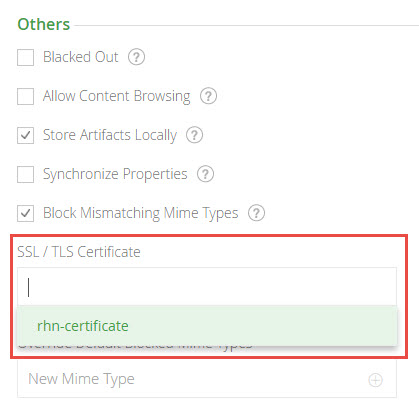
- Under the remote repository's Other Settings, select the certificate you want to use from the list provided in the SSL/TLS Certificate field.
Proxy a Resource that Uses a Self-Signed Certificates
If the remote resource proxied by your JFrog Artifactory remote repository (for example, Red Hat Network's server) uses an untrusted server certificate (that is, self-signed and not signed by any known Certificate Authority), you must import the server's certificate into Artifactory's JVM truststore. For more information, see Trust a Signed Certificate or a New CA.
You cannot configure a self-signed certificate in Artifactory SaaS
If you are using Artifactory SaaS (as opposed to a self-managed installation), you cannot proxy resources that use untrusted (self-signed) certificates because you do not have access to the Artifactory SaaS JVM truststore.
For information on how to configure additional Artifactory security settings, see Security Keys Management.
Related Topics
Updated 4 months ago