

Register Remote Custom MCP Servers
Register remote custom MCP server endpoints in the JFrog MCP Registry using the Platform UI or REST API so your team can govern tools for AI Catalog agents.
A custom remote MCP server is an external web service endpoint that provides specific tools and capabilities to AI agents but isn't hosted as an artifact within JFrog Artifactory. Once you register the server in the JFrog MCP Registry, it becomes discoverable in the AI Catalog so developers can connect coding agents (such as Claude Code, Cursor, or VS Code) to internal or external company assets through the governed JFrog Agent Guard.
Registration is the approval mechanism for these servers in your organization. You can register remote servers through the JFrog Platform UI or the MCP Registry REST API. For package-based servers stored in Artifactory, see Registering Local Custom MCP Servers.
Prerequisites Before Registering a Remote Custom MCP Server
Ensure the following requirements are met:
- Permissions: You must have Allow or Manage permissions for the target project in the AI Catalog.
- Connection details: You must have a valid endpoint URL that supports the required transport protocol.
- Network access: The JFrog Platform must have network connectivity to the remote endpoint.
| Transport protocol | Use when |
|---|---|
| SSE (Server-Sent Events) | You need real-time, push-based communication with the remote server. |
| Streamable HTTP | You need standard request-response streaming over HTTP. |
Register a Remote Custom MCP Server
Registering a remote MCP server approves the external endpoint for organizational use and applies tool policies you define during registration. Use either procedure:
Register Through the UI
Use the Platform registry when you want to register one remote endpoint and configure tool policies in the UI.
To register a remote custom MCP server through the UI:
-
In the Platform module, navigate to AI/ML > AI Catalog.
-
Select Registry.
-
Click Add AI Asset > Add MCP Server.
-
Select the Remote (Endpoint) tab and set up the endpoint:
- Enter the connection details:
- Project: The project for which you want to register the MCP server.
- MCP Server Name: A unique identifier for the catalog (for example,
acme-internal-db-mcp). - Endpoint URL: The secure address (HTTPS recommended) where the MCP server is hosted.
- Transport Protocol: Select SSE (Server-Sent Events) or Streamable HTTP (see the transport table in Prerequisites Before Registering a Remote Custom MCP Server).
- Description: Add a description of your MCP server.
Select the project for which you want to register the MCP server.
- Enter the connection details:
-
Click Next.
-
Define the tool policy for how tools in this server are governed:
- Allow all tools: Automatically approves all current and future tools on this server.
- Select tools manually: Enables granular control with an Allow List or Block List and regular expression patterns. See Configure Tool Policies.
-
Click Next.
-
Under the Configuration step, click Add Header to define HTTP headers the Agent Guard sends when it proxies requests to your remote endpoint.
The Agent Guard connects to your external server on behalf of coding agents. If the endpoint expects API keys, bearer tokens, or other metadata in headers, define that header schema here: header names, descriptions, and whether each value is required or secret. You do not enter secret values at registration; developers provide them when they connect through the Agent Guard.
Define headers when the endpoint requires authentication. Skip them only if the service is reachable without auth on your network (HTTPS and authentication are still recommended).
Field Description When to enable Header name Standard HTTP header key (for example, Authorization,X-API-Key).Always, when the remote server expects a header. Description What the value is for; shown to developers at connect time. Always. Required Developers must supply a value before they can use this MCP. Auth tokens and other mandatory headers. Secret Input is masked and handled as sensitive data. Passwords, API keys, and bearer tokens. Example: For a Jira integration, set header name to
Authorization, description to "Bearer token for Jira API access", and enable Required and Secret. -
Click Complete Registration. The MCP server details page is displayed with the Tools policy tab open. The headers and other information, such as identified tools, can be seen on the Configuration and other tabs. The MCP server now also appears in the Registry page.
You have completed the registration. In order to use the MCP server, you must now Install it on your IDE by clicking Install.
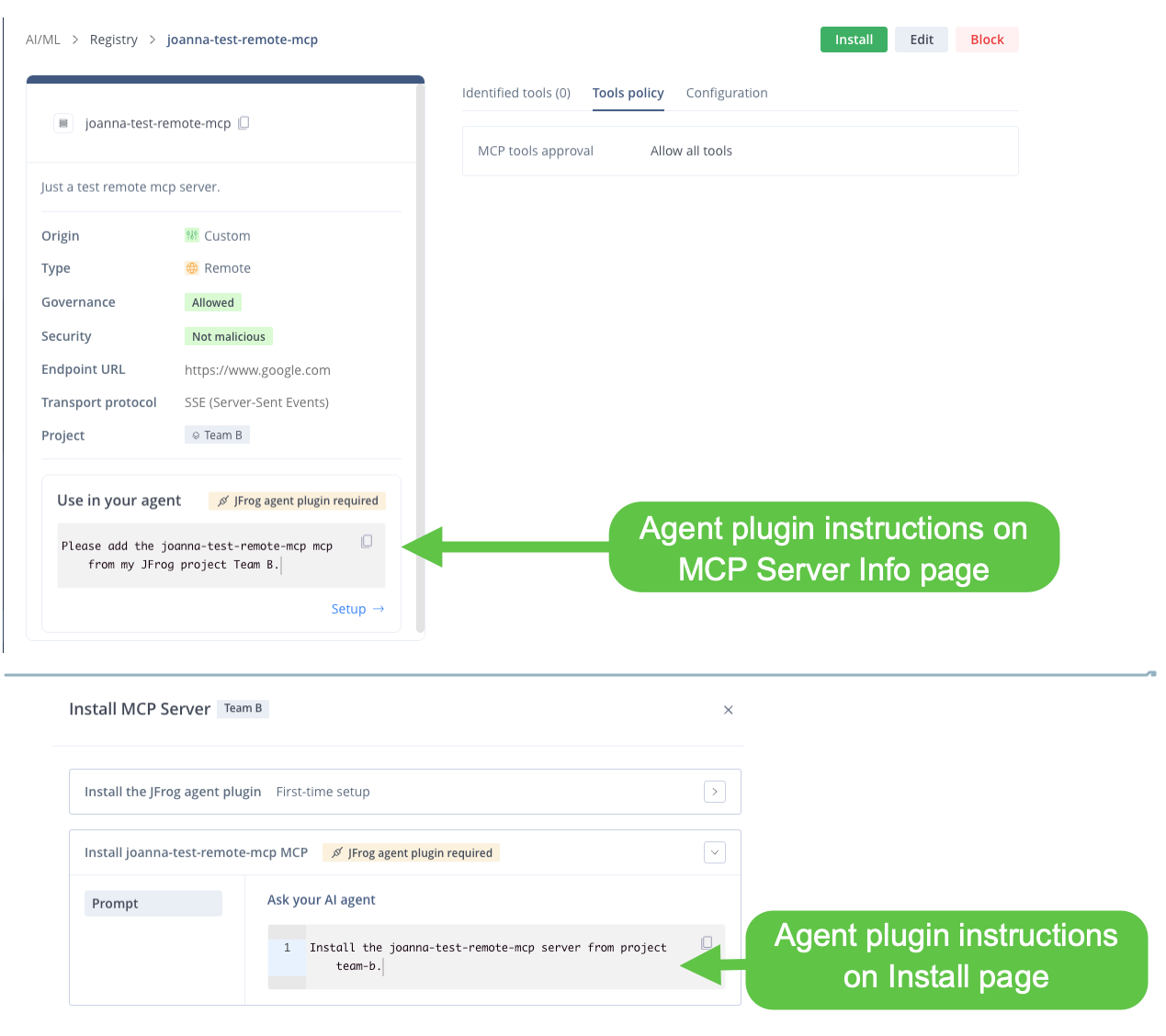
To use the MCP Server in your agent you must first make sure you have added the JFrog agent plugin. Instructions available in the MCP server info page or the Install page.
Register Through the REST API
Use the REST API to automate remote MCP registration in a CI/CD pipeline.
To register a remote custom MCP server through the REST API:
-
Send a
POSTrequest to the custom-server registration endpoint:https://<JFROG_DOMAIN>/ml/core/api/v1/mcp-registry/custom-server -
Include a JSON body that sets
mcpServerInfo.typetoremoteand supplies the endpoint URL, transport, and any required custom headers. For example:
curl --location 'https://<JFROG_URL>/ml/core/api/v1/mcp-registry/custom-server' \
--header 'Content-Type: application/json' \
--header 'Authorization: Bearer <JFROG_ACCESS_TOKEN>' \
--data '{
  "projectKey": "<PROJECT_KEY>",
  "mcpServerInfo": {
    "description": "<DESCRIPTION>"
  },
  "remoteServerSpec": {
    "name": "<SERVER_NAME>",
    "displayName": "<DISPLAY_NAME>",
    "server": {
      "endpoints": [
        {
          "url": "<ENDPOINT_URL>",
          "transportType": "<TRANSPORT_TYPE>",
          "headers": [
            {
              "mcpInput": {
                "mcpInputDetails": {
                  "name": "<HEADER_NAME>",
                  "description": "<HEADER_DESCRIPTION>",
                  "format": "string",
                  "isRequired": true,
                  "isSecret": true
                }
              }
            }
          ]
        }
      ]
    }
  }
}'
Where:
<JFROG_URL>: Your JFrog Platform domain (for example, mycompany.jfrog.io).<JFROG_ACCESS_TOKEN>: A valid access token with permissions to register MCP servers in the target project.projectKey: The project identifier for isolation.type: Set to remote for external endpoints.endpointUrl: The URL where the server is hosted.transport: Communication protocol (sse or http).customHeaders: Headers required for the connection, including whether each is required and treated as a secret.
Constraints for Remote Custom MCP
remoteServerSpec.namemust match^[a-zA-Z0-9][a-zA-Z0-9._-]{0,127}$transportTypemust beMCP_REMOTE_SERVER_TRANSPORT_TYPE_SSEorMCP_REMOTE_SERVER_TRANSPORT_TYPE_STREAMABLE_HTTP- At least one endpoint is required
- Header names must be unique (case-insensitive)
mcpServerInfo.version,environmentVariables, andruntimeArguments` are forbidden on remote registrations
Once registered, the server appears in the AI Catalog for members of the selected project. Developers can discover the server and its configuration, then connect an AI agent through the JFrog Agent Guard. The guard prompts for any secret values defined in the header schema.
Frequently Asked Questions
These questions cover common issues when you register a remote custom MCP server in the MCP Registry.
FAQs
Q: What is a remote custom MCP server?
A: A remote custom MCP server is an HTTPS endpoint outside Artifactory that exposes MCP tools. Registration adds it to the JFrog MCP Registry so tool policies and Agent Guard govern agent access.
Q: What permissions do I need to register a remote MCP server?
A: You need Allow or Manage permissions for the target project in the AI Catalog. The Platform must also reach the endpoint URL over the network.
Q: When should I use SSE versus Streamable HTTP?
A: Use SSE for push-based, real-time communication. Use Streamable HTTP for standard request-response streaming. Select the protocol that matches how your remote server implements MCP transport (see Prerequisites Before Registering a Remote Custom MCP Server).
Q: Can I register a remote MCP server without using the UI?
A: Yes. Send a POST request to https://<JFROG_DOMAIN>/ml/core/api/v1/mcp-registry/custom-server with mcpServerInfo.type set to remote. See Register Through the REST API.
Q: How do coding agents use custom headers I define at registration?
A: At registration you define the header schema (names, descriptions, and whether each header is required or secret). You do not enter header values. Developers enter values when they connect through the JFrog Agent Guard; required values must be supplied, and secret values are masked. The guard attaches headers to every proxied request according to your tool policies. See Security and Validation.
Related Topics
Updated about 12 hours ago