

Troubleshoot Models in AI Catalog
Troubleshoot model deployment and inference errors in JFrog AI Catalog, including validation failures, 401/404 responses, and NVIDIA NGC authentication.
Use this topic to diagnose common JFrog AI Catalog model errors during deployment, inference, access control, and NVIDIA NGC remote repository setup. For setup steps, see AI Catalog Quick Start. To allow models before deployment, see Discover and Allow Models.
- Deployment and validation issues
- Inference errors
- Model access and connection issues
- NVIDIA NGC remote repository authentication
Deployment and Validation Issues
Expand the accordion that matches your deployment or validation symptom.
Deploy model validate fails?
When model deployment validation fails, use the table to match your symptom to a cause and resolution.
| Symptom | Cause | Resolution |
|---|---|---|
Local system does not recognize the frogml command | The frogml command is not on your system PATH | Add frogml to your system PATH environment variable |
| Deployed model not supported | The model is not supported for deployment in AI Catalog | Confirm the model is on the supported models list in Discover and Allow Models |
Inference Errors
Expand the accordion that matches your inference HTTP status code or symptom.
Execute inference fails with 404?
When inference returns HTTP 404, review the causes in the following table.
| Symptom | Cause | Resolution |
|---|---|---|
| Inference request after blocking | Inference was attempted after the model was blocked | Confirm the model is not blocked for the project |
Execute inference fails with 401?
When inference returns HTTP 401, review the causes in the following table. For example, the response might indicate a bad token or an incorrect model name.
| Symptom | Cause | Resolution |
|---|---|---|
| Bad token | The token value is invalid or expired | Verify the token value |
| Incorrect model name | The model name is incorrect or does not match a known model | Verify the model name matches a known model in the project |
Model Access and Connection Issues
Expand the accordion that matches your allow, block, or delete symptom.
Block model fails?
When blocking a model fails, review the causes in the following table.
| Symptom | Cause | Resolution |
|---|---|---|
| Block action rejected | The model is still deployed | Undeploy the model for the project, then block it |
Delete connection fails?
When deleting a model connection fails, review the causes in the following table.
| Symptom | Cause | Resolution |
|---|---|---|
| Delete action rejected | The model is still allowed or connected | Block the model first, then delete the connection |
Error allowing model usage?
When you allow model usage for an open source model, you might see an error similar to the following screenshot.
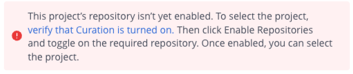
Review the causes in the following table.
| Symptom | Cause | Resolution |
|---|---|---|
| Allow action fails for open source model | Curation is not enabled for the repository or package type | Turn on Curation and enable the package type and repository. For more information, see Set Up Curation Settings for Model Packages |
NVIDIA NGC Remote Repository Authentication
Expand the accordion if your Artifactory remote repository cannot authenticate against the NVIDIA NGC registry.
NVIDIA NGC remote repository authentication errors?
The Artifactory remote repository might fail to authenticate against the NVIDIA NGC registry. You might see errors such as Error Response from Daemon: ... Invalid username/password configured for Remote Docker repository or Can't fetch token for repo... proxy_auth.
Review the causes in the following table.
| Symptom | Cause | Resolution |
|---|---|---|
| Remote repository authentication failure | The NVIDIA NGC API key in the remote repository settings is missing or incorrect | Ask your administrator to verify the NVIDIA NGC API key in the remote repository settings |
| Remote repository authentication failure | The API key is valid, but Governing Terms (EULA) were not accepted for this gated model on the NVIDIA NGC website | Log in to the NVIDIA NGC Catalog, navigate to the specific model page, and select Accept Terms |
Related Topics
Updated 4 months ago