
Get Started with the Skills Registry
Publish, discover, and securely install skill bundles in the JFrog Skills Registry.
Note
To start using JFrog's Skills Scanning, ask JFrog Support to enable Skills Scanning in the AI Catalog.
Note that skill scanning is only available in JFrog SaaS systems.
The JFrog Skills Registry is a centralized hub in the AI Catalog where your coding agent (Claude Code, VS Code with Claude, Cursor, or another harness) can publish, discover, and install skill bundles. These are versioned packages of reasoning logic and prompts stored in your organization's Artifactory repositories.
Without the Skills Registry, teams lose track of what exists, reuse the wrong version, or install something that was never scanned.
Skills Registry fixes that with:
- A single place to discover every skill your organization has published
- An Xray scan gate before anything is installable
- Immutable versioned bundles, enabling your agent to know exactly what it's installing
- Project policies on top of the security scan, so administrators can further control which skills can run
All of this can be handled using agent commands in your IDE. Based on your connected project, the agent automatically resolves the repository so you never have to manage Artifactory paths manually.
How does it work? Publish your skill → Xray scans it → the AI Catalog auto-registers it → your team discovers and installs it. Administrators can add policies to control which skills can run after that; see Govern the Skills Registry.
Prerequisites
- A coding agent configured for your project (Claude Code version 0.3.3 or newer, VS Code with Claude, Cursor, or another harness).
- JFrog plugins are installed so the agent can use AI Catalog skills.
- JFrog CLI v2.123.0 or newer: Install and configure it. See Configure JFrog CLI for Skills.
- Xray version XXX or newer, and indexing must be enabled for the Skills repository. For more information, see Enable Indexing in Xray.
- Local enforcement require the Preview to be enabled first, in MyJFrog > Settings > Previews, before any of the scan-gate or enforcement behavior described below takes effect.
- Your organization's AI Addendum must be signed for scanning to actually run — see AI Addendum. Without it, skills register but stay Unscanned indefinitely.
This topic covers the following tasks:
First Time Using the Skills Registry?
Confirm connectivity and publish your first skill using these steps:
- Verify connectivity: Ask your agent, "What project are you configured for?" to ensure you are connected.
- Publish your skill: Once you know you're connected to the correct project, follow the Publish a Skill instructions.
- Wait for the Xray scan to finish: This should only take a few minutes if you are using your project's default repository.
- Install the skill: Once the scan is complete, install the skill you just published.
That's the entire workflow. Everything past this point can be used as a reference for performing the different steps, including what to do when your agent can't confirm project access (see Skills Registry Troubleshooting). If a skill installs but is blocked at runtime by a project policy, see Govern the Skills Registry.
Publish a Skill
Once your skill folder is ready, ask your agent to publish it. Agent Guard automatically resolves your active project and target repository.
To publish a skill:
Prepare a skill bundle: A folder with a SKILL.md file with proper frontmatter, plus any supporting files (prompts, scripts, and so on).
Required fields:
slug: my-skill
version: 1.0.0
description: Brief summary of what the skill doesslug: lowercase identifier matching ^[a-z0-9][a-z0-9-]*$.version: semantic version (for example, 1.0.0).description: brief summary (recommended). For full skill structure, see Skills Repositories.
In your IDE conversation, ask your agent to publish it. For example, ask "Can you publish the skill I just created in /Users/me/projects/my-skill?"
Your agent locates the folder, reads SKILL.md for metadata, validates structure, packages the bundle, signs it if configured, resolves your project and repository through Agent Guard, scans it with Xray, publishes it, and reports back the skill's name, version, and repository.
Success Your agent confirms the skill has been published. Note the name and version. You'll need them for discovery and installation.
To publish a skill using the JFrog CLI:
Run the following command:
jf agent skills publish <PATH_TO_SKILL_FOLDER> --repo <REPOSITORY_NAME>Where:
<PATH_TO_SKILL_FOLDER>: Path to the skill folder that contains SKILL.md<REPOSITORY_NAME>: Target skills repository name
For example:
jf agent skills publish ./my-skill --repo my-project-skills-localFor more information, see Publish Skills with JFrog CLI.
Your skill registers in the Skills Registry immediately. Whether it's installable yet depends on whether it was marked as unsafe in the Xray scan. For more information, see Understanding Skill Status.
Note
On the first publish to a project the AI Catalog auto-provisions a dedicated local skills repository named
Xray indexing and security policies are enabled on your skill automatically — see Enable Indexing in Xray and How to block malicious packages in your SDLC.
Publish with Evidence Signing
With Enterprise+, after you ask to publish, the agent will ask you if you want to attach a cryptographic attestation to a published skill.
See Publish Skills with Evidence Signing.
Discover Skills
Browsing your skills (using your agent or the JFrog Platform) shows every skill published to your active project. Skills are scoped to your project. Contact your administrator if you need skills from another project.
To discover skills using your agent:
- Ask your agent, for example, "What skills are available in our project?" or "Do we have a skill for API testing?" It queries the AI Catalog discovery index at the project scope and returns the name, version, description, and status for each.
To discover skills using the JFrog Platform:
- Navigate to AI/ML > AI Catalog and select Skills (tab). The JFrog Platform AI Catalog shows a list of skills with name, latest version, number of downloads, and origin.
To discover skills using the JFrog CLI:
-
Run the following command (to search by name):
jf agent skills listFor more information, see List Skills.
Inspect a Skill
Using the JFrog Platform, review a skill's metadata, bundle contents, and other details before installing.
To inspect a skill in the JFrog Platform:
Navigate to AI/ML > AI Catalog and select Skills (tab).
2.
3. Click a skill and then select the relevant project to open the Skill Details Pane (latest version by default). The following details are displayed:
- The name (linked to Artifactory), version, dates, Xray status (linked to the scan results) and other relevant details.
- The SKILL.md (purpose, usage, dependencies).
- The Files tab shows the bundle structure. For more information, see Skills Repositories.
Understanding Skill Status
Every skill uploaded to Artifactory registers in the Skills Registry immediately.
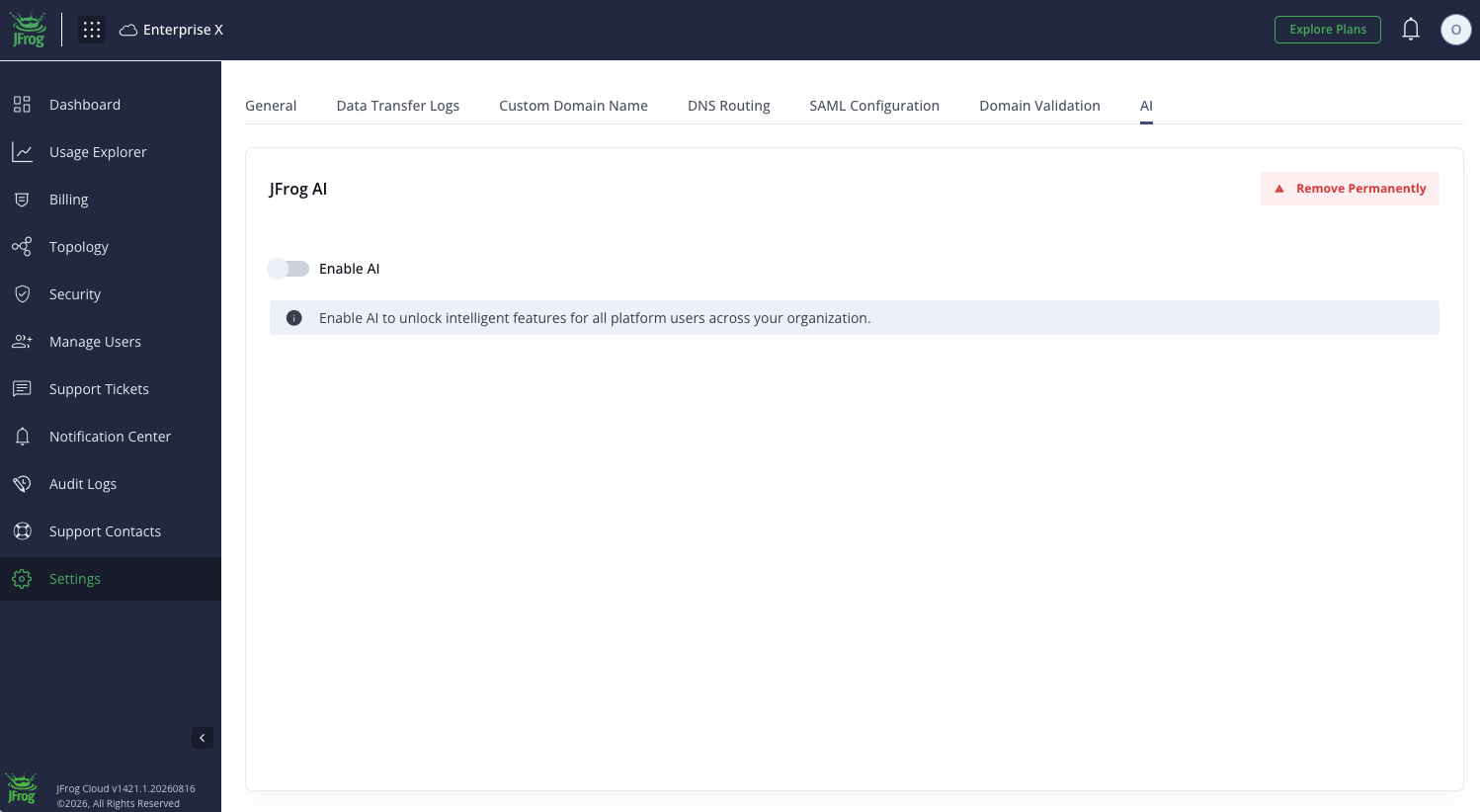
AI Addendum RequiredAI-based scanning runs only after your organization's AI Addendum is signed. If the Addendum is not signed, skills are registered but not scanned, and scan status shows as Unscanned. To sign, go to My JFrog → Settings → AI → Enable AI. See AI Addendum.
| Status | Meaning | Installable? |
|---|---|---|
| Not malicious | Scanned by JFrog Xray, no issues found | Yes |
| Not scanned | Xray scan not yet complete (or the repository has no Xray applied, scan reached the limit or AI Addendum is not signed) | If the repo has Xray applied: not yet. Wait for scanning to finish. If the repo has no Xray applied: yes, indefinitely. |
| Scanning | Xray scan is in progress | No |
| Suspicious | Xray detected patterns that warrant review | No |
| Malicious | Xray confirmed malicious code or intent | No |
Every auto-provisioned project skills repository has Xray applied by default, so on those repos Not scanned is temporary. Scanning usually completes within minutes, then resolves to Not malicious, Suspicious, or Malicious. If it persists longer than that on an auto-provisioned repo, contact your administrator — it likely means Xray indexing isn't actually enabled on that repository. To enable Xray scanning on this repository, see Enable Indexing in Xray.
Security scan status controls whether a skill is installable. Project policies can still block a skill from running after install. For policies and allow-lists, see Govern the Skills Registry.
AI Addendum
AI-based skill scanning requires that your organization's AI Addendum is signed. If it is not signed, skills are registered in the Registry but Xray scanning does not run, and scan status shows as Unscanned.
To sign the AI Addendum, go to My JFrog → Settings → AI → Enable AI. An alert appears at the top of the AI Catalog Coding Assistants page if the Addendum is not yet signed for your organization.
Install a Skill
Install a skill after you've inspected it and confirmed its status allows installation.
To install a skill using your agent:
- Ask your agent, for example, "Install the my-skill skill" or "Install version 2.1.0 of api-helper." Your agent verifies status, downloads the bundle, verifies its signature if signed, installs it, and confirms.
To install a skill using the JFrog CLI:
-
Run the following command:
jf agent skills install <SKILL_NAME> --harness <HARNESS_NAME> [--repo <REPOSITORY_NAME>] [--version <SKILL_VERSION>]Where:
<SKILL_NAME>: Name of the skill to install<HARNESS_NAME>: Target agent harness<REPOSITORY_NAME>: (Optional) Skills repository name<SKILL_VERSION>: (Optional) Skill version to install
For example:
jf agent skills install my-skill --harness cursorFor more information, see Install Skills with JFrog CLI.
Note
Install is blocked for skills marked Suspicious or Malicious. A separate policy can still block a skill at runtime even when the security scan allows install. See Govern the Skills Registry.
Once installed, your agent recognizes the skill and invokes it as part of normal reasoning. No extra step is required. You can publish from any machine with the skill folder and Agent Guard configured. Once published, it's installable project-wide from anywhere.
Frequently Asked Questions
This section provides answers to frequently asked questions.
FAQs
Q: How does the Skills Registry handle repository creation?
A: The first time you publish a skill to a project, the AI Catalog automatically provisions a dedicated local repository named
Q: Can I overwrite or update an existing skill version?
A: To ensure reliability and prevent "silent updates" that could break your agent's execution logic, the registry enforces strict immutability. Each publish captures a complete, unchanging snapshot of the skill's code, prompts, metadata, and dependencies. To update an existing skill, you must increment the version in your SKILL.md file and publish a new release.
Q: Do I have to manually track or configure Artifactory repository paths?
A: You do not have to manually track or configure Artifactory repository paths. Whether you use your IDE agent or the JFrog CLI, Agent Guard automatically maps your workspace to the correct project and repository. The one exception to this is Publish with Evidence Signing, which requires you to explicitly define the target repository using the --repo flag.
Q: How is this different from just downloading code off GitHub?
A: Skills Registry adds versioned bundles, central discovery, automatic registration, and an Xray scan gate before install, without requiring a repository path. For how scan results affect installability, see Understanding Skill Status.
Q: Does Skills Registry work with Xray and Pipelines?
A: Yes. Skills are stored in Artifactory repositories, so JFrog Xray can scan them like other packages. For status values after scan, see Understanding Skill Status.
Q: My skill is installable but blocked when the agent runs it. Why?
A: Security scan status controls install. Project policies can still block the skill at runtime. Check with a project administrator. See Govern the Skills Registry.
Q: Can I use the JFrog CLI instead of an agent for everything here?
A: Yes. Use jf agent skills publish, jf agent skills install, and jf agent skills list with the same project resolution as your agent. See Publish a Skill and Install a Skill.
Q: Do I need special permissions to publish a skill?
A: Write access to the project's skills repository is enough to publish through your agent or the CLI. For the publish flow, see Publish a Skill.
Q: Can my agent automatically suggest a skill for a task?
A: Some IDE integrations may suggest skills when you describe a task. You can also ask your agent to discover and install skills directly. See Discover Skills.
Related Topics
Updated about 1 month ago