

Register Local Custom MCP Servers
Register local custom MCP server endpoints in the JFrog MCP Registry
A custom local MCP server is a privately developed package (Python or npm) stored securely in a local JFrog Artifactory repository. It provides specific tools and capabilities to AI agents — for example, connectors to internal databases, internal APIs, or private platforms. Once registered in the JFrog MCP Registry, the server becomes discoverable in the AI Catalog, allowing developers to securely connect their AI agents to it via the governed JFrog Agent Guard.
Registration acts as the approval mechanism for these servers within your organization and links the physical Artifactory binary to the MCP Registry. You can register local servers through the JFrog Platform UI or the AI Catalog REST API.
Prerequisites Before Registering a Local Custom MCP server
Ensure the following requirements are met:
- Upload the binary: Publish your MCP package to a local npm or local PyPI repository using the standard package managers. All uploaded artifacts must be fully self-contained and include all runtime dependencies.
- Check project scoping: Ensure the local repository is assigned to the JFrog Project where you intend to register the server.
- ALLOW permission for the target project within the AI Catalog.
- READ access to the repository containing the custom MCP server package.
- Custom MCP registration currently supports npm and PyPI.
- Public MCPs are available through Discovery (public catalog) and can be allowed for your project from there.
Register a Local Custom MCP Server
Registering an MCP server links the physical Artifactory binary to the MCP Registry, approving it for organizational use. Use either procedure:
Register through the UI
-
In the Platform module, navigate to AI/ML > AI Catalog.
-
Select Registry.
-
Click Add AI Asset > Add MCP Server.
-
Select the Local (Artifactory) tab and set up:
- Select the project for which you want to register the MCP server.
- Select the local repository that contains the server binary, and enter the artifact.
-
Click Next.
-
Define the Tool Policy: choose how to govern the tools within this server:
- Allow all tools: Automatically approves all current tools and any tools added to this server in future updates.
- Select tools manually: Opens the Allow List and Block List configuration. This enables you to define granular policies using static text and Regex patterns. See Configure Tool Policies.
-
Click Next.
-
(Optional) Configure runtime settings:
- Runtime arguments: Enter the required strings for execution and provide a description for each argument. These are optional command-line execution flags.
- Environment variables: Define required keys with descriptions and toggles for
isSecret(to mask values in the UI) andisRequired.
-
Click Next.
-
Enter the path to the README file in Markdown format.
-
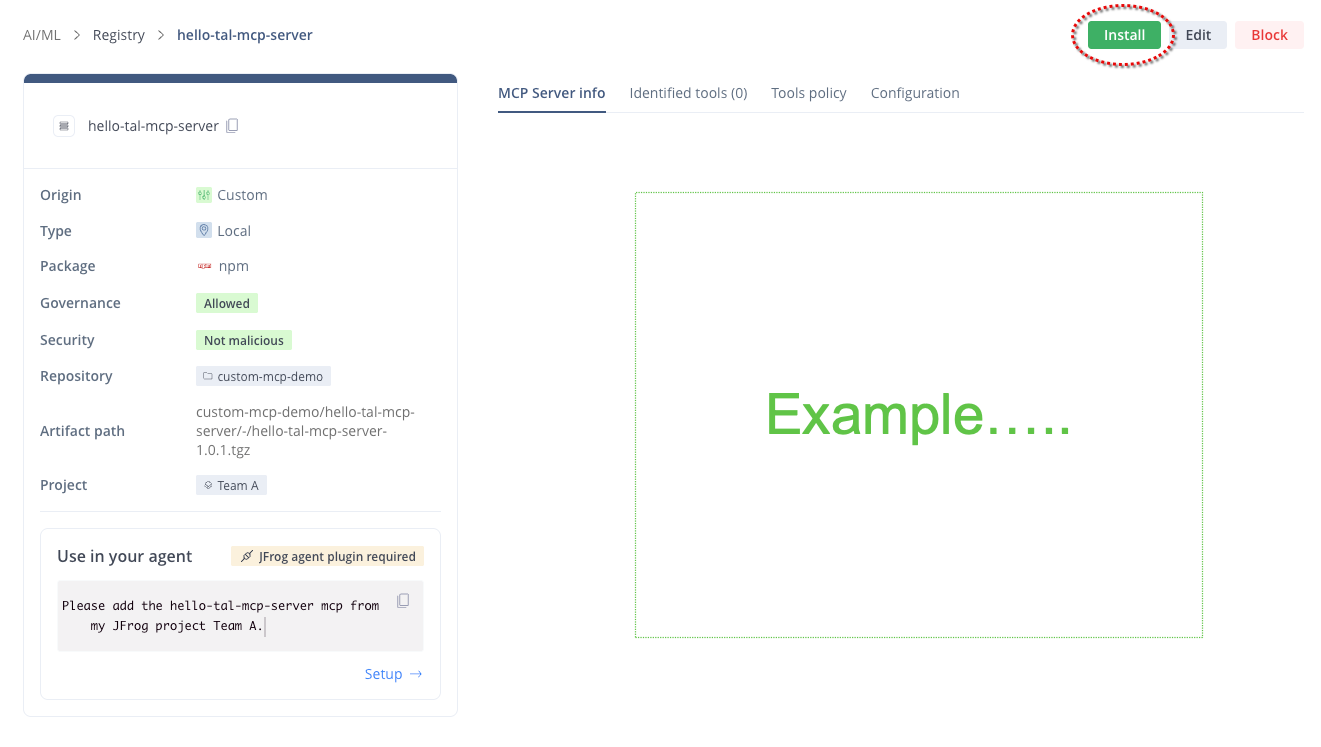
Click Complete registration. The MCP Server Info page is displayed, and the MCP Server appears in the Registry page.
You have completed the registration. In order to use the MCP server, you must now Install it on your IDE by clicking Install. For instructions how to install, see Install and MCP Server
Register through the REST API
To automate custom MCP registration in your CI/CD pipeline, send a POST request to the registration endpoint:
https://<JFROG_DOMAIN>/ml/core/api/v1/mcp-registry/custom-server.
Example 1: With runtime arguments and environment variables
curl --location 'https://{JFROG_DOMAIN}/ml/core/api/v1/mcp-registry/custom-server' \
--header 'Content-Type: application/json' \
--header 'Authorization: Bearer {TOKEN}' \
--data '{
    "projectKey": "ai-research",
    "repoArtifactInfo": {
      "repoKey": "custom-mcp",
      "repoPath": "custom-mcp/mcp-server/1.0.0/mcp_server.tgz",
      "readmePath": "custom-mcp/mcp-server/1.0.0/README.md"
    },
    "mcpServerInfo": {
      "description": "Internal Database Connector for AI Agents",
      "version": "1.0.0",
      "environmentVariables": [
        {
          "name": "DB_CONNECTION_STRING",
          "description": "Connection string for the production DB",
          "format": "string",
          "isRequired": true,
          "isSecret": true
        }
      ],
      "runtimeArguments": [
        {
          "name": "--port",
          "description": "Runtime port for the MCP server",
          "format": "integer",
          "type": "int",
          "defaultValue": "8080"
        }
      ]
    }
}'
Example 2: Without runtime arguments and environment variables
curl --location 'https://{JFROG_DOMAIN}/ml/core/api/v1/mcp-registry/custom-server' \
--header 'Content-Type: application/json' \
--header 'Authorization: Bearer {TOKEN}' \
--data '{
    "projectKey": "ai-research",
    "repoArtifactInfo": {
      "repoKey": "custom-mcp",
      "repoPath": "custom-mcp/mcp-server/1.0.0/mcp_server.tgz",
      "readmePath": "custom-mcp/mcp-server/1.0.0/README.md"
    },
    "mcpServerInfo": {
      "description": "A basic utility MCP server with default settings",
      "version": "1.0.0",
      "environmentVariables": [],
      "runtimeArguments": []
    }
}'
JSON Payload Parameters
| Parameter | Description | Required? |
|---|---|---|
{TOKEN} | Your authentication token. | Yes |
projectKey | The target JFrog project key for this MCP server | Yes |
repoArtifactInfo.repoKey | The local Artifactory repository name housing the package. | Yes |
repoArtifactInfo.repoPath | Full artifact path including the repository key as the first segment Must start with the same value as repoKey. | Yes |
mcpServerInfo.description | A readable summary of the MCP server's purpose and capabilities. | Yes |
mcpServerInfo.version | The version of the custom MCP server. | Yes |
repoArtifactInfo.readmePath | The path to a Markdown README file within the repository. | No |
mcpServerInfo.environmentVariables | Array of required configuration keys (for example, API keys, URLs). | No |
mcpServerInfo.runtimeArguments | Array of command-line execution flags (for example, --verbose). | No |
Managing Registrations
Discovery
Registered MCPs are listed in the AI Catalog. You can filter tools by Name or Type and sort them by Name or Last Update.
Unregister Custom MCP Servers
Unregistering an MCP server immediately removes its metadata and governance policies from the AI Catalog, disconnecting it from developer IDEs, but does not delete the physical binary from Artifactory.
Unregister Through the UI
-
In the Platform module, navigate to AI/ML > AI Catalog > Registry.
-
Locate the MCP server in the list, click it to open the Select a project pane.
-
Select the project to which the MCP server you want to remove is registered.
-
Click Block.
-
Confirm the action by following the instructions in the confirmation message.
The MCP server is immediately removed from the MCP Registry and developers can no longer connect to it.
Updated 15 minutes ago