

Monitoring Storage
The JFrog Unified Platform allows you to monitor various statistics related to the amount of storage that repositories occupy in your system. You can view the number of artifacts and physical files as well as the amount of space that they occupy.
To monitor usage of storage in your system, in the Administration module, go to Monitoring > Storage.
Retrieving the Storage Summary Details
By default, the storage summary is calculated every hour and saved in cache. This is useful for large Artifactory instances with many repositories and artifacts.
Administrators in Self-Managed instances can configure the time and frequency by setting the
artifactory.update.storage.summary.cronproperty with a cron expression in theartifactory.system.propertiesfile.For example:
artifactory.update.storage.summary.cron = "0 0/30 * * * ?", will set the frequency to every 30 minutes.If the default
NULLvalue is used, a random minute will be selected and the job will run every hour, beginning on that minute.To retrieve the latest storage summary details, use the
Refreshbutton from the UI or the Refresh Storage Summary Info REST API.
Binaries
The Binaries table provides information on the number of files in your system and the amount of physical and virtual storage that they occupy.
| Field | Description |
|---|---|
| Binaries Size | The amount of physical storage occupied by the binaries in your system. |
| Binaries Count | The total number of physical binaries stored in your system. |
| Artifacts Size | The amount of physical storage that would be occupied if each artifact was a physical binary (not just a link). |
| Artifacts Count | The total number of artifacts stored in the system. |
| Optimization | The ratio of Binaries Size to Artifacts Size. Shows how much real storage space the content uses compared to its full size. |
| Items Count | The total number of items (both files and folders) in your system. |
Monitor the File Store
Your system stores binaries as defined in your storage configuration file.
This section provides information on where your binaries are stored and the amount of storage space they are using.
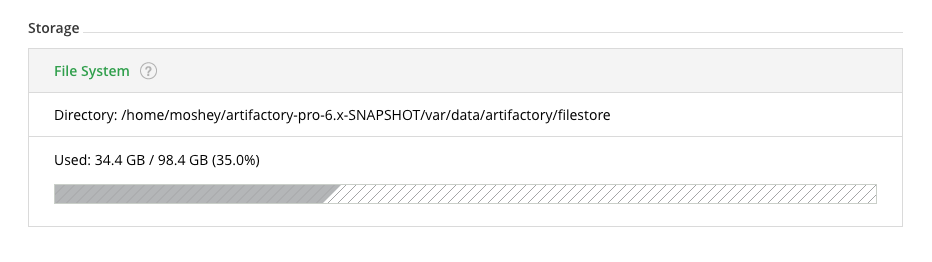
| Field | Description |
|---|---|
| Storage Type | The type of storage used (e.g. "File system"). |
| Storage Directory | If Storage Type is "filesystem", then this is the path to the physical file store. If Storage Type is "fullDb", then this is the path to the directory that caches binaries when they are extracted from the database. |
| Usage | Displays the amount of storage used out of the total available. Storage space warning and limit thresholds set for your system are also displayed. |
Monitor Repositories
The Repositories section provides detailed information about the storage used by each repository in your system.
| Field | Description |
|---|---|
| Repository Key | The repository id. |
| Repository Type | Indicates if this is a local repository, a remote repository cache, or a virtual repository. |
| Package Type | The repository's package type. |
| Percentage | The percentage of the total available space occupied by this repository. |
| Artifacts Size | The amount of space used by artifacts in this repository. Similar to the total export size (including non-unique artifact references). |
| Files | The total number of files in this repository. |
| Folders | The total number of folders in this repository. |
| Items | The total number of items (folders and files) in this repository. |
Updated 2 months ago