

Workers Overview
Subscription Information
The Workers service is supported with Enterprise X and Enterprise+ licenses, for both SaaS and Self-Managed JFrog environments.
Workers is a JFrog Platform service that allows you to extend and control your execution flows. It provides a serverless execution environment. You can create workers to enhance the platform's functionality. Workers are triggered automatically by events within the JFrog Platform, giving you the flexibility to address specific use cases. For on-demand tasks, configure HTTP-triggered Workers.
With Workers, you can:
- Enhance Platform Capabilities: Perform custom tasks tailored to your needs.
- Control Execution Flows: Intercept and modify workflows, such as blocking unauthorized actions or enhancing security.
- Integrate Custom Logic: Write TypeScript and create Workers with the CLI, UI, REST API, MCP Server, or Terraform.
Start with Worker Types to understand Event-driven, HTTP-triggered, and Scheduled Workers, then choose how to create and manage them in Create and Manage Workers.
Only enabled Workers are triggered by platform events, ensuring you have full control over which custom logic is executed.
Learn more about JFrog Workers at JFrog Academy!
Workers in Self-Hosted Environments
To use Workers in Self-Hosted environments, both Artifactory and Workers must be deployed in Kubernetes or Docker Compose. For more information, see Installing Workers.
Conflicts Between Worker Events and User Plugins in Artifactory Repositories
Using both Artifactory User Plugins and JFrog Artifactory Worker events on the same repository may lead to unexpected behavior. To avoid this, we recommend configuring JFrog Artifactory Worker events on repositories that do not have user plugins enabled.
JFrog Workers is the newer, recommended way to easily extend the JFrog Platform (not just Artifactory) in a Cloud-native way. While plugins are supported, we strongly suggest using JFrog Workers whenever possible.
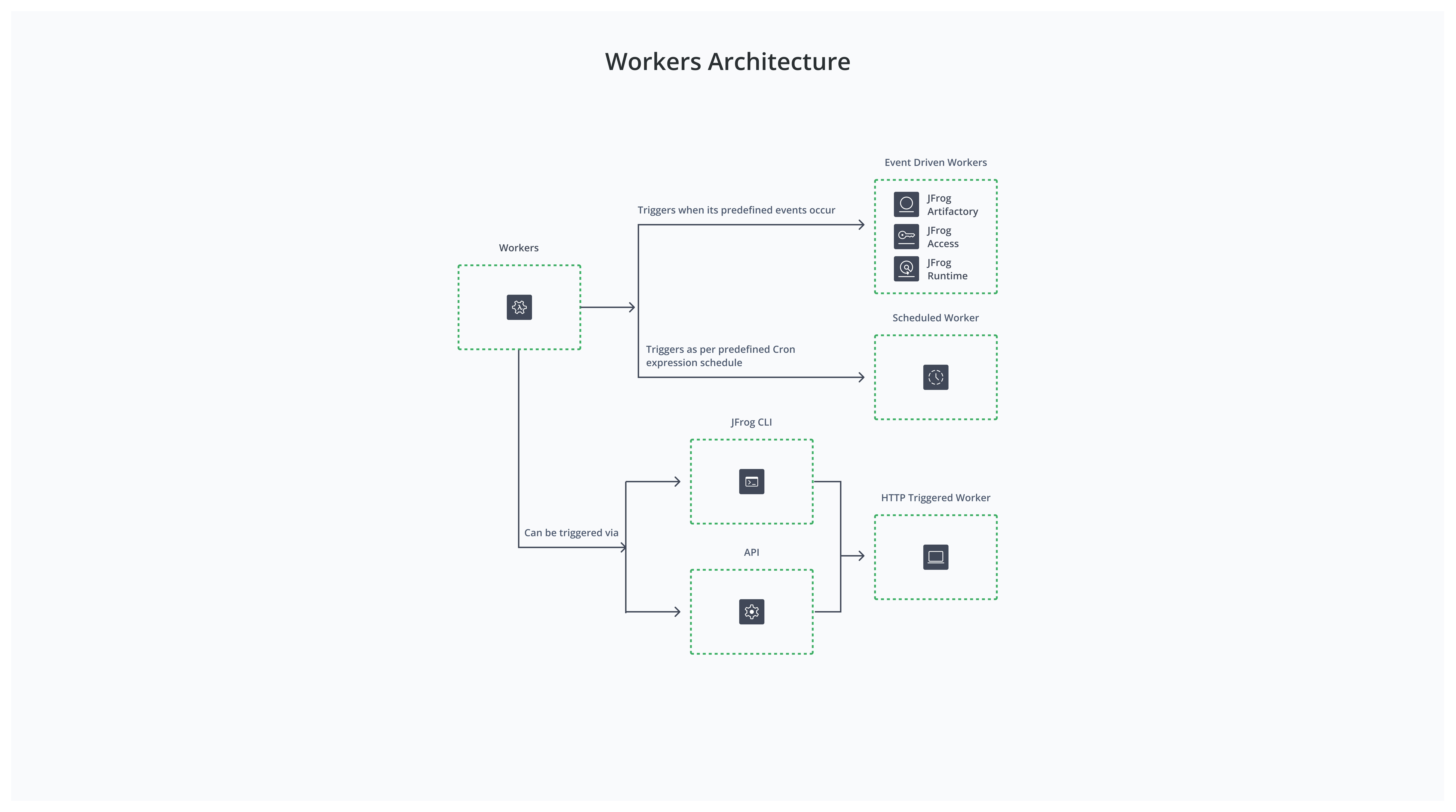
Workers Features
JFrog Workers is a service that allows you to create Workers that execute custom TypeScript you write.
- Worker Types: Workers are Event-driven, HTTP-triggered, or Scheduled, matching the Platform UI. You can create every type with any supported method. See Create and Manage Workers. For the full event catalog, see Worker Event Types.
- TypeScript Code for Workers: Use the TypeScript editor in the UI, or author
worker.tslocally with the CLI (or supplysourceCodevia REST API / Terraform / MCP). - Configured Workers: Enable/disable, search, edit, view, and delete Workers.
- Troubleshooting: Debug mode collects Worker execution status (failed or successful).
Workers Benefits
Workers provide the following functionalities that greatly increase the flexibility of the JFrog Platform.
- Workers allow you to execute your own code inside JFrog execution flows using synchronized hooks that integrate custom code to control JFrog execution flows. Workers simplify development support by offering full out-of-the-box Worker APIs, with automation execution points and third-party integration scenarios already enabled.
- Workers are executed on JFrog nodes with auto-scaling support that essentially provides Functions as a Service with a serverless experience.
- The Workers' online code editor is easy to use and provides autocompletion support. Code auto-complete exposes available functions and parameters and accelerates code development.
- JFrog Workers CLI integration supports a local development experience.
- Network connectivity between JFrog services is established seamlessly using pre-authenticated API calls.
Updated about 1 month ago