

Understand Worker Event Workflows
When an action occurs on the JFrog Platform, it triggers specific worker events according to the component's lifecycle. The JFrog Platform dynamically fetches these events at runtime. This dynamic approach allows your workers to intercept and execute custom logic at specific points without needing to dive deep into the platform's internal system mechanics.
The Generic Worker Flow
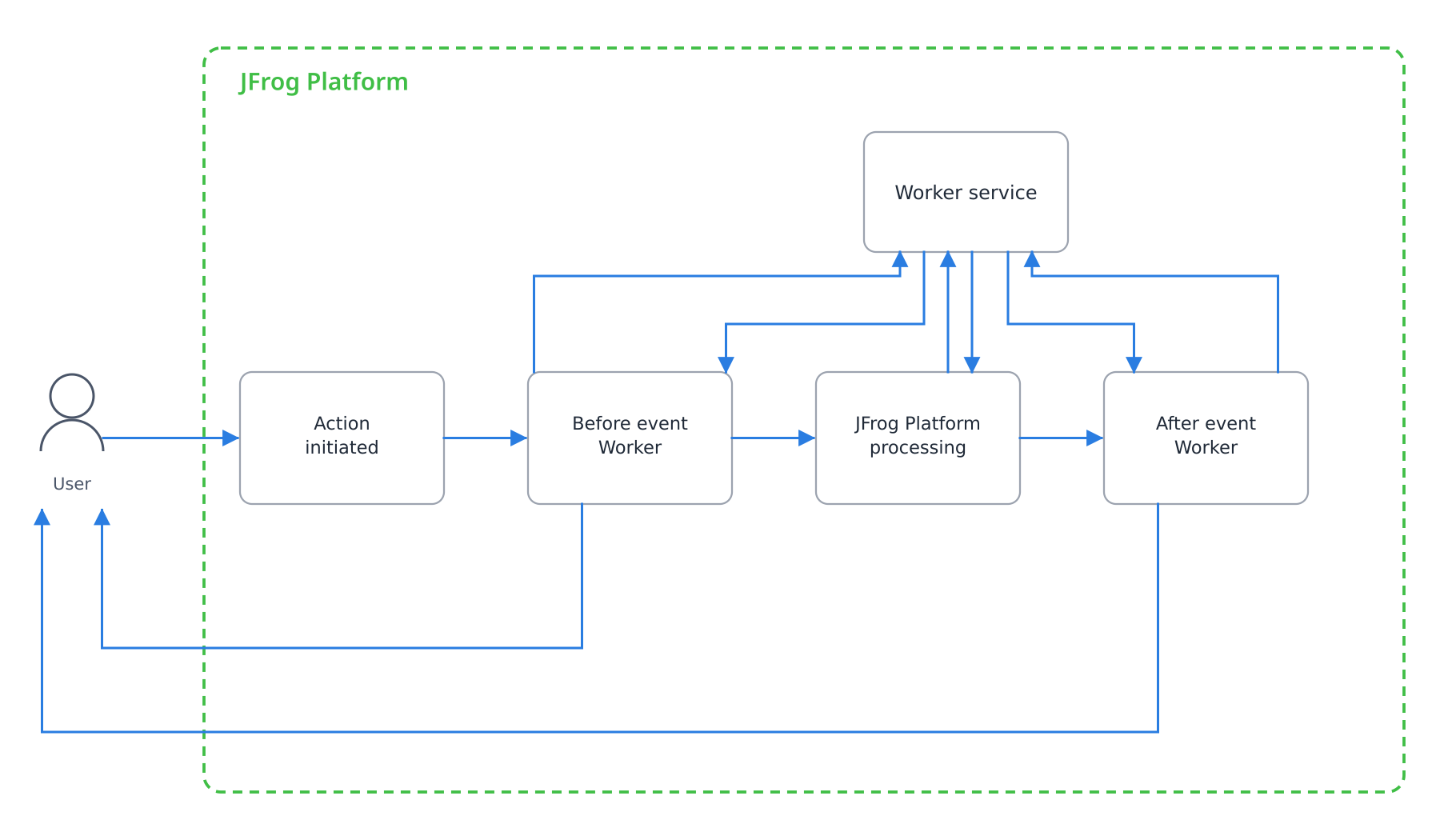
While specific events vary depending on the action, most worker lifecycles follow a similar high-level pattern:
- Initiation: An action is initiated on the platform by a user or system request (for example, requesting to download a package).
- Before Event: A "before" event triggers the worker. Your worker executes its custom logic and returns a result to the platform.
- Internal System Processing: The platform receives the worker's result and proceeds with the core internal action. This is where Artifactory handles its internal mechanics, such as checking if a requested package is already cached, resolving local dependencies, or starting a download.
- After Event: Once the internal process completes, an "after" event is triggered, allowing your worker to handle the final result or perform cleanup tasks.
Common Use Cases
To help you get started, here are a few common scenarios where you might implement a worker:
- Download Flows: You can intercept a download before it occurs using a
before downloadevent or trigger an action right after using anafter downloadevent. - Token Flows: You can execute logic during the creation of access tokens using
before create tokenorafter create tokenevents, or manage expirations with atoken expiryevent.
Example: The Download Workflow
To see how this generic flow applies in a real-world scenario, let's look at a standard download request.
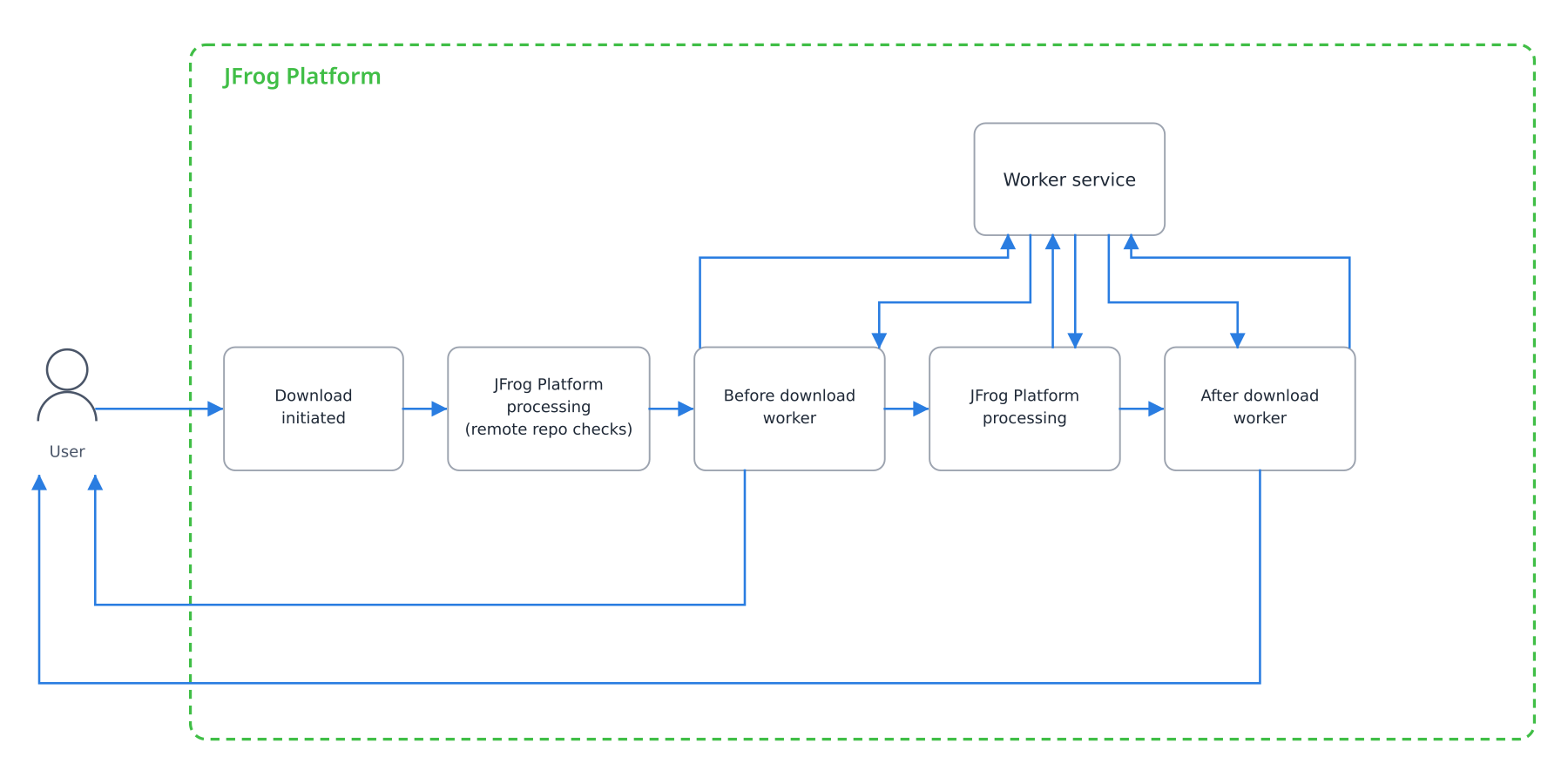
When a client requests to download an artifact from JFrog Artifactory, the request moves through several stages. Your Workers can intercept the workflow at specific hooks to allow or block the request, modify headers, or provide alternate content.
1. Initial Request
When a download is initiated, the system evaluates the request before proceeding.
- Before Download Request: Intercept the initial request to evaluate constraints. You can provide a status directive to either allow or, for JFrog Advanced Security users, block the download entirely.
2. Remote Repository Checks
If the requested artifact is located in a remote repository, the system must fetch it. You can intercept this process using the following hooks:
- Alt Remote Path: Redirect the request to a different repository path by specifying a modifiedRepoPath.
- Before Remote Info: Add custom requestHeaders before Artifactory fetches the remote resource information.
- Alt All Responses: Modify the response details (such as headers, status code, response message, or the input stream) once the remote resource is found.
- Before Remote Download: Add custom requestHeaders right before the actual remote download executes.
- After Remote Download: Trigger a custom asynchronous event after the remote content is received.
- Alt Remote Content: Replace the fetched remote content entirely by sending an alternate input stream.
3. Delivery and Completion
Once the artifact (whether local, cached, or remote) is ready for the client, the final delivery phase begins.
- Before Download: Perform a final check before the artifact is delivered to the client. You can modify the outcome or response if any last-minute issues arise.
- After Download Error Handling: If the download fails, use this hook to customize the error communicated to the client (e.g., providing a custom status code, message, or alternate stream).
- After Download: Upon successful download initiation, trigger an asynchronous event. (Note: This event cannot change the context of the download, but it can be used to kick off subsequent flows).
Updated 3 months ago