

Cold Storage
Subscription Information
This feature is supported on the Self-Hosted platform, with an Enterprise X or Enterprise+ license.
JFrog Cold Storage is an archiving solution that enables you to move artifacts or packages not in use from one Artifactory instance to another Artifactory instance that is connected to cost-effective storage. As such, Cold Storage provides customers with the ability to retain artifacts and packages that are not in use, but cannot be deleted for several years due to regulatory obligations.
The Cold Storage solution enables you to define an archiving policy that runs periodically, select artifacts or packages based on specific criteria, and then move the artifacts or packages to a Cold Artifactory instance. The artifacts or packages that are moved to a Cold instance are removed from the Live Artifactory instance. This helps to improve the usability, search capabilities, and performance of the Live instance, by reducing the number of artifacts and packages that require maintenance.
Artifacts and packages that have been archived in the Cold Artifactory instance can be searched for and restored at any point in time using either the UI or dedicated archive search-and-restore APIs. Archived artifacts and packages can be restored to their original location in the Live Artifactory instance or to a new destination. The restore mechanism runs as a background process and notifies you when completed. The metadata associated with archived artifacts or packages is not lost during the archiving period, and you can continue to consume this data after items are restored.
In the following sections, you will find information about the features that are included in this solution.
Note
Currently there is a limitation when using Cold Storage with a Federated Repository. If a retention policy (used to archive artifacts or packages to a Cold Storage server) is configured to clear artifacts or packages from a Federated Repository, the archiving event and any restore event will not be synced with the Federation members. In addition, any deleted artifacts or packages will be recreated due to the Federation. Therefore, it is not recommended to use Cold Storage with Federated Repositories.
In a future Artifactory version, the sync with the Federation members will be enabled.
Cold Storage Features
Cold Storage has a number of features that enable you to archive, search, restore and monitor the archiving process. In the following section, you will find a detailed overview of the Cold Storage features as well as information about the logs that are created for some of these functions.
Archive Policy
Cold Storage enables admins to create archiving policies, which are used to decide which artifacts or packages need to be archived. When the archiving policy is executed, artifacts or packages are moved from the Live Artifactory instance to the Cold Artifactory instance, while the corresponding binaries are stored in the storage connected to the Cold Artifactory.
The archiving policies can be configured using the following options:
- Scheduled Execution: Scheduling enables you to configure the periodic execution of a policy that can be set to a daily, weekly, or monthly frequency. You can also define when (or after what period) the policy execution will be stopped, which enables you to perform archiving execution during weekends or maintenance windows.
Note
If required, the archiving policy can also be executed manually.
-
AQL-based Selection Criteria: When archiving artifacts (not for package archiving), you can define an AQL query that is executed to collect artifacts targeted for archival. The selection criteria can include:
- Folders and Repositories: Select artifacts or packages located in specific folders within specific repositories.
- Properties: Select artifacts based on specific properties, such as application versioning
- Age: Select artifacts based on usage and age by defining 'Last Downloaded before' and 'Deployed before'
After artifacts or packages are successfully archived in the Cold instance, the archived items and corresponding metadata are deleted from the original repository in the Live instance. If the archive process fails, items and the corresponding metadata are not removed, and the incident is logged with an appropriate error message.
As the archive process progresses, the system generates detailed logs in the Artifactory service logs in the Live Artifactory instance. If an email server has been configured, the system sends notifications to the admin after the archiving policy execution is completed.
Admins can create, view, edit, and delete archiving policies as the need arises using the UI or APIs. For more information, see Working with Cold Storage.
Note
Only Artifactory admins can create and run archiving policies.
Cold Storage Archive Search
The search functionality enables admins to perform a dedicated archive search from the Live Artifactory for artifacts or packages that can later be restored. For information about performing search operations, see Search and Restore Archived Artifacts or Packages or to search using the REST APIs see Work with Cold Storage Using REST APIs.
Restoring Archived Items
After performing a search for archived artifacts or packages, admins can trigger the restoration of artifacts or packages from the Cold instance to the Live instance. Restoration is a non-destructive process and none of the restored artifacts or packages are deleted from the Cold instance.
When creating a request for restoration, the admin can choose one of the following destinations:
- Restore items to their original repository and provide a fallback repository (if the original repository was deprecated)
- Restore all the items to a new repository
The system performs the restore operation in the background and updates the Artifactory service logs in the Cold Artifactory instance. After the restore operation is complete, the admin is notified by an email about the completion. This email provides a summary of the operation.
For more information about restoring artifacts, see Restore Archived Artifacts and Packages or Work with Cold Storage Using REST APIs.
Note
- The admin must have an email server configured to receive email notifications.
- Depending on the number of items being restored, the restore process can take a few minutes to a few hours.
- If the restore process encounters an error, the process fails and corresponding error messages are logged.
Monitor Cold Storage
Policy and Archive Logs
Cold Storage adds dedicated logs in the Live Artifactory service logs for the events that are related to the artifacts and packages being archived, including running archiving policies and the archive process itself. The following events are documented in the log:
-
Create archiving policy
-
Perform archiving policy execution
-
Finish archiving policy execution, which includes the following information:
- A short summary about the execution, including information about when the process started and ended, and the success percentage
- The number of total processed items, successfully archived items, and items that failed to be archived
- The status of each archived artifact or package

Restoration Logs
After restoring archived artifacts or packages, Cold Storage adds dedicated logs in the Cold Artifactory service logs for the events related to the items being restored. Dedicated logs are created for the following events:
- Start restore process: Each time the restore process starts, a log is created with the size, number of artifacts or packages, and approximate retrieval process end time
- Finish restore process
- Status for each restored object

Archive and Restoration Operations
Because both the archive and restore operations take place in the background, Cold Storage provides a monitoring functionality that enables you to track the status and progress of these operations. The monitoring process provides the following information:
-
Summary of the archived items with status: Provides the status and summary of the number of archived artifacts or packages and their size.
- Can be filtered by from and to dates
- Can be searched using a policy key
-
Summary of restored items with status: Provides the status and summary of the number of restored artifacts or packages and their size.
- Can be filtered by from and to dates
For more information, see Monitor Archive and Restoration Operations or Work with Cold Storage Using REST APIs.
Manage Cold Storage Bindings
Revoking a Binding Using the Platform UI
Important Note on Revoking Bindings
You cannot remove the binding between the Live instance and the Cold instance in cases where the Cold instance is not available anymore.
-
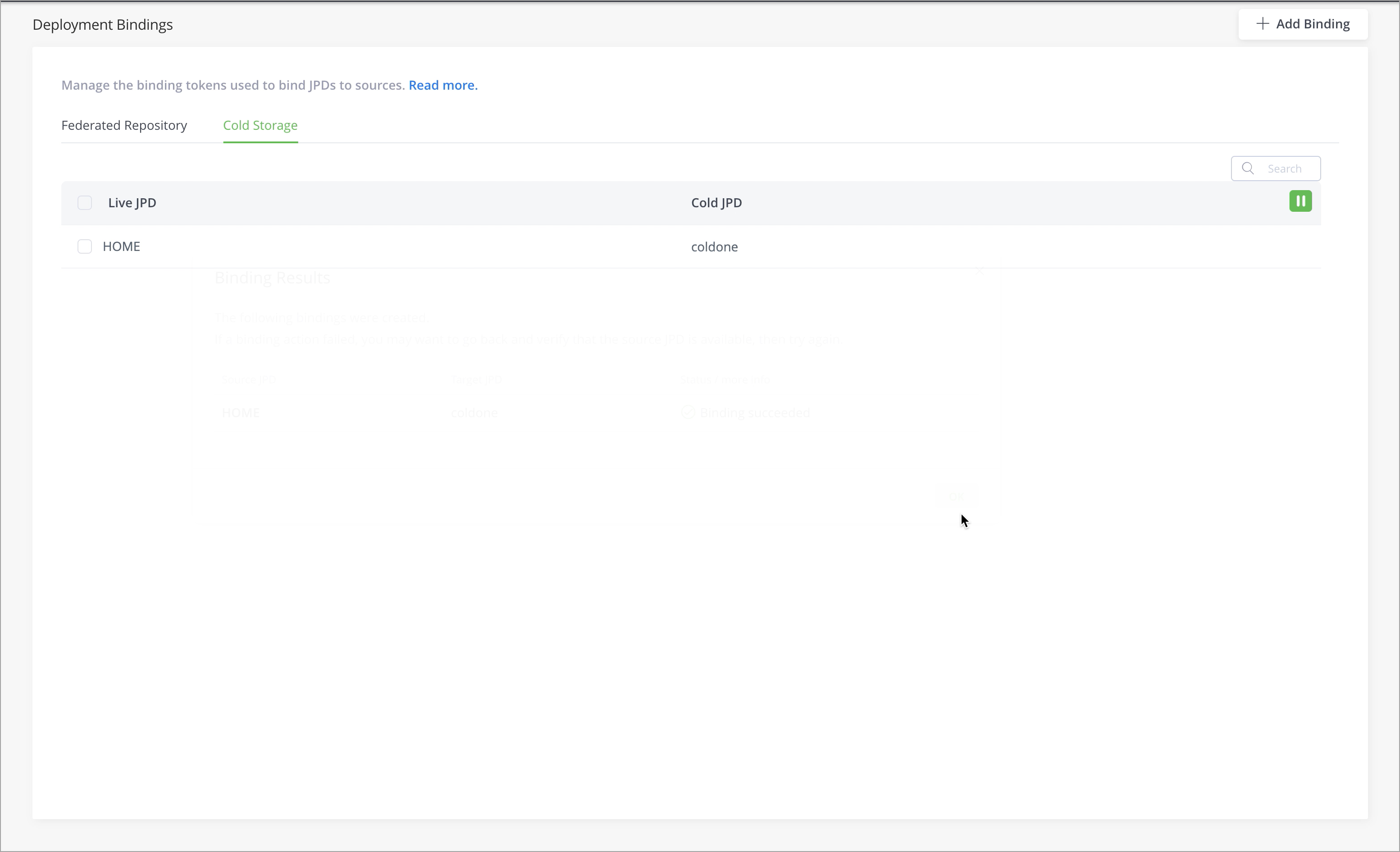
To revoke the binding between a Live and Cold instance, from the Administration module, click Platform Deployments | Bindings and then click the Cold Storage tab.
-
Select the checkboxes for the bindings you wish to remove, and then click the Delete button to the right of the binding.
-
If you are deleting multiple bindings, select all checkboxes, and at the bottom of the window, select Delete.
This displays a confirmation message that asks if you are sure you wish to remove the binding.
-
Click OK to confirm.
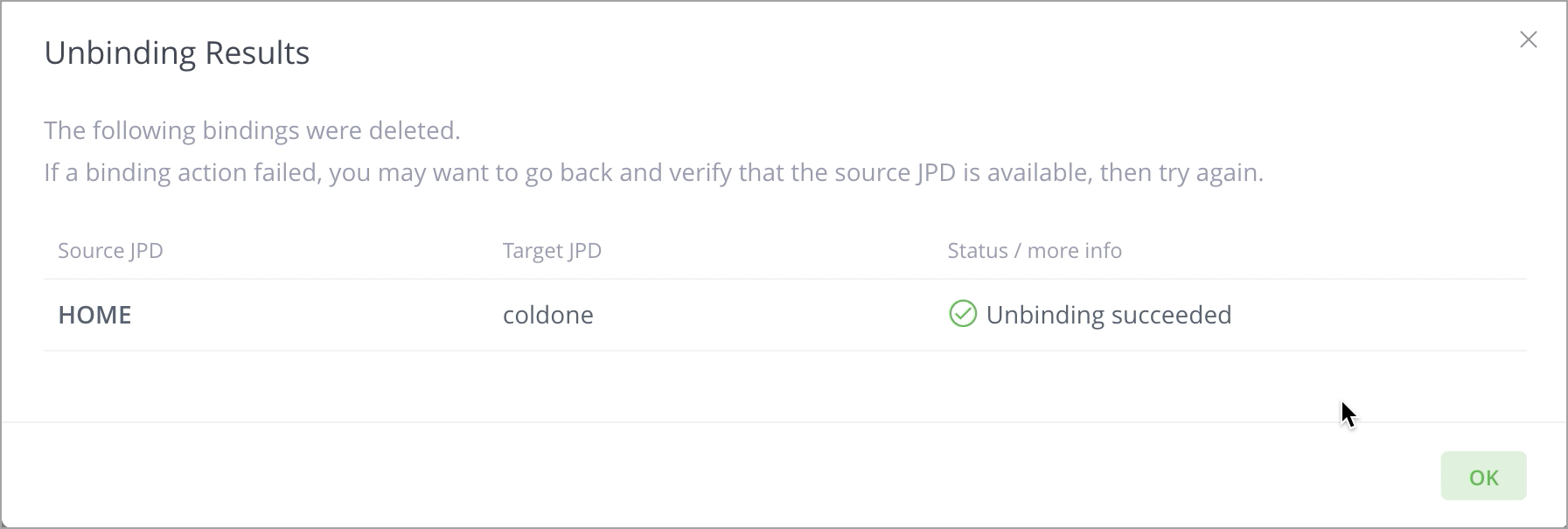
Your action is applied and the results of the unbinding are now displayed.
Re-establishing Trust
Each connection between a Live instance and a Cold instance is bound to a namespace in the Cold instance, which is generated during the paring process. The namespace is unique and the trust is established for that specific namespace.
This namespace is required when you need to re-establish the trust between the Live and Cold instances, for example, after the token was revoked by mistake. In such scenarios:
- Retrieve the namespace using APIs.
- Regenerate the pairing token by providing the namespace as an argument in the POST request.
Example: curl -u admin:password -X POST https://<cold_instance_ip_address>/artifactory/api/v1/service_trust/pairing/artifactory-cold/gbbxmcuj
Where: gbbxmcuj is the namespace.
Optimize Cold Storage Performance
Cold Storage includes several properties that can be used to configure and optimize its performance.
Warning
The list of parameters and their corresponding values that are shown below are for reference only. It is highly recommended that you do not change these values.
Live Artifactory Properties
The following properties can be configured in the Live Artifactory's $JFROG_HOME/etc/artifactory/artifactory.system.properties file.
| Parameter | Description | Range/ Default |
|---|---|---|
| Basic Properties | ||
| artifactory.retention.warm.archive.concurrency.maxLevel | Number of threads that will be used per policy to archive items. | Default: 5 |
| artifactory.retention.warm.restore.concurrency.maxLevel | Number of threads that will be used to restore items. | Default: 5 |
| Advanced Properties | ||
| artifactory.retention.cold.http.client.max.total.connections | Number of HTTP connections that are allowed to deploy artifacts from the Live instance to the Cold instance. | Default: 50 |
| artifactory.retention.cold.http.client.socketTimeout | Maximum socket timeout for an HTTP connection. | Default: 15,000 |
| artifactory.retention.cold.http.client.max.connections.per.route | Number of HTTP peers per route that are allowed to deploy artifacts from the Live instance to the Cold instance. | Default: 50 |
| artifactory.retention.warm.restore.pull.items.intervalSecs | Setting for how often the Live instance will try to pull restored items from the Cold instance. | Default: 120 Recommended: 1,800 |
| artifactory.retention.warm.restore.batchSize | Setting for how many restored items will be pulled from the Cold instance to the Live instance. | Default: 1,000 |
| artifactory.retention.warm.restore.bandwidth.maxSizeMb | Approximate maximum allowed bandwidth for all restore operations. | Default: 0 |
| artifactory.retention.warm.restore.error.threshold.percent | Error threshold to stop restore operation. | Default: 10 |
| artifactory.retention.warm.archive.batchSize | Setting for how many items are fetched from the database during archive policy execution. | Default: 10,000 |
| artifactory.retention.warm.archive.bandwidth.maxSizeMb | Approximate max allowed bandwidth for a single archive policy execution. | Default: 0 |
| artifactory.retention.warm.archive.error.threshold.percent | Stop execution if there are 10% errors during an archive process. | Default: 10 |
| artifactory.retention.warm.package.archive.query.limit | Specifies the maximum amount of packages archived per one batch. | Default: 10,000 |
| artifactory.retention.cold.http.client.retry.count | Specifies the maximum number of retries in the event of Cold Server communication failure. | Default: 30 |
| artifactory.retention.cold.http.client.retry.delay | Specifies the delay (in seconds) between retries if there is a Cold Server communication failure. | Default: 2 |
Cold Artifactory Properties
The following properties can be configured in the Cold Artifactory System YAML.
| Parameter | Description | Range/ Default |
|---|---|---|
| Advanced Properties | ||
| artifactory.retention.cold.restore.render.tree.concurrency.level | Number of threads that will be used when processing the restore request. | Default: 5 |
| artifactory.retention.cold.restore.status.mapper.intervalSecs | By default, on the Cold Artifactory instance, the cron job rate to check the restore status for each archived item is 120 seconds (2min). This can be reconfigured for cost optimization. | Default: 120 Recommended: 10800 |
| artifactory.retention.cold.restore.cleanup.intervalSecs | Interval for the cleanup job. | Default: 300 |
The following property can be configured in the Cold Artifactory's $JFROG_HOME/etc/artifactory/artifactory.system.properties file.
| Parameter | Description | Range/ Default |
|---|---|---|
| artifactory.retention.warm.restore.artifact.limit | The default maximum number of artifacts that can be restored during a single run is 30k. This value can be configured higher or lower using the artifactory.retention.warm.restore.artifact.limit property. During the restore process, if the number of artifacts crosses the max limit, the restore process terminates after completing the restoration of artifacts to the maximum limit and the cause for termination is logged. | Default: 30k |
Working with Cold Storage
Subscription Information
This feature is supported on the Self-Hosted platform, with an Enterprise X or Enterprise+ license.
This section describes how to work with the different Cold Storage capabilities and features.
The Cold Storage tasks outlined in this section can be performed using the Artifactory platform UI or the Cold Storage REST APIs.
Cold Artifactory Instance UI
While you can access and use the Cold Artifactory instance UI, its functionality is limited to the following:
Set Up Archive Retention Policies
Artifactory Cold Storage enables admins to create retention policies that determine which artifacts or packages need to be removed and archived from a Live Artifactory instance. When the policy is executed, artifacts or packages are moved from the Live Artifactory instance to the Cold Artifactory instance, and the corresponding binaries are stored in the storage solution connected to the Cold Artifactory.
During the archiving process, new repositories are created dynamically in the Cold instance for each repository in the Live instance.
Note
Only Artifactory admins can create and run retention policies.
Create an Artifact Retention Policy
-
In the Live Artifactory instance, go to the Administration module, click Artifactory (Project Admin) or Artifactory Settings (Platform Admin)| Retention Policies, and then click Create Policy.
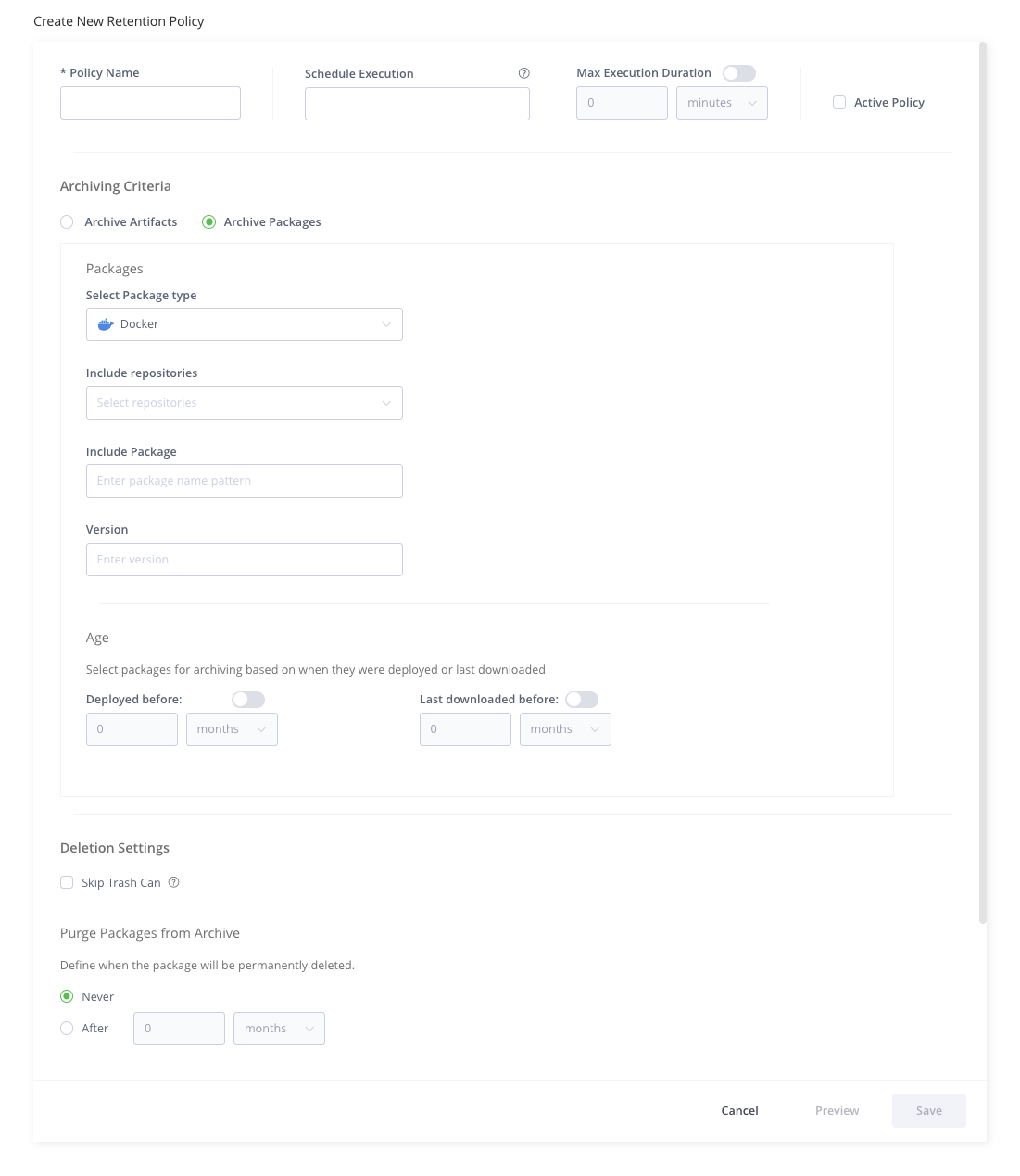
The Create New Retention Policy page appears.
-
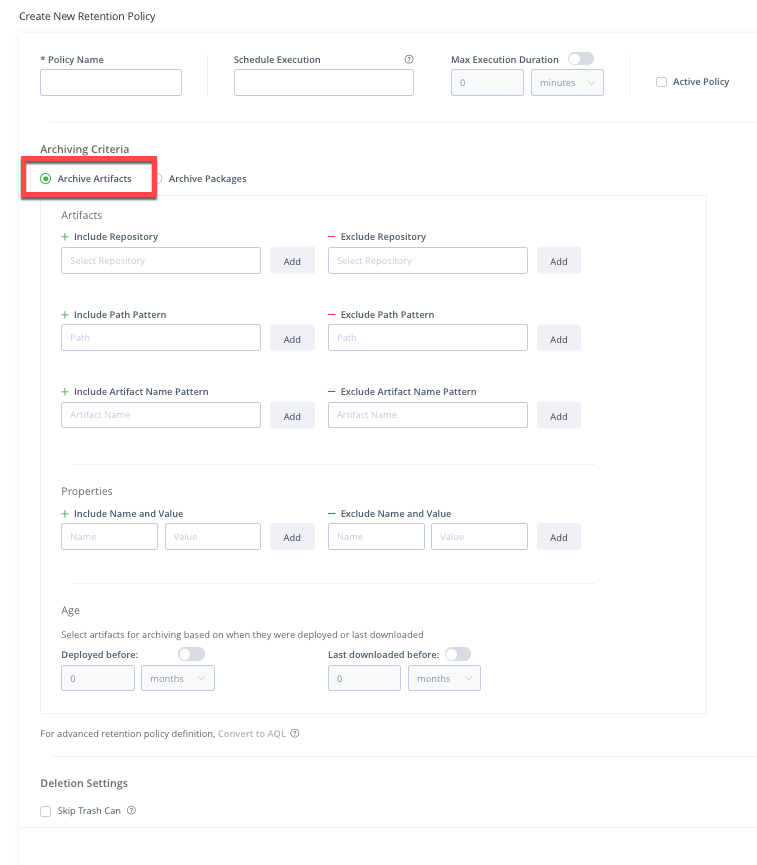
Under Archiving Criteria, select Archive Artifacts.
The settings for archiving artifacts are displayed.
-
Configure the following details:
| Field | Description |
|---|---|
| Policy Name | Provide a unique and meaningful name for the policy. |
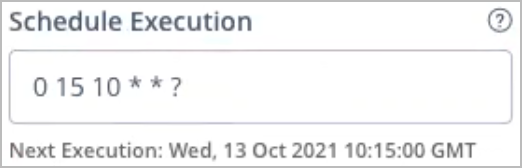
| Schedule Execution | Use a cron expression to set the schedule for the policy to execute. Example:
|
| Max Execution Duration | Enable and select the maximum duration that the policy has to execute. While this is useful for adhering to a strict archiving schedule, it can cause the archive policy to stop before completion. |
| Active Policy | Select the checkbox to make this an active policy. Clear the checkbox if you do not want the policy to run according to schedule. |
| Artifacts | |
| Include Repository | Type a repository name and then click Add to include it in the policy. If you add more than one repository, the And/Or toggle offers you following options:
|
| Exclude Repository | If you want to exclude one or more repositories from repositories that you included, click Add to add repositories that you want to exclude. |
| Include Path Pattern | Click Add to add path patterns that you want to include in the policy. |
| Exclude Path Pattern | If you want to exclude one or more path patterns from path patterns that you included, click Add to add path patterns that you want to exclude. |
| Include Artifact Name Pattern | Click Add if you want to archive only artifacts with a specific name pattern. |
| Exclude Artifact Name Pattern | If you want to exclude one or more artifact name patterns from artifact name patterns that you included, click Add to add name patterns that you want to exclude. |
| Properties | |
| Include Name and Value | Click Add if you want to archive only artifacts that have a property with a specific name and value. pattern. |
| Exclude Name and Value | If you want to exclude one or more artifact properties from artifact properties that you included, click Add to add the properties that you want to exclude. |
| Age | |
| Deployed before | Enable this setting if you want to archive artifacts based on when they were last deployed. For example, archive artifacts that were deployed a year ago. |
| Last downloaded before | Enable this setting if you want to archive artifacts based on when they were last downloaded. For example, select artifacts that were downloaded a year ago. |
| Convert to AQL | Click Convert to AQL to use Artifactory Query Language (AQL) queries to select the artifacts that you want to archive.
|
| Deletion Settings | |
| Skip Trash Can | Enable this setting if you want to prevent transferring artifacts to the trash can repository when artifacts are archived to the Cold Instance. Enabling this setting will cause artifacts to be permanently deleted from the Live Instance after the archiving process is complete. |
| Purge Artifacts from Archive | Specify if and when archived artifacts should be permanently deleted from the archive:
|
| Description | If required, add a description for the policy. |
-
Click Preview to get an estimate of the number of artifacts that will be archived based on the settings selected for the policy.
-
Click Save to save the policy. The policy will run on the scheduled date and time.
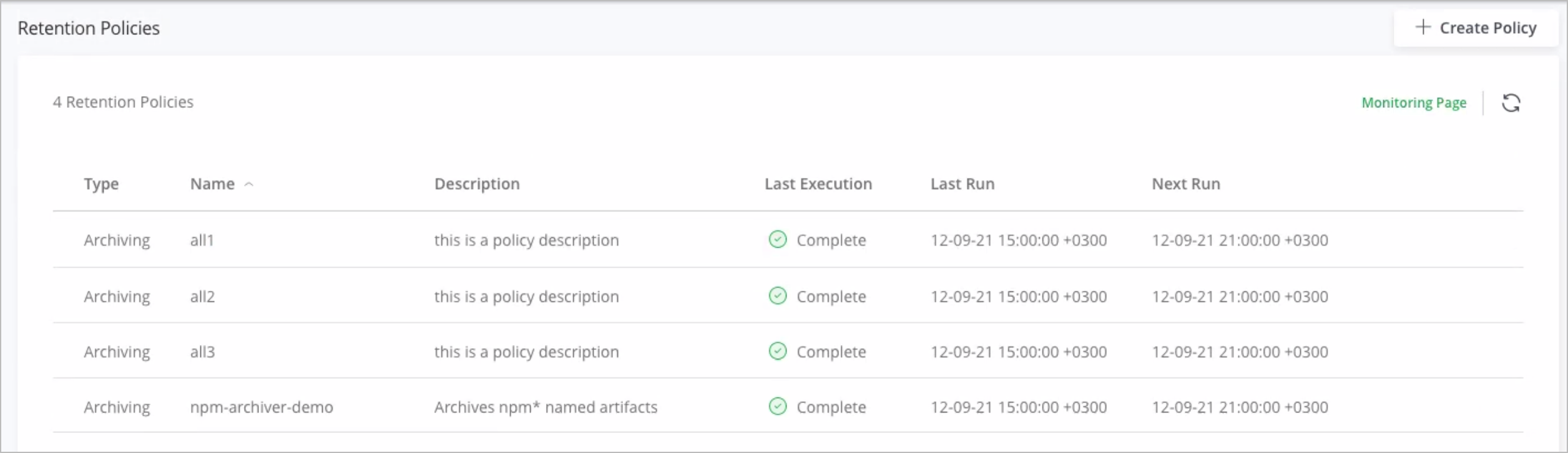
The newly created policy appears in the Retention Policies list.
Supported Package Types for Package Retention Policies
Artifactory package-level archiving currently supports the following package types:
- Conan
- Debian
- Docker
- Gems
- Generic
- Go
- Gradle
- Helm
- Maven
- Npm
- NuGet
- Pypi
- Rpm / yum
Create a Package Retention Policy
-
In the Live Artifactory instance, go to the Administration module, and select Artifactory | Retention Policies and click Create Policy.
The Create New Retention Policy page appears.
-
Under Archiving Criteria, ensure that Archive Packages is selected and configure the following details:
| Field | Description |
|---|---|
| Policy Name | Provide a unique and meaningful name for the policy. |
| Schedule Execution | Use a cron expression to set the schedule for the policy to execute. Example:
|
| Max Execution Duration | Enable and select the maximum duration that the policy has to execute. While this is useful for adhering to a strict archiving schedule, it can cause the archive policy to stop before completion. |
| Active Policy | Select the checkbox to make this an active policy. Clear the checkbox if you do not want the policy to run according to schedule. |
| Packages | |
| Select Package Type | Select the type of package that you want to archive. |
| Include repositories | From the drop-down, select one or more repositories to be included in the policy.
|
| Include Package | If you want to archive a specific package in a repository, enter the package name here. Wildcard characters are permitted. |
| Version | If you want to archive a specific version of a package, enter the version number or name here. Wildcard characters are permitted. |
| Age | |
| Deployed before | Enable this setting if you want to archive packages based on when they were last deployed. For example, archive packages that were deployed a year ago. |
| Last downloaded before | Enable this setting if you want to archive packages based on when they were last downloaded. For example, select packages that were downloaded a year ago. |
| Deletion Settings | |
| Skip Trash Can | Enable this setting if you want to prevent transferring packages to the trash can repository when packages are archived to the Cold Instance. Enabling this setting will cause packages to be permanently deleted from the Live Instance after the archiving process is complete |
| Purge Packages from Archive | Specify if and when the archived packages should be permanently deleted:
|
| Description | If required, add a description for the policy. |
-
Click Preview to get an estimate on the number of artifacts that will be archived based on the settings selected for the policy.
-
Click Save to save the policy. The policy will run on the scheduled date and time.
The newly created policy appears in the Retention Policies list.
What Happens after the Archive Policy is Created?
After the archive policy is defined and created:
-
It executes on the scheduled date and time.
The archiving policy can also be executed manually using the Trigger button.
Note
Do not run more than 10 policies at the same time as this causes performance issues.
- The system archives the artifacts or packages, along with the associated metadata, and moves it to the Cold Artifactory.
- When an item is archived, the system dynamically creates dedicated archiving repositories on the Cold instance (the new repositories are created with a randomly generated namespace prefix).
- As the archival process progresses, the system updates the logs in the Artifactory Service logs in the Live Artifactory instance. Additionally, if you have set up an email server, the admin user will receive notifications for all the completed operations.
Note
Single-file package types, such as Debian, can be easily archived using simple age-based criteria in the same manner as artifacts. Regarding multiple-file package types, the current version of Artifactory supports package archiving for Docker, Maven, npm, and Gradle package types. If you want to archive other multiple-file package types, JFrog recommends using props/location-based policies on top of time-based policies. To ensure that your packages do not disappear while archiving, use the following 3-step approach:
Tag all the packages/images that are not in use using Property Sets in Artifactory.
Example: 'targeted for archiving'
Move the tagged packages/images to a dedicated repository.
Example: 'Ready_for_archiving'
Create an archiving policy based on:
- Property. Example: 'targeted for archiving'
- Repository. Example: 'Ready_for_archiving'
- Age. Example: Deployed before 3 months, not downloaded during 1 last month
In future versions of Artifactory, more package types will added for archiving.
Manage Archiving Policies
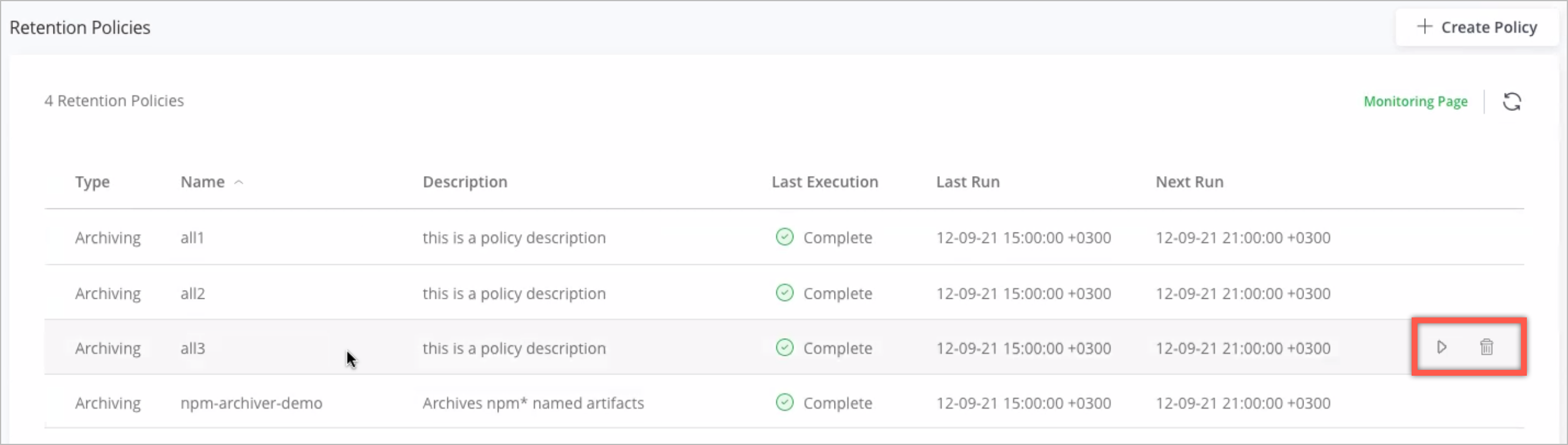
The Retention Policies page lists the name of all the retention policies, their last execution status, last run date and time, and the schedule for their next run.
Hover over a policy and:
- Click to view and edit the policy.
- Click the Trigger icon to manually trigger the policy.
- Click the Stop icon to manually stop the execution of the policy that is in progress.
- Click the Delete icon to permanently delete the policy.
Status Icons
The Last Execution column displays the current status of each retention policy execution, which can be one of the following:
| Icon | Last Execution Status | Meaning |
|---|---|---|
 | Pending | Pending execution - policy has never been executed. |
 | Triggered | User manually triggered the execution of the policy. |
 | Running | Execution of the policy is in progress and there are no errors. |
 | Running | Execution of the policy is in progress, but there are some errors. For information about these errors, see the logs. |
 | Complete | Execution of the policy completed successfully, without any errors. |
 | Complete | Execution of the policy completed, but there are some errors. For information about these errors, see the logs. |
 | Stopping | User manually stopped the execution of the policy and the execution is being stopped. |
 | Stopped | User manually stopped the execution of the policy. |
Search and Restore Archived Artifacts or Packages
The Artifactory Search enables you to perform a dedicated search for artifacts or packages in the Cold instance that you wish to restore to the Live instance. The search results indicate the original repository of the artifacts or packages that are found.
After performing a search for the archived artifacts or packages, admins can provide an explicit list of artifacts or packages to be restored and trigger the restoration from the Cold instance to the Live instance. Restoration is a non-destructive process and none of the restored artifacts or packages are deleted from the Cold instance.
Search for Archived Artifacts
To search for archived artifacts:
-
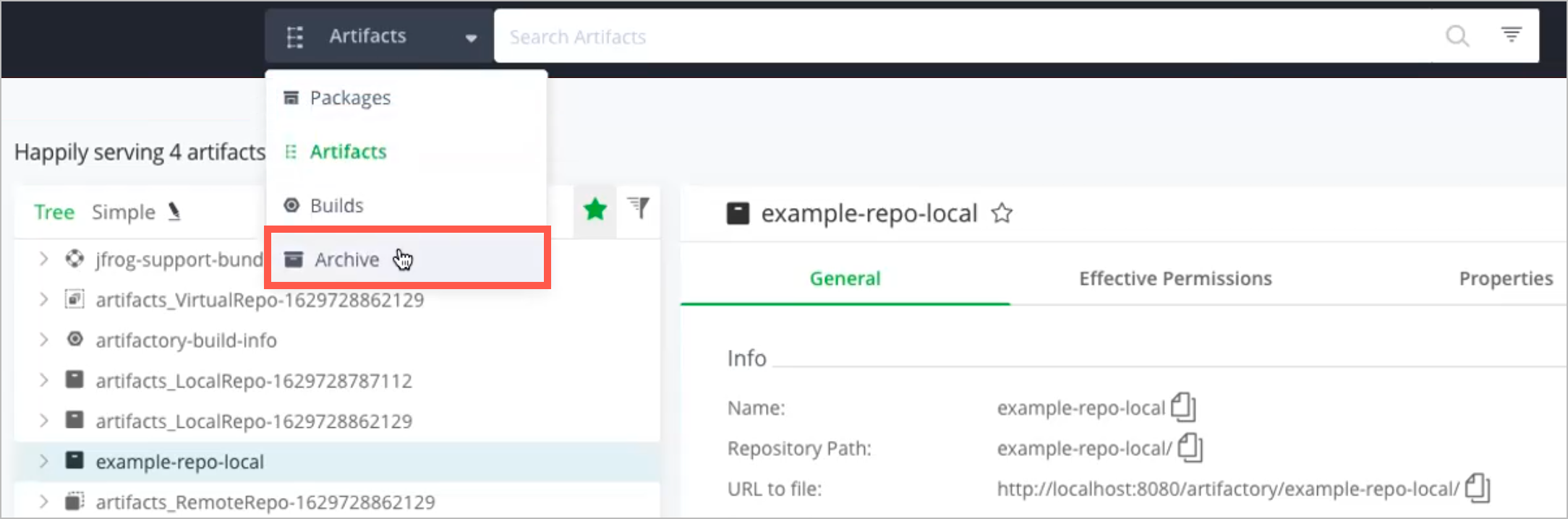
In the Live Artifactory instance, in the Application global search drop-down, select Archive.
-
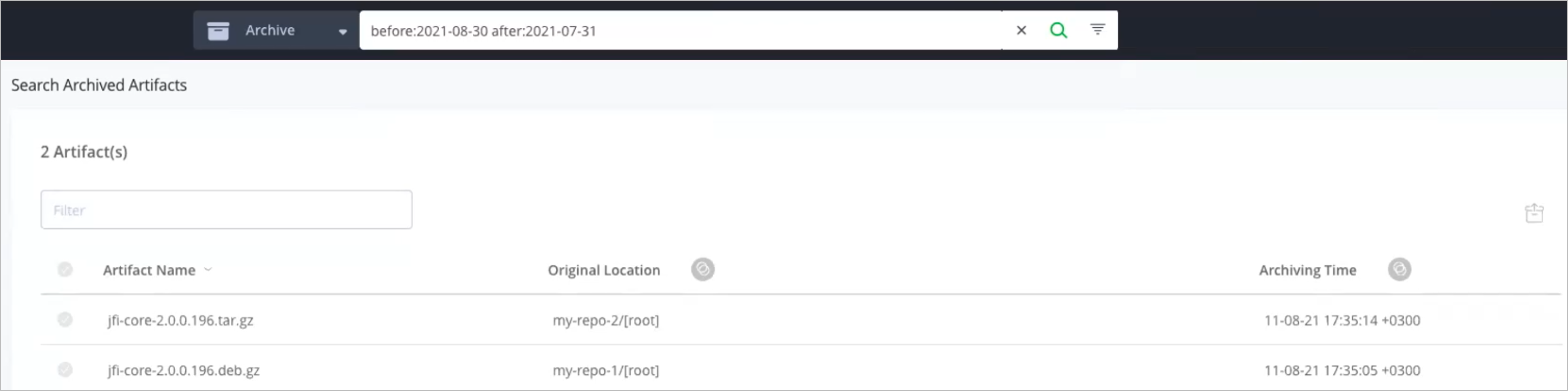
In the search field, you can either perform a:
-
or
-
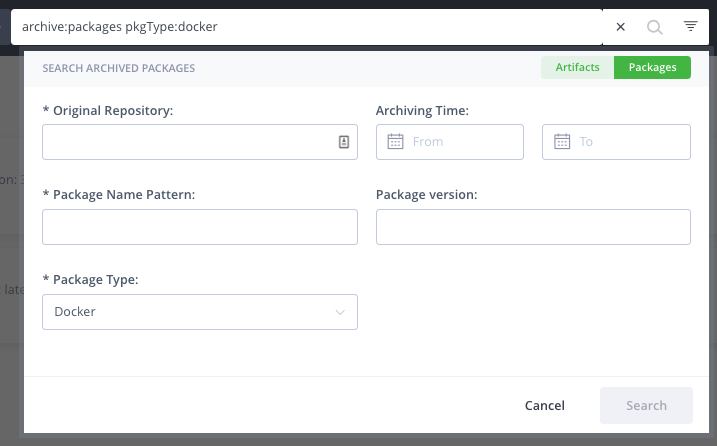
Advanced Search: Click the Filter icon at the right end of the search bar, as shown below.

The search drop-down window appears, as shown below:
In the search drop down window, click Artifacts in the upper-right section of the window. The criteria for searching for archived artifacts appears, as shown below.
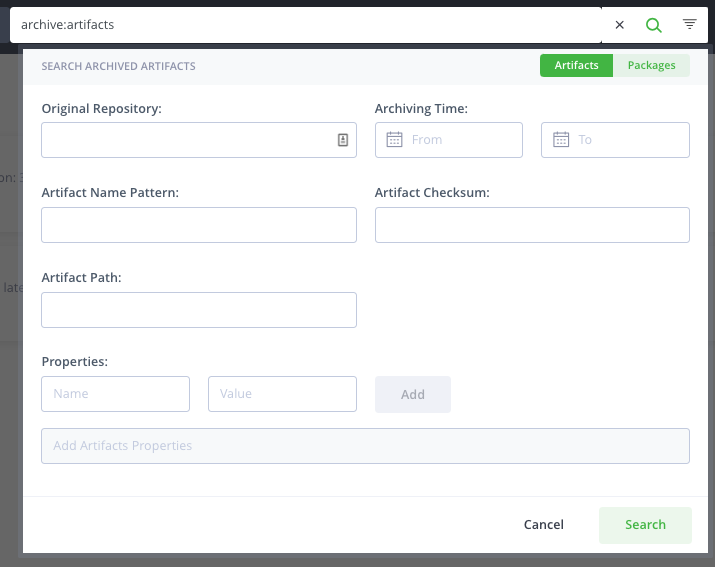
Enter criteria for searching for archived artifacts, as described in the following table.
-
| Field | Description |
|---|---|
| Original Repository | Search for artifacts based on the original repository name. Wildcard characters are supported. |
| Archiving Time | Search for all the artifacts archived within the specified time period. |
| Artifact Name Pattern | Search for artifacts based on the artifact name pattern. Wildcard characters are supported. |
| Artifact Checksum | Search for artifacts based on MD5, SHA1 or SHA256 checksum value. Wildcard characters are not supported in Checksum search, so the term entered in the search field must be a valid MD5, SHA1 or SHA256 value. |
| Artifact Path | Search for artifacts in a specific path in a repository. |
| Properties | Search for artifacts or folders based on Properties assigned to them, whether they are standard properties assigned by Artifactory or custom properties. |
-
When you have finished entering the search criteria, click Search to display results.
Search for Archived Packages
To search for archived packages:
-
In the Live Artifactory instance, in the Application global search drop-down, select Archive.
-
In the search field, you can either perform a:
-
or
-
Advanced Search: Click the Filter icon at the right end of the search bar, as shown below.
The search drop-down window appears, as shown below:
In the search drop-down window, ensure that Packages is selected in the upper-right section of the window.
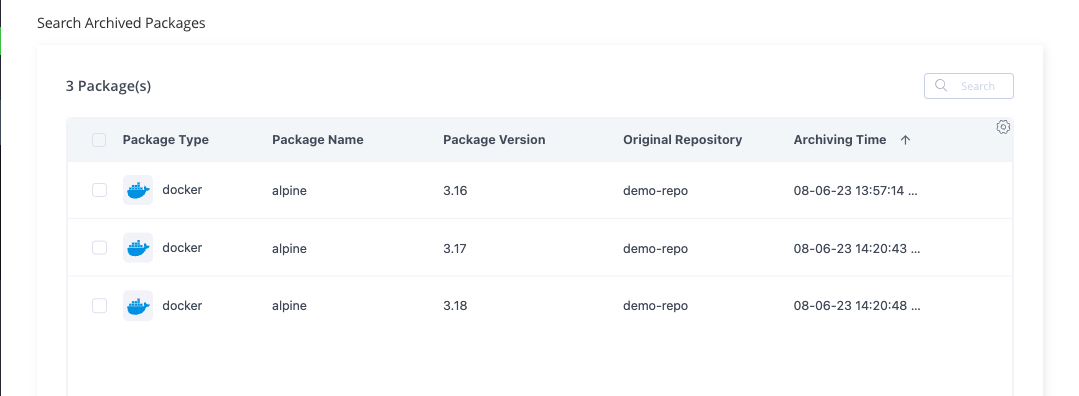
Enter criteria for searching for archived packages, as described in the following table.
-
| Field | Description |
|---|---|
| Original Repository | Search for packages based on the original repository name. Wildcard characters are supported. |
| Archiving Time | Search for all packages archived within the specified time period. |
| Package Name Pattern | Search for packages based on the name pattern. Wildcard characters are supported. |
| Package version | If you want to search for a specific package version, enter the version number here. Wildcard characters are supported. |
| Package Type | Select the package type that you want to search for. |
-
When you have finished entering the search criteria, click Search to display results.
Restore Archived Artifacts and Packages
To restore an archived artifact or package:
-
Run the search as described in Search for Archived Artifacts or Search for Archived Packages.
-
To restore a single item, hover over the item and click the Restore icon.
-
To restore multiple or all items, select the relevant items and click the main Restore icon.
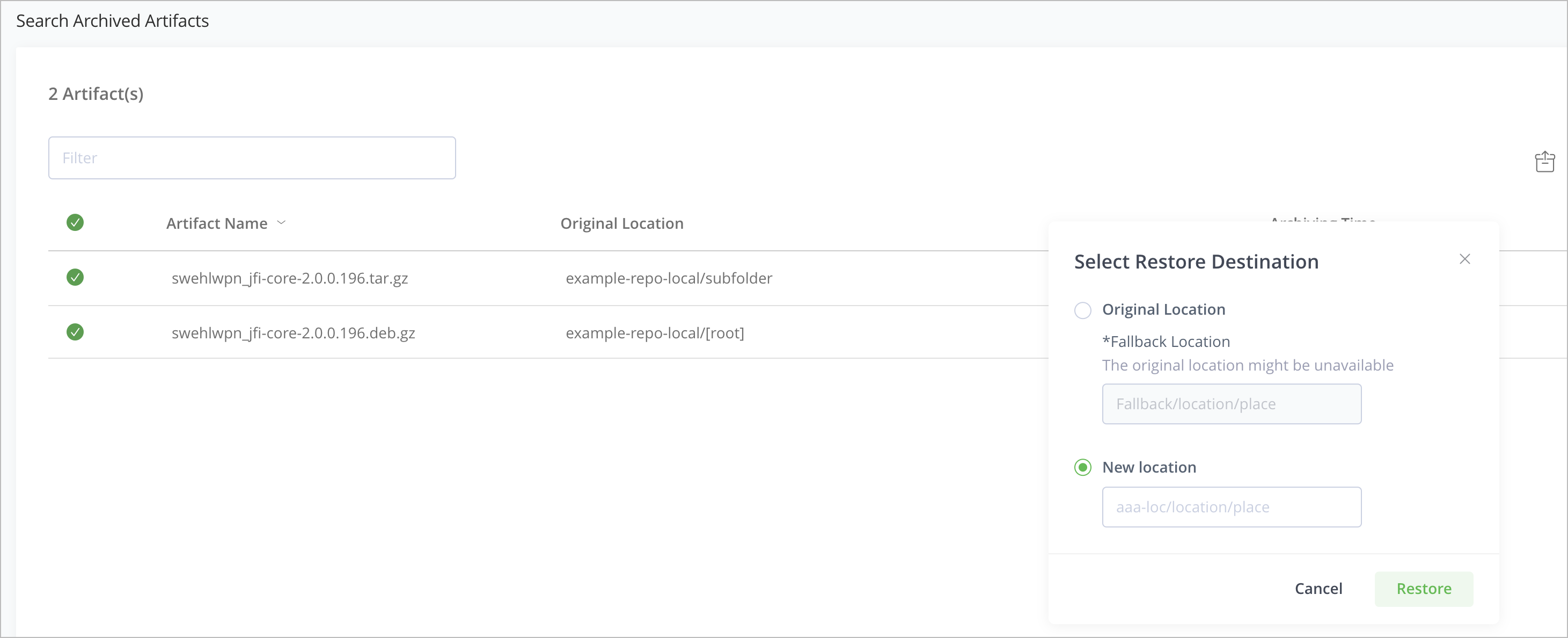
The Select Restore Destination window is displayed.
-
Based on your preference, select the following:
| Field | Description |
|---|---|
| Original Location | Restore to the original repository where the items were located before archiving. |
| Fallback Location | If Original Location is selected, it is mandatory to provide a Fallback Location. If the Original Location no longer exists, the Fallback Location is used as the location for restoring artifacts and packages.
|
| New Location | Restore to a new location on the Live instance.
|
- Click Restore.
- Admins who have their email server configured will receive an e-mail notification when the restore operation is complete.
Note
- Depending on the number of Artifacts being restored, the restoration process can take a few minutes to a few hours.
- If the restoration process encounters an error, the process fails and the error messages are logged accordingly.
- The default maximum number of artifacts that can be restored during a single run is 30k. However, this value can be configured to higher or lower using the
retention.warm.restore.artifact.limitproperty in the Artifactory System Properties file. During the restore process, if the number of artifacts crosses the maximum limit, the restore process terminates after completing the restoration of artifacts to the maximum limit and the cause for termination is logged.
Monitor Archive and Restoration Operations
After initiating an archive or restore operation, you can monitor its progress and view the status of archive and restore operations based on policy name and timeframe. The last execution will always be displayed on top.
To monitor archive and restoration operations:
-
In the Administration module, select Artifactory | Cold Storage Monitoring.
The Cold Storage Monitoring page appears.
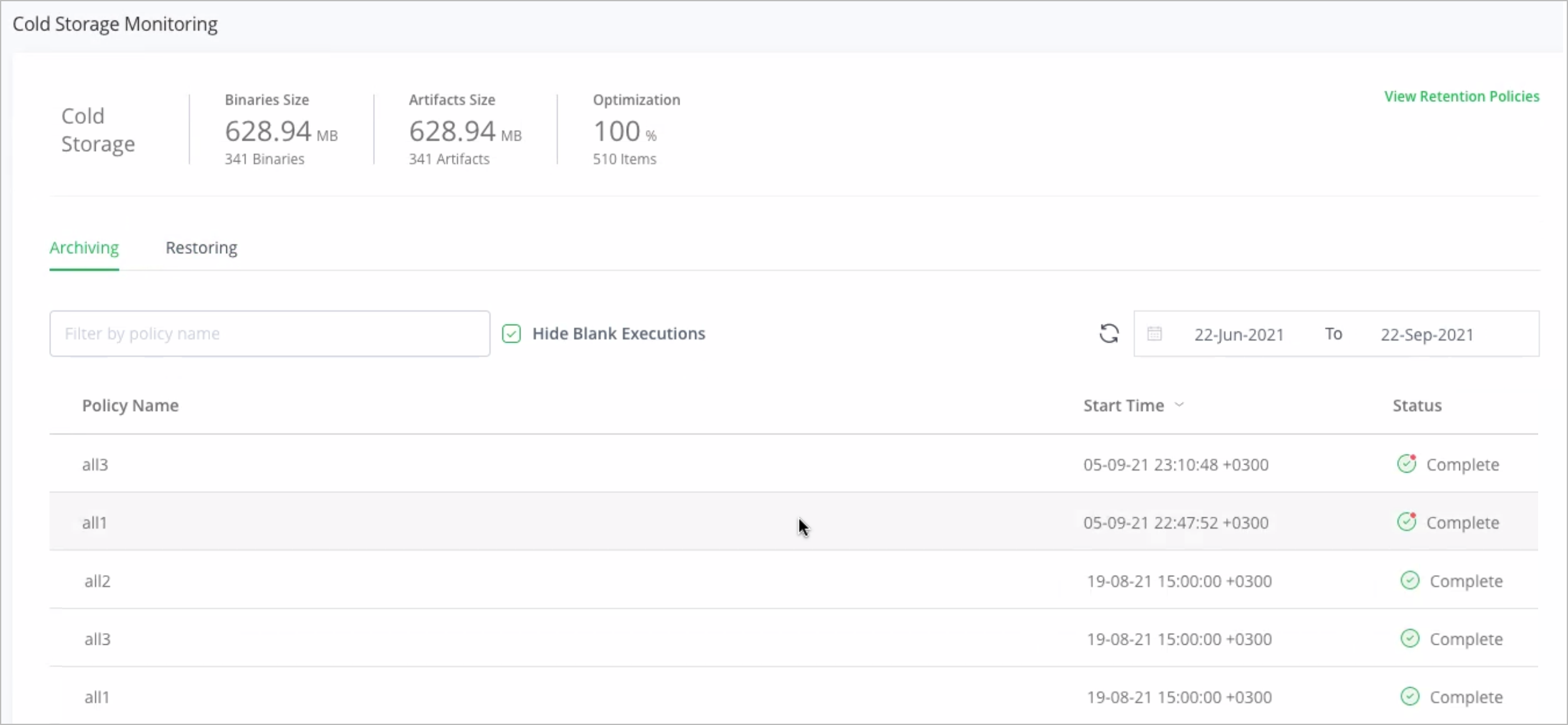
The Cold Storage Monitoring page provides information about the following:
| Field | Description |
|---|---|
| Binaries Size | The total number and total size of the archived binaries. |
| Artifacts Size | The total number and total size of the archived artifacts. |
| Optimization | The ratio between the total size and the size of the binaries. |
- Click Archiving/ Restoring tab to view the following details:
| Field | Description |
|---|---|
| Filter (Archiving only) | Filter the list based on policy name. |
| Hide Blank Executions (Archiving only) | Select this check box to hide all the executions that resulted in zero archival. |
| Policy Name (Archiving only) | Name of the retention policy. |
| Execution Id | Shows the unique Execution ID generated for each execution of a policy. This ID is useful when reviewing the archive/restore logs. |
| Date Range | The time period for which you would like to see the archive/restore status. |
| Start Time | The date and time when the archive/restore operation started running. |
| Status | The current status of the archive/restore operation, which can be one of the following:
|
Work with Cold Storage Using REST APIs
Set up Retention Policies Using a REST API
Artifactory Cold Storage enables admins to create retention policies that determine which artifacts need to be removed and archived from a Live Artifactory instance. When the policy is executed, artifacts are moved from the Live Artifactory instance to the Cold Artifactory instance, and the binaries are stored in the storage solution connected to the Cold Artifactory.
To perform archiving operations, the Live instance uses standard Artifactory REST API to deploy artifacts to the Cold instance. During the archiving process, new repositories are created dynamically in the Cold instance for each repository.
Note
Only Artifactory admins can create and run retention policies.
To set up a policy, use the Create an Archive Policy API. This will create a new archive policy in Artifactory using the policy configuration you set up in the API.
-
Define the archiving policy with a policy name and an optional description.
-
Use the Artifactory Query Language (AQL) to set the scope:
- Include or exclude a repository, inner path, or artifact name (one or many)
- Include or exclude associated properties (one or many)
- Include an age, such as last downloaded before or deployed before (weeks, months, years)
- If the selection criteria are not sufficient, you can also use an AQL to define specific selection criteria for archiving
-
Use a Cron Expression to set the schedule for periodically triggering the archive policy
-
Set the maximum duration (in minutes) for policy execution.
Archive Artifacts Using a REST API
After the archive policy is defined and created:
-
It executes on the scheduled date and time.
The archiving policy can also be executed manually using the Run an Archive Policy API.
Note
Do not run more than 10 policies at the same time as it cause performance issues.
- The system archives the artifacts selected by the archiving policy along with the associated metadata and moves it to the Cold Artifactory.
- When an artifact is archived, the system dynamically creates dedicated archiving repositories on the Cold instance (the new repositories are created with a randomly generated namespace prefix).
- As the archival process progresses, the system updates the logs in the Artifactory service logs in the Live Artifactory instance. Additionally, if you have set up an email server, the admin user will receive notifications for all the completed operations.
Manage Archive Policies Using REST APIs
After creating an archive policy, you can use the following APIs to view, edit, and delete the policy:
- Update an Archive Policy
- Delete an Archive Policy
- Get All Archive Policies
- Get an Archive Policy
- Preview Retention Policy by Policy Key
- Preview Retention Policy by Policy Model
Running an Archive Policy – Example
The example below demonstrates how to invoke the Run Archive Policy REST API with the following assumptions:
- You are using cURL from the Unix command line, and are presently working from the home (~) directory of the admin user myUser.
- You wish to run an archive policy called myPolicy.
- You have configured an admin user named
myUser, with the passwordmyP455w0rd!. - Your API key is
ABcdEF.
To execute a call using basic authentication, you would use the following command:
curl -u admin:password -X POST https://[JFrogPlatformURL]/artifactory/api/retention/archive/policies/mPolicy/triggerTo execute a call using your API key for basic authentication, you would use the following command:
curl -u myUser:ABcdEF -X POST https://[JFrogPlatformURL]/artifactory/api/retention/archive/policies/mPolicy/triggerTo execute a call using your API key in a header, you would use the following command:
curl -H "X-JFrog-Art-Api:ABcdEF" -X POST https://[JFrogPlatformURL]/artifactory/api/retention/archive/policies/mPolicy/triggerTo execute a call using an access token for basic authentication, you would use the following command:
curl -u myUser:<Token> -X POST https://[JFrogPlatformURL]/artifactory/api/retention/archive/policies/mPolicy/triggerTo execute a call access token in a header, you would use the following command:
curl -H "Authorization: Bearer <Token>" -X POST https://[JFrogPlatformURL]/artifactory/api/retention/archive/policies/mPolicy/triggerSearch and Restore Archived Artifacts Using REST APIs
Search enables you to perform a dedicated search for artifacts in the Cold instance that you wish to restore to the Live instance. The search results indicate the origin of the resolved artifact (repo) and the availability, which depends on the type of storage used in the Cold instance.
After performing a search for the archived artifacts, admins can select the artifacts to be restored and trigger the restoration from the Cold instance to the Live instance. Restoration is a non-destructive process and none of the restored artifacts are deleted from the Cold instance.
Note
You may run AQL queries only on the Item domain. Other primary domains, such as Build, Entry, Promotion, and Release are not supported.
Search Archived Artifacts Using a REST API
-
Use the Search for Archives API to search for an archived artifact.
-
Use AQL to search within an archive based on the following criteria:
- Repository and path
- Artifact name
- Artifact checksum
- Artifact properties
- Archiving period
-
After the search is complete, select the specific artifacts from the search results that you wish to retrieve.
Restore Archived Artifacts Using a REST API
- To restore an archived artifact, run the search as per the instructions above.
- Use the Restore from Archive API to specify the file's explicit name and path. When retrieving, you can choose to restore to the original/fallback location or a new location. All the restored files are then uploaded to the Live instance.
- Admins who have their email server configured will receive an e-mail notification when the restore operation is complete.
Note
- Depending on the number of artifacts being restored, the restoration process can take a few minutes to a few hours.
- If the restoration process encounters an error, the process fails and the error messages are logged accordingly.
- The maximum number of artifacts that can be restored during a single run is 30k. This value can be configured using the
retention.warm.restore.artifact.limitproperty in the Artifactory System Properties file. During the restore process, if the number of artifacts crosses the max limit, the restore process terminates after completing the restoration of 30k artifacts and the cause for termination is logged.
Monitor the Archive and Restore Processes using a REST API
After initiating an archive or restore process, you can monitor its progress and view the status of archive and restore operations based on policy name and timeframe. The last execution will always be displayed on top.
- To monitor the status of an archiving process, use the Get Archive Policy Status API.
- To monitor the status of a restoration process, use the Get Restore Process Status API.
Review Archive and Restore Logs
In addition to using the Cold Storage UI and APIs to monitor the archive and restore processes, you can also review the Artifactory service logs to learn more about the status of archive and restore operations.
Archive Logs
To find and review the archive logs, in the Artifactory service logs, search for:
- The name of the policy key.
- The
retention_archive_artifactprefix, which is appended to the migration and archive operation IDs, as shown in the example below. - The
retention_archive_packageprefix, which is appended to the migration and archive operation IDs, as shown in the example below.
2023-06-26T07:34:02.301Z [jfrt ] [INFO ] [37fa1a619f874a56] [ArtifactRetentionArchiveJob:57] [74a56|art-exec-37321] - Executing retention policy 'small'. Is manual true.
2023-06-26T07:34:02.327Z [jfrt ] [INFO ] [37fa1a619f874a56] [ionStatusStorageServiceImpl:99] [74a56|art-exec-37321] - About to insert new migration status record 'MigrationStatus(identifier=retention_archive_package_small_OKVTPOIGIN, started=1687764842327, finished=0, migrationInfoBlob=ArtifactRetentionArchiveInfoBlob(estimatedTotalCount=18, stoppedByUser=false))'
2023-06-26T07:34:02.328Z [jfrt ] [INFO ] [37fa1a619f874a56] [tifactRetentionServiceImpl:514] [74a56|art-exec-37321] - Executing artifact archive to cold storage. Archive policy: small with operation Id: retention_archive_package_small_OKVTPOIGIN
2023-06-26T07:34:02.334Z [jfrt ] [INFO ] [37fa1a619f874a56] [o.a.a.p.ArchiveHelper:35      ] [74a56|art-exec-37321] - 2 packages to archive for package type DOCKER with name  and version tag-1
2023-06-26T07:34:02.334Z [jfrt ] [INFO ] [37fa1a619f874a56] [kageArchivedItemsProcessor:173] [74a56|art-exec-37321] - Received 2 packages
2023-06-26T07:34:03.792Z [jfrt ] [INFO ] [cbf38e2143baab78] [r.c.t.ArchiveDeployRunnable:84] [b78|pool-73-thread-2] - docker-mix:postgress/tag-1/sha256__1921dda0e2c520146bbe1f96f73f1e270baade07da45f761ba4141b2f0c550b7 was successfully deployed to cold
2023-06-26T07:34:03.794Z [jfrt ] [INFO ] [dc147cb39b977280] [r.c.t.ArchiveDeployRunnable:84] [280|pool-73-thread-4] - docker-mix:postgress/tag-1/sha256__28bb5ab88d7aca2a970379520e082026d1062763272533bf24358cd42da78754 was successfully deployed to cold
2023-06-26T07:34:03.809Z [jfrt ] [INFO ] [f590658722ad1523] [r.c.t.ArchiveDeployRunnable:84] [523|pool-73-thread-3] - docker-mix:postgress/tag-1/sha256__254f758dbb83e424d684bd8be194099edb1ed4137152cab7cfdc486484d3adc7 was successfully deployed to cold
2023-06-26T07:34:09.302Z [jfrt ] [INFO ] [37fa1a619f874a56] [c.u.ArtifactRetentionUtils:644] [74a56|art-exec-37321] - docker-mix:postgress/tag-1/manifest.json was successfully undeployed from warm
2023-06-26T07:34:09.320Z [jfrt ] [INFO ] [37fa1a619f874a56] [c.u.ArtifactRetentionUtils:644] [74a56|art-exec-37321] - docker-mix:postgress/tag-1/sha256__0543b0f5d286859c23fd17cd78d02387a2eafb60662601af8fa9a3b6e050f334 was successfully undeployed from warm
2023-06-26T07:34:09.335Z [jfrt ] [INFO ] [37fa1a619f874a56] [c.u.ArtifactRetentionUtils:644] [74a56|art-exec-37321] - docker-mix:postgress/tag-1/sha256__1921dda0e2c520146bbe1f96f73f1e270baade07da45f761ba4141b2f0c550b7 was successfully undeployed from warm
2023-06-26T07:34:09.558Z [jfrt ] [INFO ] [37fa1a619f874a56] [onStatusStorageServiceImpl:137] [74a56|art-exec-37321] - Migration for 'retention_archive_package_small_OKVTPOIGIN' has finished.
2023-06-26T07:34:09.561Z [jfrt ] [INFO ] [37fa1a619f874a56] [.r.c.s.ArchiveBaseStrategy:136] [74a56|art-exec-37321] - Archive operation to cold storage ended. Operation Id: retention_archive_package_small_OKVTPOIGIN. Started at: Mon Jun 26 07:34:02 GMT 2023. Ended at: Mon Jun 26 07:34:09 GMT 2023. Total items processed: 20. Success percentage: 100%.
Restore Logs
To find and review the restore logs, in the Artifactory service logs, search for:
- The restore operation I.
- The
retention_restore_artifact_prefix, which is appended to the migration and restore operation IDs, as shown in the example below. - The
retention_restore_package_prefix, which is appended to the migration and restore operation IDs.
2023-06-27T06:45:57.523Z [jfrt ] [INFO ] [3a80716725fdf1b8] [ionStatusStorageServiceImpl:99] [27.0.0.1-8081-exec-3] - About to insert new migration status record 'MigrationStatus(identifier=retention_restore_package_URPXF4HBCL, started=1687848357523, finished=0, migrationInfoBlob=ArtifactRetentionRestoreInfoBlob(totalCount=1, restoreToOriginal=true, fallbackDestinationPath=docker-restore, centralDestinationPath=, initializationState=IN_PROGRESS))'

2023-06-27T06:45:57.542Z [jfrt ] [INFO ] [3a80716725fdf1b8] [ifactRetentionServiceImpl:1145] [27.0.0.1-8081-exec-3] - Executing restore process from cold storage. Operation Id: retention_restore_package_URPXF4HBCL for 1 items

2023-06-27T06:47:03.243Z [jfrt ] [INFO ] [c8dea5f7a720715c] [tifactRetentionServiceImpl:734] [20715c|art-exec-6799] - Pull items for restore operation with ID: retention_restore_package_URPXF4HBCL and destination info: ArtifactRetentionRestoreDestinationInfo(restoreToOriginal=true, fallbackDestinationPath=docker-restore, centralDestinationPath=)

2023-06-27T06:49:03.277Z [jfrt ] [INFO ] [4dfee8247cc56f5a] [t.PullRestoredItemRunnable:129] [f5a|pool-48-thread-1] - Item restore-in-transit:vglwruop/retention_restore_package_URPXF4HBCL/alpine-local-50000/docker-alpine-pipe-tag-10/alpine/pipe/tag-10/sha256__63b65145d645c1250c391b2d16ebe53b3747c295ca8ba2fcb6b0cf064a4dc21c will be restored to its original repository: alpine-local-50000:

2023-06-27T06:49:03.279Z [jfrt ] [INFO ] [c4aad1bed3a10bdd] [t.PullRestoredItemRunnable:129] [bdd|pool-48-thread-2] - Item restore-in-transit:vglwruop/retention_restore_package_URPXF4HBCL/alpine-local-50000/docker-alpine-pipe-tag-10/alpine/pipe/tag-10/sha256__b2aa39c304c27b96c1fef0c06bee651ac9241d49c4fe34381cab8453f9a89c7d will be restored to its original repository: alpine-local-50000:

2023-06-27T06:49:03.332Z [jfrt ] [INFO ] [c4aad1bed3a10bdd] [o.a.e.UploadServiceImpl:518   ] [bdd|pool-48-thread-2] - Deploy to 'alpine-local-50000:alpine/pipe/tag-10/sha256__b2aa39c304c27b96c1fef0c06bee651ac9241d49c4fe34381cab8453f9a89c7d' Content-Length: 82 (estimation) artificial: false

2023-06-27T06:49:03.332Z [jfrt ] [INFO ] [4dfee8247cc56f5a] [o.a.e.UploadServiceImpl:518   ] [f5a|pool-48-thread-1] - Deploy to 'alpine-local-50000:alpine/pipe/tag-10/sha256__63b65145d645c1250c391b2d16ebe53b3747c295ca8ba2fcb6b0cf064a4dc21c' Content-Length: 79 (estimation) artificial: false

2023-06-27T06:51:03.217Z [jfrt ] [INFO ] [1ede2f44ddc9f2af] [t.PullRestoredItemRunnable:129] [2af|pool-48-thread-3] - Item restore-in-transit:vglwruop/retention_restore_package_URPXF4HBCL/alpine-local-50000/docker-alpine-pipe-tag-10/alpine/pipe/tag-10/manifest.json will be restored to its original repository: alpine-local-50000:
retention_restore_package_URPXF4HBCL and destination info: ArtifactRetentionRestoreDestinationInfo(restoreToOriginal=true, fallbackDestinationPath=docker-restore, centralDestinationPath=)

2023-06-27T06:51:03.220Z [jfrt ] [INFO ] [1ede2f44ddc9f2af] [o.a.e.UploadServiceImpl:518   ] [2af|pool-48-thread-3] - Deploy to 'alpine-local-50000:alpine/pipe/tag-10/manifest.json' Content-Length: 232 (estimation) artificial: false

2023-06-27T06:53:03.224Z [jfrt ] [INFO ] [712134ab9166d58d] [onStatusStorageServiceImpl:137] [66d58d|art-exec-6959] - Migration for 'retention_restore_package_URPXF4HBCL' has finished.

2023-06-27T06:53:03.268Z [jfrt ] [WARN ] [712134ab9166d58d] [c.u.ArtifactRetentionUtils:174] [66d58d|art-exec-6959] - Illegal number of total artifacts: 1

2023-06-27T06:53:03.268Z [jfrt ] [INFO ] [712134ab9166d58d] [s.PullRestoredItemsStrategy:99] [66d58d|art-exec-6959] - Restore operation from cold storage ended. Operation Id: retention_restore_package_URPXF4HBCL. Started at: Tue Jun 27 06:45:57 GMT 2023. Ended at: Tue Jun 27 06:53:03 GMT 2023. Total items processed: 1. Success percentage: 0%.[INFO] Downloading from central: https://entplus.jfrog.io/artifactory/plugins-releases/org/apache/maven/plugins/maven-enforcer-plugin/3.0.0-M3/maven-enforcer-plugin-3.0.0-M3.pom
[INFO] Downloaded from central: https://entplus.jfrog.io/artifactory/plugins-releases/org/apache/maven/plugins/maven-enforcer-plugin/3.0.0-M3/maven-enforcer-plugin-3.0.0-M3.pom (7.3 kB at 179 kB/s)
[INFO] Downloading from central: https://entplus.jfrog.io/artifactory/plugins-releases/org/apache/maven/enforcer/enforcer/3.0.0-M3/enforcer-3.0.0-M3.pom
[INFO] Downloaded from central: https://entplus.jfrog.io/artifactory/plugins-releases/org/apache/maven/enforcer/enforcer/3.0.0-M3/enforcer-3.0.0-M3.pom (7.8 kB at 181 kB/s)
[INFO] Downloading from central: https://entplus.jfrog.io/artifactory/plugins-releases/org/apache/maven/maven-parent/33/maven-parent-33.pom
[INFO] Downloaded from central: https://entplus.jfrog.io/artifactory/plugins-releases/org/apache/maven/maven-parent/33/maven-parent-33.pom (45 kB at 740 kB/s)
[INFO] Downloading from central: https://entplus.jfrog.io/artifactory/plugins-releases/org/apache/apache/21/apache-21.pom
[INFO] Downloaded from central: https://entplus.jfrog.io/artifactory/plugins-releases/org/apache/apache/21/apache-21.pom (17 kB at 303 kB/s)
[INFO] Downloading from central: https://entplus.jfrog.io/artifactory/plugins-releases/org/apache/maven/plugins/maven-enforcer-plugin/3.0.0-M3/maven-enforcer-plugin-3.0.0-M3.jar
[INFO] Downloaded from central: https://entplus.jfrog.io/artifactory/plugins-releases/org/apache/maven/plugins/maven-enforcer-plugin/3.0.0-M3/maven-enforcer-plugin-3.0.0-M3.jar (27 kB at 551 kB/s)
[INFO] Downloading from central: https://entplus.jfrog.io/artifactory/plugins-releases/org/apache/maven/plugins/maven-source-plugin/3.2.1/maven-source-plugin-3.2.1.pom
[INFO] Downloaded from central: https://entplus.jfrog.io/artifactory/plugins-releases/org/apache/maven/plugins/maven-source-plugin/3.2.1/maven-source-plugin-3.2.1.pom (6.9 kB at 147 kB/s)
[INFO] Downloading from central: https://entplus.jfrog.io/artifactory/plugins-releases/org/apache/maven/plugins/maven-plugins/33/maven-plugins-33.pom
[INFO] Downloaded from central: https://entplus.jfrog.io/artifactory/plugins-releases/org/apache/maven/plugins/maven-plugins/33/maven-plugins-33.pom (11 kB at 261 kB/s)
[INFO] Downloading from central: https://entplus.jfrog.io/artifactory/plugins-releases/org/apache/maven/plugins/maven-source-plugin/3.2.1/maven-source-plugin-3.2.1.jar
[INFO] Downloaded from central: https://entplus.jfrog.io/artifactory/plugins-releases/org/apache/maven/plugins/maven-source-plugin/3.2.1/maven-source-plugin-3.2.1.jar (32 kB at 510 kB/s)
[INFO] Downloading from central: https://entplus.jfrog.io/artifactory/plugins-releases/org/apache/maven/plugins/maven-clean-plugin/3.1.0/maven-clean-plugin-3.1.0.pom
[INFO] Downloaded from central: https://entplus.jfrog.io/artifactory/plugins-releases/org/apache/maven/plugins/maven-clean-plugin/3.1.0/maven-clean-plugin-3.1.0.pom (5.2 kB at 50 kB/s)
[INFO] Downloading from central: https://entplus.jfrog.io/artifactory/plugins-releases/org/apache/maven/plugins/maven-plugins/31/maven-plugins-31.pom
[INFO] Downloaded from central: https://entplus.jfrog.io/artifactory/plugins-releases/org/apache/maven/plugins/maven-plugins/31/maven-plugins-31.pom (10 kB at 65 kB/s)
[INFO] Downloading from central: https://entplus.jfrog.io/artifactory/plugins-releases/org/apache/maven/maven-parent/31/maven-parent-31.pom
[INFO] Downloaded from central: https://entplus.jfrog.io/artifactory/plugins-releases/org/apache/maven/maven-parent/31/maven-parent-31.pom (44 kB at 1.3 MB/s)
[INFO] Downloading from central: https://entplus.jfrog.io/artifactory/plugins-releases/org/apache/apache/19/apache-19.pom
[INFO] Downloaded from central: https://entplus.jfrog.io/artifactory/plugins-releases/org/apache/apache/19/apache-19.pom (16 kB at 318 kB/s)
[INFO] Downloading from central: https://entplus.jfrog.io/artifactory/plugins-releases/org/apache/maven/plugins/maven-clean-plugin/3.1.0/maven-clean-plugin-3.1.0.jar
[INFO] Downloaded from central: https://entplus.jfrog.io/artifactory/plugins-releases/org/apache/maven/plugins/maven-clean-plugin/3.1.0/maven-clean-plugin-3.1.0.jar (30 kB at 663 kB/s)
[INFO] Downloading from central: https://entplus.jfrog.io/artifactory/plugins-releases/org/apache/maven/plugins/maven-checkstyle-plugin/3.1.1/maven-checkstyle-plugin-3.1.1.pom
[INFO] Downloaded from central: https://entplus.jfrog.io/artifactory/plugins-releases/org/apache/maven/plugins/maven-checkstyle-plugin/3.1.1/maven-checkstyle-plugin-3.1.1.pom (14 kB at 356 kB/s)
[INFO] Downloading from central: https://entplus.jfrog.io/artifactory/plugins-releases/org/apache/maven/plugins/maven-plugins/34/maven-plugins-34.pom
[INFO] Downloaded from central: https://entplus.jfrog.io/artifactory/plugins-releases/org/apache/maven/plugins/maven-plugins/34/maven-plugins-34.pom (11 kB at 243 kB/s)
[INFO] Downloading from central: https://entplus.jfrog.io/artifactory/plugins-releases/org/apache/maven/maven-parent/34/maven-parent-34.pom
[INFO] Downloaded from central: https://entplus.jfrog.io/artifactory/plugins-releases/org/apache/maven/maven-parent/34/maven-parent-34.pom (44 kB at 932 kB/s)
[INFO] Downloading from central: https://entplus.jfrog.io/artifactory/plugins-releases/org/apache/apache/23/apache-23.pom
[INFO] Downloaded from central: https://entplus.jfrog.io/artifactory/plugins-releases/org/apache/apache/23/apache-23.pom (18 kB at 509 kB/s)
[INFO] Downloading from central: https://entplus.jfrog.io/artifactory/plugins-releases/org/apache/maven/plugins/maven-checkstyle-plugin/3.1.1/maven-checkstyle-plugin-3.1.1.jar
[INFO] Downloaded from central: https://entplus.jfrog.io/artifactory/plugins-releases/org/apache/maven/plugins/maven-checkstyle-plugin/3.1.1/maven-checkstyle-plugin-3.1.1.jar (109 kB at 1.3 MB/s)
[INFO] Downloading from central: https://entplus.jfrog.io/artifactory/plugins-releases/org/apache/maven/plugins/maven-resources-plugin/3.2.0/maven-resources-plugin-3.2.0.pom
[INFO] Downloaded from central: https://entplus.jfrog.io/artifactory/plugins-releases/org/apache/maven/plugins/maven-resources-plugin/3.2.0/maven-resources-plugin-3.2.0.pom (8.1 kB at 202 kB/s)
[INFO] Downloading from central: https://entplus.jfrog.io/artifactory/plugins-releases/org/apache/maven/plugins/maven-resources-plugin/3.2.0/maven-resources-plugin-3.2.0.jar
[INFO] Downloaded from central: https://entplus.jfrog.io/artifactory/plugins-releases/org/apache/maven/plugins/maven-resources-plugin/3.2.0/maven-resources-plugin-3.2.0.jar (33 kB at 804 kB/s)
[INFO] Downloading from central: https://entplus.jfrog.io/artifactory/plugins-releases/org/apache/maven/plugins/maven-compiler-plugin/3.8.1/maven-compiler-plugin-3.8.1.pom
[INFO] Downloaded from central: https://entplus.jfrog.io/artifactory/plugins-releases/org/apache/maven/plugins/maven-compiler-plugin/3.8.1/maven-compiler-plugin-3.8.1.pom (12 kB at 255 kB/s)
[INFO] Downloading from central: https://entplus.jfrog.io/artifactory/plugins-releases/org/apache/maven/plugins/maven-compiler-plugin/3.8.1/maven-compiler-plugin-3.8.1.jar
[INFO] Downloaded from central: https://entplus.jfrog.io/artifactory/plugins-releases/org/apache/maven/plugins/maven-compiler-plugin/3.8.1/maven-compiler-plugin-3.8.1.jar (62 kB at 1.4 MB/s)
[INFO] Downloading from central: https://entplus.jfrog.io/artifactory/plugins-releases/org/apache/maven/plugins/maven-dependency-plugin/3.0.2/maven-dependency-plugin-3.0.2.pom
[INFO] Downloaded from central: https://entplus.jfrog.io/artifactory/plugins-releases/org/apache/maven/plugins/maven-dependency-plugin/3.0.2/maven-dependency-plugin-3.0.2.pom (14 kB at 212 kB/s)
[INFO] Downloading from central: https://entplus.jfrog.io/artifactory/plugins-releases/org/apache/maven/plugins/maven-plugins/30/maven-plugins-30.pom
[INFO] Downloaded from central: https://entplus.jfrog.io/artifactory/plugins-releases/org/apache/maven/plugins/maven-plugins/30/maven-plugins-30.pom (10 kB at 268 kB/s)
[INFO] Downloading from central: https://entplus.jfrog.io/artifactory/plugins-releases/org/apache/maven/maven-parent/30/maven-parent-30.pom
[INFO] Downloaded from central: https://entplus.jfrog.io/artifactory/plugins-releases/org/apache/maven/maven-parent/30/maven-parent-30.pom (42 kB at 1.1 MB/s)
[INFO] Downloading from central: https://entplus.jfrog.io/artifactory/plugins-releases/org/apache/apache/18/apache-18.pom
[INFO] Downloaded from central: https://entplus.jfrog.io/artifactory/plugins-releases/org/apache/apache/18/apache-18.pom (16 kB at 126 kB/s)
[INFO] Downloading from central: https://entplus.jfrog.io/artifactory/plugins-releases/org/apache/maven/plugins/maven-dependency-plugin/3.0.2/maven-dependency-plugin-3.0.2.jar
[INFO] Downloaded from central: https://entplus.jfrog.io/artifactory/plugins-releases/org/apache/maven/plugins/maven-dependency-plugin/3.0.2/maven-dependency-plugin-3.0.2.jar (166 kB at 3.3 MB/s)
[INFO] Downloading from central: https://entplus.jfrog.io/artifactory/plugins-releases/org/apache/maven/plugins/maven-surefire-plugin/2.22.0/maven-surefire-plugin-2.22.0.pom
[INFO] Downloaded from central: https://entplus.jfrog.io/artifactory/plugins-releases/org/apache/maven/plugins/maven-surefire-plugin/2.22.0/maven-surefire-plugin-2.22.0.pom (5.0 kB at 133 kB/s)
[INFO] Downloading from central: https://entplus.jfrog.io/artifactory/plugins-releases/org/apache/maven/surefire/surefire/2.22.0/surefire-2.22.0.pom
[INFO] Downloaded from central: https://entplus.jfrog.io/artifactory/plugins-releases/org/apache/maven/surefire/surefire/2.22.0/surefire-2.22.0.pom (27 kB at 536 kB/s)
[INFO] Downloading from central: https://entplus.jfrog.io/artifactory/plugins-releases/org/apache/maven/plugins/maven-surefire-plugin/2.22.0/maven-surefire-plugin-2.22.0.jar
[INFO] Downloaded from central: https://entplus.jfrog.io/artifactory/plugins-releases/org/apache/maven/plugins/maven-surefire-plugin/2.22.0/maven-surefire-plugin-2.22.0.jar (41 kB at 714 kB/s)
[INFO] Downloading from central: https://entplus.jfrog.io/artifactory/plugins-releases/org/apache/maven/plugins/maven-jar-plugin/3.2.0/maven-jar-plugin-3.2.0.pom
[INFO] Downloaded from central: https://entplus.jfrog.io/artifactory/plugins-releases/org/apache/maven/plugins/maven-jar-plugin/3.2.0/maven-jar-plugin-3.2.0.pom (7.3 kB at 148 kB/s)
[INFO] Downloading from central: https://entplus.jfrog.io/artifactory/plugins-releases/org/apache/maven/plugins/maven-jar-plugin/3.2.0/maven-jar-plugin-3.2.0.jar
[INFO] Downloaded from central: https://entplus.jfrog.io/artifactory/plugins-releases/org/apache/maven/plugins/maven-jar-plugin/3.2.0/maven-jar-plugin-3.2.0.jar (29 kB at 467 kB/s)
[INFO] Downloading from central: https://entplus.jfrog.io/artifactory/plugins-releases/org/apache/maven/plugins/maven-install-plugin/2.5.2/maven-install-plugin-2.5.2.pom
[INFO] Downloaded from central: https://entplus.jfrog.io/artifactory/plugins-releases/org/apache/maven/plugins/maven-install-plugin/2.5.2/maven-install-plugin-2.5.2.pom (6.4 kB at 221 kB/s)
Cold Storage Limitations, Known Issues and Workarounds
These are some of the limitations that you may encounter when using Cold Storage and any possible workarounds.
| Type | Description and workaround |
|---|---|
| Known Issue | Debian Package When Debian packages are uploaded directly to the root directory, all packages may be archived during archive actions. Impact: Only the Version-based condition is affected by this issue. The Time-based condition remains unaffected. To learn more, see Artifactory 7.98 Known Issues. Workaround: To avoid unintended archive, always upload Debian packages to a subdirectory rather than the root. |
| Known Issue | SBT Package When SBT packages are uploaded with the sbt-default repository layout, they are not resolved during archive actions.Workaround: Choose Recommended Repository Layouts as described in the sbt Repository Layouts. |
| Limitation | In the event of an unexpected shutdown, archive policy execution might be interrupted. Due to this, the policy's corresponding operation record in the database will not be marked as done. Workaround: In this situation, items that were not archived will be picked up for archive during the next policy run. Stop policy execution before restarting the server. |
| Limitation | If the restore path that the system generates during the restore operation exceeds the path limit, the restore operation will fail. Workaround: No workaround. The maximum path length supported is 1024 characters. The maximum repository name length supported is 64 characters. |
| Limitation | Restore by folder path is not supported. Workaround: Select all files that are to be restored. |
| Limitation | When creating a retention policy, cannot save basic search criteria as AQL, even though preview is able to identify content. Workaround: Create and save the retention policy using the Create an Archive Policy API. |
| Limitation | Archive policy cron expression validation not working. Workaround: Though the cron expression always appears as invalid in UI, you can still save it. So use an external cron expression validator to validate your cron expressions and then save the policy. |
| Limitation | Cold storage retention policy does not persist Age settings. Workaround: This is a UI issue. Though the Age settings do not look like they persist, the real data is still correct and will work as expected when saved. |
| Limitation | Currently there is a limitation when using Cold Storage with a Federated Repository. If a retention policy (used to archive artifacts or packages to a Cold Storage server) is configured to clear artifacts or packages from a Federated Repository, the archiving event and any restore event will not be synced with the Federation members. In addition, any deleted artifacts or packages will be recreated due to the Federation. Therefore, it is not recommended to use Cold Storage with Federated Repositories. In a future Artifactory version, the sync with the Federation Members will be enabled. |
| Limitation | Restore by folder path is not supported. Workaround: Select all files that are to be restored. |
Updated 22 days ago