

Local Repositories
Configure Artifactory local repositories to store and manage first-party artifacts.
Local repositories store and manage the artifacts that your organization uploads or creates internally, sometimes referred to as first-party artifacts. Using local repositories, JFrog Artifactory gives you a central location for storing your internal binaries. Through repository replication, you can even share binaries with teams that are located in remote locations.
Important
Replication configuration values stored in the database are subject to a strict character limit. Artifactory now proactively enforces this limit during replication creation and update by validating the combined length of Include Patterns and Exclude Patterns in advance.
If the total length exceeds the allowed threshold of about 1,500 characters, including a safety buffer, replication creation or update is blocked to prevent database errors at runtime.
For environments where the database schema has been modified outside of supported configurations, Artifactory provides two internal parameters that allow adjusting this enforced limit.
Artifacts in a local repository can be accessed using the following URL:
http://<HOST>:<PORT>/artifactory/<LOCAL_REPOSITORY_NAME>/<ARTIFACT_PATH>Where:
<HOST>: The Artifactory host name<PORT>: The Artifactory port<LOCAL_REPOSITORY_NAME>: The repository key of the local repository<ARTIFACT_PATH>: The path to the artifact in the repository
For example:
http://company.jfrog.io:8081/artifactory/payments-maven-dev-local/com/acme/app/1.0/app-1.0.jarBest Practices for Local Repositories
JFrog recommends the following best practices when creating and managing local repositories:
-
Standardized Naming Convention: A four-part naming structure supports consistency and scalability, according to the following prototype:
<team>-<tech>-<maturity>-<locator><team>: The name of the team or product, for examplepayments<tech>: The technology or package type, for exampledockerormaven<maturity>: The stage of the artifact, for exampledev,qa, orprod<locator>: The physical site or type, for examplelocalorus-east
Example:
payments-maven-dev-local -
Repository Granularity: Create separate repositories for different teams or business units. This provides clear security boundaries and prevents cross-team interference without needing complex folder-level permissions.
Configure a Local Repository
The procedure for configuring a local repository includes tabs for basic and advanced settings, as well as a tab for replication, if required.
To configure a local repository:
-
In the Administration module, select Repositories.
-
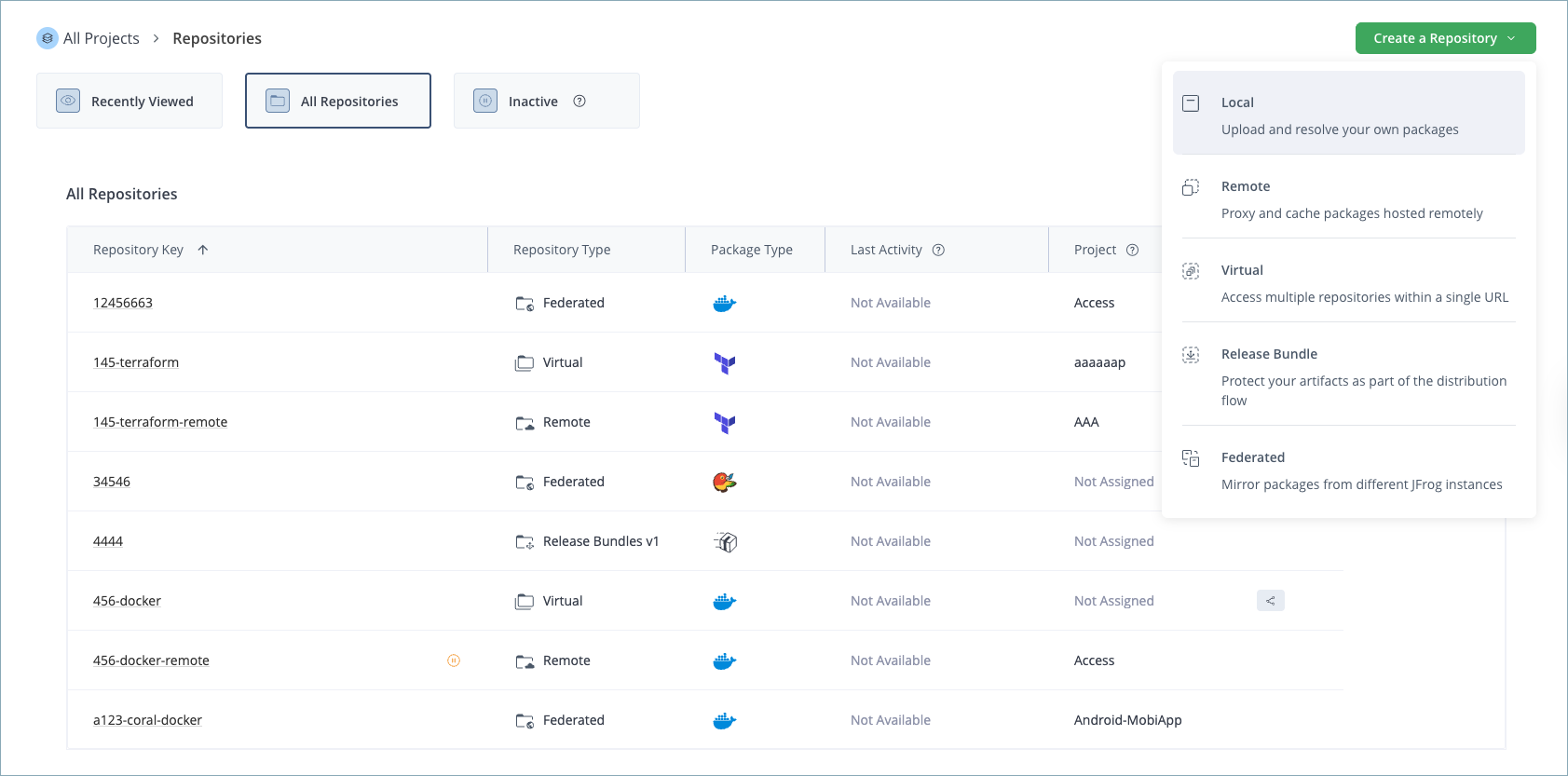
Click Create a Repository and select Local from the list.
-
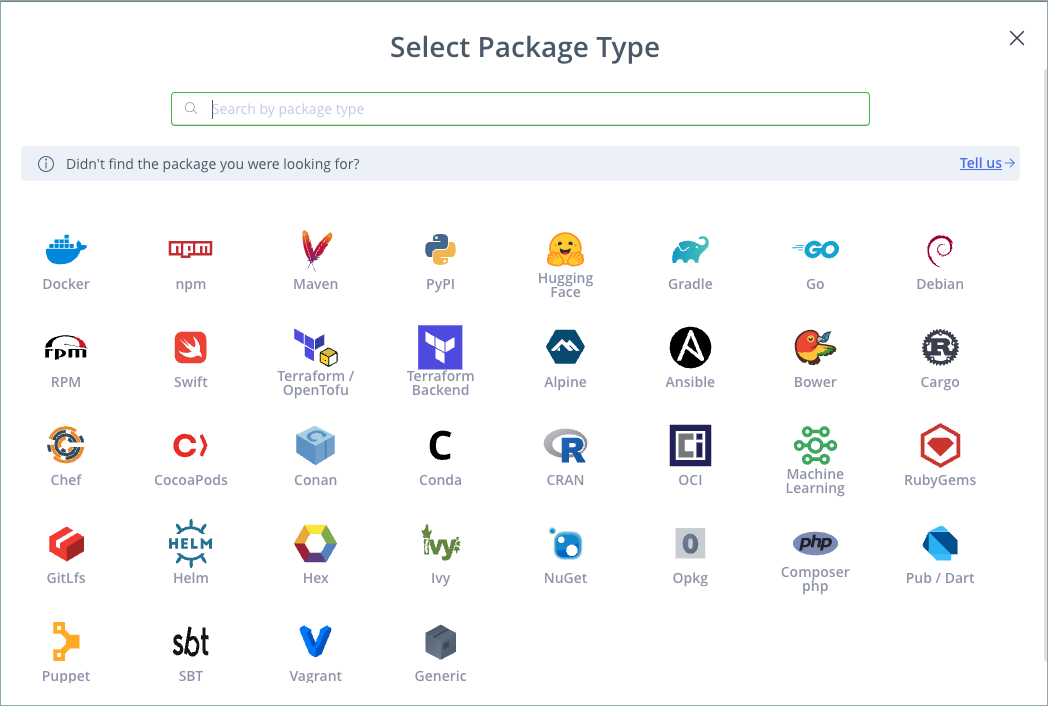
In the Select Package Type window, click the icon for the desired package type.
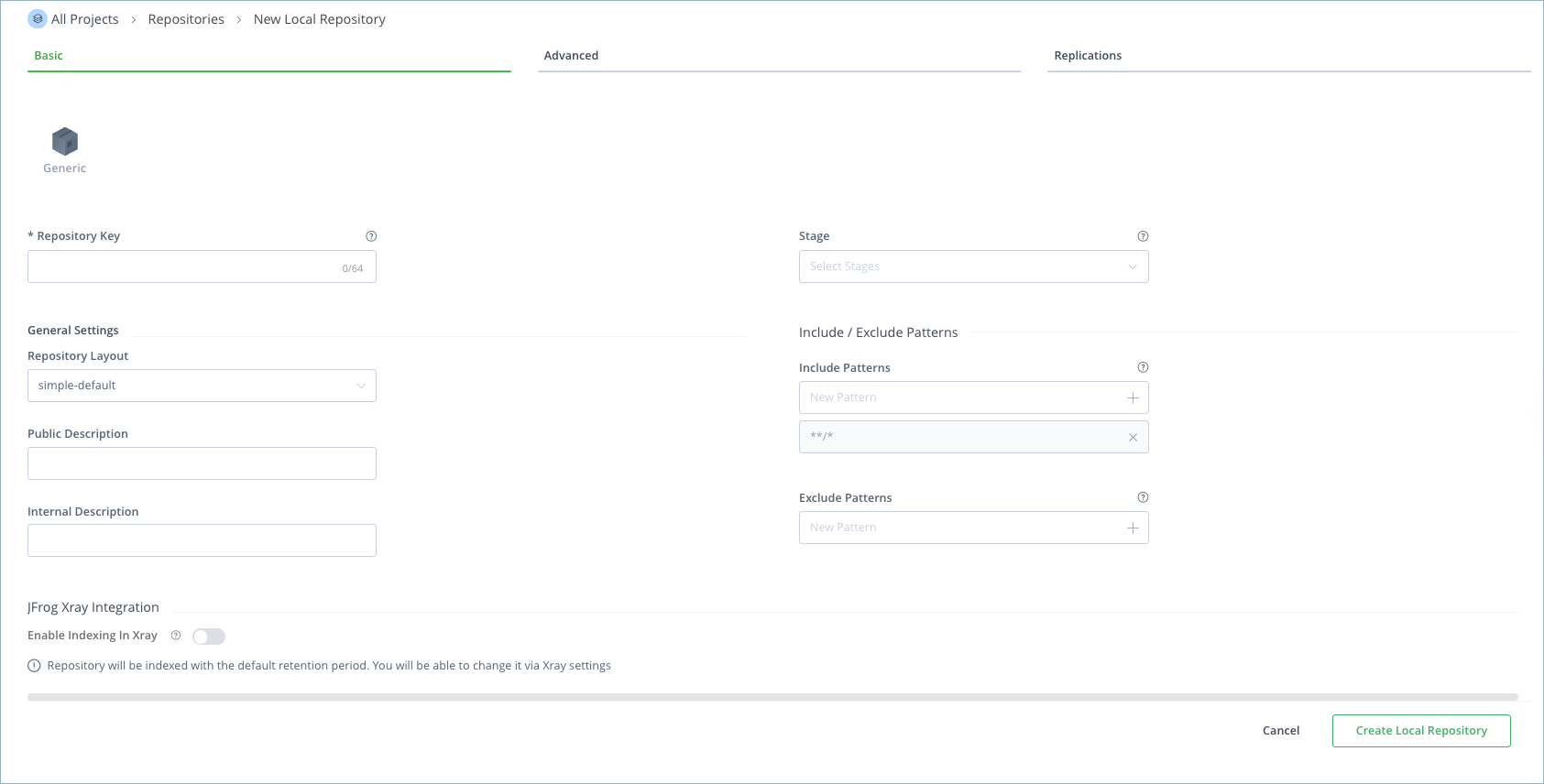
The Basic tab for local repositories is displayed.
-
In the Basic tab, enter the basic settings for the local repository. For details, see Basic Settings for Local Repositories.
-
In the Advanced tab, enter additional advanced settings for the local repository as required. For details, see Advanced Settings for Local Repositories.
-
(Optional) In the Replications tab, select the checkbox to enable event replication and then add the required replications. For more information, see Replications Tab.
-
When finished configuring the repository, click Create Local Repository.
Configure a Local Repository Using the REST API
The Create Repository REST API creates a local repository. For more information, see Create Repository API and Repository Configuration JSON.
Basic Settings for Local Repositories
The following basic settings are common for all package types.
| Setting | Description |
|---|---|
| Package Type | The package type must be specified when the repository is created, and once set, cannot be changed. |
| Repository Key | The repository key is a mandatory, unique identifier for the repository. It cannot begin with a number or contain spaces or special characters. |
| Stage | Defines one or more stages in which this repository will reside. Stages aggregate project resources such as repositories and Pipeline sources to simplify their management. For more information, see Stages & Lifecycle. Note Defining a stage is mandatory when creating a repository within a specific project. The default selection is DEV. |
| Repository Layout | Sets the layout that the repository should use for storing and identifying modules. A recommended layout that corresponds to the package type defined is suggested. |
| Public Description | A free text field that describes the content and purpose of the repository. This description can be viewed by all users with access to the repository. |
| Internal Description | A free text field to add additional notes about the repository. These notes are visible only to the administrator. |
| Include and Exclude Patterns | The Include Patterns and Exclude Patterns fields allow you to filter out specific repositories when resolving the location of different artifacts. In each field, you can specify a list of Ant-like patterns to filter in and filter out artifact queries. Filtering works by subtracting the excluded patterns (default is none) from the included patterns (default is all).
Example: Consider that the Include Patterns and Exclude Patterns for a repository are as follows:
org/apache/maven/parent/1/1.pom and com/acme/project-x/core/1.0/nit-1.0.jar, but not for com/acme/exp-project/core/1.1/san-1.1.jar because com/acme/exp-project/** is specified as an Exclude pattern.
|
Enable Indexing in Xray
JFrog Xray enables repository indexing for security and compliance analysis of the following package types:
- Supported Package Types: Alpine, Bower, Cargo, Composer, Conan, Conda, CRAN, Debian, Docker, Gems, Generic, Go, Gradle, HuggingFace, Ivy, Maven, npm, NuGet, PyPI, RPM, SBT, Terraform BE
- Unsupported Package Types: Chef, CocoaPods, GitLfs, Helm, Opkg, Pub, Puppet, Swift, Terraform, Vagrant
Note
For information about specific settings for particular package types, see Additional Local Repository Settings for Specific Package Types.
Advanced Settings for Local Repositories
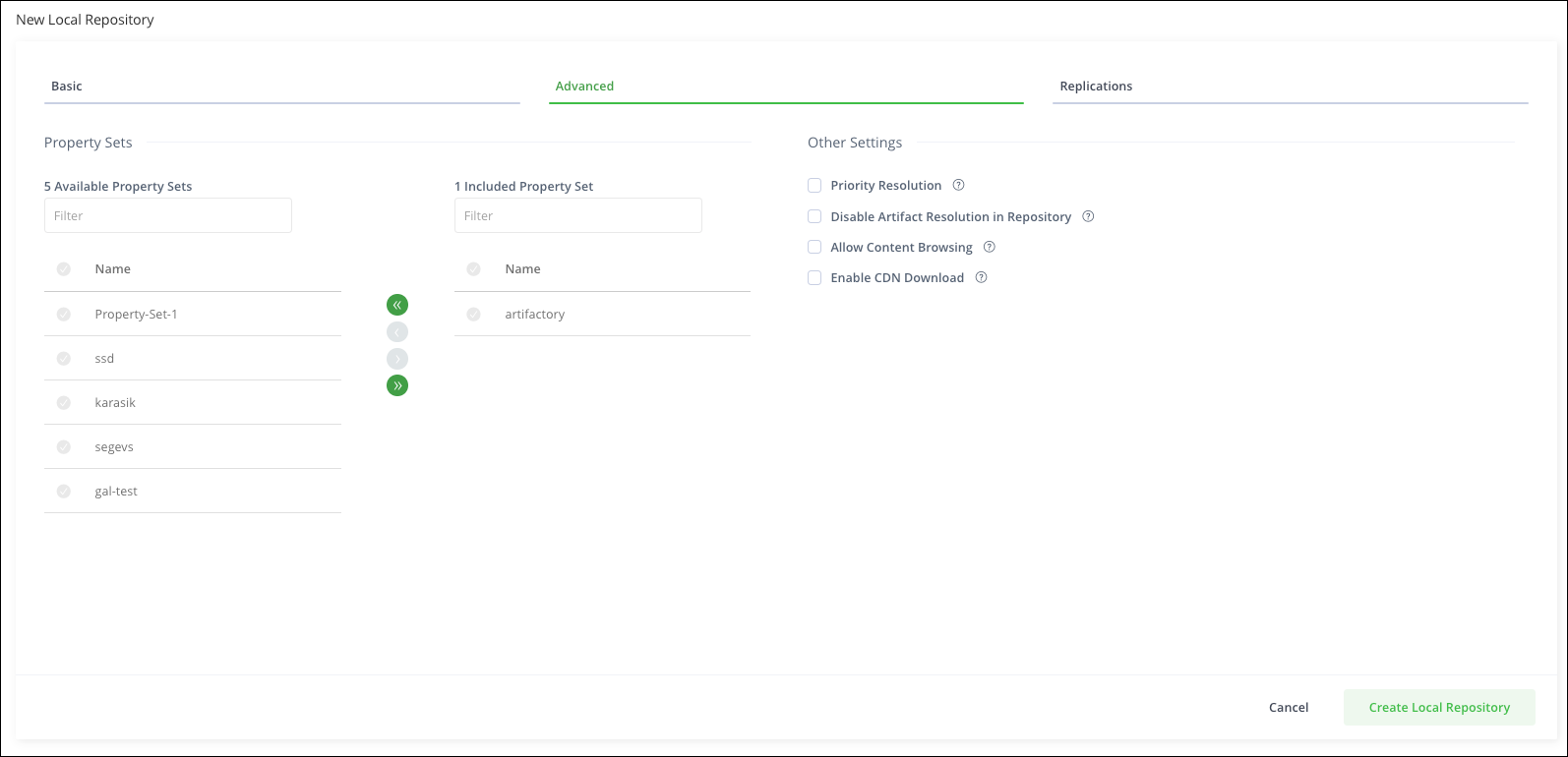
The following advanced settings are common for all package types, with exceptions noted in the field descriptions.
| Field | Description |
|---|---|
| Property Sets | Defines the property sets that will be available for artifacts stored in this repository. For more information, see Property Sets. |
| Priority Resolution | Setting Priority Resolution takes precedence over the resolution order when resolving virtual repositories. Setting repositories with priority will cause metadata to be merged only from repositories set with this field. If a package is not found in those repositories, Artifactory will merge metadata from the repositories that have not been set with the Priority Resolution field. Note The following package types do not support this field: Cargo, Chef, Debian, Git LFS, Ivy, NuGet, Opkg, Pub, Puppet, Swift, Terraform, Vagrant, and HuggingFace ML. For Docker repositories, Priority Resolution requires the |
| Disable Artifact Resolution in Repository | If set, Artifactory ignores this repository when trying to resolve artifacts. The repository is also not available for download or deployment of artifacts. Note The following package types do not support this field: HuggingFace ML, Debian, Terraform, Terraform BE, Chef, Git LFS, Puppet, and Vagrant. |
| Allow Artifact Content Browsing | When set, allows Artifactory users to browse the internal contents of archives (for example, browsing specific Javadoc files from within a Javadoc archive). When archive browsing is allowed, use strict content moderation so that malicious users do not upload content that may compromise security, for example cross-site scripting attacks. |
| Enable CDN Download | When you enable CDN Download, requests to this repository redirect the client to download the files directly from AWS CloudFront. This field is available with Enterprise+ and Enterprise subscriptions. For more information, see JFrog SaaS with Amazon CloudFront CDN. Note: The following package types do not support this field: Alpine, Ansible, Cargo, Chef, CocoaPods, Conda, OCI, Gems, Go, Ivy, NuGet, Opkg, Pub, Puppet, SBT, Swift, Terraform BE, HuggingFace ML, and Machine Learning. |
Note
For information about specific settings for particular package types, see Additional Local Repository Settings for Specific Package Types.
Replications Tab
The Replications tab lets you define and edit replication settings for the repository. For details, refer to Repository Replication.
Additional Local Repository Settings for Specific Package Types
Local repositories may have additional settings depending on the package type, as described in the following topics:
- Additional Settings for Alpine Local Repositories
- Additional Settings for Cargo Local Repositories
- Additional Settings for CocoaPods Local Repositories
- Additional Settings for Conan Local Repositories
- Additional Settings for Debian Local Repositories
- Additional Settings for Docker Local Repositories
- Additional Settings for Hex Local Repositories
- Additional Settings for Maven/Gradle/Ivy/SBT Local Repositories
- Additional Settings for npm Local Repositories
- Additional Settings for NuGet Local Repositories
- Additional Settings for OCI Local Repositories
- Additional Settings for Opkg Local Repositories
- Additional Settings for PHP Composer Local Repositories
- Additional Settings for RPM Local Repositories
- Additional Settings for Terraform Local Repositories
Additional Settings for Alpine Local Repositories
In addition to the basic settings and advanced settings that are common for all local repositories, the following settings are available when configuring Alpine repositories.
| Field | Description |
|---|---|
| Select Key Pair | Select the RSA key pair to use for signing the Alpine Linux index file. |
Additional Settings for Cargo Local Repositories
In addition to the basic settings and advanced settings that are common for all local repositories, the following settings are available when configuring Cargo repositories.
| Field | Description |
|---|---|
| Allow anonymous download and search | The Cargo client does not send credentials when downloading and searching for crates. When this option is selected, anonymous access is allowed to these resources (only). Note: This option overrides the security anonymous access option. |
| Enable sparse index support | When selected, this option enables internal index support based on Cargo sparse index specifications. The legacy Git index is deprecated and no longer supported. For more information, see Index Cargo Repositories Using Sparse Indexing. |
Additional Settings for CocoaPods Local Repositories
In addition to the basic settings and advanced settings that are common for all local repositories, the following settings are available when configuring CocoaPods repositories.
| Field | Description |
|---|---|
| Custom URL Base | [read-only] Displays the hard-coded URL prefix used to calculate relative URLs. |
Additional Settings for Conan Local Repositories
In addition to the basic settings and advanced settings that are common for all local repositories, the following settings are available when configuring Conan repositories.
| Field | Description |
|---|---|
| Force Authentication | When selected, this option requires basic authentication credentials to use this repository. |
Additional Settings for Debian Local Repositories
In addition to the basic settings and advanced settings that are common for all local repositories, the following settings are available when configuring Debian repositories.
| Field | Description |
|---|---|
| Primary Key Name | The name of the GPG primary key used by the repository. |
| Secondary Key Name | The name of the GPG secondary key used by the repository. |
| Trivial Layout | When set, the repository will use the deprecated trivial layout. Warning: Artifactory no longer supports the trivial layout for virtual Debian repositories. |
| Enable indexing with debug symbols (.ddeb) | When set, it enables the indexing of debug symbols for more efficient debugging. |
| Optional Index Compression Formats | Used for selecting the index file formats to create in addition to the default Gzip (.gzip extension) format, which is created for every Debian repository and cannot be disabled. |
Additional Settings for Docker Local Repositories
In addition to the basic settings and advanced settings that are common for all local repositories, the following settings are available when configuring Docker repositories.
| Field | Description |
|---|---|
| API Version | Select the Docker API version to use, V1 or V2. Note: OCI does not support Docker v1. |
| Max Unique Tags | Specifies the maximum number of unique tags, per repository, that should be stored for a Docker image. If the number of tags for an image exceeds this number, older tags will be removed. Leaving the field blank (default) means all tags will be stored. For more information, see Use Max Unique Tags. |
| Docker Tag Retention | Controls how many overwrites of the same tag are saved in Artifactory. Tag overwriting occurs when you upload a new revision of a tag name that already exists in your repository. For more information, see Use Tag Retention. |
| Block pushing of image manifest v2 schema 1 | When set, Artifactory will block the pushing of Docker images with manifest v2 schema 1 to this repository. |
Additional Settings for Hex Local Repositories
In addition to the basic settings and advanced settings that are common for all local repositories, the following setting is available when configuring Hex repositories.
| Field | Description |
|---|---|
| Select Key Pair | Select the RSA key pair to sign and encrypt content for secure communication between Artifactory and the Mix client. |
Additional Settings for Maven/Gradle/Ivy/sbt Local Repositories
In addition to the basic settings and advanced settings that are common for all local repositories, there are settings that are specific to the following package types:
| Field | Description |
|---|---|
| Checksum Policy | The checksum effectively verifies the integrity of a deployed resource. The Checksum Policy determines how Artifactory behaves when a client checksum for a deployed resource is missing or conflicts with the locally calculated checksum. There are two options:
|
| Maven Snapshot Version Behavior | Artifactory supports centralized control of how snapshots are deployed into a repository, regardless of end user-specific settings. This can be used to guarantee a standardized format for deployed snapshots within your organization. There are three options:
|
| Max Unique Snapshots | Specifies the maximum number of unique snapshots of the same artifact that should be stored. Once this number is reached and a new snapshot is uploaded, the oldest stored snapshot is removed automatically. Blank (default) indicates that there is no limit on the number of unique snapshots. |
| Handle Releases | When set, enables you to deploy release artifacts into this repository. |
| Handle Snapshots | When set, enables you to deploy snapshot artifacts into this repository. |
| Suppress POM Consistency | When deploying an artifact to a repository, Artifactory verifies that the value set for If there is a conflict between these then Artifactory will reject the deployment. You can disable this behavior by setting this checkbox. |
Additional Settings for npm Local Repositories
In addition to the basic settings and advanced settings that are common for all local repositories, the following settings are available when configuring npm repositories.
| Field | Description |
|---|---|
| Primary Key Name | The name of the primary key used by the repository. npm repositories use key pairs generated by the elliptic curve implementation of RSA (ECDSA). |
| Secondary Key Name | The name of the secondary key used by the repository. npm repositories use key pairs generated by the elliptic curve implementation of RSA (ECDSA). |
| Enforce strict layout | When selected, Artifactory stores and resolves the packages in this repository by path. Noncompliant uploads are stored but not indexed. For more information, see Enforce Strict Layout on npm Local Repositories. |
Additional Settings for NuGet Local Repositories
In addition to the basic settings and advanced settings that are common for all local repositories, the following settings are available when configuring NuGet repositories.
| Field | Description |
|---|---|
| Max Unique Snapshots | The maximum number of unique snapshots of a single artifact to store. When the number of snapshots exceeds this value, older versions are removed. A value of 0 (default) indicates there is no limit, and unique snapshots are not cleaned up. |
| Force Authentication | When selected, this option requires basic authentication credentials to use this repository. |
| Enforce Layout | When selected, the repository will not allow duplicate package versions according to the NuGet version normalization rules. This ensures your NuGet repositories align with the NuGet upstream registry. |
Additional Settings for OCI Local Repositories
In addition to the basic settings and advanced settings that are common for all local repositories, the following settings are available when configuring OCI repositories.
| Field | Description |
|---|---|
| Max Unique Tags | Specifies the maximum number of unique tags, per repository, that should be stored for an OCI image. Once the number of tags for an image exceeds this number, older tags will be removed. Leaving the field blank (default) means all tags will be stored. For more information, see Use Max Unique Tags. |
| OCI Tag Retention | Specifies the number of tags that the JFrog Platform will retain when they are overwritten. Leaving the field at 1 (default) means that overwritten tags will not be saved. For more information, see Use Tag Retention. |
Additional Settings for Opkg Local Repositories
In addition to the basic settings and advanced settings that are common for all local repositories, the following settings are available when configuring Opkg repositories.
| Field | Description |
|---|---|
| Primary Key Name | The name of the GPG primary key used by the repository. |
| Secondary Key Name | The name of the GPG secondary key used by the repository. |
Additional Settings for PHP Composer Local Repositories
In addition to the basic settings and advanced settings that are common for all local repositories, the following settings are available when configuring PHP Composer repositories.
| Field | Description |
|---|---|
| Enable Composer V1 Indexing | When selected, uses Composer V1 indexing on the repository. Note From Artifactory 7.24.1, all local PHP repositories are created automatically using PHP Composer V2, which supports faster download times and enhanced performance. |
Additional Settings for RPM Local Repositories
In addition to the basic settings and advanced settings that are common for all local repositories, the following settings are available when configuring RPM repositories.
| Field | Description |
|---|---|
| Primary Key Name | The name of the GPG primary key used by the repository. |
| Secondary Key Name | The name of the GPG secondary key used by the repository. |
| RPM Metadata Folder Depth | Informs Artifactory under which level of directory to search for RPMs and save the By default this value is 0 and refers to the repository's root folder. In this case, Artifactory searches the entire repository for RPMs and saves the Using a different depth is useful in cases where generating metadata for a repository separates its artifacts by name, version and architecture. This will allow you to create multiple RPM repositories under the same Artifactory RPM repository. For example: If the repository layout is similar to the following and you want to generate RPM metadata for every artifact divided by name, set the
Note: When you change the configured depth of an existing repository, packages indexed in the old depth might need to be re-indexed or moved to a new depth to be available at the new configured depth, and YUM clients might need to change their configuration to point to the new depth. |
| Auto Calculate RPM Metadata | When set, RPM metadata calculation is automatically triggered by the actions described by the RPM Metadata Folder Depth setting. |
| Enable File List Indexing | When set, RPM metadata calculation will also include indexing the filelists.xml metadata file. |
| RPM Group File Names | A comma-separated list of YUM group files associated with your RPM packages. At each level, or depth, the |
Additional Settings for Terraform Local Repositories
In addition to the basic settings and advanced settings that are common for all local repositories, the following settings are available when configuring Terraform repositories.
| Field | Description |
|---|---|
| Terraform Registry Type | Select one of the following Terraform repository layouts:
|
Frequently Asked Questions
This section provides answers to frequently asked questions.
FAQs
Q: How do I configure a local repository in Artifactory?
A: In the Administration module, go to Repositories, click Create a Repository, and select Local. Then set the package type, complete the Basic and Advanced tabs, and click Create Local Repository. For the full procedure, see Configure a Local Repository.
Q: What happens if I try to change the package type after I create a local repository?
A: The package type must be specified when the repository is created, and once set, it cannot be changed. For field details, see Basic Settings for Local Repositories.
Q: What is the difference between include patterns and exclude patterns on a local repository?
A: Include Patterns and Exclude Patterns filter artifact queries using Ant-like patterns. Filtering subtracts the excluded patterns from the included patterns, so artifacts that match an exclude pattern are not resolved from that repository. For examples, see Basic Settings for Local Repositories.
Q: What do I need before I create a local repository in a project?
A: You must define a stage when you create a repository within a specific project. The default selection is DEV. For field details, see Basic Settings for Local Repositories.
Q: Can I replicate a local repository to another Artifactory instance?
A: Use the Replications tab to enable event replication and add the required replications. Combined Include Patterns and Exclude Patterns must stay under about 1,500 characters, or Artifactory blocks the replication create or update. For details, see Replications Tab.
Related Topics
Updated about 1 month ago