

Configure Workers for Custom Flows
This page provides step-by-step instructions for creating and configuring Workers through the JFrog Platform UI. For a complete reference of all supported event types with descriptions and code sample links, see Worker Event Types.
Configure Workers in the UI
The following sections provide information on how to configure workers through the UI and their related Code Samples.
Configure Event Driven Workers
This section outlines the event-driven workers you can create in the JFrog Platform. For a full list of supported event types with descriptions, see Worker Event Types.
Configure Event Driven Workers for Artifactory
This topic provides a step-by-step instruction to configure a custom event-driven Worker for Artifactory. Event-driven Workers are a powerful tool that allows you to automate actions in response to specific events occurring within your Artifactory environment.
Prerequisite
Before starting the configuration, ensure that you have selected the desired project for which you want to apply the worker.
To configure an event driven worker for Artifactory, follow these steps:
Step 1: Navigate to the Workers Configuration
-
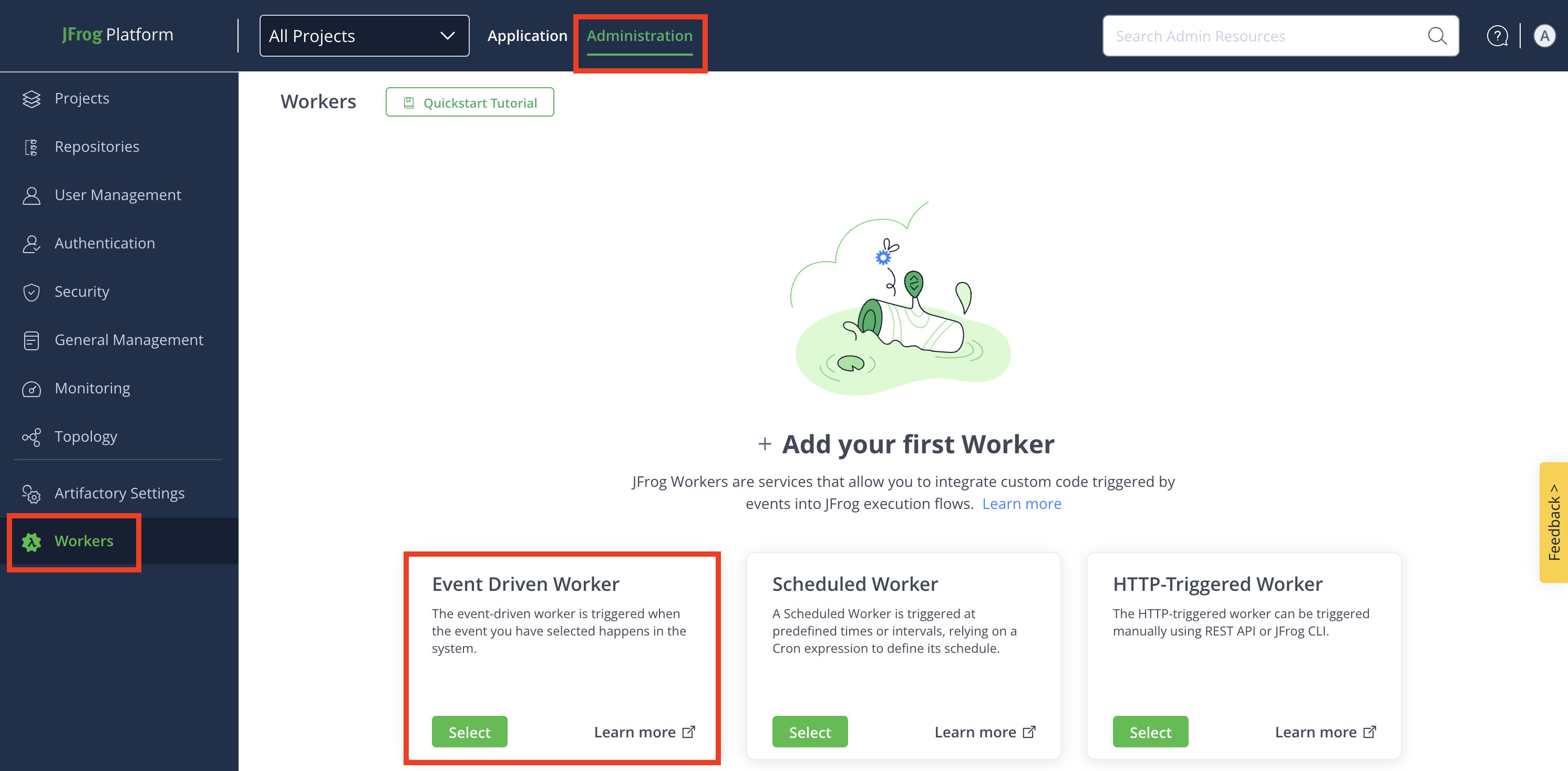
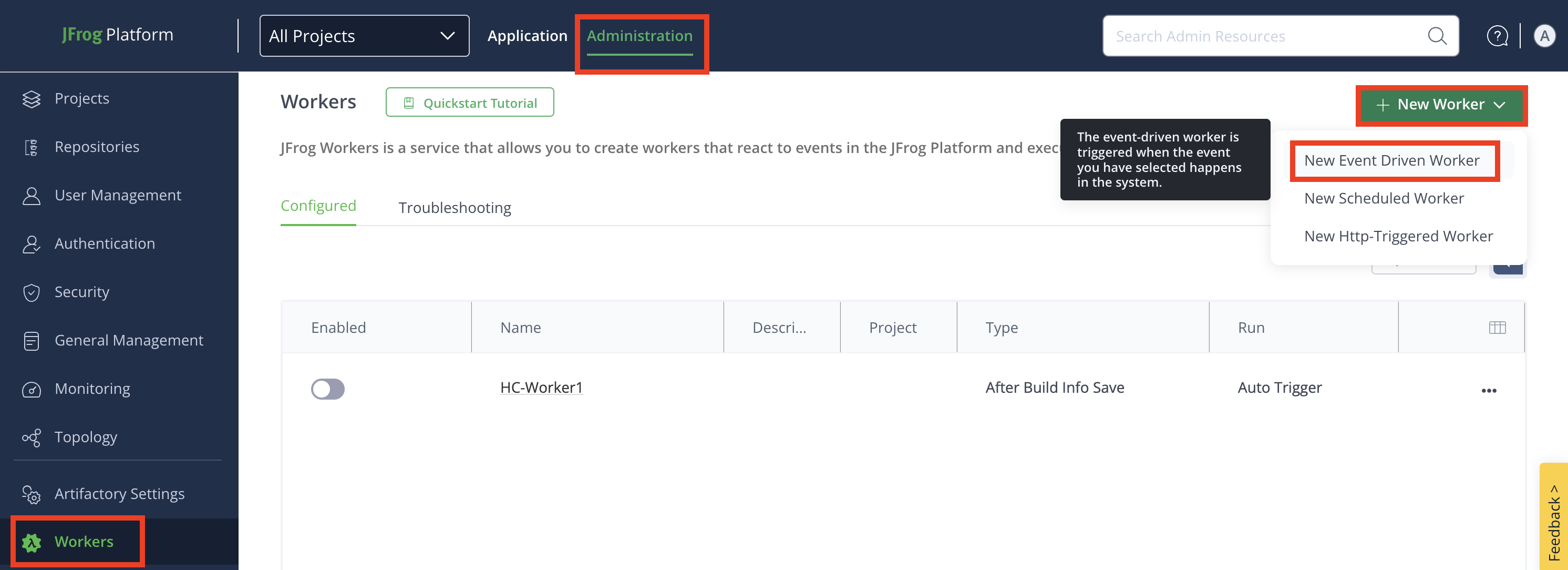
Navigate to the Administration module and click Workers.
-
+ Add your first Worker: If you are creating a worker for the first time, click the Select button in the Event Driven Worker tile.
-
+ Add Additional Worker: To create more Workers after the first one, click + New Worker, and then click New Event Driven Worker.
-
-
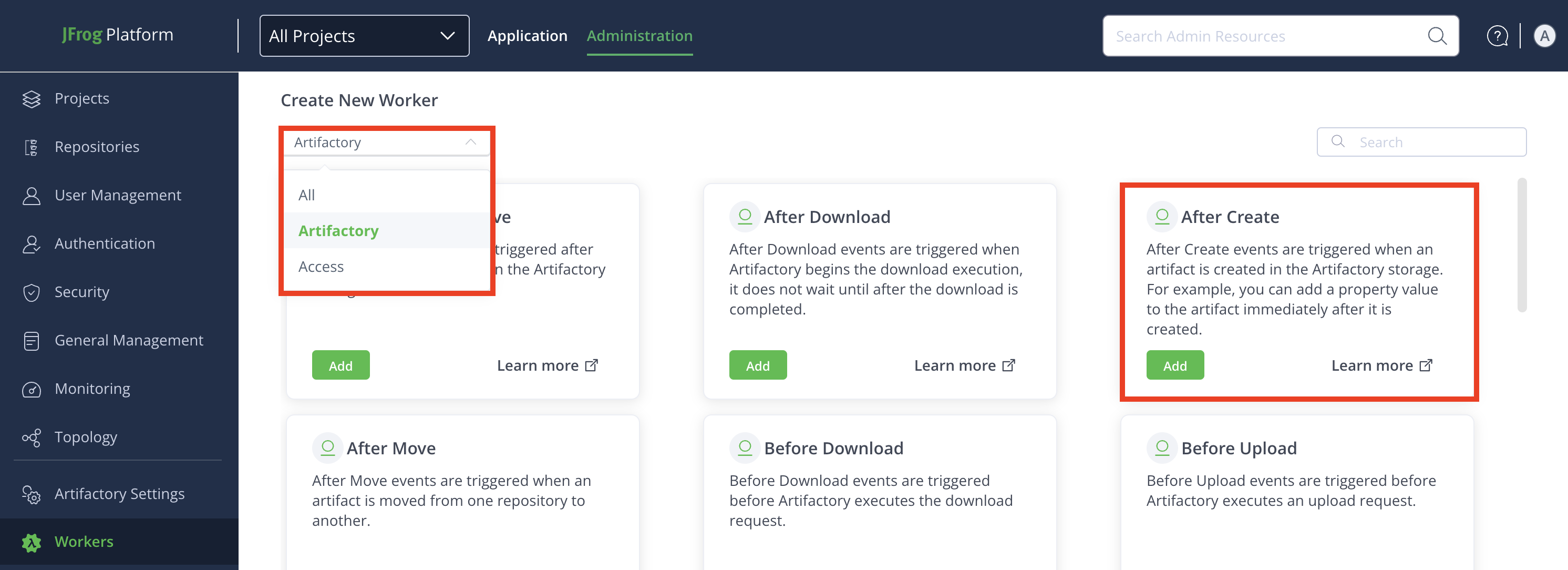
From the Create New Worker drop-down, click Artifactory to see available Artifactory Workers.
-
Locate the desired Artifactory Worker, and then click Add.
-
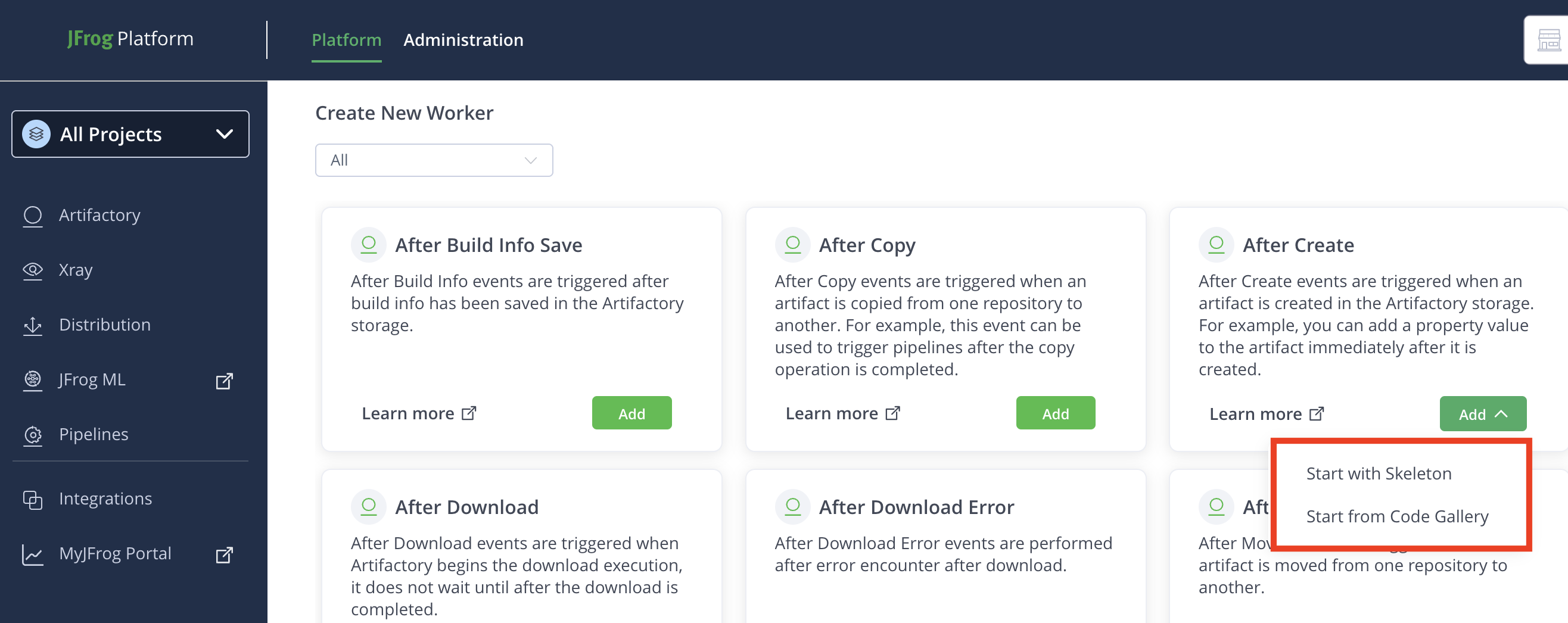
(Optional): Some Workers have a code gallery of ready-made code samples, Worker script examples that you can use to inspire and accelerate your work. To use code samples, select Start with Code Gallery from the drop-down menu. Select a code sample from the list and click Apply: the code sample will appear in the Script field in the Worker menu, and you can edit it there.
Note
The code gallery samples are for reference only, aimed to accelerate your development work using real-world examples.
To use an empty, 'Hello-world' example, select Start with Skeleton.
Step 2: Configure Worker Fields
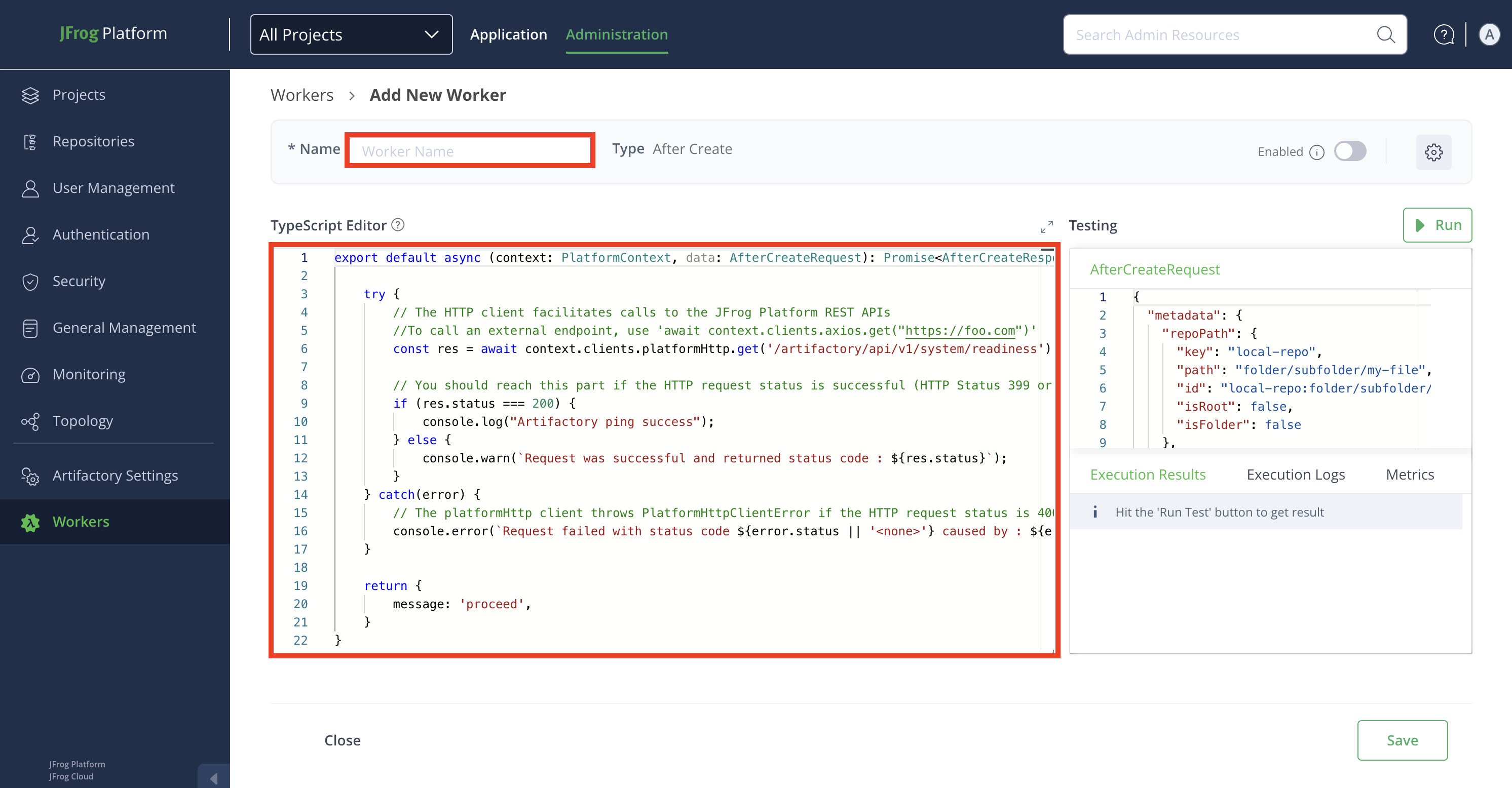
In the Add New Worker window, enter the details in the relevant fields:
- Name: Enter a descriptive name for the worker.
- Script: Enter or modify the script in the TypeScript Editor. Use the auto-complete function for improved efficiency while coding.
Worker Settings
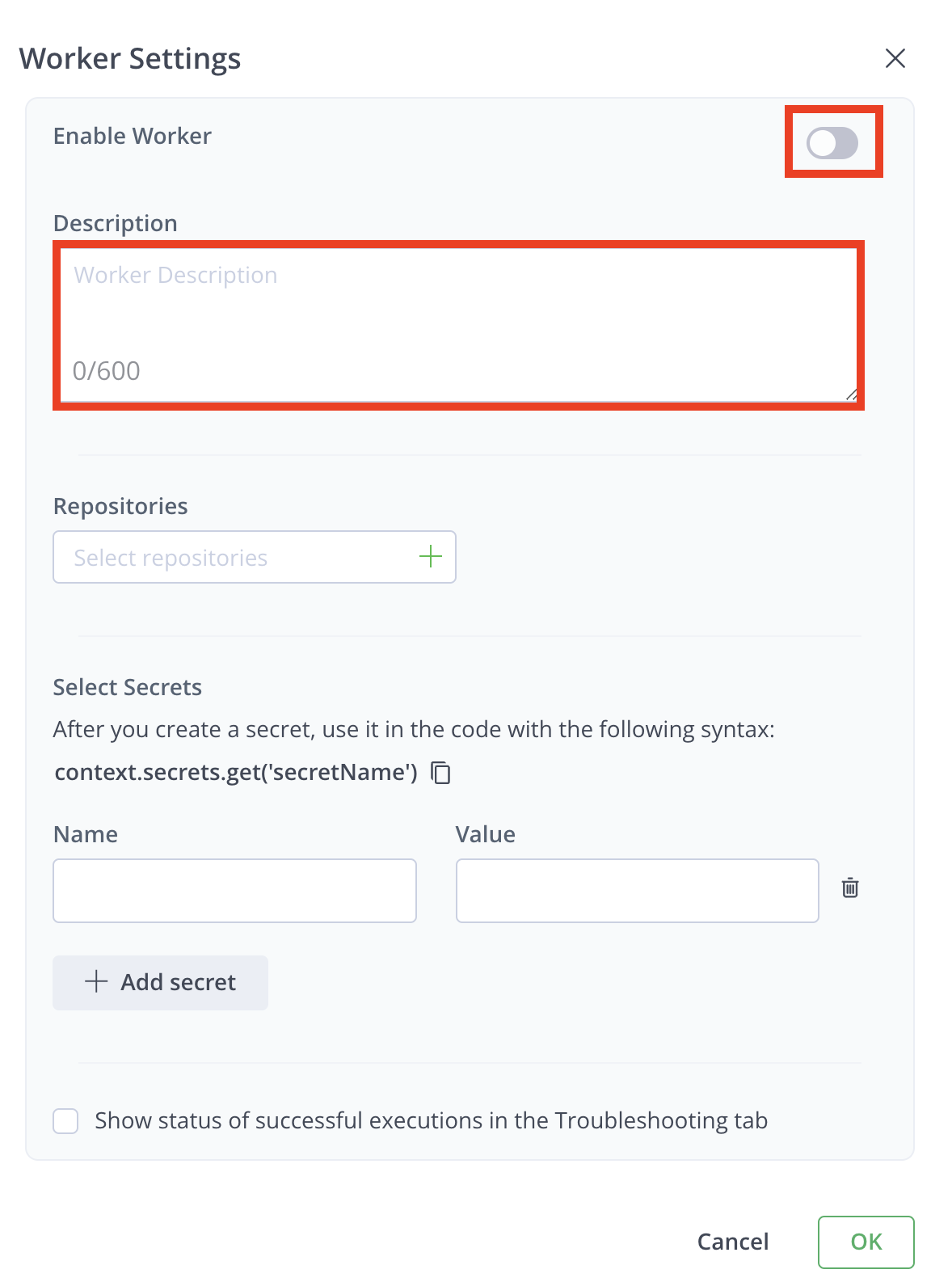
Click the Settings icon from the top-right corner of the window, and then enter the details in the relevant fields:

- Enable Worker: Enable the worker in the Worker Settings modal by clicking the toggle button.
Note
The worker can also be enabled later from the Add New Worker window or Configured window. Repositories must be selected to enable the worker. Once enabled, the worker triggers when a predefined event occurs.
-
Description: Enter a brief description of the worker.
-
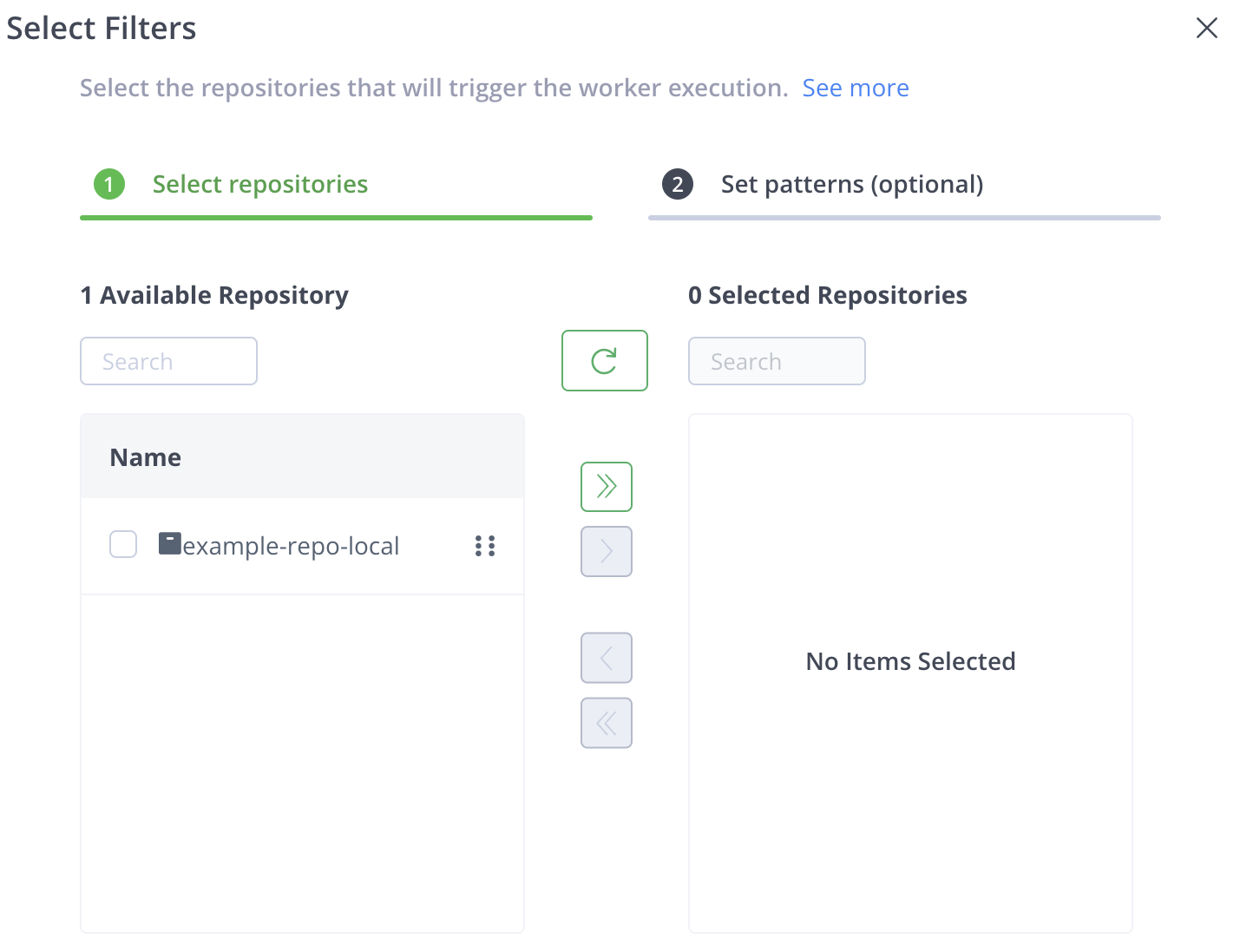
Repositories: Click the + icon in the Repositories field.
Note
When creating a Worker within a project, you can select only repositories that are directly within the project, and not ones that are shared with the project.
You can either:
-
Select Repositories: Move selected repositories from the Available Repositories list.
-
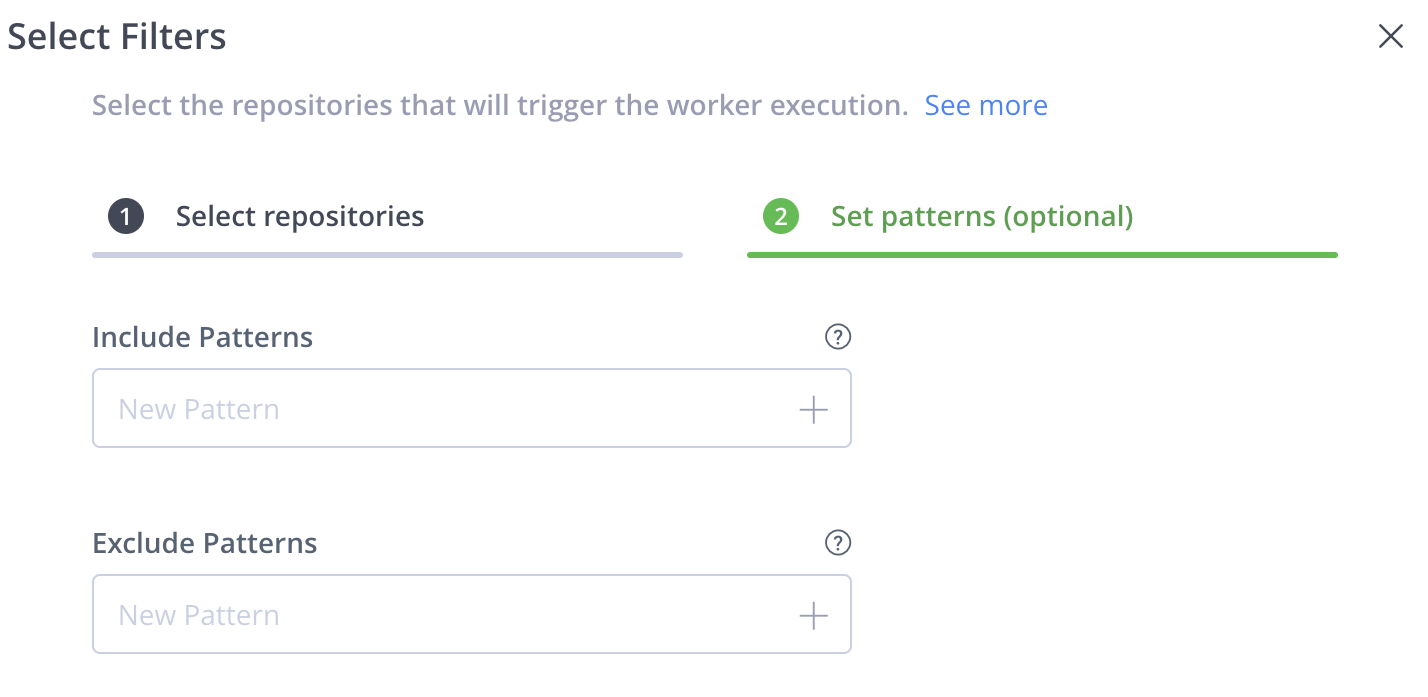
Set Patterns: Use wildcards (for example, , *, ?) to define patterns for repository selection.
Example Patterns:
com/t?st.zip- Matchescom/test.zip,com/tast.zip, etc.com/*.zip- Matches all.zipfiles in the com directory.com/**/test.zip- Matches alltest.zipfiles in subdirectories ofcom.
You can add multiple patterns to the filter. After you enter a pattern, click + to add that pattern to the filter.
Note
For more information, see AntPathMatcher Documentation.
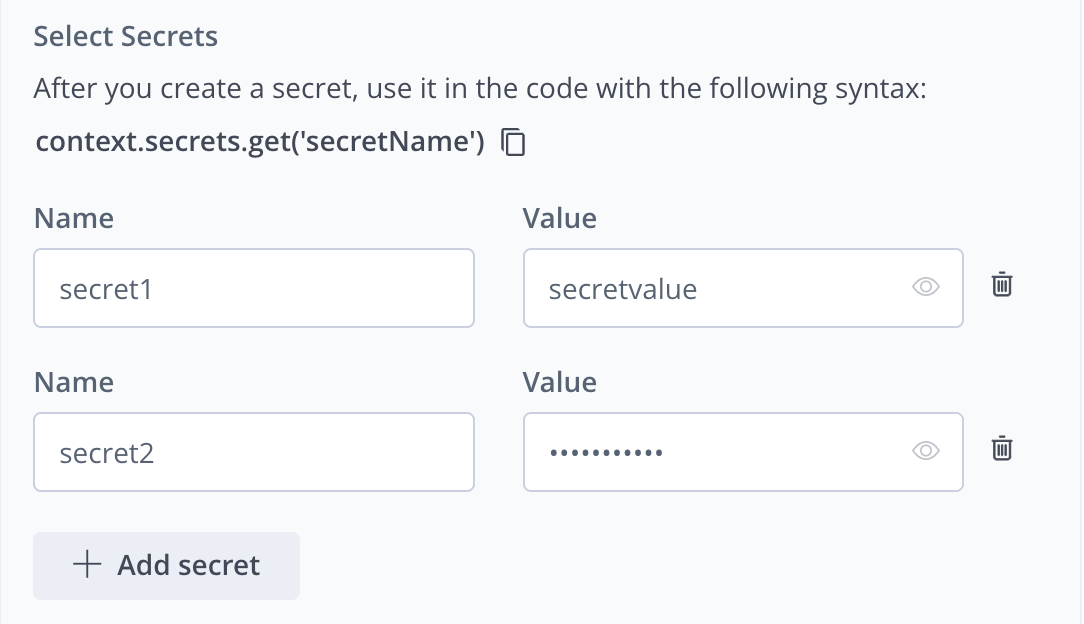
- Select Secrets: Secrets are stored securely and not in plain text. The secret's clear-text value is never returned in an API or UI and will be masked from all the logs.
To add a secret:
- Enter the Name and Value of the secret.
- Click + Add secret to add more secrets.
- Click Delete icon to remove any secret.
Note
Use secrets in your code with the syntax:
context.secrets.get('secretName').
-
Enable Debugging: Click the checkbox for Show Status of Successful Executions in the Troubleshooting tab to view successful execution results. By default, only unsuccessful executions are shown.
-
Click OK when done.
Step 3: Testing pane
Edit the JSON payload used to simulate the worker's events.
Click Run to test the worker.
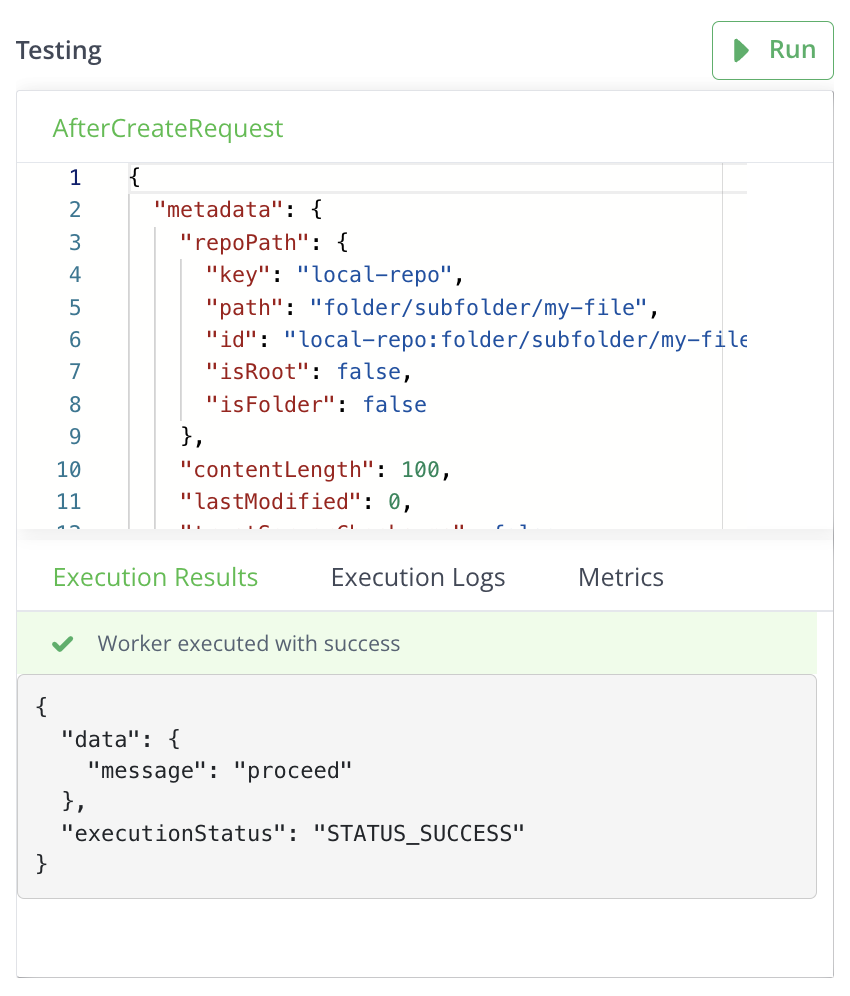
Review results in:
- Execution Results tab: for responses
- Execution Logs tab: for logs
- Metrics tab: for run time, memory, and CPU utilization details.
Step 4: Save Your Configuration
- Click Save to finalize the worker configuration.
- To cancel the configuration, click Close, and then click Discard to discard changes.
Related Information
Artifactory Workers Code Samples
The following sections provide code samples for workers. For event descriptions, see Worker Event Types.
After Build Info Save Worker Code Sample
The following section provides a sample code for After Build Info Save worker.
export default async (
  context: PlatformContext,
  data: AfterBuildInfoSaveRequest
): Promise<AfterBuildInfoSaveResponse> => {
  try {
    // The HTTP client facilitates calls to the JFrog Platform REST APIs
    //To call an external endpoint, use 'await context.clients.axios.get("https://foo.com")'
    const res = await context.clients.platformHttp.get(
      "/artifactory/api/v1/system/readiness"
    );

    // You should reach this part if the HTTP request status is successful (HTTP Status 399 or lower)
    if (res.status === 200) {
      console.log("Artifactory ping success");
    } else {
      console.warn(
        `Request was successful and returned status code : ${res.status}`
      );
    }
  } catch (error) {
    // The platformHttp client throws PlatformHttpClientError if the HTTP request status is 400 or higher
    console.error(
      `Request failed with status code ${
        error.status || "<none>"
      } caused by : ${error.message}`
    );
  }

  return {
    message: "proceed",
    executionStatus: Status.STATUS_SUCCESS,
  };
};
Input Parameters
context
Provides baseUrl, token, and clients to communicate with the JFrog Platform (for more information, see PlatformContext).
data
The request with upload details sent by Artifactory.
{
  "build": {
    "name": "buildName",  // The name of the build, used for identification.
    "number": "buildNumber",  // A unique identifier for this build instance.
    "started": "startDate",  // The date and time when the build process started.
    "buildAgent": "buildAgent",  // The name of the build agent that executed the build.
    "agent": "agent",  // Another identifier for the build agent.
    "durationMillis": 1000,  // Total time taken for the build in milliseconds.
    "principal": "principal",  // The user responsible for initiating the build.
    "artifactoryPrincipal": "artifactoryPrincipal",  // User associated with artifact storage.
    "url": "url",  // A link to the build details or logs.
    "parentName": "parentName",  // Name of the parent build, if applicable.
    "parentNumber": "parentNumber",  // Unique identifier for the parent build.
    "buildRepo": "buildRepo",  // Repository where the source code for the build is stored.
    "modules": [  // List of modules included in this build.
      {
        "id": "module1",  // Unique identifier for the module.
        "artifacts": [  // Collection of artifacts produced by the module.
          {
            "name": "name",  // Name of the artifact (output file/package).
            "type": "type",  // Type/category of the artifact (e.g., jar, zip).
            "remotePath": "remotePath",  // Path where the artifact is stored remotely.
            "properties": "prop2"  // Other metadata related to the artifact.
          }
        ],
        "dependencies": [  // List of dependencies required by the module.
          {
            "id": "id",  // Unique identifier for the dependency.
            "scopes": "scopes",  // Scopes in which the dependency is used (e.g., compile, runtime).
            "requestedBy": "requestedBy"  // Identifies who requested the dependency.
          }
        ]
      }
    ],
    "releaseStatus": "releaseStatus",  // Current status of the build in terms of release readiness.
    "promotionStatuses": [  // History of promotional statuses for this build.
      {
        "status": "status",  // Current status of the promotion process (e.g., promoted, rejected).
        "comment": "comment",  // Remarks associated with the promotional status.
        "repository": "repository",  // Repository related to the promotional status.
        "timestamp": "timestamp",  // Date and time when the promotional status was recorded.
        "user": "user",  // User who made the promotional change.
        "ciUser": "ciUser"  // User under which the CI process ran during promotion.
      }
    ]
  }
}
Response
{
 "message": "proceed" // Message to print to the log, in case of an error, it will be printed as a warning
}- message : This is a mandatory field.
After Copy Worker Code Sample
The following section provides a sample code for an After Copy worker.
export default async (
  context: PlatformContext,
  data: AfterCopyRequest
): Promise<AfterCopyResponse> => {
  try {
    // The HTTP client facilitates calls to the JFrog Platform REST APIs
    //To call an external endpoint, use 'await context.clients.axios.get("https://foo.com")'
    const res = await context.clients.platformHttp.get(
      "/artifactory/api/v1/system/readiness"
    );

    // You should reach this part if the HTTP request status is successful (HTTP Status 399 or lower)
    if (res.status === 200) {
      console.log("Artifactory ping success");
    } else {
      console.warn(
        `Request was successful and returned status code : ${res.status}`
      );
    }
  } catch (error) {
    // The platformHttp client throws PlatformHttpClientError if the HTTP request status is 400 or higher
    console.error(
      `Request failed with status code ${
        error.status || "<none>"
      } caused by : ${error.message}`
    );
  }

  return {
    message: "proceed",
  };
};
Input Parameters
context
Provides baseUrl, token, and clients to communicate with the JFrog Platform (for more information, see PlatformContext).
data
The request with copy details sent by Artifactory.
For Artifactory Versions before 7.122
{
  "metadata": {  // Metadata information about the repository and file
    "repoPath": {  // Path information for the repository
      "key": "local-repo",  // The key or identifier for the local repository
      "path": "folder/subfolder/my-file",  // The location of the file within the repository
      "id": "local-repo:folder/subfolder/my-file",  // Unique identifier combining repo key and path
      "isRoot": false,  // Indicates whether this path is the root of the repository (true/false)
      "isFolder": false  // Indicates whether this is a folder (true) or a file (false)
    },
    "contentLength": 100,  // Length of the content in bytes
    "lastModified": 0,  // Timestamp of the last modification (0 means not modified)
    "trustServerChecksums": false,  // Indicates whether server checksums are trusted (true/false)
    "servletContextUrl": "servlet.com",  // URL context for servlet, useful for API interactions
    "skipJarIndexing": false,  // Flag to skip indexing for JAR files (true/false)
    "disableRedirect": false,  // Flag to disable HTTP redirects (true/false)
    "repoType": 1  // Numeric identifier for the type of repository (1 typically denotes a local repository)
  },
  "targetRepoPath": {  // Destination path information for the target repository
    "key": "target-repo",  // The key or identifier for the target repository
    "path": "new_folder/my-file",  // The desired location of the file in the target repository
    "id": "target-repo:new_folder/my-file",  // Unique identifier for the target path
    "isRoot": false,  // Indicates whether this path is the root of the repository (true/false)
    "isFolder": false  // Indicates whether this is a folder (true) or a file (false)
  },
  "properties": {  // Custom properties associated with the file
    "prop1": {  // A custom property named "prop1"
      "value": [  // An array of values for this property
        "value1",  // First value for prop1
        "value2"   // Second value for prop1
      ]
    },
    "size": {  // Custom property representing the size of the file
      "value": "50Gb"  // The size value for this property
    },
    "shaResolution": {  // Custom property for hash resolution
      "value": "sha256"  // Specifies the SHA algorithm used (e.g., sha256)
    }
  },
  "userContext": {  // Contextual information about the user making the request
    "id": "id",  // Unique identifier for the user
    "isToken": false,  // Indicates if the user is authenticated via a token (true/false)
    "realm": "realm"  // The realm in which the user is authenticated (used for authorization)
  }
}
For Artifactory Versions from 7.122
{
  "metadata": {  // Metadata information about the repository and file
    "repoPath": {  // Path information for the repository
      "key": "local-repo",  // The key or identifier for the local repository
      "path": "folder/subfolder/my-file",  // The location of the file within the repository
      "id": "local-repo:folder/subfolder/my-file",  // Unique identifier combining repo key and path
      "isRoot": false,  // Indicates whether this path is the root of the repository (true/false)
      "isFolder": false  // Indicates whether this is a folder (true) or a file (false)
    },
    "lastModified": 0,  // Timestamp of the last modification (0 means not modified)
    "repoType": 1  // Numeric identifier for the type of repository (1 typically denotes a local repository)
  },
  "targetRepoPath": {  // Destination path information for the target repository
    "key": "target-repo",  // The key or identifier for the target repository
    "path": "new_folder/my-file",  // The desired location of the file in the target repository
    "id": "target-repo:new_folder/my-file",  // Unique identifier for the target path
    "isRoot": false,  // Indicates whether this path is the root of the repository (true/false)
    "isFolder": false  // Indicates whether this is a folder (true) or a file (false)
  },
  "properties": {  // Custom properties associated with the file
    "prop1": {  // A custom property named "prop1"
      "value": [  // An array of values for this property
        "value1",  // First value for prop1
        "value2"   // Second value for prop1
      ]
    },
    "size": {  // Custom property representing the size of the file
      "value": "50Gb"  // The size value for this property
    },
    "shaResolution": {  // Custom property for hash resolution
      "value": "sha256"  // Specifies the SHA algorithm used (e.g., sha256)
    }
  },
  "userContext": {  // Contextual information about the user making the request
    "id": "id",  // Unique identifier for the user
    "isToken": false,  // Indicates if the user is authenticated via a token (true/false)
    "realm": "realm"  // The realm in which the user is authenticated (used for authorization)
  }
}
Response
{
 "message": "proceed" // Message to print to the log, in case of an error, it will be printed as a warning
}
message : This is a mandatory field.
After Create Property Worker Code Sample
The following section provides a sample code for an After Create Property worker.
export default async (
  context: PlatformContext,
  data: AfterPropertyCreateRequest
): Promise<AfterPropertyCreateResponse> => {
  try {
    // The HTTP client facilitates calls to the JFrog Platform REST APIs
    //To call an external endpoint, use 'await context.clients.axios.get("https://foo.com")'
    const res = await context.clients.platformHttp.get(
      "/artifactory/api/v1/system/readiness"
    );

    // You should reach this part if the HTTP request status is successful (HTTP Status 399 or lower)
    if (res.status === 200) {
      console.log("Artifactory ping success");
    } else {
      console.warn(
        `Request was successful and returned status code : ${res.status}`
      );
    }
  } catch (error) {
    // The platformHttp client throws PlatformHttpClientError if the HTTP request status is 400 or higher
    console.error(
      `Request failed with status code ${
        error.status || "<none>"
      } caused by : ${error.message}`
    );
  }

  return {
    message: "proceed",
  };
};
Input Parameters
context
Provides baseUrl, token, and clients to communicate with the JFrog Platform (for more information, see PlatformContext).
data
The request with the created property details sent by Artifactory.
For Artifactory Versions before 7.122
{
  "metadata": {
    "repoPath": {  // Object containing information about the repository path
      "key": "local-repo",  // Unique key identifier for the repository
      "path": "folder/subfolder/my-file",  // Path to the file/folder in the repository
      "id": "local-repo:folder/subfolder/my-file",  // Unique identifier combining repo key and path
      "isRoot": false,  // Indicates if the path is a root directory
      "isFolder": false  // Indicates if the path is a folder
    },
    "contentLength": 100,  // Length of the content in bytes
    "lastModified": 0,  // Timestamp of the last modification (0 indicates no modification)
    "trustServerChecksums": false,  // Indicates whether server checksums should be trusted
    "servletContextUrl": "servlet.com",  // URL for the servlet context
    "skipJarIndexing": false,  // Indicates whether to skip indexing for JAR files
    "disableRedirect": false,  // Indicates whether HTTP redirects should be disabled
    "repoType": 1  // Numeric identifier for the type of repository (1 typically denotes a local repository)
  },
  "headers": {
    "Content-Type": {  // Content-Type header for the request
      "value": [
        "text/plain"  // Indicates that the content type is plain text
      ]
    },
    "Accept": {  // Accept header for the request
      "value": [
        "application/json"  // Indicates that the expected response format is JSON
      ]
    }
  },
  "userContext": {  // Object containing user context information
    "id": "id",  // Unique identifier for the user
    "isToken": false,  // Indicates if the user is authenticated via a token
    "realm": "realm"  // Realm for user authentication context
  }
}
For Artifactory Versions from 7.122
{
  "metadata": {  // Object containing metadata about the artifact
    "repoPath": {  // Information about the repository path for the artifact
      "key": "local-repo",  // Unique identifier for the repository
      "path": "folder/subfolder/my-file",  // Path to the specific file within the repository
      "id": "local-repo:folder/subfolder/my-file",  // Unique identifier combining the repository key and path
      "isRoot": false,  // Indicates if the path is a root directory (false means it is nested)
      "isFolder": false  // Indicates if the path is a folder (false means it is a file)
    },
    "lastModified": 0,  // Timestamp of the last modification (0 means not modified)
    "repoType": 1  // Numeric identifier for the type of repository (1 typically denotes a local repository)
 },
 "userContext": {  // Context information about the user making the request
    "id": "id",  // Unique identifier for the user
    "isToken": false,  // Indicates if the user is authenticated using a token
    "realm": "realm"  // Realm for user authentication context
  },
  "itemInfo": {  // Object containing information about the specific item (artifact)
    "repoPath": {  // Repository path information for the item
      "key": "local-repo",  // Unique key identifier for the repository
      "path": "folder/subfolder/my-file",  // Path to the specific item within the repository
      "id": "local-repo:folder/subfolder/my-file",  // Unique identifier combining the repository key and path
      "isRoot": false,  // Indicates if the path is a root directory (false means it is nested)
      "isFolder": false  // Indicates if the path is a folder (false means it is a file)
    },
    "name": "my-artifact",  // Name of the item (artifact)
    "created": 1,  // Timestamp indicating when the item was created (assumed to be Unix timestamp)
    "lastModified": 0  // Timestamp of the last modification (0 indicates no modification)
  },
  "name": "property-name",  // Name of the property being set or modified
  "values": [  // Array of values associated with the property
    "value1",  // First value of the property
    "value2"   // Second value of the property
  ]
}
Response
{
 "message": "proceed" // Message to print to the log, in case of an error, it will be printed as a warning
}
message : This is a mandatory field.
After Create Worker Code Sample
The following section provides a sample code for a After Create worker.
export default async (
  context: PlatformContext,
  data: AfterCreateRequest
): Promise<AfterCreateResponse> => {
  try {
    // The HTTP client facilitates calls to the JFrog Platform REST APIs
    //To call an external endpoint, use 'await context.clients.axios.get("https://foo.com")'
    const res = await context.clients.platformHttp.get(
      "/artifactory/api/v1/system/readiness"
    );

    // You should reach this part if the HTTP request status is successful (HTTP Status 399 or lower)
    if (res.status === 200) {
      console.log("Artifactory ping success");
    } else {
      console.warn(
        `Request was successful and returned status code : ${res.status}`
      );
    }
  } catch (error) {
    // The platformHttp client throws PlatformHttpClientError if the HTTP request status is 400 or higher
    console.error(
      `Request failed with status code ${
        error.status || "<none>"
      } caused by : ${error.message}`
    );
  }

  return {
    message: "proceed",
  };
};
Input Parameters
context
Provides baseUrl, token, and clients to communicate with the JFrog Platform (for more information, see PlatformContext).
data
The request with upload details sent by Artifactory.
{
 "metadata": { // Various immutable upload metadata
   "repoPath": { // The repository path object of the request
     "key": "key", // The repository key
     "path": "path", // The path itself
     "id": "key:path", // The key:path combination
     "isRoot": false, // Is the path the root?
     "isFolder": false // Is the path a folder?
   },
   "contentLength": 0, // The deploy request content length
   "lastModified": 1, // Last modification time that occurred
   "trustServerChecksums": false, // Is the request trusting the server checksums?
   "servletContextUrl": "base", // The URL that points to Artifactory
   "skipJarIndexing": false, // Is it a request that skips jar indexing?
   "disableRedirect": false, // Is redirect disabled on this request?
   "repoType": 1 // Repository type
 },
 "headers": { // The immutable request headers
   "key": {
     "value": []
   }
 },
 "userContext": { // The user context which sends the request
   "id": "id", // The username or subject
   "isToken": false, // Is the context an access token?
   "realm": "realm" // The realm of the user
 },
 "artifactProperties": {  // The properties of the request
   "key": {
     "value": []
   }
 }
}
Response
{
 "message": "proceed" // Message to print to the log, in case of an error, it will be printed as a warning
}
message : This is a mandatory field.
After Delete Property Worker Code Sample
The following section provides a sample code for an After Delete Property worker.
export default async (
  context: PlatformContext,
  data: AfterPropertyDeleteRequest
): Promise<AfterPropertyDeleteResponse> => {
  try {
    // The in-browser HTTP client facilitates making calls to the JFrog REST APIs
    //To call an external endpoint, use 'await context.clients.axios.get("https://foo.com")'
    const res = await context.clients.platformHttp.get(
      "/artifactory/api/v1/system/readiness"
    );

    // You should reach this part if the HTTP request status is successful (HTTP Status 399 or lower)
    if (res.status === 200) {
      console.log("Artifactory ping success");
    } else {
      console.warn(
        `Request was successful and returned status code : ${res.status}`
      );
    }
  } catch (error) {
    // The platformHttp client throws PlatformHttpClientError if the HTTP request status is 400 or higher
    console.error(
      `Request failed with status code ${
        error.status || "<none>"
      } caused by : ${error.message}`
    );
  }

  return {
    message: "proceed",
  };
};
Input Parameters
context
Provides baseUrl, token, and clients to communicate with the JFrog Platform (for more information, see PlatformContext).
data
The request with delete property details sent by Artifactory.
For Artifactory Versions before 7.123
{
  "metadata": {  // Object containing metadata information about the artifact
    "repoPath": {  // Information about the repository path for the artifact
      "key": "local-repo",  // Unique key identifier for the repository
      "path": "folder/subfolder/my-file",  // Path to the file within the repository
      "id": "local-repo:folder/subfolder/my-file",  // Unique identifier combining the repo key and path
      "isRoot": false,  // Indicates if the path is a root directory (false means it is not)
      "isFolder": false  // Indicates if the path is a folder (false means it is a file)
    },
    "contentLength": 100,  // Length of the content in bytes
    "lastModified": 0,  // Timestamp of the last modification (0 indicates no modification)
    "trustServerChecksums": false,  // Indicates whether server checksums should be trusted
    "servletContextUrl": "https://jpd.jfrog.io/artifactory",  // URL for the servlet context
    "skipJarIndexing": false,  // Indicates whether to skip indexing for JAR files
    "disableRedirect": false,  // Indicates whether HTTP redirects should be disabled
    "repoType": 1  // Numeric type identifier for the repository (e.g., local, remote, virtual)
  },
  "userContext": {  // Object containing information about the user context
    "id": "id",  // Unique identifier for the user
    "isToken": false,  // Indicates if the user is authenticated via a token
    "realm": "realm"  // Realm for user authentication context
  },
  "itemInfo": {  // Object containing information about the item (artifact)
    "repoPath": {  // Information about the repository path of the item
      "key": "local-repo",  // Unique key identifier for the repository
      "path": "folder/subfolder/my-file",  // Path to the file within the repository
      "id": "local-repo:folder/subfolder/my-file",  // Unique identifier combining the repo key and path
      "isRoot": false,  // Indicates if the path is a root directory (false means it is not)
      "isFolder": false  // Indicates if the path is a folder (false means it is a file)
    },
    "name": "my-artifact",  // Name of the artifact
    "created": 1,  // Timestamp of when the artifact was created (assuming Unix timestamp)
    "lastModified": 0  // Timestamp of the last modification (0 indicates no modification)
  },
  "name": "property-name"  // Name of a specific property associated with the artifact
}
For Artifactory Versions from 7.123
{
  "metadata": {  // Object containing metadata information about the artifact
    "repoPath": {  // Information about the repository path for the artifact
      "key": "local-repo",  // Unique key identifier for the repository
      "path": "folder/subfolder/my-file",  // Path to the file within the repository
      "id": "local-repo:folder/subfolder/my-file",  // Unique identifier combining the repo key and path
      "isRoot": false,  // Indicates if the path is a root directory (false means it is not)
      "isFolder": false  // Indicates if the path is a folder (false means it is a file)
    },
    "lastModified": 0,  // Timestamp of the last modification (0 indicates no modification)
    "repoType": 1  // Numeric type identifier for the repository (e.g., local, remote, virtual)
  },
  "userContext": {  // Object containing information about the user context
    "id": "id",  // Unique identifier for the user
    "isToken": false,  // Indicates if the user is authenticated via a token
    "realm": "realm"  // Realm for user authentication context
  },
  "itemInfo": {  // Object containing information about the item (artifact)
    "repoPath": {  // Information about the repository path of the item
      "key": "local-repo",  // Unique key identifier for the repository
      "path": "folder/subfolder/my-file",  // Path to the file within the repository
      "id": "local-repo:folder/subfolder/my-file",  // Unique identifier combining the repo key and path
      "isRoot": false,  // Indicates if the path is a root directory (false means it is not)
      "isFolder": false  // Indicates if the path is a folder (false means it is a file)
    },
    "name": "my-artifact",  // Name of the artifact
    "created": 1,  // Timestamp of when the artifact was created (assuming Unix timestamp)
    "lastModified": 0  // Timestamp of the last modification (0 indicates no modification)
  },
  "name": "property-name"  // Name of a specific property associated with the artifact
}
Response
{
 "message": "proceed" // Message to print to the log, in case of an error, it will be printed as a warning
}
message : This is a mandatory field.
After Delete Worker Code Sample
The following section provides a sample code for an After Delete worker.
export default async (
  context: PlatformContext,
  data: AfterDeleteRequest
): Promise<AfterDeleteResponse> => {
  try {
    // The HTTP client facilitates calls to the JFrog Platform REST APIs
    //To call an external endpoint, use 'await context.clients.axios.get("https://foo.com")'
    const res = await context.clients.platformHttp.get(
      "/artifactory/api/v1/system/readiness"
    );

    // You should reach this part if the HTTP request status is successful (HTTP Status 399 or lower)
    if (res.status === 200) {
      console.log("Artifactory ping success");
    } else {
      console.warn(
        `Request was successful and returned status code : ${res.status}`
      );
    }
  } catch (error) {
    // The platformHttp client throws PlatformHttpClientError if the HTTP request status is 400 or higher
    console.error(
      `Request failed with status code ${
        error.status || "<none>"
      } caused by : ${error.message}`
    );
  }

  return {
    message: "proceed",
  };
};
Input Parameters
context
Provides baseUrl, token, and clients to communicate with the JFrog Platform (for more information, see PlatformContext).
data
The request with deleted details sent by Artifactory.
For Artifactory Versions before 7.122
{
  "metadata": {  // Object containing metadata about the artifact
    "repoPath": {  // Information about the repository path for the artifact
      "key": "local-repo",  // Unique identifier for the repository
      "path": "folder/subfolder/my-file",  // Path to the specific file within the repository
      "id": "local-repo:folder/subfolder/my-file",  // Unique identifier combining the repository key and path
      "isRoot": false,  // Indicates if the path is a root directory (false means it is nested)
      "isFolder": false  // Indicates if the path is a folder (false means it is a file)
    },
    "contentLength": 100,  // Length of the content in bytes
    "lastModified": 0,  // Timestamp of the last modification (0 indicates it has not been modified)
    "trustServerChecksums": false,  // Indicates whether server checksums should be trusted
    "servletContextUrl": "servlet.com",  // URL of the servlet context for accessing the artifact
    "skipJarIndexing": false,  // Indicates whether to skip indexing for JAR files
    "disableRedirect": false,  // Indicates whether HTTP redirects should be disabled
    "repoType": 1  // Numeric identifier representing the repository type (e.g., local, remote, virtual)
  },
  "headers": {  // HTTP headers for the request
    "Content-Type": {  // Content-Type header to specify the type of content being sent
      "value": [  // Array of values for the Content-Type header
        "text/plain"  // Indicates that the content type is plain text
      ]
    },
    "Accept": {  // Accept header to specify the expected response format
      "value": [  // Array of values for the Accept header
        "application/json"  // Indicates that the expected response format is JSON
      ]
    }
  },
  "userContext": {  // Context information about the user making the request
    "id": "id",  // Unique identifier for the user
    "isToken": false,  // Indicates if the user is authenticated using a token
    "realm": "realm"  // Realm for user authentication context
  }
}
For Artifactory Versions from 7.122
{
  "metadata": {  // Object containing metadata about the artifact
    "repoPath": {  // Information about the repository path for the artifact
      "key": "local-repo",  // Unique identifier for the repository
      "path": "folder/subfolder/my-file",  // Path to the specific file within the repository
      "id": "local-repo:folder/subfolder/my-file",  // Unique identifier combining the repository key and path
      "isRoot": false,  // Indicates if the path is a root directory (false means it is nested)
      "isFolder": false  // Indicates if the path is a folder (false means it is a file)
    },
    "repoType": 1,  // Numeric identifier representing the type of repository (1 typically denotes a local repository)
    "triggerMetadataCalculation": false,  // Indicates whether metadata calculation should be triggered (false means it does not)
    "allowAsyncDelete": false,  // Indicates if asynchronous deletion of the artifact is allowed (false means it is not)
    "skipTrashcan": false,  // Indicates if the deletion should skip the trashcan (false means it will go to the trashcan)
    "isTriggeredByGc": false,  // Indicates if the deletion was triggered by garbage collection (false means it was not)
    "triggeredByMove": false  // Indicates if the action was triggered by moving the artifact (false means it was not)
 },
 "userContext": {  // Context information about the user making the request
    "id": "id",  // Unique identifier for the user
    "isToken": false,  // Indicates if the user is authenticated using a token
    "realm": "realm"  // Realm for user authentication context
  },
  "itemInfo": {  // Object containing information about the specific item (artifact)
    "repoPath": {  // Repository path information for the item
      "key": "local-repo",  // Unique key identifier for the repository
      "path": "folder/subfolder/my-file",  // Path to the specific item within the repository
      "id": "local-repo:folder/subfolder/my-file",  // Unique identifier combining the repository key and path
      "isRoot": false,  // Indicates if the path is a root directory (false means it is nested)
      "isFolder": false  // Indicates if the path is a folder (false means it is a file)
    },
    "name": "my-artifact",  // Name of the item (artifact)
    "created": 1,  // Timestamp indicating when the item was created (assumed to be Unix timestamp)
    "lastModified": 0  // Timestamp of the last modification (0 indicates no modification)
  }
}
Response
{
 "message": "proceed" // Message to print to the log, in case of an error, it will be printed as a warning
}
message : This is a mandatory field.
After Download Worker Code Sample
The following section provides a sample code for an After Download worker.
export default async (
  context: PlatformContext,
  data: AfterDownloadRequest
): Promise<AfterDownloadResponse> => {
  try {
    // The in-browser HTTP client facilitates making calls to the JFrog REST APIs
    //To call an external endpoint, use 'await context.clients.axios.get("https://foo.com")'
    const res = await context.clients.platformHttp.get(
      "/artifactory/api/v1/system/readiness"
    );

    // You should reach this part if the HTTP request status is successful (HTTP Status 399 or lower)
    if (res.status === 200) {
      console.log("Artifactory ping success");
    } else {
      console.warn(
        `Request was successful and returned status code : ${res.status}`
      );
    }
  } catch (error) {
    // The platformHttp client throws PlatformHttpClientError if the HTTP request status is 400 or higher
    console.error(
      `Request failed with status code ${
        error.status || "<none>"
      } caused by : ${error.message}`
    );
  }

  return {
    message: "proceed",
  };
};
Input Parameters
context
Provides baseUrl, token, and clients to communicate with the JFrog Platform (for more information, see PlatformContext).
data
The request with download details sent by Artifactory.
{
 "metadata": { // Various immutable download metadata
   "repoPath": { // The repository path object of the request
     "key": "key", // The repository key
     "path": "path", // The path itself
     "id": "key:path", // The key:path combination
     "isRoot": false, // Is the path the root?
     "isFolder": false  // Is the path a folder?
   },
   "originalRepoPath": { // The original repository path if a virtual repository is involved
     "key": "key",
     "path": "path",
     "id": "key:path",
     "isRoot": false,
     "isFolder": false
   },
   "name": "name", // The file name from path
   "headOnly": false, // Is it a head request?
   "checksum": false, // Is it a checksum request?
   "recursive": false, // Is it a recursive request?
   "modificationTime": 0, // When a modification has occurred
   "directoryRequest": false, // Is it a directory request
   "metadata": false, // Is it a metadata request?
   "lastModified": 1, // Last modification time that occurred
   "ifModifiedSince": 0, // If a modification happened since the last modification time
   "servletContextUrl": "base", // The URL that points to artifactory
   "uri": "jfrog.com", // The request URI
   "clientAddress": "localhost", // The client address
   "zipResourcePath": "", // The resource path of the requested zip
   "zipResourceRequest": false, // Is the request a zip resource request?
   "replaceHeadRequestWithGet": false, // Should the head request be replaced with GET?
   "repoType": 1 // Repository type
 },
 "headers": { // The immutable request headers
   "key": {
     "value": []
   }
 },
 "userContext": { // The user context that sends the request
   "id": "id", // The username or subject
   "isToken": false, // Is the context an accessToken?
   "realm": "realm" // The realm of the user
 }
}
Response
{
 "message": "proceed" // Message to print to the log, in case of an error, it will be printed as a warning
}
message : This is a mandatory field.
After Move Worker Code Sample
The following section provides a sample code for an After Move worker.
export default async (
  context: PlatformContext,
  data: AfterMoveRequest
): Promise<AfterMoveResponse> => {
  try {
    // The in-browser HTTP client facilitates making calls to the JFrog REST APIs
    //To call an external endpoint, use 'await context.clients.axios.get("https://foo.com")'
    const res = await context.clients.platformHttp.get(
      "/artifactory/api/v1/system/readiness"
    );

    // You should reach this part if the HTTP request status is successful (HTTP Status 399 or lower)
    if (res.status === 200) {
      console.log("Artifactory ping success");
    } else {
      console.warn(
        `Request was successful and returned status code : ${res.status}`
      );
    }
  } catch (error) {
    // The platformHttp client throws PlatformHttpClientError if the HTTP request status is 400 or higher
    console.error(
      `Request failed with status code ${
        error.status || "<none>"
      } caused by : ${error.message}`
    );
  }

  return {
    message: "proceed",
  };
};
Input Parameters
context
Provides baseUrl, token, and clients to communicate with the JFrog Platform (for more information, see PlatformContext).
data
The request with upload details sent by Artifactory.
For Artifactory Versions before 7.122
{
  "metadata": {  // Object containing metadata information about the artifact
    "repoPath": {  // Information about the current repository path for the artifact
      "key": "local-repo",  // Unique key identifier for the repository
      "path": "folder/subfolder/my-file",  // Path to the specific file within the repository
      "id": "local-repo:folder/subfolder/my-file",  // Unique identifier combining the repository key and path
      "isRoot": false,  // Indicates if the path is a root directory (false means it is nested)
      "isFolder": false  // Indicates if the path is a folder (false means it is a file)
    },
    "contentLength": 100,  // Length of the content in bytes
    "lastModified": 0,  // Timestamp of the last modification (0 indicates the file has not been modified)
    "trustServerChecksums": false,  // Indicates whether to trust server checksums for validation
    "servletContextUrl": "https://jpd.jfrog.io/artifactory",  // URL for accessing the servlet context
    "skipJarIndexing": false,  // Indicates whether to skip indexing for JAR files
    "disableRedirect": false,  // Indicates whether HTTP redirects should be disabled
    "repoType": 1  // Numeric identifier representing the type of repository (e.g., local, remote, virtual)
  },
  "targetRepoPath": {  // Object containing information about the target repository path for the artifact
    "key": "target-repo",  // Unique key identifier for the target repository
    "path": "new_folder/my-file",  // Path to the specific file in the target repository
    "id": "target-repo:new_folder/my-file",  // Unique identifier for the target path combining its repository key
    "isRoot": false,  // Indicates if the target path is a root directory (false means it is not)
    "isFolder": false  // Indicates if the target path is a folder (false means it is a file)
  },
  "artifactProperties": {  // Object containing properties associated with the artifact
    "prop1": {  // Custom property name
      "value": [  // Array of values associated with the property
        "value1",  // First value of the property
        "value2"   // Second value of the property
      ]
    }
  },
  "userContext": {  // Object containing context information about the user making the request
    "id": "id",  // Unique identifier for the user
    "isToken": false,  // Indicates if the user is authenticated via a token (false means they are not)
    "realm": "realm"  // Realm for user authentication context
  }
}
For Artifactory Versions from 7.122
{
  "metadata": {  // Object containing metadata information about the artifact
    "repoPath": {  // Information about the current repository path for the artifact
      "key": "local-repo",  // Unique key identifier for the repository
      "path": "folder/subfolder/my-file",  // Path to the specific file within the repository
      "id": "local-repo:folder/subfolder/my-file",  // Unique identifier combining the repository key and path
      "isRoot": false,  // Indicates if the path is a root directory (false means it is nested)
      "isFolder": false  // Indicates if the path is a folder (false means it is a file)
    },
    "lastModified": 0,  // Timestamp of the last modification (0 indicates the file has not been modified)
    "repoType": 1  // Numeric identifier representing the type of repository (e.g., local, remote, virtual)
  },
  "targetRepoPath": {  // Object containing information about the target repository path for the artifact
    "key": "target-repo",  // Unique key identifier for the target repository
    "path": "new_folder/my-file",  // Path to the specific file in the target repository
    "id": "target-repo:new_folder/my-file",  // Unique identifier for the target path combining its repository key
    "isRoot": false,  // Indicates if the target path is a root directory (false means it is not)
    "isFolder": false  // Indicates if the target path is a folder (false means it is a file)
  },
  "artifactProperties": {  // Object containing properties associated with the artifact
    "prop1": {  // Custom property name
      "value": [  // Array of values associated with the property
        "value1",  // First value of the property
        "value2"   // Second value of the property
      ]
    }
  },
  "userContext": {  // Object containing context information about the user making the request
    "id": "id",  // Unique identifier for the user
    "isToken": false,  // Indicates if the user is authenticated via a token (false means they are not)
    "realm": "realm"  // Realm for user authentication context
  }
}
Response
{
 "message": "proceed" // Message to print to the log, in case of an error, it will be printed as a warning
}
message : This is a mandatory field.
After Remote Download Worker Code Sample
The following section provides a sample code for an After Remote Download worker.
export default async (
  context: PlatformContext,
  data: AfterRemoteDownloadRequest
): Promise<AfterRemoteDownloadResponse> => {
  try {
    // The in-browser HTTP client facilitates making calls to the JFrog REST APIs
    //To call an external endpoint, use 'await context.clients.axios.get("https://foo.com")'
    const res = await context.clients.platformHttp.get(
      "/artifactory/api/v1/system/readiness"
    );

    // You should reach this part if the HTTP request status is successful (HTTP Status 399 or lower)
    if (res.status === 200) {
      console.log("Artifactory ping success");
    } else {
      console.warn(
        `Request is successful but returned status other than 200. Status code : ${res.status}`
      );
    }
  } catch (error) {
    // The platformHttp client throws PlatformHttpClientError if the HTTP request status is 400 or higher
    console.error(
      `Request failed with status code ${
        error.status || "<none>"
      } caused by : ${error.message}`
    );
  }

  return {
    message: "proceed",
  };
};
Input Parameters
context
Provides baseUrl, token, and clients to communicate with the JFrog Platform (for more information, see PlatformContext).
data
The request with download details sent by Artifactory.
{
  "metadata": {  // Object containing metadata about the artifact
    "repoPath": {  // Current repository path information for the artifact
      "key": "local-repo",  // Unique key identifier for the repository
      "path": "folder/subfolder/my-file",  // Path to the specific file within the repository
      "id": "local-repo:folder/subfolder/my-file",  // Unique identifier combining the repository key and path
      "isRoot": false,  // Indicates if the path is a root directory (false means it is nested)
      "isFolder": false  // Indicates if the path is a folder (false means it is a file)
    },
    "originalRepoPath": {  // Original path of the artifact before any modifications
      "key": "local-repo",  // Unique key identifier for the original repository
      "path": "old/folder/subfolder/my-file",  // Path to the artifact's previous location
      "id": "local-repo:old/folder/subfolder/my-file",  // Unique identifier for the original path
      "isRoot": false,  // Indicates if the original path is a root directory (false means it is nested)
      "isFolder": false  // Indicates if the original path is a folder (false means it is a file)
    },
    "name": "my-file",  // Name of the artifact being referenced
    "headOnly": false,  // Indicates if only the header should be processed (false means body is included)
    "checksum": false,  // Indicates whether a checksum of the file should be calculated
    "recursive": false,  // Indicates if the operation should be performed recursively (false means it is not)
    "modificationTime": 0,  // Timestamp of the last modification (0 indicates no modification)
    "directoryRequest": false,  // Indicates if the request is for a directory (false means for a file)
    "metadata": false,  // Indicates if metadata should be included in the request (false means it is not)
    "lastModified": 1,  // Timestamp of the last modification (assuming it is in Unix time format)
    "ifModifiedSince": 0,  // Timestamp to check if the file has been modified since (0 means no check)
    "servletContextUrl": "https://jpd.jfrog.io/artifactory",  // URL for accessing the servlet context
    "uri": "/artifactory/local-repo/folder/subfolder/my-file",  // URI for accessing the artifact
    "clientAddress": "100.100.100.100",  // IP address of the client making the request
    "zipResourcePath": "",  // Path to a ZIP resource if applicable (empty indicates none)
    "zipResourceRequest": false,  // Indicates if the request involves a ZIP resource
    "replaceHeadRequestWithGet": false,  // Indicates if HEAD requests should be replaced with GET requests
    "repoType": 1  // Numeric identifier representing the type of repository (e.g., local, remote, virtual)
  },
  "userContext": {  // Contextual information about the user making the request
    "id": "jffe@00xxxxxxxxxxxxxxxxxxxxxxxx/users/bob",  // Unique identifier for the user
    "isToken": true,  // Indicates if the user is authenticated via a token (true indicates they are)
    "realm": "realm"  // Realm for user authentication context
  },
  "responseHeaders": {  // HTTP headers associated with the response
    "Content-Type": {  // Content-Type header for the response
      "value": [  // Array of values for the Content-Type header
        "text/plain"  // Indicates that the response content type is plain text
      ]
    },
    "Accept": {  // Accept header indicating what response formats the sender can handle
      "value": [  // Array of values for the Accept header
        "application/json"  // Indicates that the expected response format is JSON
      ]
    }
  }
}
Response
{
 "message": "proceed" // Message to print to the log, in case of an error, it will be printed as a warning
}
message : This is a mandatory field.
Alt Remote Path Worker Code Sample
The following section provides a sample code for an alt remote path worker.
Note
Platforms entitled to JFrog Advanced Security (JAS) or JFrog Curation can block downloads via an alternative remote path using this Worker's Stop response. Platforms without JAS or Curation can still deploy and run this Worker, but the Stop Action is not enforced: if the Worker returns Stop, the download will not be blocked and a warning will be logged.
export default async (
  context: PlatformContext,
  data: AltRemotePathRequest
): Promise<AltRemotePathResponse> => {
  let status: ActionStatus = ActionStatus.UNSPECIFIED;
  try {
    // The in-browser HTTP client facilitates making calls to the JFrog REST APIs
    //To call an external endpoint, use 'await context.clients.axios.get("https://foo.com")'
    const res = await context.clients.platformHttp.get(
      "/artifactory/api/v1/system/readiness"
    );

    // You should reach this part if the HTTP request status is successful (HTTP Status 399 or lower)
    if (res.status === 200) {
      console.log("Artifactory ping success");
      status = ActionStatus.PROCEED;
    } else {
      console.warn(
        `Request is successful but returned status other than 200. Status code : ${res.status}`
      );
      status = ActionStatus.WARN;
    }
  } catch (error) {
    // The platformHttp client throws PlatformHttpClientError if the HTTP request status is 400 or higher
    console.error(
      `Request failed with status code ${
        error.status || "<none>"
      } caused by : ${error.message}`
    );
    status = ActionStatus.STOP;
  }

  return {
    message: "proceed",
    status,
    modifiedRepoPath: data.repoPath,
  };
};
Input Parameters
context
Provides baseUrl, token, and clients to communicate with the JFrog Platform (for more information, see PlatformContext).
data
The request with alt remote path details sent by Artifactory.
{
  "repoPath": {  // Object containing information about the path of the artifact in the repository
    "key": "local-repo",  // Unique key identifier for the repository
    "path": "folder/subfolder/my-file",  // Path to the specific file within the repository
    "id": "local-repo:folder/subfolder/my-file",  // Unique identifier combining the repository key and path
    "isRoot": false,  // Indicates if the path is a root directory (false means it is not)
    "isFolder": false  // Indicates if the path is a folder (false means it is a file)
  },
  "repoType": 1,  // Numeric identifier representing the type of repository (e.g., 1 for local, 2 for remote, etc.)
  "userContext": {  // Object containing information about the user making the request
    "id": "jffe@00xxxxxxxxxxxxxxxxxxxxxxxx/users/bob",  // Unique identifier for the user
    "isToken": true,  // Indicates if the user is authenticated with a token (true means they are)
    "realm": "realm"  // Realm for user authentication context
  }
}
Response
{
 "message": "proceed", // Message to print to the log, in case of an error, it will be printed as a warning
 "status": ActionStatus.PROCEED // The instruction of how to proceed
}- message and status : These are mandatory fields.
Possible Statuses
ActionStatus.PROCEED- The worker allows Artifactory to proceed with copying an artifact in storage.ActionStatus.STOP- The worker does not allow Artifactory to copy an artifact in storage.ActionStatus.WARN- The worker provides a warning before Artifactory can proceed with copying an artifact in storage.
Alt All Responses Worker Code Sample
The following section provides a sample code for an Alt All Responses worker.
Note
Platforms entitled to JFrog Advanced Security (JAS) or JFrog Curation can block downloads from alternative responses using this Worker's Stop response. Platforms without JAS or Curation can still deploy and run this Worker, but the Stop Action is not enforced: if the Worker returns Stop, the download will not be blocked and a warning will be logged.
export default async (
  context: PlatformContext,
  data: AltAllResponsesRequest
): Promise<AltAllResponsesResponse> => {
  let status: ActionStatus = ActionStatus.UNSPECIFIED;
  try {
    // The in-browser HTTP client facilitates making calls to the JFrog REST APIs
    //To call an external endpoint, use 'await context.clients.axios.get("https://foo.com")'
    const res = await context.clients.platformHttp.get(
      "/artifactory/api/v1/system/readiness"
    );

    // You should reach this part if the HTTP request status is successful (HTTP Status 399 or lower)
    if (res.status === 200) {
      console.log("Artifactory ping success");
      status = ActionStatus.PROCEED;
    } else {
      console.warn(
        `Request is successful but returned status other than 200. Status code : ${res.status}`
      );
      status = ActionStatus.WARN;
    }
  } catch (error) {
    // The platformHttp client throws PlatformHttpClientError if the HTTP request status is 400 or higher
    console.error(
      `Request failed with status code ${
        error.status || "<none>"
      } caused by : ${error.message}`
    );
    status = ActionStatus.STOP;
  }

  return {
    message: "proceed",
    status,
  };
};
Input Parameters
context
Provides baseUrl, token, and clients to communicate with the JFrog Platform (for more information, see PlatformContext).
data
The request with alt all request details sent by Artifactory.
{
  "metadata": {  // Object containing metadata information about the artifact
    "repoPath": {  // Current path information of the artifact in the repository
      "key": "local-repo",  // Unique key identifier for the repository
      "path": "folder/subfolder/my-file",  // Current path to the specific file within the repository
      "id": "local-repo:folder/subfolder/my-file",  // Unique identifier combining the repository key and path
      "isRoot": false,  // Indicates if the path is a root directory (false means it is not)
      "isFolder": false  // Indicates if the path is a folder (false means it is a file)
    },
    "originalRepoPath": {  // Object containing the original path of the artifact before modification
      "key": "local-repo",  // Unique key identifier for the original repository
      "path": "old/folder/subfolder/my-file",  // Previous path to the file before it was modified
      "id": "local-repo:old/folder/subfolder/my-file",  // Unique identifier for the original path
      "isRoot": false,  // Indicates if the original path is a root directory (false means it is nested)
      "isFolder": false  // Indicates if the original path is a folder (false means it is a file)
    },
    "name": "my-file",  // Name of the file being referenced
    "headOnly": false,  // Indicates whether to process only the header of the request (false means process body as well)
    "checksum": false,  // Indicates whether a checksum should be calculated for the file
    "recursive": false,  // Indicates if the operation should be recursive (false means it operates only on the specified file)
    "modificationTime": 0,  // Timestamp of the last modification (0 indicates no modification)
    "directoryRequest": false,  // Indicates if this request pertains to a directory (false means it relates to a file)
    "metadata": false,  // Indicates if metadata should be included in the request (false means it will not)
    "lastModified": 1,  // Timestamp of when the file was last modified (assumed to be Unix timestamp)
    "ifModifiedSince": 0,  // Timestamp to check if the file has been modified since this time (0 means no check)
    "servletContextUrl": "https://jpd.jfrog.io/artifactory",  // URL for accessing the servlet context
    "uri": "/artifactory/local-repo/folder/subfolder/my-file",  // URI for accessing the artifact
    "clientAddress": "100.100.100.100",  // IP address of the client making the request
    "zipResourcePath": "",  // Path to a ZIP resource if applicable (empty indicates none)
    "zipResourceRequest": false,  // Indicates if the request involves a ZIP resource (false means it does not)
    "replaceHeadRequestWithGet": false,  // Indicates if HEAD requests should be replaced with GET requests
    "repoType": 1  // Numeric identifier representing the repository type (e.g., local = 1, remote = 2, virtual = 3, etc.)
  },
  "userContext": {  // Object containing context information about the user making the request
    "id": "jffe@00xxxxxxxxxxxxxxxxxxxxxxxx/users/bob",  // Unique identifier for the user
    "isToken": true,  // Indicates if the user is authenticated using a token (true means they are)
    "realm": "realm"  // Realm for user authentication context
  },
  "headers": {  // Object containing HTTP headers associated with the request
    "Content-Type": {  // Content-Type header indicating the type of data being sent
      "value": [  // Array of values for the Content-Type header
        "text/plain"  // Indicates that the content type is plain text
      ]
    },
    "Accept": {  // Accept header indicating the formats the client can accept
      "value": [  // Array of values for the Accept header
        "application/json"  // Indicates that the expected response format is JSON
      ]
    }
  }
}
Response
{
 "message": "proceed", // Message to print to the log, in case of an error, it will be printed as a warning
 "status": ActionStatus.PROCEED // The instruction of how to proceed
}
message : This is a mandatory field.
Possible Statuses
ActionStatus.PROCEED- The worker allows Artifactory to proceed with alt all response events.ActionStatus.STOP- The worker does not allow Artifactory to alt all response events.ActionStatus.WARN- The worker provides a warning before Artifactory can proceed with alt all response events.
Alt Remote Content Worker Code Sample
The following section provides a sample code for an Alt Remote Content worker.
Note
Platforms entitled to JFrog Advanced Security (JAS) or JFrog Curation can block downloads of remote content using this Worker's Stop response. Platforms without JAS or Curation can still deploy and run this Worker, but the Stop Action is not enforced: if the Worker returns Stop, the download will not be blocked and a warning will be logged.
export default async (
  context: PlatformContext,
  data: AltRemoteContentRequest
): Promise<AltRemoteContentResponse> => {
  let status: ActionStatus = ActionStatus.UNSPECIFIED;
  try {
    // The in-browser HTTP client facilitates making calls to the JFrog REST APIs
    //To call an external endpoint, use 'await context.clients.axios.get("https://foo.com")'
    const res = await context.clients.platformHttp.get(
      "/artifactory/api/v1/system/readiness"
    );

    // You should reach this part if the HTTP request status is successful (HTTP Status 399 or lower)
    if (res.status === 200) {
      console.log("Artifactory ping success");
      status = ActionStatus.PROCEED;
    } else {
      console.warn(
        `Request is successful but returned status other than 200. Status code : ${res.status}`
      );
      status = ActionStatus.WARN;
    }
  } catch (error) {
    // The platformHttp client throws PlatformHttpClientError if the HTTP request status is 400 or higher
    console.error(
      `Request failed with status code ${
        error.status || "<none>"
      } caused by : ${error.message}`
    );
    status = ActionStatus.STOP;
  }

  return {
    message: "proceed",
    status,
  };
};
Input Parameters
context
Provides baseUrl, token, and clients to communicate with the JFrog Platform (for more information, see PlatformContext).
data
The request with download request details sent by Artifactory.
{
  "repoPath": {
    "key": "local-repo",
    "path": "folder/subfolder/my-file",
    "id": "local-repo:folder/subfolder/my-file",
    "isRoot": false,
    "isFolder": false
  },
  "repoType": 1,
  "userContext": {
    "id": "jffe@00xxxxxxxxxxxxxxxxxxxxxxxx/users/bob",
    "isToken": true,
    "realm": "realm"
  }
}
Response
{
    "message": "proceed", // Message to print to the log. In case of an error, it will be printed as a warning.
    "status": ActionStatus.PROCEED // Numeric status indicating the result of the operation (1 could signify success)
}
message : This is a mandatory field.
Possible Statuses
ActionStatus.PROCEED- The worker allows Artifactory to proceed with alt remote content events.ActionStatus.STOP- The worker does not allow Artifactory to alt remote content events.ActionStatus.WARN- The worker provides a warning before Artifactory can proceed with alt remote content events.
After Download Error Worker Code Sample
The following section provides a sample code for an After Download Error worker.
export default async (
  context: PlatformContext,
  data: AfterDownloadErrorRequest
): Promise<AfterDownloadErrorResponse> => {
  try {
    // The in-browser HTTP client facilitates making calls to the JFrog REST APIs
    //To call an external endpoint, use 'await context.clients.axios.get("https://foo.com")'
    const res = await context.clients.platformHttp.get(
      "/artifactory/api/v1/system/readiness"
    );

    // You should reach this part if the HTTP request status is successful (HTTP Status 399 or lower)
    if (res.status === 200) {
      console.log("Artifactory ping success");
    } else {
      console.warn(
        `Request is successful but returned status other than 200. Status code : ${res.status}`
      );
    }
  } catch (error) {
    // The platformHttp client throws PlatformHttpClientError if the HTTP request status is 400 or higher
    console.error(
      `Request failed with status code ${
        error.status || "<none>"
      } caused by : ${error.message}`
    );
  }

  return {
    message: "proceed",
  };
};
Input Parameters
context
Provides baseUrl, token, and clients to communicate with the JFrog Platform (for more information, see PlatformContext).
data
The request with download request details sent by Artifactory.
{
  "metadata": {  // Object containing metadata information about the artifact
    "repoPath": {  // Information about the current repository path for the artifact
      "key": "local-repo",  // Unique identifier for the repository
      "path": "folder/subfolder/my-file",  // Current path to the specific file within the repository
      "id": "local-repo:folder/subfolder/my-file",  // Unique identifier combining the repo key and path
      "isRoot": false,  // Indicates if the path is a root directory (false means it is not)
      "isFolder": false  // Indicates if the path is a folder (false means it is a file)
    },
    "originalRepoPath": {  // Information about the original repository path before any changes
      "key": "local-repo",  // Unique identifier for the original repository
      "path": "old/folder/subfolder/my-file",  // Previous path to the file before modification
      "id": "local-repo:old/folder/subfolder/my-file",  // Unique identifier for the original path
      "isRoot": false,  // Indicates if the original path is a root directory (false means it is not)
      "isFolder": false  // Indicates if the original path is a folder (false means it is a file)
    },
    "name": "my-file",  // Name of the file
    "headOnly": false,  // Indicates if only the header request is to be processed
    "checksum": false,  // Indicates whether to calculate a checksum for the file
    "recursive": false,  // Indicates if the operation should be recursive (false means it is not)
    "modificationTime": 0,  // Time of last modification (0 indicates no modification)
    "directoryRequest": false,  // Indicates if the request is for a directory
    "metadata": false,  // Indicates if metadata should be included in the request
    "lastModified": 1,  // Timestamp of the last modification (assuming it is Unix timestamp)
    "ifModifiedSince": 0,  // Timestamp to check if the file has been modified since this time (0 indicates no check)
    "servletContextUrl": "https://jpd.jfrog.io/artifactory",  // URL for the servlet context accessing the artifact
    "uri": "/artifactory/local-repo/folder/subfolder/my-file",  // URI for accessing the artifact
    "clientAddress": "100.100.100.100",  // IP address of the client making the request
    "zipResourcePath": "",  // Path to zip resource if applicable (empty indicates none)
    "zipResourceRequest": false,  // Indicates if the request involves a zip resource
    "replaceHeadRequestWithGet": false,  // Indicates if HEAD requests should be replaced with GET requests
    "repoType": 1  // Numeric identifier representing the repository type (e.g., local, remote, virtual)
  },
  "userContext": {  // Object containing context information about the user making the request
    "id": "jffe@00xxxxxxxxxxxxxxxxxxxxxxxx/users/bob",  // Unique identifier for the user
    "isToken": true,  // Indicates if the user is authenticated via a token
    "realm": "realm"  // Realm for user authentication context
  },
  "requestHeaders": {  // HTTP headers associated with the request
    "Content-Type": {  // Content-Type header for the request
      "value": [  // Array of values for the Content-Type header
        "text/plain"  // Indicates that the content type is plain text
      ]
    },
    "Accept": {  // Accept header for the request
      "value": [  // Array of values for the Accept header
        "application/json"  // Indicates that the expected response format is JSON
      ]
    }
  }
{
Response
{
 "message": "proceed" // Message to print to the log, in case of an error, it will be printed as a warning
}
message : This is a mandatory field.
Before Copy Worker Code Sample
The following section provides a sample code for a Before Copy worker.
export default async (
  context: PlatformContext,
  data: BeforeCopyRequest
): Promise<BeforeCopyResponse> => {
  let status: ActionStatus = ActionStatus.UNSPECIFIED;

  try {
    // The HTTP client facilitates calls to the JFrog Platform REST APIs
    //To call an external endpoint, use 'await context.clients.axios.get("https://foo.com")'
    const res = await context.clients.platformHttp.get(
      "/artifactory/api/v1/system/readiness"
    );

    // You should reach this part if the HTTP request status is successful (HTTP Status 399 or lower)
    if (res.status === 200) {
      status = ActionStatus.PROCEED;
      console.log("Artifactory ping success");
    } else {
      status = ActionStatus.WARN;
      console.warn(
        `Request was successful and returned status code : ${res.status}`
      );
    }
  } catch (error) {
    // The platformHttp client throws PlatformHttpClientError if the HTTP request status is 400 or higher
    status = ActionStatus.STOP;
    console.error(
      `Request failed with status code ${
        error.status || "<none>"
      } caused by : ${error.message}`
    );
  }

  return {
    status,
    message: "proceed",
  };
};
Input Parameters
context
Provides baseUrl, token, and clients to communicate with the JFrog Platform (for more information, see PlatformContext).
data
The request with copy details sent by Artifactory.
For Artifactory Versions before 7.123
{
  "metadata": {  // Object containing metadata information about the artifact
    "repoPath": {  // Current repository path information for the artifact
      "key": "local-repo",  // Unique key identifier for the repository
      "path": "folder/subfolder/my-file",  // Current path to the specific file within the repository
      "id": "local-repo:folder/subfolder/my-file",  // Unique identifier combining the repository key and path
      "isRoot": false,  // Indicates if the path is a root directory (false means it is nested)
      "isFolder": false  // Indicates if the path is a folder (false means it is a file)
    },
    "contentLength": 100,  // Length of the content in bytes
    "lastModified": 0,  // Timestamp of the last modification (0 indicates it has not been modified)
    "trustServerChecksums": false,  // Indicates whether to trust server checksums for validation
    "servletContextUrl": "servlet.com",  // URL for accessing the servlet context
    "skipJarIndexing": false,  // Indicates whether to skip indexing for JAR files
    "disableRedirect": false,  // Indicates whether HTTP redirects should be disabled
    "repoType": 1  // Numeric identifier representing the type of repository (e.g., local, remote, virtual)
  },
  "itemInfo": {  // Object containing information about the specific item (artifact)
    "repoPath": {  // Current repository path information for the item
      "key": "local-repo",  // Unique key identifier for the repository
      "path": "folder/subfolder/my-file",  // Current path to the specific item within the repository
      "id": "local-repo:folder/subfolder/my-file",  // Unique identifier combining the repository key and path
      "isRoot": false,  // Indicates if the path is a root directory (false means it is nested)
      "isFolder": false  // Indicates if the path is a folder (false means it is a file)
    },
    "name": "my-artifact",  // Name of the item (artifact)
    "created": 1,  // Timestamp of when the item was created (assumed to be Unix timestamp)
    "lastModified": 0  // Timestamp of the last modification (0 indicates no modification)
  },
  "targetRepoPath": {  // Object containing information about the target repository path for the item
    "key": "target-repo",  // Unique key identifier for the target repository
    "path": "new_folder/my-file",  // Path to where the item will be moved in the target repository
    "id": "target-repo:new_folder/my-file",  // Unique identifier for the target path
    "isRoot": false,  // Indicates if the target path is a root directory (false means it is nested)
    "isFolder": false  // Indicates if the target path is a folder (false means it is a file)
  },
  "properties": {  // Object containing various properties associated with the item
    "prop1": {  // Custom property name
      "value": [  // Array of values associated with the property
        "value1",  // First value of the property
        "value2"   // Second value of the property
      ]
    },
    "size": {  // Property related to the size of the item
      "value": "50Gb"  // Size of the item specified as a string
    },
    "shaResolution": {  // Property related to the hashing algorithm used
      "value": "sha256"  // Value indicating the SHA resolution (hashing algorithm)
    }
  },
  "userContext": {  // Object containing information about the user making the request
    "id": "id",  // Unique identifier for the user
    "isToken": false,  // Indicates if the user is authenticated via a token (false means not)
    "realm": "realm"  // Realm for user authentication context
  }
}
For Artifactory Versions from 7.123
{
  "metadata": {  // Object containing metadata information about the artifact
    "repoPath": {  // Current repository path information for the artifact
      "key": "local-repo",  // Unique key identifier for the repository
      "path": "folder/subfolder/my-file",  // Current path to the specific file within the repository
      "id": "local-repo:folder/subfolder/my-file",  // Unique identifier combining the repository key and path
      "isRoot": false,  // Indicates if the path is a root directory (false means it is nested)
      "isFolder": false  // Indicates if the path is a folder (false means it is a file)
    },
    "lastModified": 0,  // Timestamp of the last modification (0 indicates it has not been modified)
    "repoType": 1  // Numeric identifier representing the type of repository (e.g., local, remote, virtual)
  },
  "itemInfo": {  // Object containing information about the specific item (artifact)
    "repoPath": {  // Current repository path information for the item
      "key": "local-repo",  // Unique key identifier for the repository
      "path": "folder/subfolder/my-file",  // Current path to the specific item within the repository
      "id": "local-repo:folder/subfolder/my-file",  // Unique identifier combining the repository key and path
      "isRoot": false,  // Indicates if the path is a root directory (false means it is nested)
      "isFolder": false  // Indicates if the path is a folder (false means it is a file)
    },
    "name": "my-artifact",  // Name of the item (artifact)
    "created": 1,  // Timestamp of when the item was created (assumed to be Unix timestamp)
    "lastModified": 0  // Timestamp of the last modification (0 indicates no modification)
  },
  "targetRepoPath": {  // Object containing information about the target repository path for the item
    "key": "target-repo",  // Unique key identifier for the target repository
    "path": "new_folder/my-file",  // Path to where the item will be moved in the target repository
    "id": "target-repo:new_folder/my-file",  // Unique identifier for the target path
    "isRoot": false,  // Indicates if the target path is a root directory (false means it is nested)
    "isFolder": false  // Indicates if the target path is a folder (false means it is a file)
  },
  "properties": {  // Object containing various properties associated with the item
    "prop1": {  // Custom property name
      "value": [  // Array of values associated with the property
        "value1",  // First value of the property
        "value2"   // Second value of the property
      ]
    },
    "size": {  // Property related to the size of the item
      "value": "50Gb"  // Size of the item specified as a string
    },
    "shaResolution": {  // Property related to the hashing algorithm used
      "value": "sha256"  // Value indicating the SHA resolution (hashing algorithm)
    }
  },
  "userContext": {  // Object containing information about the user making the request
    "id": "id",  // Unique identifier for the user
    "isToken": false,  // Indicates if the user is authenticated via a token (false means not)
    "realm": "realm"  // Realm for user authentication context
  }
}
Response
{
 "message": "proceed", // Message to print to the log, in case of an error, it will be printed as a warning
 "status": "proceed" // The instruction of how to proceed
}- message and status : These are mandatory fields.
Possible Statuses
ActionStatus.PROCEED- The worker allows Artifactory to proceed with copying an artifact in storage.ActionStatus.STOP- The worker does not allow Artifactory to copy an artifact in storage.ActionStatus.WARN- The worker provides a warning before Artifactory can proceed with copying an artifact in storage.
Before Create Property Worker Code Sample
The following section provides a sample code for a Before Create Property worker.
export default async (
  context: PlatformContext,
  data: BeforePropertyCreateRequest
): Promise<BeforePropertyCreateResponse> => {
  let status: BeforePropertyCreateStatus =
    BeforePropertyCreateStatus.BEFORE_PROPERTY_CREATE_UNSPECIFIED;

  try {
    // The in-browser HTTP client facilitates making calls to the JFrog REST APIs
    //To call an external endpoint, use 'await context.clients.axios.get("https://foo.com")'
    const res = await context.clients.platformHttp.get(
      "/artifactory/api/v1/system/readiness"
    );

    // You should reach this part if the HTTP request status is successful (HTTP Status 399 or lower)
    if (res.status === 200) {
      status = BeforePropertyCreateStatus.BEFORE_PROPERTY_CREATE_PROCEED;
      console.log("Artifactory ping success");
    } else {
      status = BeforePropertyCreateStatus.BEFORE_PROPERTY_CREATE_WARN;
      console.warn(
        `Request is successful but returned status other than 200. Status code : ${res.status}`
      );
    }
  } catch (error) {
    // The platformHttp client throws PlatformHttpClientError if the HTTP request status is 400 or higher
    status = BeforePropertyCreateStatus.BEFORE_PROPERTY_CREATE_STOP;
    console.error(
      `Request failed with status code ${
        error.status || "<none>"
      } caused by : ${error.message}`
    );
  }

  return {
    message: "proceed",
    status,
  };
};
Input Parameters
context
Provides baseUrl, token, and clients to communicate with the JFrog Platform (for more information, see PlatformContext).
data
The request with create details sent by Artifactory.
For Artifactory Versions before 7.123
{
  "metadata": {  // Object containing metadata information about the artifact
    "repoPath": {  // Current repository path information for the artifact
      "key": "local-repo",  // Unique key identifier for the repository
      "path": "folder/subfolder/my-file",  // Current path to the specific file within the repository
      "id": "local-repo:folder/subfolder/my-file",  // Unique identifier combining the repository key and path
      "isRoot": false,  // Indicates if the path is a root directory (false means it is nested)
      "isFolder": false  // Indicates if the path is a folder (false means it is a file)
    },
    "contentLength": 100,  // Length of the content in bytes
    "lastModified": 0,  // Timestamp of the last modification (0 indicates it has not been modified)
    "trustServerChecksums": false,  // Indicates whether to trust server checksums for validation
    "servletContextUrl": "https://jpd.jfrog.io/artifactory",  // URL for accessing the servlet context
    "skipJarIndexing": false,  // Indicates whether to skip indexing for JAR files
    "disableRedirect": false,  // Indicates whether HTTP redirects should be disabled
    "repoType": 1  // Numeric identifier representing the type of repository (e.g., local, remote, virtual)
  },
  "userContext": {  // Object containing information about the user making the request
    "id": "id",  // Unique identifier for the user
    "isToken": false,  // Indicates if the user is authenticated using a token (false means they are not)
    "realm": "realm"  // Realm for user authentication context
  },
  "itemInfo": {  // Object containing information about the specific item (artifact)
    "repoPath": {  // Current repository path information for the item
      "key": "local-repo",  // Unique key identifier for the repository
      "path": "folder/subfolder/my-file",  // Current path to the specific item within the repository
      "id": "local-repo:folder/subfolder/my-file",  // Unique identifier combining the repository key and path
      "isRoot": false,  // Indicates if the path is a root directory (false means it is nested)
      "isFolder": false  // Indicates if the path is a folder (false means it is a file)
    },
    "name": "my-artifact",  // Name of the item (artifact)
    "created": 1,  // Timestamp of when the item was created (assumed to be Unix timestamp)
    "lastModified": 0  // Timestamp of the last modification (0 indicates no modification)
  },
  "name": "property-name",  // Name of the property being set or modified
  "values": [  // Array of values associated with the property
    "value1",  // First value of the property
    "value2"   // Second value of the property
  ]
}
For Artifactory Versions from 7.123
{
  "metadata": {  // Object containing metadata information about the artifact
    "repoPath": {  // Current repository path information for the artifact
      "key": "local-repo",  // Unique key identifier for the repository
      "path": "folder/subfolder/my-file",  // Current path to the specific file within the repository
      "id": "local-repo:folder/subfolder/my-file",  // Unique identifier combining the repository key and path
      "isRoot": false,  // Indicates if the path is a root directory (false means it is nested)
      "isFolder": false  // Indicates if the path is a folder (false means it is a file)
    },
    "lastModified": 0,  // Timestamp of the last modification (0 indicates it has not been modified)
    "repoType": 1  // Numeric identifier representing the type of repository (e.g., local, remote, virtual)
  },
  "userContext": {  // Object containing information about the user making the request
    "id": "id",  // Unique identifier for the user
    "isToken": false,  // Indicates if the user is authenticated using a token (false means they are not)
    "realm": "realm"  // Realm for user authentication context
  },
  "itemInfo": {  // Object containing information about the specific item (artifact)
    "repoPath": {  // Current repository path information for the item
      "key": "local-repo",  // Unique key identifier for the repository
      "path": "folder/subfolder/my-file",  // Current path to the specific item within the repository
      "id": "local-repo:folder/subfolder/my-file",  // Unique identifier combining the repository key and path
      "isRoot": false,  // Indicates if the path is a root directory (false means it is nested)
      "isFolder": false  // Indicates if the path is a folder (false means it is a file)
    },
    "name": "my-artifact",  // Name of the item (artifact)
    "created": 1,  // Timestamp of when the item was created (assumed to be Unix timestamp)
    "lastModified": 0  // Timestamp of the last modification (0 indicates no modification)
  },
  "name": "property-name",  // Name of the property being set or modified
  "values": [  // Array of values associated with the property
    "value1",  // First value of the property
    "value2"   // Second value of the property
  ]
}
Response
{
  status: BeforePropertyCreateStatus.BEFORE_PROPERTY_CREATE_PROCEED, // The instruction of how to proceed
  message: 'proceed',  // Message to print to the log. In case of an error, it will be printed as a warning.
}- message and status : These are mandatory fields.
Possible Statuses
BeforePropertyCreateStatus.BEFORE_PROPERTY_CREATE_PROCEED- The worker allows Artifactory to proceed with creating a property.BeforePropertyCreateStatus.BEFORE_PROPERTY_CREATE_STOP- The worker does not allow Artifactory to create a property.BeforePropertyCreateStatus.BEFORE_PROPERTY_CREATE_WARN- The worker provides a warning before Artifactory can proceed with creating a property.
Before Create Worker Code Sample
The following section provides a sample code for a Before Create worker.
Note
Platforms entitled to JFrog Advanced Security (JAS) or JFrog Curation can block uploads of artifacts using this Worker's Stop response. Platforms without JAS or Curation can still deploy and run this Worker, but the Stop Action is not enforced: if the Worker returns Stop, the upload will not be blocked and a warning will be logged.
export default async (
  context: PlatformContext,
  data: BeforeCreateRequest
): Promise<BeforeCreateResponse> => {
  let status: ActionStatus = ActionStatus.UNSPECIFIED;

  try {
    // The HTTP client facilitates calls to the JFrog Platform REST APIs
    //To call an external endpoint, use 'await context.clients.axios.get("https://foo.com")'
    const res = await context.clients.platformHttp.get(
      "/artifactory/api/v1/system/readiness"
    );

    // You should reach this part if the HTTP request status is successful (HTTP Status 399 or lower)
    if (res.status === 200) {
      status = ActionStatus.PROCEED;
      console.log("Artifactory ping success");
    } else {
      status = ActionStatus.WARN;
      console.warn(
        `Request was successful and returned status code : ${res.status}`
      );
    }
  } catch (error) {
    // The platformHttp client throws PlatformHttpClientError if the HTTP request status is 400 or higher
    status = ActionStatus.STOP;
    console.error(
      `Request failed with status code ${
        error.status || "<none>"
      } caused by : ${error.message}`
    );
  }

  return {
    status,
    message: "proceed",
  };
};
Input Parameters
context
Provides baseUrl, token, and clients to communicate with the JFrog Platform (for more information, see PlatformContext).
data
The request with create details sent by Artifactory.
For Artifactory Versions before 7.123
{
  "metadata": {  // Object containing metadata information about the artifact
    "repoPath": {  // Repository path information for the artifact
      "key": "local-repo",  // Unique key identifier for the repository
      "path": "folder/subfolder/my-file",  // Path to the specific file within the repository
      "id": "local-repo:folder/subfolder/my-file",  // Unique identifier combining the repository key and path
      "isRoot": false,  // Indicates whether the path is a root directory (false means it is nested)
      "isFolder": false  // Indicates whether the path is a folder (false means it is a file)
    },
    "contentLength": 100,  // Length of the content in bytes
    "lastModified": 0,  // Timestamp of the last modification (0 indicates it has not been modified)
    "trustServerChecksums": false,  // Indicates if server checksums should be trusted (false means not)
    "servletContextUrl": "servlet.com",  // URL for accessing the servlet context
    "skipJarIndexing": false,  // Indicates whether to skip indexing for JAR files (false means indexing will occur)
    "disableRedirect": false,  // Indicates whether HTTP redirects should be disabled
    "repoType": 1  // Numeric identifier representing the type of repository (1 typically represents a local repository)
  },
  "itemInfo": {  // Object containing information about the specific item (artifact)
    "repoPath": {  // Repository path information for the item
      "key": "local-repo",  // Unique key identifier for the repository
      "path": "folder/subfolder/my-file",  // Path to the specific item within the repository
      "id": "local-repo:folder/subfolder/my-file",  // Unique identifier combining the repository key and path
      "isRoot": false,  // Indicates whether the path is a root directory (false means it is nested)
      "isFolder": false  // Indicates whether the path is a folder (false means it is a file)
    },
    "name": "my-artifact",  // Name of the item (artifact)
    "created": 1,  // Timestamp of when the item was created (assumed to be in Unix timestamp format)
    "lastModified": 0  // Timestamp of the last modification (0 indicates no modification)
  },
  "userContext": {  // Object containing information about the user making the request
    "id": "id",  // Unique identifier for the user
    "isToken": false,  // Indicates whether the user is authenticated via a token (false means not)
    "realm": "realm"  // Realm for user authentication context
  }
}
For Artifactory Versions from 7.123
{
  "metadata": {  // Object containing metadata information about the artifact
    "repoPath": {  // Repository path information for the artifact
      "key": "local-repo",  // Unique key identifier for the repository
      "path": "folder/subfolder/my-file",  // Path to the specific file within the repository
      "id": "local-repo:folder/subfolder/my-file",  // Unique identifier combining the repository key and path
      "isRoot": false,  // Indicates whether the path is a root directory (false means it is nested)
      "isFolder": false  // Indicates whether the path is a folder (false means it is a file)
    },
    "lastModified": 0,  // Timestamp of the last modification (0 indicates it has not been modified)
    "repoType": 1  // Numeric identifier representing the type of repository (1 typically represents a local repository)
  },
  "itemInfo": {  // Object containing information about the specific item (artifact)
    "repoPath": {  // Repository path information for the item
      "key": "local-repo",  // Unique key identifier for the repository
      "path": "folder/subfolder/my-file",  // Path to the specific item within the repository
      "id": "local-repo:folder/subfolder/my-file",  // Unique identifier combining the repository key and path
      "isRoot": false,  // Indicates whether the path is a root directory (false means it is nested)
      "isFolder": false  // Indicates whether the path is a folder (false means it is a file)
    },
    "name": "my-artifact",  // Name of the item (artifact)
    "created": 1,  // Timestamp of when the item was created (assumed to be in Unix timestamp format)
    "lastModified": 0  // Timestamp of the last modification (0 indicates no modification)
  },
  "userContext": {  // Object containing information about the user making the request
    "id": "id",  // Unique identifier for the user
    "isToken": false,  // Indicates whether the user is authenticated via a token (false means not)
    "realm": "realm"  // Realm for user authentication context
  }
}
Response
{
 "message": "proceed", // Message to print to the log, in case of an error, it will be printed as a warning
 "status": "proceed" // The instruction of how to proceed
}- message and status : These are mandatory fields.
Possible Statuses
ActionStatus.PROCEED- The worker allows Artifactory to proceed with creating an artifact in storage.ActionStatus.STOP- The worker does not allow Artifactory to create an artifact in storage.ActionStatus.WARN- The worker provides a warning before Artifactory can proceed with creating an artifact in storage.
Before Delete Property Worker Code Sample
The following section provides a sample code for a Before Delete Property worker.
export default async (
  context: PlatformContext,
  data: BeforePropertyDeleteRequest
): Promise<BeforePropertyDeleteResponse> => {
  let status: BeforePropertyDeleteStatus =
    BeforePropertyDeleteStatus.BEFORE_PROPERTY_DELETE_UNSPECIFIED;

  try {
    // The in-browser HTTP client facilitates making calls to the JFrog REST APIs
    //To call an external endpoint, use 'await context.clients.axios.get("https://foo.com")'
    const res = await context.clients.platformHttp.get(
      "/artifactory/api/v1/system/readiness"
    );

    // You should reach this part if the HTTP request status is successful (HTTP Status 399 or lower)
    if (res.status === 200) {
      status = BeforePropertyDeleteStatus.BEFORE_PROPERTY_DELETE_PROCEED;
      console.log("Artifactory ping success");
    } else {
      status = BeforePropertyDeleteStatus.BEFORE_PROPERTY_DELETE_WARN;
      console.warn(
        `Request is successful but returned status other than 200. Status code : ${res.status}`
      );
    }
  } catch (error) {
    // The platformHttp client throws PlatformHttpClientError if the HTTP request status is 400 or higher
    status = BeforePropertyDeleteStatus.BEFORE_PROPERTY_DELETE_STOP;
    console.error(
      `Request failed with status code ${
        error.status || "<none>"
      } caused by : ${error.message}`
    );
  }

  return {
    message: "proceed",
    status,
  };
};
Input Parameters
context
Provides baseUrl, token, and clients to communicate with the JFrog Platform (for more information, see PlatformContext).
data
The request with delete details sent by Artifactory.
For Artifactory Versions before 7.123
{
  "metadata": {  // Object containing metadata about the artifact
    "repoPath": {  // Information about the current path of the artifact in the repository
      "key": "local-repo",  // Unique key identifier for the repository
      "path": "folder/subfolder/my-file",  // Path to the specific file within the repository
      "id": "local-repo:folder/subfolder/my-file",  // Unique identifier combining the repository key and path
      "isRoot": false,  // Indicates if the path is a root directory (false means it is nested)
      "isFolder": false  // Indicates if the path is a folder (false means it is a file)
    },
    "contentLength": 100,  // Length of the content in bytes
    "lastModified": 0,  // Timestamp of the last modification (0 indicates it has not been modified)
    "trustServerChecksums": false,  // Indicates whether to trust server checksums for artifact validation
    "servletContextUrl": "https://jpd.jfrog.io/artifactory",  // URL for accessing the servlet context in Artifactory
    "skipJarIndexing": false,  // Indicates whether to skip indexing for JAR files (false means indexing will occur)
    "disableRedirect": false,  // Indicates whether HTTP redirects should be disabled
    "repoType": 1  // Numeric identifier representing the type of repository (1 typically denotes a local repository)
  },
  "userContext": {  // Object containing information about the user making the request
    "id": "id",  // Unique identifier for the user
    "isToken": false,  // Indicates whether the user is authenticated using a token (false means they are not)
    "realm": "realm"  // Realm for user authentication context
  },
  "itemInfo": {  // Object containing information about the specific item (artifact)
    "repoPath": {  // Information about the current path of the item in the repository
      "key": "local-repo",  // Unique key identifier for the repository
      "path": "folder/subfolder/my-file",  // Path to the specific item in the repository
      "id": "local-repo:folder/subfolder/my-file",  // Unique identifier combining the repository key and path
      "isRoot": false,  // Indicates if the path is a root directory (false means it is nested)
      "isFolder": false  // Indicates if the path is a folder (false means it is a file)
    },
    "name": "my-artifact",  // Name of the item (artifact) being referenced
    "created": 1,  // Timestamp indicating when the item was created (assumed to be Unix timestamp)
    "lastModified": 0  // Timestamp of the last modification (0 indicates no modification)
  },
  "name": "property-name"  // Name of the property being referenced or set
}
For Artifactory Versions from 7.123
{
  "metadata": {  // Object containing metadata about the artifact
    "repoPath": {  // Information about the current path of the artifact in the repository
      "key": "local-repo",  // Unique key identifier for the repository
      "path": "folder/subfolder/my-file",  // Path to the specific file within the repository
      "id": "local-repo:folder/subfolder/my-file",  // Unique identifier combining the repository key and path
      "isRoot": false,  // Indicates if the path is a root directory (false means it is nested)
      "isFolder": false  // Indicates if the path is a folder (false means it is a file)
    },
    "lastModified": 0,  // Timestamp of the last modification (0 indicates it has not been modified)
    "repoType": 1  // Numeric identifier representing the type of repository (1 typically denotes a local repository)
  },
  "userContext": {  // Object containing information about the user making the request
    "id": "id",  // Unique identifier for the user
    "isToken": false,  // Indicates whether the user is authenticated using a token (false means they are not)
    "realm": "realm"  // Realm for user authentication context
  },
  "itemInfo": {  // Object containing information about the specific item (artifact)
    "repoPath": {  // Information about the current path of the item in the repository
      "key": "local-repo",  // Unique key identifier for the repository
      "path": "folder/subfolder/my-file",  // Path to the specific item in the repository
      "id": "local-repo:folder/subfolder/my-file",  // Unique identifier combining the repository key and path
      "isRoot": false,  // Indicates if the path is a root directory (false means it is nested)
      "isFolder": false  // Indicates if the path is a folder (false means it is a file)
    },
    "name": "my-artifact",  // Name of the item (artifact) being referenced
    "created": 1,  // Timestamp indicating when the item was created (assumed to be Unix timestamp)
    "lastModified": 0  // Timestamp of the last modification (0 indicates no modification)
  },
  "name": "property-name"  // Name of the property being referenced or set
}
Response
{
 "message": "proceed", // Message to print to the log, in case of an error, it will be printed as a warning
 "status": "proceed" // The instruction of how to proceed
}- message and status : These are mandatory fields.
Possible Statuses
BeforePropertyDeleteStatus.BEFORE_PROPERTY_DELETE_PROCEED- The worker allows Artifactory to proceed with deleting a property.BeforePropertyDeleteStatus.BEFORE_PROPERTY_DELETE_STOP- The worker does not allow Artifactory to delete a property.BeforePropertyDeleteStatus.BEFORE_PROPERTY_Delete_WARN- The worker provides a warning before Artifactory can proceed with deleting a property.
Before Delete Replication Worker Code Sample
The following section provides a sample code for a Before Delete Replication worker.
export default async (
  context: PlatformContext,
  data: BeforeDeleteReplicationRequest
): Promise<BeforeDeleteReplicationResponse> => {
  let status: ActionStatus = ActionStatus.UNSPECIFIED;
  try {
    // The in-browser HTTP client facilitates making calls to the JFrog REST APIs
    //To call an external endpoint, use 'await context.clients.axios.get("https://foo.com")'
    const res = await context.clients.platformHttp.get(
      "/artifactory/api/v1/system/readiness"
    );

    // You should reach this part if the HTTP request status is successful (HTTP Status 399 or lower)
    if (res.status === 200) {
      status = ActionStatus.PROCEED;
      console.log("Artifactory ping success");
    } else {
      status = ActionStatus.WARN;
      console.warn(
        `Request was successful and returned status code : ${res.status}`
      );
    }
  } catch (error) {
    status = ActionStatus.STOP;
    // The platformHttp client throws PlatformHttpClientError if the HTTP request status is 400 or higher
    console.error(
      `Request failed with status code ${
        error.status || "<none>"
      } caused by : ${error.message}`
    );
  }

  return {
    message: "proceed",
    status,
  };
};
Input Parameters
context
Provides baseUrl, token, and clients to communicate with the JFrog Platform (for more information, see PlatformContext).
data
The request with delete replication details sent by Artifactory.
{
  "metadata": {  // Object containing metadata about the artifact
    "repoPath": {  // Current repository path information for the artifact
      "key": "local-repo",  // Unique key identifier for the repository
      "path": "folder/subfolder/my-file",  // Path to the specific file within the repository
      "id": "local-repo:folder/subfolder/my-file",  // Unique identifier combining the repository key and path
      "isRoot": false,  // Indicates if the path is a root directory (false means it is nested)
      "isFolder": false  // Indicates if the path is a folder (false means it is a file)
    },
    "repoType": 1  // Numeric identifier for the type of repository (1 typically denotes a local repository)
  },
  "userContext": {  // Contextual information about the user making the request
    "id": "id",  // Unique identifier for the user
    "isToken": false,  // Indicates if the user is authenticated via a token (true/false)
    "realm": "realm"  // The realm in which the user is authenticated (used for authorization)
  },
  "targetInfo": {  // Object containing information about the target instance and repository
    "instanceUrl": "artInstance1.jfrog.com",  // URL of the target JFrog Artifactory instance
    "repoKey": "testRepoKey"  // Key identifier for the target repository
  }
}
Response
{
 "message": "proceed", // Message to print to the log, in case of an error, it will be printed as a warning
 "status": "proceed" // The instruction of how to proceed
}- message and status : These are mandatory fields.
Possible Statuses
ActionStatus.PROCEED- The worker allows Artifactory to proceed with deleting a replication.ActionStatus.STOP- The worker does not allow Artifactory to delete a replication.ActionStatus.WARN- The worker provides a warning before Artifactory can proceed with deleting a replication.
Before Delete Worker Code Sample
The following section provides a sample code for a Before Delete worker.
export default async (
  context: PlatformContext,
  data: BeforeDeleteRequest
): Promise<BeforeDeleteResponse> => {
  let status: BeforeDeleteStatus = BeforeDeleteStatus.BEFORE_DELETE_UNSPECIFIED;

  try {
    // The in-browser HTTP client facilitates making calls to the JFrog REST APIs
    //To call an external endpoint, use 'await context.clients.axios.get("https://foo.com")'
    const res = await context.clients.platformHttp.get(
      "/artifactory/api/v1/system/readiness"
    );

    // You should reach this part if the HTTP request status is successful (HTTP Status 399 or lower)
    if (res.status === 200) {
      status = BeforeDeleteStatus.BEFORE_DELETE_PROCEED;
      console.log("Artifactory ping success");
    } else {
      status = BeforeDeleteStatus.BEFORE_DELETE_WARN;
      console.warn(
        `Request is successful but returned status other than 200. Status code : ${res.status}`
      );
    }
  } catch (error) {
    // The platformHttp client throws PlatformHttpClientError if the HTTP request status is 400 or higher
    status = BeforeDeleteStatus.BEFORE_DELETE_STOP;
    console.error(
      `Request failed with status code ${
        error.status || "<none>"
      } caused by : ${error.message}`
    );
  }

  return {
    message: "proceed",
    status,
  };
};
Input Parameters
context
Provides baseUrl, token, and clients to communicate with the JFrog Platform (for more information, see PlatformContext).
data
The request with delete details sent by Artifactory.
{
  "metadata": {  // Object containing metadata information about the artifact
    "repoPath": {  // Repository path information for the artifact
      "key": "local-repo",  // Unique key identifier for the repository
      "path": "folder/subfolder/my-file",  // Path to the specific file within the repository
      "id": "local-repo:folder/subfolder/my-file",  // Unique identifier combining the repository key and path
      "isRoot": false,  // Indicates if the path is a root directory (false means it is nested)
      "isFolder": false  // Indicates if the path is a folder (false means it is a file)
    },
    "repoType": 1,  // Numeric identifier representing the type of repository (1 typically denotes a local repository)
    "triggerMetadataCalculation": false,  // Indicates whether metadata calculation should be triggered (false means it does not)
    "allowAsyncDelete": false,  // Indicates if asynchronous deletion of the artifact is allowed (false means it is not)
    "skipTrashcan": false,  // Indicates if the deletion should skip the trashcan (false means it will go to the trashcan)
    "isTriggeredByGc": false,  // Indicates if the deletion was triggered by garbage collection (false means it was not)
    "triggeredByMove": false  // Indicates if the action was triggered by moving the artifact (false means it was not)
  },
  "userContext": {  // Object containing information about the user making the request
    "id": "id",  // Unique identifier for the user
    "isToken": false,  // Indicates whether the user is authenticated using a token (false means not)
    "realm": "realm"  // Realm for user authentication context
  },
  "itemInfo": {  // Object containing information about the specific item (artifact)
    "repoPath": {  // Repository path information for the item
      "key": "local-repo",  // Unique key identifier for the repository
      "path": "folder/subfolder/my-file",  // Path to the specific item within the repository
      "id": "local-repo:folder/subfolder/my-file",  // Unique identifier combining the repository key and path
      "isRoot": false,  // Indicates if the path is a root directory (false means it is nested)
      "isFolder": false  // Indicates if the path is a folder (false means it is a file)
    },
    "name": "my-artifact",  // Name of the item (artifact)
    "created": 1,  // Timestamp indicating when the item was created (assumed to be Unix timestamp)
    "lastModified": 0  // Timestamp of the last modification (0 indicates no modification)
  }
}
Response
{
 "message": "proceed", // Message to print to the log, in case of an error, it will be printed as a warning
 "status": "proceed" // The instruction of how to proceed
}- message and status : These are mandatory fields.
Possible Statuses
BeforePropertyDeleteStatus.BEFORE_PROPERTY_DELETE_PROCEED- The worker allows Artifactory to proceed with deleting a property.BeforePropertyDeleteStatus.BEFORE_PROPERTY_DELETE_STOP- The worker does not allow Artifactory to delete a property.BeforePropertyDeleteStatus.BEFORE_PROPERTY_Delete_WARN- The worker provides a warning before Artifactory can proceed with deleting a property.
Before Directory Replication Worker Code Sample
The following section provides a sample code for a Before Directory Replication worker.
Note
Platforms entitled to JFrog Advanced Security (JAS) or JFrog Curation can block directory replication using this Worker's Stop response. Platforms without JAS or Curation can still deploy and run this Worker, but the Stop Action is not enforced: if the Worker returns Stop, the replication will not be blocked and a warning will be logged.
export default async (
  context: PlatformContext,
  data: BeforeDirectoryReplicationRequest
): Promise<BeforeDirectoryReplicationResponse> => {
  let status: ActionStatus = ActionStatus.UNSPECIFIED;
  try {
    // The in-browser HTTP client facilitates making calls to the JFrog REST APIs
    //To call an external endpoint, use 'await context.clients.axios.get("https://foo.com")'
    const res = await context.clients.platformHttp.get(
      "/artifactory/api/v1/system/readiness"
    );

    // You should reach this part if the HTTP request status is successful (HTTP Status 399 or lower)
    if (res.status === 200) {
      status = ActionStatus.PROCEED;
      console.log("Artifactory ping success");
    } else {
      status = ActionStatus.WARN;
      console.warn(
        `Request was successful and returned status code : ${res.status}`
      );
    }
  } catch (error) {
    status = ActionStatus.STOP;
    // The platformHttp client throws PlatformHttpClientError if the HTTP request status is 400 or higher
    console.error(
      `Request failed with status code ${
        error.status || "<none>"
      } caused by : ${error.message}`
    );
  }

  return {
    message: "proceed",
    status,
  };
};
Input Parameters
context
Provides baseUrl, token, and clients to communicate with the JFrog Platform (for more information, see PlatformContext).
data
The request with directory replication details sent by Artifactory.
{
  "metadata": {  // Object containing metadata about the artifact
    "repoPath": {  // Current repository path information for the artifact
      "key": "local-repo",  // Unique key identifier for the repository
      "path": "folder/subfolder/my-file",  // Path to the specific file within the repository
      "id": "local-repo:folder/subfolder/my-file",  // Unique identifier combining the repository key and path
      "isRoot": false,  // Indicates if the path is a root directory (false means it is nested)
      "isFolder": false  // Indicates if the path is a folder (false means it is a file)
    },
    "repoType": 1  // Numeric identifier for the type of repository (1 typically denotes a local repository)
  },
  "userContext": {  // Contextual information about the user making the request
    "id": "id",  // Unique identifier for the user
    "isToken": false,  // Indicates if the user is authenticated via a token (true/false)
    "realm": "realm"  // The realm in which the user is authenticated (used for authorization)
  },
  "targetInfo": {  // Object containing information about the target instance and repository
    "instanceUrl": "artInstance1.jfrog.com",  // URL of the target JFrog Artifactory instance
    "repoKey": "testRepoKey"  // Key identifier for the target repository
  }
}
Response
{
 "message": "proceed", // Message to print to the log, in case of an error, it will be printed as a warning
 "status": "proceed" // The instruction of how to proceed
}- message and status : These are mandatory fields.
Possible Statuses
ActionStatus.PROCEED- The worker allows Artifactory to proceed with replicating a directory.ActionStatus.STOP- The worker does not allow Artifactory to replicate a directory.ActionStatus.WARN- The worker provides a warning before Artifactory can proceed with replicating a directory.
Before Download Worker Code Sample
The following section provides a sample code for a Before Download Worker.
Note
Platforms entitled to JFrog Advanced Security (JAS) or JFrog Curation can block downloads of artifacts using this Worker's Stop response. Platforms without JAS or Curation can still deploy and run this Worker, but the Stop Action is not enforced: if the Worker returns Stop, the download will not be blocked and a warning will be logged.
export default async (
  context: PlatformContext,
  data: BeforeDownloadRequest
): Promise<BeforeDownloadResponse> => {
  let status: DownloadStatus = DownloadStatus.DOWNLOAD_UNSPECIFIED;

  try {
    // The in-browser HTTP client facilitates making calls to the JFrog REST APIs
    //To call an external endpoint, use 'await context.clients.axios.get("https://foo.com")'
    const res = await context.clients.platformHttp.get(
      "/artifactory/api/v1/system/readiness"
    );

    // You should reach this part if the HTTP request status is successful (HTTP Status 399 or lower)
    if (res.status === 200) {
      status = DownloadStatus.DOWNLOAD_PROCEED;
      console.log("Artifactory ping success");
    } else {
      status = DownloadStatus.DOWNLOAD_WARN;
      console.warn(
        `Request is successful but returned status other than 200. Status code : ${res.status}`
      );
    }
  } catch (error) {
    // The platformHttp client throws PlatformHttpClientError if the HTTP request status is 400 or higher
    status = DownloadStatus.DOWNLOAD_STOP;
    console.error(
      `Request failed with status code ${
        error.status || "<none>"
      } caused by : ${error.message}`
    );
  }

  return {
    status,
    message: "Overwritten by worker-service if an error occurs.",
  };
};
Input Parameters
context
Provides baseUrl, token, and clients to communicate with the JFrog Platform (for more information, see PlatformContext).
data
The request with download details sent by Artifactory.
{
 "metadata": { // Various immutable download metadata
   "repoPath": { // The repository path object of the request
     "key": "key", // The repository key
     "path": "path", // The path itself
     "id": "key:path", // The key:path combination
     "isRoot": false, // Is the path the root?
     "isFolder": false  // Is the path a folder?
   },
   "originalRepoPath": { // The original repository path if a virtual repository is involved
     "key": "key",
     "path": "path",
     "id": "key:path",
     "isRoot": false,
     "isFolder": false
   },
   "name": "name", // The file name from path
   "headOnly": false, // Is it a head request?
   "checksum": false, // Is it a checksum request?
   "recursive": false, // Is it a recursive request?
   "modificationTime": 0, // When a modification has occurred
   "directoryRequest": false, // Is it a directory request?
   "metadata": false, // Is it a metadata request?
   "lastModified": 1, // Last modification time that occurred
   "ifModifiedSince": 0, // If a modification happened since the last modification time
   "servletContextUrl": "base", // The URL that points to Artifactory
   "uri": "jfrog.com", // The request URI
   "clientAddress": "localhost", // The client address
   "zipResourcePath": "", // The resource path of the requested zip
   "zipResourceRequest": false, // Is the request a zip resource request?
   "replaceHeadRequestWithGet": false, // Should the head request be replaced with GET?
   "repoType": 1 // Repository type
 },
 "headers": { // The immutable request headers
   "key": {
     "value": []
   }
 },
 "userContext": { // The user context that sends the request
   "id": "id", // The username or subject
   "isToken": false, // Is the context an accessToken?
   "realm": "realm" // The realm of the user
 },
 "repoPath": { // The response repository path
   "key": "key",
   "path": "path",
   "id": "key:path",
   "isRoot": false,
   "isFolder": false
 }
}
Response
{
 "message": "proceed", // Message to print to the log, in case of an error, it will be printed as a warning
 "status": "proceed" // The instruction of how to proceed
}- message and status : These are mandatory fields.
Possible Statuses
DownloadStatus.DOWNLOAD_PROCEED- The worker allows to proceed with download.DownloadStatus.DOWNLOAD_STOP- The worker forbids download. Download will be aborted.DownloadStatus.DOWNLOAD_WARN- The worker allows to proceed with download. A warning log with the provided message will be recorded in Artifactory.
Before File Replication Worker Code Sample
The following section provides a sample code for a Before File Replication worker.
Note
Platforms entitled to JFrog Advanced Security (JAS) or JFrog Curation can block file replication using this Worker's Stop response. Platforms without JAS or Curation can still deploy and run this Worker, but the Stop Action is not enforced: if the Worker returns Stop, the replication will not be blocked and a warning will be logged.
export default async (
  context: PlatformContext,
  data: BeforeFileReplicationRequest
): Promise<BeforeFileReplicationResponse> => {
  let status: ActionStatus = ActionStatus.UNSPECIFIED;
  try {
    // The in-browser HTTP client facilitates making calls to the JFrog REST APIs
    //To call an external endpoint, use 'await context.clients.axios.get("https://foo.com")'
    const res = await context.clients.platformHttp.get(
      "/artifactory/api/v1/system/readiness"
    );

    // You should reach this part if the HTTP request status is successful (HTTP Status 399 or lower)
    if (res.status === 200) {
      status = ActionStatus.PROCEED;
      console.log("Artifactory ping success");
    } else {
      status = ActionStatus.WARN;
      console.warn(
        `Request was successful and returned status code : ${res.status}`
      );
    }
  } catch (error) {
    status = ActionStatus.STOP;
    // The platformHttp client throws PlatformHttpClientError if the HTTP request status is 400 or higher
    console.error(
      `Request failed with status code ${
        error.status || "<none>"
      } caused by : ${error.message}`
    );
  }

  return {
    message: "proceed",
    status,
  };
};
Input Parameters
context
Provides baseUrl, token, and clients to communicate with the JFrog Platform (for more information, see PlatformContext).
data
The request with file replication details sent by Artifactory.
{
  "metadata": {  // Object containing metadata about the artifact
    "repoPath": {  // Current repository path information for the artifact
      "key": "local-repo",  // Unique key identifier for the repository
      "path": "folder/subfolder/my-file",  // Path to the specific file within the repository
      "id": "local-repo:folder/subfolder/my-file",  // Unique identifier combining the repository key and path
      "isRoot": false,  // Indicates if the path is a root directory (false means it is nested)
      "isFolder": false  // Indicates if the path is a folder (false means it is a file)
    },
    "repoType": 1  // Numeric identifier for the type of repository (1 typically denotes a local repository)
  },
  "userContext": {  // Contextual information about the user making the request
    "id": "id",  // Unique identifier for the user
    "isToken": false,  // Indicates if the user is authenticated via a token (true/false)
    "realm": "realm"  // The realm in which the user is authenticated (used for authorization)
  },
  "targetInfo": {  // Object containing information about the target instance and repository
    "instanceUrl": "artInstance1.jfrog.com",  // URL of the target JFrog Artifactory instance
    "repoKey": "testRepoKey"  // Key identifier for the target repository
  }
}
Response
{
 "message": "proceed", // Message to print to the log, in case of an error, it will be printed as a warning
 "status": "proceed" // The instruction of how to proceed
}- message and status : These are mandatory fields.
Possible Statuses
- Supported Versions
- Installation Types
- RPM / Debian / Linux Archive Installation
Before Move Worker Code Sample
The following section provides a sample code for a Before Move worker.
export default async (
  context: PlatformContext,
  data: BeforeMoveRequest
): Promise<BeforeMoveResponse> => {
  let status: ActionStatus = ActionStatus.UNSPECIFIED;
  try {
    // The in-browser HTTP client facilitates making calls to the JFrog REST APIs
    //To call an external endpoint, use 'await context.clients.axios.get("https://foo.com")'
    const res = await context.clients.platformHttp.get(
      "/artifactory/api/v1/system/readiness"
    );

    // You should reach this part if the HTTP request status is successful (HTTP Status 399 or lower)
    if (res.status === 200) {
      status = ActionStatus.PROCEED;
      console.log("Artifactory ping success");
    } else {
      status = ActionStatus.WARN;
      console.warn(
        `Request was successful and returned status code : ${res.status}`
      );
    }
  } catch (error) {
    status = ActionStatus.STOP;
    // The platformHttp client throws PlatformHttpClientError if the HTTP request status is 400 or higher
    console.error(
      `Request failed with status code ${
        error.status || "<none>"
      } caused by : ${error.message}`
    );
  }

  return {
    message: "proceed",
    status,
  };
};
Input Parameters
context
Provides baseUrl, token, and clients to communicate with the JFrog Platform (for more information, see PlatformContext).
data
The request with move details sent by Artifactory.
For Artifactory Versions before 7.122
{
  "metadata": {  // Object containing metadata information about the artifact
    "repoPath": {  // Repository path information for the current location of the artifact
      "key": "local-repo",  // Unique key identifier for the repository
      "path": "folder/subfolder/my-file",  // Path to the specific artifact within the repository
      "id": "local-repo:folder/subfolder/my-file",  // Unique identifier combining the repository key and path
      "isRoot": false,  // Indicates if the path is a root directory (false means it is nested)
      "isFolder": false  // Indicates if the path is a folder (false means it is a file)
    },
    "contentLength": 100,  // Length of the artifact's content in bytes
    "lastModified": 0,  // Timestamp of the last modification (0 indicates no modifications)
    "trustServerChecksums": false,  // Indicates whether server checksums should be trusted for validation
    "servletContextUrl": "https://jpd.jfrog.io/artifactory",  // URL for accessing the servlet context in Artifactory
    "skipJarIndexing": false,  // Indicates whether to skip indexing for JAR files (false means indexing will occur)
    "disableRedirect": false,  // Indicates whether HTTP redirects should be disabled
    "repoType": 1  // Numeric identifier for the type of repository (1 typically denotes a local repository)
  },
  "targetRepoPath": {  // Object containing information about the target repository path
    "key": "target-repo",  // Unique key identifier for the target repository
    "path": "new_folder/my-file",  // New path to the specific artifact within the target repository
    "id": "target-repo:new_folder/my-file",  // Unique identifier for the target path
    "isRoot": false,  // Indicates if the target path is a root directory (false means it is nested)
    "isFolder": false  // Indicates if the target path is a folder (false means it is a file)
  },
  "properties": {  // Object containing properties associated with the artifact
    "prop1": {  // Custom property name
      "value": [  // Array of values for the property
        "value1",  // First value of the property
        "value2"   // Second value of the property
      ]
    },
    "size": {  // Property related to the size of the artifact
      "value": "50Gb"  // Size of the artifact specified as a string
    },
    "shaResolution": {  // Property indicating the hashing algorithm used
      "value": "sha256"  // Value indicating the SHA resolution (hashing algorithm)
    }
  },
  "userContext": {  // Object containing information about the user making the request
    "id": "id",  // Unique identifier for the user
    "isToken": false,  // Indicates if the user is authenticated using a token (false means not)
    "realm": "realm"  // Realm for user authentication context
  }
}
For Artifactory Versions from 7.122
{
  "metadata": {  // Object containing metadata information about the artifact
    "repoPath": {  // Repository path information for the current location of the artifact
      "key": "local-repo",  // Unique key identifier for the repository
      "path": "folder/subfolder/my-file",  // Path to the specific artifact within the repository
      "id": "local-repo:folder/subfolder/my-file",  // Unique identifier combining the repository key and path
      "isRoot": false,  // Indicates if the path is a root directory (false means it is nested)
      "isFolder": false  // Indicates if the path is a folder (false means it is a file)
    },
    "lastModified": 0,  // Timestamp of the last modification (0 indicates no modifications)
    "repoType": 1  // Numeric identifier for the type of repository (1 typically denotes a local repository)
  },
  "targetRepoPath": {  // Object containing information about the target repository path
    "key": "target-repo",  // Unique key identifier for the target repository
    "path": "new_folder/my-file",  // New path to the specific artifact within the target repository
    "id": "target-repo:new_folder/my-file",  // Unique identifier for the target path
    "isRoot": false,  // Indicates if the target path is a root directory (false means it is nested)
    "isFolder": false  // Indicates if the target path is a folder (false means it is a file)
  },
  "properties": {  // Object containing properties associated with the artifact
    "prop1": {  // Custom property name
      "value": [  // Array of values for the property
        "value1",  // First value of the property
        "value2"   // Second value of the property
      ]
  },
  "userContext": {  // Object containing information about the user making the request
    "id": "id",  // Unique identifier for the user
    "isToken": false,  // Indicates if the user is authenticated using a token (false means not)
    "realm": "realm"  // Realm for user authentication context
  }
}
Response
{
 "message": "proceed", // Message to print to the log, in case of an error, it will be printed as a warning
 "status": "proceed" // The instruction of how to proceed
}- message and status : These are mandatory fields.
Possible Statuses
ActionStatus.PROCEED- The worker allows Artifactory to proceed with moving an artifact.ActionStatus.STOP- The worker does not allow Artifactory to move an artifact.ActionStatus.WARN- The worker provides a warning before Artifactory can proceed with moving an artifact.
Before Property Replication Worker Code Sample
The following section provides a sample code for a Before Property Replication worker.
export default async (
  context: PlatformContext,
  data: BeforePropertyReplicationRequest
): Promise<BeforePropertyReplicationResponse> => {
  let status: ActionStatus = ActionStatus.UNSPECIFIED;
  try {
    // The in-browser HTTP client facilitates making calls to the JFrog REST APIs
    //To call an external endpoint, use 'await context.clients.axios.get("https://foo.com")'
    const res = await context.clients.platformHttp.get(
      "/artifactory/api/v1/system/readiness"
    );

    // You should reach this part if the HTTP request status is successful (HTTP Status 399 or lower)
    if (res.status === 200) {
      status = ActionStatus.PROCEED;
      console.log("Artifactory ping success");
    } else {
      status = ActionStatus.WARN;
      console.warn(
        `Request was successful and returned status code : ${res.status}`
      );
    }
  } catch (error) {
    status = ActionStatus.STOP;
    // The platformHttp client throws PlatformHttpClientError if the HTTP request status is 400 or higher
    console.error(
      `Request failed with status code ${
        error.status || "<none>"
      } caused by : ${error.message}`
    );
  }

  return {
    message: "proceed",
    status,
  };
};
Input Parameters
context
Provides baseUrl, token, and clients to communicate with the JFrog Platform (for more information, see PlatformContext).
data
The request with property replication details sent by Artifactory.
{
  "metadata": {  // Object containing metadata about the artifact
    "repoPath": {  // Current repository path information for the artifact
      "key": "local-repo",  // Unique key identifier for the repository
      "path": "folder/subfolder/my-file",  // Path to the specific file within the repository
      "id": "local-repo:folder/subfolder/my-file",  // Unique identifier combining the repository key and path
      "isRoot": false,  // Indicates if the path is a root directory (false means it is nested)
      "isFolder": false  // Indicates if the path is a folder (false means it is a file)
    },
    "repoType": 1  // Numeric identifier for the type of repository (1 typically denotes a local repository)
  },
  "userContext": {  // Contextual information about the user making the request
    "id": "id",  // Unique identifier for the user
    "isToken": false,  // Indicates if the user is authenticated via a token (true/false)
    "realm": "realm"  // The realm in which the user is authenticated (used for authorization)
  },
  "targetInfo": {  // Object containing information about the target instance and repository
    "instanceUrl": "artInstance1.jfrog.com",  // URL of the target JFrog Artifactory instance
    "repoKey": "testRepoKey"  // Key identifier for the target repository
  }
}
Response
{
 "message": "proceed", // Message to print to the log, in case of an error, it will be printed as a warning
 "status": "proceed" // The instruction of how to proceed
}- message and status : These are mandatory fields.
Possible Statuses
ActionStatus.PROCEED- The worker allows Artifactory to proceed with replicating a property.ActionStatus.STOP- The worker does not allow Artifactory to replicate a property.ActionStatus.WARN- The worker provides a warning before Artifactory can proceed with replicating a property.
Before Build Info Save Worker Code Sample
The following section provides a sample code for a Before Build Info Save worker.
Note
Platforms entitled to JFrog Advanced Security (JAS) or JFrog Curation can block publishing of build info using this Worker's Stop response. Platforms without JAS or Curation can still deploy and run this Worker, but the Stop Action is not enforced: if the Worker returns Stop, the publication will not be blocked and a warning will be logged.
export default async (
  context: PlatformContext,
  data: BeforeBuildInfoSaveRequest
): Promise<BeforeBuildInfoSaveResponse> => {
  let status: ActionStatus = ActionStatus.UNSPECIFIED;

  try {
    // The HTTP client facilitates calls to the JFrog Platform REST APIs
    //To call an external endpoint, use 'await context.clients.axios.get("https://foo.com")'
    const res = await context.clients.platformHttp.get(
      "/artifactory/api/v1/system/readiness"
    );

    // You should reach this part if the HTTP request status is successful (HTTP Status 399 or lower)
    if (res.status === 200) {
      status = ActionStatus.PROCEED;
      console.log("Artifactory ping success");
    } else {
      status = ActionStatus.WARN;
      console.warn(
        `Request was successful and returned status code : ${res.status}`
      );
    }
  } catch (error) {
    // The platformHttp client throws PlatformHttpClientError if the HTTP request status is 400 or higher
    status = ActionStatus.STOP;
    console.error(
      `Request failed with status code ${
        error.status || "<none>"
      } caused by : ${error.message}`
    );
  }

  return {
    status,
    message: "proceed",
  };
};
Input Parameters
context
Provides baseUrl, token, and clients to communicate with the JFrog Platform (for more information, see PlatformContext).
data
The request with save details sent by Artifactory.
{
  "build": {  // Object containing information about the build
    "name": "buildName",  // Name of the build
    "number": "buildNumber",  // Unique number identifying the build
    "started": "1980-01-01T00:00:00.000+0000",  // Timestamp indicating when the build started (ISO 8601 format)
    "buildAgent": "GENERIC/1.00.0",  // Identifier for the build agent used
    "agent": "jfrog-cli-go/1.00.0",  // Specific CLI agent used for the build
    "durationMillis": 1000,  // Duration of the build in milliseconds
    "principal": "bob",  // User who initiated the build
    "artifactoryPrincipal": "artifactoryPrincipal",  // Principal or user in Artifactory associated with the build
    "url": "url",  // URL to access the build details or information
    "parentName": "parentName",  // Name of the parent build (if applicable)
    "parentNumber": "parentNumber",  // Number of the parent build (if applicable)
    "buildRepo": "buildRepo",  // Repository where the build artifacts are stored
    "modules": [  // Array of modules associated with the build
      {
        "id": "module1",  // Unique identifier for the module
        "artifacts": [  // Array of artifacts produced by the module
          {
            "name": "name",  // Name of the artifact
            "type": "type",  // Type of the artifact (e.g., jar, war, etc.)
            "sha1": "sha1",  // SHA-1 checksum of the artifact
            "sha256": "sha256",  // SHA-256 checksum of the artifact
            "md5": "md5",  // MD5 checksum of the artifact
            "remotePath": "remotePath",  // Path to the remote location of the artifact
            "properties": "properties"  // Additional properties associated with the artifact
          }
        ],
        "dependencies": [  // Array of dependencies for the module
          {
            "id": "id",  // Unique identifier for the dependency
            "scopes": "scopes",  // Scopes in which the dependency is used (e.g., compile, runtime)
            "requestedBy": "requestedBy"  // User or process that requested the dependency
          }
        ]
      }
    ],
    "releaseStatus": "releaseStatus",  // Release status of the build (e.g., released, unreleased)
    "promotionStatuses": [  // Array of promotion statuses for the build
      {
        "status": "status",  // Status of the promotion (e.g., promoted, failed)
        "comment": "comment",  // Comment or note about the promotion status
        "repository": "repository",  // Repository involved in the promotion
        "timestamp": "timestamp",  // Timestamp when the promotion status was recorded
        "user": "user",  // User who performed the promotion
        "ciUser": "ciUser"  // CI user associated with the promotion (if applicable)
      }
    ]
  }
}
Response
{
 "message": "proceed", // Message to print to the log, in case of an error, it will be printed as a warning
 "status": "proceed" // The instruction of how to proceed
}- message and status : These are mandatory fields.
Possible Statuses
ActionStatus.PROCEED- The worker allows Artifactory to proceed with build info save events.ActionStatus.STOP- The worker does not allow Artifactory to save build info save events.ActionStatus.WARN- The worker provides a warning before Artifactory can proceed with the build info save events.
Before Download Request Worker Code Sample
The following section provides a sample code for a Before Download Request worker.
Note
Platforms entitled to JFrog Advanced Security (JAS) or JFrog Curation can block downloads of artifacts from download requests using this Worker's Stop response. Platforms without JAS or Curation can still deploy and run this Worker, but the Stop Action is not enforced: if the Worker returns Stop, the download will not be blocked and a warning will be logged.
export default async (
  context: PlatformContext,
  data: BeforeDownloadRequestRequest
): Promise<BeforeDownloadRequestResponse> => {
  let status: ActionStatus = ActionStatus.UNSPECIFIED;

  try {
    // The in-browser HTTP client facilitates making calls to the JFrog REST APIs
    //To call an external endpoint, use 'await context.clients.axios.get("https://foo.com")'
    const res = await context.clients.platformHttp.get(
      "/artifactory/api/v1/system/readiness"
    );

    // You should reach this part if the HTTP request status is successful (HTTP Status 399 or lower)
    if (res.status === 200) {
      status = ActionStatus.PROCEED;
      console.log("Artifactory ping success");
    } else {
      status = ActionStatus.WARN;
      console.warn(
        `Request is successful but returned status other than 200. Status code : ${res.status}`
      );
    }
  } catch (error) {
    // The platformHttp client throws PlatformHttpClientError if the HTTP request status is 400 or higher
    status = ActionStatus.STOP;
    console.error(
      `Request failed with status code ${
        error.status || "<none>"
      } caused by : ${error.message}`
    );
  }

  return {
    status,
    message: "Overwritten by worker-service if an error occurs.",
    modifiedRepoPath: data.metadata.repoPath,
  };
};
Input Parameters
context
Provides baseUrl, token, and clients to communicate with the JFrog Platform (for more information, see PlatformContext).
data
The request with download request details sent by Artifactory.
{
  "metadata": {  // Object containing metadata about the artifact
    "repoPath": {  // Repository path information for the current location of the artifact
      "key": "local-repo",  // Unique key identifier for the repository
      "path": "folder/subfolder/my-file",  // Current path to the specific file within the repository
      "id": "local-repo:folder/subfolder/my-file",  // Unique identifier combining the repository key and path
      "isRoot": false,  // Indicates if the path is a root directory (false means it is nested)
      "isFolder": false  // Indicates if the path is a folder (false means it is a file)
    },
    "originalRepoPath": {  // Information about the original path of the artifact before modification
      "key": "local-repo",  // Unique key identifier for the original repository
      "path": "old/folder/subfolder/my-file",  // Previous path to the file before modification
      "id": "local-repo:old/folder/subfolder/my-file",  // Unique identifier for the original path
      "isRoot": false,  // Indicates if the original path is a root directory (false means it is nested)
      "isFolder": false  // Indicates if the original path is a folder (false means it is a file)
    },
    "name": "my-file",  // Name of the file being referenced
    "headOnly": false,  // Indicates if only the header of the request should be processed (false means full request)
    "checksum": false,  // Indicates whether a checksum should be computed for the file
    "recursive": false,  // Indicates if the operation should be recursive (false means it will apply to this file only)
    "modificationTime": 0,  // Timestamp of the last modification (0 indicates no modification)
    "directoryRequest": false,  // Indicates if the request is for a directory (false means it relates to a file)
    "metadata": false,  // Indicates if metadata should be included in the request (false means it will not)
    "lastModified": 1,  // Timestamp of the last modification (assumed to be Unix timestamp)
    "ifModifiedSince": 0,  // Timestamp for checking if the file has been modified since a specific time (0 means no check)
    "servletContextUrl": "https://jpd.jfrog.io/artifactory",  // URL for accessing the servlet context in Artifactory
    "uri": "/artifactory/local-repo/folder/subfolder/my-file",  // URI for accessing the artifact in the repository
    "clientAddress": "100.100.100.100",  // IP address of the client making the request
    "zipResourcePath": "",  // Path to a ZIP resource if applicable (empty indicates none)
    "zipResourceRequest": false,  // Indicates if the request involves a ZIP resource
    "replaceHeadRequestWithGet": false,  // Indicates if HEAD requests should be replaced with GET requests
    "repoType": 1  // Numeric identifier representing the type of repository (e.g., local, remote, virtual)
  },
  "requestHeaders": {  // Object containing HTTP headers associated with the request
    "Content-Type": {  // Content-Type header indicating the type of data being sent
      "value": [  // Array of values for the Content-Type header
        "text/plain"  // Indicates that the content type is plain text
      ]
    },
    "Accept": {  // Accept header indicating the formats the client can accept
      "value": [  // Array of values for the Accept header
        "application/json"  // Indicates that the expected response format is JSON
      ]
    }
  },
  "userContext": {  // Object containing context information about the user making the request
    "id": "id",  // Unique identifier for the user
    "isToken": false,  // Indicates if the user is authenticated using a token (false means not)
    "realm": "realm"  // Realm for user authentication context
  }
}
Response
{
 "message": "proceed", // Message to print to the log, in case of an error, it will be printed as a warning
 "status": "proceed" // The instruction of how to proceed
}- message and status : These are mandatory fields.
Possible Statuses
ActionStatus.PROCEED- The worker allows Artifactory to proceed with download request events.ActionStatus.STOP- The worker does not allow Artifactory to download request events.ActionStatus.WARN- The worker provides a warning before Artifactory can proceed with download request events.
Before Remote Download Worker Code Sample
The following section provides a sample code for a Before Remote Download worker.
Note
Platforms entitled to JFrog Advanced Security (JAS) or JFrog Curation can block downloads of artifacts from a remote repository using this Worker's Stop response. Platforms without JAS or Curation can still deploy and run this Worker, but the Stop Action is not enforced: if the Worker returns Stop, the download will not be blocked and a warning will be logged.
export default async (
  context: PlatformContext,
  data: BeforeRemoteDownloadRequest
): Promise<BeforeRemoteDownloadResponse> => {
  let status: ActionStatus = ActionStatus.UNSPECIFIED;
  let requestHeaders: { [key: string]: Header } = {};
  try {
    // The in-browser HTTP client facilitates making calls to the JFrog REST APIs
    //To call an external endpoint, use 'await context.clients.axios.get("https://foo.com")'
    const res = await context.clients.platformHttp.get(
      "/artifactory/api/v1/system/readiness"
    );

    // You should reach this part if the HTTP request status is successful (HTTP Status 399 or lower)
    if (res.status === 200) {
      status = ActionStatus.PROCEED;
      requestHeaders["Content-Type"] = { value: ["text/plain"] };
      console.log("Artifactory ping success");
    } else {
      status = ActionStatus.WARN;
      console.warn(
        `Request is successful but returned status other than 200. Status code : ${res.status}`
      );
    }
  } catch (error) {
    // The platformHttp client throws PlatformHttpClientError if the HTTP request status is 400 or higher
    status = ActionStatus.STOP;
    console.error(
      `Request failed with status code ${
        error.status || "<none>"
      } caused by : ${error.message}`
    );
  }

  return {
    message: "proceed",
    status,
    requestHeaders,
  };
};
Input Parameters
context
Provides baseUrl, token, and clients to communicate with the JFrog Platform (for more information, see PlatformContext).
data
The request with download details sent by Artifactory.
{
  "metadata": {  // Object containing metadata information about the artifact
    "repoPath": {  // Current repository path information for the artifact
      "key": "local-repo",  // Unique key identifier for the repository
      "path": "folder/subfolder/my-file",  // Current path to the specific file within the repository
      "id": "local-repo:folder/subfolder/my-file",  // Unique identifier combining the repository key and path
      "isRoot": false,  // Indicates if the path is a root directory (false means it is nested)
      "isFolder": false  // Indicates if the path is a folder (false means it is a file)
    },
    "originalRepoPath": {  // Information about the original path of the artifact before any modifications
      "key": "local-repo",  // Unique key identifier for the original repository
      "path": "old/folder/subfolder/my-file",  // Previous path to the file before modification
      "id": "local-repo:old/folder/subfolder/my-file",  // Unique identifier for the original path
      "isRoot": false,  // Indicates if the original path is a root directory (false means it is nested)
      "isFolder": false  // Indicates if the original path is a folder (false means it is a file)
    },
    "name": "my-file",  // Name of the file being referenced
    "headOnly": false,  // Indicates if only the headers should be processed (false means full request will be processed)
    "checksum": false,  // Indicates whether a checksum should be calculated for the file
    "recursive": false,  // Indicates if the operation should be recursive (false means it operates only on this file)
    "modificationTime": 0,  // Timestamp of the last modification (0 indicates the file has not been modified)
    "directoryRequest": false,  // Indicates if the request is for a directory (false means it is for a file)
    "metadata": false,  // Indicates if metadata should be included in the request (false means it will not)
    "lastModified": 1,  // Timestamp of the last modification (assuming it is a Unix timestamp)
    "ifModifiedSince": 0,  // Timestamp to check if the file has been modified since this time (0 means no check)
    "servletContextUrl": "https://jpd.jfrog.io/artifactory",  // URL for accessing the servlet context in Artifactory
    "uri": "/artifactory/local-repo/folder/subfolder/my-file",  // URI for accessing the artifact in the repository
    "clientAddress": "100.100.100.100",  // IP address of the client making the request
    "zipResourcePath": "",  // Path to a ZIP resource if applicable (empty indicates none)
    "zipResourceRequest": false,  // Indicates if the request involves a ZIP resource
    "replaceHeadRequestWithGet": false,  // Indicates if HEAD requests should be replaced with GET requests
    "repoType": 1  // Numeric identifier representing the type of repository (e.g., local = 1)
  },
  "userContext": {  // Object containing information about the user making the request
    "id": "jffe@00xxxxxxxxxxxxxxxxxxxxxxxx/users/bob",  // Unique identifier for the user
    "isToken": true,  // Indicates if the user is authenticated using a token (true means they are)
    "realm": "realm"  // Realm for user authentication context
  },
  "headers": {  // Object containing HTTP headers associated with the request
    "Content-Type": {  // Content-Type header indicating the type of data being sent
      "value": [  // Array of values for the Content-Type header
        "text/plain"  // Indicates that the content type is plain text
      ]
    },
    "Accept": {  // Accept header indicating the formats that can be accepted in the response
      "value": [  // Array of values for the Accept header
        "application/json"  // Indicates that the expected response format is JSON
      ]
    }
  }
}
Response
{
 "message": "proceed", // Message to print to the log, in case of an error, it will be printed as a warning
 "status": "proceed" // The instruction of how to proceed
}- message and status : These are mandatory fields.
Possible Statuses
ActionStatus.PROCEED- The worker allows Artifactory to proceed with downloading an artifact from the remote.ActionStatus.STOP- The worker does not allow Artifactory to download an artifact from the remote.ActionStatus.WARN- The worker provides a warning before Artifactory can proceed with downloading an artifact from the remote.
Before Remote Info Worker Code Sample
The following section provides a sample code for a Before Remote Info worker.
Note
Platforms entitled to JFrog Advanced Security (JAS) or JFrog Curation can block downloads of remote info using this Worker's Stop response. Platforms without JAS or Curation can still deploy and run this Worker, but the Stop Action is not enforced: if the Worker returns Stop, the download will not be blocked and a warning will be logged.
export default async (
  context: PlatformContext,
  data: BeforeRemoteInfoRequest
): Promise<BeforeRemoteInfoResponse> => {
  let status: ActionStatus = ActionStatus.UNSPECIFIED;
  let requestHeaders: { [key: string]: Header } = {};

  try {
    // The in-browser HTTP client facilitates making calls to the JFrog REST APIs
    //To call an external endpoint, use 'await context.clients.axios.get("https://foo.com")'
    const res = await context.clients.platformHttp.get(
      "/artifactory/api/v1/system/readiness"
    );

    // You should reach this part if the HTTP request status is successful (HTTP Status 399 or lower)
    if (res.status === 200) {
      status = ActionStatus.PROCEED;
      requestHeaders["Content-Type"] = { value: ["text/plain"] };
      console.log("Artifactory ping success");
    } else {
      status = ActionStatus.WARN;
      console.warn(
        `Request is successful but returned status other than 200. Status code : ${res.status}`
      );
    }
  } catch (error) {
    // The platformHttp client throws PlatformHttpClientError if the HTTP request status is 400 or higher
    status = ActionStatus.STOP;
    console.error(
      `Request failed with status code ${
        error.status || "<none>"
      } caused by : ${error.message}`
    );
  }

  return {
    message: "proceed",
    status,
    requestHeaders,
  };
};
Input Parameters
context
Provides baseUrl, token, and clients to communicate with the JFrog Platform (for more information, see PlatformContext).
data
The request with info details sent by Artifactory.
{
  "metadata": {  // Object containing metadata information about the artifact
    "repoPath": {  // Current repository path information for the artifact
      "key": "local-repo",  // Unique key identifier for the repository
      "path": "folder/subfolder/my-file",  // Current path to the specific file within the repository
      "id": "local-repo:folder/subfolder/my-file",  // Unique identifier combining the repository key and path
      "isRoot": false,  // Indicates if the path is a root directory (false means it is nested)
      "isFolder": false  // Indicates if the path is a folder (false means it is a file)
    },
    "originalRepoPath": {  // Information about the original path of the artifact before modification
      "key": "local-repo",  // Unique key identifier for the original repository
      "path": "old/folder/subfolder/my-file",  // Previous path to the file before modification
      "id": "local-repo:old/folder/subfolder/my-file",  // Unique identifier for the original path
      "isRoot": false,  // Indicates if the original path is a root directory (false means it is nested)
      "isFolder": false  // Indicates if the original path is a folder (false means it is a file)
    },
    "name": "my-file",  // Name of the file being referenced
    "headOnly": false,  // Indicates if only the headers should be processed (false means full request will be processed)
    "checksum": false,  // Indicates whether a checksum should be calculated for the file
    "recursive": false,  // Indicates if the operation should be recursive (false means it operates only on this file)
    "modificationTime": 0,  // Timestamp of the last modification (0 indicates the file has not been modified)
    "directoryRequest": false,  // Indicates if the request is for a directory (false means it relates to a file)
    "metadata": false,  // Indicates if metadata should be included in the request (false means it will not)
    "lastModified": 1,  // Timestamp of the last modification (assumed to be in Unix timestamp format)
    "ifModifiedSince": 0,  // Timestamp to check if the file has been modified since (0 means no check)
    "servletContextUrl": "https://jpd.jfrog.io/artifactory",  // URL for accessing the servlet context in Artifactory
    "uri": "/artifactory/local-repo/folder/subfolder/my-file",  // URI for accessing the artifact in the repository
    "clientAddress": "100.100.100.100",  // IP address of the client making the request
    "zipResourcePath": "",  // Path to a ZIP resource if applicable (empty indicates none)
    "zipResourceRequest": false,  // Indicates if the request involves a ZIP resource (false means it does not)
    "replaceHeadRequestWithGet": false,  // Indicates if HEAD requests should be replaced with GET requests
    "repoType": 1  // Numeric identifier representing the type of repository (1 typically denotes a local repository)
  },
  "userContext": {  // Object containing information about the user making the request
    "id": "jffe@00xxxxxxxxxxxxxxxxxxxxxxxx/users/bob",  // Unique identifier for the user
    "isToken": true,  // Indicates if the user is authenticated using a token (true means they are)
    "realm": "realm"  // Realm for user authentication context
  },
  "headers": {  // Object containing HTTP headers associated with the request
    "Content-Type": {  // Content-Type header indicating the type of data being sent
      "value": [  // Array of values for the Content-Type header
        "text/plain"  // Indicates that the content type is plain text
      ]
    },
    "Accept": {  // Accept header indicating the formats that can be accepted in the response
      "value": [  // Array of values for the Accept header
        "application/json"  // Indicates that the expected response format is JSON
      ]
    }
  }
}
Response
{
 "message": "proceed", // Message to print to the log, in case of an error, it will be printed as a warning
 "status": "proceed" // The instruction of how to proceed
}- message and status : These are mandatory fields.
Possible Statuses
ActionStatus.PROCEED- The worker allows Artifactory to proceed with getting info of an artifact from the remote.ActionStatus.STOP- The worker does not allow Artifactory to get info of an artifact from the remote.ActionStatus.WARN- The worker provides a warning before Artifactory can get an artifact's info from the remote.
Before Statistics Replication Worker Code Sample
The following section provides a sample code for a Before Statistics Replication worker.
export default async (
  context: PlatformContext,
  data: BeforeStatisticsReplicationRequest
): Promise<BeforeStatisticsReplicationResponse> => {
  let status: ActionStatus = ActionStatus.UNSPECIFIED;
  try {
    // The in-browser HTTP client facilitates making calls to the JFrog REST APIs
    //To call an external endpoint, use 'await context.clients.axios.get("https://foo.com")'
    const res = await context.clients.platformHttp.get(
      "/artifactory/api/v1/system/readiness"
    );

    // You should reach this part if the HTTP request status is successful (HTTP Status 399 or lower)
    if (res.status === 200) {
      status = ActionStatus.PROCEED;
      console.log("Artifactory ping success");
    } else {
      status = ActionStatus.WARN;
      console.warn(
        `Request was successful and returned status code : ${res.status}`
      );
    }
  } catch (error) {
    status = ActionStatus.STOP;
    // The platformHttp client throws PlatformHttpClientError if the HTTP request status is 400 or higher
    console.error(
      `Request failed with status code ${
        error.status || "<none>"
      } caused by : ${error.message}`
    );
  }

  return {
    message: "proceed",
    status,
  };
};
Input Parameters
context
Provides baseUrl, token, and clients to communicate with the JFrog Platform (for more information, see PlatformContext).
data
The request with statistics replication details sent by Artifactory.
{
  "metadata": {  // Object containing metadata about the artifact
    "repoPath": {  // Current repository path information for the artifact
      "key": "local-repo",  // Unique key identifier for the repository
      "path": "folder/subfolder/my-file",  // Path to the specific file within the repository
      "id": "local-repo:folder/subfolder/my-file",  // Unique identifier combining the repository key and path
      "isRoot": false,  // Indicates if the path is a root directory (false means it is nested)
      "isFolder": false  // Indicates if the path is a folder (false means it is a file)
    },
    "repoType": 1  // Numeric identifier for the type of repository (1 typically denotes a local repository)
  },
  "userContext": {  // Contextual information about the user making the request
    "id": "id",  // Unique identifier for the user
    "isToken": false,  // Indicates if the user is authenticated via a token (true/false)
    "realm": "realm"  // The realm in which the user is authenticated (used for authorization)
  },
  "targetInfo": {  // Object containing information about the target instance and repository
    "instanceUrl": "artInstance1.jfrog.com",  // URL of the target JFrog Artifactory instance
    "repoKey": "testRepoKey"  // Key identifier for the target repository
  }
}
Response
{
 "message": "proceed", // Message to print to the log, in case of an error, it will be printed as a warning
 "status": "proceed" // The instruction of how to proceed
}- message and status : These are mandatory fields.
Possible Statuses
ActionStatus.PROCEED- The worker allows Artifactory to proceed with replicating statistics.ActionStatus.STOP- The worker does not allow Artifactory to replicate statistics.ActionStatus.WARN- The worker provides a warning before Artifactory can proceed with replicating statistics.
Before Upload Worker Code Sample
The following section provides a sample code for a Before Upload worker.
Note
Platforms entitled to JFrog Advanced Security (JAS) or JFrog Curation can block uploads of artifacts using this Worker's Stop response. Platforms without JAS or Curation can still deploy and run this Worker, but the Stop Action is not enforced: if the Worker returns Stop, the upload will not be blocked and a warning will be logged.
export default async (
  context: PlatformContext,
  data: BeforeUploadRequest
): Promise<BeforeUploadResponse> => {
  let status: UploadStatus = UploadStatus.UPLOAD_UNSPECIFIED;

  try {
    // The in-browser HTTP client facilitates making calls to the JFrog REST APIs
    //To call an external endpoint, use 'await context.clients.axios.get("https://foo.com")'
    const res = await context.clients.platformHttp.get(
      "/artifactory/api/v1/system/readiness"
    );

    // You should reach this part if the HTTP request status is successful (HTTP Status 399 or lower)
    if (res.status === 200) {
      status = UploadStatus.UPLOAD_PROCEED;
      console.log("Artifactory ping success");
    } else {
      status = UploadStatus.UPLOAD_WARN;
      console.warn(
        `Request was successful but returned status other than 200. Status code : ${res.status}`
      );
    }
  } catch (error) {
    // The platformHttp client throws PlatformHttpClientError if the HTTP request status is 400 or higher
    status = UploadStatus.UPLOAD_STOP;
    console.error(
      `Request failed with status code ${
        error.status || "<none>"
      } caused by : ${error.message}`
    );
  }

  return {
    status,
    message: "Overwritten by worker-service if an error occurs.",
    modifiedRepoPath: data.metadata.repoPath,
  };
};
Input Parameters
context
Provides baseUrl, token, and clients to communicate with the JFrog Platform (for more information, see PlatformContext).
data
The request with upload details sent by Artifactory.
{
  "metadata": {  // Object containing metadata information about the artifact
    "repoPath": {  // Repository path information for the artifact
      "key": "local-repo",  // Unique key identifier for the repository
      "path": "folder/subfoder/my-file",  // Current path to the specific artifact within the repository
      "id": "local-repo:folder/subfoder/my-file",  // Unique identifier combining the repository key and path
      "isRoot": false,  // Indicates if the path is a root directory (false means it is nested)
      "isFolder": false  // Indicates if the path is a folder (false means it is a file)
    },
    "contentLength": 100,  // Length of the content in bytes
    "lastModified": 0,  // Timestamp of the last modification (0 indicates it has not been modified)
    "trustServerChecksums": false,  // Indicates whether server checksums should be trusted for validation
    "servletContextUrl": "servlet.com",  // URL for accessing the servlet context
    "skipJarIndexing": false,  // Indicates whether to skip indexing for JAR files (false means indexing will occur)
    "disableRedirect": false,  // Indicates whether HTTP redirects should be disabled
    "repoType": 1  // Numeric identifier representing the type of repository (e.g., local = 1)
  },
  "headers": {  // Object containing HTTP headers associated with the request
    "key": {  // Example of a custom header
      "key": "bla",  // Name of the custom header
      "value": "bla"  // Value of the custom header
    }
  },
  "userContext": {  // Object containing information about the user making the request
    "id": "jffe@00xxxxxxxxxxxxxxxxxxxxxxxx/users/bob",  // Unique identifier for the user
    "isToken": true,  // Indicates if the user is authenticated using a token (true means they are)
    "realm": "realm"  // Realm for user authentication context
  },
  "artifactProperties": {  // Object containing additional properties associated with the artifact
    "anyProperty": {  // Example of a custom property name
      "value": [  // Array of values for the property
        "anything"  // Example value for the property
      ]
    }
  }
}
Response
{
 "message": "proceed", // Message to print to the log, in case of an error, it will be printed as a warning
 "status": "proceed" // The instruction of how to proceed
}- message and status : These are mandatory fields.
Possible Statuses
UploadStatus.UPLOAD_PROCEED- The worker allows to proceed with the upload.UploadStatus.UPLOAD_STOP- The worker forbids upload. Upload will be aborted.UploadStatus.UPLOAD_WARN- The worker allows to proceed with the upload. A warning log with the provided message will be recorded in Artifactory.
Before Repository Create Worker Code Sample
The following section provides a sample code for a Before Repository Create worker.
Note
The Before Repository Create event is blocking. Each Worker must be configured with a repository filter. System-managed repositories are excluded.
Example: Enforce Repository Naming Convention
export default async (
  context: PlatformContext,
  data: BeforeRepoCreateRequest
): Promise<BeforeRepoCreateResponse> => {
  const REQUIRED_PREFIX = 'prefix-';
  const repoKey = data.metadata.repositoryKey ?? '';
  if (!repoKey.startsWith(REQUIRED_PREFIX)) {
    return {
      status: BeforeRepoCreateStatus.BEFORE_REPO_CREATE_STOP,
      message: `Repository key must start with "${REQUIRED_PREFIX}", got: ${repoKey}`
    };
  }
  return {
    status: BeforeRepoCreateStatus.BEFORE_REPO_CREATE_PROCEED,
    message: ''
  };
};
Input Parameters
context
Provides baseUrl, token, and clients to communicate with the JFrog Platform (for more information, see PlatformContext).
data
The repository create request sent by Artifactory.
{
  "context": {
    "actor": "myorg/users/admin"
  },
  "metadata": {
    "repositoryKey": "my-docker-repo",
    "repositoryType": "local",
    "packageType": "docker",
    "isFederated": false,
    "project": null,
    "hasSharedProjects": false,
    "hasReplication": false,
    "environments": []
  },
  "userContext": {
    "id": "myorg/users/admin",
    "isToken": true,
    "realm": "internal",
    "triggerSource": "JFROG_UI"
  },
  "config": {
    "key": "my-docker-repo",
    "packageType": "Docker",
    "baseConfig": {
      "modelVersion": 2,
      "description": "",
      "notes": "",
      "repoLayoutRef": "simple-default",
      "includesPattern": "**/*",
      "excludesPattern": "",
      "federationConfig": {
        "gridTopologyId": null,
        "federationOnGrid": false,
        "members": [],
        "modificationDate": 0,
        "federated": false
      }
    },
    "repoTypeConfig": {
      "archiveBrowsingEnabled": false,
      "blackedOut": false,
      "cdnRedirectRepoConfig": null,
      "downloadRedirectConfig": null,
      "propertySetRefs": [
        "artifactory"
      ],
      "checksumPolicyType": "CLIENT",
      "priorityResolution": false,
      "maxUniqueSnapshots": 0,
      "handleReleases": true,
      "handleSnapshots": true,
      "snapshotVersionBehavior": "UNIQUE"
    },
    "packageTypeConfig": {
      "dockerTagRetention": "1",
      "blockPushingSchema1": "true",
      "dockerApiVersion": "V2",
      "maxUniqueTags": "0"
    },
    "securityConfig": {
      "primaryKeyPairRef": null,
      "secondaryKeyPairRef": null,
      "xrayConfig": null,
      "hideUnauthorizedResources": false,
      "keyPair": null,
      "signedUrlTtl": 90
    },
    "federation": null,
    "repoType": "LOCAL"
  }
}
Response
{
  "status": "BEFORE_REPO_CREATE_PROCEED",
  "message": "proceed"
}- status and message are mandatory fields.
Possible Statuses
BeforeRepoCreateStatus.BEFORE_REPO_CREATE_PROCEED— Allow repository creation to continue.BeforeRepoCreateStatus.BEFORE_REPO_CREATE_STOP— Block repository creation. In bulk create flows, a STOP aborts the entire batch.BeforeRepoCreateStatus.BEFORE_REPO_CREATE_WARN— Allow creation; log the Worker message as a warning.
Before Repository Update Worker Code Sample
The following section provides a sample code for a Before Repository Update worker.
Note
The Before Repository Update event is blocking. Bulk updates follow all-or-nothing blocking: a STOP on any repository aborts the entire batch.
export default async (
  context: PlatformContext,
  data: BeforeRepoUpdateRequest
): Promise<BeforeRepoUpdateResponse> => {
  const packageTypeChanged = data.changeAttributes.some(
    attribute => attribute.attributeName === "packageType"
  );
  if (packageTypeChanged) {
    return {
      status: BeforeRepoUpdateStatus.BEFORE_REPO_UPDATE_STOP,
      message: `Repository ${data.metadata.repositoryKey} cannot change package type`
    };
  }
  return {
    status: BeforeRepoUpdateStatus.BEFORE_REPO_UPDATE_PROCEED,
    message: "proceed"
  };
};
Input Parameters
context
Provides baseUrl, token, and clients to communicate with the JFrog Platform (for more information, see PlatformContext).
data
The repository update request. Includes changeAttributes describing the pending configuration diff instead of the full config.
{
  "context": {
    "actor": "myorg/users/admin"
  },
  "metadata": {
    "repositoryKey": "my-docker-repo",
    "repositoryType": "local",
    "packageType": "docker",
    "isFederated": false,
    "project": null,
    "hasSharedProjects": false,
    "hasReplication": false,
    "environments": []
  },
  "userContext": {
    "id": "myorg/users/admin",
    "isToken": true,
    "realm": "internal",
    "triggerSource": "JFROG_UI"
  },
  "changeAttributes": [
    {
      "attributeName": "packageTypeConfig»maxUniqueTags",
      "oldValue": "0",
      "newValue": "3"
    }
  ]
}
Response
{
  "status": "BEFORE_REPO_UPDATE_PROCEED",
  "message": "proceed"
}- status and message are mandatory fields.
Possible Statuses
BeforeRepoUpdateStatus.BEFORE_REPO_UPDATE_PROCEED— Allow the repository update to continue.BeforeRepoUpdateStatus.BEFORE_REPO_UPDATE_STOP— Block the repository update. In bulk update flows, a STOP aborts the entire batch.BeforeRepoUpdateStatus.BEFORE_REPO_UPDATE_WARN— Allow the update; log the Worker message as a warning.
Before Repository Delete Worker Code Sample
The following section provides a sample code for a Before Repository Delete worker.
Note
The Before Repository Delete event is blocking. Bulk deletes follow all-or-nothing blocking: a STOP on any repository aborts the entire batch.
export default async (
  context: PlatformContext,
  data: BeforeRepoDeleteRequest
): Promise<BeforeRepoDeleteResponse> => {
  if (data.metadata.hasReplication) {
    return {
      status: BeforeRepoDeleteStatus.BEFORE_REPO_DELETE_STOP,
      message: `Repository ${data.metadata.repositoryKey} has replication configured`
    };
  }
  return {
    status: BeforeRepoDeleteStatus.BEFORE_REPO_DELETE_PROCEED,
    message: "proceed"
  };
};
Input Parameters
context
Provides baseUrl, token, and clients to communicate with the JFrog Platform (for more information, see PlatformContext).
data
The repository delete request. No config or changeAttributes fields are present.
{
  "context": {
    "actor": "myorg/users/admin"
  },
  "metadata": {
    "repositoryKey": "my-docker-repo",
    "repositoryType": "local",
    "packageType": "docker",
    "isFederated": false,
    "project": null,
    "hasSharedProjects": false,
    "hasReplication": false,
    "environments": []
  },
  "userContext": {
    "id": "myorg/users/admin",
    "isToken": true,
    "realm": "internal",
    "triggerSource": "JFROG_UI"
  }
}
Response
{
  "status": "BEFORE_REPO_DELETE_PROCEED",
  "message": "proceed"
}- status and message are mandatory fields.
Possible Statuses
BeforeRepoDeleteStatus.BEFORE_REPO_DELETE_PROCEED— Allow repository deletion to continue.BeforeRepoDeleteStatus.BEFORE_REPO_DELETE_STOP— Block repository deletion. In bulk delete flows, a STOP aborts the entire batch.BeforeRepoDeleteStatus.BEFORE_REPO_DELETE_WARN— Allow deletion; log the Worker message as a warning.
After Repository Create Worker Code Sample
The following section provides a sample code for an After Repository Create worker.
Note
The After Repository Create event is non-blocking. Worker responses do not affect the repository create operation. Sensitive remote repository fields (for example, password, customHttpHeaders) are masked in the payload.
export default async (
  context: PlatformContext,
  data: AfterRepoCreateRequest
): Promise<AfterRepoCreateResponse> => {
  console.log(
    `Repository ${data.metadata.repositoryKey} was created by ${data.context.actor}`
  );
  return {
    message: "processed"
  };
};
Input Parameters
context
Provides baseUrl, token, and clients to communicate with the JFrog Platform (for more information, see PlatformContext).
data
The post-create repository event. Includes the persisted config with sensitive fields masked.
{
  "context": {
    "actor": "myorg/users/admin"
  },
  "metadata": {
    "repositoryKey": "my-docker-repo",
    "repositoryType": "local",
    "packageType": "docker",
    "isFederated": false,
    "project": null,
    "hasSharedProjects": false,
    "hasReplication": false,
    "environments": []
  },
  "userContext": {
    "id": "myorg/users/admin",
    "isToken": true,
    "realm": "internal",
    "triggerSource": "JFROG_UI"
  },
  "config": {
    "key": "my-docker-repo",
    "packageType": "Docker",
    "baseConfig": {
      "modelVersion": 2,
      "description": "",
      "notes": "",
      "repoLayoutRef": "simple-default",
      "includesPattern": "**/*",
      "excludesPattern": "",
      "federationConfig": {
        "gridTopologyId": null,
        "federationOnGrid": false,
        "members": [],
        "modificationDate": 0,
        "federated": false
      }
    },
    "repoTypeConfig": {
      "archiveBrowsingEnabled": false,
      "blackedOut": false,
      "cdnRedirectRepoConfig": null,
      "downloadRedirectConfig": null,
      "propertySetRefs": [
        "artifactory"
      ],
      "checksumPolicyType": "CLIENT",
      "priorityResolution": false,
      "maxUniqueSnapshots": 0,
      "handleReleases": true,
      "handleSnapshots": true,
      "snapshotVersionBehavior": "UNIQUE"
    },
    "packageTypeConfig": {
      "dockerTagRetention": "1",
      "blockPushingSchema1": "true",
      "dockerApiVersion": "V2",
      "maxUniqueTags": "0"
    },
    "securityConfig": {
      "primaryKeyPairRef": null,
      "secondaryKeyPairRef": null,
      "xrayConfig": null,
      "hideUnauthorizedResources": false,
      "keyPair": null,
      "signedUrlTtl": 90
    },
    "federation": null,
    "repoType": "LOCAL"
  }
}
Response
{
  "message": "processed"
}- message is the only response field. The response is informational only and does not gate the repository operation.
After Repository Update Worker Code Sample
The following section provides a sample code for an After Repository Update worker.
Note
The After Repository Update event is non-blocking. Worker responses do not affect the repository update operation. Sensitive field changes in
changeAttributesare masked (for example, password values appear as***).
export default async (
  context: PlatformContext,
  data: AfterRepoUpdateRequest
): Promise<AfterRepoUpdateResponse> => {
  console.log(
    `Repository ${data.metadata.repositoryKey} was updated by ${data.context.actor}`
  );
  console.log(`Changed attributes: ${data.changeAttributes.length}`);
  return {
    message: "processed"
  };
};
Input Parameters
context
Provides baseUrl, token, and clients to communicate with the JFrog Platform (for more information, see PlatformContext).
data
The post-update event. Includes changeAttributes instead of full config.
{
  "context": {
    "actor": "myorg/users/admin"
  },
  "metadata": {
    "repositoryKey": "my-docker-repo",
    "repositoryType": "local",
    "packageType": "docker",
    "isFederated": false,
    "project": null,
    "hasSharedProjects": false,
    "hasReplication": false,
    "environments": []
  },
  "userContext": {
    "id": "myorg/users/admin",
    "isToken": true,
    "realm": "internal",
    "triggerSource": "JFROG_UI"
  },
  "changeAttributes": [
    {
      "attributeName": "packageTypeConfig»maxUniqueTags",
      "oldValue": "0",
      "newValue": "3"
    }
  ]
}
Response
{
  "message": "processed"
}- message is the only response field. The response is informational only and does not gate the repository operation.
After Repository Delete Worker Code Sample
The following section provides a sample code for an After Repository Delete worker.
Note
The After Repository Delete event is non-blocking. Worker responses do not affect the repository delete operation.
export default async (
  context: PlatformContext,
  data: AfterRepoDeleteRequest
): Promise<AfterRepoDeleteResponse> => {
  if (data.statusCode == 207) {
    console.warn(
      `Repository ${data.metadata.repositoryKey} content deletion partially succeeded`
    );
  } else if (data.statusCode == 200) {
    console.log(
      `Repository ${data.metadata.repositoryKey} was deleted by ${data.context.actor}`
    );
  }
  return {
    message: "processed"
  };
};
Input Parameters
context
Provides baseUrl, token, and clients to communicate with the JFrog Platform (for more information, see PlatformContext).
data
The post-delete event.
{
  "context": {
    "actor": "myorg/users/admin"
  },
  "metadata": {
    "repositoryKey": "my-docker-repo",
    "repositoryType": "local",
    "packageType": "docker",
    "isFederated": false,
    "project": null,
    "hasSharedProjects": false,
    "hasReplication": false,
    "environments": []
  },
  "userContext": {
    "id": "myorg/users/admin",
    "isToken": true,
    "realm": "internal",
    "triggerSource": "JFROG_UI"
  },
  "statusCode": 200
}
Response
{
  "message": "processed"
}- message is the only response field. The response is informational only and does not gate the repository operation.
Configure Event Driven Workers for Access
This topic provides a step-by-step instruction to configure a custom event-driven Worker for Access. Event-driven Workers are a powerful tool that allows you to automate actions in response to specific events occurring within your Access environment.
Prerequisite
Before starting the configuration, ensure you have selected the project you want to apply the worker to.
To configure an event driven worker for Artifactory, follow these steps:
Step 1: Navigate to the Workers Configuration
-
Navigate to the Administration module and click Workers.
-
+ Add your first Worker: If you are creating a worker for the first time, click the Select button in the Event Driven Worker tile.
-
+ Add Additional Worker: To create more Workers after the first one, click + New Worker, and then click New Event Driven Worker.
-
-
From the Create New Worker drop-down, click Access to see available Access Workers.
-
Locate the desired Access Worker, and then click Add.
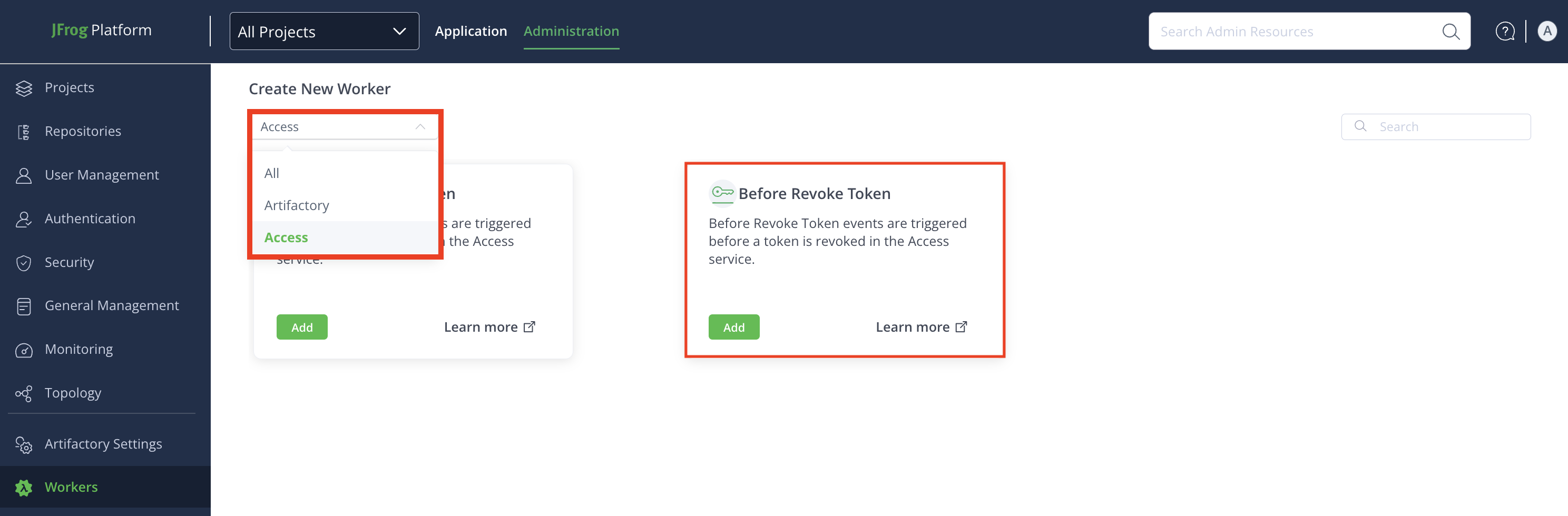
-
(Optional): Some Workers have a code gallery of ready-made code samples, Worker script examples that you can use to inspire and accelerate your work. To use code samples, select Start with Code Gallery from the drop-down menu. Select a code sample from the list and click Apply: the code sample will appear in the Script field in the Worker menu, and you can edit it there.
Note
The code gallery samples are for reference only, aimed to accelerate your development work using real-world examples.
To use an empty, 'Hello-world' example, select Start with Skeleton.
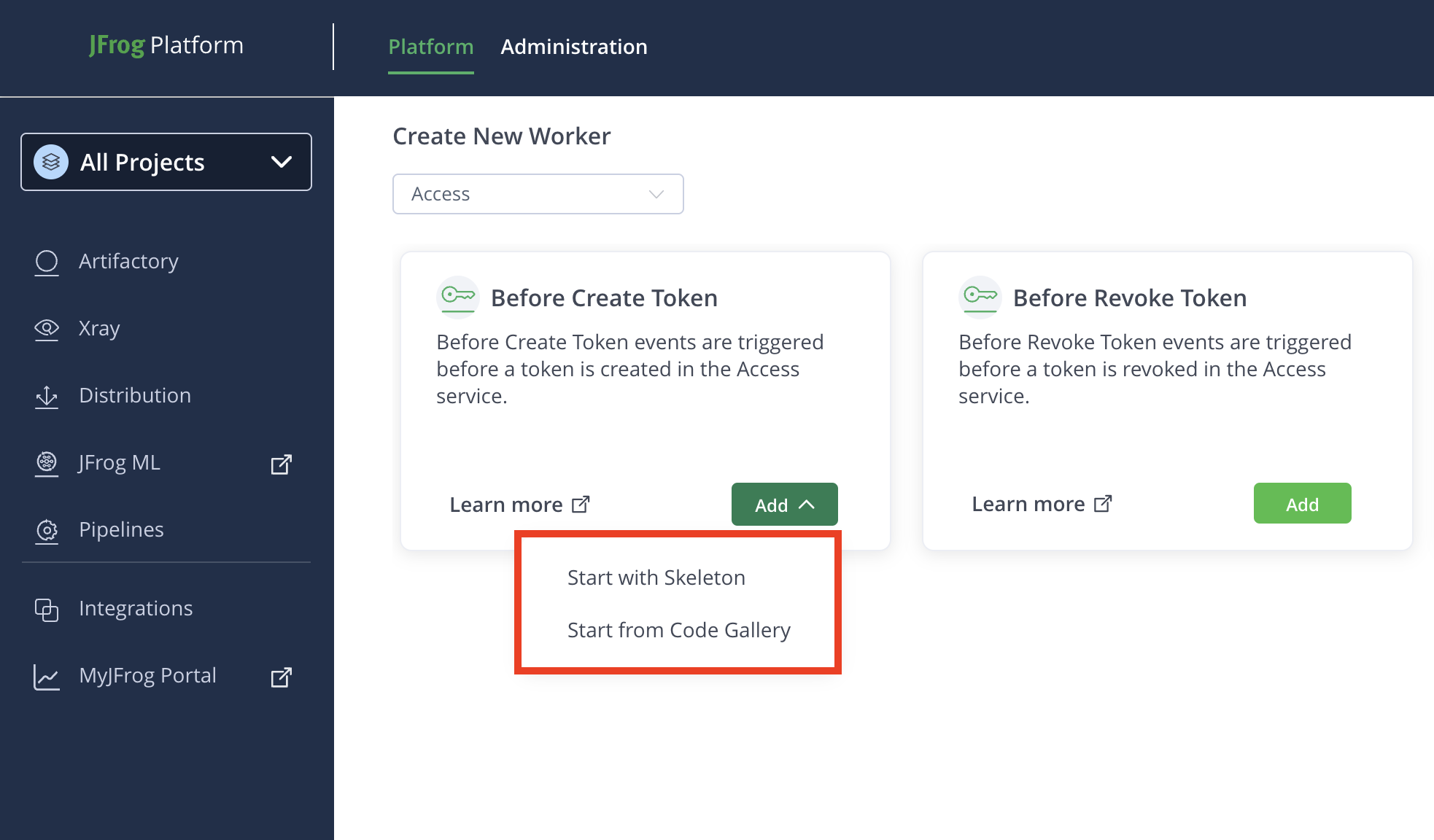
Step 2: Configure Worker Fields
In the Add New Worker window, enter the details in the relevant fields:
- Name: Enter a descriptive name for the worker.
- Script: Enter or modify the script in the TypeScript Editor. Use the auto-complete function for improved efficiency while coding.
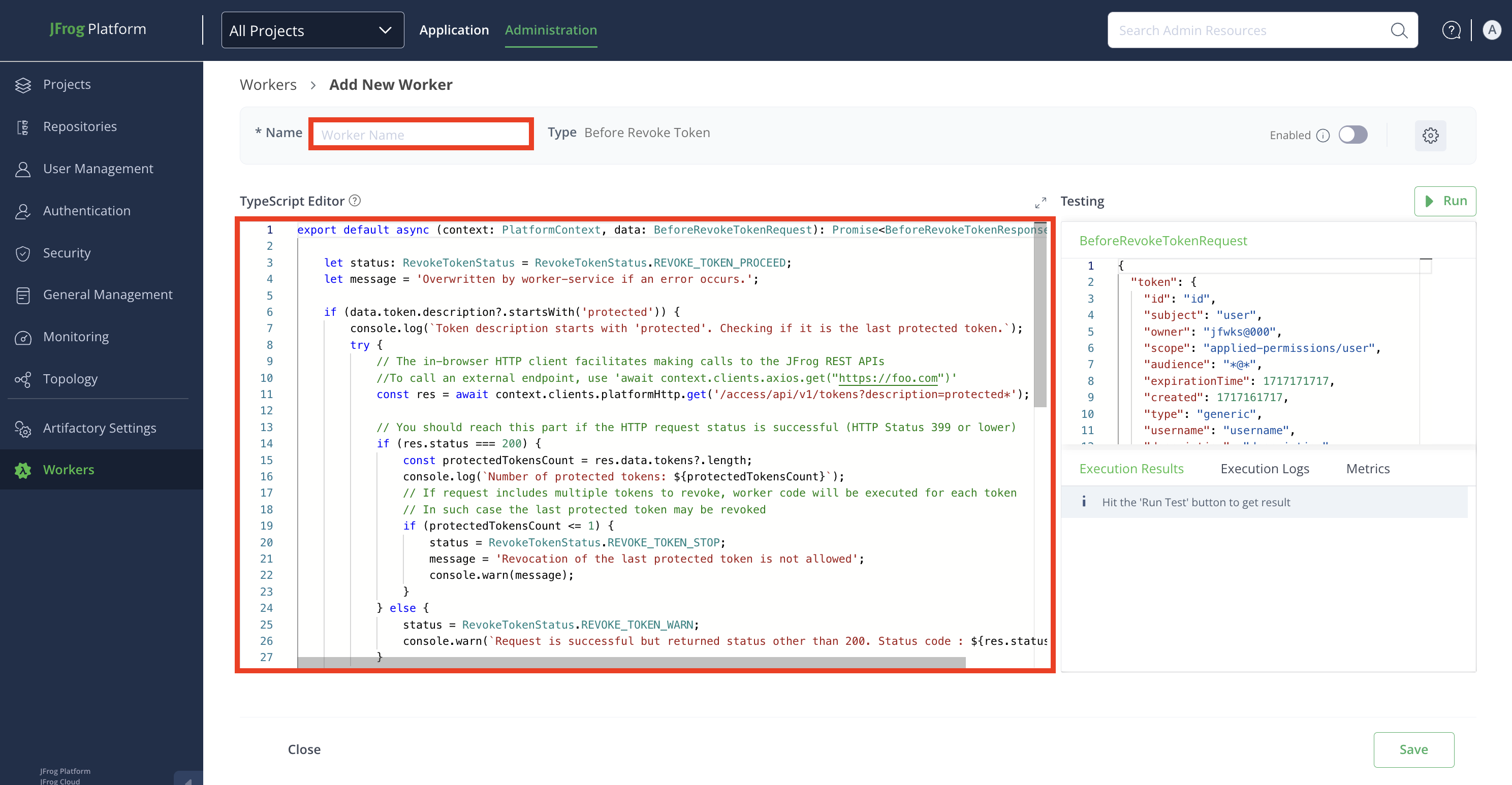
Worker Settings
Click the Settings icon from the top-right corner of the window, and then enter the details in the relevant fields:

- Enable Worker: Enable the worker in the Worker Settings modal by clicking the toggle button.
Note
The worker can also be enabled later from the Add New Worker window or Configured window. Repositories must be selected to enable the worker. Once enabled, the worker triggers when a predefined event occurs.
-
Description: Enter a brief description of the worker.
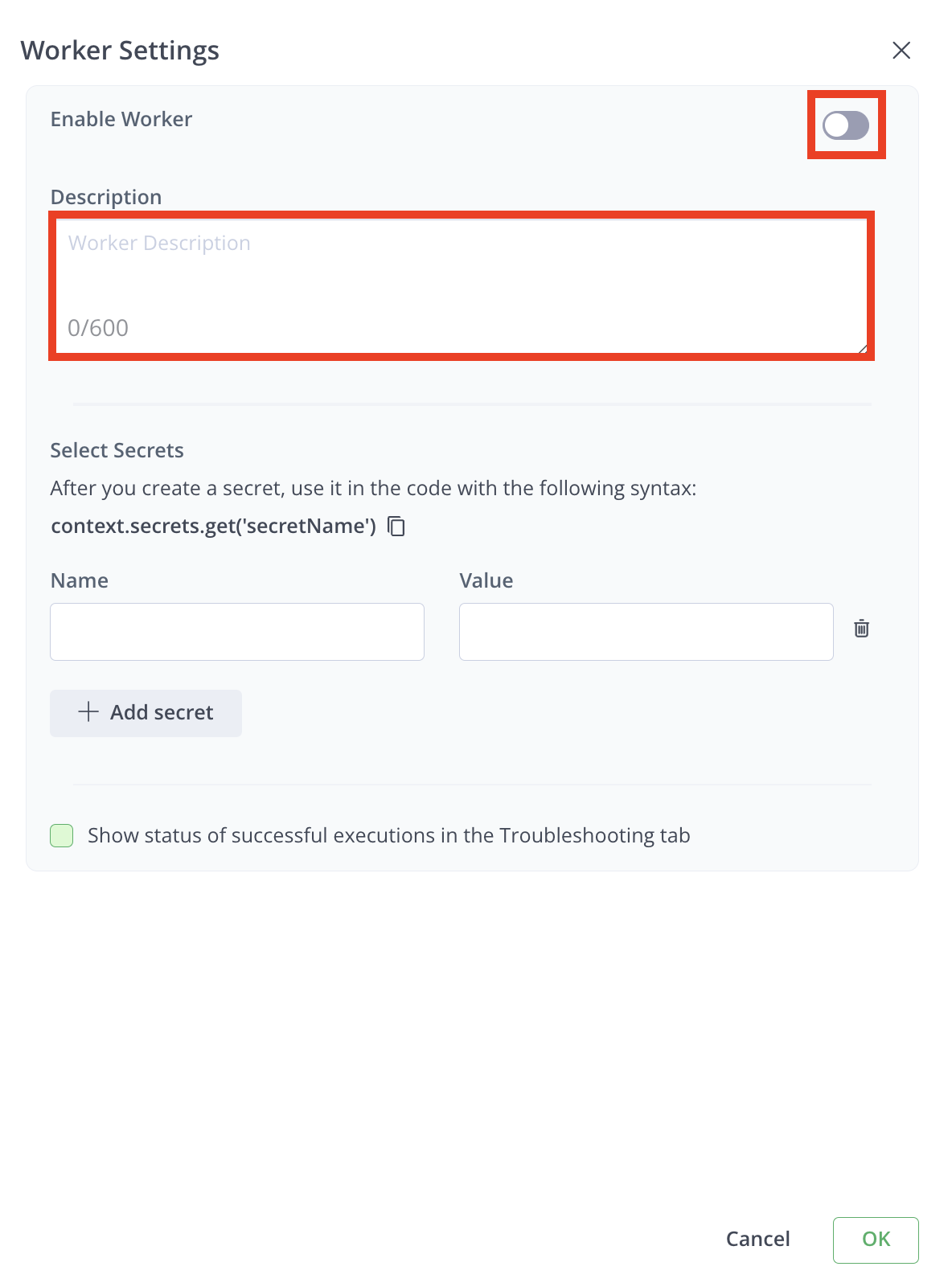
-
Select Secrets: Secrets are stored securely and not in plain text. The secret's clear-text value is never returned in an API or UI and will be masked from all the logs.
To add a secret:
- Enter the Name and Value of the secret.
- Click + Add secret to add more secrets.
- Click Delete icon to remove any secret.
Note
Use secrets in your code with the syntax:
context.secrets.get('secretName').
- Enable Debugging: Click the checkbox for Show Status of Successful Executions in the Troubleshooting tab to view successful execution results. By default, only unsuccessful executions are shown. 5. Click OK when done.
Step 3: Testing Pane
Edit the JSON payload used to simulate the worker's events.
Click Run to test the worker.
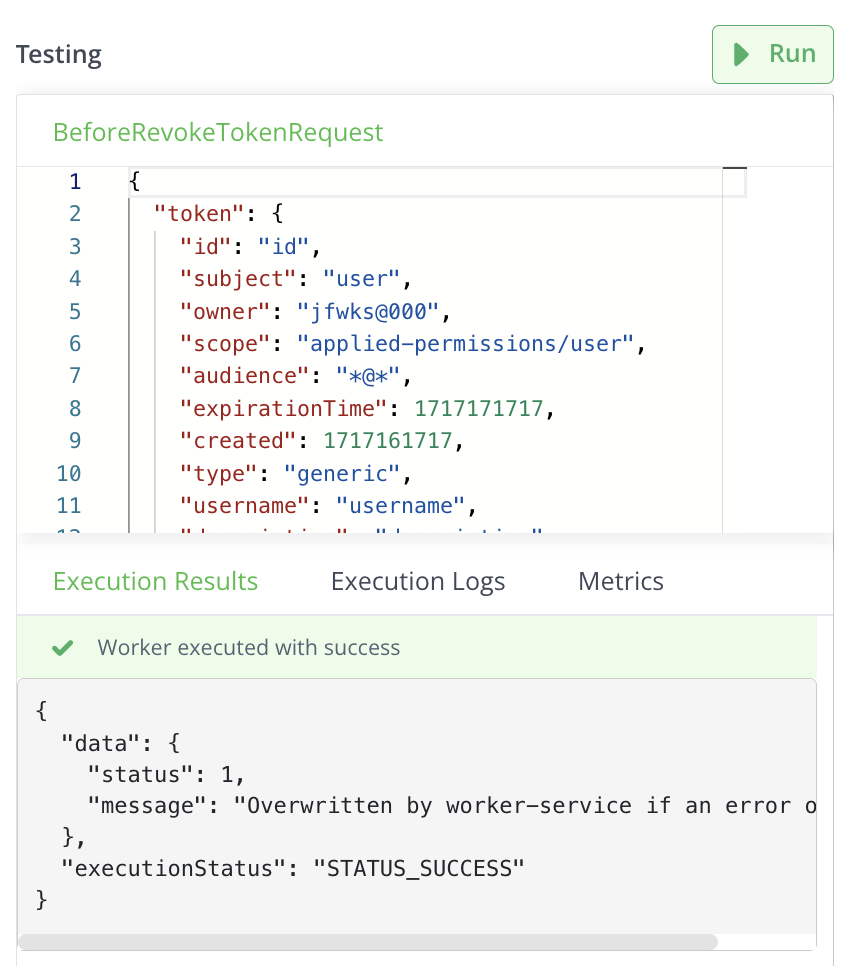
Review results in:
- Execution Results tab: for responses
- Execution Logs tab: for logs
- Metrics tab: for run time, memory, and CPU utilization details.
Step 4: Save Your Configuration
- Click Save to finalize the worker configuration.
- To cancel the configuration, click Close, and then click Discard to discard changes.
Related Information
Access Workers Code Samples
The following sections provide code samples for workers. For event descriptions, see Worker Event Types.
| Worker | Code Sample |
|---|---|
| Before Create Token Worker | Before Create Token Worker Code Sample |
| Before Revoke Token Worker | Before Revoke Token Worker Code Sample |
| Before Token Expiry Worker | Before Token Expiry Worker Code Sample |
Before Create Token Worker Code Sample
The following section provides a sample code for a Before Create Token worker.
export default async (context: PlatformContext, data: BeforeCreateTokenRequest): Promise<BeforeCreateTokenResponse> => {

    let status: CreateTokenStatus = CreateTokenStatus.CREATE_TOKEN_UNSPECIFIED;
    let message = 'Overwritten by worker-service if an error occurs.';

    try {
        // The in-browser HTTP client facilitates making calls to the JFrog REST APIs
        //To call an external endpoint, use 'await context.clients.axios.get("https://foo.com")'
        const res = await context.clients.platformHttp.get('/access/api/v1/config/token/default_expiry');

        // You should reach this part if the HTTP request status is successful (HTTP Status 399 or lower)
        if (res.status === 200) {
            const defaultExpiry = res.data.default_token_expiration;
            const tokenExpiry = data.tokenSpec.expiresIn;
            console.log(`Got default token expiry ${defaultExpiry}`);
            if (data.tokenSpec.scope.includes('applied-permissions/admin')
                    && defaultExpiry > 0
                    && (!tokenExpiry || (tokenExpiry > defaultExpiry))) {
                status = CreateTokenStatus.CREATE_TOKEN_STOP;
                message = 'Admin token generation with expiry greater that default expiry is not allowed';
            } else {
                status = CreateTokenStatus.CREATE_TOKEN_PROCEED;
            }
        } else {
            status = CreateTokenStatus.CREATE_TOKEN_WARN;
            console.warn(`Request is successful but returned status other than 200. Status code : ${ res.status }`);
        }
    } catch(error) {
        // The platformHttp client throws PlatformHttpClientError if the HTTP request status is 400 or higher
        status = CreateTokenStatus.CREATE_TOKEN_STOP;
        console.error(`Request failed with status code ${ error.status || '<none>' } caused by : ${ error.message }`);
    }

    return {
        status,
        message,
    }
};
Input Parameters
context
Provides baseUrl, token, and clients to communicate with the JFrog Platform (for more information, see PlatformContext).
data
The request with delete details sent by Artifactory.
{
  "tokenSpec": {
    "subject": "user",
    "owner": "jfwks@000",
    "scope": [
      "applied-permissions/user"
    ],
    "audience": [
      "*@*"
    ],
    "expiresIn": 3600,
    "refreshable": false,
    "extension": "extension",
    "description": "description",
    "includeReferenceToken": true
  },
  "userContext": {
    "id": "id",
    "isToken": false,
    "realm": "realm"
  }
}
Response
{
  "status": CreateTokenStatus.CREATE_TOKEN_PROCEED,
  "message": "Overwritten by worker-service if an error occurs.",
}
Possible Statuses
CreateTokenStatus.CREATE_TOKEN_PROCEED- The worker allows Artifactory to proceed with creating a token.CreateTokenStatus.CREATE_TOKEN_STOP- The worker does not allow Artifactory to create a token.CreateTokenStatus.CREATE_TOKEN_WARN- The worker provides a warning before Artifactory can proceed with creating a token.
Before Revoke Token Worker Code Sample
The following section provides a sample code for a Before Revoke Token worker.
export default async (context: PlatformContext, data: BeforeRevokeTokenRequest): Promise<BeforeRevokeTokenResponse> => {

    let status: RevokeTokenStatus = RevokeTokenStatus.REVOKE_TOKEN_PROCEED;
    let message = 'Overwritten by worker-service if an error occurs.';

    if (data.token.description?.startsWith('protected')) {
        console.log(`Token description starts with 'protected'. Checking if it is the last protected token.`);
        try {
            // The in-browser HTTP client facilitates making calls to the JFrog REST APIs
            //To call an external endpoint, use 'await context.clients.axios.get("https://foo.com")'
            const res = await context.clients.platformHttp.get('/access/api/v1/tokens?description=protected*');

            // You should reach this part if the HTTP request status is successful (HTTP Status 399 or lower)
            if (res.status === 200) {
                const protectedTokensCount = res.data.tokens?.length;
                console.log(`Number of protected tokens: ${protectedTokensCount}`);
                // If request includes multiple tokens to revoke, worker code will be executed for each token
                // In such case the last protected token may be revoked
                if (protectedTokensCount <= 1) {
                    status = RevokeTokenStatus.REVOKE_TOKEN_STOP;
                    message = 'Revocation of the last protected token is not allowed';
                    console.warn(message);
                }
            } else {
                status = RevokeTokenStatus.REVOKE_TOKEN_WARN;
                console.warn(`Request is successful but returned status other than 200. Status code : ${ res.status }`);
            }
        } catch(error) {
            // The platformHttp client throws PlatformHttpClientError if the HTTP request status is 400 or higher
            status = RevokeTokenStatus.REVOKE_TOKEN_STOP;
            console.error(`Request failed with status code ${ error.status || '<none>' } caused by : ${ error.message }`);
        }
    }

    return {
        status,
        message,
    }
};
Input Parameters
context
Provides baseUrl, token, and clients to communicate with the JFrog Platform (for more information, see PlatformContext).
data
The request with details sent by Access.
{
    token: {
        id: 'id',
        subject: 'user',
        owner: 'jfwks@000',
        scope: 'applied-permissions/user',
        audience: '*@*',
        expirationTime: 1717171717,
        created: 1717161717,
        type: 'generic',
        username: 'username',
        description: 'description',
        projectKey: 'projectKey',
    },
    userContext: { id: 'id', isToken: false, realm: 'realm' },
}
Response
{
  "status": RevokeTokenStatus.REVOKE_TOKEN_PROCEED,
  "message": "Overwritten by worker-service if an error occurs.",
  "executionStatus": "STATUS_SUCCESS"
}
Possible Statuses
RevokeTokenStatus.REVOKE_TOKEN_PROCEED- The worker allows Artifactory to proceed with revoking a token.RevokeTokenStatus.REVOKE_TOKEN_STOP- The worker does not allow Artifactory to revoke a token.RevokeTokenStatus.REVOKE_TOKEN_WARN- The worker provides a warning before Artifactory can proceed with revoking a token.
Before Token Expiry Worker Code Sample
The following section provides a sample code for a Before Token Expiry worker.
export default async (
  context: PlatformContext,
  data: BeforeTokenExpiryRequest
): Promise<BeforeTokenExpiryResponse> => {
  try {
    // The in-browser HTTP client facilitates making calls to the JFrog REST APIs
    //To call an external endpoint, use 'await context.clients.axios.get("https://foo.com")'
    const res = await context.clients.platformHttp.get(
      "/artifactory/api/v1/system/readiness"
    );

    // You should reach this part if the HTTP request status is successful (HTTP Status 399 or lower)
    if (res.status === 200) {
      console.log("Artifactory ping success");
    } else {
      console.warn(
        `Request is successful but returned status other than 200. Status code : ${res.status}`
      );
    }
  } catch (error) {
    // The platformHttp client throws PlatformHttpClientError if the HTTP request status is 400 or higher
    console.error(
      `Request failed with status code ${
        error.status || "<none>"
      } caused by : ${error.message}`
    );
  }

  return {
    message: `Acknowledged tokens that are about to expire: ${data.tokens.length}`,
  };
};
Input Parameters
context
Provides baseUrl, token, and clients to communicate with the JFrog Platform (for more information, see PlatformContext).
data
The request with details sent by Access.
export interface BeforeTokenExpiryRequest {
    /** The tokens that will expire */
    tokens:
            | Array<Token>
            | undefined;
    /** Contextual information about the user who triggered the event */
    userContext: {
        /** The username or token subject */
        id: string;
        /** Indicates if the user is authenticated via an access token */
        isToken: boolean;
        /** The realm in which the user is authenticated */
        realm: string;
    };
}

export interface Token {
    /** The token id to revoke */
    id: string
    /** The subject the token belongs to */
    subject: string;
    /** The owner of the token */
    owner: string;
    /** The scope of the token*/
    scope: string;
    /** The audience (i.e. services) this token is aimed for. These services are expected to accept this token */
    audience: string;
    /** The time (epoch) this token expires (optional if it has no expiration time) */
    expirationTime: number;
    /** The time (epoch) this token was created */
    created: number;
    /** Token type. Could be session or generic */
    type: string;
    /** Optional username derived from the token subject */
    username: string;
    /** Optional free text describing the token */
    description: string;
    /** The project key associated with the token */
    projectKey: string;
}
Response
export interface BeforeTokenExpiryResponse {
    /** Message to print to the log, in case of an error it will be printed as a warning */
    message: string;
}
{
  "status": CreateTokenStatus.CREATE_TOKEN_PROCEED,
  "message": "Overwritten by worker-service if an error occurs.",
}{
"continue": true
}
Configure Event Driven Workers for Runtime
This topic provides step-by-step instructions for configuring a custom event-driven Worker for Runtime. Event-driven Workers are a powerful tool that allows you to automate actions in response to specific events occurring within your Runtime environment.
Prerequisite
Before starting the configuration, ensure you have selected the project you want to apply the worker to.
To configure an event driven worker for Artifactory, follow these steps:
Step 1: Navigate to the Workers Configuration
-
Navigate to the Administration module and click Workers.
-
+ Add your first Worker: If you are creating a worker for the first time, click the Select button in the Event Driven Worker tile.
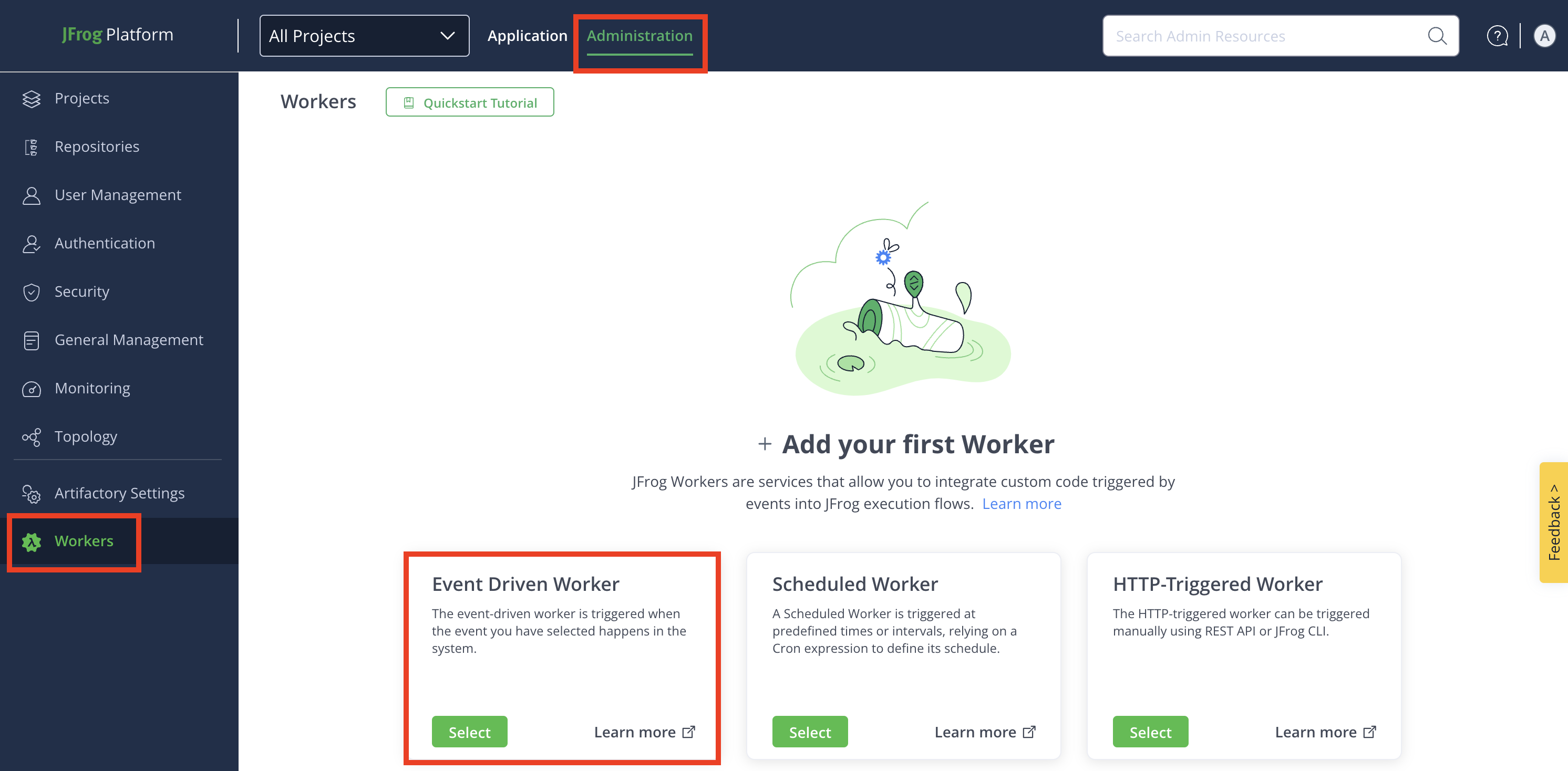
-
+ Add Additional Worker: To create more Workers after the first one, click + New Worker, and then click New Event Driven Worker.
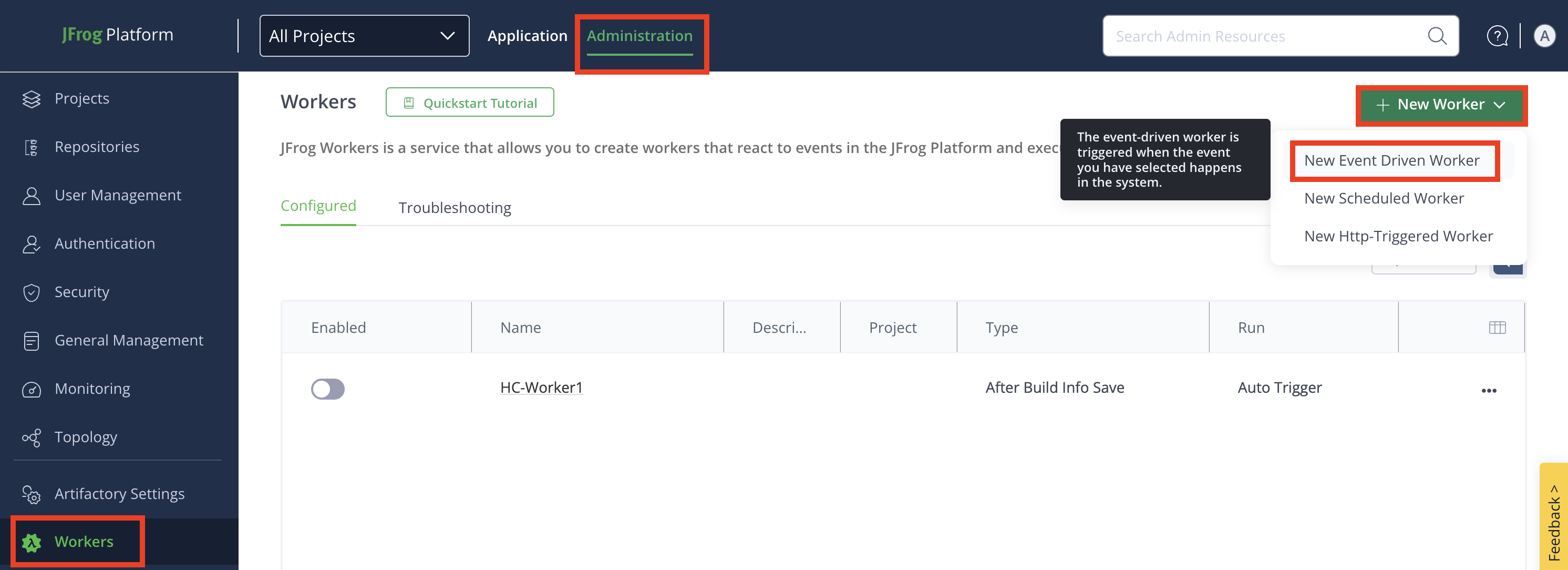
-
-
From the Create New Worker drop-down, click Runtime to see available Runtime Workers.
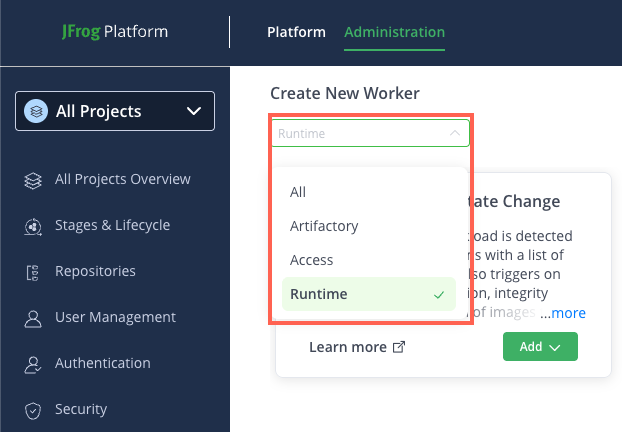
-
Locate the desired Runtime Worker, and then click Add.
-
(Optional): Some Workers have a code gallery of ready-made code samples, Worker script examples that you can use to inspire and accelerate your work. To use code samples, select Start with Code Gallery from the drop-down menu. Select a code sample from the list and click Apply: the code sample will appear in the Script field in the Worker menu, and you can edit it there.
Note
The code gallery samples are for reference only, aimed to accelerate your development work using real-world examples.
To use an empty, 'Hello-world' example, select Start with Skeleton.
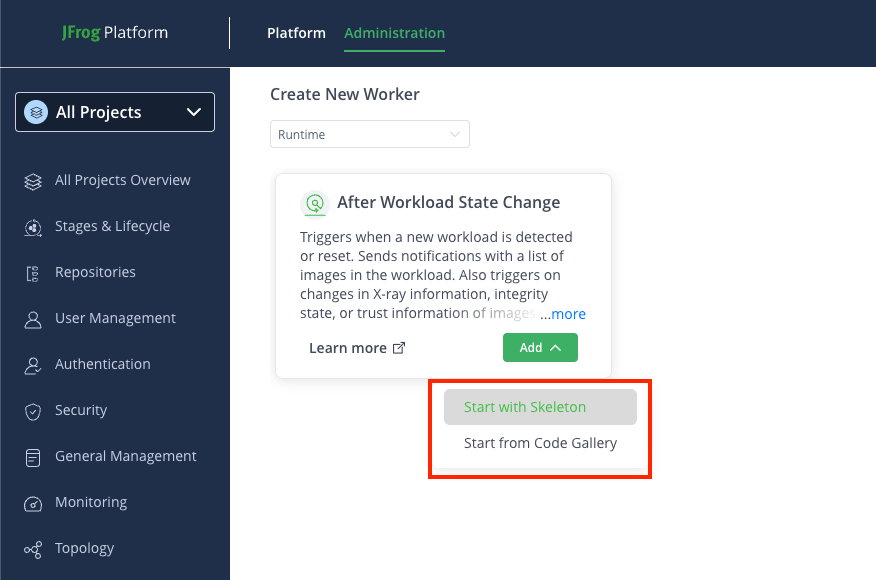
Step 2: Configure Worker Fields
In the Add New Worker window, enter the details in the relevant fields:
-
Name: Enter a descriptive name for the worker.
-
Script: Enter or modify the script in the TypeScript Editor. Use the auto-complete function for improved efficiency while coding.
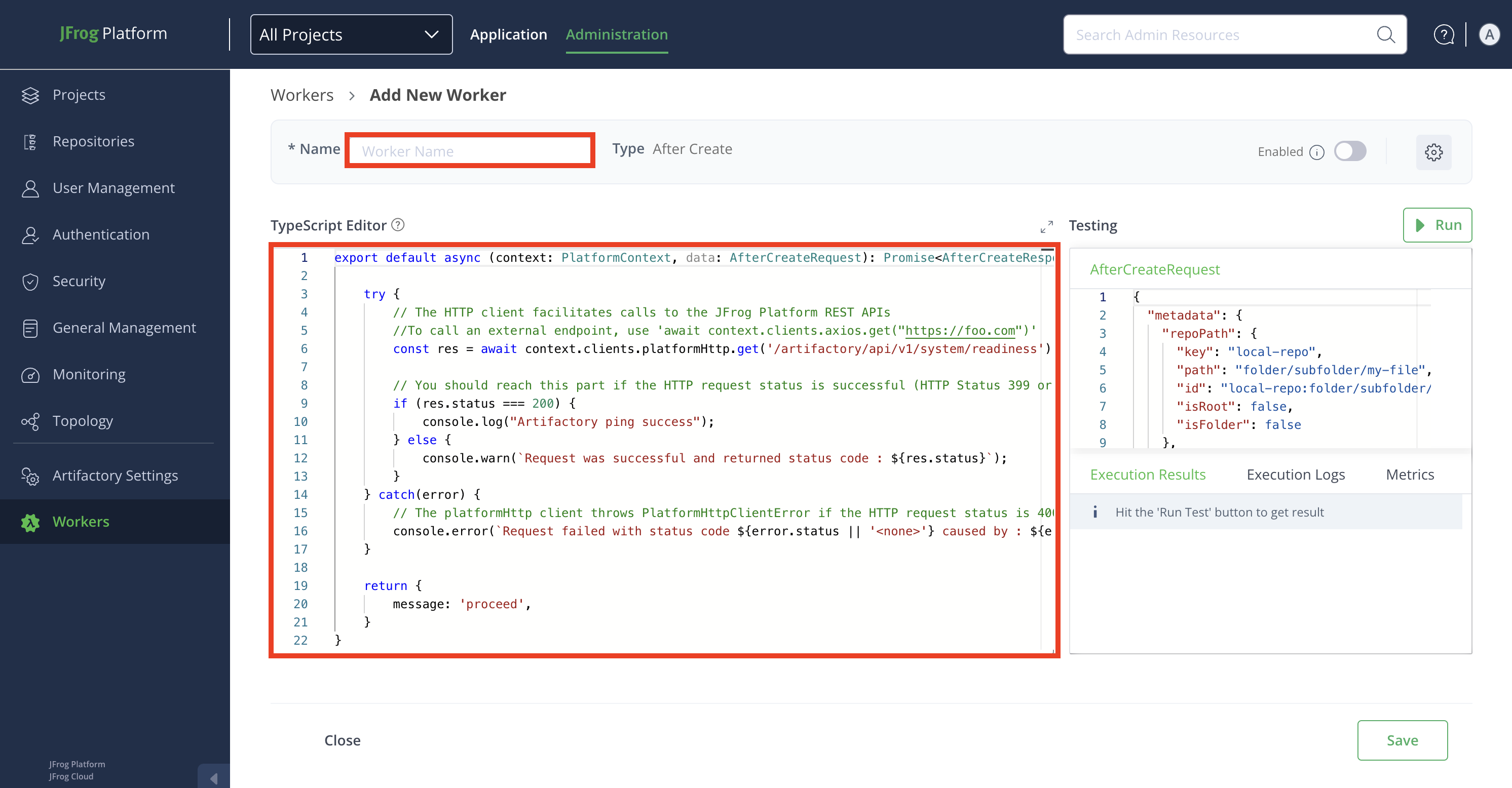
Worker Settings
Click the Settings icon from the top-right corner of the window, and then enter the details in the relevant fields:

-
Enable Worker: Enable the worker in the Worker Settings modal by clicking the toggle button.
Note
The worker can also be enabled later from the Add New Worker window or Configured window. Repositories must be selected to enable the worker. Once enabled, the worker triggers when a predefined event occurs.
-
Description: Enter a brief description of the worker.
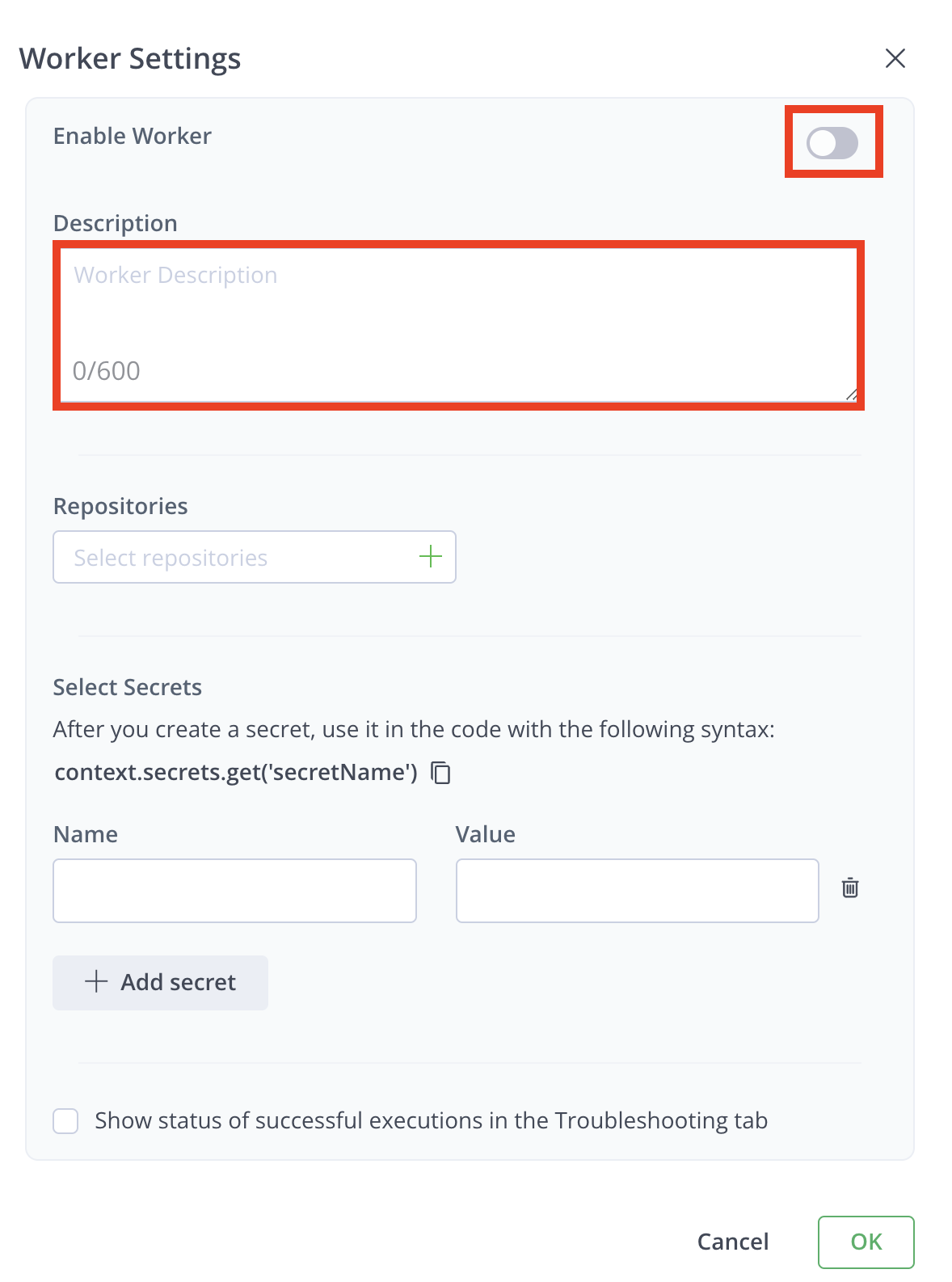
-
Repositories: Click the + icon in the Repositories field.
Note
When creating a Worker within a project, you can select only repositories that are directly within the project, and not ones that are shared with the project.
You can either:
-
Select Repositories: Move selected repositories from the Available Repositories list.
-
Set Patterns: Use wildcards (for example, , *, ?) to define patterns for repository selection.
Example Patterns:
com/t?st.zip- Matchescom/test.zip,com/tast.zip, etc.com/*.zip- Matches all.zipfiles in the com directory.com/**/test.zip- Matches alltest.zipfiles in subdirectories ofcom.
You can add multiple patterns to the filter. After you enter a pattern, click + to add that pattern to the filter.
Note
For more information, see AntPathMatcher Documentation.
-
Select Secrets: Secrets are stored securely and not in plain text. The secret's clear-text value is never returned in an API or UI and will be masked from all the logs.
To add a secret:
- Enter the Name and Value of the secret.
- Click + Add secret to add more secrets.
- Click Delete icon to remove any secret.
Note
Use secrets in your code with the syntax:
context.secrets.get('secretName').
-
Enable Debugging: Click the checkbox for Show Status of Successful Executions in the Troubleshooting tab to view successful execution results. By default, only unsuccessful executions are shown.
-
Click OK when done.
Step 3: Testing pane
Edit the JSON payload used to simulate the worker's events.
Click Run to test the worker.
Review results in:
- Execution Results tab: for responses
- Execution Logs tab: for logs
- Metrics tab: for run time, memory, and CPU utilization details.
Step 4: Save Your Configuration
- Click Save to finalize the worker configuration.
- To cancel the configuration, click Close, and then click Discard to discard changes.
Related Information
After Runtime Workload State Change Worker Code Sample
Use the following code sample for an After Runtime Workload State Change worker.
export default async (context: PlatformContext, data: AfterWorkloadStateChangeRequest): Promise<AfterWorkloadStateChangeResponse> => {
try {
// The HTTP client facilitates calls to the JFrog Platform REST APIs
// To call an external endpoint, use 'await context.clients.axios.get("[https://foo.com](https://foo.com)")'
const res = await context.clients.platformHttp.get('/runtime/api/v1/system/readiness');
// You'll reach this part if the HTTP request status is successful (HTTP Status 399 or lower)
if (res.status === 200) {
console.log("Runtime ping success");
} else {
console.warn(`Request was successful and returned status code : ${res.status}`);
}
} catch (error) {
// The platformHttp client throws PlatformHttpClientError if the HTTP request status is 400 or higher
console.error(`Request failed with status code ${error.status || '<none>'} caused by : ${error.message}`)
}
return {
'continue': true,
}
}Input Parameters
Context
Use the context parameter to access the baseUrl, token, and clients needed to communicate with the JFrog Platform. For more information, see PlatformContext.
Data
The request details sent by JFrog Runtime:
{
"change_type": "workload",
"workload_changed_object": {
"name": "frontend-service",
"namespace": "production",
"cluster": "production-euc1",
"nodes": ["node-1", "node-2"],
"risks": ["untrusted_registry_images", "critical_and_applicable_cves"],
"vulnerabilities_count": 5
},
"image_tags_object": [
{
"name": "frontend-image",
"registry": "docker.io",
"repository_path": "company/frontend",
"architecture": "amd64",
"tag": "v1.2.3",
"sha256": "bcek9g0025d450f7865cnl97jebea13108166f81fe414620696klnb4d96c00f",
"risks": ["critical_and_applicable_cves"],
"vulnerabilities": [
{
"package_type": "npm",
"xray_id": "XRAY-2024-001",
"cve_id": "CVE-2024-1234",
"severity": "Critical",
"cvss_v2": "6.5",
"cvss_v3": "8.2",
"last_fetched": "2025-02-15T12:00:00Z",
"issue_kind": 1,
"applicability": "applicable",
"components": [
{
"component_id": "npm:lodash",
"name": "lodash",
"version": "4.17.21"
}
]
}
],
"malicious_packages": null,
"deployed_by": "jenkins-user",
"build_info": {
"build_owner": "devops-team",
"build_name": "frontend-service",
"build_number": "456",
"build_repository": "jfrog-artifactory"
}
}
]
}Response
{
  "continue": true
}
Configure Scheduled Worker
This topic provides a step-by-step instruction to configure a custom scheduled Worker. Scheduled Workers are a powerful tool that allows you to trigger at predefined times or intervals, which you can define using cron expressions.
Prerequisite
Before starting the configuration, ensure that you have selected the desired project for which you want to apply the worker.
To configure a scheduled worker for Artifactory, follow these steps:
Step 1: Navigate to the Workers Configuration
Navigate to the Administration module and click Workers.
+ Add your first Worker: If you are creating a worker for the first time, click Select button in the Scheduled Worker tile.
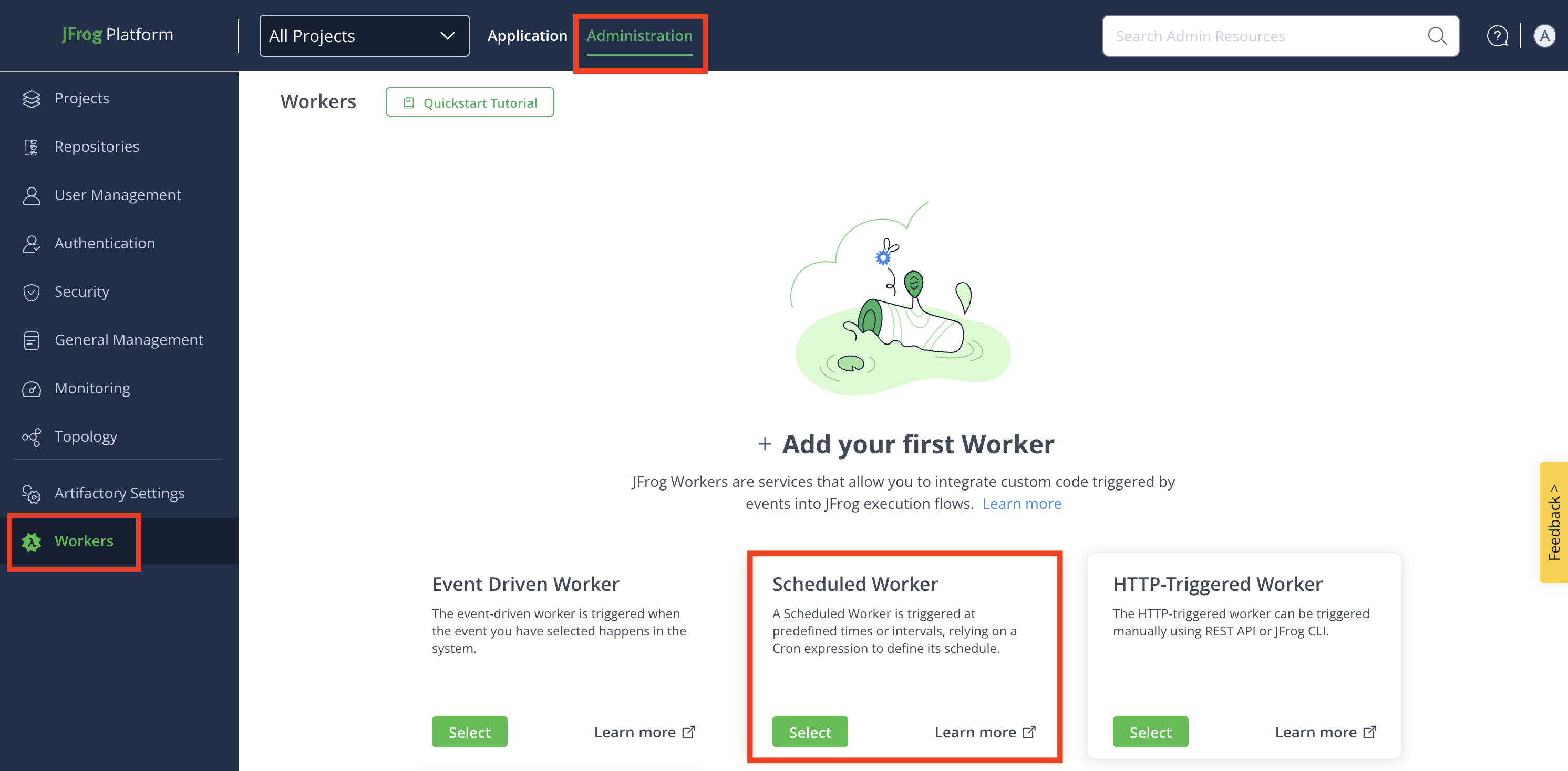
+ Add Additional Worker: For the second and more workers, click + New Worker, and then click New Scheduled Worker.
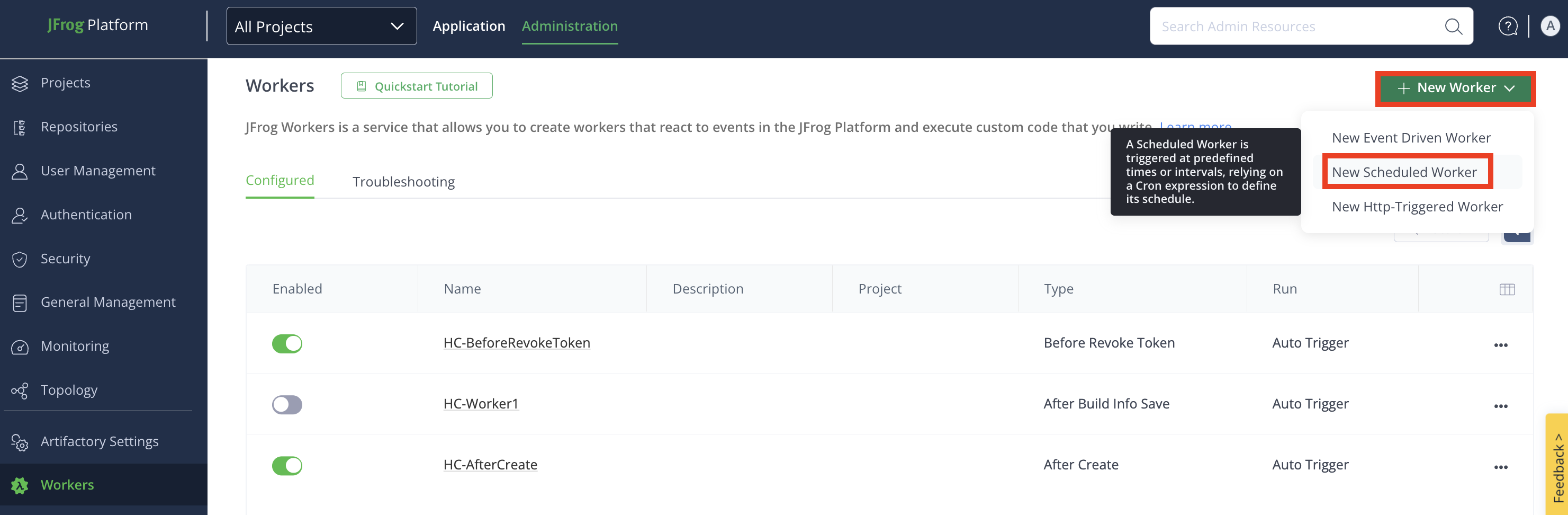
Step 2: Configure Worker Fields
In the Add New Worker window, enter the details in the relevant fields:
-
Name: Enter a descriptive name for the worker.
-
(Optional) To use code samples, go to the Code Samples section, select the event you want to use from the drop-down menu, and click Apply. To see the full sample details, and the link to view it on GitHub, click See More. The code sample will be populated in the Script field, and you can modify it there.
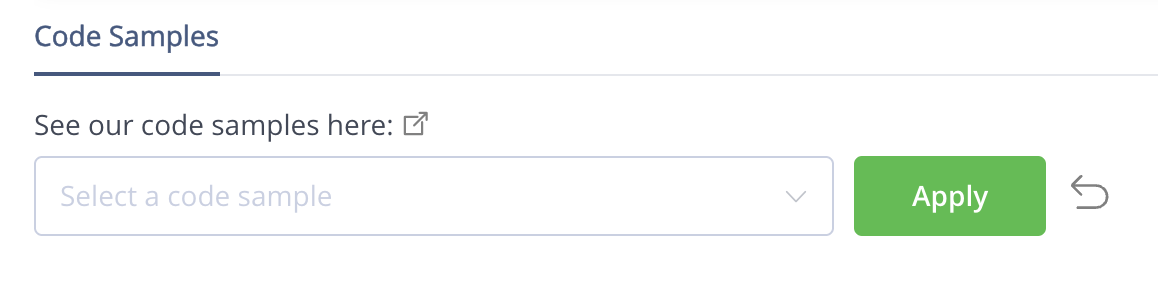
-
Script: Enter or modify the script in the TypeScript Editor. Use the auto-complete function for improved efficiency while coding.
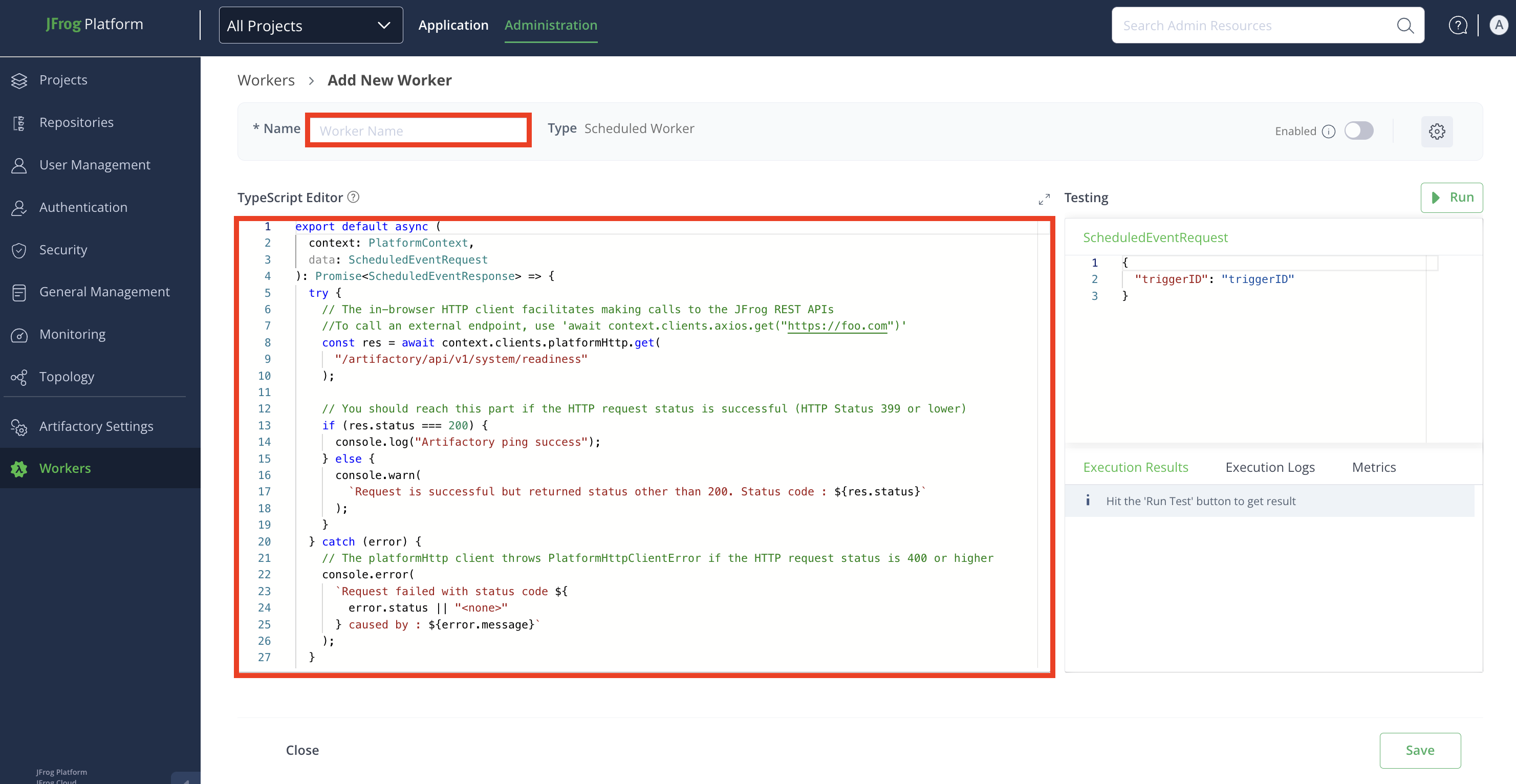
Worker Settings
Click the Settings icon from the top-right corner of the window, and then enter the details in the relevant fields:

- Enable Worker: Enable the worker in the Worker Settings modal by clicking the toggle button.
Note
The worker can also be enabled later from the Add New Worker window or Configured window. Repositories must be selected to enable the worker. Once enabled, the worker triggers when a predefined event occurs.
-
Description: Enter a brief description of the worker.
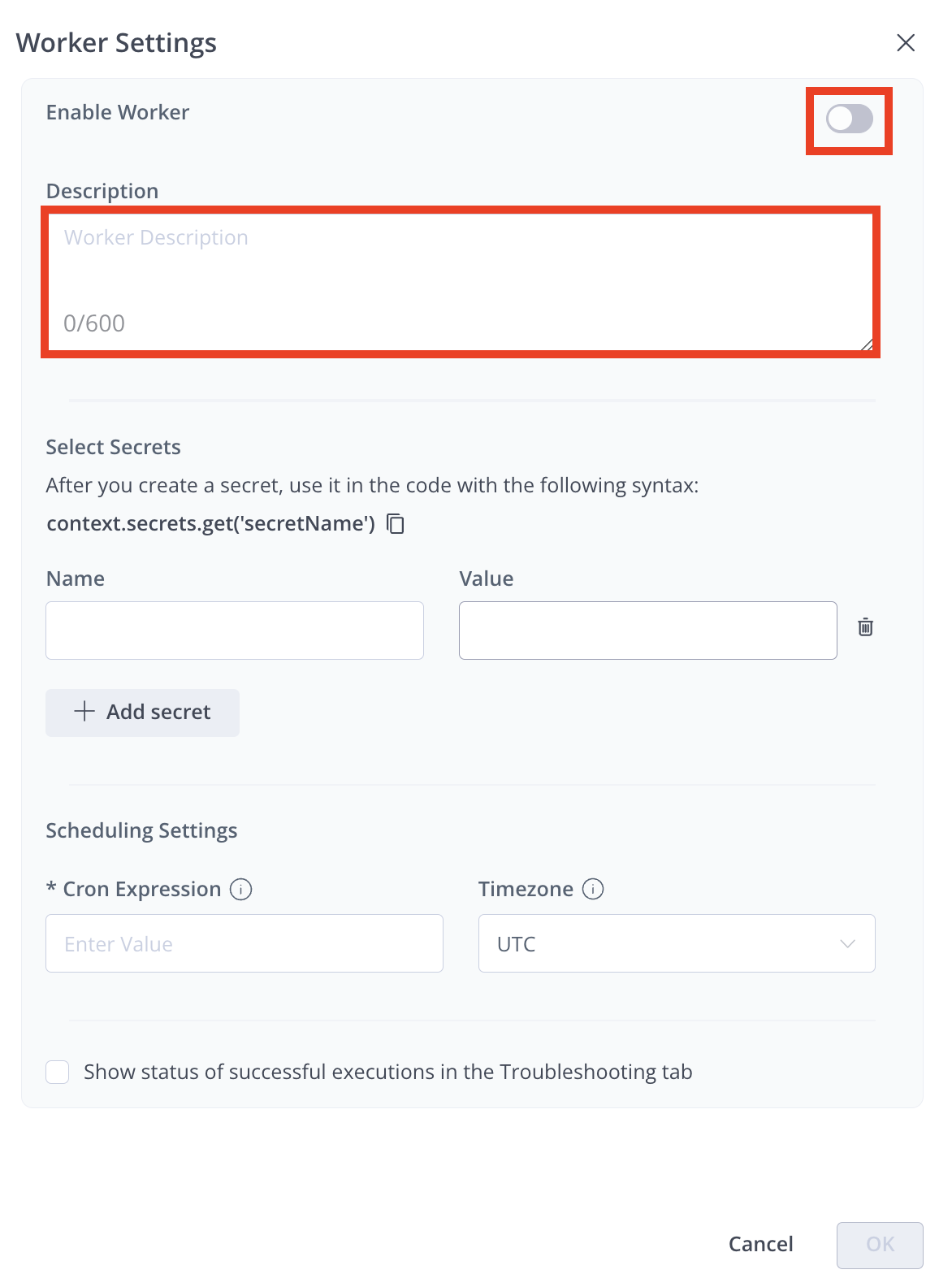
-
Select Secrets: Secrets are stored securely and not in plain text. The secret's clear-text value is never returned in an API or UI and will be masked from all the logs.
To add a secret:
- Enter the Name and Value of the secret.
- Click + Add secret to add more secrets.
- Click Delete icon to remove any secret.
Note
Use secrets in your code with the syntax:
context.secrets.get('secretName').
-
Scheduled Settings:
-
In the Cron Expressions, enter the cron expression that you want the worker to follow. For more information, see cron expressions
-
Under Timezone, select the timezone the worker will use from the drop-down menu. By default, the timezone is UTC.
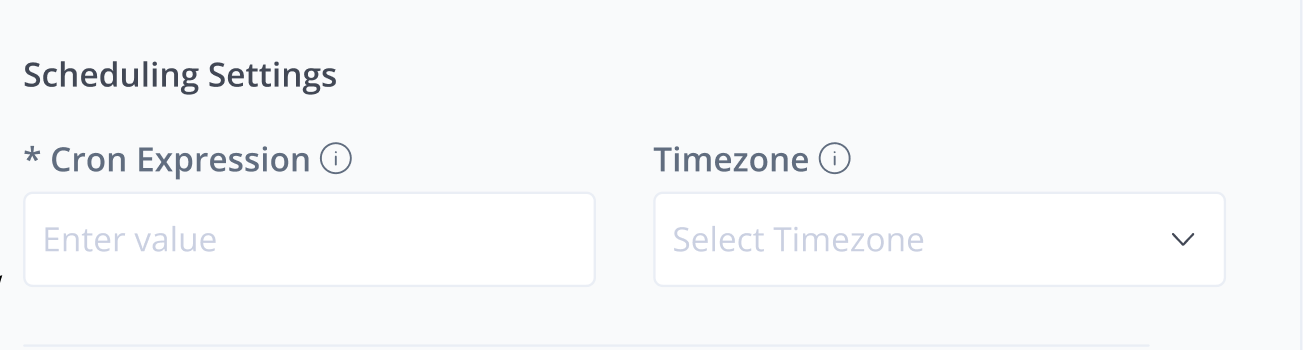
-
Enable Debugging: Click the checkbox for Show Status of Successful Executions in the Troubleshooting tab to view successful execution results. By default, only unsuccessful executions are shown.
-
Click OK when done.
Step 3: Testing Pane
Edit the JSON payload used to simulate the worker's events.
Click Run to test the worker.
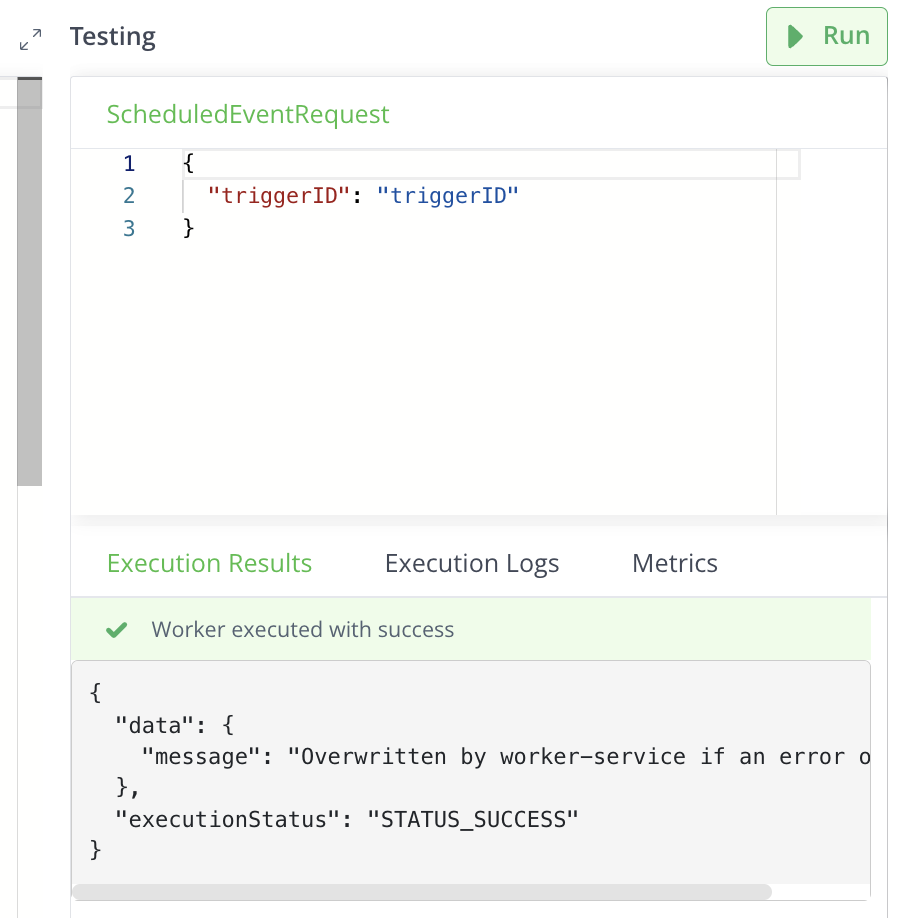
Review results in:
- Execution Results tab: for responses
- Execution Logs tab: for logs
- Metrics tab: for run time, memory, and CPU utilization details.
Step 4: Save Your Configuration
- Click Save to finalize the worker configuration.
- To cancel the configuration, click Close, and then click Discard to discard changes.
Related Information
Scheduled Worker Code Sample
The following section provides a sample code for a scheduled worker.
export default async (
 context: PlatformContext,
 data: ScheduledEventRequest
): Promise<ScheduledEventResponse> => {
 try {
   // The in-browser HTTP client facilitates making calls to the JFrog REST APIs
   //To call an external endpoint, use 'await context.clients.axios.get("https://foo.com")'
   const res = await context.clients.platformHttp.get(
     "/artifactory/api/v1/system/readiness"
   );


   // You should reach this part if the HTTP request status is successful (HTTP Status 399 or lower)
   if (res.status === 200) {
     console.log("Artifactory ping success");
   } else {
     console.warn(
       `Request is successful but returned status other than 200. Status code : ${res.status}`
     );
   }
 } catch (error) {
   // The platformHttp client throws PlatformHttpClientError if the HTTP request status is 400 or higher
   console.error(
     `Request failed with status code ${
       error.status || "<none>"
     } caused by : ${error.message}`
   );
 }


 return {
   message: "Overwritten by worker-service if an error occurs.",
 };
};
Input Parameters
Context
Provides baseUrl, token, and clients to communicate with the JFrog Platform (for more information, see PlatformContext).
Data
The trigger ID of the scheduled execution
{
   "triggerID": "triggerID"
}
Response
{
   message: 'custom message', // Message to print to the log. If an error occurs, it will be printed as a warning.
}
Configure HTTP-Triggered Worker
This topic provides a step-by-step instruction to configure a custom HTTP-triggered Worker. These Workers can execute custom code independent of any events in the JFrog Platform. Generic event Workers are launched on demand. You can choose permissions for generic event Workers and determine whether they can be run by admin or non-admin users.
Prerequisite
Before starting the configuration, ensure that you have selected the desired project for which you want to apply the worker.
To configure an HTTP-Triggered worker for Artifactory, follow these steps:
Step 1: Navigate to the Workers Configuration
Navigate to the Administration module and click Workers.
+ Add your first Worker: If you are creating a Worker for the first time, click Select button in the HTTP-Triggered Worker tile.
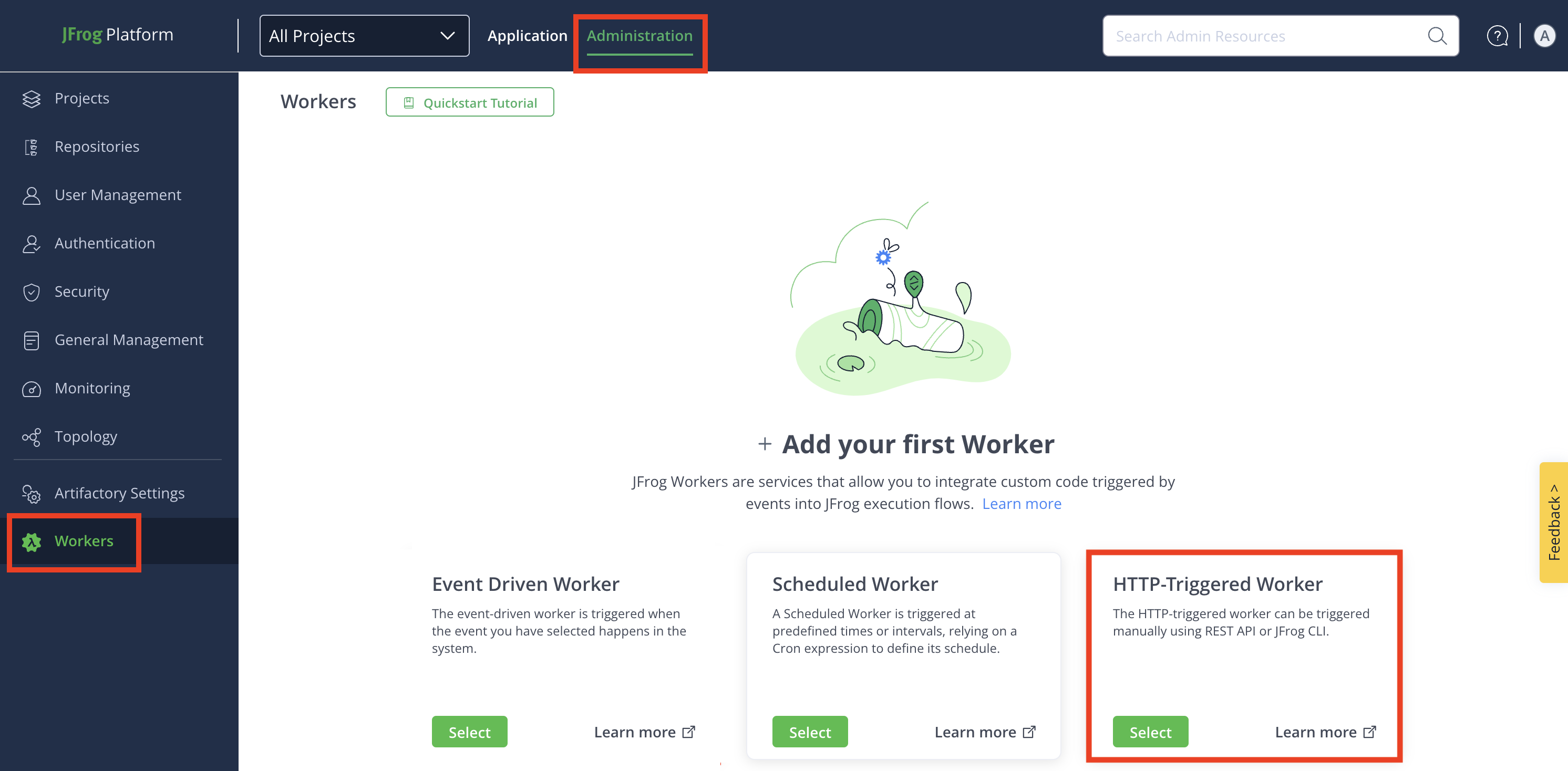
+ Add Additional Worker: For the second and more workers, click + New Worker, and then click HTTP-Triggered Driven Worker.
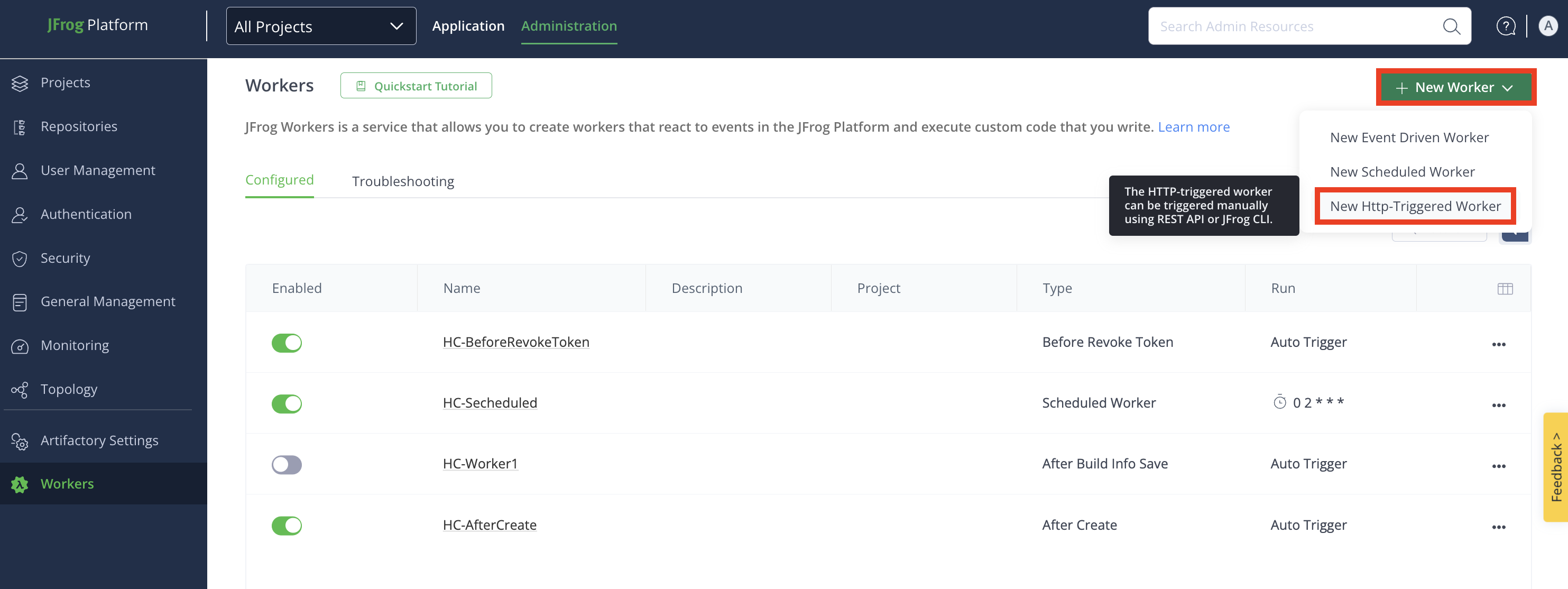
Step 2: Configure Worker Fields
In the Add New Worker window, enter the details in the relevant fields:
-
Name: Enter a descriptive name for the worker.
-
(Optional) To use code samples, go to the Code Samples section, select the event you want to use from the drop-down menu, and click Apply. To see the full sample details, and the link to view it on GitHub, click See More. The code sample will be populated in the Script field, and you can modify it there.
-
Script: Enter or modify the script in the TypeScript Editor. Use the auto-complete function for improved efficiency while coding.
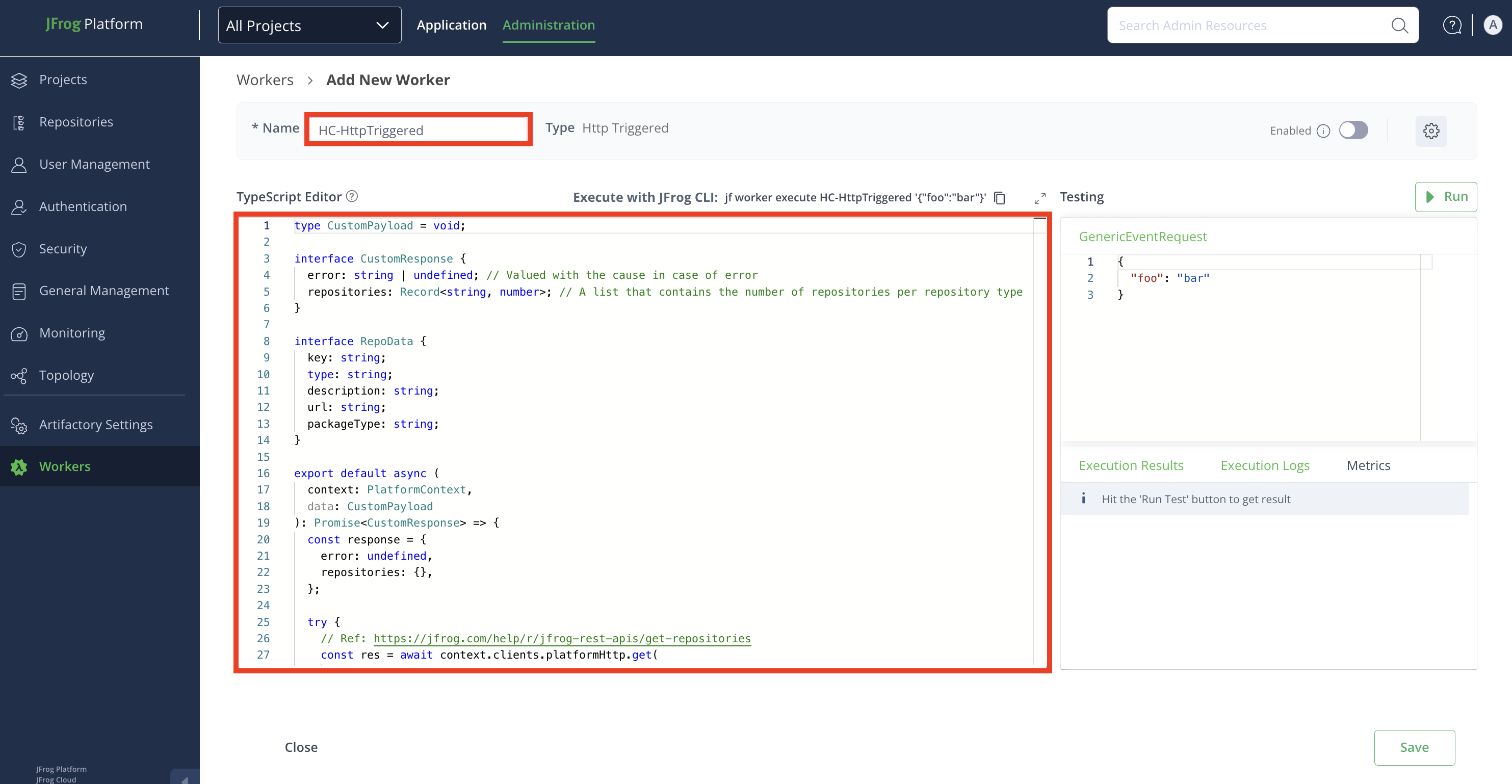
Worker Settings
Click the Settings icon from the top-right corner of the window, and then enter the details in the relevant fields:

- Enable Worker: Enable the worker in the Worker Settings modal by clicking the toggle button.
Note
The worker can also be enabled later from the Add New Worker window or Configured window. Repositories must be selected to enable the worker. Once enabled, the worker triggers when a predefined event occurs.
-
Description: Enter a brief description of the worker.
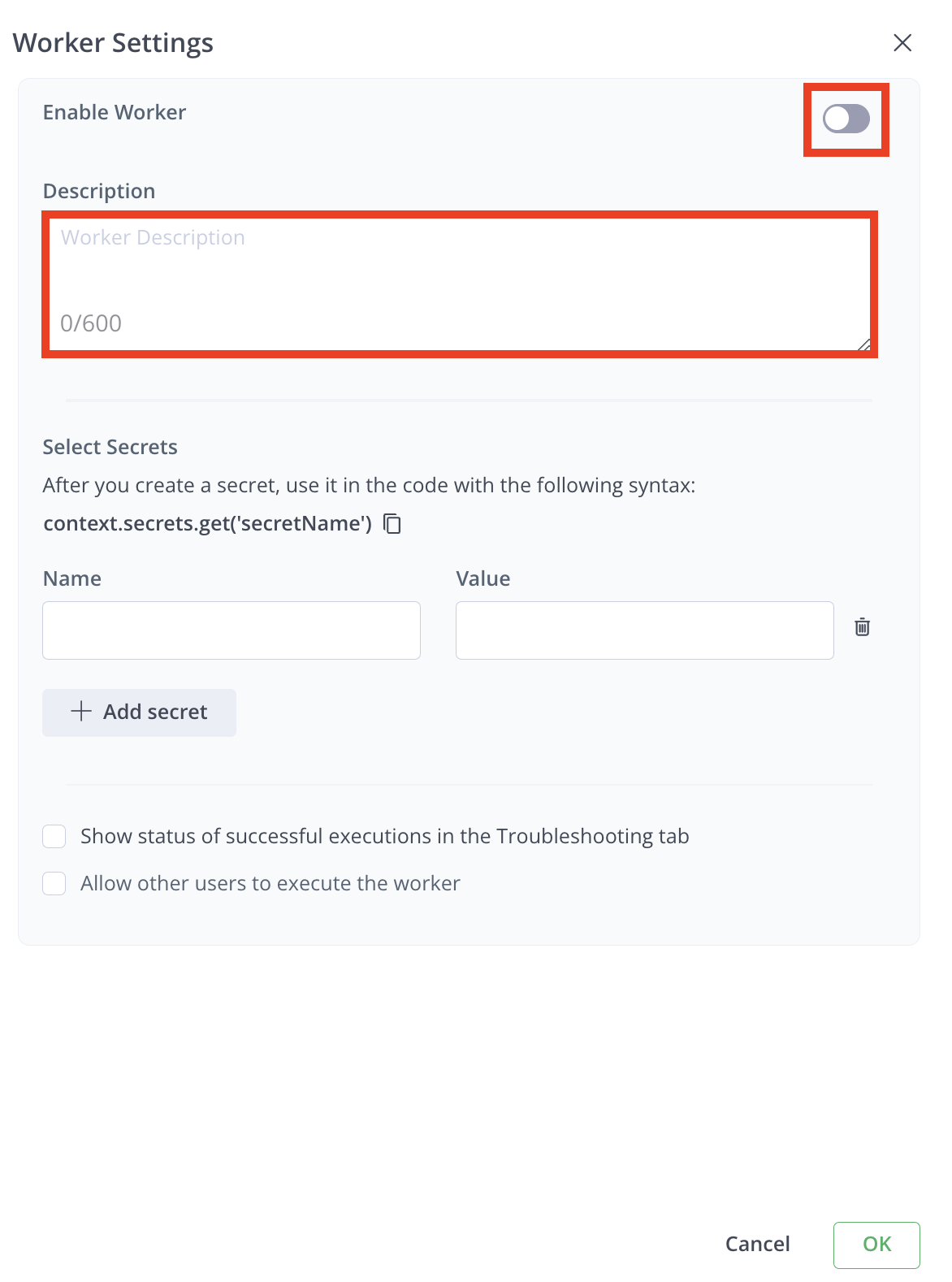
-
Select Secrets: Secrets are stored securely and not in plain text. The secret's clear-text value is never returned in an API or UI and will be masked from all the logs.
To add a secret:
- Enter the Name and Value of the secret.
- Click + Add secret to add more secrets.
- Click Delete icon to remove any secret.
Note
Use secrets in your code with the syntax:
context.secrets.get('secretName').
- Enable Debugging: Click the checkbox for Show Status of Successful Executions in the Troubleshooting tab to view successful execution results. By default, only unsuccessful executions are shown. 5. Allow other Users: To enable the worker to be run by non-admin users, click the checkbox Allow other users to execute the worker. 6. Click OK when done.
Step 3: Testing Pane
Edit the JSON payload used to simulate the worker's events.
Click Run to test the worker.
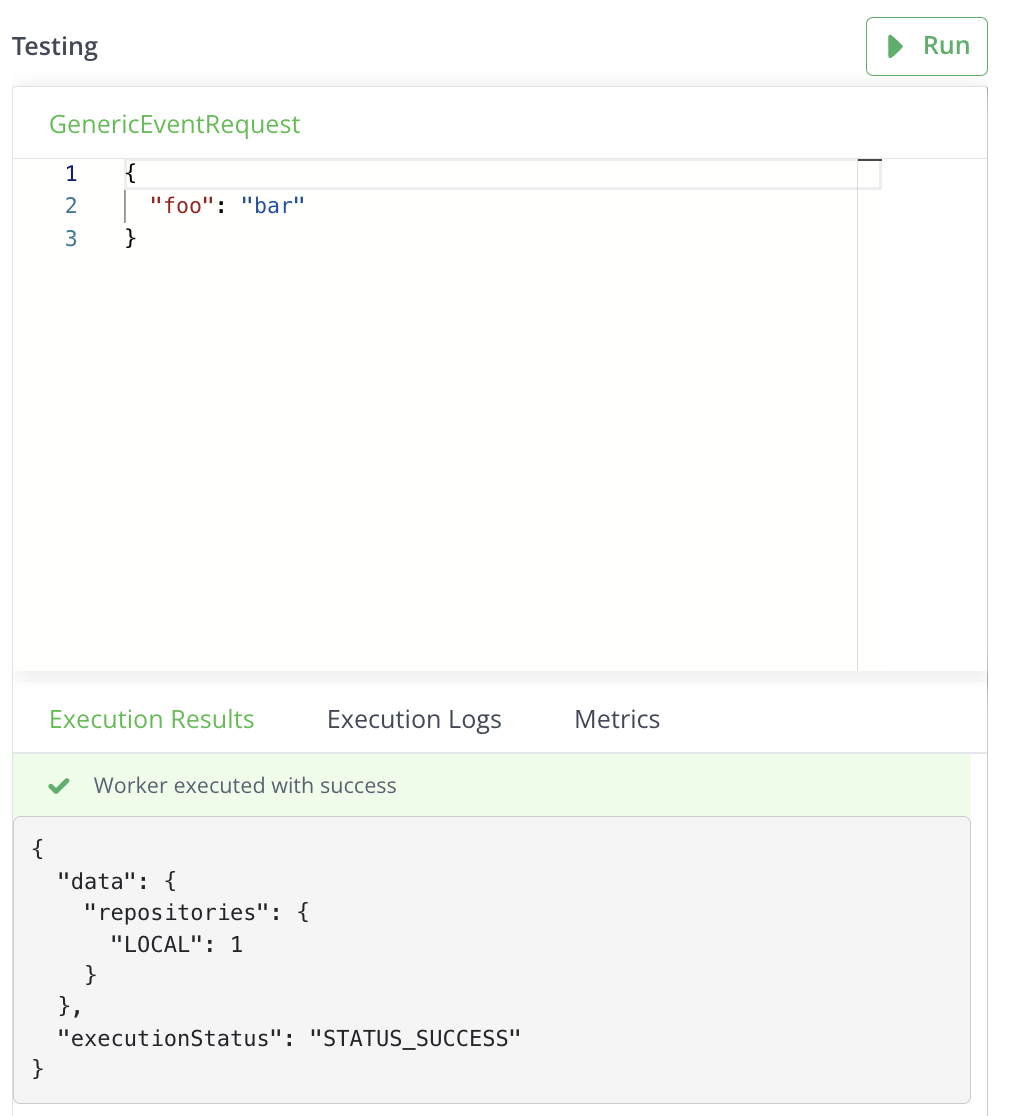
Review results in:
- Execution Results tab: for responses
- Execution Logs tab: for logs
- Metrics tab: for run time, memory, and CPU utilization details.
Step 4: Save Your Configuration
- Click Save to finalize the worker configuration.
- To cancel the configuration, click Close, and then click Discard to discard changes.
Related Information
HTTP-Trigged Worker Code Sample
The following section provides a sample code for a Execute Worker for Generic Event worker.
This sample code calls an API and fetches its data into a response object. The worker could potentially be used to enable non-Platform Admin users to run an API which requires Platform Admin permissions.
export default async (context: PlatformContext, data: { repoKey: string }): Promise<{ error: string | undefined, repository: any }> => {
    const response = {
        error: undefined,
        repository: {},
    };

    try {
        // Ref: https://docs.jfrog.com/artifactory/reference/getrepositoryconfiguration
        const res = await context.clients.platformHttp.get(`/artifactory/api/repositories/${data.repoKey}`);
        if (res.status === 200) {
            response.repository = res.data;
            console.log("Repository fetch success");
        } else {
            response.error = `Request is successful but returned an unexpected status : ${ res.status }`;
            console.warn(response.error);
        }
    } catch(error) {
        response.error = `Request failed with status code ${ error.status || '<none>' }`;
        console.error(response.error);
    }

    return response;
}
Input Parameters
context
Provides baseUrl, token, and clients to communicate with the JFrog Platform (for more information, see PlatformContext).
data
The request with upload details sent by Artifactory.
{
  "foo": "one"
}
Response
{
  "data": {
    "repository": {
      "key": "type",
      "packageType": "type",
      "description": "",
      "notes": "",
      "includesPattern": "**/*",
      "excludesPattern": "",
      "repoLayoutRef": "simple-default",
      "signedUrlTtl": 90,
      "enableComposerSupport": false,
      "enableNuGetSupport": false,
      "enableGemsSupport": false,
      "enableNpmSupport": false,
      "enableBowerSupport": false,
      "enableChefSupport": false,
      "enableCocoaPodsSupport": false,
      "enableConanSupport": false,
      "enableDebianSupport": true,
      "debianTrivialLayout": false,
      "ddebSupported": false,
      "enablePypiSupport": false,
      "enablePuppetSupport": false,
      "enableDockerSupport": false,
      "dockerApiVersion": "V2",
      "blockPushingSchema1": true,
      "forceNugetAuthentication": false,
      "forceP2Authentication": false,
      "forceConanAuthentication": false,
      "enableVagrantSupport": false,
      "enableGitLfsSupport": false,
      "enableDistRepoSupport": false,
      "dockerProjectId": "",
      "priorityResolution": false,
      "environments": [],
      "checksumPolicyType": "client-checksums",
      "handleReleases": true,
      "handleSnapshots": true,
      "maxUniqueSnapshots": 0,
      "maxUniqueTags": 0,
      "snapshotVersionBehavior": "unique",
      "suppressPomConsistencyChecks": false,
      "blackedOut": false,
      "propertySets": [
        "artifactory"
      ],
      "optionalIndexCompressionFormats": [
        "bz2"
      ],
      "archiveBrowsingEnabled": false,
      "calculateYumMetadata": false,
      "enableFileListsIndexing": false,
      "yumRootDepth": 0,
      "dockerTagRetention": 1,
      "enableComposerV1Indexing": false,
      "terraformType": "MODULE",
      "encryptStates": true,
      "cargoInternalIndex": false,
      "cargoAnonymousAccess": false,
      "xrayDataTtl": 90,
      "downloadRedirect": false,
      "cdnRedirect": false,
      "xrayIndex": true,
      "rclass": "local"
    }
  },
  "executionStatus": "STATUS_SUCCESS"
}
Example
curl --location '<JDP_BASE_URL>/worker/api/v1/execute/<WORKER_KEY>' \
--header 'Content-Type: application/json' \
--header 'Authorization: Bearer <BEARER>' \
--data '{
    "repoKey": "my-repository"
}'
Trigger HTTP-Triggered Worker From a Webhook
Starting from Artifactory version 7.98.2, it is possible to set webhooks to trigger workers. This is useful in cases when you would like to configure workers to events that are not pre-configured in Workers, such as a Docker tag push.
For example, to set a worker that is triggered by a webhook whenever a Docker tag is pushed:
-
Create an HTTP-triggered worker and add your worker logic. You can build your JSON payload to get details about the event inside your worker code:
type DockerPushPayload = { "repo_key": string, "path": string, "name": string, "image_name": string, "tag": string } // This worker does something after a docker push export default async (context: PlatformContext, data: DockerPushPayload): Promise<any> => { console.log(data) return {}; } -
Create a custom webhook with the following settings:
| Field Name | Setting |
|---|---|
| Name | Enter a name for your webhook |
| URL | https://<your_instance_url>/worker/api/v1/execute/<your_worker_key> |
| Method | POST |
| Event | Select your event from the drop-down menu: for example, a Docker tag was pushed. |
| Secrets | Enter your token as a secret: Name: “token” Value: Enter a token with admin privilege |
| Headers | Enter these two headers:
|
- Click Test on the Webhook page to verify that the webhook is triggering the worker as expected
- Click Save. Now your worker will be triggered when a Docker tag is pushed.
export default async (context: PlatformContext, data: AfterWorkloadStateChangeRequest): Promise<AfterWorkloadStateChangeResponse> => {

    try {
        // The HTTP client facilitates calls to the JFrog Platform REST APIs
        // To call an external endpoint, use 'await context.clients.axios.get("[https://foo.com](https://foo.com)")'
        const res = await context.clients.platformHttp.get('/runtime/api/v1/system/readiness');

        // You should reach this part if the HTTP request status is successful (HTTP Status 399 or lower)
        if (res.status === 200) {
            console.log("Runtime ping success");
        } else {
            console.warn(`Request was successful and returned status code : ${res.status}`);
        }
    } catch (error) {
        // The platformHttp client throws PlatformHttpClientError if the HTTP request status is 400 or higher
        console.error(`Request failed with status code ${error.status || '<none>'} caused by : ${error.message}`)
    }

    return {
        'continue': true,
    }
}
Configure Workers via API
This topic outlines the references to the REST API to work with Workers via API.
To configure workers via API, refer to the Create Worker.
Other Workers REST APIs:
- Get Workers
- Get Specified Worker
- Get Available Actions
- Execute an HTTP-Triggered Worker
- Update Worker
- Execute Test
- Workers Service Readiness
- Workers Service Liveness
- Get Worker Execution History
- Delete Worker
Configure Workers via CLI
This topic outlines the reference to the CLI documentation to work with Workers via JFrog CLI.
To configure workers via CLI, refer to the CLI for JFrog Platform Services.
Configure Terraform to Create and Manage Workers
The JFrog Terraform provider allows you to seamlessly manage JFrog Workers as part of your Infrastructure as Code (IaC) strategy. Follow these steps to configure workers effectively.
Prerequisites
Install Terraform: Ensure you have Terraform installed and configured. You can find installation instructions and tutorials on the HashiCorp Terraform website.
JFrog Terraform Provider: Familiarize yourself with the available JFrog Terraform providers.
Configuring workers with JFrog Platform Terraform Provider broadly includes the following steps:
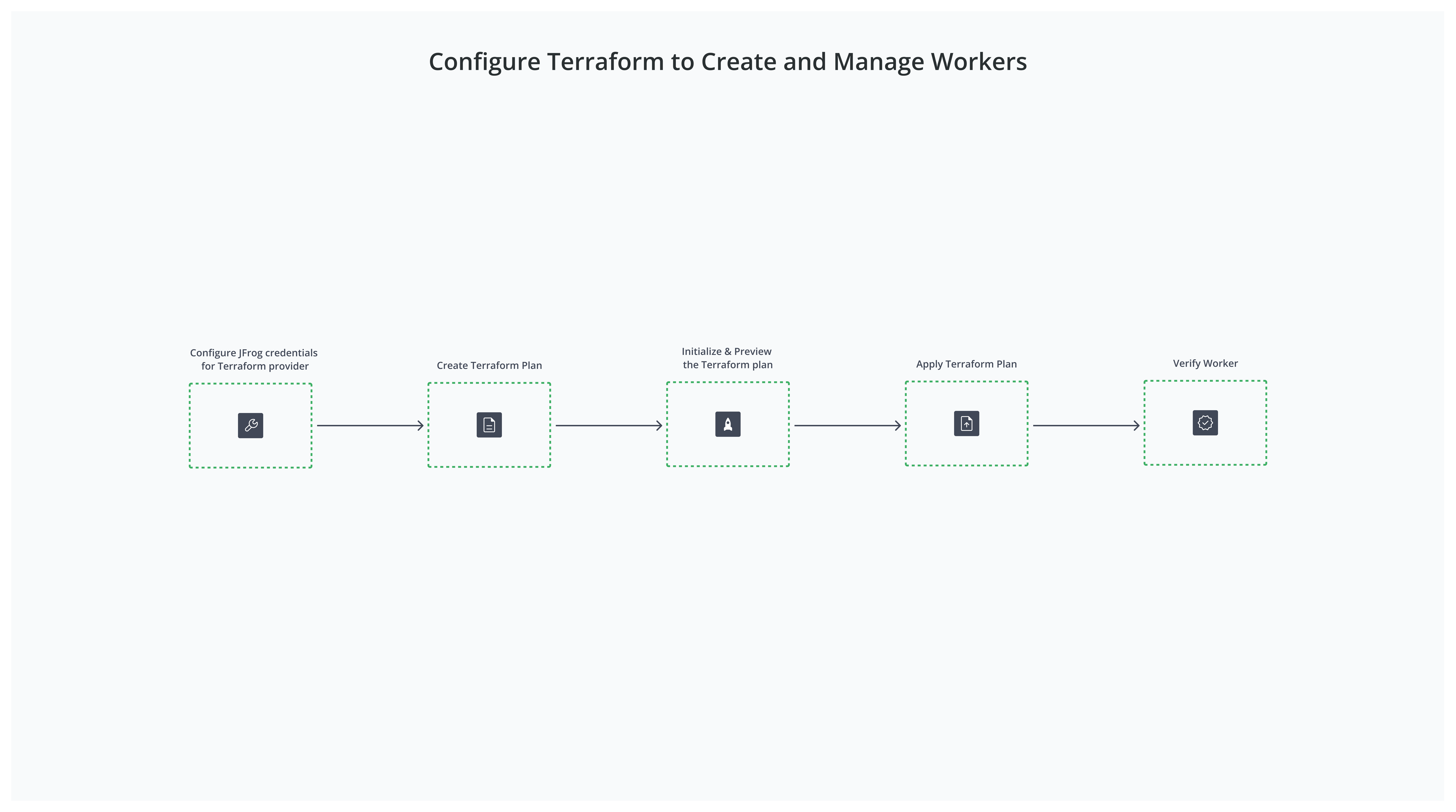
- Step 1: Configure JFrog Credential for Terraform Provider
- Step 2: Create Terraform Plan
- Step 3: Initialize and Preview the Terraform Plan
- Step 4: Apply Terraform Plan
- Step 5: Verify Worker
Step 1: Configure JFrog Credential for Terraform Provider
This topic describes how to configure JFrog credentials for Terraform Provider.
The provider requires the JFrog platform URL and an access token to make changes on the JFrog Platform. You can find more information about the JFrog Credential for Terraform Provider here.
You can use the following methods to manage these sensitive data.
- Environment variables
- HashiCorp Vault provider
- Input variables with
.tfvarsfile
For environment variables, set JFROG_URL and JFROG_ACCESS_TOKEN to your JFrog Platform URL and access token.
export JFROG_URL=https://myexample.jfrog.io
export JFROG_ACCESS_TOKEN=<your access token>Note
The access token needs to have admin permission.
Step 2: Create Terraform Plan
This topic describes how to create Terraform Plan.
Open your preferred text editor, create a new file named main.tf, and add the following sample configuration, which includes providers for managing a local generic repository in Artifactory and a Workers Service resource using the Platform provider.
The following example configuration creates a local generic repository resource using the Artifactory Terraform provider, and then uses the Platform provider to create a Workers Service resource.
terraform {
  required_providers {
    artifactory = {
      source  = "registry.terraform.io/jfrog/artifactory"
      version = "12.7.1"
    }
    platform = {
      source  = "registry.terraform.io/jfrog/platform"
      version = "2.2.0"
    }
  }
}

provider "artifactory" {
  url           = "<artifactory_url>"
  access_token  = "<access_token>"
}

provider "platform" {
  url           = "<platform_url>"
  access_token  = "<access_token"
}

resource "artifactory_local_generic_repository" "my_generic_local1" {
  key = "my-generic-local1"
}

resource "platform_workers_service" "my_workers_service" {
  key         = "my-workers-service"
  enabled     = true
  description = "My workers service"
  source_code = <<EOF
export default async (context: PlatformContext, data: BeforeDownloadRequest): Promise<BeforeDownloadResponse> => {
  console.log(await context.clients.platformHttp.get('/artifactory/api/system/ping'));
  return { status: 'DOWNLOAD_PROCEED', message: 'proceed' };
}
EOF
  action      = "BEFORE_DOWNLOAD"

  filter_criteria = {
    artifact_filter_criteria = {
      repo_keys = [artifactory_local_generic_repository.my_generic_local1.key]
    }
  }

  secrets = [
    {
      key   = "my-secret-key-1"
      value = "my-secret-value-1"
    },
    {
      key   = "my-secret-key-2"
      value = "my-secret-value-2"
    }
  ]
}
Step 3: Initialize and Preview the Terraform Plan
This topic describes how to initialize and preview Terraform Plan.
The results should match what you are planning to create. If not, adjust the configuration and run terraform plan.
-
Run
terraform initto initialize your configuration.This examines your configuration and downloads any required providers.
jfrog ~/Desktop/WorkersTF $ terraform init Initializing the backend... Initializing provider plugins... - Finding jfrog/artifactory versions matching "12.7.1"... - Finding jfrog/platform versions matching "2.2.0"... - Installing jfrog/platform v2.2.0... - Installed jfrog/platform v2.2.0 (signed by a HashiCorp partner, key ID 2FA4D2A520237FA7) - Installing jfrog/artifactory v12.7.1... - Installed jfrog/artifactory v12.7.1 (signed by a HashiCorp partner, key ID 2FA4D2A520237FA7) Partner and community providers are signed by their developers. If you'd like to know more about provider signing, you can read about it here: https://www.terraform.io/docs/cli/plugins/signing.html Terraform has created a lock file .terraform.lock.hcl to record the provider selections it made above. Include this file in your version control repository so that Terraform can guarantee to make the same selections by default when you run "terraform init" in the future. Terraform has been successfully initialized! You may now begin working with Terraform. Try running "terraform plan" to see any changes that are required for your infrastructure. All Terraform commands should now work. If you ever set or change modules or backend configuration for Terraform, rerun this command to reinitialize your working directory. If you forget, other commands will detect it and remind you to do so if necessary. -
Run
terraform planto preview the changes.jfrog ~/Desktop/WorkersTF $ terraform plan Terraform used the selected providers to generate the following execution plan. Resource actions are indicated with the following symbols: + create Terraform will perform the following actions: # artifactory_local_generic_repository.my_generic_local1 will be created + resource "artifactory_local_generic_repository" "my_generic_local1" { + archive_browsing_enabled = false + blacked_out = false + cdn_redirect = false + download_direct = false + id = (known after apply) + includes_pattern = "**/*" + key = "my-generic-local1" + priority_resolution = false + project_environments = (known after apply) + repo_layout_ref = "simple-default" + xray_index = false # (4 unchanged attributes hidden) } # platform_workers_service.my_workers_service will be created + resource "platform_workers_service" "my_workers_service" { + action = "BEFORE_DOWNLOAD" + description = "My workers service" + enabled = true + filter_criteria = { + artifact_filter_criteria = { + repo_keys = [ + "my-generic-local1", ] } } + key = "my-workers-service" + secrets = [ + { + key = "my-secret-key-1" + value = "my-secret-value-1" }, + { + key = "my-secret-key-2" + value = "my-secret-value-2" }, ] + source_code = <<-EOT export default async (context: PlatformContext, data: BeforeDownloadRequest): Promise<BeforeDownloadResponse> => { console.log(await context.clients.platformHttp.get('/artifactory/api/system/ping')); return { status: 'DOWNLOAD_PROCEED', message: 'proceed' }; } EOT } Plan: 2 to add, 0 to change, 0 to destroy.
Step 4: Apply Terraform Plan
This topic describes how to apply Terraform Plan.
-
Run
terraform applyto apply the configuration and create the repository and worker on your JFrog platform if you are satisfied with the configuration.jfrog ~/Desktop/WorkersTF $ terraform apply Terraform used the selected providers to generate the following execution plan. Resource actions are indicated with the following symbols: + create Terraform will perform the following actions: # artifactory_local_generic_repository.my_generic_local1 will be created + resource "artifactory_local_generic_repository" "my_generic_local1" { + archive_browsing_enabled = false + blacked_out = false + cdn_redirect = false + download_direct = false + id = (known after apply) + includes_pattern = "**/*" + key = "my-generic-local1" + priority_resolution = false + project_environments = (known after apply) + repo_layout_ref = "simple-default" + xray_index = false # (4 unchanged attributes hidden) } # platform_workers_service.my_workers_service will be created + resource "platform_workers_service" "my_workers_service" { + action = "BEFORE_DOWNLOAD" + description = "My workers service" + enabled = true + filter_criteria = { + artifact_filter_criteria = { + repo_keys = [ + "my-generic-local1", ] } } + key = "my-workers-service" + secrets = [ + { + key = "my-secret-key-1" + value = "my-secret-value-1" }, + { + key = "my-secret-key-2" + value = "my-secret-value-2" }, ] + source_code = <<-EOT export default async (context: PlatformContext, data: BeforeDownloadRequest): Promise<BeforeDownloadResponse> => { console.log(await context.clients.platformHttp.get('/artifactory/api/system/ping')); return { status: 'DOWNLOAD_PROCEED', message: 'proceed' }; } EOT } Plan: 2 to add, 0 to change, 0 to destroy. Do you want to perform these actions? Terraform will perform the actions described above. Only 'yes' will be accepted to approve. Enter a value: yes artifactory_local_generic_repository.my_generic_local1: Creating... artifactory_local_generic_repository.my_generic_local1: Creation complete after 0s [id=my-generic-local1] platform_workers_service.my_workers_service: Creating... platform_workers_service.my_workers_service: Creation complete after 1s Apply complete! Resources: 2 added, 0 changed, 0 destroyed. -
Enter
Yesto apply the changes.
The worker should now be created on your JFrog Platform.
Step 5: Verify Worker
This topic describes how to verify the worker created via Terraform.
Note
If you make any changes to the worker in the JFrog UI, you will get a resource drift next time you run
terraform planorterraform run.
Updated about 1 month ago