

Artifactory Query Language
Search artifacts, builds, and properties in JFrog Artifactory using Artifactory Query Language (AQL). Construct cross-domain queries with filters, sorting, and pagination via a RESTful API.
Artifactory Query Language (AQL) is specially designed to let you uncover any data related to the artifacts and builds stored within Artifactory. Its syntax offers a way to formulate complex queries that specify any number of search criteria, filters, sorting options, and output parameters. AQL is exposed as a RESTful API which uses data streaming to provide output data resulting in extremely fast response times and low memory consumption. AQL can only extract data that resides in your instance of Artifactory, so it runs on Local Repositories, Remote Repositories Caches, and Virtual Repositories.
From Artifactory 7.17.4, you can search within remote repositories.
Note
The Archive domain and all related fields are deprecated and no longer functional since Q3 2024. This includes:
[- Primary domain query:archive.entries.find(...)]
[- Fields:archive.entry.name,archive.entry.path, and allarchive.*fields]
[- Include clauses:.include("archive.entry")][Using any archive-related syntax will result in a query parsing error.]
When to Use AQL
Artifactory provides multiple search mechanisms. Use AQL when you need complex, cross-domain queries that go beyond what the UI or simple REST search endpoints offer.
AQL vs. REST Search Endpoints
| Feature | AQL | REST Search APIs |
|---|---|---|
| Query complexity | Complex boolean logic, cross-domain | Simple, single-purpose |
| Field selection | Full control via .include() | Fixed response format |
| Sorting | Multi-field, configurable | Limited or none |
| Learning curve | Moderate | Low |
REST Search endpoints such as /api/search/artifact, /api/search/gavc, and /api/search/prop are best suited for simple, single-criterion searches.
AQL vs. File Specs
File specs are JSON-based search definitions used primarily with JFrog CLI and Pipelines.
| Feature | AQL | File Specs |
|---|---|---|
| Integration | REST API, CLI, Plugins | CLI, Pipelines, REST |
| Query power | Full AQL syntax | Pattern matching + AQL |
| Primary use | Search and analysis | Download/upload operations |
File specs can embed AQL queries, combining the convenience of file specs with the power of AQL.
When AQL is the Right Choice
Use AQL when you need:
- Complex filtering -- multiple conditions with AND/OR logic
- Cross-domain queries -- joining items with builds, properties, or statistics
- Custom result shaping -- specific fields, sorting, pagination
- Build integration -- finding artifacts by build name, number, or status
- Statistical analysis -- queries based on download counts or dates
- Cleanup automation -- finding old, unused, or oversized artifacts
For more information on all available search methods, see Platform Search.
AQL Architecture
AQL is constructed as a set of interconnected domains as displayed in the following diagram. You may run queries only on one domain at a time, and this is referred to as the Primary domain of the query.
The following primary domains are supported:
| Domain | Form of Query |
|---|---|
| Item | items.find(...) |
| Build | builds.find(...). Note: You must be admin user to run queries on the build domain. |
| [ | [ |
| Promotion | build.promotions.find(...) |
| Release | releases.find(...). Note: The Release domain refers to Release Bundles v1, which is created in JFrog Distribution, and not the Release Bundles v2 created in Artifactory. For more information, see Types of Release Bundles . |
| Release Artifact | release_artifacts.find(...). Note: Queries the files associated with Release Bundles v1. |
You may use fields from other domains as part of your search criteria or to specify fields to display in the output, but in that case, you need to follow the conventions described in Query Structure and Syntax.
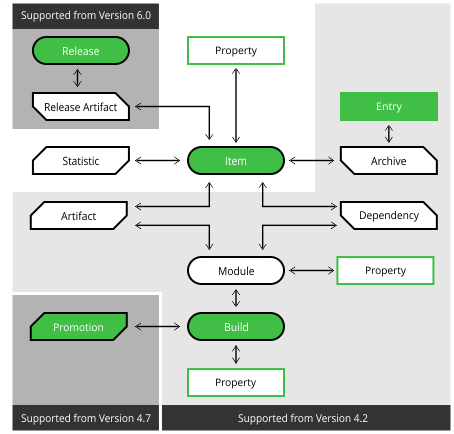
AQL Supported Domains
AQL was introduced in Artifactory V3.5.0 with support for Item as a primary domain with its attached Property, as well as Statistic as a secondary domain. Later versions of Artifactory introduced additional domains that can be included in queries. The following table summarizes from which version each domain is accessible.
| 3.5.0 | 4.2.0 | 4.7.0 | 6.0.0/ 7.0.0 | |
|---|---|---|---|---|
| Item |  | | | |
| Item.Property | | | | |
| Statistic | | | | |
| Archive |  | | | |
| Archive.Entry | | | | |
| Artifact | | | | |
| Dependency | | | | |
| Module | | | | |
| Module.Property | | | | |
| Build | | | | |
| Build.Property | | | | |
| Promotion | | | | |
| Release | | | | |
| Release_artifact | | | | |
Note
- To run queries on the build domain, you must be an admin user.
- The Release domain refers to Release Bundles v1, which is created in JFrog Distribution, and not the Release Bundles v2 created in Artifactory. For more information, see Types of Release Bundles.
Getting Started
Prerequisites
AQL requires authentication. Anonymous users cannot execute AQL queries.
Supported authentication methods:
- Basic authentication (username:password)
- API key authentication
- Access token authentication
AQL respects Artifactory's permission model: users only see results for repositories they have read access to. For details on permission requirements, see Query Execution and Permissions.
Your First Query
The simplest query finds all items in a repository:
items.find({"repo": "libs-release-local"})To execute this query via cURL:
curl -X POST \
  -u username:password \
  -H "Content-Type: text/plain" \
  -d 'items.find({"repo": "libs-release-local"})' \
  "https://<JFrogPlatformURL>/artifactory/api/search/aql"
JSON Response Format
AQL returns results in JSON format:
{
    "results": [
        {
            "repo": "libs-release-local",
            "path": "org/example",
            "name": "artifact-1.0.jar",
            "type": "file",
            "size": 15234,
            "created": "2024-01-15T10:30:00.000Z",
            "created_by": "admin",
            "modified": "2024-01-15T10:30:00.000Z",
            "modified_by": "admin",
            "updated": "2024-01-15T10:30:00.000Z"
        }
    ],
    "range": {
        "start_pos": 0,
        "end_pos": 1,
        "total": 1
    }
}| Field | Description |
|---|---|
results | Array of matching items |
range.start_pos | Starting position (for pagination) |
range.end_pos | Ending position |
range.total | Total number of matches |
Frequently Asked Questions
What is the AQL REST API endpoint?
Send a POST request to /api/search/aql with the query as a text/plain body. You must authenticate — anonymous access isn't allowed. See Query Execution and Permissions for details.
Can non-admin users run AQL queries?
Yes, but with restrictions. Non-admin users can only query the items domain and must include repo, path, and name in the output. Scoped tokens can unlock the builds domain without admin privileges. See Query Execution and Permissions.
What is the difference between AQL and REST search endpoints?
REST search endpoints (/api/search/artifact, /api/search/gavc) are best for single-criterion lookups. AQL supports complex boolean logic, cross-domain joins, custom field selection, and sorting — making it the right choice for advanced queries.
Can AQL search remote repositories?
Yes, from Artifactory 7.17.4 onward. Add .transitive() to your query to search items on remote Artifactory instances. See Repository-Specific Queries.
Why does a large AQL spec file return HTTP 400 or 500?
Artifactory limits AQL request bodies to 6,000 characters by default (POST /artifactory/api/search/aql). Bodies over that limit return HTTP 400 with AQL query is too long. On older versions that didn't enforce the limit, the same large query could return HTTP 500. Split the query rather than posting a large spec file. See What Is the Maximum AQL Query String Size?.
Related Topics
Updated 26 days ago