

Activity Log
The AppTrust Activity Log displays a record of activities performed on your applications, policies, stages, and lifecycle. This feature is essential for maintaining a comprehensive audit trail, troubleshooting, and event monitoring. For more information, see Activity Log Events.
The Activity Log can be viewed at the platform level, at the level of individual projects, and for individual applications.
To view the platform-level Activity Log:
- n the JFrog Platform, choose All Projects in the project selection dropdown.
- Go to AppTrust > Activity Log. The Events table appears.
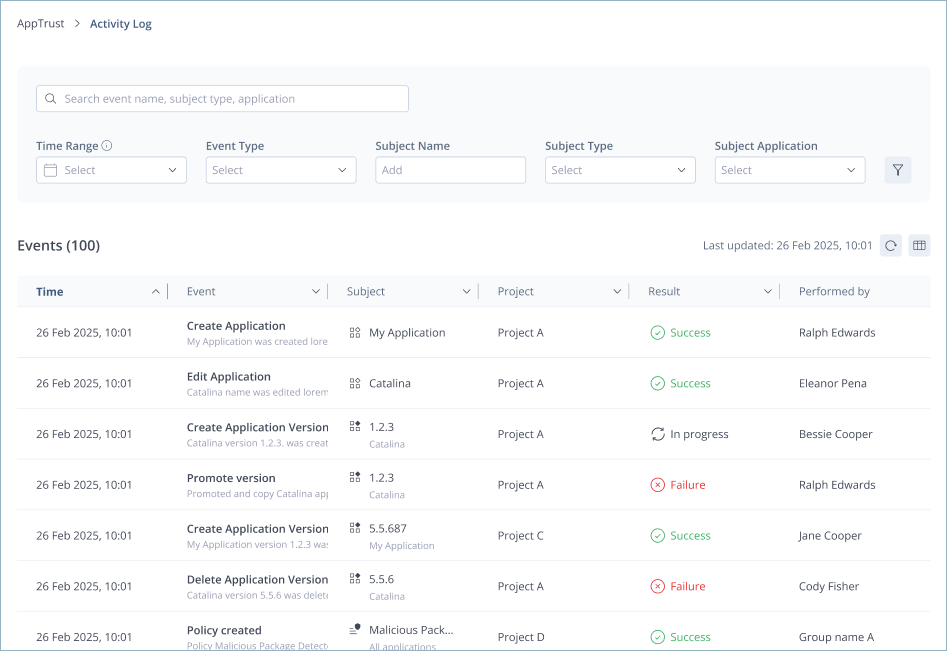
The Activity Log includes the following information about each AppTrust event:
- Time: The date and time when the event occurred.
- Event: A short description of the event that occurred.
- Event ID: A unique alphanumeric string identifying the event.
- Event Category: The type of event, for example, Application Management or Lifecycle Policy Management. For more information see Activity Log Events.
- Subject: The subject of the event (for example, the name and version of the application version, or the name of the policy).
- Subject ID: A unique alphanumeric string identifying the subject.
- Project: The name of the project where the event occurred. Appears only when All Projects is selected.
- Result: The result of the event (for example, In progress, Success, Failure, Blocked).
- Performed By: The name of the user or group that performed the event.
View Event Details
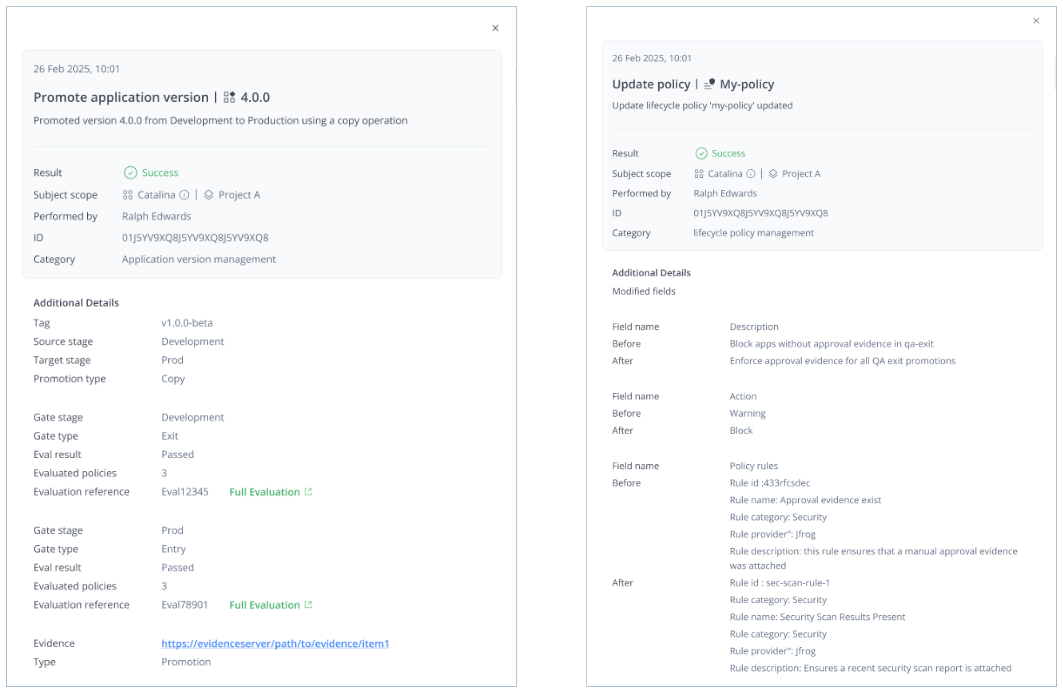
Click inside the row for an event in the Activity Log to open a window showing event details.
For example, event details for the promotion of an application version include the source and target stages of the promotion, the gates encountered at each stage, and the results of any policy evaluations at each gate. There is also a link to related evidence.
Event details for an update policy event include details about the fields that were modified.
Search the Activity Log
You can use the search field above the table to search the Activity Log by event name, subject type, or application name.
Filter the Activity Log

The Activity Log provides several options for filtering the events displayed in the table, including:
- Time Range: The active search window goes back between 90 and 180 days (after which the oldest 90-day block of logs is archived for long-term storage).
- Event Type: For example, create/update/delete application, create/update/delete application version, etc.
- Subject Name: For example, the name of the policy or the application.
- Subject Type: Options include application, application version, policy, stages, and package.
- Subject Application: Either a specific application or all applications. If you are already in an application, this filter does not appear.
In addition, you can click the filter icon  to display additional filtering options:
- Event Category (for example, application management and stage management)
- Result
- Project
- Performed by
- Subject ID
Log Retention
The AppTrust Activity Log retains logs for a period of 90 to 180 days. Every 90 days, logs from the 91-180 day period are archived. These archives are stored as ZIP files in a system repository. A webhook is triggered when an archive is created, enabling you to implement custom logic to handle the archived logs, such as exporting them to cold storage, archiving them in a different system, or deleting them.
Updated 3 months ago